

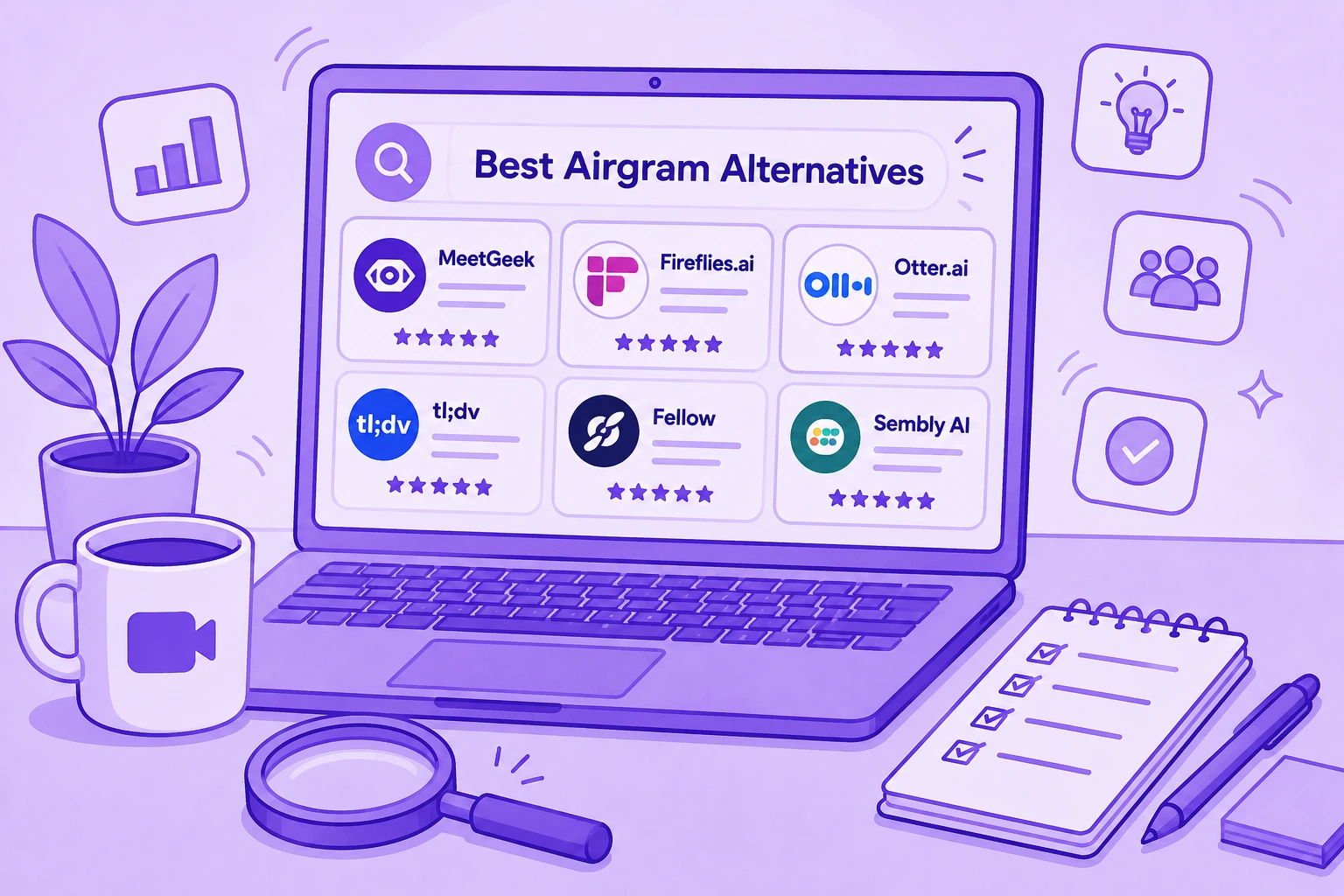

- O Airgram se juntou ao Notta em 2024 e saiu do ar em 8 de março de 2024, ou seja, não existe mais nenhum plano do Airgram para usar ou comprar.
- O Notta é o produto sucessor do Airgram, e as seis alternativas abaixo são MeetGeek, Fireflies.ai, Otter.ai, tl;dv, Fellow e Sembly AI.
- A escolha certa depende do recurso do Airgram que você mais usava: notas ao vivo, atas compartilhadas, clipes de destaques ou pautas de reunião.
Se você usava o Airgram, precisa de um novo lugar para suas notas de reunião. O Airgram se juntou ao Notta em 2024 e saiu do ar em 8 de março de 2024. O site dele, airgram.io, não existe mais.
O Notta é o produto sucessor do Airgram, e nossa análise do Notta AI trata dele em detalhes. Mas ele não é a única opção. Abaixo, você pode comparar o Notta com seis assistentes de reunião com IA que entram nas suas chamadas pela agenda, transcrevem tudo e compartilham as notas com sua equipe. Cada um aparece ligado ao recurso do Airgram que ele melhor substitui.
Quando o Airgram Saiu do Ar
O Airgram era um assistente de reunião com IA para Zoom, Google Meet e Microsoft Teams. Em 2024, a empresa anunciou na sua página do LinkedIn que o Airgram estava se juntando ao Notta, um assistente de transcrição e de reuniões com IA. Hoje essa página se chama "Airgram (merged into Notta)".
O Notta descreve a mudança como uma união de forças entre o Airgram e o Notta para criar uma única solução de notas de reunião com IA e transcrição de áudio. A empresa não publica etapas de migração nem um plano específico para quem usava o Airgram.
O Airgram saiu do ar em 8 de março de 2024, e o airgram.io e o aplicativo web do Airgram não existem mais. Qualquer plano ou preço do Airgram que você ainda encontre na internet se refere a um produto no qual não é mais possível se cadastrar.
O Que o Airgram Fazia e O Que Substitui Cada Recurso
Segundo a própria página do LinkedIn, o Airgram oferecia transcrição ao vivo em 8 idiomas no Zoom, Google Meet e Microsoft Teams. Ele se conectava à sua agenda para que o assistente entrasse nas reuniões e as gravasse, permitia que sua equipe fizesse anotações em conjunto em tempo real e compartilhava atas e transcrições com outros apps de trabalho. As páginas de produto também mencionavam clipes de destaques e a gestão de reuniões recorrentes.
Veja onde cada um desses recursos está hoje:
| O que o Airgram fazia | Melhor opção neste guia |
|---|---|
| Assistente que entra nas reuniões da sua agenda e as grava | A maioria das ferramentas deste guia, incluindo o Notta |
| Transcrição ao vivo durante a chamada | Otter.ai e Notta |
| Transcrição em 8 idiomas | MeetGeek e Fireflies.ai (mais de 100 cada), depois Fellow (mais de 90), Notta (58), Sembly AI (mais de 45) e tl;dv (mais de 30) |
| Compartilhamento de atas e transcrições com outros apps de trabalho | MeetGeek e Fireflies.ai, que se conectam a muitos apps de trabalho |
| Clipes de destaques | tl;dv |
| Planejamento e condução de reuniões recorrentes | Fellow |
Tabela atualizada pela última vez em: 29 de setembro de 2026.
O Que Faz uma Boa Alternativa ao Airgram?
Alguns assistentes de reunião focam na transcrição. Outros ajudam as equipes a registrar decisões, organizar o conhecimento gerado nas reuniões e cuidar dos próximos passos.
Ao comparar alternativas ao Airgram, estes são os recursos que costumam pesar mais na escolha.
1. Notas e Transcrições Precisas
A primeira coisa a verificar é a qualidade da transcrição.
Um assistente de reunião deve captar as conversas com confiabilidade, identificar quem está falando e gerar notas de reunião claras, que você não precise reescrever depois. A precisão é especialmente importante em chamadas de vendas, entrevistas com clientes e discussões de projeto, em que um único detalhe errado pode mudar uma decisão.
Se sua equipe trabalha em mais de um idioma, confira quantos idiomas cada ferramenta suporta. O Airgram cobria 8, e a maioria das ferramentas abaixo cobre mais.
2. Itens de Ação Automáticos
Além de registrar o que foi dito, um assistente de reunião deve mostrar o que acontece em seguida.
A maioria das ferramentas deste guia identifica itens de ação, decisões e tarefas de acompanhamento na conversa, para você ver quem é responsável por cada coisa sem reler a transcrição. O MeetGeek também pode criar essas tarefas diretamente na sua ferramenta de gestão de projetos.
3. Integrações com as Ferramentas Que Você Já Usa
As integrações enviam suas notas de reunião para as outras ferramentas que sua equipe usa.
Procure ferramentas que se conectem ao Slack, Notion, Google Calendar, Microsoft Outlook, softwares de gestão de projetos e sistemas de CRM, para compartilhar informações sem copiar notas de um app para outro. Algumas vão além: com o MeetGeek, por exemplo, você pode fazer perguntas sobre suas reuniões pelo Slack.
4. Busca e Organização
À medida que o número de reuniões cresce, fica mais difícil encontrar as informações.
Uma boa alternativa ao Airgram permite pesquisar nas transcrições, encontrar discussões antigas, revisar o feedback de clientes e localizar decisões importantes sem precisar vasculhar gravações. No MeetGeek, você faz uma pergunta com suas próprias palavras e recebe uma resposta que reúne informações de várias reuniões anteriores.
5. Recursos de Colaboração
Outras pessoas da sua equipe muitas vezes também precisam das notas.
Compartilhamento, comentários e espaços de equipe ajudam quem perdeu uma chamada a se atualizar, ou a se preparar para a próxima. As notas compartilhadas em tempo real eram um dos principais recursos do Airgram, então, se sua equipe dependia disso, veja como cada ferramenta lida com esse ponto.
6. Limites do Plano Gratuito por Conversa
Se você quer testar uma ferramenta nas suas reuniões reais antes de pagar, o limite por conversa importa tanto quanto os minutos mensais.
A diferença entre as ferramentas é grande. O plano gratuito do Notta transcreve gravações de até 3 minutos, então não dá para transcrever uma reunião inteira. O plano gratuito do Otter.ai para de gravar cada conversa aos 30 minutos. O plano gratuito do MeetGeek grava até 2 horas por reunião, o que cobre uma chamada inteira de uma hora.
Você sabia?
Segundo dados do MeetGeek do primeiro semestre de 2026, 44,8% das reuniões gravadas pelo MeetGeek terminaram em menos de 30 minutos. Mais da metade durou 30 minutos ou mais, então um limite de 30 minutos por conversa pode afetar uma parcela grande das reuniões reais.
Vale a Pena Simplesmente Migrar para o Notta?
Para muitos ex-usuários do Airgram, o Notta é o próximo passo mais simples. Ele é o produto sucessor do Airgram e cobre as mesmas plataformas que o Airgram cobria (Zoom, Google Meet e Microsoft Teams), além do Webex.
O Notta transcreve em 58 idiomas, pode transcrever ao vivo enquanto você fala e tem um gravador que registra as reuniões no seu dispositivo sem que um bot entre na chamada. O plano Pro custa US$ 13,49 por mês, ou US$ 8,17 por mês com cobrança anual.
Com o plano gratuito, é mais difícil testar a ferramenta. Ele inclui 120 minutos de transcrição por mês, mas, com o limite de 3 minutos por gravação, você não consegue experimentar o Notta em uma reunião inteira sem pagar.
O ponto forte do Notta é a transcrição, tanto de arquivos de áudio quanto de fala ao vivo. Se você quer uma ferramenta que também cuide do trabalho depois da reunião, ou que foque em algo que o Airgram fazia bem, como clipes ou pautas, vale a pena comparar as seis alternativas abaixo.
Aviso: o MeetGeek publica esta comparação e é um dos produtos incluídos. Conferimos preços e limites de plano nas páginas oficiais atuais de cada fornecedor e indicamos quando outra ferramenta pode ser uma opção melhor.
Visão Geral das Alternativas ao Airgram
O Notta está incluído como sucessor do Airgram; as outras seis ferramentas são alternativas independentes.
| Ferramenta | Ideal para | Plano gratuito / teste | Plano pago a partir de | Idiomas | Gravação sem bot |
|---|---|---|---|---|---|
| Notta | Ex-usuários do Airgram que querem o produto sucessor | 120 min por mês, mas só gravações de até 3 min | US$ 13,49 por mês, ou US$ 8,17 com cobrança anual | 58 | Sim |
| MeetGeek | Transformar reuniões em próximos passos | 3 horas por mês, até 2 horas por gravação | US$ 15,99 por usuário por mês, ou US$ 9,99 com cobrança anual | Mais de 100 | Sim |
| Fireflies.ai | Acervo de reuniões pesquisável | Transcrição ilimitada, 400 min de armazenamento | US$ 18 por usuário por mês, ou US$ 10 com cobrança anual | Mais de 100 | Sim (Pro ou superior) |
| Otter.ai | Transcrição ao vivo | 300 min por mês, até 30 min por conversa | US$ 16,99 por usuário por mês, ou US$ 8,33 com cobrança anual | 6 | Sim |
| tl;dv | Compartilhar clipes de reuniões | Gravações e transcrição ilimitadas; notas com IA para até 10 reuniões por mês | US$ 18 por usuário por mês, com cobrança anual | Mais de 30 | Sim |
| Fellow | Pautas e estrutura de reuniões | 5 notas com IA e 5 gravações por usuário | US$ 11 por usuário por mês, ou US$ 7 com cobrança anual | Mais de 90 | Sim |
| Sembly AI | Entregáveis para clientes | Teste gratuito: 1 hora de reunião | US$ 17 por mês, ou US$ 10 com cobrança anual | Mais de 45 | Não documentado |
Tabela atualizada pela última vez em: 29 de setembro de 2026.
As 6 Melhores Alternativas ao Airgram em 2026
1. MeetGeek: Ideal para Transformar Reuniões em Próximos Passos
O MeetGeek grava, transcreve e resume reuniões e, depois, cuida do trabalho que normalmente vem em seguida: atualizar o CRM, criar tarefas e redigir e-mails de acompanhamento.
%20(2).webp)
Assim como o Airgram, o MeetGeek pode entrar nas reuniões do Zoom, Google Meet e Microsoft Teams pela sua agenda e gravá-las. Você também pode gravar sem bot pelo aplicativo para desktop ou pela extensão do Chrome, registrar conversas presenciais no app para celular ou enviar um arquivo de áudio ou vídeo.
Depois da chamada, o MeetGeek gera notas, itens de ação e decisões, e guarda cada conversa em um repositório de reuniões pesquisável. Você pode fazer perguntas sobre reuniões anteriores, o que ajuda antes de uma chamada com um cliente ou de uma revisão de projeto.
O MeetGeek também tem as Meeting Skills. Uma Meeting Skill é uma instrução reutilizável que roda depois de uma reunião, em um horário programado ou quando uma palavra-chave aparece. Skills como Sales Call Scorer e Candidate Screening Agent já estão disponíveis. O MeetGeek se conecta a outros apps por meio de integrações nativas, de conexões com mais de 10.000 apps via Zapier, Make e n8n, de uma API pública e de um servidor MCP para assistentes como Claude e ChatGPT.
Principais Recursos
- Gravação automática no Zoom, Google Meet e Microsoft Teams, com ou sem bot;
- Notas de reunião, resumos, itens de ação e decisões gerados com IA;
- Repositório de reuniões pesquisável e chat com IA sobre todas as reuniões;
- Meeting Skills que atualizam o CRM, criam tarefas e redigem e-mails;
- Integrações nativas e mais de 10.000 apps conectados via Zapier, Make e n8n;
- Acesso por API e MCP;
- Análise de reuniões e inteligência de conversas;
- Transcrição em mais de 100 idiomas, com detecção automática do idioma.
Preços
O plano gratuito inclui 3 horas de transcrição por mês, até 2 horas por gravação e 3 meses de armazenamento de transcrições. O Pro custa US$ 15,99 por usuário por mês, ou US$ 9,99 com cobrança anual, e acrescenta 20 horas por mês e integrações. O Business custa US$ 27 por usuário por mês, ou US$ 17 com cobrança anual, com transcrição ilimitada.
Prós
- Cuida dos próximos passos, não só das notas;
- Oferece várias formas de gravar, incluindo a gravação sem bot;
- É fácil pesquisar reuniões anteriores;
- Você pode combinar usuários dos planos Free, Pro, Business e Enterprise em um mesmo workspace.
Contras
- Alguns recursos são mais do que você precisa se só quer uma transcrição;
- As integrações só estão disponíveis a partir do plano Pro.
2. Fireflies.ai: Ideal para um Acervo de Reuniões Pesquisável
O Fireflies.ai é um assistente de reunião com IA cujo principal ponto forte é organizar e pesquisar o conteúdo das reuniões.
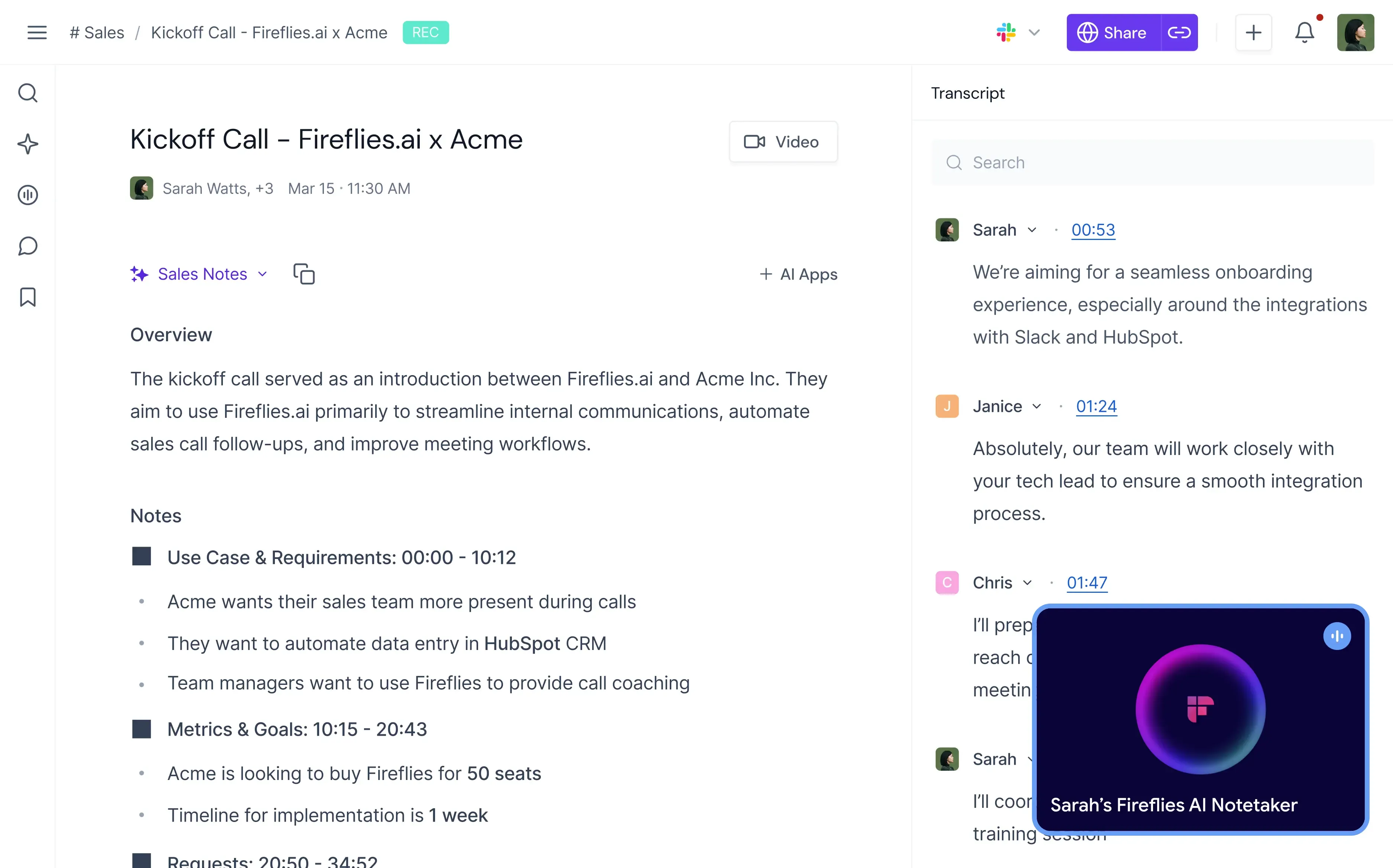
Ele grava e transcreve reuniões no Zoom, Google Meet, Microsoft Teams, Webex e várias outras plataformas e, nos planos pagos, também tem um aplicativo para desktop que grava sem bot. Em comparação com o Airgram, ele dá menos peso às anotações ao vivo e mais ao que você consegue encontrar nas reuniões depois. Assim que uma reunião é processada, você pode pesquisar por palavra-chave, tema, falante, sentimento, data ou filtros personalizados, e voltar a um momento específico sem assistir à gravação de novo.
O Fireflies também identifica tendências entre reuniões. As equipes de vendas podem usá-lo para revisar conversas com clientes, acompanhar menções a concorrentes e analisar as objeções mais comuns. Ele se conecta ao Salesforce, HubSpot, Slack, Notion, Asana e Zapier, entre outros.
Principais Recursos
- Gravação e transcrição automáticas de reuniões em mais de 100 idiomas;
- Resumos e itens de ação gerados com IA;
- Busca avançada nas reuniões;
- Análise de conversas;
- Integrações com CRM e ferramentas de produtividade;
- Bibliotecas de reuniões compartilhadas.
Prós
- A busca é detalhada e flexível;
- Conecta-se a muitos apps de trabalho;
- Plano gratuito com transcrição ilimitada.
Contras
- A interface pode parecer complexa para novos usuários;
- O plano gratuito armazena até 400 minutos de reuniões.
Quer ver mais de perto? Confira nossa comparação MeetGeek vs. Fireflies.
3. Otter.ai: Ideal para Transcrição ao Vivo
O Otter.ai é uma das ferramentas de transcrição com IA há mais tempo no mercado.
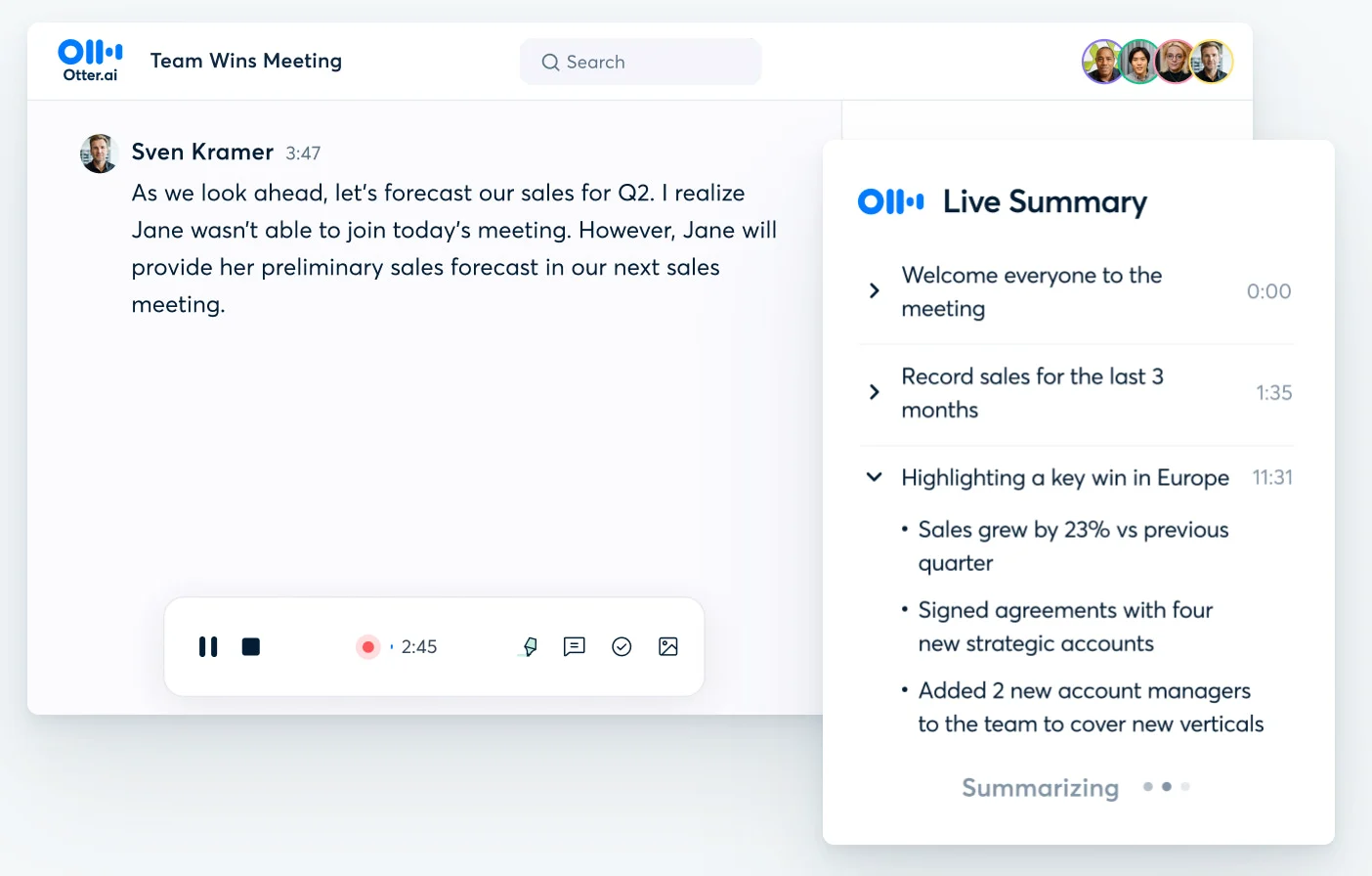
O Otter entra nas reuniões do Zoom, Google Meet e Microsoft Teams e mostra uma transcrição ao vivo que os participantes podem acompanhar durante a chamada, de forma parecida com as notas ao vivo do Airgram. Hoje o Otter se apresenta como um "Conversational Knowledge Engine", e você pode fazer perguntas sobre todas as suas reuniões. Ele também tem um aplicativo para desktop que grava sem bot.
A interface é simples e fácil de aprender, e o Otter é uma escolha comum para profissionais autônomos, estudantes, consultores e equipes pequenas. Ele suporta 6 idiomas: inglês, espanhol, francês, alemão, japonês e chinês (simplificado).
Principais Recursos
- Transcrição de reuniões em tempo real;
- Identificação de falantes;
- Resumos e itens de ação gerados com IA;
- Transcrições pesquisáveis e chat com IA;
- Aplicativo para desktop que grava sem bot;
- Apps para celular e web.
Prós
- Transcrição ao vivo durante a chamada;
- Fácil de aprender e usar;
- Plano gratuito com 300 minutos por mês.
Contras
- Suporta 6 idiomas, menos que os 8 do Airgram;
- O plano gratuito para de gravar cada conversa aos 30 minutos, então reuniões mais longas não são registradas por inteiro.
Quer ver mais de perto? Confira nossa comparação MeetGeek vs. Otter.
4. tl;dv: Ideal para Compartilhar Clipes de Reuniões
O tl;dv foca em facilitar a revisão e o compartilhamento de reuniões. Nossa análise do tl;dv trata da ferramenta com mais profundidade.
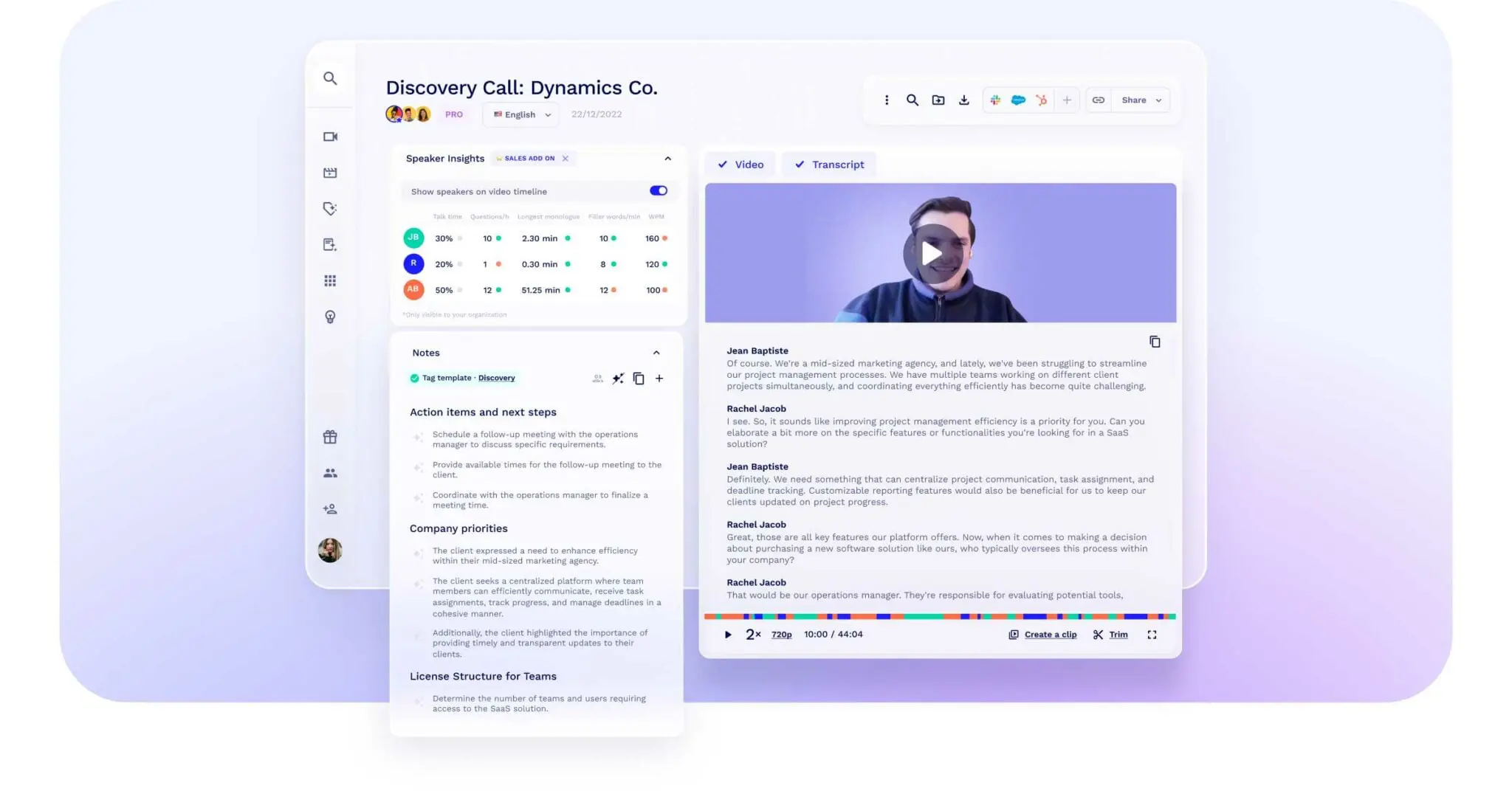
Você pode criar clipes dos momentos importantes e compartilhá-los com sua equipe, o que é útil para equipes de produto, customer success, pesquisa e vendas que repassam insights de chamadas com clientes. O recurso funciona de forma muito parecida com os clipes de destaques do Airgram.
O tl;dv também gera resumos, envia insights das reuniões para outros apps e transcreve em mais de 30 idiomas. Ele funciona no Zoom, Google Meet e Microsoft Teams, e pode gravar sem bot.
Principais Recursos
- Gravação e transcrição de reuniões;
- Resumos com IA;
- Clipes e compartilhamento;
- Busca com IA;
- Integrações com seus outros apps;
- Suporte a Zoom, Google Meet e Microsoft Teams.
Prós
- Criar e compartilhar clipes é fácil;
- Plano gratuito com gravações ilimitadas;
- Pode gravar sem bot.
Contras
- O plano gratuito limita as notas com IA a 10 reuniões por mês;
- No plano gratuito, as gravações ficam armazenadas por 3 meses.
Quer ver mais de perto? Confira nossa comparação MeetGeek vs. tl;dv.
5. Fellow: Ideal para Pautas e Estrutura de Reuniões
O Fellow foca em planejar e conduzir reuniões, além de gravá-las.
Sua equipe pode montar pautas em conjunto antes de uma reunião, documentar decisões, atribuir itens de ação e manter as reuniões recorrentes consistentes. O Fellow se apresenta como "The Secure AI Meeting Assistant" e afirma que a IA dele nunca é treinada com os seus dados, em nenhum plano.
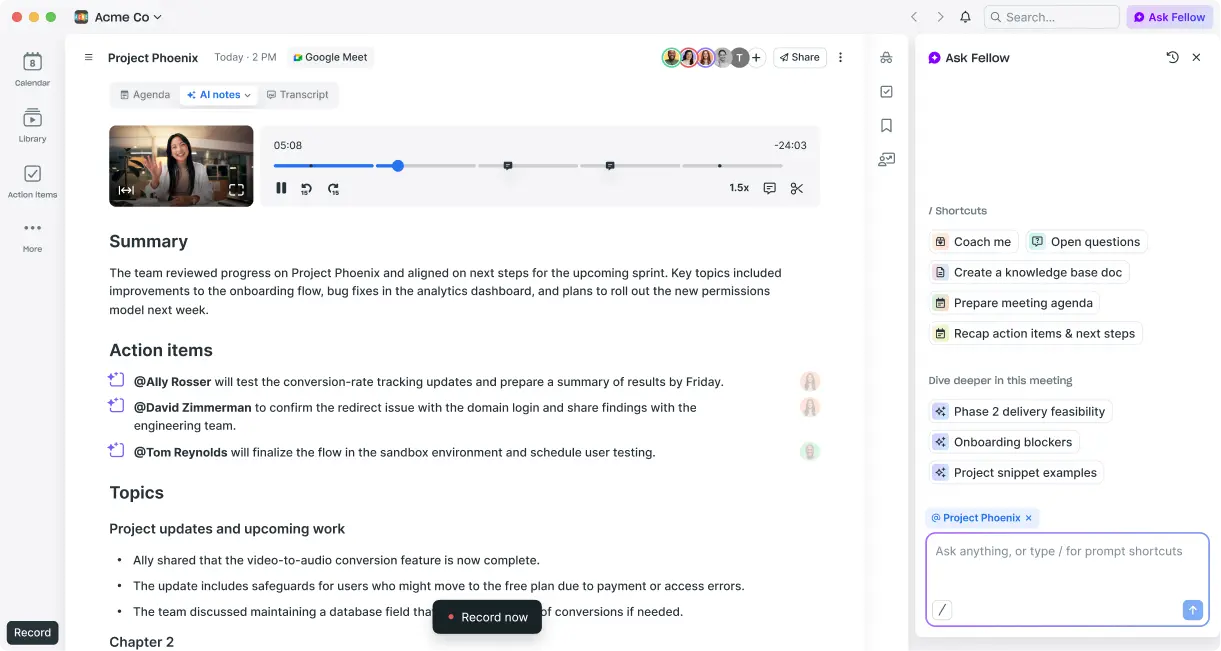
Isso faz do Fellow uma boa opção para gestores, equipes de liderança, reuniões one-on-one e reuniões operacionais recorrentes. Entre as ferramentas deste guia, é a que mais se aproxima da forma como o Airgram ajudava no planejamento das reuniões. O Fellow também transcreve em mais de 90 idiomas e pode captar o áudio pelos aplicativos para desktop e celular sem que um bot entre na chamada.
Principais Recursos
- Pautas de reunião colaborativas;
- Acompanhamento de itens de ação, com integrações para ferramentas como Asana e Jira;
- Notas de reunião com IA em mais de 90 idiomas;
- Modelos para reuniões one-on-one;
- Captação sem bot pelos aplicativos para desktop e celular.
Prós
- Boas ferramentas de pauta e estrutura de reuniões;
- Mantém as reuniões recorrentes consistentes;
- O Fellow afirma que seus dados nunca são usados para treinar a IA dele.
Contras
- O plano gratuito inclui 5 notas com IA e 5 gravações por usuário, no total, e não por mês.
Quer ver mais de perto? Confira nossa comparação MeetGeek vs. Fellow.
6. Sembly AI: Ideal para Transformar Reuniões em Entregáveis para Clientes
O Sembly AI foi além das notas de reunião. O site dele agora o descreve como "AI deliverable production for professional services": ele transforma reuniões, documentos e dados do CRM em documentos e apresentações prontos para entregar aos clientes.
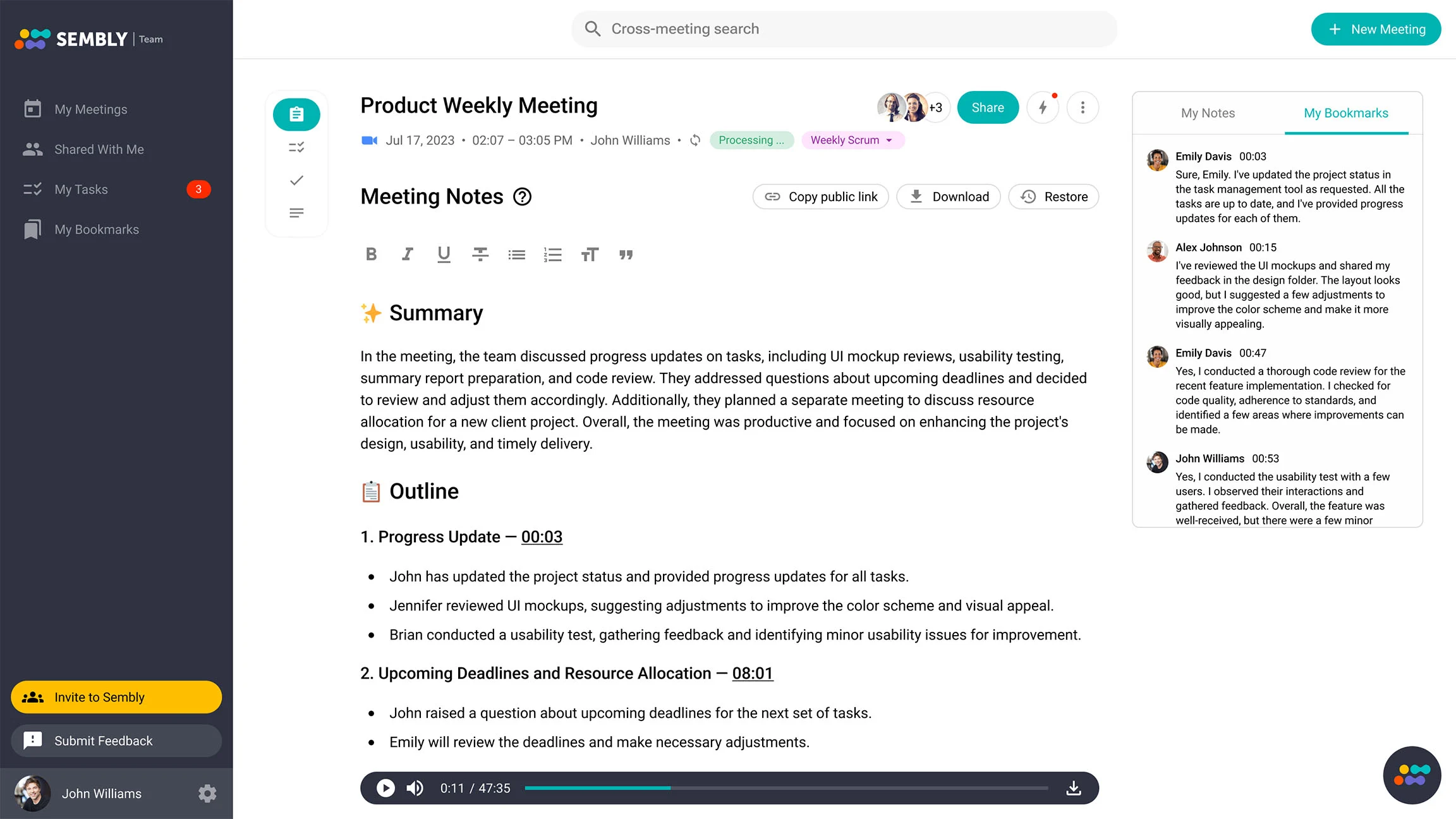
Ele continua gravando chamadas no Zoom, Google Meet, Microsoft Teams e Webex, onde entra como "Sembly Teammate". Gera transcrições, resumos e itens de ação em mais de 45 idiomas.
Por isso, o Sembly é mais útil para consultores, agências e outras equipes de serviços profissionais cujas reuniões terminam em um documento para um cliente. Se você só precisa de notas, as outras ferramentas desta lista estão mais próximas do que o Airgram fazia.
Principais Recursos
- Transcrição e resumos de reuniões;
- Extração de itens de ação;
- Entregáveis para clientes criados a partir de reuniões, documentos e dados do CRM;
- Registros de reuniões pesquisáveis;
- Suporte a Zoom, Google Meet, Microsoft Teams e Webex.
Prós
- Transforma reuniões em documentos prontos para clientes;
- Suporta o Webex, além das três principais plataformas.
Contras
- Foi feito para equipes de serviços profissionais, então é mais do que você precisa se só quer notas;
- A opção gratuita é um teste gratuito com 1 hora de reunião, e não um plano gratuito permanente.
Qual Alternativa ao Airgram Você Deve Escolher?
A melhor escolha depende de como sua equipe usava o Airgram.
Se você quer seguir o caminho que o próprio Airgram escolheu, o Notta é a mudança mais simples, sobretudo se a transcrição for sua principal necessidade.
Se você acompanhava principalmente a transcrição ao vivo durante as chamadas, o Otter.ai é a opção mais parecida.
Se você quer um acervo pesquisável de reuniões e análises que cruzam várias reuniões, o Fireflies.ai é uma boa opção.
Se você compartilhava destaques de chamadas com clientes ou de pesquisa, o tl;dv facilita criar e enviar clipes.
Se você usava o Airgram para planejar e conduzir reuniões recorrentes, o Fellow cobre pautas e itens de ação.
Se suas reuniões terminam em um documento para um cliente, o Sembly AI as transforma em documentos prontos para entregar.
Se você quer que as notas virem ações concretas, como atualizações no CRM, tarefas e e-mails de acompanhamento nas ferramentas que você já usa, o MeetGeek foi feito para isso.
Principais Conclusões
- O Airgram se juntou ao Notta em 2024 e saiu do ar em 8 de março de 2024;
- O Notta é o produto sucessor do Airgram e transcreve em 58 idiomas;
- O Otter.ai é a opção mais parecida para transcrição ao vivo, o tl;dv para clipes de destaques, o Fellow para pautas e o Fireflies.ai para pesquisar reuniões anteriores;
- Nos planos gratuitos, confira o limite por conversa: 3 minutos no Notta, 30 no Otter.ai e 2 horas no MeetGeek;
- O MeetGeek foi feito para transformar reuniões em próximos passos, com Meeting Skills e integrações.
Perguntas Frequentes
O Airgram Ainda Está Disponível?
Não. O Airgram se juntou ao Notta em 2024 e saiu do ar em 8 de março de 2024. O Notta é o produto sucessor do Airgram.
O Que o Airgram Fazia?
O Airgram era um assistente de reunião com IA para Zoom, Google Meet e Microsoft Teams. Ele entrava nas reuniões pela sua agenda, transcrevia tudo ao vivo em 8 idiomas, permitia que as equipes fizessem anotações em conjunto e compartilhava atas e transcrições com outros apps de trabalho.
Qual É a Melhor Alternativa Gratuita ao Airgram?
Depende da duração das suas reuniões. O MeetGeek oferece 3 horas por mês, com até 2 horas por gravação, o suficiente para testá-lo em reuniões inteiras. O Fireflies.ai oferece transcrição ilimitada com armazenamento limitado. O Otter.ai dá 300 minutos por mês, mas para de gravar cada conversa aos 30 minutos, e o plano gratuito do Notta se limita a gravações de 3 minutos.
As Alternativas ao Airgram Funcionam com Google Meet e Microsoft Teams?
Sim. Todas as ferramentas deste guia são compatíveis com Zoom, Google Meet e Microsoft Teams, e a maioria também pode gravar sem bot por meio de um aplicativo para desktop.
Qual Alternativa ao Airgram Suporta Mais Idiomas?
O MeetGeek e o Fireflies.ai suportam mais de 100 idiomas cada. O Fellow suporta mais de 90, o Notta 58, o Sembly AI mais de 45, o tl;dv mais de 30 e o Otter.ai 6.
Os Assistentes de Reunião com IA Podem Criar Itens de Ação Automaticamente?
Sim. A maioria das ferramentas deste guia identifica itens de ação na conversa. Algumas, como o MeetGeek e o Fellow, também podem enviar essas tarefas para suas ferramentas de gestão de projetos.







.avif)