By clicking “Accept All Cookies”, you agree to the storing of cookies on your device to enhance site navigation, analyze site usage, and assist in our marketing efforts. View our Privacy Policy for more information.
MeetGeekBlogThe 6 Best Airgram Alternatives in 2026
Back to Blog

The 6 Best Airgram Alternatives in 2026

Productivity
Productivity

Compare the best Airgram alternatives for 2026, including MeetGeek, Fireflies, Otter, tl;dv, Fellow, and Sembly AI.

Melania Ciocianu
June 19, 2026
/
5 min read
Table of content
Get started with MeetGeek AI Meeting Assistant:
📝 AI-powered Meeting Note taker
✅ Free meeting recording & transcription
💬 Automated sharing of insights to other tools.
Sign Up for Free
Share the knowledge with your circle
Copied

TL;DR

  • Airgram has joined Notta, so users looking for an Airgram alternative are really choosing between Notta and other AI meeting assistants.
  • The best alternatives in 2026 include MeetGeek, Fireflies.ai, Otter.ai, tl;dv, Fellow, and Sembly AI.
  • The right choice depends on whether you need transcription, meeting intelligence, collaboration features, or workflow automation.

If you're looking for Airgram alternatives, there's an important update to know first: Airgram has joined Notta, and Airgram users are now being directed to Notta's meeting transcription and AI note-taking platform.

That means most people searching for an "Airgram alternative" today are actually trying to answer a slightly different question: should you continue with Notta or choose a different AI meeting assistant altogether?

In this guide, we'll compare the best Airgram alternatives in 2026, including platforms that offer stronger meeting intelligence, better collaboration features, more advanced workflow automation, searchable meeting repositories, and deeper integrations with tools like Slack, Notion, and CRM systems.

Why look for an Airgram alternative?

Airgram remains a capable meeting assistant, but many teams eventually reach a point where they need more than meeting transcription.

Most organizations want a way to automatically capture meetings, extract action items, organize knowledge, and sync outcomes across the rest of their tools. As meetings become a larger part of daily work, simple note-taking is no longer enough.

Based on common user feedback across the category, the most frequent reasons people switch from Airgram include:

  • Limited workflow automation
  • Basic meeting intelligence capabilities
  • Fewer integrations with business systems
  • Limited customization for different meeting types
  • Challenges managing large volumes of transcripts
  • Need for stronger collaboration features
  • Desire for better search and knowledge management

The best Airgram alternatives help teams learn from conversations, automate follow-ups, and build a searchable record of decisions, feedback, and important moments.

What makes a good Airgram alternative?

Not every meeting assistant solves the same problem.

Some tools focus almost entirely on transcription. Others help teams capture decisions, organize meeting knowledge, automate follow-ups, and reduce administrative work after meetings.

When comparing Airgram alternatives, these are the features that usually matter most.

1. Accurate meeting notes and transcripts

The first thing to evaluate is transcription quality.

A meeting assistant should reliably capture conversations, identify speakers, and generate clear meeting notes without requiring extensive editing afterward. Accuracy becomes even more important for sales calls, customer interviews, and project discussions where small details can affect decisions.

If your team works internationally, look for support for multiple languages such as English, Spanish, and French.

2. Automatic action items

Good meeting notes tell you what happened. Great meeting notes tell you what happens next.

The best Airgram alternatives automatically identify action items, decisions, and follow-up tasks from the discussion. Instead of manually reviewing transcripts after every meeting, teams can quickly see who owns what and what needs to happen next.

This saves time and helps prevent important tasks from falling through the cracks.

3. Integrations with your existing tools

Meeting notes become much more useful when they connect to the rest of your workflow.

Look for tools that integrate with platforms like Slack, Notion, Google Calendar, Microsoft Outlook, project management software, and CRM systems. This makes it easier to share information, keep teams aligned, and avoid manually copying notes between applications.

4. Search and organization

As the number of meetings grows, finding information becomes harder.

A strong Airgram alternative should make it easy to search transcripts, locate past discussions, review customer feedback, and find key decisions without digging through dozens of recordings or documents.

The goal is to turn meetings into a searchable knowledge base rather than a collection of isolated notes.

5. Collaboration features

Meeting information is rarely useful to just one person. In fact, teams that collaborate often are 5x more likely to have higher productivity levels.

Features like sharing, comments, team workspaces, and collaborative editing help teams work together around meeting content. Whether someone missed a call or needs context before the next discussion, shared meeting knowledge keeps everyone on the same page.

The best tools make it easy to access, share, and build on information long after the meeting ends.

The top 6 Airgram alternatives in 2026

1. Fireflies.ai: Best for searchable meeting archives

Fireflies.ai is one of the most established AI meeting assistants and is particularly strong when it comes to organizing and searching meeting content.
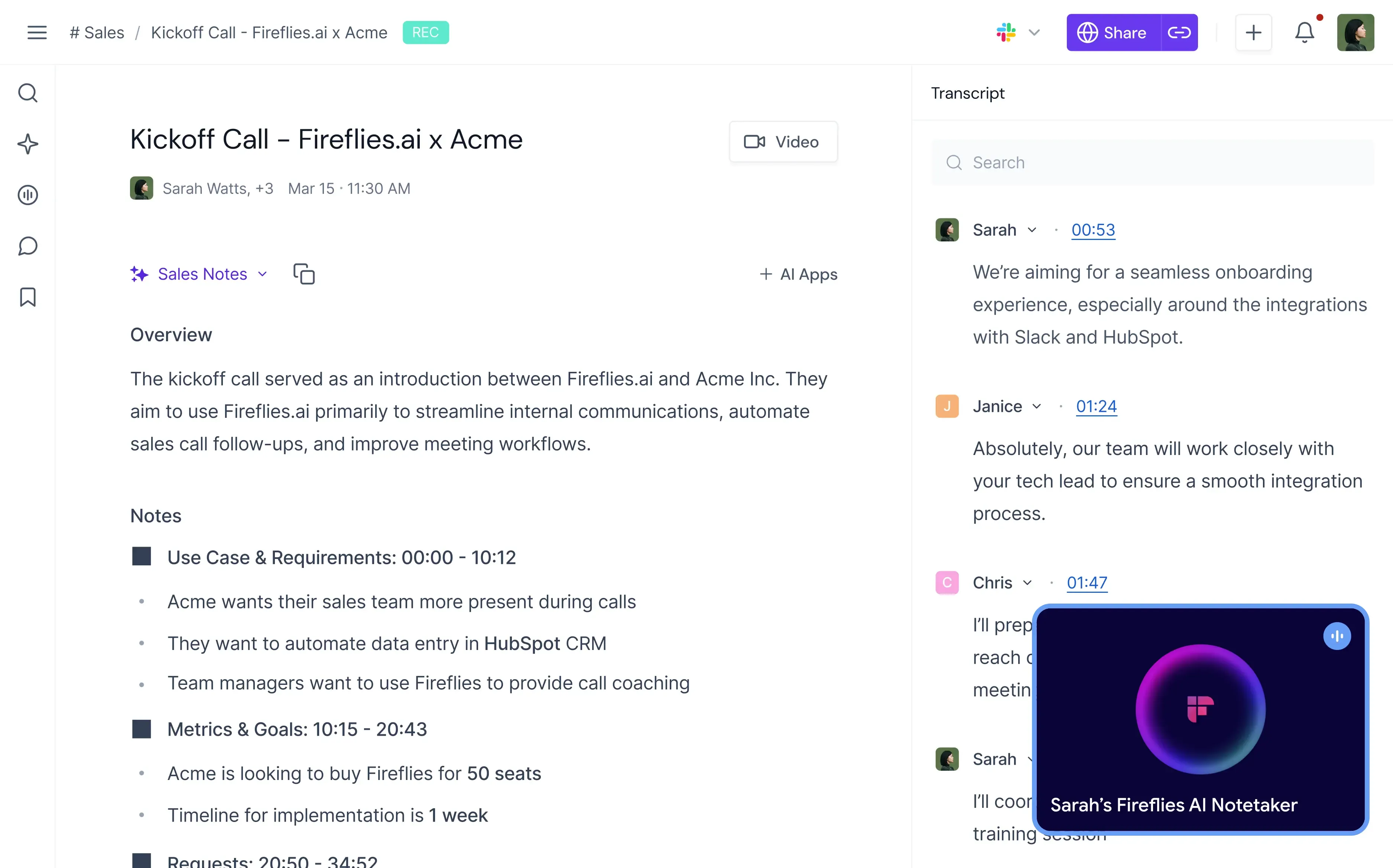
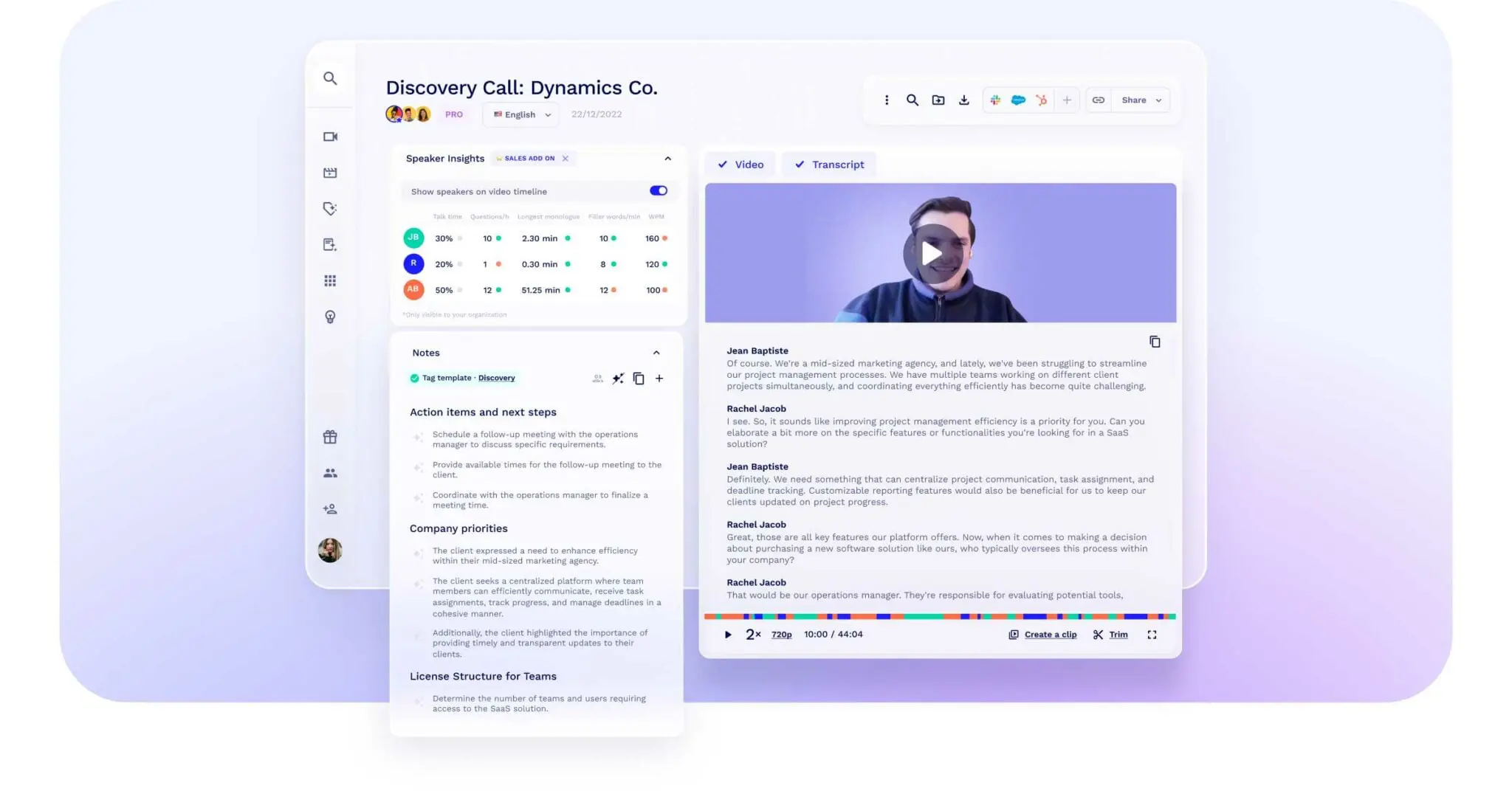
Fireflies AI meeting transcription, overview and notes

The platform automatically records and transcribes meetings across Zoom, Google Meet, Microsoft Teams, Webex, and other conferencing platforms. After meetings are processed, users can search conversations by keyword, topic, speaker, sentiment, date, or custom filters, making it easy to revisit specific moments without watching entire recordings.

Fireflies also offers conversation intelligence features that help teams identify trends across meetings. Sales teams often use it to review customer conversations, track competitor mentions, and analyze common objections.

The platform integrates with a wide range of business tools, including Salesforce, HubSpot, Slack, Notion, Asana, and Zapier, making it relatively easy to incorporate into existing workflows.

Key features

  • Automatic meeting recording and transcription
  • AI-generated summaries and action items
  • Advanced meeting search
  • Conversation analytics
  • CRM and productivity tool integrations
  • Shared meeting libraries
  • Speaker identification
  • Collaboration and commenting

Pros

  • Powerful search capabilities
  • Broad integration ecosystem
  • Strong collaboration features
  • Useful conversation analytics

Cons

  • Interface can feel complex for new users
  • Costs can increase quickly for larger teams
  • Accuracy may vary depending on audio quality

Want a closer look? See our MeetGeek vs. Fireflies comparison.

2. Otter.ai: Best for transcription-focused teams

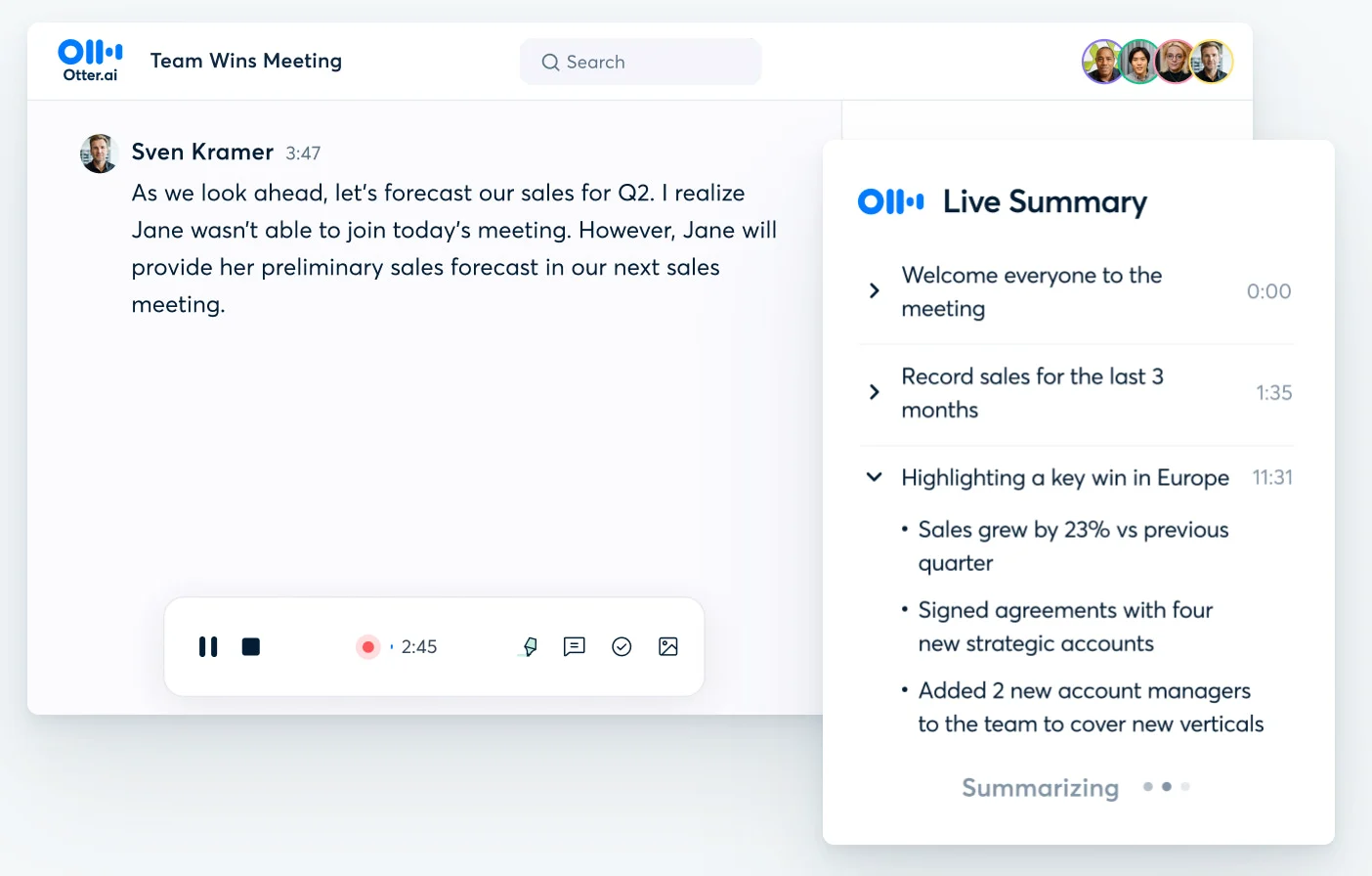
Otter.ai helped popularize AI-powered meeting transcription and remains one of the most recognizable tools in the category.

Otter meeting live summary

The platform focuses primarily on turning conversations into searchable transcripts and collaborative meeting notes. Otter automatically joins supported meetings, captures conversations, identifies speakers, and creates live transcripts that participants can follow during meetings.

Recent updates have expanded Otter's capabilities with AI-generated summaries, action items, and conversational AI features, but transcription remains its core strength. The interface is simple and easy to learn, making it a popular choice for individuals, students, consultants, and small teams.

While Otter excels at documentation, it generally offers fewer workflow automation and meeting intelligence capabilities than more comprehensive meeting platforms.

Key features

  • Real-time meeting transcription
  • Speaker identification
  • AI summaries
  • Collaborative notes
  • Searchable transcripts
  • Meeting recording
  • Mobile and desktop apps

Pros

  • Strong transcription accuracy
  • Easy-to-use interface
  • Well-established platform
  • Free plan available

Cons

  • Limited workflow automation
  • Fewer advanced integrations
  • Less focused on organization-wide meeting intelligence

Want a closer look? See our MeetGeek vs. Otter comparison.

3. MeetGeek: Best overall for meeting intelligence and workflow automation

MeetGeek is an AI meeting assistant designed to automate the entire meeting lifecycle, from recording and transcription to follow-ups, knowledge management, and workflow automation.

MeetGeek automated transcription and meeting notes

Like Airgram, MeetGeek can automatically join and record Zoom, Google Meet, and Microsoft Teams meetings. Where it goes further is what happens after the meeting ends. The platform generates AI meeting notes, extracts action items, identifies decisions, creates summaries, and organizes every conversation into a searchable meeting repository.

One of MeetGeek's strongest differentiators is its focus on meeting intelligence. Instead of simply storing transcripts, it helps teams find information across previous meetings, analyze conversations, retrieve customer feedback, and build a centralized knowledge base. Teams can search discussions, review historical context before calls, and generate follow-up emails or reports directly from meeting data.

MeetGeek also includes AI voice agents that can conduct repetitive conversations such as screening interviews, qualification calls, and customer outreach while automatically collecting information and generating structured notes.

Key features

  • Automatic meeting recording for Zoom, Google Meet, and Microsoft Teams
  • AI meeting notes and summaries
  • Action item and decision tracking
  • Searchable meeting repository
  • Slack, Notion, HubSpot, and Google Drive integrations
  • Meeting analytics and conversation intelligence
  • Team collaboration and commenting
  • AI voice agents
  • Multi-language transcription support
  • Workflow automation and CRM enrichment

Pros

  • Reduces manual note-taking and meeting administration
  • Makes past meetings easy to find and revisit
  • Helps teams stay aligned with shared meeting knowledge
  • Combines multiple meeting tools into a single platform

Cons

  • Some advanced features may be unnecessary for users who only need basic transcription
  • Full value is best realized when teams actively use integrations and workflows

4. tl;dv: Best for sharing meeting highlights

tl;dv focuses on making meetings easier to review and share rather than simply storing transcripts.

tl;dv meeting transcription and notes

The platform allows users to capture highlights during meetings, create clips from important moments, and share those clips across teams. This makes it particularly useful for product, customer success, research, and sales teams that frequently need to distribute insights from customer conversations.

In addition to recording and transcription, tl;dv generates summaries and provides AI-powered search capabilities. Teams can quickly locate relevant discussion points and share specific moments without requiring colleagues to watch an entire meeting recording.

Its free plan is also one of the more generous options in the category.

Key features

  • Meeting recording and transcription
  • AI-generated summaries
  • Highlight creation
  • Video clips and sharing
  • AI search
  • Slack integration
  • Zoom, Google Meet, and Microsoft Teams support

Pros

  • Excellent sharing functionality
  • Strong free plan
  • Easy highlight creation
  • Good meeting summaries

Cons

  • Some workflows require manual interaction
  • Advanced exports are limited to paid plans

Want a closer look? See our MeetGeek vs. tl;dv comparison.

5. Fellow: Best for structured meeting management

Fellow approaches meetings differently from most Airgram alternatives.

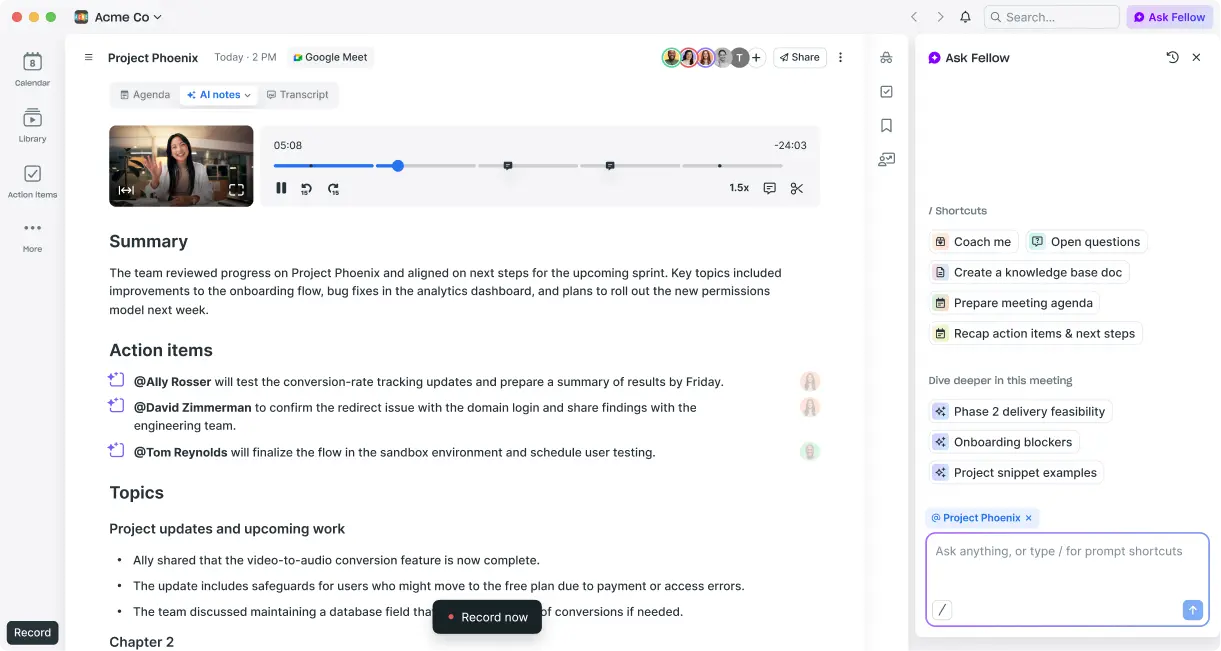
Rather than focusing primarily on recording and transcription, Fellow emphasizes meeting preparation, agendas, accountability, and recurring meeting management. The platform helps teams create structured agendas, document decisions, assign action items, and maintain meeting consistency.

Fellow AI meeting summary, action items, topics, and AI chat

This makes Fellow particularly useful for managers, leadership teams, one-on-ones, and recurring operational meetings where organization and accountability matter as much as transcription.

While Fellow has expanded its AI note-taking capabilities, its biggest strength remains helping teams run better meetings before, during, and after conversations take place.

Key features

  • Meeting agendas
  • Action item management
  • AI meeting notes
  • One-on-one templates
  • Team collaboration
  • Meeting reminders
  • Integrations with major workplace tools

Pros

  • Excellent meeting structure tools
  • Strong agenda management
  • Good collaboration features
  • Useful recurring meeting workflows

Cons

  • Transcription is not its primary focus
  • Free plan has limitations

6. Sembly AI: Best for meeting workflow automation

Sembly AI is designed to automate many of the tasks that happen before and after meetings.

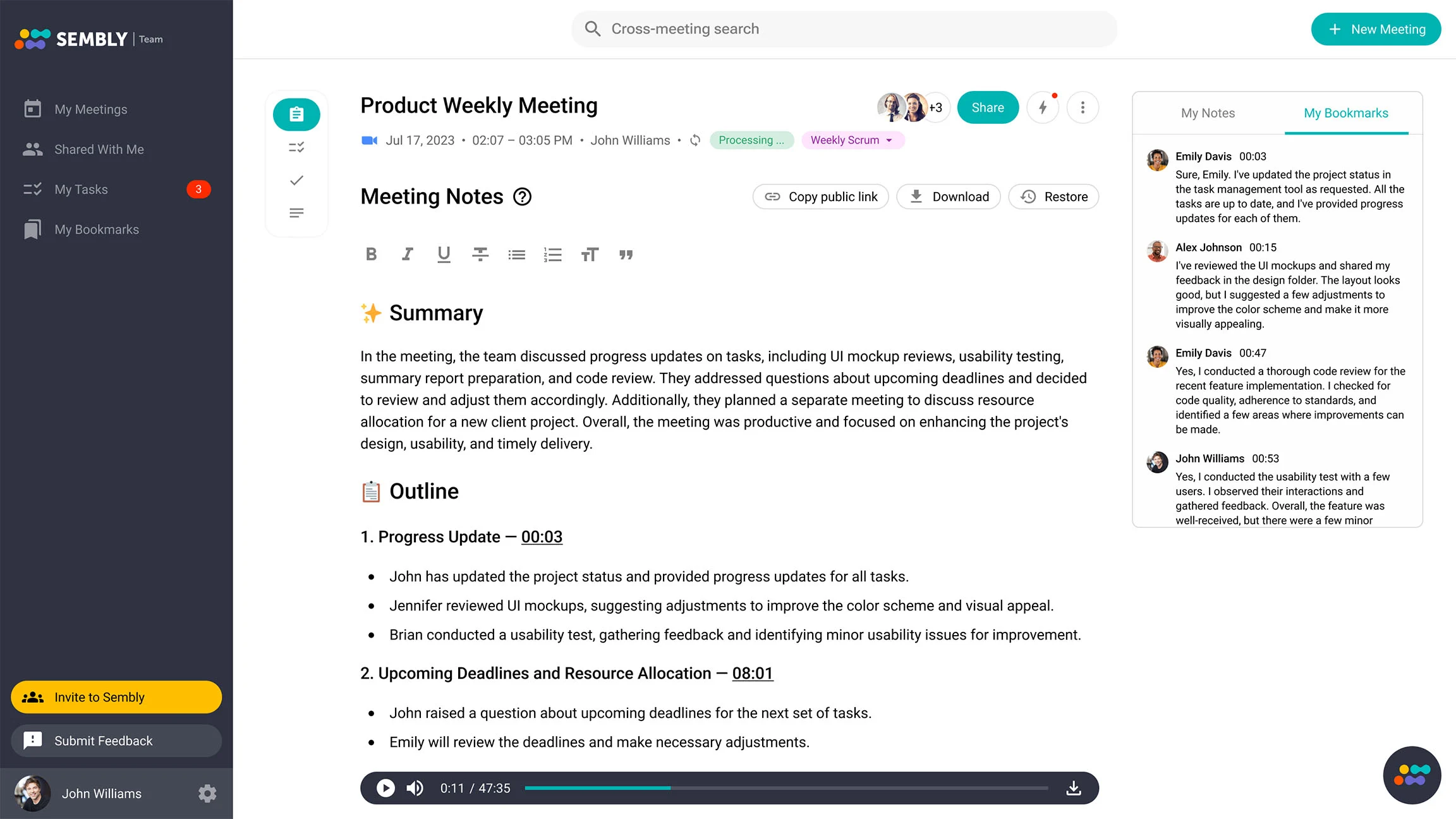
Sembly AI meeting notes

The platform records meetings, generates transcripts, creates summaries, extracts action items, and identifies key discussion points automatically. Its focus is reducing manual administrative work so teams can spend less time documenting meetings and more time executing on outcomes.

Sembly also integrates with project management and productivity platforms, allowing action items and meeting outputs to flow directly into existing workflows. The platform includes searchable meeting records, meeting analytics, and automation capabilities that can help teams manage high volumes of meetings more efficiently.

For organizations looking to automate follow-ups and meeting administration, Sembly is one of the stronger options in the category.

Key features

  • AI meeting summaries
  • Action item extraction
  • Meeting transcription
  • Workflow automation
  • Searchable meeting repository
  • Project management integrations
  • Meeting analytics

Pros

  • Strong automation capabilities
  • Good summary quality
  • Useful integrations
  • Searchable meeting history

Cons

  • Learning curve for new users
  • Interface can feel less intuitive than competitors

Airgram alternatives overview

Tool Best for Free plan Languages Integrations
MeetGeek Meeting intelligence and automation Yes 50+ Extensive
Fireflies.ai Searchable meeting archives Yes Multiple Strong
Otter.ai Transcription Yes Limited Moderate
tl;dv Meeting highlights Yes 20+ Strong
Fellow Meeting management Yes Multiple Strong
Sembly AI Workflow automation Yes Multiple Strong

Which Airgram alternative should you choose?

Since Airgram has joined Notta, the real decision today is which meeting platform best fits your team's workflow and requirements.

If your primary need is transcription, Otter.ai remains one of the strongest options. It focuses on converting conversations into searchable transcripts and collaborative meeting notes with minimal setup.

If you want a searchable repository of meetings and conversation insights, Fireflies.ai offers strong search capabilities and useful analytics for reviewing discussions over time.

For teams that frequently share customer conversations, research interviews, or sales calls, tl;dv makes it easy to capture highlights and distribute important moments across the organization.

If your focus is meeting structure and accountability, Fellow provides agenda management, recurring meeting workflows, and action item tracking that help teams stay organized.

For organizations looking to automate follow-ups and reduce administrative work, Sembly AI offers strong workflow automation capabilities that help move meeting outcomes into the rest of your productivity stack.

However, many teams eventually need more than a transcription tool or meeting recorder. They need a platform that can capture meetings, generate notes, track action items, organize knowledge, support collaboration, and automate repetitive work.

For teams looking for that all-in-one approach, MeetGeek offers the most complete solution. It combines recording, transcription, AI meeting notes, workflow automation, collaboration, analytics, and knowledge management in a single platform.

Choose the right Airgram alternative for you

Airgram is still a capable meeting assistant, but many teams eventually need more than transcription and basic summaries.

The best alternatives help teams save time, improve productivity, automate repetitive work, and make meeting information easier to access across the organization.

MeetGeek combines AI meeting notes, transcripts, action items, workflow automation, collaboration tools, analytics, and AI voice agents into a single platform designed for modern teams.

If you want fewer manual tasks, better meeting visibility, and a smarter way to manage conversations across Zoom, Google Meet, and Microsoft Teams, try MeetGeek for free.

Key takeaways

  • Airgram has joined Notta, so users are now choosing between Notta and other AI meeting assistants.
  • Fireflies.ai is a strong option for searchable meeting archives and conversation analysis.
  • Otter.ai is best suited for teams primarily focused on transcription and meeting notes.
  • MeetGeek offers recording, transcription, meeting notes, workflow automation, and meeting intelligence in one platform.
  • tl;dv excels at sharing meeting highlights and customer insights across teams.
  • Sembly AI helps automate follow-ups, action items, and meeting workflows.

Frequently asked questions

Is Airgram still available?

Airgram's technology has been integrated into Notta's meeting transcription platform, making Notta one of the most commonly recommended alternatives for existing Airgram users.

What is the best free Airgram alternative?

Several tools offer a free plan, including MeetGeek, Otter.ai, Fireflies.ai, tl;dv, and Fellow. The best option depends on whether you prioritize transcription, collaboration, or workflow automation.

Can Airgram alternatives work with Google Meet and Microsoft Teams?

Yes, most modern meeting assistants support Google Meet, Microsoft Teams, MS Teams, and Zoom. Many can automatically join meetings, record conversations, and generate meeting notes.

Which Airgram alternative supports the most languages?

MeetGeek has the most extensive language coverage. MeetGeek supports more than 50 languages, including English, Spanish, and French, making it suitable for global teams.

Can AI meeting assistants automatically create action items?

Yes, most leading platforms use artificial intelligence to identify action items, decisions, tasks, and follow-ups automatically from meeting discussions, reducing the need for manual note-taking.

Article updated on 
June 19, 2026
Share the knowledge with your circle
Copied
Related posts

The 6 Best Airgram Alternatives in 2026

Compare the best Airgram alternatives for 2026, including MeetGeek, Fireflies, Otter, tl;dv, Fellow, and Sembly AI.

This is some text inside of a div block.

Meeting Notes in ChatGPT: Benefits, Uses, and Setup

Connect your meeting notes to ChatGPT and turn past calls into instant answers, drafts, and automations, in plain language.

This is some text inside of a div block.

How To Type Faster: 15 Typing Hacks That Work

Want to type faster and make fewer mistakes? Discover practical typing hacks, keyboard shortcuts, and tools that help you work smarter.

This is some text inside of a div block.

10 Best ChatGPT Alternatives For Work In 2026

Looking for a ChatGPT alternative? Compare the top AI tools for research, meetings, writing, coding, search, and productivity in 2026.

This is some text inside of a div block.

9 Best Calendly Alternatives in 2026 (Tested + Compared)

Cal.com, Acuity, Chili Piper, and more — the best Calendly alternatives in 2026, tested and ranked by use case.

This is some text inside of a div block.

8 Best Google Meet Extensions in 2026 (Tested for Productivity)

From AI notes to noise cancellation, here are 8 Chrome extensions that fix what Google Meet doesn’t do natively.

This is some text inside of a div block.

AI Productivity Tools We Actually Use in Sales and Marketing

A practical look at the AI productivity tools we use daily for meetings, content, automation, sales workflows, and teamwork.

This is some text inside of a div block.

Gemini vs. Google Assistant: Full Comparison Guide

Confused about Gemini vs Google Assistant? Learn the key differences, what Google is changing, and which assistant fits you best.

This is some text inside of a div block.

Managing Hybrid Teams in 2026: Common Challenges and How to Overcome Them

Communication gaps, time-zone friction, culture drift — the four challenges every hybrid manager faces, and how to solve them.

This is some text inside of a div block.

MeetGeek vs tl;dv: Which AI Meeting Tool Is Right for Your Team in 2026?

Features, pricing, accuracy, integrations on a side-by-side comparison with a clear verdict for sales, CS, and ops teams.

This is some text inside of a div block.

How to Convert MP4 to Transcript (Fast & Accurate)

Learn how to convert MP4 files into accurate transcripts, subtitles, and captions with AI tools for meetings, webinars, and interviews.

This is some text inside of a div block.

Google Transcription Service in 2026: Honest Review and Best Alternative

Google Meet, Cloud Speech-to-Text, Docs, Recorder — what each does, where each falls short, and the better alternative.

This is some text inside of a div block.

AI Sales Coaching: How Modern Sales Teams Use AI to Close More Deals

How AI sales coaching analyzes every call (not just the 3% a manager samples) and surfaces coachable moments by rep, stage, and objection type.

This is some text inside of a div block.

Can ChatGPT Transcribe Audio? What It Can and Can’t Do

Can ChatGPT transcribe audio? Discover how it works, its limitations, and when to use MeetGeek for better results.

This is some text inside of a div block.

AI for Customer Success: The 2026 Playbook

Where AI plugs into the CSM day (Renewals, Risk, References, Reviews) plus a maturity model and a 10-item checklist for choosing tools.

This is some text inside of a div block.

A Complete Guide to the MEDDIC Sales Methodology

Discover MEDDIC sales, how it helps qualify leads, understand decision processes, and improve win rates across complex B2B sales cycles.

This is some text inside of a div block.

How To Write an Out of Office Message

Learn how to write a clear out of office message, what to include, and use ready-to-copy examples for any situation.

This is some text inside of a div block.

How To Cancel Your Zoom Subscription in 2026

Need to cancel your Zoom subscription? This guide explains exactly how to do it on the Zoom website, Apple App Store, or Google Play, what happens after cancellation, and how to avoid extra billing charges.

This is some text inside of a div block.

MeetGeek vs Fellow: Comparing Meeting Notes, Agendas, and Automation

Comparing MeetGeek vs Fellow? See how their AI meeting notes, agendas, recordings, and automation features differ to find the best fit for your team.

This is some text inside of a div block.

How to Screen Record on Mac (With Audio, System Sound & Pro Tips)

Learn how to screen record on Mac using built-in tools, capture audio correctly, and see when MeetGeek is the smarter option.

This is some text inside of a div block.

MeetGeek vs Krisp: Which AI Meeting Assistant Is Right for Your Team?

MeetGeek vs Krisp compared: AI notes, noise cancellation, pricing, integrations, and recording features explained clearly.

This is some text inside of a div block.

Video Conference Tips for Running Successful Virtual Meetings

Learn practical video conference tips that improve audio quality, engagement, and follow-through, and help teams stay aligned after virtual meetings.

This is some text inside of a div block.

Webex vs Zoom: Which Video Conferencing Platform Fits Your Meetings Best?

A clear comparison of Webex vs Zoom, from features and pricing to security and integrations.

This is some text inside of a div block.

How to Raise Hand in Zoom and Actually Get Heard

Learn how to raise your hand in Zoom on any device, avoid interruptions, and keep meetings organized from start to finish.

This is some text inside of a div block.

Good Questions to Ask in an Interview That Help You Make the Right Choice

Learn which questions to ask, when to ask them, and how to use interviews to decide if a role, team, and company are truly right for you.

This is some text inside of a div block.

What is Companion Mode in Google Meet? Everything You Need to Know

Read on for a practical guide to using Companion Mode in Google Meet for clearer, more balanced hybrid meetings.

This is some text inside of a div block.

What Is a Skip-Level Meeting? How Leaders Use Skip-Levels to Improve Communication

An in-depth look at skip-level meetings and how they help leaders connect with teams and gain real insight.

This is some text inside of a div block.

What Is an AI Voice Agent? A Practical Guide to How Voice AI Really Works

This guide explains what an AI voice agent is, how it works, the benefits it offers, and where it fits best alongside human teams.

This is some text inside of a div block.

Stand-Up Meeting Guide: What They Are and How to Run Them

Discover what makes a stand-up meeting actually useful. This guide explains how to run daily stand-ups that stay short, surface blockers, and keep teams aligned.

This is some text inside of a div block.

Everything About Microsoft Teams AI Interpreter + How to Go Beyond Translation

Find out how Microsoft Teams AI Interpreter works, where it falls short, and how to go beyond translation.

This is some text inside of a div block.

Best Lecture Recording App in 2026: 5 Tools Students Actually Use

Let’s take an in-depth look at what students are using nowadays to record and organize their lectures, both online and offline.

This is some text inside of a div block.

Read AI Pricing Explained for 2026: Is It Worth It for Meeting Notes

Explore Read AI’s 2026 pricing, its core features, and how it handles meeting notes, transcription, and insights to support modern teams.

This is some text inside of a div block.

What Is a Searchable Knowledge Base and How Does It Work?

Explore how searchable knowledge bases improve access to information and see how MeetGeek turns your meetings into a fast, reliable knowledge hub.

This is some text inside of a div block.

How to Blur Background in Google Meet (Simple Guide for All Devices)

Discover how to blur your background in Google Meet on desktop and mobile, use visual effects, and get a cleaner, more focused look in every call.

This is some text inside of a div block.

How to Join Teams Meeting With Code: A Complete Step-by-Step Guide

Find out how to join Microsoft Teams meetings using a meeting code, as well as other options like a link or invite. This guide explains every method in a clear, step-by-step way.

This is some text inside of a div block.

5 Best NoteGPT Alternatives in 2026

Explore the top 5 NoteGPT alternatives that help you capture key insights, transcribe content, and boost productivity across learning and professional workflows.

This is some text inside of a div block.

What Is Perplexity AI? A Guide to the AI-Powered Search Engine Transforming How We Find Information

In this article we’ll take a close look at Perplexity AI, what it can do for you compared to traditional search engines, and some of its pros and cons.

This is some text inside of a div block.

Top tl;dv Alternatives to Streamline Your Meetings

Discover the top tl;dv alternatives and explore and compare their features to choose the right AI meeting tool for your organization.

This is some text inside of a div block.

ChatGPT Record Mode vs MeetGeek: Here's Everything You Need to Know

Curious how the ChatGPT recorder compares to MeetGeek? We looked at features, integration, and data security for recording meetings.

This is some text inside of a div block.

Fathom AI Pricing 2026: Is It Still Worth It for Modern Teams?

Explore Fathom AI pricing for 2026, including features, limits, and plan comparisons, plus how MeetGeek offers more flexibility for teams.

This is some text inside of a div block.

AI Meeting Agents: How Autonomous AI Is Transforming the Future of Work

Discover how AI meeting agents are redefining the future of work—handling scheduling, follow-ups, and even speaking on your behalf to save time and turn every meeting into real action.

This is some text inside of a div block.

Notta AI Review: Is This AI Transcription Tool Worth It in 2026?

Read this in-depth Notta AI review to see how well it transcribes meetings, handles multiple languages, and delivers AI summaries, plus where it falls short compared to smarter meeting assistants.

This is some text inside of a div block.

These 5 AI Tools for Nonprofits Will Make Every Hour Count

Make your nonprofit more efficient with AI tools that cut admin time, improve collaboration, and maximize every hour of impact.

This is some text inside of a div block.

Granola AI Notes Alternatives: The Best Options to Try in 2026

Explore the best Granola AI Notes alternatives for 2025 with smarter tools that go beyond transcription, offering automation, insights, and collaboration.

This is some text inside of a div block.

Follow-Up Email After Interview: How to Write It, When to Send It, and What to Say

Discover how to write an effective follow-up email after an interview. From timing and templates to tone and structure, this guide covers everything you need to stand out and stay memorable.

This is some text inside of a div block.

Tactiq Pricing Review 2026: Plans, Limits, and The Best Alternative

Explore the latest Tactiq pricing plans and find out how they stack up against MeetGeek’s all-in-one meeting assistant.

This is some text inside of a div block.

Ad Hoc Meeting Meaning and How to Run One

Discover the true ad hoc meeting meaning and learn how to make spontaneous discussions more focused and effective. Find out when to hold and manage them.

This is some text inside of a div block.

Virtual Meeting Etiquette: 15 Essential Rules for Professional Video Calls

Discover 15 essential virtual meeting etiquette rules and tips that keep conversations focused, professional, and engaging.

This is some text inside of a div block.

How to Blur Background in Zoom: Step-by-Step Guide

Discover how to use Zoom’s blur background feature for privacy and focus, plus tips, fixes, and when to switch to virtual backgrounds.

This is some text inside of a div block.

How to Share Screen on Google Meet: A Simple Step-by-Step Guide

Learn how to share your screen on Google Meet with clear steps for computer, iPhone, iPad, and Android.

This is some text inside of a div block.

MeetGeek’s MCP Server Explained: How It Enables AI Assistants to Transform Meetings

See how MeetGeek’s MCP Server helps AI assistants turn your meetings into smart, actionable insights, all from your local machine.

This is some text inside of a div block.

How to Change Name on Zoom (Before and After You Join a Meeting)

Learn how to change your Zoom name step by step on any device, plus tips for hosts, waiting rooms, and troubleshooting.

This is some text inside of a div block.

Note-Taking AI for Students: The Best Tools to Study Smarter in 2026

A guide to the best AI note-taking tools for students in 2026, with features, pros, and cons to help you choose the right app for learning.

This is some text inside of a div block.

Descript Pricing Review 2026: What It Offers, Where It Falls Short, and a Better Alternative

A closer look at Descript’s pricing tiers, their trade-offs, and why MeetGeek stands out as a smarter choice for creators.

This is some text inside of a div block.

Google Meet Time Limit: Everything You Need to Know

In this article, you’ll learn everything you need to know about Google Meet’s time limits and how you go beyond them.

This is some text inside of a div block.

How To Transcribe Voice Memos To Text (3 Different Ways)

In this article, you’ll learn how to transcribe voice memos in three different ways, weighing the pros and cons of each option.

This is some text inside of a div block.

Best ClickUp Alternatives for AI Note Taking

Learn about the best 5 ClickUp alternatives if you want to go beyond simple AI note-taking and find a comprehensive meeting assistant.

This is some text inside of a div block.

What Is an Objective Summary? Definition, Examples & Tips

Objective summaries are a must when you need key information from lengthy meetings. We’ll discuss all about them in this article!

This is some text inside of a div block.

How to Record a Google Meet: All Options Explained

In this article, we break down how to record a Google Meet both natively and with the help of third-party tools like MeetGeek

This is some text inside of a div block.

7 Best Note-Taking Apps for Meetings in 2026

Looking for the best meeting note-taking app for your team? We break down the features, pros, and cons of the 7 best ones right now.

This is some text inside of a div block.

How to Record a Zoom Webinar as a Host or Participant (2 Methods)

In this article, we will review how to record a Zoom webinar as host or participant using Zoom’s built-in recording and third-party tool with AI transcription.

This is some text inside of a div block.

7 Best Chrome Extensions for Salespeople and AMs

In this article, we will explore the best Chrome extensions for sales reps, focusing on tools that improve meeting intelligence, integrate with CRMs, and optimize productivity.

This is some text inside of a div block.

The Best Chrome Audio Capture Extensions and Tools in 2026 [Comparison]

We'll dive into a range of options, from basic recorders to advanced platforms that offer transcription, summaries, and seamless integrations.

This is some text inside of a div block.

7 Best Speech to Text Chrome Extensions: Comparison & Features

This guide breaks down the top 8 speech-to-text Chrome extensions for 2025, reviewing their key features, pricing, and ideal use cases to help you make an informed decision.

This is some text inside of a div block.

Meeting Overload Isn’t the Real Problem - Bad Meeting Design Is

When meeting overload becomes obvious, there are soma small changes that can transform your entire meeting culture.

This is some text inside of a div block.

Best Conversation Intelligence Software in 2026

By leveraging AI, these conversational intelligence platforms provide the analysis needed to refine sales or investor pitches, improve coaching, and influence revenue.

This is some text inside of a div block.

How to Add Meeting Notes to Google Docs [3 Easy Ways]

Let's explore 3 ways of how to add your meeting notes to Google Docs - manually or automatically.

This is some text inside of a div block.

Find the Best Zoom Alternative in 2026

Looking for a Zoom alternative? Check out the best options for 2026 and find the perfect fit for your meetings!

This is some text inside of a div block.

How to Extend the Zoom Time Limit: Paid & Free Solutions

Need more time for your Zoom meeting? Learn how to easily extend your session with this simple guide.

This is some text inside of a div block.

Microsoft Teams for Mac: How to Download, Install & Use It (2026)

Setting up Microsoft Teams on Mac is easy! Follow our quick guide to start collaborating seamlessly.

This is some text inside of a div block.

How to Record WhatsApp Calls: 5 Methods for Any Device (2026)

Discover the easiest way to record WhatsApp calls with our clear, step-by-step instructions.

This is some text inside of a div block.

Top 5 Integrations for AI Meeting Assistants in 2026

Looking to boost your meeting productivity? Explore the top AI meeting assistant integrations of 2026 that seamlessly connect with your favorite tools and apps.

This is some text inside of a div block.

7 Ways AI Meeting Assistants Save Time for Sales Teams in 2026

Learn how AI meeting assistants transform sales productivity in 2026 by eliminating manual tasks, streamlining workflows, and enabling reps to focus on selling.

This is some text inside of a div block.

The Complete Guide to Zoom Pricing Plans in 2026

Get a clear breakdown of all Zoom pricing plans, including add-ons and clear comparisons.

This is some text inside of a div block.

Can I Take a Screenshot in Teams? Your Questions, Answered

Wondering how to take a screenshot in Teams? We break down what works, what doesn’t, and what to watch for.

This is some text inside of a div block.

Google Meet Pricing in 2026: Free vs. Paid Plans Compared

Find the right Google Meet plan for your team with our clear breakdown and smart cost-saving tips.

This is some text inside of a div block.

Where Are Teams Recordings Stored? All Locations, Explained

Wondering where your Microsoft Teams recordings end up? Here’s every storage option clearly explained.

This is some text inside of a div block.

The 4-Day Workweek: How Companies Are Winning the Talent War

Why working less might be the smartest move for companies chasing productivity, innovation, and talent retention.

This is some text inside of a div block.

Find the Best Speech to Text App for Work in 2026 (Free & Paid)

Looking for a speech to text app in 2026? We’ve rounded up top picks to boost productivity and save time at work.

This is some text inside of a div block.

Managing Security and Compliance Risks Related to AI Note-Takers

Keep your AI-powered meetings secure and compliant! Learn how to manage security and compliance risks, protect sensitive data, and ensure privacy in your virtual meetings.

This is some text inside of a div block.

How to Write a Business Meeting Follow-Up Email + Templates & ChatGPT Prompts

Learn how to write clear, professional business meeting follow-ups with templates and ChatGPT prompts to save time and boost responses.

This is some text inside of a div block.

How to Use Microsoft Teams AI for Meetings

Learn how to automate notes, improve team collaboration and knowledge exchange, and make Teams meetings more productive with AI-powered features.

This is some text inside of a div block.

How to Take Minutes for a Meeting Like a Pro [+ Free Customizable Template]

Take flawless meeting minutes every time! Learn expert tips to capture key points, track action items, and impress your team with professional note-taking skills.

This is some text inside of a div block.

The 5 A's of Effective Communication: A Startup Guide to Better Team Collaboration

Startup success isn’t just about great ideas—it’s about how well your team communicates. Discover the 5 A’s framework to improve collaboration, reduce friction, and turn conversations into action.

This is some text inside of a div block.

Teams Meeting Attendance Report: What It Is & How to Use It

Demystify the Teams Meeting Attendance Report! Learn how to access, interpret, and leverage it to track engagement and improve your virtual meetings effortlessly.

This is some text inside of a div block.

How to Create & Use Google Meet Breakout Rooms

Master Google Meet breakout rooms! Learn how to create, manage, and use them to foster collaboration and engagement in your virtual meetings.

This is some text inside of a div block.

How to Record Yourself on Zoom, Step-by-Step

Master the art of recording on Zoom with our straightforward guide. Learn how to capture your meetings or personal notes effortlessly.

This is some text inside of a div block.

30+ Sales KPIs to Track in 2026

Unlock the secrets to sales success in 2026 with this guide to over 30 essential sales KPIs. Learn what to track to drive your team’s performance and revenue growth.

This is some text inside of a div block.

How to Create a Zoom Transcript: 3 Ways

Discover how to effortlessly create Zoom transcripts with our guide on three simple methods, perfect for capturing every key discussion point.

This is some text inside of a div block.

Find the Perfect Employee Performance Review Template

Discover the best employee performance review templates to streamline your evaluation process and boost workplace productivity.

This is some text inside of a div block.

Best 60+ Sales Motivational Quotes for Your Sales Team in 2026

Looking for sales motivation? Find the best sales quotes for 2026 to empower your team, encourage a positive mindset, and keep everyone focused on hitting targets.

This is some text inside of a div block.

How to Professionally Handle Any Schedule Conflict

Learn how to handle schedule conflicts professionally. This guide offers practical tips to manage overlaps, reschedule meetings, and maintain strong relationships.

This is some text inside of a div block.

Easy Guide for Installing Zoom for Windows

New to Zoom? Follow this simple guide to install Zoom on your Windows computer. Get set up in no time and start joining meetings with ease. Perfect for beginners.

This is some text inside of a div block.

How to Generate ChatGPT Meeting Notes [+Free ChatGPT Prompts]

Discover simple steps to generate meeting notes with ChatGPT. Follow this guide to capture key points, action items, and more for organized and efficient meeting records.

This is some text inside of a div block.

7 Best Loom Alternatives in 2026

Discover the top 7 Loom alternatives in 2026. Find the best tools for video messaging and team collaboration.

This is some text inside of a div block.

Microsoft Teams vs Zoom: What Works Better in 2026?

Discover which is better for you in 2026: Zoom or Microsoft Teams? Compare features and make the best choice for your needs!

This is some text inside of a div block.

Land More Appointments With a Meeting QR Codes

Read this handbook to learn all about meeting QR Codes. Dive into their practical use cases, benefits, and step-by-step instructions to create these for your needs.

This is some text inside of a div block.

Fireflies vs. Otter: Which One’s the Best

Compare Fireflies.AI and Otter.AI to find out which meeting transcription tool fits your needs best. Explore features, pricing, and more to make the right choice!

This is some text inside of a div block.

How to Make the Most of the Zoom AI Companion as Your AI Meeting Assistant

Learn how to use Zoom AI Companion features to enhance your meetings, save time, and boost productivity with helpful features and tips for a smoother workflow.

This is some text inside of a div block.

How to Use the Google Meet AI Note-Taker

Learn how to make the most of Google Meet’s AI note-taker to automatically capture meeting details, stay organized, and save time on follow-ups and summaries!

This is some text inside of a div block.

Get Started with MeetGeek

Turn meetings from a necessary evil into a positive and rewarding experience
Sign up for free
No credit card required.