


O Grain é um assistente de reuniões com IA que transforma chamadas de vendas, entrevistas com clientes e chamadas com clientes em transcrições pesquisáveis, resumos e clipes de vídeo compartilháveis.
Neste guia, analisamos o que o Grain faz bem, onde deixa a desejar e como se compara com 6 alternativas ao Grain para diferentes equipes e fluxos de trabalho.
Resumo: quais são as melhores alternativas ao Grain AI?
| Ferramenta | Ideal para | Preço inicial (cobrança mensal) | Recursos de destaque | Principal ponto fraco |
|---|---|---|---|---|
| Grain | Clipes compartilháveis e insights de clientes | US$ 19/usuário/mês | Clipes de vídeo, stories, busca em transcrições e fluxos de trabalho com IA | As gravações podem ficar difíceis de organizar quando o volume cresce |
| Fathom | Profissionais individuais e pequenas equipes | US$ 19/usuário/mês | Plano gratuito generoso e fluxo pós-reunião simples | Menos indicado para inteligência corporativa complexa |
| tl;dv | Clipes e análise de várias reuniões | US$ 29/usuário/mês | Compartilhamento de clipes, insights recorrentes e playbooks de vendas | Os recursos avançados podem ser desnecessários para usuários básicos |
| MeetGeek | Automação completa de reuniões | US$ 15,99/usuário/mês | Notas, análises, coaching, captura pelo celular e automação de fluxos de trabalho | Os templates e fluxos de trabalho podem exigir alguma configuração inicial |
| Fireflies.ai | Integrações e fluxos de trabalho flexíveis com IA | US$ 18/usuário/mês | Amplo ecossistema de integrações, AI Apps, análises e agentes | Os limites dos planos e os créditos de IA podem ser difíceis de comparar |
| Avoma | Equipes de receita | US$ 29/usuário com gravação/mês | Notas de reunião, coaching, automação de CRM e inteligência de receita | Os recursos voltados para vendas podem ser desnecessários para quem só quer fazer anotações |
| Otter.ai | Notas colaborativas em tempo real | US$ 16,99/usuário/mês | Transcrição em tempo real e colaboração durante a reunião | Menos focado em clipes de vídeo e fluxos avançados de receita |
O que é o Grain AI?
O Grain é um assistente de anotações com IA e uma plataforma de inteligência de conversas para Zoom, Google Meet e Microsoft Teams. Ele pode entrar nas chamadas como um bot visível para capturar o vídeo ou usar a captura pelo desktop para transcrever sem bot.
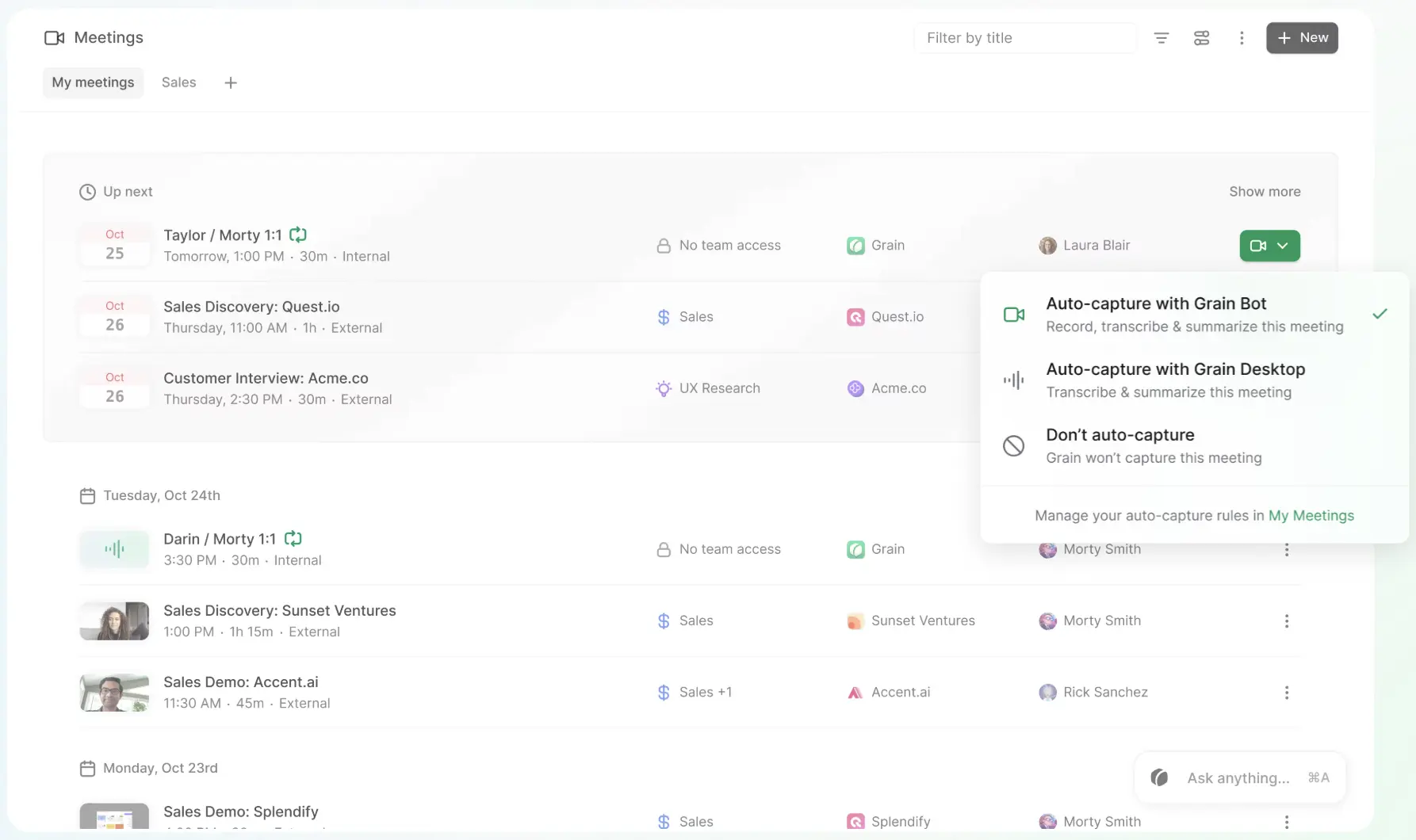
Após cada chamada, o Grain cria uma transcrição com identificação de falantes, notas geradas por IA, itens de ação e um resumo da reunião. Seus principais recursos incluem:
- Transcrições pesquisáveis com marcações de tempo e identificação de falantes
- Resumos com IA, pontos-chave e itens de ação
- Clipes de vídeo, stories e playlists compartilháveis
- Busca e perguntas sobre todo o histórico de reuniões
- Workspaces compartilhados, comentários e regras de compartilhamento automático
- Integrações de CRM e fluxos de trabalho com ferramentas como HubSpot, Salesforce, Slack e Zapier
- Exportação de transcrições, acesso à API e suporte a MCP para conectar dados de reuniões a agentes de IA
O Grain continua sendo mais conhecido por facilitar a criação e o compartilhamento de clipes, mas seus recursos de busca, colaboração e integrações com IA o tornam útil para além da transcrição básica de reuniões.
O que dizem os usuários do Grain?
Os usuários do Grain costumam elogiar o tempo que economizam com anotações, a busca nas transcrições e a facilidade de reaproveitar clipes. Ao mesmo tempo, as avaliações apontam algumas frustrações com a organização, a visibilidade do bot e a profundidade das ferramentas de IA.
Laura I., que trabalha com enablement e design de experiência, diz que o Grain "me economiza horas toda semana". Ela usa os clipes e stories para transformar conversas com clientes em material de coaching e acha a busca nas transcrições útil para rever o que um cliente disse. No entanto, ela acrescenta que "a organização das gravações fica bagunçada quando o volume cresce", principalmente quando o conteúdo precisa ser marcado manualmente por projeto ou cliente.
Um usuário verificado que trabalha na área de saúde mental gosta de o Grain poder gravar "reuniões e chamadas em qualquer serviço de plataforma de vídeo". A principal ressalva é simples: "As ferramentas de revisão e de IA do Grain poderiam ser melhores". Leia a avaliação completa no G2.
Garred S., gerente de pesquisa de mercado e insights, gosta de poder "armazenar todos os nossos vídeos de pesquisa em playlists específicas" e de criar rapidamente trechos menores de vídeo a partir das transcrições. A principal reclamação dele é que o Grain "ocupa um espaço no nosso Google Meet", o que pode distrair durante uma entrevista, mesmo que o bot não apareça na gravação.
O padrão é relativamente claro. O Grain funciona bem quando os clipes e as evidências diretas dos clientes são a prioridade. O ponto fraco é que uma biblioteca de gravações em crescimento pode exigir mais trabalho manual para ficar organizada, e o bot visível pode parecer invasivo em algumas chamadas.
Quais são os prós e contras do Grain?
Prós do Grain
- Transforma conversas longas em evidências reutilizáveis. Os clipes e stories do Grain permitem que as equipes que lidam com clientes compartilhem as palavras exatas do cliente, em vez de parafraseá-las em uma mensagem ou apresentação.
- Reduz a distância entre pesquisa e ação. As transcrições pesquisáveis facilitam recuperar uma citação, objeção, pedido ou decisão importante semanas depois de uma conversa.
- Favorece um coaching mais direcionado. Os gestores podem comentar um momento específico de uma chamada de vendas, em vez de dar um feedback vago com base em uma gravação inteira.
- Encaixa-se no trabalho de voz do cliente entre várias áreas. Vendas, produto, enablement e sucesso do cliente podem reaproveitar os mesmos destaques das reuniões para finalidades diferentes.
- Leva as transcrições das equipes para fluxos de trabalho com IA. Os recursos de exportação, API e MCP tornam os dados das reuniões úteis para além do próprio Grain.
Contras do Grain
- Um workspace centrado em clipes pode ficar difícil de estruturar à medida que cresce. Como aponta a avaliação de Laura I., equipes que atendem muitos clientes ou projetos podem depender de marcação manual para manter organizada uma biblioteca de reuniões em crescimento.
- A visibilidade do bot pode afetar chamadas com clientes. Mesmo quando o bot é discreto, ele ocupa uma vaga de participante e pode mudar o clima de entrevistas delicadas ou reuniões virtuais.
- A captura sem bot tem um custo no fluxo de trabalho. A captura pelo desktop evita que um bot entre na reunião, mas equipes que precisam de gravação completa em vídeo ou de participação automática ainda podem precisar do bot visível.
- O resultado da IA ainda precisa de revisão humana. Como observou um avaliador do G2, a camada de revisão com IA pode não ser profunda o suficiente para todos os casos de uso. Ruído de fundo, terminologia especializada, falas sobrepostas e baixa qualidade de áudio também podem afetar a precisão da transcrição em qualquer ferramenta de reuniões com IA.
- O plano gratuito tem limites que pesam na prática. Atualmente, o Grain divulga reuniões ilimitadas para usuários gratuitos, mas os limites do plano gratuito incluem um teto de 45 minutos por reunião, histórico de reuniões de 30 dias e recursos de IA básicos, e não avançados. As equipes devem comparar os limites reais de uso, e não apenas verificar se existe um plano gratuito.
Quanto custa o Grain AI?
Os preços do Grain AI incluem quatro planos, e todos os valores abaixo consideram a cobrança mensal:
- Free: US$ 0
- Starter: US$ 19 por usuário/mês
- Business: US$ 39 por usuário/mês
- Enterprise: preço personalizado disponível sob consulta
O plano Free é útil para testar o Grain antes de assinar um plano pago, enquanto equipes maiores que precisam de recursos, controles ou suporte mais avançados podem comparar os planos Business e Enterprise.
Por que considerar uma alternativa ao Grain?
O Grain já lida bem com clipes, transcrições e fluxos de trabalho com IA. Antes de trocar de ferramenta, vale ter clareza sobre o problema específico que outra ferramenta precisa resolver.
Talvez você precise de uma alternativa ao Grain se quiser:
- Análises de reuniões e inteligência de conversas mais detalhadas entre equipes
- Automação de CRM, inteligência de oportunidades ou coaching de vendas mais robustos
- Gravação sem bot em mais dispositivos ou para mais tipos de reunião
- Melhor suporte a reuniões presenciais e ao upload de gravações
- Cobertura mais ampla de idiomas, tradução em tempo real ou transcrição bilíngue
- Pastas, filtros e recursos de colaboração mais flexíveis para um grande histórico de reuniões
- Um plano gratuito generoso com menos restrições de gravação
- Recursos mais avançados para reuniões de conselho, gestão de projetos e compartilhamento de conhecimento em toda a empresa
1. Fathom: melhor alternativa gratuita ao Grain
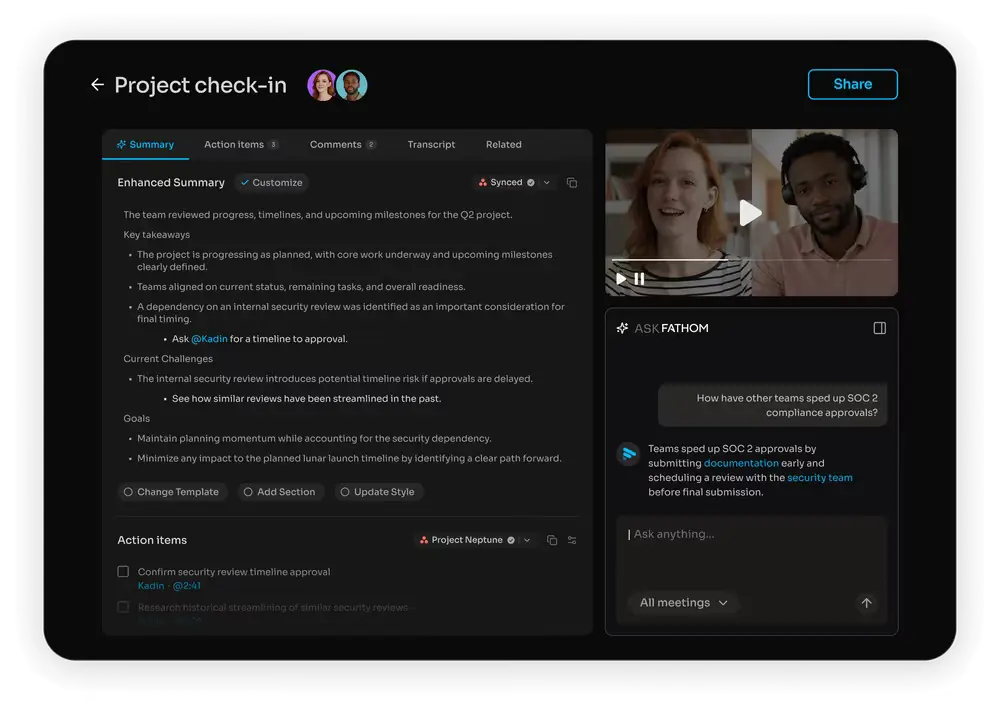
O Fathom grava, transcreve e resume reuniões no Zoom, Google Meet e Microsoft Teams. Ele gera resumos de reuniões e itens de ação, permite que os usuários criem clipes e pode enviar as notas para outros sistemas após uma chamada.
O Fathom é uma das melhores alternativas ao Grain AI se você quer principalmente notas confiáveis sem esbarrar em limites do plano gratuito depois de algumas chamadas. O plano gratuito generoso é uma boa parte do seu atrativo, embora equipes em crescimento ainda precisem verificar quais ferramentas de colaboração e de IA avançada ficam restritas aos planos pagos.
Principais recursos
- Gravação automática e transcrição de reuniões
- Resumos com IA, itens de ação e apoio ao follow-up
- Clipes e gravações de reuniões compartilháveis
- Busca e perguntas à IA sobre todas as chamadas
- Integrações com CRM e ferramentas de produtividade
Prós do Fathom
- O onboarding é simples para usuários que querem notas úteis sem montar fluxos de trabalho complexos.
- O plano gratuito generoso facilita que consultores, fundadores e pequenas equipes avaliem o produto em reuniões reais.
- Os resumos rápidos após a chamada facilitam o envio de uma recapitulação enquanto a conversa ainda está fresca na memória.
Contras do Fathom
- Organizações que precisam de governança detalhada, análises de desempenho de toda a equipe ou inteligência de receita podem achar o fluxo de trabalho simples do Fathom limitado demais.
- Alguns recursos de colaboração e administração são pensados para as edições pagas para equipes, e não para usuários individuais do plano gratuito.
- Não é a única ferramenta de que as equipes podem precisar se as reuniões tiverem que alimentar uma gestão de projetos complexa ou automações entre departamentos.
Preços do Fathom
- O Fathom tem um plano gratuito para uso individual.
- O Premium custa US$ 20 por usuário por mês, com cobrança mensal.
- O Team custa US$ 19 por usuário por mês, com mínimo de dois usuários e cobrança mensal.
- O Business custa US$ 34 por usuário por mês, com o mesmo mínimo e cobrança mensal.
- O preço do Enterprise está disponível sob consulta.
Os planos pagos individuais e para equipes incluem um teste gratuito e uma garantia de 90 dias.
Se você quiser conhecer os planos completos em detalhes, confira nosso artigo sobre preços do Fathom.
2. tl;dv: melhor para clipes e insights de várias reuniões
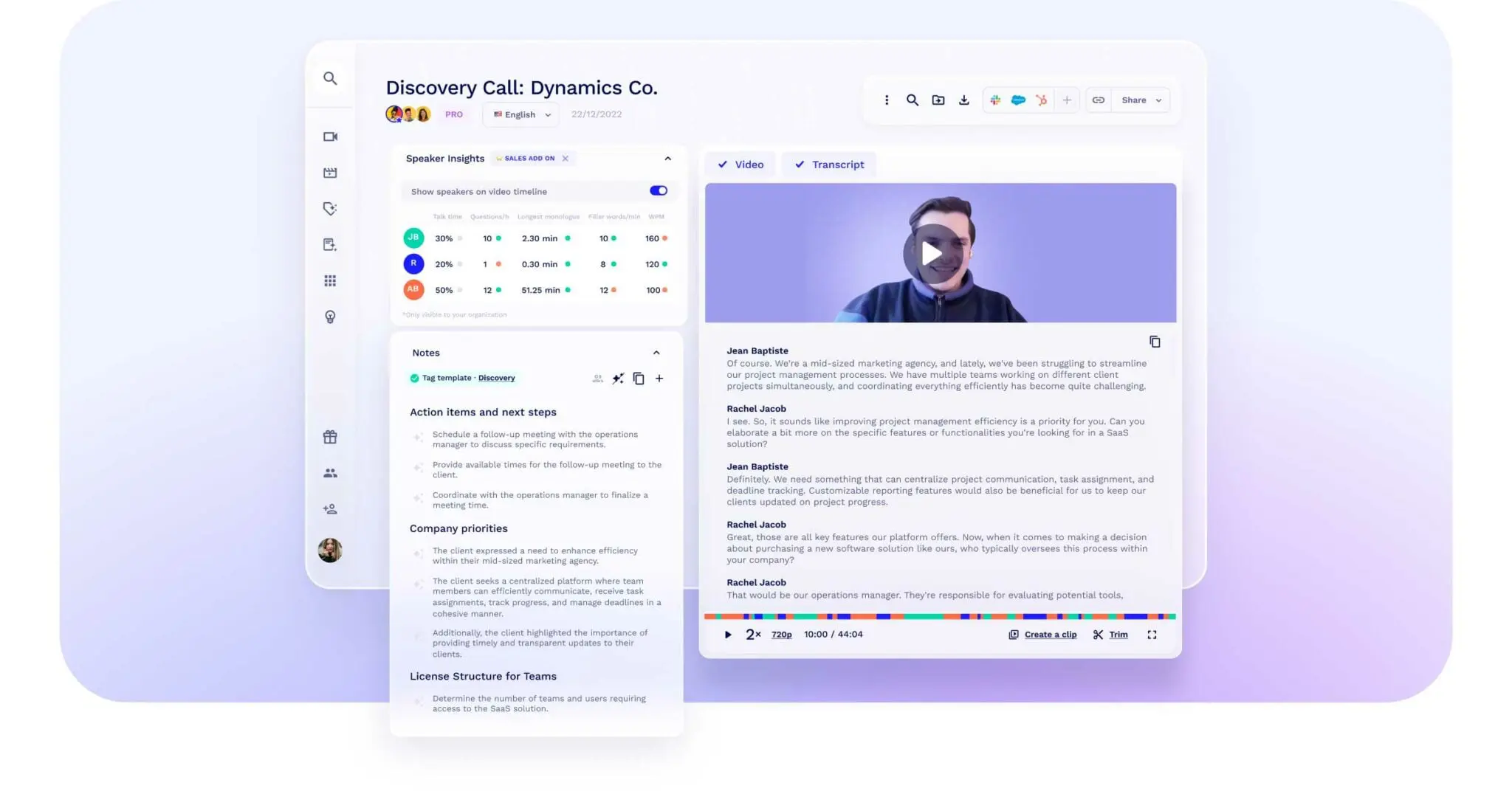
O tl;dv é um assistente de reuniões com IA para Zoom, Google Meet e Microsoft Teams. Assim como o Grain, ele dá ênfase a gravações, transcrições, destaques e clipes curtos de reuniões. Ele também analisa várias reuniões, acompanha temas recorrentes e oferece suporte a playbooks de vendas e fluxos de coaching.
Isso faz do tl;dv uma das alternativas mais próximas para equipes que gostam dos clipes de vídeo do Grain, mas querem identificar padrões em uma série de conversas com clientes ou de vendas. Ele é uma boa opção para equipes de receita, pesquisadores e departamentos que lidam com clientes e precisam de mais do que uma visão reunião por reunião.
Principais recursos
- Gravação automática, transcrição e notas com IA
- Clipes de vídeo compartilháveis e comentários com marcação de tempo
- Relatórios de várias reuniões e acompanhamento de temas recorrentes
- Playbooks de vendas, acompanhamento de objeções e insights de coaching
- Integrações com CRM e fluxos de trabalho
Prós do tl;dv
- As equipes podem transformar sinais repetidos dos clientes em tendências, em vez de deixar cada insight preso em uma única transcrição.
- O fluxo de clipes parece familiar para usuários do Grain, o que pode reduzir o atrito da mudança.
- Os relatórios recorrentes ajudam os gestores a acompanhar temas importantes sem abrir cada gravação manualmente.
Contras do tl;dv
- Equipes que buscam apenas anotações básicas podem achar os recursos de análise de várias reuniões e de vendas mais completos do que precisam.
- A diferença entre um plano gratuito generoso e os recursos de que uma equipe inteira precisa pode se tornar importante à medida que o uso cresce.
- Os insights automatizados ainda precisam ser revisados antes de serem tratados como dados definitivos sobre clientes ou desempenho.
Preços do tl;dv
- O tl;dv tem um plano gratuito que não exige cartão de crédito.
- O Pro custa US$ 29 por usuário por mês, com cobrança mensal.
- O Business custa US$ 39 por usuário por mês, com cobrança mensal.
- O preço do Enterprise é personalizado.
Saiba mais sobre como o tl;dv se sai em relação a outras ferramentas de reunião lendo nossa comparação entre MeetGeek e tl;dv.
3. MeetGeek: melhor para automação e insights de reuniões
%20(2).webp)
O MeetGeek grava e transcreve reuniões online, cria resumos com IA, extrai itens de ação e decisões importantes e transforma o histórico de reuniões em uma base de conhecimento pesquisável. Ele inclui integração com Zoom, integração com Google Meet e integração com Microsoft Teams, e também aceita upload de áudio ou vídeo e captura conversas presenciais pelo aplicativo para celular.
O que faz o MeetGeek se destacar é a forma como ele conecta a documentação das reuniões ao trabalho que vem depois. As equipes podem usar templates diferentes para chamadas de vendas, conversas com clientes, entrevistas, reuniões one-on-one e reuniões de conselho. Também podem analisar a proporção entre fala e escuta, o sentimento, a participação e outros sinais e, depois, enviar automaticamente os resultados para ferramentas de CRM, colaboração ou gestão de projetos.
Principais recursos
- Gravação automática de áudio, vídeo e tela com Microsoft Teams, Google Meet ou integração com Zoom
- Transcrição de reuniões com identificação de falantes e suporte a mais de 100 idiomas
- Notas de reunião, resumos, destaques e itens de ação com IA personalizáveis
- Busca e perguntas à IA sobre várias reuniões
- Gravação pelo celular para reuniões presenciais
- Inteligência de conversas, coaching de vendas e análises de reuniões
- Workspaces compartilhados, comentários, pastas e clipes de reuniões
- Automação de fluxos de trabalho e integrações com mais de 10.000 aplicativos
- Agentes de voz com IA para conversas estruturadas e repetíveis
Prós do MeetGeek
- Oferece profundidade real para equipes de negócios em geral e equipes de vendas, sem limitar a plataforma a chamadas comerciais.
- As análises ajudam os usuários a melhorar a condução das reuniões, e não apenas a lembrar o que foi dito.
- As opções de gravação pelo celular e envio de arquivos reúnem reuniões online, reuniões presenciais e gravações existentes em um único histórico de reuniões.
- Os fluxos de trabalho automatizados reduzem a chance de os itens de ação se perderem entre as notas da reunião e as ferramentas em que a equipe gerencia o trabalho.
Contras do MeetGeek
- Equipes que só querem uma transcrição e um resumo curto podem não usar todos os recursos disponíveis.
- As análises, os templates, as regras de compartilhamento e as automações geram mais valor depois que os administradores definem uma configuração consistente do workspace.
- Como em qualquer plataforma de transcrição, a precisão pode variar com ruído de fundo, sotaques, falas sobrepostas e qualidade do áudio, por isso vale revisar os detalhes importantes.
Preços do MeetGeek
- O MeetGeek tem um plano gratuito.
- O Pro custa US$ 15,99 por usuário por mês e inclui um teste gratuito de 14 dias.
- O Business custa US$ 27 por usuário por mês.
- O preço do Enterprise está disponível sob consulta.
Todos os preços consideram a cobrança mensal.
Para uma análise direta, recurso por recurso, das duas ferramentas, leia nossa comparação entre MeetGeek e Grain.
4. Fireflies.ai: melhor para integrações e fluxos de trabalho com IA
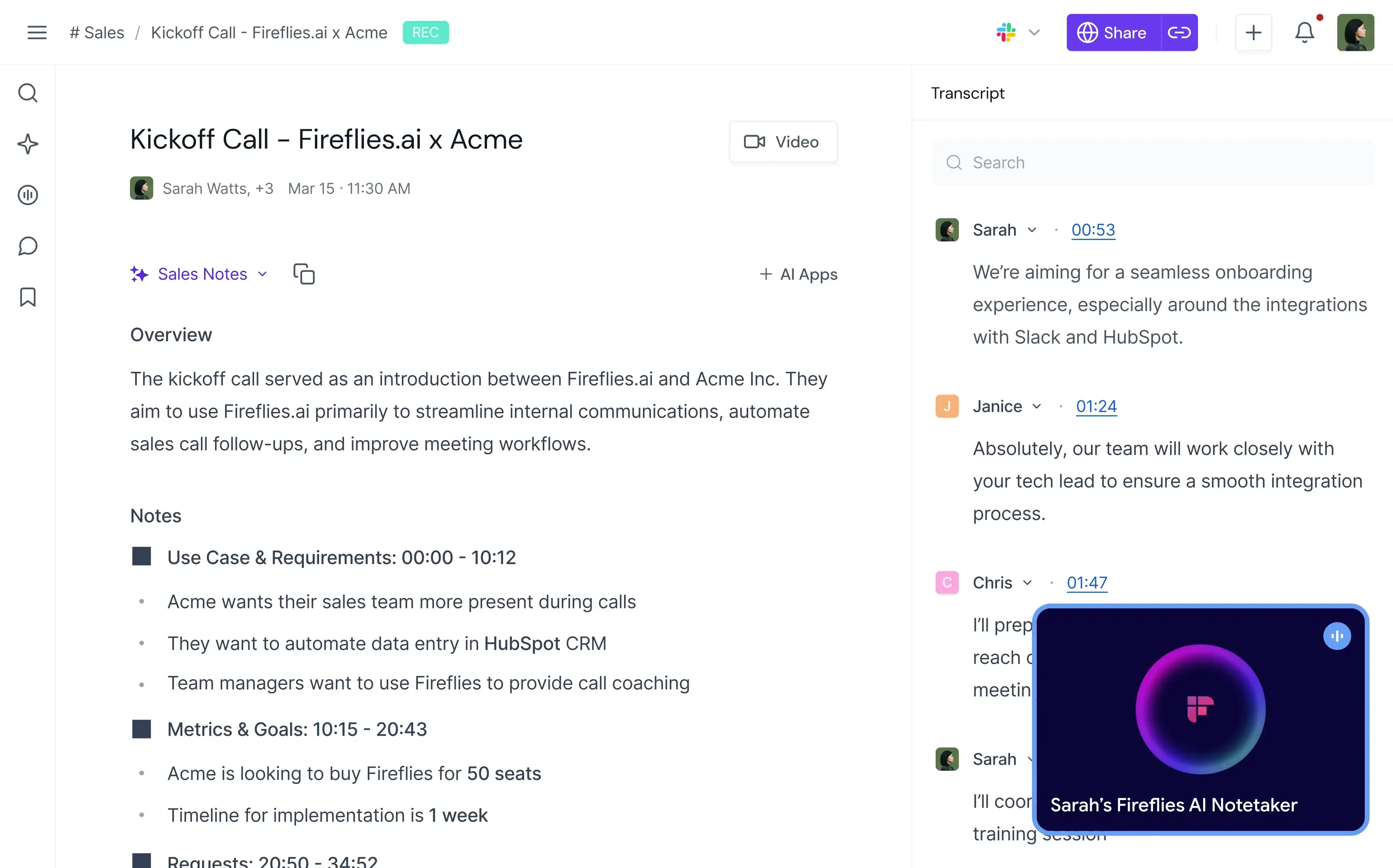
O Fireflies.ai captura reuniões nas principais plataformas de vídeo e oferece transcrições em tempo real, resumos com IA, itens de ação, busca, soundbites e análises de conversas. O AskFred responde a perguntas sobre as reuniões e pode gerar conteúdo de follow-up, enquanto os AI Apps e AI Teammates estendem a plataforma para fluxos de trabalho personalizados e tarefas conduzidas por agentes.
Vale a pena considerar o Fireflies se os dados das reuniões precisarem chegar a muitos outros sistemas da empresa. Ele se conecta com plataformas de CRM, gestão de projetos, ATS, armazenamento e colaboração. As equipes também podem definir regras sobre em quais reuniões ele entra, quem recebe as notas e para onde cada recapitulação deve ir.
Principais recursos
- Transcrição em tempo real, resumos com IA e itens de ação
- Assistente de IA AskFred e AI Apps
- Soundbites, comentários, marcadores e canais
- Análises de temas, falantes, sentimento e equipe
- Automações de CRM e gestão de projetos
- Regras para captura e distribuição de reuniões
- Agentes de voz e de reuniões
Prós do Fireflies.ai
- A amplitude de integrações facilita encaixar os resultados das reuniões em um conjunto de softwares já existente.
- As regras e os grupos de usuários ajudam workspaces maiores a controlar para onde vão as notas, sem depender de compartilhamento manual.
- A busca, as análises e as funções de IA personalizadas atendem vários departamentos, e não um único caso de uso restrito.
Contras do Fireflies.ai
- A quantidade de aplicativos, agentes, ferramentas de análise e cotas de uso pode dificultar identificar qual plano cobre o fluxo de trabalho real de uma equipe.
- Algumas ações avançadas de IA podem consumir créditos cobrados à parte da assinatura principal.
- Equipes interessadas principalmente em clipes de vídeo bem acabados podem preferir a experiência mais centrada em clipes do Grain ou do tl;dv.
Preços do Fireflies.ai
- O Fireflies.ai tem um plano gratuito.
- O Pro custa US$ 18 por usuário por mês, com cobrança mensal.
- O Business custa US$ 29 com cobrança mensal.
- O Enterprise custa US$ 39 por usuário por mês e está disponível apenas com cobrança anual.
Conheça melhor os recursos do Fireflies.ai conferindo nossa comparação entre MeetGeek e Fireflies.
5. Avoma: melhor para equipes de receita
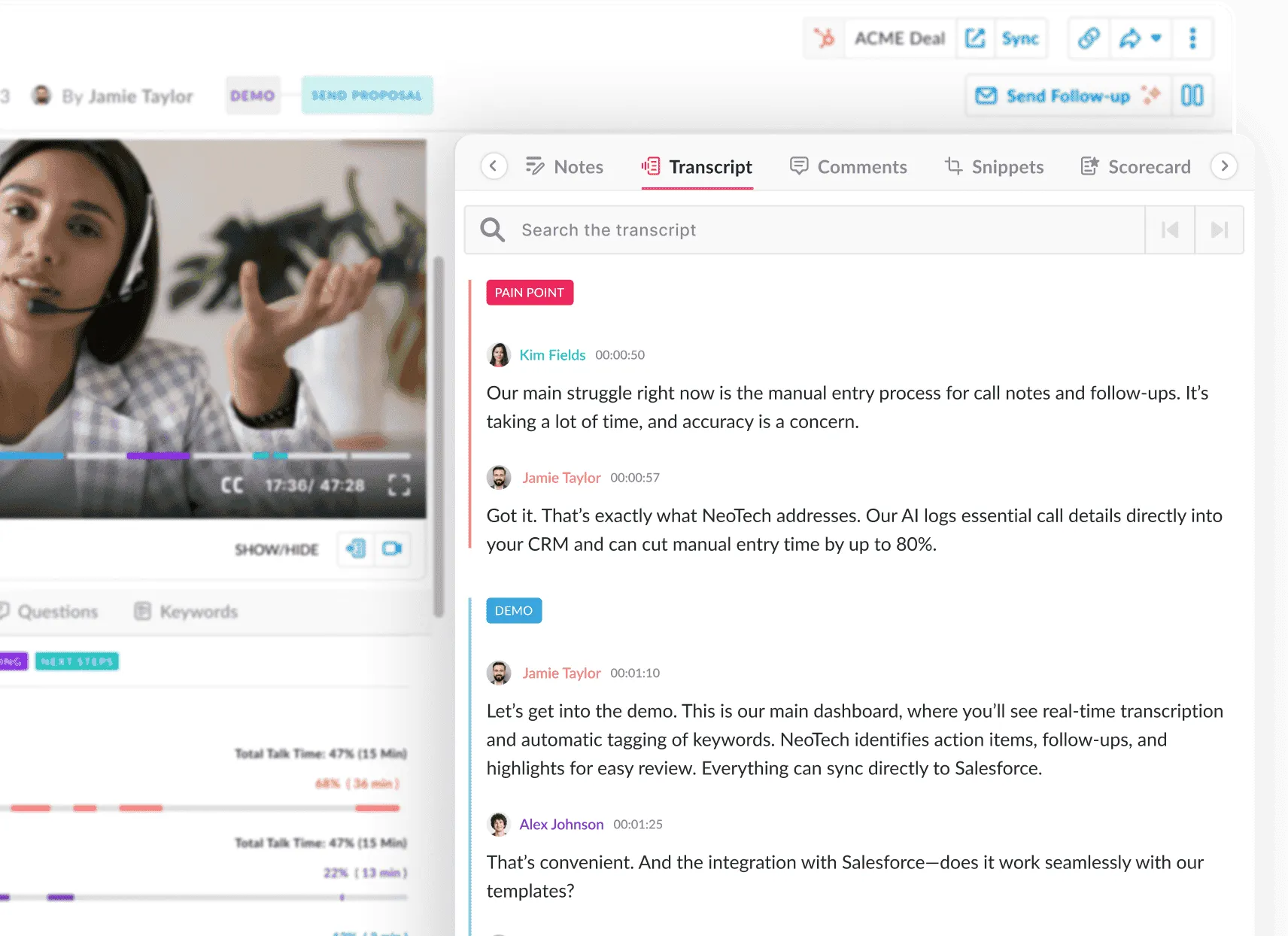
O Avoma combina um assistente de reuniões com IA com inteligência de conversas e inteligência de receita. Ele grava chamadas, transcreve conversas em tempo real, gera notas e e-mails de follow-up, divide as gravações em capítulos inteligentes e atualiza campos do CRM.
O Avoma faz mais sentido para equipes de vendas que precisam de mais do que notas de reunião. Ele adiciona coaching de vendas, pontuação de chamadas, gestão de pipeline, previsão de vendas e análise de ganhos e perdas, dando aos gestores uma relação mais clara entre o que acontece nas chamadas e o que acontece com a receita.
Principais recursos
- Gravação automática e transcrições em tempo real
- Notas com IA personalizadas e capítulos inteligentes
- E-mails de follow-up e Ask Avoma
- Preenchimento automático de dados no CRM
- Pontuação e coaching de chamadas de vendas
- Inteligência de oportunidades, pipeline e receita
Prós do Avoma
- Conecta o que os vendedores dizem nas chamadas de vendas ao andamento das negociações e à higiene do CRM.
- O coaching pode se basear em scorecards consistentes e no comportamento observado, em vez de revisões ocasionais de chamadas.
- O acesso gratuito somente para visualização permite levar os insights a stakeholders que não precisam de uma licença completa.
Contras do Avoma
- A amplitude do produto, voltado para receita, pode ser excessiva para equipes que só precisam de um assistente de anotações com IA.
- Uma implementação bem-sucedida depende de processos de CRM organizados, metodologias definidas e participação dos gestores.
- Equipes que lidam com clientes fora da área de vendas podem pagar por recursos que não correspondem ao seu trabalho diário.
Descubra ainda mais prós e contras de usar a ferramenta no nosso artigo de review do Avoma.
Preços do Avoma
- O Avoma oferece um teste gratuito.
- O Startup custa US$ 29 por usuário com gravação por mês, com cobrança mensal.
- O Organization custa US$ 39 por usuário com gravação por mês, com cobrança mensal.
- O Enterprise custa US$ 39 por usuário com gravação por mês e tem apenas cobrança anual.
- Coaching e inteligência de receita são complementos pagos (US$ 35 por usuário/mês).
6. Otter.ai: melhor para notas colaborativas em tempo real
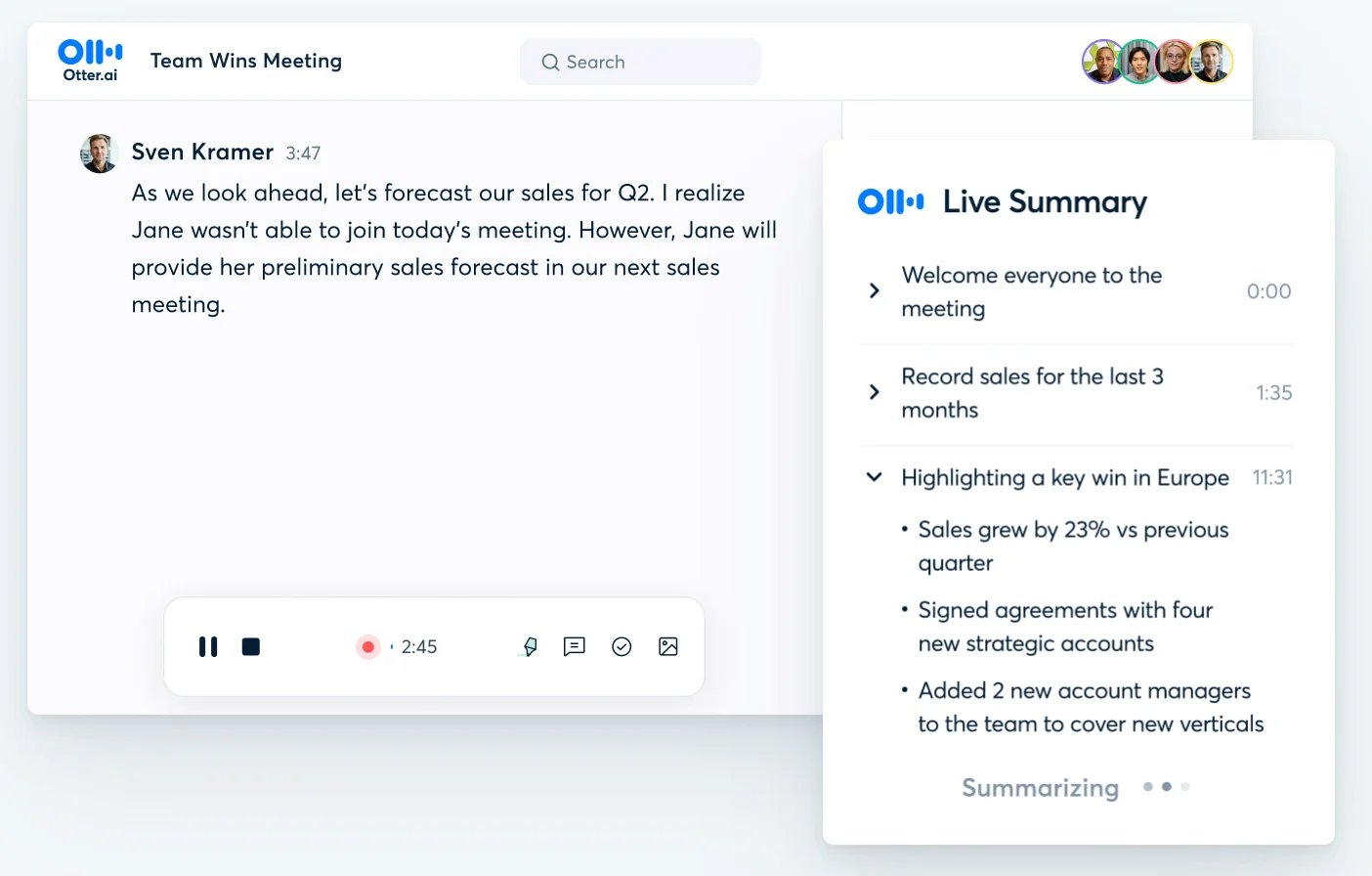
O Otter.ai tem foco em transcrição em tempo real, notas de reunião e assistência de IA durante e depois das conversas. O OtterPilot pode entrar em reuniões online, enquanto os membros da equipe podem destacar trechos, comentar e atribuir itens de ação dentro da transcrição. O AI Meeting Agent pode responder a perguntas e ajudar a criar conteúdo de follow-up.
O Otter funciona melhor quando ver a transcrição em tempo real importa mais do que criar clipes de vídeo bem acabados depois. Isso pode ser útil em aulas, entrevistas, reuniões internas e fluxos de trabalho voltados para acessibilidade, em que os participantes se beneficiam de acompanhar a conversa enquanto ela acontece.
Principais recursos
- Transcrição em tempo real e identificação de falantes
- Resumos de reuniões e itens de ação automatizados
- Destaques, comentários e colaboração dentro da transcrição
- Chat com IA e geração de follow-up
- Bot que entra nas reuniões a partir do calendário conectado
- Histórico de reuniões pesquisável
Prós do Otter.ai
- As transcrições em tempo real permitem que os participantes confirmem nomes, decisões e pontos-chave antes do fim da reunião.
- A edição colaborativa transforma as notas em um documento de trabalho compartilhado, em vez de uma recapitulação estática.
- A interface é simples de usar para equipes que querem adotar notas de reunião com IA sem uma plataforma de vendas complexa.
Contras do Otter.ai
- Equipes que dependem de clipes de vídeo para pesquisa, enablement ou storytelling com clientes podem achar o Grain mais adequado a esse propósito.
- Equipes internacionais devem conferir com atenção o suporte a idiomas e plataformas.
- Inteligência de conversas avançada e coaching de vendas não são o foco principal.
Preços do Otter.ai
- O Otter.ai tem um plano Basic gratuito.
- O Pro custa US$ 16,99 por usuário por mês, com cobrança mensal.
- O Business custa US$ 30 por usuário por mês, com cobrança mensal.
- O preço do Enterprise é personalizado.
Leia nossa comparação entre MeetGeek e Otter.ai e saiba mais sobre os recursos do Otter.
Qual alternativa ao Grain é a certa para sua equipe?
O Grain continua sendo uma escolha sólida para equipes que querem gravar reuniões e transformar conversas com clientes em transcrições pesquisáveis, clipes de reuniões e stories compartilháveis. Seus pontos fortes são concretos: economiza tempo de anotação, preserva as palavras exatas dos clientes e facilita a distribuição dos momentos importantes.
A alternativa certa depende do que o Grain não resolve para você. O Fathom é atraente para um fluxo de trabalho gratuito e simples. O tl;dv é próximo da abordagem baseada em clipes do Grain, com uma análise de várias reuniões mais robusta. O Avoma vai mais a fundo para equipes de vendas e receita. O Fireflies.ai dá ênfase a integrações e recursos de IA flexíveis, enquanto o Otter.ai tem foco em notas em tempo real.
O MeetGeek oferece a opção mais equilibrada para equipes que querem uma única plataforma para a captura online e presencial e tudo o que vem depois que a reunião termina. Ele pode documentar reuniões e, ao mesmo tempo, ajudar as equipes a transformar os resultados em ação.
Perguntas frequentes
Qual é a melhor alternativa ao Grain AI?
O MeetGeek é uma das melhores alternativas completas ao Grain para equipes que querem transformar reuniões em insights claros e próximos passos acionáveis. O Fathom pode atender ao uso individual gratuito, o tl;dv é forte em clipes e o Avoma pode ser melhor quando a inteligência de receita é a prioridade.
Qual é a melhor alternativa gratuita ao Grain?
O Fathom costuma ser a alternativa gratuita ao Grain mais forte para uso individual, graças ao seu plano gratuito generoso. O próprio Grain também tem um plano gratuito com reuniões ilimitadas, mas os limites do plano gratuito incluem a duração das reuniões, o histórico e o acesso a recursos avançados. Compare os limites atuais com o seu uso mensal típico antes de escolher.
Quais alternativas ao Grain funcionam com Zoom, Google Meet e Microsoft Teams?
Fathom, tl;dv, MeetGeek, Fireflies.ai, Avoma e Otter.ai funcionam com Zoom, Google Meet e Microsoft Teams em diferentes combinações. Se a cobertura de Zoom, Google Meet e Teams for essencial, verifique cada plataforma separadamente, porque os métodos exatos de captura podem variar. Confirme se cada ferramenta usa um bot visível, captura pelo desktop, integração nativa ou mais de um método.
O Grain consegue gravar sem bot?
Sim. O Grain oferece captura sem bot, transcrevendo o áudio do computador pelo aplicativo para desktop. No entanto, a gravação completa em vídeo e a captura de reuniões em que ninguém da equipe está presente ainda podem exigir um bot, por isso as equipes devem escolher o método conforme priorizem uma captura invisível ou um registro completo em vídeo.
As notas de reunião com IA são precisas?
As notas de reunião com IA podem resumir de forma confiável conversas claras, mas nenhuma ferramenta é perfeita. A precisão da transcrição e a qualidade do resumo podem cair com áudio de baixa qualidade, ruído de fundo, falas sobrepostas, sotaques fortes ou terminologia especializada. Revise nomes, números, compromissos e decisões importantes antes de compartilhar ou automatizar o follow-up.





.avif)