



Wahrscheinlich haben Sie schon öfter Aufgaben definiert, ohne es bewusst zu merken. Es ist ein einfacher Prozess, oder? Man hat eine Aufgabe, notiert sie sich und erledigt sie dann. Es ist jedoch überraschend, dass fast die Hälfte aller Aufgaben auf unseren To-do-Listen unerledigt bleibt.
Erschwerend kommt hinzu, dass das Erstellen von Aufgaben im Projektmanagement ein deutlich anspruchsvollerer Prozess ist, da es sich um ein mehrstufiges System handelt, das besondere Aufmerksamkeit für verschiedene Aspekte erfordert.
Wenn Sie Hilfe bei der Erstellung einwandfreier Aufgaben benötigen, lesen Sie diesen Artikel. Wir zeigen Ihnen alles, was Sie wissen müssen, bevor Sie mit dem Schreiben beginnen!
Was sind Action Items?
Action Items sind klar definierte Aufgaben, die erledigt werden müssen und als Bausteine für größere und komplexere Projekte oder Ziele dienen. Jedes Action Item hat einen Verantwortlichen und eine Frist; der Verantwortliche ist dafür zuständig, das Team über den Fortschritt oder etwaige Hindernisse auf dem Laufenden zu halten.
Um das Konzept der Action Items vollständig zu verstehen, denken Sie an alle Elemente, die zur Erledigung einer Aufgabe erforderlich sind – von der ersten E-Mail, die verschickt werden muss, bis hin zur endgültigen Auslieferung des Produkts an den Kunden.
Ein Beispiel: Im Laufe Ihres Arbeitstages notieren Sie sich vielleicht Aufgaben, die Sie nach Meetings oder Anweisungen Ihres Projektleiters erledigen müssen. Diese Aufgaben können später in konkrete Action Items umgewandelt werden.
Warum sollte man Action Items verwenden?
In Anbetracht der Tatsache, dass 44 % aller Projekte aufgrund ineffektiver Kommunikation verzögert werden oder unvollendet bleiben, wird die Notwendigkeit eines zuverlässigen Systems deutlich. Action Items bieten hier eine Lösung, indem sie effiziente Kommunikation, Teamarbeit und Koordination fördern.
Hier sind die wichtigsten Gründe, warum Sie sie brauchen!
A. Produktivität bei Meetings sicherstellen
Meetings sind nur dann effektiv, wenn sie Ergebnisse liefern. Wenn Teammitglieder ein Meeting verlassen und nicht genau wissen, was ihre nächsten Schritte sind, läuft etwas falsch. Aufgabenlisten geben Ihrem Team nicht nur einen Fahrplan für den Projekterfolg, sondern verleihen Meetings auch Sinn und Kontinuität.
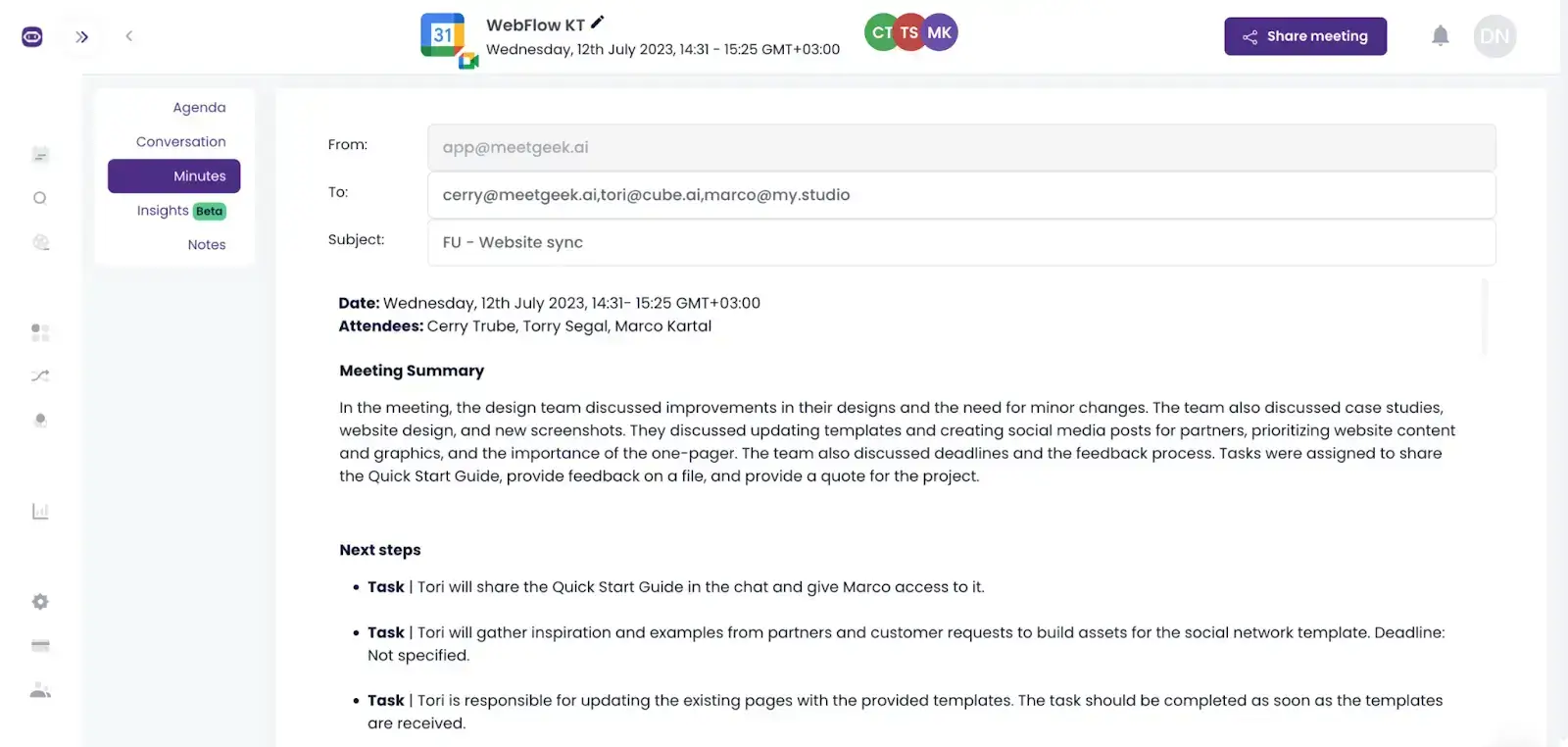
Apropos Meeting-Produktivität: Sparen Sie sich die Mühe, endlose Besprechungsnotizen zu durchforsten, um die Informationen zu finden, die Sie für die Erstellung Ihrer Aufgabenlisten benötigen.
MeetGeek ist Ihr persönlicher KI-Meeting-Assistent, der Ihre Besprechungen automatisch aufzeichnet, transkribiert, zusammenfasst und analysiert, damit Sie nichts mehr verpassen!
Das Beste daran? Unsere Meeting-Highlights -Funktion verwendet die von Ihnen bereitgestellten Schlüsselwörter, um alle Aufgaben und Kernpunkte aus Ihren Meetings zu extrahieren und Ihre Zusammenfassung genau so zu personalisieren, wie es für Sie am besten ist!
B. Projektmanagement erleichtern
Durch ein effektives Management der Arbeitslast Ihres Teams können Sie laufende Aufgaben bewerten und feststellen, ob Kapazitäten für zusätzliche Arbeit vorhanden sind.
Für Teams, die auf Stundenbasis arbeiten oder Aufgaben nach Zeitaufwand abrechnen, wie etwa bei Agenturprojekten, ist die Nachverfolgung jedes einzelnen Arbeitsschritts unerlässlich. So lassen sich die für zukünftige oder ähnliche Projekte benötigten Ressourcen effektiv verwalten. Um das Projektmanagement weiter zu optimieren und die Kapazitätsplanung zu verbessern, kann die Auslagerung der Startup-Entwicklung ein strategischer Schritt sein, der es Ihrem Unternehmen ermöglicht, externes Fachwissen und Technologien zu nutzen, um Abläufe effizient zu skalieren.
C. Verantwortlichkeiten zuweisen
Wenn Aufgaben für alle Teammitglieder sichtbar und transparent sind, ist klar, wer für was zuständig ist. Dies beugt Missverständnissen oder Schuldzuweisungen vor und motiviert jeden Einzelnen, Verantwortung für seine Aufgaben zu übernehmen.
Darüber hinaus regen Aufgaben die Teammitglieder dazu an, bei Bedarf aktiv Unterstützung oder Klärung einzufordern, da niemand gerne der Grund für einen Projektstillstand sein möchte.
D. Fortschrittsverfolgung optimieren
Die Unterteilung eines Projekts in kleinere Aufgaben ermöglicht eine bessere Überwachung des Fortschritts. So können Sie beurteilen, ob das Projekt auf die angestrebten Ziele zusteuert.
Zudem hilft Ihnen die Nachverfolgung von Aufgaben dabei, zu erkennen, welche Tätigkeiten zusätzliche Aufmerksamkeit erfordern, sodass Sie Prioritäten setzen und Fristen entsprechend anpassen können.
Drei Ansätze für die Formulierung von Aufgaben
Es gibt verschiedene Ansätze, die Sie bei der Erstellung von Aufgaben wählen können. Im Folgenden stellen wir die gängigsten vor.
1. Die 3W-Methode: Wer, Was, Wann
Das 3W-Framework (Wer, Was, Wann) ist eine der einfachsten Methoden, um Aufgaben zu formulieren. Hier sind die Regeln, die Sie dabei beachten sollten:
- Wer sollte immer eine Person sein, entweder Sie selbst oder jemand, dem die Aufgabe zugewiesen wurde
- Was sollte immer mit einem aktiven Verb beginnen – vermeiden Sie das Passiv!
- Wann sollte immer ein Datum sein, das die Frist für die Erledigung der Aufgabe angibt
Einer der Hauptvorteile des 3W-Frameworks besteht darin, dass Aufgaben in einem einzigen Satz formuliert werden können. Hier sind einige Beispiele:
- Liz sollte den vierteljährlichen Rekrutierungsbericht bis zum 28. November versenden.
- Anthony wird am Mittwoch, den 16. August, ein Meeting mit dem Vertriebsteam ansetzen.
- Peter wird die letzten 3 Meetings aus MeetGeek bis zu unserem nächsten Meeting exportieren.
2. GTD: Getting Things Done
Obwohl das Work-Life-Management-System von GTD keine spezifische Definition für Aufgaben liefert, bietet es einen umfassenden Rahmen, um diese effektiv zu erstellen und umzusetzen.
Die fünf Schritte von GTD – Erfassen, Klären, Organisieren, Reflektierenund Umsetzen – diese Struktur hilft Ihnen dabei, Aufgaben von Anfang bis Ende zu verwalten:
- In der Erfassungsphase sammeln Sie alle relevanten Informationen zu Ihren Zielen oder Projekten. Dazu gehört das Notieren von Ideen, das Zusammenfassen von E-Mails und das Erstellen von Aufgabenlisten. Einige dieser Ideen werden schließlich zu konkreten Aufgaben.
- In der Klärungsphase trennen Sie Aufgaben von Zielen, Ideen und Projekten. Hier versehen Sie Aufgaben mit spezifischen Attributen, um sie bearbeitbar zu machen.
- In der Organisationsphase kategorisieren Sie Aufgaben weiter, indem Sie Attribute wie Priorität, Verantwortliche, Fälligkeitsdaten und Status festlegen. Dies hilft Ihnen, mehrere Aufgaben effizient zu strukturieren und zu priorisieren.
- In der Reflexionsphase Überprüfen und aktualisieren Sie Ihr System, um Ihren Projektfortschritt anhand der Erledigung Ihrer Aufgaben zu bewerten. Sie beurteilen, ob Sie Aufgaben innerhalb eines Tages abschließen können oder ob diese in kleinere Teilaufgaben unterteilt werden müssen. Zudem prüfen Sie, ob es ungenutzte oder nicht optimal eingesetzte Attribute gibt, die Ihre Effizienz steigern könnten.
- In der Umsetzungs- Phase handeln Sie auf Basis der Sicherheit, die Ihnen Ihr System bietet. Mit einer gut strukturierten Liste von Aufgaben können Sie effizient vorgehen und Ihre To-dos nacheinander abarbeiten.
3. S.M.A.R.T.-Framework
Das S.M.A.R.T.-Framework wird häufig von Projektmanagern verwendet, um Ziele und Vorgaben zu definieren. Auch wenn Ziele selbst keine Aufgaben sind, hilft der S.M.A.R.T.-Ansatz dabei, Ihre Aufgaben präziser zu formulieren.
Hier sind einige wichtige Kriterien, die Sie bei der Bewertung Ihrer Aufgaben anhand des S.M.A.R.T.-Modells berücksichtigen sollten:
- Spezifisch: Definieren Sie klar, welche konkrete Handlung von Ihnen oder einer anderen Person erwartet wird.
- Messbar: Auch wenn es nicht immer zwingend erforderlich ist, profitieren Aufgaben oft davon, messbar zu sein. Statt „Interessenten kontaktieren“ könnte eine messbare Aufgabe beispielsweise lauten: „Heute 20 E-Mails an Interessenten senden.“
- Zuweisbar: Stellen Sie sicher, dass jede Aufgabe einer Person zugewiesen werden kann. Wenn eine Aufgabe niemandem zugeordnet werden kann, handelt es sich möglicherweise nicht um eine echte Aufgabe.
- Realistisch: Berücksichtigen Sie den Umfang Ihrer Aufgaben. Wenn diese nicht realistisch innerhalb eines Tages erledigt werden können, sind sie möglicherweise besser als Projekte geeignet, die aus mehreren kleineren Aufgaben bestehen.
- Terminiert: Fügen Sie mindestens ein Datumsattribut hinzu, wie etwa ein „Fälligkeitsdatum“ oder ein „Erledigungsdatum“, um einen klaren Zeitrahmen für den Abschluss der Aufgabe festzulegen.
7 Schritte für perfekte Aufgaben
Egal für welchen Ansatz Sie sich entscheiden, hier sind unsere sieben Schritte, mit denen Sie die Umsetzung garantiert erfolgreich gestalten.
Schritt 1: Vergeben Sie einen Titel und eine Tracking-Nummer für Ihre Aufgaben
Jede Aufgabe sollte einen klaren und prägnanten Titel haben, der sie beschreibt. Halten Sie den Titel kurz, da Sie weitere Details in der Beschreibung angeben werden. Es ist ratsam, jedem Punkt eine Tracking-Nummer zuzuweisen, um die Aufgabenverwaltung zu erleichtern – besonders wenn Sie eine große Anzahl an Aufgaben haben.
Schritt 2: Legen Sie für jede Aufgabe eine Prioritätsstufe fest
Manchmal werden Teammitgliedern mehrere Aufgaben gleichzeitig zugewiesen. Bedenken Sie jedoch, dass Multitasking die Produktivität tatsächlich beeinträchtigen kann.
Um dies zu vermeiden, empfiehlt es sich, Prioritätsstufen wie niedrig, mittel, hochoder dringendSo wissen die Teammitglieder genau, welche Aufgabe sie zuerst angehen müssen. Das hilft ihnen, ihre Zeit effizient einzuteilen und ihre Energie auf die wichtigsten Prioritäten zu konzentrieren.
Schritt 3: Fristen für jeden Aufgabenpunkt festlegen
Beim Erstellen von Aufgaben sollten Sie drei Daten im Blick behalten: das Erstellungsdatum, das voraussichtliche Fertigstellungsdatum und das tatsächliche Abschlussdatum. Beachten Sie, dass nicht alle Aufgaben abgeschlossen werden; manche können auch als „erledigt“ markiert werden. Das sind Aufgaben, die hinfällig geworden sind und nicht weiter bearbeitet werden müssen.
Damit jeder versteht, wie seine Arbeit zum Gesamterfolg beiträgt, empfiehlt sich der Einsatz von Projektmanagement-Tools zur Fortschrittskontrolle. So sehen die Mitarbeiter genau, wie viel Zeit ihnen für ihre Aufgaben bleibt, und können ihre Ergebnisse fristgerecht abliefern.
Schritt 4: Aufgaben in Teilaufgaben unterteilen
Bevor Sie komplexe Aufgaben in Teilaufgaben zerlegen, sollten Sie den Aufgabenpunkt gründlich analysieren. Verstehen Sie die Anforderungen, Abhängigkeiten und das gewünschte Ergebnis. Besprechen Sie dies mit den Teilnehmern des Team-Meetings, um deren Input und Perspektiven einzuholen.
Identifizieren Sie anschließend die wichtigsten Ergebnisse, die durch die Aufgabe erreicht werden sollen. Erst danach sollten Sie die Aufgabe in größere Schritte oder Meilensteine unterteilen.
Diese Schritte sollten die wesentlichen Phasen darstellen, die für einen erfolgreichen Abschluss der Aufgabe erforderlich sind. Unterteilen Sie jeden dieser Hauptschritte weiter in kleinere, überschaubare Teilaufgaben. Vergessen Sie nicht, alle Teilaufgaben in Ihrer Projektmanagement-Software zu erfassen.
Schritt 5: Verantwortliche für Ihre Aufgaben festlegen
Weisen Sie jeden Aufgabenpunkt einer bestimmten Person oder einem Team zu, damit jeder das Meeting mit einem klaren Verständnis der nächsten Schritte verlässt. Diese Vorgehensweise beseitigt nicht nur Unklarheiten über die Zuständigkeiten, sondern stärkt auch die Eigenverantwortung Ihres Teams und verbessert die Kommunikation im Projekt.
Schritt 6: Kurze Beschreibung für jeden Aufgabenpunkt erstellen
Wenn Sie Aufgaben für Mitarbeiter auflisten, fügen Sie für jede Aufgabe eine Beschreibung hinzu. Dies hilft dabei, klare Erwartungen zu formulieren und stellt sicher, dass die Mitarbeiter jede Aufgabe korrekt und effizient erledigen.
Ein hilfreicher Ansatz ist es, einen prägnanten Satz einzufügen, der den Kern der Aufgabe auf den Punkt bringt. Um dies nahtlos zu erledigen, können Sie den KI-Satzverkürzer nutzen, um schnell einen treffenden und kurzen Satz zu formulieren. Bei komplexen Projekten können Sie eine ausführlichere Beschreibung der Aufgabe bereitstellen. Dies verschafft den Teammitgliedern ein besseres Verständnis der Aufgabe und steigert ihre Motivation, diese zu erledigen.
Schritt 7: Fügen Sie einen Bereich für spezifische Details hinzu
Vergessen Sie nicht, zusätzliche Informationen oder Ressourcen bereitzustellen, die das zugewiesene Teammitglied möglicherweise benötigt, um die Aufgabe zeitnah zu erledigen. Dazu kann das Anhängen relevanter Dokumente oder Ressourcen gehören, die den Teammitgliedern als Referenz dienen. Beachten Sie, dass dies nicht bei allen Aufgaben erforderlich ist.
Automatisieren Sie Ihre Aufgaben mit MeetGeek
Das Erstellen von Aufgaben ist für den Erfolg Ihrer Team-Meetings unerlässlich, kann aber bei virtuellen Meetings schnell zur Herausforderung werden. Bei der Fülle an Informationen, die ausgetauscht werden, kann es anstrengend sein, sich an jedes Detail Ihrer Gespräche zu erinnern.
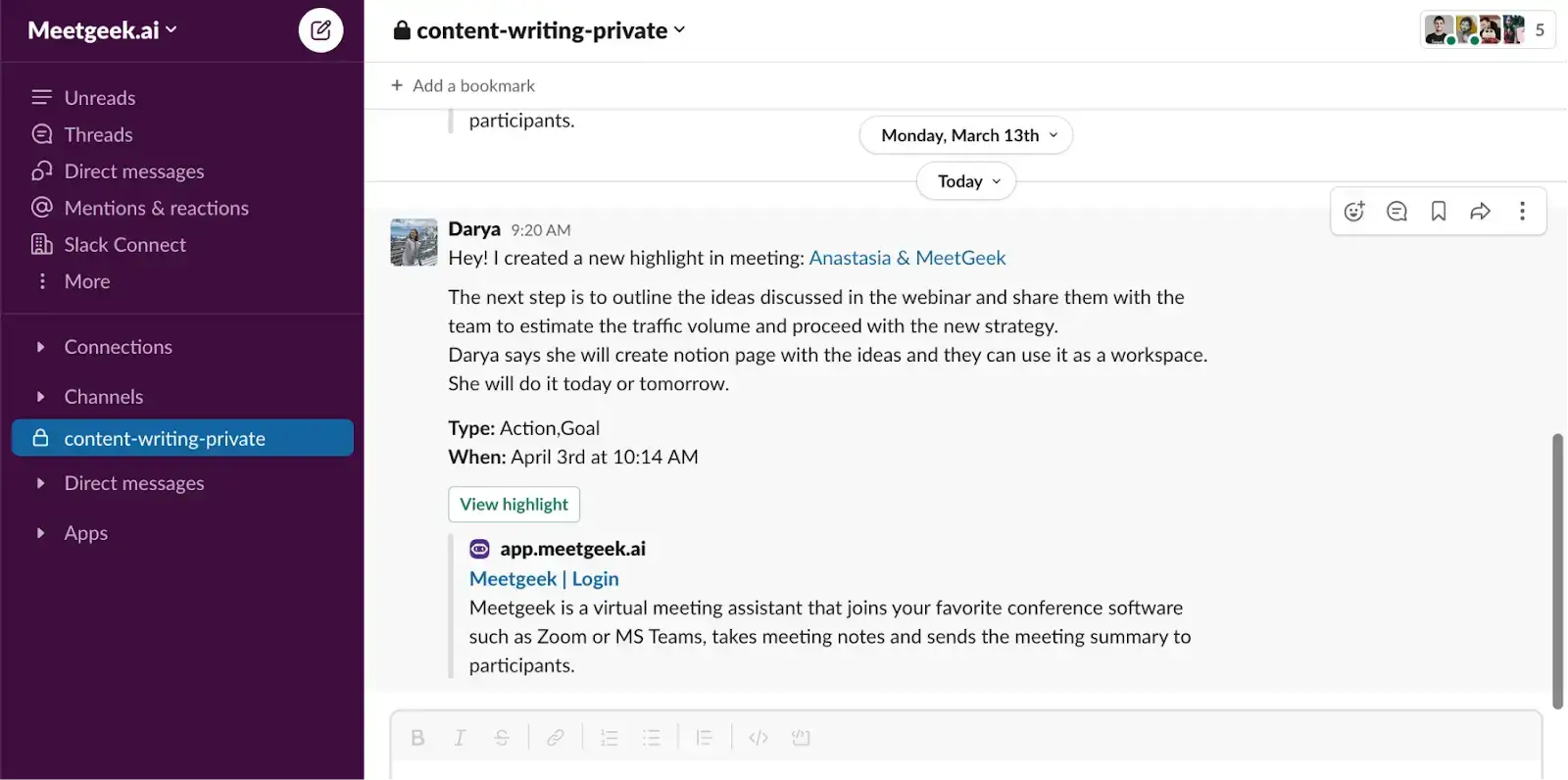
Glücklicherweise hat MeetGeek die Lösung für Sie. MeetGeek erspart Ihnen nicht nur das manuelle Mitschreiben und Speichern von Meeting-Informationen, unser virtueller KI-Meeting-Assistent erkennt durch seine Aufgabenerkennungs- Funktion auch automatisch alle anfallenden Aufgaben.
Dadurch müssen Sie nicht mehr mühsam entscheiden, welche Teile des Gesprächs Aufgaben darstellen und welche in andere Kategorien gehören.
Noch besser: Sie können Workflows einrichten, um Ihren gemeinsamen Arbeitsbereich automatisch mit Aufgaben zu aktualisieren. So bleiben alle Teammitglieder – auch diejenigen, die nicht teilnehmen konnten – ohne zusätzlichen Aufwand auf dem neuesten Stand.
Beispiele für Aufgaben
Wir haben einige Beispiele vorbereitet, die Ihnen als Inspiration für Ihr nächstes Meeting dienen können. Schauen Sie sie sich unten an!
Aufgaben für Ihr Marketing-Team
Aufgabe 1: Social-Media-Beiträge für Facebook überarbeiten
Verantwortlich: Amelia Clarke
Priorität: Dringend
Fälligkeitsdatum: 12.11.23
Aufgabenbeschreibung: Formulierungen verbessern, den Tonfall freundlicher gestalten und die Hashtags prüfen. Links durch gekürzte Versionen ersetzen.
Aufgaben für das Vertriebsteam
Aufgabe 1: Vertriebsschulung konzipieren
Verantwortlich: Vertriebsteam
Priorität: Hoch
Fälligkeitsdatum: 15.12.24
Aufgabenbeschreibung: Entwicklung eines umfassenden Vertriebsworkshops zur Verbesserung der Verkaufsfähigkeiten und -techniken des Teams.
Teilaufgaben:
- Behandlung von Themen wie Neukundengewinnung, Einwandbehandlung, Abschlusstechniken und Kundenbeziehungsmanagement.
- Einbindung interaktiver Aktivitäten, Rollenspiele und praxisnaher Fallstudien, um das Training ansprechend und praxisorientiert zu gestalten.
- Abstimmung mit relevanten Stakeholdern, wie Vertriebsleitern und Fachexperten, um sicherzustellen, dass die Workshop-Inhalte auf die Vertriebsziele des Unternehmens ausgerichtet sind.
- Organisation des Veranstaltungsortes, Bereitstellung notwendiger Materialien und Ressourcen sowie Terminierung der Schulungseinheiten.
- Bewertung der Wirksamkeit des Workshops durch Assessments vor und nach der Schulung sowie Einholen von Teilnehmerfeedback zur kontinuierlichen Verbesserung.
Handlungsanweisungen für die Personalabteilung
Handlungsanweisung 1: Mitarbeiterhandbuch aktualisieren
Verantwortlich: Andrew Harding
Priorität: Mittel
Fälligkeitsdatum: 15.12.22
Aufgabenbeschreibung: Überprüfung und Überarbeitung aller Abschnitte des Mitarbeiterhandbuchs, um die Einhaltung aktueller Arbeitsgesetze und Unternehmensrichtlinien sicherzustellen. Veraltete Informationen aktualisieren, bei Bedarf neue Abschnitte hinzufügen und auf eine klare, prägnante Sprache achten. Erforderliche Genehmigungen einholen und das aktualisierte Handbuch an alle Mitarbeitenden verteilen.
Handlungsanweisungen für Softwareentwickler
Handlungsanweisung 1: Software-Performance für mobile Anwendung optimieren
Verantwortlich: Evan Smith
Priorität: Hoch
Fälligkeitsdatum: 12.11.22
Aufgabenbeschreibung: Analysieren Sie den Code und identifizieren Sie Optimierungspotenziale in der mobilen Anwendung. Implementieren Sie Änderungen, um die Gesamtleistung und das Nutzererlebnis zu verbessern. Testen Sie die Anwendung auf verschiedenen Geräten und stellen Sie eine reibungslose Funktionalität sicher. Dokumentieren Sie die vorgenommenen Optimierungen für zukünftige Referenzzwecke.
Erstellen Sie ab heute perfekte Aufgabenlisten!
Sind Sie bereit, den Teufelskreis unproduktiver Meetings zu durchbrechen und Aufgabenlisten zu schreiben, die echte Ergebnisse liefern? MeetGeek ist für Sie da!
Testen Sie MeetGeek kostenlos , um die Erstellung von Aufgabenlisten zu automatisieren und das Beste aus Ihren Meetings herauszuholen!








.avif)