



Wenn Sie Remote-Teams führen, kommt es weniger darauf an, zu wissen, wo die Leute gerade sind, als darauf, sicherzustellen, dass jeder weiß, wofür er zuständig ist, wo Entscheidungen festgehalten werden und wann alle tatsächlich gleichzeitig online sein müssen.
Im Büro passiert vieles davon, ohne dass es jemand plant. Sie bekommen nebenbei ein Problem mit, klären ein Missverständnis kurz auf dem Flur und merken, wenn jemand ratlos wirkt. In Remote-Teams passiert das nur, wenn Sie die Voraussetzungen dafür schaffen: klare Erwartungen, Abläufe, bei denen niemand darauf warten muss, dass alle online sind, Ergebnisse statt Online-Stunden, Meetings mit Rücksicht auf Zeitzonen und Entscheidungen, die auch nach dem Meeting sichtbar bleiben.
Im Folgenden finden Sie die Vorteile eines gut geführten Remote-Teams, die Herausforderungen, über die Führungskräfte am häufigsten stolpern, und 25 praktische Tipps, wie Sie damit umgehen.
Die Vorteile eines erfolgreichen Remote-Teams
Manche zweifeln noch immer daran, dass Remote-Arbeit effektiv ist, doch ein gut geführtes Remote-Team hat klare Vorteile für das Unternehmen und für die Menschen, die darin arbeiten.
A. Sie können die besten Talente gewinnen
Wenn Sie nur Menschen einstellen, die in der Nähe eines Büros wohnen, beschränken Sie sich auf eine einzige Stadt. Remote-Arbeit erweitert Ihre Suche auf einen deutlich größeren Talentpool, und genau das wünschen sich auch viele Bewerber. Im Report 2022 State of Remote Work von Buffer wollten 86 % der Beschäftigten einen Arbeitsplatz, der vollständig remote oder remote-first organisiert ist, und viele Menschen suchen inzwischen gezielt nach Jobs, in denen sie remote arbeiten können.
Mit Tools für Eignungstests vor der Einstellung können Sie auch Bewerber einschätzen, die Sie vielleicht nie persönlich treffen. Eine breitere Suche heißt also nicht, dass Sie Ihre Ansprüche senken müssen.
B. Remote-Arbeit spart wertvolle Unternehmensressourcen
Weniger Bürofläche senkt die Ausgaben für Miete, Nebenkosten, Büromaterial und Ausstattung. Ein von TheStreet zitierter Gründer eines HR-Softwareunternehmens beziffert die Einsparungen bei den Gemeinkosten auf bis zu 11.000 $ pro Mitarbeiter, und wer nicht von zu Hause arbeiten möchte, kann stattdessen einen Coworking-Space nutzen.
Hybride Teams können mit Software zur Arbeitsplatzbuchung die Bürogröße an die Tage anpassen, an denen die Leute tatsächlich vor Ort sind. Remote-Arbeit kann außerdem die Fluktuation senken, denn Menschen, denen Flexibilität wichtig ist, wechseln seltener zu einem anderen Arbeitgeber, der sie bietet.
C. Teammitglieder haben mehr Flexibilität
Flexibilität hilft Ihnen, gute Leute zu gewinnen und zu halten. Ihre Mitarbeiter können die Arbeit mit ihrem Privatleben vereinbaren, vom Abholen der Kinder aus Schule oder Kita bis zum Arzttermin, und für das Unternehmen kann sich das in einer stärkeren Mitarbeiterbindung und weniger Fehlzeiten zeigen.
D. Remote-Teams können engagierter sein
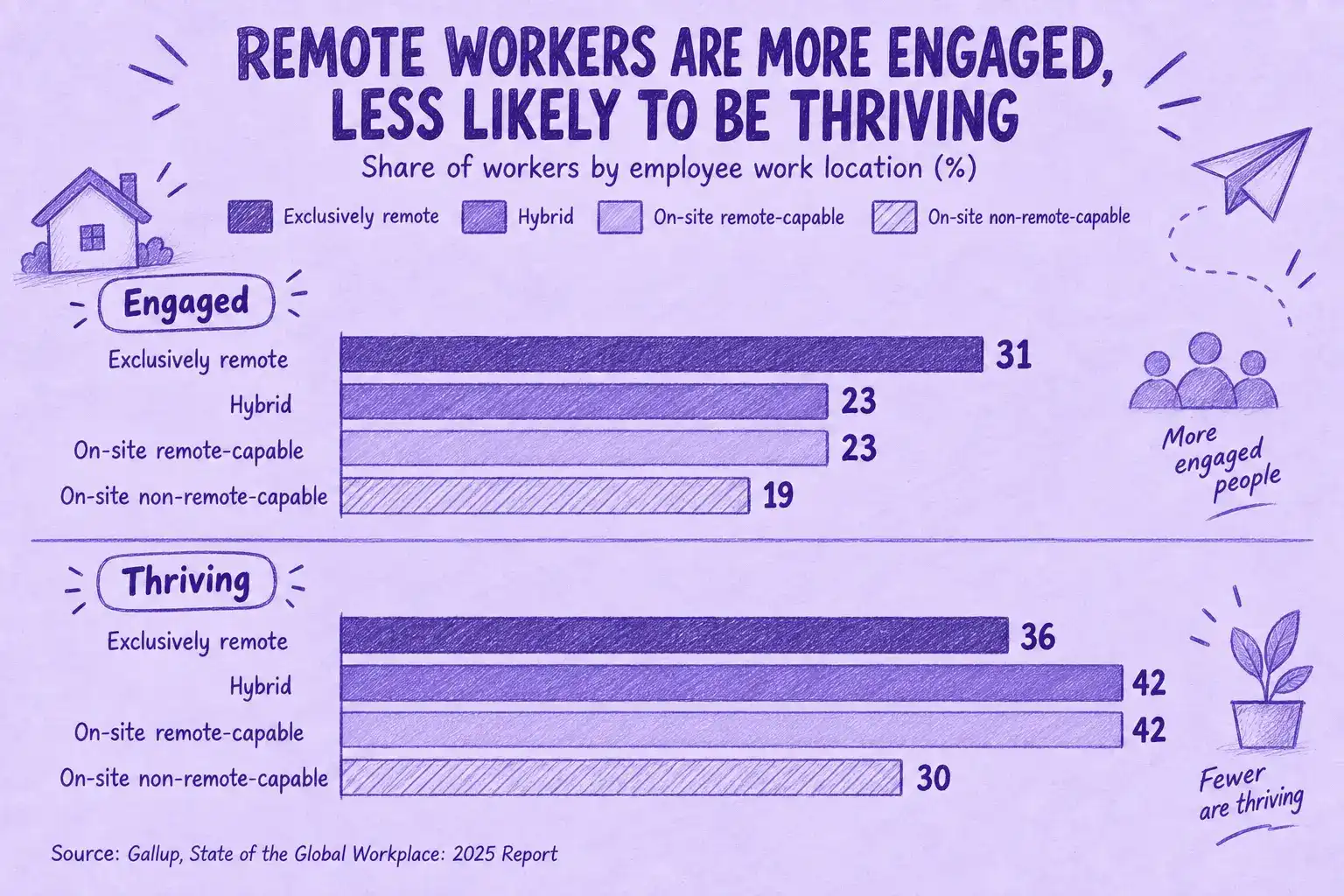
Laut der globalen Studie von Gallup waren vollständig remote arbeitende Beschäftigte mit 31 % am häufigsten bei der Arbeit engagiert, gegenüber 23 % bei hybrid arbeitenden Beschäftigten.
Remote-Arbeit fördert außerdem die Eigenständigkeit. Wenn ihnen niemand über die Schulter schaut, lernen die Leute, ihre Zeit, Prioritäten und Deadlines selbst zu managen. Das funktioniert allerdings nur, wenn sie wissen, wofür sie verantwortlich sind, und genau dort setzen die meisten der folgenden Tipps an.
Die Herausforderungen beim Führen von Remote-Teams
Die meisten Führungsprobleme in Remote-Teams sind ganz normale Büroprobleme, die nur später auffallen.
A. Unklare Erwartungen und fehlende Grenzen
Menschen, die im Büro genau wussten, was von ihnen erwartet wird, können diese Klarheit im Homeoffice verlieren. Niemand sieht, wann sie anfangen oder Feierabend machen. Also müssen sie raten, ob sie um 19 Uhr noch antworten, an jedem Meeting teilnehmen oder den ganzen Tag online bleiben sollen.
Klären Sie das früh. Legen Sie gemeinsam fest, zu welchen Zeiten gearbeitet wird, welcher Kanal wofür da ist, wie schnell Antworten kommen sollten und an welchen Meetings jemand wirklich teilnehmen muss.
B. Isolation und fehlende Verbundenheit
Eine in der Harvard Business Review veröffentlichte Studie mit 1.100 Beschäftigten ergab, dass sich Remote-Mitarbeiter eher als ihre Kollegen im Büro gemieden und ausgeschlossen fühlen.
Die neuere globale Studie von Gallup weist in dieselbe Richtung. 27 % der vollständig remote arbeitenden Beschäftigten fühlen sich nach eigenen Angaben einsam, gegenüber 20 % der Beschäftigten mit remotefähigem Job, die vor Ort arbeiten.
Isolation kündigt sich selten an. Die Leute werden in den Kanälen stiller und sagen in Meetings nichts mehr. Fragen Sie deshalb nach, bevor jemand das Thema selbst ansprechen muss. Regelmäßige Einzelgespräche und etwas Austausch abseits der Arbeit bewirken viel (Tipps 9 und 14).
C. Umstieg auf digitale Kommunikation
Wer früher die Meinung eines Kollegen hören wollte, ging einfach zu dessen Schreibtisch. Im Remote-Alltag wird daraus eine Nachricht, die vielleicht stundenlang ungelesen bleibt, besonders über Zeitzonen hinweg. Microsoft hat festgestellt, dass fast ein Drittel der Meetings inzwischen mehrere Zeitzonen umspannt, ein Plus von 35 % seit 2021.
Die Arbeit darf also nicht davon abhängen, dass alle gleichzeitig online sind. Vereinbaren Sie, wie schnell auf E-Mails und Chatnachrichten geantwortet werden sollte, und halten Sie alles, was keine Antwort in Echtzeit braucht, schriftlich fest, damit andere es in ihrer eigenen Arbeitszeit aufgreifen können.
D. Vertrauen und Nähe aufbauen
Vertrauen entsteht meist durch kleine, wiederkehrende Momente: eine schnell beantwortete Frage, ein ernst genommenes Anliegen, ein gehaltenes Versprechen. Auf Distanz gibt es weniger solcher Momente, und eine müde Stimme oder ein Teammitglied, das still geworden ist, fällt schwerer auf.
Gleichen Sie das gezielt aus. Hören Sie sich Bedenken und Vorschläge an, tun Sie, was Sie angekündigt haben, und planen Sie regelmäßige Check-ins ein, damit niemand erst auf ein Problem warten muss, um mit Ihnen zu sprechen.
E. Work-Life-Balance und Meeting-Müdigkeit
Ohne Arbeitsweg und ohne Büro, das man abends verlässt, verschwimmt der Arbeitstag mit dem Feierabend. Auf Dauer zermürbt das die Leute und macht sie weniger leistungsfähig.
Meeting-Müdigkeit verschärft das Problem. Laut MeetGeek-Daten aus dem ersten Halbjahr 2026 dauerten 23,5 % der wöchentlichen Team-Meetings 60 Minuten oder länger. Nicht alle müssen solche Meetings komplett durchsitzen, vor allem nicht diejenigen, die nur wissen müssen, was entschieden wurde.
Diese Kollegen müssen nicht teilnehmen und können sich später informieren. MeetGeek zeichnet das Meeting auf und schickt eine Zusammenfassung dessen, was besprochen und entschieden wurde, samt To-dos. So können alle auf dem Laufenden bleiben, ohne an jedem Meeting teilzunehmen, auch Kollegen in anderen Zeitzonen, die kein zusätzliches Meeting brauchen sollten, nur um auf den gleichen Stand zu kommen.
Mit MeetGeek jedes Meeting nachholen
Erhalten Sie nach jedem Meeting die Zusammenfassung und die To-dos, egal in welcher Zeitzone Sie arbeiten. Gratis-Tarif, keine Kreditkarte nötig.
F. Ablenkungen
Zu Hause wird die Arbeit von Dingen unterbrochen, die es im Büro selten gibt: Kinder, Paketboten, ein bellender Hund mitten im Meeting.
Damit umzugehen, ist vor allem Sache jedes Einzelnen, aber Sie können helfen. Schützen Sie Fokuszeiten, behandeln Sie Hintergrundgeräusche nicht als Problem und sorgen Sie dafür, dass es selbstverständlich ist, Bescheid zu geben, wenn man nicht erreichbar ist.
Remote-Teams führen: 25 praktische Tipps
Die Tipps beginnen mit den Regeln und Tools, die die Arbeit am Laufen halten, und widmen sich dann der Frage, wie Sie die Menschen führen, unterstützen und miteinander verbinden, die diese Arbeit machen.
1. Eigene Zuständigkeiten klären
Bevor Sie Erwartungen an andere stellen, klären Sie Ihre eigene Rolle. Sie sollten wissen, welche Entscheidungen Sie allein treffen können, welche eine Freigabe brauchen und welche Unternehmensrichtlinien Sie durchsetzen sollen, etwa zu Arbeitszeiten, Spesen, Ausstattung und Sicherheit.
So können Sie Fragen aus dem Team einheitlich beantworten, statt zu improvisieren, und die Regeln bei allen gleich anwenden.
2. Regeln für Arbeit und Kommunikation festlegen
Wenn ein Team auf Remote-Arbeit umstellt, leidet oft zuerst die Kommunikation, und die Leute arbeiten zunehmend in Silos. Halten Sie die Regeln früh schriftlich fest, bevor sich Gewohnheiten einschleifen, vor allem wenn Sie Remote- und Büromitarbeiter gemeinsam führen oder ein starkes virtuelles Team aufbauen, das über mehrere Standorte verteilt ist.
Beginnen Sie mit klaren Kommunikationsregeln:
- Bevorzugte Kanäle: Entscheiden Sie, ob das Team E-Mail, SMS, Chat, Telefon oder Videocalls nutzt und wofür;
- Kernzeiten: Vereinbaren Sie, zu welchen Uhrzeiten die Leute erreichbar sein sollen;
- Antwortzeiten: Legen Sie für jeden Kanal fest, wie schnell eine Antwort angemessen ist;
- Wo Entscheidungen stehen: Wählen Sie einen Ort, etwa einen Kanal oder ein gemeinsames Dokument, an dem Entscheidungen und Updates schriftlich festgehalten werden;
- Fokustage: Kennzeichnen Sie die Tage, an denen sich die Leute ohne Unterbrechungen auf ihre eigene Arbeit konzentrieren können;
- Remote-Tage: Klären Sie, wie die Leute dem Team mitteilen, dass sie remote arbeiten, vor allem wenn das nicht ihre feste Regelung ist.
3. Zeitzonen und Arbeitszeiten im Blick behalten
Wenn Ihr Team über mehrere Zeitzonen verteilt ist, landet eine Nachricht, die Sie am Ende Ihres Arbeitstags schicken, bei jemand anderem mitten in der Nacht. Passiert das oft genug, schalten die Leute nicht mehr ab, und das führt schnell ins Burnout.
Ein Meeting-Planer für Zeitzonen hilft Ihnen, die Arbeitszeiten aller auf einen Blick zu sehen. Auf dem Mac zeigt eine App wie Menu World Time mehrere Zeitzonen gleichzeitig an, und Windows-Nutzer können Globe Time ausprobieren.
Prüfen Sie vor einem Gruppenmeeting die Zeitzonen aller Beteiligten und suchen Sie einen Zeitpunkt, der für alle passt. Gibt es keinen, zeichnen Sie das Meeting auf, statt jemanden um Mitternacht dazuzuholen. MeetGeek kann das für Sie übernehmen und anschließend die Zusammenfassung und die To-dos verschicken, damit die Person, die geschlafen hat, gleich zu Beginn ihres Tages weiß, was passiert ist.
Noch besser: Nutzen Sie Live-Meetings nur für Themen, bei denen wirklich alle gleichzeitig dabei sein müssen, und geben Sie Status-Updates schriftlich weiter, damit jeder sie in seiner eigenen Arbeitszeit lesen kann.
4. Die richtigen Kommunikationskanäle wählen
E-Mail ist nützlich, eignet sich aber nicht für alles. Updates, gemeinsame Ressourcen und Deadlines laufen über andere Kanäle oft besser.
Geben Sie jedem Kanal eine klare Aufgabe: Chat für kurze Fragen, ein Projektmanagement-Tool für Updates zu Aufgaben, E-Mail für alles Externe oder Formelle. Wenn Chat der Standard ist, gibt es außerdem weniger spontane Videocalls.
Für alles, was keine sofortige Antwort braucht, hält asynchrone Kommunikation, etwa ein schriftliches Update oder eine kurze aufgezeichnete Erklärung, die Arbeit über Zeitzonen hinweg am Laufen, ohne dass jemand auf eine Antwort warten muss.
5. Die richtige Projektmanagement-Software wählen
Ein Tool für das Aufgabenmanagement gibt allen einen zentralen Ort, an dem sie sehen, wer wofür zuständig ist und bis wann etwas fertig sein muss. So muss niemand nach dem Stand fragen.
Gute Projektmanagement-Tools bündeln außerdem die Diskussion direkt in der Aufgabe statt in langen E-Mail-Ketten. Wer in einer anderen Zeitzone arbeitet, kann dort weitermachen, wo ein Kollege aufgehört hat, ohne zu warten, bis dieser online ist.
6. Ihr Team mit den richtigen Tools ausstatten
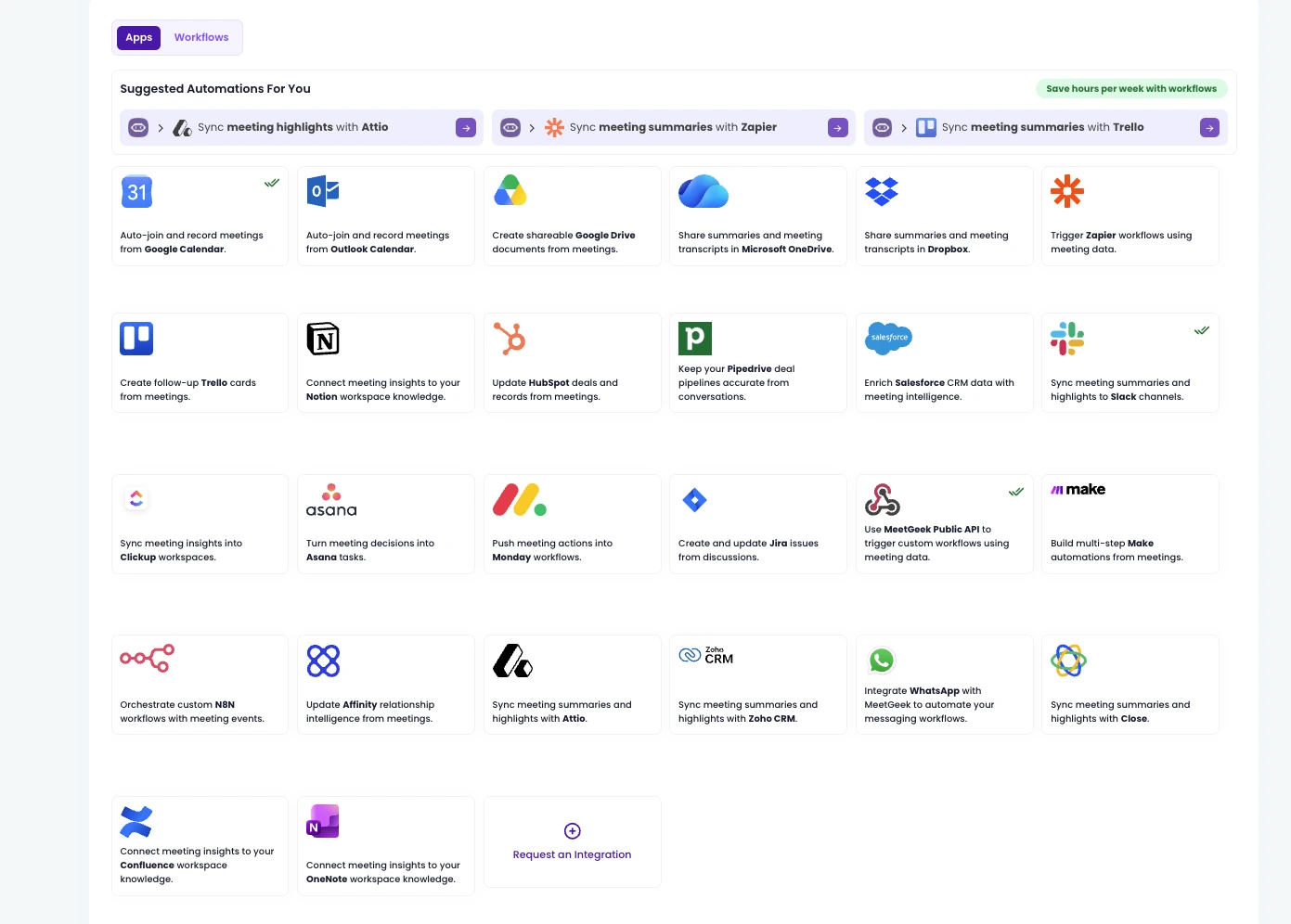
Remote-Mitarbeiter haben oft nicht die Tools, die sie im Büro hätten. Welche Sie bereitstellen, hängt von Ihrer Branche und der Rolle der einzelnen Person ab. Unsere Übersicht der Tools für die Remote-Zusammenarbeit ist ein guter Ausgangspunkt.
Weniger Tools mit klaren Aufgaben sind besser als fünf Orte, an denen dasselbe Update stehen könnte. Welche Tools Sie auch wählen, sie sollten sich mit dem Rest Ihres Tech-Stacks verbinden lassen, damit niemand Notizen von Hand aus einer App in eine andere kopieren muss.
Für Meetings heißt das: Notizen und To-dos sollten nicht noch einmal abgetippt werden müssen. Die Integrationen des Meeting-Assistenten von MeetGeek senden sie in den kostenpflichtigen Tarifen an Tools wie Slack, Notion und Asana und verbinden sich über Zapier, Make und n8n mit über 10.000 weiteren Apps.
7. Klare und realistische Erwartungen formulieren
Remote-Teams leben von klaren Zuständigkeiten. Bei jeder Aufgabe sollten alle wissen, wann sie als erledigt gilt, wer dafür verantwortlich ist und bis wann sie fertig sein muss.
Bewerten Sie dann das Ergebnis und nicht die Stunden, die jemand online ist. Ein grüner Statuspunkt verrät nur, dass die App geöffnet ist, und nicht, dass die Arbeit vorankommt. Und wenn Sie ständig nach Updates fragen, zeigen Sie den Leuten vor allem, dass Sie ihnen nicht vertrauen.
8. Eine Remote-Version der „offenen Tür“ einführen
Rund um die Uhr erreichbar zu sein, ist nicht realistisch. Feste „Sprechstunden“ zeigen den Leuten aber, wann sie mit Fragen, Ideen oder Bedenken zu Ihnen kommen können. Das fühlt sich nicht so spontan an wie ein Klopfen an der Tür, macht Sie aber leichter ansprechbar.
Tragen Sie die Zeitfenster in einen Kalender ein, den alle sehen können, und verteilen Sie sie über den Tag, damit auch Kollegen in anderen Zeitzonen sie nutzen können.
9. Einzelgespräche mit jedem Teammitglied priorisieren
Regelmäßige Einzelgespräche geben Teammitgliedern Raum für Anliegen, die sie in einem Gruppenmeeting vielleicht nicht ansprechen und auch nicht in eine E-Mail schreiben würden, in der der Ton leicht falsch ankommt.
Zwängen Sie dabei nicht jedes Einzelgespräch in dasselbe Zeitfenster. Laut MeetGeek-Daten aus dem ersten Halbjahr 2026 endeten 23,3 % der Einzelgespräche innerhalb von 15 Minuten, während 14,9 % länger als eine Stunde dauerten. Lassen Sie den Inhalt die Länge bestimmen: ein kurzer Check-in, wenn alles gut läuft, und ein längeres Zeitfenster, wenn jemand etwas ausführlich besprechen muss.
Einzelgespräche sind auch ein guter Moment, um über die Rolle der jeweiligen Person zu sprechen und darüber, ob sie noch zu ihren beruflichen Zielen passt.
10. Ein gründliches Onboarding für neue Mitarbeiter aufsetzen
Ein gutes Onboarding gibt neuen Mitarbeitern die Tools und das Wissen, die sie für ihren Erfolg brauchen. In einem Remote-Team muss es geplant werden, denn niemand sitzt neben einem Kollegen und schnappt dabei etwas auf.
Auch wenn viel zu tun ist: Geben Sie neuen Mitarbeitern in den ersten Wochen Zeit, sich auf das Onboarding zu konzentrieren statt auf dringende Aufgaben. Langfristige Effizienz ist mehr wert, als früh ein paar Aufgaben abzuhaken.
Stellen Sie jeder neuen Person ein Teammitglied zur Seite, dem sie Fragen stellen kann, und geben Sie ihr einen schriftlichen Leitfaden zur Arbeitsweise des Teams sowie Aufzeichnungen wichtiger Meetings. So kann sie vergangene Entscheidungen in ihrem eigenen Tempo nachvollziehen, statt zu warten, bis jemand Zeit hat.
11. Aufgaben und Verantwortung im Remote-Team delegieren
Gut zu delegieren gehört zum Job, und es wird noch wichtiger, wenn Sie Ihren Leuten nicht bei der Arbeit zusehen können. Diese Reihenfolge ist ein guter Ausgangspunkt:
- Bestimmen Sie die Arbeit, die erledigt werden muss;
- Teilen Sie sie in kleinere, überschaubare Aufgaben auf;
- Legen Sie für jede Aufgabe fest, wann sie als erledigt gilt;
- Weisen Sie jede Aufgabe genau einer Person zu, passend zu ihren Stärken und Fähigkeiten;
- Tragen Sie Aufgaben, Verantwortliche und Deadlines in ein gemeinsames Projektmanagement-Tool ein;
- Geben Sie den Leuten von Anfang an den Kontext, die Ressourcen und die Zugänge, die sie brauchen;
- Prüfen Sie regelmäßig den Fortschritt, schriftlich oder in einem kurzen Meeting;
- Nutzen Sie einfache Berichte, um Aufgaben zu erkennen, die ins Stocken geraten sind.
12. Remote-Mitarbeiter Ideen einbringen lassen
Regeln und Prozesse sind wichtig, aber die Menschen, die die Arbeit machen, wissen oft am besten, wie sie sich von ihrem Standort aus erledigen lässt.
Fragen Sie sie, bevor Sie etwas an der Arbeitsweise des Teams ändern, und beziehen Sie sie in Entscheidungen ein, die sie direkt betreffen.
13. Alle einbeziehen
Manche Führungskräfte leiten gleichzeitig Mitarbeiter im Büro und Remote-Mitarbeiter, und dabei können die Zusatzleistungen zwischen den beiden Gruppen ungleich verteilt sein.
Wenn Ihre Büromitarbeiter zum Beispiel kostenloses Essen bekommen, finden Sie einen Weg, das auch Remote-Mitarbeitern zu bieten. Und wenn Remote-Mitarbeiter flexible Arbeitszeiten genießen, ist es nur fair, dasselbe auch den Leuten im Büro anzubieten.
14. Sozialen Austausch fördern
In Remote-Teams fällt der Small Talk an der Kaffeemaschine weg. Deshalb müssen Sie bewusst Raum dafür schaffen.
Richten Sie einen Kanal ohne Arbeitsbezug ein, in dem sich die Leute unterhalten, Neuigkeiten teilen und Fotos posten können.
Sie können auch Mitarbeiternetzwerke (Employee Resource Groups, kurz ERGs) ins Leben rufen, um das Gemeinschaftsgefühl zu stärken. ERGs bieten Menschen mit gemeinsamem Hintergrund oder gemeinsamen Interessen einen Ort, um sich zu vernetzen, und das ist umso wichtiger, wenn sie sich nie im Büro begegnen.
15. Ab und zu Meetings vor Ort einplanen
Treffen Sie sich auch mit einem Remote-Team ab und zu persönlich, wenn Sie können. Das wird nicht immer möglich sein, aber ein paar Tage im selben Raum schaffen ein Vertrauen, das die Remote-Arbeit in den folgenden Monaten erleichtert.
Und wenn es so weit ist: Die mobile App von MeetGeek zeichnet Meetings vor Ort auf, sodass alle, die nicht anreisen konnten, trotzdem die Notizen bekommen.
16. Teambuilding für Remote-Teams organisieren
Teambuilding muss keinen ganzen Tag dauern. Kurze Aktivitäten können genauso gut funktionieren. Und falls es schwierig ist, alle ins Boot zu holen, reservieren Sie doch einmal 15 bis 20 Minuten im Anschluss an reguläre virtuelle Meetings.
Wenn die Leute danach mit mehr Energie und enger verbunden auseinandergehen, hat die Aktivität ihren Zweck erfüllt.
17. Kontinuierlich Feedback geben
Remote-Mitarbeitern fehlen die zufälligen Momente eines gemeinsamen Büros, und das macht es für Sie schwerer, formelles wie informelles Feedback zu geben. Außerdem sehen sie nicht, wie Kollegen ähnliche Aufgaben angehen, was sie bei der eigenen Leistung verunsichern kann.
Deshalb liegt es an Ihnen, Feedback zu geben, das zeitnah, klar und konkret ist.
18. Das Team um Feedback zur eigenen Remote-Leadership bitten
Ob Sie gerade erst mit dem Führen auf Distanz beginnen oder schon seit Jahren Remote-Teams leiten: Ihr Team weiß am besten, was funktioniert und was nicht.
Fragen Sie in Einzelgesprächen nach, machen Sie alle paar Monate eine anonyme Umfrage oder halten Sie nach einem großen Projekt eine kurze Retrospektive ab. Setzen Sie dann einen Teil davon um, damit die Leute sehen, dass ihr Feedback etwas bewirkt hat.
19. Schulungen speziell für Remote-Arbeit anbieten
Gut remote zu arbeiten, ist eine Fähigkeit, und nicht jeder bringt sie mit. Schulungen helfen vor allem in Phasen des Wandels und können alles abdecken, vom Leiten eines guten Videocalls bis zum Schreiben eines Updates, mit dem jemand in einer anderen Zeitzone ohne Rückfrage weiterarbeiten kann.
20. Beim Führungsstil flexibel bleiben
Ein Remote-Team zu führen, ist schwieriger, wenn die Arbeit selbst wenig Flexibilität zulässt, etwa im Kundensupport. Widerstehen Sie trotzdem dem Drang zum Mikromanagement.
Einigen Sie sich auf die Ergebnisse und auf die Zeiten, die wirklich abgedeckt sein müssen, und lassen Sie die Leute den Rest so organisieren, wie es für sie am besten funktioniert.
21. Auf technische Probleme vorbereitet sein
Viele Unternehmen haben ein internes IT-Team für technische Probleme. Kleinere Probleme können Mitarbeiter selbst lösen, etwa wenn auf dem Mac der Speicherplatz knapp wird, aber Netzwerk- oder Zugangsprobleme erfordern meist einen Profi.
Da Remote-Teams verteilt arbeiten, sollten Sie vorausplanen. Sie könnten zum Beispiel für jedes Teammitglied einen Dienstleister vor Ort suchen, der schnell einspringen kann. Oder Sie bezahlen den Zugang zu einem Coworking-Space, in dem die Leute arbeiten können, während ihr Setup repariert wird.
22. Remote-Mitarbeiter motiviert halten
Selbst wenn Sie sich noch so bemühen, kann ein Remote-Team Phasen mit geringerer Produktivität durchlaufen. Es gibt viele Möglichkeiten, die Stimmung zu heben, und alle beginnen damit, zu zeigen, dass Ihnen das Wohlbefinden der Leute am Herzen liegt.
Nutzen Sie Umfrage-Tools, um zu verstehen, wie es den Leuten geht. Klare, konkrete Fragen liefern nützlichere Antworten, und je mehr Sie erfahren, desto gezielter können Sie Ihr Team motivieren.
Lockere Check-ins per Video sind eine weitere Möglichkeit, die Leute wieder stärker einzubinden. Dabei können Sie Unterstützung anbieten, und Ihr Team hat Raum, Ideen zu teilen und über alles zu sprechen, was seine Arbeit beeinflusst.
Sie können auch gemeinsam mit anderen Führungskräften ein Programm zur Mitarbeiteranerkennung aufsetzen, damit gute Arbeit teamübergreifend wahrgenommen wird.
23. In psychische Gesundheit und emotionale Unterstützung investieren
Laut der Weltgesundheitsorganisation (WHO) kosten Depressionen und Angststörungen die Weltwirtschaft jährlich 1 Billion US-Dollar an verlorener Produktivität, wobei schätzungsweise 12 Milliarden Arbeitstage pro Jahr verloren gehen.
Emotionale Probleme sind schwerer zu erkennen, wenn Menschen im Homeoffice arbeiten. Manche kommen mit Remote-Arbeit gut zurecht, während sie anderen schwerfällt. Die WHO empfiehlt, Führungskräfte so zu schulen, dass sie erkennen, wenn jemand zu kämpfen hat, und darauf reagieren. Ein paar praktische Ansätze für den Anfang:
- Bieten Sie Zusatzleistungen für die psychische Gesundheit an;
- Fördern Sie eine offene Gesprächskultur, damit sich alle wohl dabei fühlen, über ihr emotionales Wohlbefinden zu sprechen;
- Stellen Sie eine Fachkraft für psychische Gesundheit bereit, an die sich Mitarbeiter wenden können, wenn sie Rat brauchen;
- Teilen Sie Leitfäden und Ressourcen zur Selbstfürsorge;
- Ermutigen Sie zu regelmäßigen Pausen und machen Sie die Work-Life-Balance zur Priorität, um Burnout vorzubeugen.
24. Kleine und große Erfolge feiern
Wenn Sie ein virtuelles Team führen, sollte die Distanz Sie nicht davon abhalten, Erfolge anzuerkennen und zu feiern.
Sie könnten eine kleine virtuelle Feier veranstalten, ein persönliches Geschenk nach Hause schicken oder jemandem einen zusätzlichen freien Tag geben.
Feiern Sie auch kleine Erfolge. Kurzfristige Erfolge sind genauso wichtig wie langfristige, und wenn sie übergangen werden, kann das die Motivation dämpfen.
25. Entscheidungen und To-dos festhalten
Wenn ein Teil des Teams während eines Meetings schläft, muss die Entscheidung trotzdem vorliegen, wenn diese Kollegen aufwachen. Dasselbe gilt für den Kollegen, der im Urlaub war, die neue Kollegin, die nächsten Monat anfängt, und für Sie selbst in sechs Wochen, wenn Sie versuchen, sich zu erinnern, warum sich eine Deadline verschoben hat.
Jedes wichtige Meeting sollte etwas hinterlassen:
- Entscheidungen: was vereinbart wurde, in klaren Worten;
- To-dos: was als Nächstes passiert;
- Verantwortliche und Deadlines: wer es übernimmt und bis wann;
- Durchsuchbarer Kontext: Notizen oder ein Transkript zum Nachlesen, statt sich auf das Gedächtnis des Teams zu verlassen.
Das klappt auch von Hand, hängt aber davon ab, dass jedes Mal jemand gute Notizen macht. MeetGeek automatisiert das. Es zeichnet das Meeting auf, nutzt eine Speech-to-Text-Transkription, die in mehr als 100 Sprachen funktioniert, und schickt dem Team anschließend die Zusammenfassung und die To-dos. Später können Sie alle vergangenen Meetings nach dem Gesagten durchsuchen oder dem AI Chat eine Frage stellen.
Der Gratis-Tarif umfasst 3 Stunden Transkription pro Monat, unbegrenzte KI-Zusammenfassungen und die Suche in Ihren Meetings. So können Sie MeetGeek zuerst in ein paar regelmäßigen Meetings Ihres Teams testen.
Fangen Sie mit Ihrem nächsten Team-Meeting an und lassen Sie MeetGeek die Notizen schreiben.
Das Wichtigste in Kürze
- Machen Sie Erwartungen explizit: wer wofür zuständig ist, wann etwas als erledigt gilt, bis wann es fertig sein muss und wie schnell geantwortet werden sollte;
- Bewerten Sie Ergebnisse statt Online-Status und verzichten Sie auf ständige Check-ins, die den Leuten signalisieren, dass Sie ihnen nicht vertrauen;
- Sorgen Sie dafür, dass die Arbeit weiterläuft, ohne dass alle gleichzeitig online sein müssen: Prüfen Sie die Zeitzonen, bevor Sie Meetings ansetzen, und halten Sie alles schriftlich fest, was nicht live besprochen werden muss;
- Da nicht jeder jedes Meeting braucht (in den MeetGeek-Daten aus dem ersten Halbjahr 2026 dauerten 23,5 % der wöchentlichen Team-Meetings eine Stunde oder länger), sollten Sie die wichtigen Meetings aufzeichnen und danach Entscheidungen, To-dos und Verantwortliche teilen;
- Führen Sie regelmäßig Einzelgespräche und geben Sie Feedback, denn vollständig remote arbeitende Beschäftigte fühlen sich eher einsam als ihre Kollegen im Büro.
Häufig gestellte Fragen
Wie führt man Remote-Mitarbeiter erfolgreich?
Formulieren Sie klare Erwartungen, bewerten Sie Ergebnisse statt Online-Stunden, halten Sie Entscheidungen schriftlich fest, respektieren Sie Zeitzonen und führen Sie regelmäßig Einzelgespräche. Auch ein gutes Onboarding, Feedback und etwas gemeinsame Zeit abseits der Arbeit sind wichtig, denn Kontext und Verbundenheit ergeben sich für Remote-Mitarbeiter nicht automatisch.
Was ist das Schwierigste am Führen auf Distanz?
Einer der schwierigsten Punkte ist, dass Probleme länger unsichtbar bleiben können. Ohne Büro bemerken Sie vielleicht erst, dass jemand nicht weiterkommt, überlastet oder isoliert ist, wenn die Person es schriftlich mitteilt oder in einem Meeting anspricht. Deshalb sind regelmäßige Einzelgespräche und schriftlich festgehaltene Entscheidungen umso wichtiger.
Hat Remote-Arbeit 2026 ausgedient?
Nein. Laut Daten von Gallup vom Mai 2026 arbeiten 26 % der US-Beschäftigten mit remotefähigem Job vollständig remote und 52 % hybrid, unverändert gegenüber der vorherigen Erhebung, und nur 22 % arbeiten ausschließlich vor Ort.
Welche Tools braucht man, um ein Remote-Team zu führen?
Die meisten Remote-Teams brauchen ein Chat-Tool, eine Plattform für Video-Meetings, ein Projektmanagement-Tool und einen gemeinsamen Ort für Dokumente, jeweils mit einer klaren Aufgabe. Ein Meeting-Assistent wie MeetGeek deckt einen Teil davon ab: eine schriftliche Aufzeichnung jedes Meetings für alle, die nicht dabei sein konnten.








.avif)