



Die Zusammenarbeit über verschiedene Zeitzonen hinweg bringt einzigartige Herausforderungen mit sich, insbesondere durch die halbjährliche Umstellung auf Sommer- und Winterzeit. Dieser Wechsel kann Zeitpläne durcheinanderbringen und zu Verwirrung, verpassten Meetings und Verzögerungen bei Projekten führen.
Dieser Artikel bietet praktische Tipps für die reibungslose Umstellung auf Sommer- und Winterzeit, damit Ihr Team überall auf der Welt synchron bleibt. Von der Nutzung eines Zeitzonen-Planers bis hin zur strategischen Abstimmung Ihrer Kommunikation – wir haben die passenden Lösungen für Sie!
Die negativen Auswirkungen von Zeitzonenunterschieden und Zeitumstellungen
Teams, die über Kontinente hinweg verteilt sind, sind heute eher die Regel als die Ausnahme. Dies bringt die Herausforderung mit sich, Zeitzonenunterschiede sowie die Umstellung auf Sommer- und Winterzeit zu bewältigen.
Obwohl diese Probleme oft als geringfügige logistische Hürden betrachtet werden, können sie erhebliche Auswirkungen auf die Teamdynamik, die Produktivität und das Wohlbefinden der Einzelnen haben.

So können sich Zeitzonenunterschiede negativ auf Ihre Arbeit auswirken:
- Erhöhtes Risiko für verpasste oder verzögerte Kommunikation: Wenn Teams in verschiedenen Zeitzonen arbeiten, schrumpft das Zeitfenster für den direkten Austausch. Dies kann dazu führen, dass wichtige Informationen übersehen werden und Entscheidungen ohne den Input aller Beteiligten getroffen werden.
- Schwierigkeiten bei der Koordination wiederkehrender Meetings: Als wären regelmäßige Meetings nicht schon stressig genug, sorgt die Zeitumstellung für zusätzliche Komplexität. Führungskräfte müssen Meeting-Zeiten anpassen und intensiv mit ihren Teams kommunizieren, damit jeder weiß, wann er teilnehmen muss.
- Herausforderungen bei der Abstimmung von Projektzeitplänen: Die Synchronisierung von Projektplänen über Zeitzonen hinweg erfordert sorgfältige Planung und Flexibilität. Der Beginn und das Ende der Sommerzeit können diese Abstimmung zusätzlich erschweren, da sich der Zeitunterschied zwischen Teammitgliedern plötzlich ändern kann.
- Nachlassender Teamzusammenhalt und weniger Zusammenarbeit: Das Zugehörigkeitsgefühl kann leiden, wenn persönliche Interaktionen selten sind und Zeitzonenunterschiede spontane Zusammenarbeit erschweren. Diese Situation wird durch Zeitumstellungen noch verschärft, da sie eingespielte Rhythmen der Zusammenarbeit stören können.
- Erhöhtes Fehlerrisiko durch Schlafmangel: Die Umstellung auf die Sommerzeit ist berüchtigt für führt zu Schlafstörungen, da den Menschen eine Stunde Schlaf verloren geht, was die Fehleranfälligkeit bei der Arbeit erhöhen kann.
- Geringere Effizienz bei der Entscheidungsfindung: Müdigkeit und Stress beeinträchtigen die kognitiven Funktionen, was zu langsameren Entscheidungsprozessen und einer verminderten Problemlösungskompetenz führt. Wenn Teammitglieder nicht ihr volles Potenzial abrufen können, leidet die allgemeine Effizienz der Entscheidungsfindung.
- Auswirkungen auf die Arbeitsmoral und Mitarbeiterzufriedenheit: Ein Gefühl der Isolation, Schwierigkeiten bei der Anpassung an wechselnde Zeitpläne und die körperliche Belastung durch die Zeitumstellung können die Arbeitsmoral und Zufriedenheit der Mitarbeiter dämpfen. Dies kann zu einer höheren Fluktuation führen und die Gewinnung von Top-Talenten erschweren.
- Zusätzlicher Verwaltungsaufwand für die Personalabteilung bei der Zeiterfassung: Die Verwaltung der Zeiterfassung über verschiedene Zeitzonen hinweg und die Berücksichtigung der Zeitumstellung bedeuten einen erheblichen administrativen Mehraufwand. Denn die Einhaltung von Arbeitsgesetzen und die präzise Erfassung der Arbeitsstunden werden dadurch deutlich komplexer.
Das Problem mit der Zeitumstellung
Der Wechsel zwischen Sommer- und Winterzeit mag trivial erscheinen – es ist ja nur eine Stunde Zeitunterschied. Doch diese kleine Änderung kann zu erheblichen Störungen führen.
Die Zeitumstellung bringt unsere innere Uhr durcheinander. Das bedeutet, dass es den Menschen schwerer fallen kann, sich zu konzentrieren, sie machen mehr Fehler und sind weniger produktiv, während sie versuchen, sich an den neuen Zeitplan anzupassen.
Für global verteilte Teams stellt die Zeitumstellung eine zusätzliche Herausforderung dar. Da verschiedene Regionen zu unterschiedlichen Terminen umstellen, wird die Planung von Meetings und die Koordination von Projekten zu einem komplizierten Puzzle.
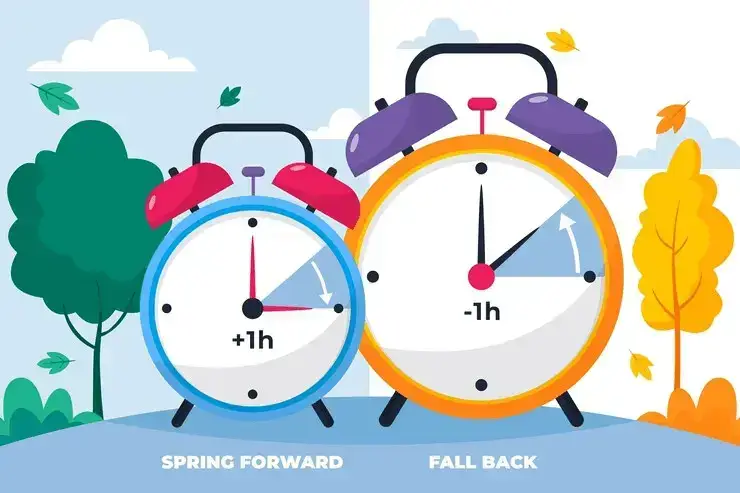
Diese Störungen schleichen sich oft langsam ein und äußern sich in einem Produktivitätsabfall oder erhöhtem Stress, wodurch es schwierig wird, die Zeitumstellung als Ursache zu identifizieren. Wenn die Auswirkungen voll spürbar werden, kann der Schaden für die Teamdynamik und die individuelle Gesundheit bereits erheblich sein.
Wie hilft ein Zeitzonen-Planer für Meetings?
Zeitzonen-Planer für Meetings sind Tools, die entwickelt wurden, um die Terminplanung zu vereinfachen und eine reibungslose Zusammenarbeit über Ländergrenzen und Zeitverschiebungen hinweg zu gewährleisten.
So nutzen Sie einen Zeitzonen-Planer, um Zeitunterschiede zu bewältigen:
- Ermöglicht die Planung von Meetings über Zeitzonen hinweg: Durch die gleichzeitige Anzeige mehrerer Zeitzonen lassen sich Zeitfenster finden, in denen alle Teilnehmer verfügbar sind. Das reduziert die typische Hin-und-her-Kommunikation bei der Terminfindung für Telefonate und Videokonferenzen und spart Zeit, da Teammitglieder die Zeitunterschiede nicht mehr mühsam im Kopf berechnen müssen.
- Reduziert Terminkonflikte und verpasste Meetings: Das Tool weist Sie auf mögliche Überschneidungen mit bestehenden Terminen in den Kalendern der Teilnehmer hin und schlägt alternative Zeiten vor. So werden Meetings zu für alle passenden Zeiten angesetzt, was Frust vermeidet und erneute Terminverschiebungen überflüssig macht.
- Erleichtert den Wechsel zwischen Sommer- und Winterzeit: Die halbjährliche Zeitumstellung kann selbst die besten Zeitpläne durcheinanderbringen. Ein Zeitzonen-Planer berücksichtigt diese Änderungen automatisch und stellt sicher, dass Meeting-Zeiten das ganze Jahr über korrekt bleiben.
- Bietet visuelle Darstellungen von Zeitzonen: Einige Zeitzonen-Planer bieten visuelle Hilfsmittel wie Farbcodierungen, Weltkarten oder grafische Zeitstrahlen. Diese machen Zeitunterschiede auf einen Blick erfassbar und beschleunigen die Entscheidungsfindung bei der Terminplanung.
- Integration mit Kalenderplattformen: Die Integration mit Kalenderplattformen wie Google Kalender oder Outlook ermöglicht es, geplante Meetings direkt in die Kalender der Teilnehmer einzutragen – inklusive Erinnerungen und automatischer Anpassung an die jeweilige Ortszeit.
- Unterstützt die Work-Life-Balance: Ein Zeitzonen-Planer unterstützt eine gesunde Work-Life-Balance. Er berücksichtigt die Bedeutung der Freizeit und hilft Teams dabei, Meetings nicht zu Zeiten anzusetzen, die für einzelne Teilnehmer zu früh am Morgen oder zu spät am Abend liegen, und fördert so eine ausgewogenere Zusammenarbeit.
- Zusammenarbeit und Produktivität steigern: Indem Reibungsverluste bei der Terminplanung und dem Zeitzonen-Management beseitigt werden, können sich Teams stärker auf ihre Arbeit konzentrieren statt auf logistische Hürden. Dies fördert einen reibungsloseren, effizienteren Arbeitsablauf und ermöglicht es Teammitgliedern, von überall auf der Welt ihre beste Leistung zu erbringen.
Apropos Zusammenarbeit und Produktivität: Diese sind für Teams, die asynchron arbeiten, oft schwer zu erreichen. Deshalb haben wir MeetGeekentwickelt, eine KI-Plattform zur Meeting-Automatisierung, die alle auf dem Laufenden hält, ohne dass jedes Teammitglied an der eigentlichen Telefonkonferenz teilnehmen muss.
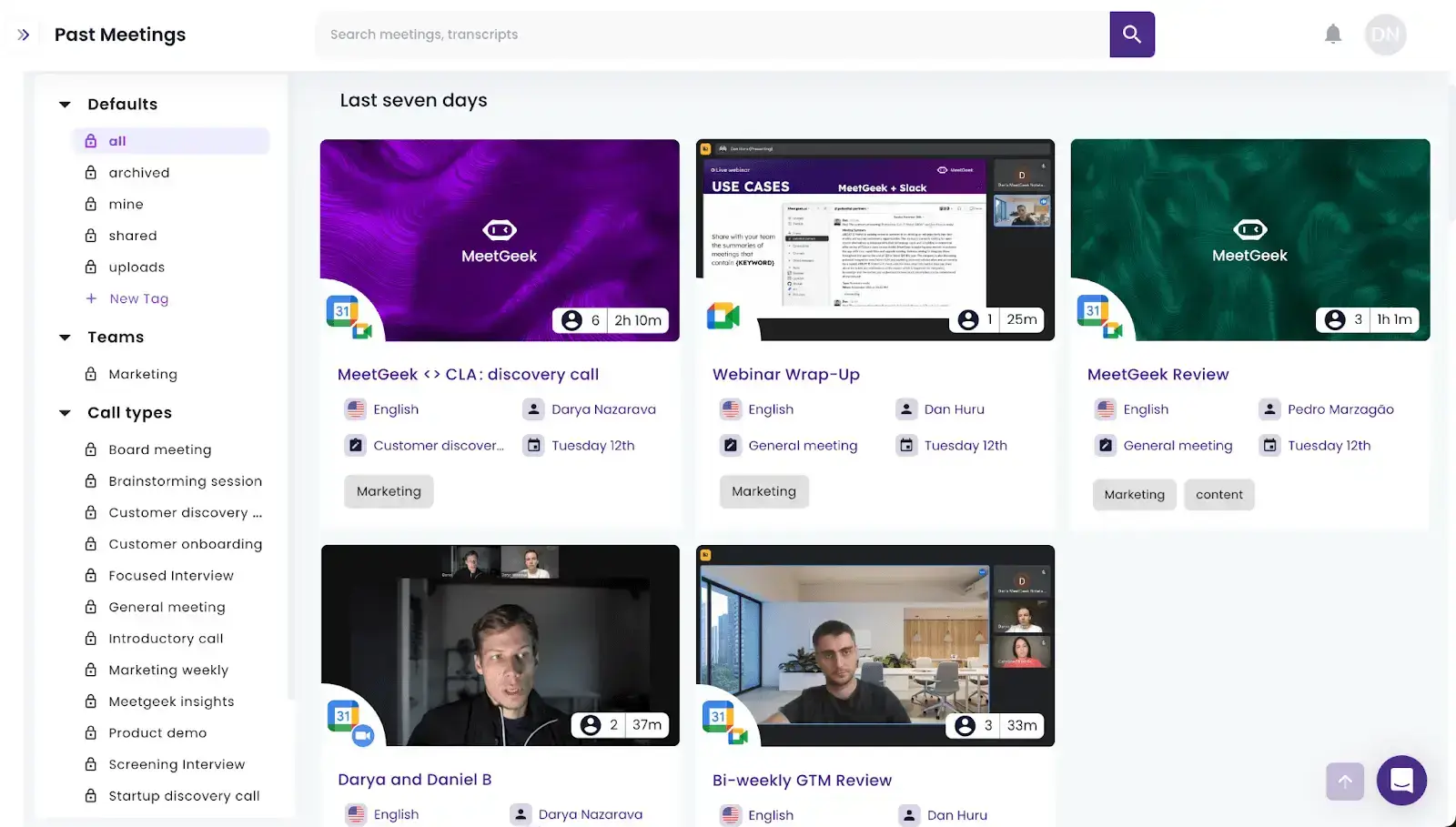
So können Sie MeetGeek für die asynchrone Zusammenarbeit über verschiedene Zeitzonen hinweg nutzen:
- Automatisierte Aufzeichnung und Transkription: MeetGeek nimmt automatisch an Ihren geplanten Meetings teil, zeichnet sie auf und transkribiert sie. So entsteht ein zentrales und durchsuchbares Archiv für alle Ihre Meeting-Aufzeichnungen und Transkripte.
- KI-Zusammenfassungen: Die KI-Algorithmen von MeetGeek extrahieren automatisch die wichtigsten Punkte aus Ihren Meetings und sparen Ihnen so wertvolle Zeit und Mühe.
- Erfassung von Aufgaben: MeetGeek hält Aufgaben aus jedem Meeting fest und stellt sicher, dass nichts untergeht – was gerade in stressigen Zeiten der Zeitumstellung leicht passieren kann.
- Nahtlose Integration: Egal, ob Sie CRM-Software, Projektmanagement-Tools oder Plattformen zum Wissensaustausch nutzen, MeetGeek lässt sich mühelos in Ihr bestehendes Toolkit integrieren.
- Anpassbare Workflows: Passen Sie Workflows an, um die Verteilung von Meeting-Aufzeichnungen und Transkripten an Ihr Team zu automatisieren und sicherzustellen, dass alle auf dem neuesten Stand sind – unabhängig davon, ob sie teilgenommen haben oder nicht.
- Meeting-Analyse: Die Conversation Intelligence von MeetGeek hilft Ihnen dabei, die Effektivität Ihrer Online-Meetings während der Zeitumstellung zu bewerten. Nutzen Sie diese Informationen, um Ihr Team in dieser stressigen Phase zu unterstützen.
So stellen Sie mit einem Zeitzonen-Meetingplaner auf Sommer- und Winterzeit um
Die effektive Umstellung auf Sommer- oder Winterzeit bei einem über mehrere Zeitzonen verteilten Team erfordert eine Kombination aus den richtigen Tools, durchdachter Planung und einer rücksichtsvollen Umsetzung.
So stellen Sie mit einem Zeitzonen-Meetingplaner effektiv auf Sommer- und Winterzeit um:
- Berücksichtigen Sie individuelle Bedürfnisse und Präferenzen
- Wählen Sie einen leistungsstarken Zeitzonen-Meetingplaner
- Starten Sie die Kontoeinrichtung
- Passen Sie Meeting-Einladungen an
- Versenden Sie strategische Erinnerungen
- Nutzen Sie erweiterte Funktionen
- Optimieren Sie die Vorbereitung auf Meetings
- Ermöglichen Sie eine reibungslose Nachbereitung
- Bieten Sie kontinuierliche Schulungen und Unterstützung an
1. Individuelle Bedürfnisse und Vorlieben berücksichtigen
Ein durchdachter Ansatz, der auf Verständnis und Flexibilität basiert, kann die Zeitumstellung in eine positive Erfahrung verwandeln und den Zusammenhalt Ihres Teams stärken.
Fragen Sie Ihr Team zunächst nach seinen Arbeitspräferenzen. Dazu gehören die idealen Arbeitszeiten, Zeiten, in denen keine Meetings stattfinden sollten, und wie sich die Zeitumstellung auf den Tagesablauf auswirkt.
Wenn jemand seinen Arbeitstag früher oder später beginnen möchte, um die Zeitumstellung besser zu bewältigen, versuchen Sie, Ihre Meeting-Pläne entsprechend anzupassen. Diese Flexibilität ist nicht nur rücksichtsvoll, sondern auch sinnvoll, da Untersuchungen zeigen, dass berufliche Autonomie entscheidend für die Arbeitszufriedenheit und die Bindung an das Unternehmen ist.
2. Wählen Sie einen zuverlässigen Zeitzonen-Planer für Meetings
Die Wahl eines geeigneten Tools zur Zeitzonenplanung ist für globale Teams entscheidend, um den Wechsel zur Sommer- und Winterzeit reibungslos zu bewältigen.
So wählen Sie den richtigen Planer für Online-Meetings aus:
- Umfassende Zeitzonenunterstützung: Ihr ideales Tool sollte alle Zeitzonen abdecken und Zeitumstellungen automatisch berücksichtigen. So bleibt der Zeitplan jedes Teammitglieds das ganze Jahr über präzise, unabhängig vom jeweiligen Standort.
- Nahtlose Integration: Die besten Planer arbeiten Hand in Hand mit den Terminierungstools Ihres Teams, wie Google Kalender oder Microsoft Outlook, damit Sie Meetings mühelos planen und aktualisieren können.
- Benutzerfreundliche Oberfläche: Wählen Sie einen Planer, der für alle leicht zu bedienen ist. Ein übersichtliches Layout und eine einfache Navigation helfen dem gesamten Team dabei, schnell den besten Zeitpunkt für Meetings zu finden.
- Anpassungsoptionen: Entscheiden Sie sich für einen Planer, dessen Funktionen Sie an Ihren Arbeitsablauf anpassen können. Ob individuelle Arbeitszeiten, lokale Feiertage, benutzerdefinierte Erinnerungen oder die Planung wiederkehrender Meetings – durch Anpassungsmöglichkeiten wird ein Tool zur perfekten Lösung für Ihr Team.
- Visuelle Zeitzonendarstellung: Ein Tool, das eine visuelle Karte oder eine Weltzeituhr bietet, kann entscheidend sein. Es hilft jedem, Zeitunterschiede sofort zu erfassen, und erleichtert die Wahl eines Termins, der für alle passt.
- Mobile Erreichbarkeit: Ein mobil optimierter Planer stellt sicher, dass Ihr Team jederzeit und überall auf den Zeitplan zugreifen und Benachrichtigungen zu Telefonkonferenzen erhalten kann. Diese Flexibilität ist in der heutigen schnelllebigen, mobilen Welt unverzichtbar.
PROFI-TIPP: Nutzen Sie Testzeiträume oder kostenlose Versionen, um die Funktionen des Tools zu prüfen und sicherzustellen, dass es die Anforderungen Ihres Teams erfüllt, bevor Sie sich für einen Kauf entscheiden.
3. Kontoeinrichtung starten
Eine ordnungsgemäße Kontoeinrichtung verbessert nicht nur die Funktionalität Ihres Meeting-Planers, sondern sorgt auch für Genauigkeit bei der Terminplanung und dem Zeitmanagement.
So richten Sie Ihren Zeitzonen-Meeting-Planer richtig ein:
- Schritt 1: Jedes Teammitglied sollte sein eigenes Konto im gewählten Meeting-Planer erstellen. Weisen Sie alle an, ihre Zeitzone sorgfältig zu überprüfen, um Planungsfehler zu vermeiden.
- Schritt 2: Stellen Sie sicher, dass die Zeitzoneneinstellungen in Ihrem Meeting-Planer automatisch an die Sommerzeit angepasst werden. Falls Ihr Tool manuelle Anpassungen erfordert, richten Sie Erinnerungen für Ihr Team ein, damit diese Änderungen rechtzeitig vorgenommen werden.
- Schritt 3: Verknüpfen Sie Ihren Meeting-Planer mit den Kalendern Ihres Teams, um das Risiko von verpassten Terminen oder Doppelbuchungen zu minimieren.
- Schritt 4: Passen Sie die Einstellungen des Tools für Geschäftszeiten, Benachrichtigungspräferenzen und Intervalle für Meeting-Erinnerungen an.
- Schritt 5: Organisieren Sie eine Schulung, um sicherzustellen, dass alle Teammitglieder mit dem neuen Meeting-Planer vertraut sind. Die Vertrautheit mit den Funktionen des Tools kann die Akzeptanz und die allgemeine Effizienz erheblich steigern.
4. Meeting-Einladungen anpassen
Wenn Sie Meeting-Einladungenversenden, geben Sie die Meeting-Zeit für alle für Ihre Teilnehmer relevanten Zeitzonen an. Alternativ ist das Einbetten dynamischer Links, über die Empfänger die Meeting-Zeit in ihrer lokalen Zeitzone sehen können, äußerst hilfreich – insbesondere bei Zeitumstellungen.
Vergessen Sie nicht, eine prägnante, klare Agenda in die Einladung aufzunehmen. Führen Sie die wichtigsten Diskussionsthemen, das Ziel des Meetings und alle erforderlichen Vorbereitungen auf. Stellen Sie außerdem sicher, dass die Einladung direkte Links zur Konferenzplattform enthält.
PROFI-TIPP: Testen Sie die Einladungen vor dem großflächigen Versand mit Teammitgliedern in verschiedenen Zeitzonen, um sicherzustellen, dass die Informationen korrekt angezeigt werden und alle Links funktionieren. Fügen Sie nach Möglichkeit eine visuelle Zeitzonenkarte in Ihre Einladung ein, um die Zeitunterschiede besser verständlich zu machen.

5. Strategische Erinnerungen versenden
Das Versenden strategischer Meeting-Erinnerungen ist entscheidend, um die Zeitumstellung bei der Planung von Meetings über verschiedene Zeitzonen hinweg reibungslos zu bewältigen.
So stellen Sie sicher, dass Ihre Erinnerungen effektiv sind und die Zeit aller Beteiligten respektieren:
- Das Timing ist entscheidend: Senden Sie eine erste Erinnerung einen Tag vor dem Meeting und eine weitere eine Stunde vorher. Dieser Ansatz berücksichtigt unterschiedliche Arbeitsgewohnheiten und sorgt dafür, dass Ihre Meetings präsent bleiben.
- Klare Angaben zu Zeitzonen: Bei Zeitumstellungen ist es wichtig, die Meeting-Zeit für alle relevanten Zeitzonen klar anzugeben. Automatisieren Sie dies mit Ihrem Planungstool, um Genauigkeit zu gewährleisten und Verwirrung zu vermeiden.
- Verschiedene Kommunikationswege nutzen: Verlassen Sie sich nicht nur auf E-Mails. Erweitern Sie Ihre Reichweite durch Online-Chats oder Team-Kollaborationsplattformen, um sicherzustellen, dass Sie jeden erreichen.
- Wichtige Details einbeziehen: Ihre Erinnerung sollte die Meeting-Agenda, die Zielesowie alle erforderlichen Vorbereitungen enthalten. Dies erinnert die Teilnehmer nicht nur an den Zweck des Meetings, sondern fördert auch einen produktiven Austausch.
- Persönliche Note hinzufügen: Eine persönliche Ansprache macht Ihre Erinnerungen ansprechender. Verwenden Sie die Namen der Teilnehmer und fügen Sie Hinweise zu deren spezifischen Beiträgen hinzu, um das Engagement zu steigern.
- Um Bestätigung bitten: Bitten Sie die Empfänger, ihre Teilnahme zu bestätigen. Dieser Schritt hilft Ihnen, die Teilnehmerzahl einzuschätzen, und unterstreicht die Bedeutung ihrer Anwesenheit.
- Optionen zur Terminverschiebung anbieten: Unvorhergesehenes passiert. Geben Sie klare Anweisungen, wie ein Termin bei Bedarf verschoben werden kann. Das zeigt Wertschätzung für die Zeit aller Beteiligten und sorgt für eine positive Atmosphäre.
6. Erweiterte Funktionen nutzen
Bestimmte Planungstools für Zeitzonen bieten erweiterte Funktionen, die den Aufwand bei der Terminfindung über verschiedene Zeitzonen hinweg während der Zeitumstellung minimieren.
Hier sind einige erweiterte Funktionen, die Sie in Betracht ziehen sollten:
- Automatische Updates bei Zeitumstellung
- Vorschläge für optimale Besprechungszeiten
- Anpassbare Erinnerungen
- Farbliche Kennzeichnung von Zeitzonen
- Gerätesynchronisierung
- Automatische Neuberechnung von Besprechungszeiten
Diese erweiterten Funktionen vereinfachen nicht nur die Terminplanung, sondern unterstützen auch Ihre asynchrone Kommunikation und sorgen dafür, dass alle auf dem gleichen Stand bleiben.
7. Optimierung der Meeting-Vorbereitung
Ein Zeitzonen-Planer ist ein hilfreiches Werkzeug für die Vorbereitung von Meetings, doch erst die richtige Strategie bei der Anwendung macht den entscheidenden Unterschied.
So stellen Sie sicher, dass Ihre Meetings ein Erfolg werden:
- Zeitzonen doppelt prüfen: Bevor Sie sich auf eine Uhrzeit festlegen, sollten Sie die Zeitzonen aller Teilnehmer noch einmal überprüfen, insbesondere bei Personen in Regionen mit Zeitumstellung.
- Agenden frühzeitig verteilen: Versenden Sie die Agenda rechtzeitig, damit sich Teammitglieder in verschiedenen Zeitzonen unabhängig von der Zeitumstellung angemessen vorbereiten können.
- Meeting-Unterlagen vorbereiten: Stellen Sie sicher, dass alle notwendigen Materialien vor dem Meeting bereitstehen und für alle Teilnehmer zugänglich sind. Nutzen Sie Cloud-Speicherlösungen für den Dokumentenaustausch, damit jeder – unabhängig von der Zeitzone – Zugriff auf die aktuellste Version hat.
- Teilnahme bestätigen: Bestätigen Sie die Teilnahme einen Tag vor dem Meeting. Dies ist besonders während der Zeitumstellung wichtig, da die Zeitpläne der Teilnehmer stärker als gewöhnlich variieren können.
- Technische Überprüfung einplanen: Ermutigen Sie die Teilnehmer dazu, ihre Meeting-Software kurz zu testen, vor allem wenn sie sich aufgrund der Zeitumstellung in einer anderen Zeitzone als üblich befinden. Dies verringert das Risiko, dass technische Probleme den Beginn des Meetings verzögern.
- Flexible Terminplanung: Seien Sie bereit, Meeting-Zeiten bei Bedarf anzupassen. Zeitumstellungen können zu unerwarteten Konflikten führen; Flexibilität zu zeigen, fördert das gute Miteinander und sichert die Teilnahme.
8. Sorgen Sie für eine reibungslose Nachbereitung von Meetings
Eine effektive Nachbereitung von Meetings ist entscheidend, um die Dynamik im Team aufrechtzuerhalten und Klarheit über die nächsten Schritte zu schaffen – besonders bei Zeitumstellungen.
Versenden Sie direkt nach dem Meeting eine prägnante Zusammenfassung. Heben Sie wichtige Entscheidungen hervor, weisen Sie Aufgabenzu und legen Sie Fristen fest. Halten Sie genau fest, wer für was verantwortlich ist und bis wann es erledigt sein muss, damit jeder seine Arbeit effizient planen kann.
PROFI-TIPP: Nutzen Sie automatisierte Meeting-Plattformen wie MeetGeek, um den Prozess zu optimieren. MeetGeek verwendet KI, um Aufgaben zu extrahieren und automatische Zusammenfassungen zu erstellen, die Sie ganz einfach mit Ihrem Team teilen können. Das spart Zeit und sorgt für eine gründliche Nachbereitung, gerade in stressigen Zeiten der Zeitumstellung.
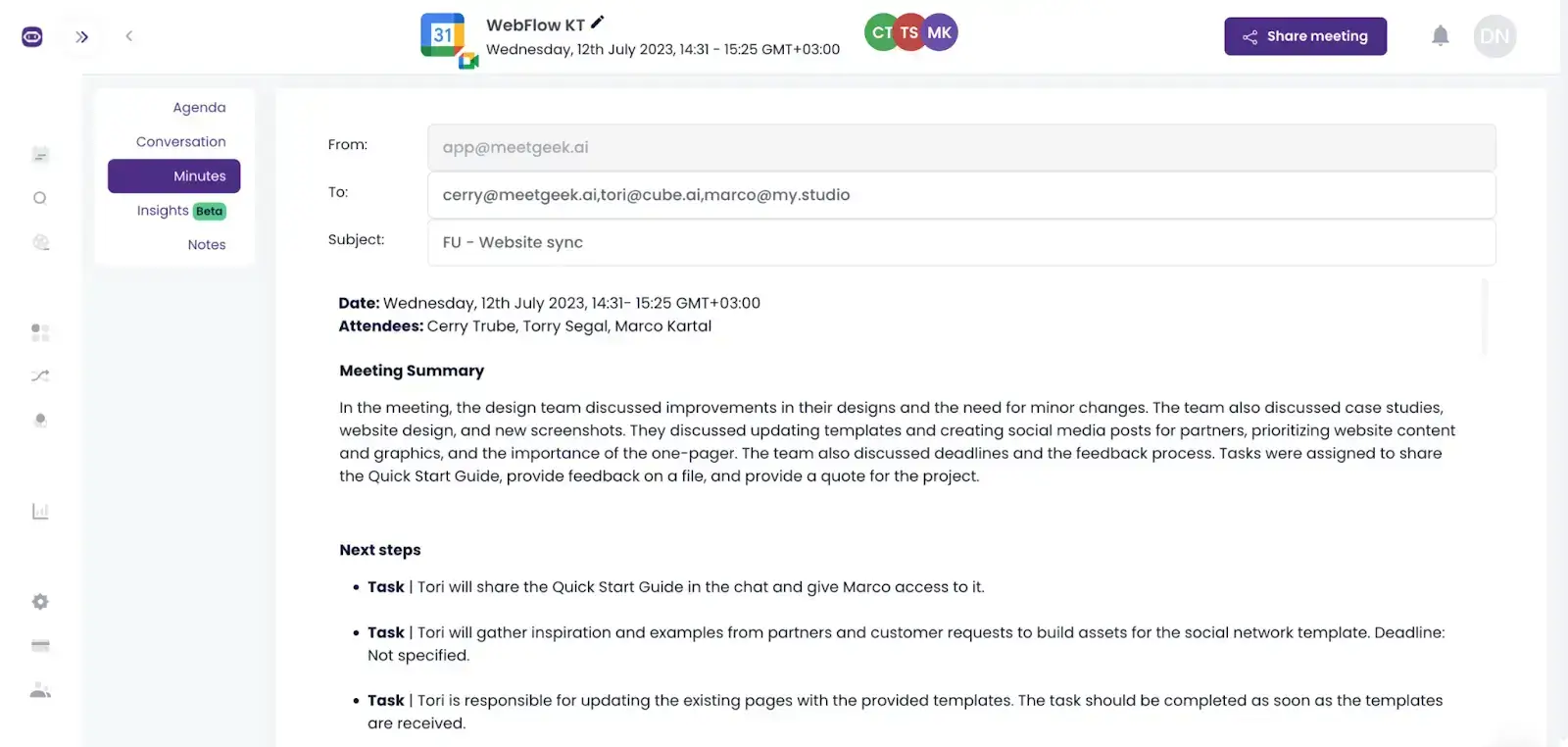
Dieser Ansatz sorgt nicht nur dafür, dass Ihr Team nach dem Meeting auf dem gleichen Stand bleibt, sondern vereinfacht auch die Nachbereitung während der Zeitumstellung, damit garantiert kein Detail untergeht.
9. Bieten Sie kontinuierliche Schulungen und Unterstützung an
Der Umgang mit Zeitumstellungen in einem globalen Team erfordert klare Schulungen und verlässliche Unterstützung, insbesondere bei der Nutzung eines Zeitzonen-Planers.
Gestalten Sie Ihre Schulungen interaktiv, um Fragen zu fördern und praktisches Lernen zu ermöglichen. Es ist zudem hilfreich, diese Sitzungen mit MeetGeek aufzuzeichnen, damit jeder, der eine Auffrischung benötigt, die Inhalte einfach erneut abrufen kann. Darüber hinaus können regelmäßige Check-ins oder Workshops, die auf die Zeitumstellung abgestimmt sind, ebenfalls von Vorteil sein.
PROFI-TIPP: Die Einrichtung einer Feedbackschleife ist entscheidend. Bitten Sie nach jeder Zeitumstellung um Rückmeldungen zu den angebotenen Schulungen und Hilfestellungen und nutzen Sie diese Informationen für notwendige Verbesserungen.
Welche weiteren Tools können Sie für die Zeitumstellung nutzen?
Neben einem Zeitzonen-Planer für Meetings können verschiedene Tools die asynchrone Arbeit unterstützen und Hürden in der asynchronen Kommunikation aus dem Weg räumen.
Hier sind einige Arten von Tools, die Sie während der Zeitumstellung einsetzen können:
- Kollaborationsplattformen: Tools wie Slack, Microsoft Teams oder Discord ermöglichen sowohl Echtzeit- als auch asynchrone Kommunikation. Sie helfen Teams dabei, in Verbindung zu bleiben, Updates auszutauschen und an Projekten zusammenzuarbeiten, ohne dass alle gleichzeitig online sein müssen.
- Projektmanagement-Software: Plattformen wie Asana, Trello und Monday.com helfen dabei, Aufgaben, Projekte und Fristen zu organisieren. Sie bieten einen klaren Überblick darüber, was von wem bis wann erledigt werden muss, was die Verwaltung von Arbeitslasten über verschiedene Zeitzonen hinweg erleichtert.
- Cloud-Speicher und Dokumentenzusammenarbeit: Dienste wie Google Drive, Dropbox und OneDrive ermöglichen es Teammitgliedern, gleichzeitig oder – je nach Arbeitszeit – zeitversetzt auf Dokumente zuzugreifen und an ihnen zu arbeiten.
- Plattformen zur Meeting-Automatisierung: Tools wie MeetGeek zeichnen Meetings automatisch auf, transkribieren und fassen sie zusammen. So entsteht ein Archiv der Unterhaltungen, das sowohl für Teilnehmer als auch für diejenigen, die nicht dabei sein konnten, jederzeit verfügbar ist.
- Zeitzonen-Umrechner: Auch wenn sie kein direktes Tool für asynchrones Arbeiten sind, ist ein zuverlässiger Zeitzonen-Umrechner wie TimeAndDatevon unschätzbarem Wert, um schnell die aktuelle Uhrzeit am Standort eines Kollegen zu prüfen und so die kurzfristige Terminplanung zu erleichtern.
Wichtige Zeitzonen weltweit + Sommerzeitregelungen
Um Ihnen die Umstellung auf Sommer- und Winterzeit in verschiedenen Zeitzonen zu erleichtern, haben wir eine Übersicht erstellt, die Sie bei der Planung Ihrer Meetings unterstützt.
Hier finden Sie die wichtigsten Zeitzonen weltweit mit den entsprechenden Sommerzeitregelungen:
HINWEIS: Bitte beachten Sie, dass einige der aufgeführten Städte zwar nicht direkt an den Grenzen ihrer jeweiligen Zeitzone liegen, sie jedoch als gängige Beispiele für die jeweilige Zone dienen. Zudem können bestimmte Regionen innerhalb einer Zeitzone entscheiden, die Sommerzeit nicht anzuwenden, auch wenn dies für die Zeitzone insgesamt üblich ist.
Setzen Sie auf flexibles Arbeiten mit MeetGeek!
Zusammenfassend lässt sich sagen, dass die Zeitumstellung insbesondere bei der Planung von Meetings über verschiedene Zeitzonen hinweg eine Herausforderung darstellen kann. Ein zuverlässiger Zeitzonen-Planer kann diesen Prozess vereinfachen und eine reibungslose Kommunikation trotz der Zeitumstellung gewährleisten.
Wenn Sie nach einer mühelosen Lösung für asynchrone Kommunikation und reibungslose Meetings suchen, probieren Sie MeetGeek aus. Mit seinen umfassenden Funktionen vereinfacht MeetGeek es, alle Beteiligten unabhängig von Zeitzonenunterschieden auf dem Laufenden zu halten. Damit ist es ein unverzichtbares Werkzeug für Remote-Teams, globale Zusammenarbeit und alle, die regelmäßig mit Zeitumstellungen zu tun haben.
Testen Sie MeetGeek kostenlos und machen Sie den ersten Schritt zu einer reibungsloseren Kommunikation!








.avif)