



El trabajo virtual llegó para quedarse, al igual que las reuniones en línea que lo acompañan. El problema es que una reunión de Zoom puede convertirse fácilmente en una cuadrícula silenciosa de cámaras, micrófonos silenciados y conversaciones paralelas que ocurren en otra parte.
Por eso los juegos para jugar en Zoom funcionan tan bien. Un juego interactivo bien elegido convierte una videollamada rutinaria en una forma divertida de lograr que la gente hable, se preste atención y cree conexiones reales, sobre todo en equipos remotos y virtuales que rara vez comparten la misma sala.
Y el momento importa. Gallup ha informado que solo el 28% de los empleados totalmente remotos está totalmente de acuerdo en que se siente conectado con la misión o el propósito de su organización. Cuando esa conexión se pierde, la comunicación se complica, la colaboración se vuelve más lenta e incluso los buenos equipos pueden sentirse «a la deriva».
Un juego corto dentro de una videollamada no lo arregla todo, pero crea momentos de atención, confianza y energía compartida que se trasladan al trabajo real.
Una nota rápida de MeetGeek antes de empezar (para que tu próxima sesión sea más fácil)
Si organizas reuniones de equipo que incluyen juegos, después normalmente querrás dos cosas:
- un resumen sencillo (qué pasó, quién ganó, qué decidió el grupo), y
- las partes útiles que surgen por casualidad durante el juego (información sobre el equipo, puntos de fricción, momentos divertidos que vale la pena compartir).
Ahí es exactamente donde MeetGeek ayuda.
Con MeetGeek conectado a Zoom, puedes capturar automáticamente la llamada de Zoom (grabación y transcripción) y, a continuación, obtener un resumen generado por IA con los puntos clave y las tareas pendientes, sin que nadie tenga que «ofrecerse como voluntario» para tomar notas en lugar de sumarse a la diversión. También es útil para los compañeros de equipo que trabajan de forma asíncrona: pueden revisar los momentos destacados, buscar en la transcripción y seguir sintiéndose parte de la sesión virtual, aunque no hayan podido asistir en directo.
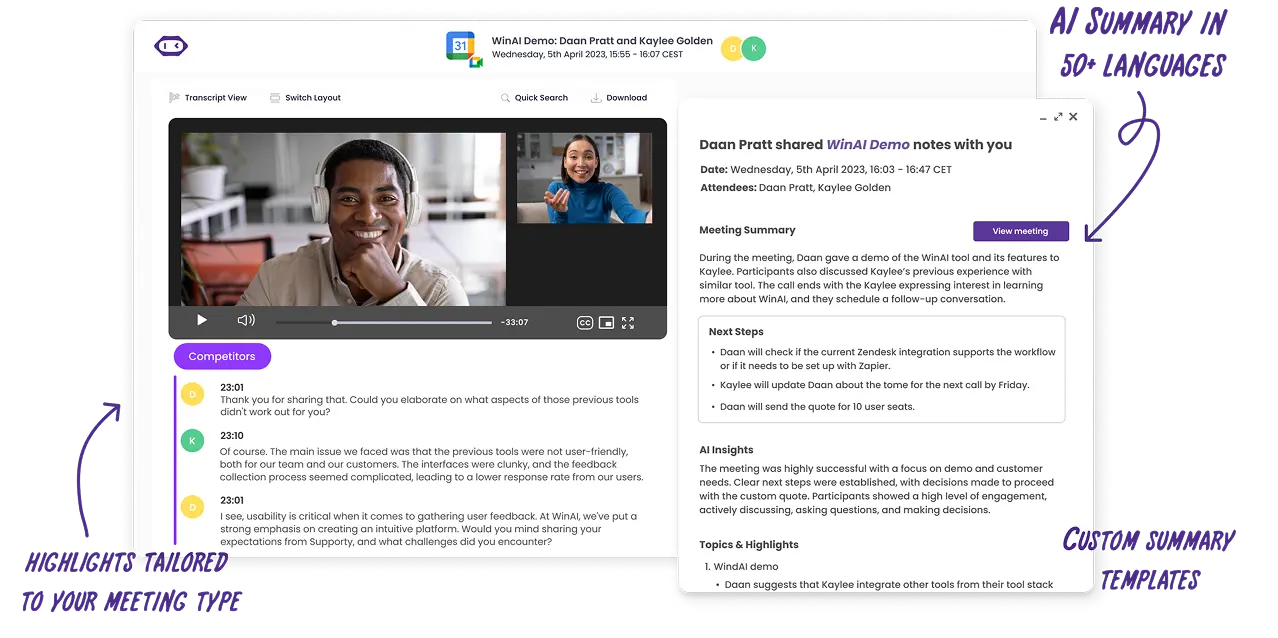
Y si organizas juegos como parte de un proceso de incorporación, de talleres o de una conferencia virtual, las transcripciones con búsqueda de MeetGeek permiten encontrar fácilmente el momento en que alguien compartió una gran idea, un obstáculo o un «dato curioso» sorprendentemente útil que merece quedar en la cultura del equipo.
¿Qué se considera «juegos de Zoom»?
Los juegos de Zoom son juegos virtuales que puedes organizar dentro de una reunión de Zoom con funciones que ya tienes, como compartir pantalla, el chat de Zoom, reacciones, encuestas y salas para grupos pequeños. Las salas para grupos pequeños son especialmente útiles porque te permiten dividir al grupo en equipos pequeños para colaborar un momento y, después, traer a todos de vuelta cuando estés listo.
Cómo elegir el juego adecuado (rápido)
Usa estos tres filtros para asegurarte de elegir juegos que sirvan al objetivo de tu reunión de Zoom:
- Duración: 5 a 10 minutos (energizante), 15 a 25 minutos (unión), 30 a 60 minutos (actividad completa)
- Tamaño del grupo: grupo completo, grupos pequeños o dos equipos compitiendo
- Objetivo: risas, unión del equipo, habilidades de comunicación, pensamiento crítico, resolución de problemas o pensamiento creativo
| Juego | Qué necesitas | Ideal para |
|---|---|---|
| Búsqueda del tesoro relámpago | Cámaras, objetos de la casa | Energía, rapidez mental, participación |
| Bingo de videollamada | Cartones de bingo | Concentración en reuniones largas |
| Torneo de trivia de Zoom | Preguntas, chat o encuestas | Competencia amistosa, unión del equipo |
| Dos verdades y una mentira | Chat | Generar confianza, datos curiosos |
| Pictionary | Pizarra o herramienta de dibujo | Creatividad, comunicación |
| Adivina quién (edición de hábitos) | Cámaras | Dinámica de grupo, escucha |
| Lee mis labios | Cámaras, micrófono silenciado | Comunicación no verbal |
| El juego de contar | Micrófonos | Coordinación, habilidades de comunicación |
| Algo en común | Salas para grupos pequeños | Unión del equipo |
| ¿Qué prefieres? | Encuestas o reacciones | Iniciar conversaciones |
| Batalla de eliminatorias | Pantalla compartida, encuestas | Toma de decisiones, debate |
| Presenta el producto ridículo | Salas para grupos pequeños | Pensamiento creativo |
| Salas de escape virtuales | Sitio de acertijos, pantalla compartida | Resolución de problemas |
| Adivina el escritorio | Fotos, pantalla compartida | Conocerse a nivel personal |
| Tabú | Chat o mensajes privados | Comunicación clara |
| Scattergories | Chat | Rapidez mental |
| ¿De quién es la historia? | Chat | Unión del equipo |
| Juegos de grupo multijugador | Pantalla de juego compartida | Conexión social |
| Apuesta por la mayoría | Encuestas | Opinión del grupo, debate |
| Encuentra la diferencia | Cámaras | Capacidad de observación |
20 juegos para jugar en Zoom con detalles, preparación y objetivos
1) Búsqueda del tesoro relámpago
Duración: De 5 a 10 minutos
Tamaño del grupo: Todo el grupo o equipos pequeños
Objetivo: Energía, rapidez mental, actividades divertidas
La búsqueda del tesoro relámpago es uno de los juegos más efectivos para jugar en Zoom cuando necesitas una inyección de energía instantánea. Como hace que las personas se levanten de sus sillas, funciona especialmente bien para equipos remotos que llevan un buen rato sentados en largas reuniones en línea o en llamadas de Zoom consecutivas. Este juego añade movimiento y urgencia a una reunión virtual, lo que ayuda a recuperar la atención y reducir la fatiga ante la pantalla.
El juego es simple, flexible y funciona igual de bien en una pequeña sesión de Zoom que en una gran conferencia virtual. También es una gran opción para grupos de edades variadas, ya que todos juegan en igualdad de condiciones.
Cómo funciona:
- El anfitrión menciona un objeto o una categoría, como algo rojo, tu taza favorita o un objeto que represente el trabajo remoto
- Los participantes corren a buscar el objeto y vuelven a la cámara
- La primera persona que regrese gana un punto, o el grupo puede usar las reacciones para votar en grupo
- Las preguntas de seguimiento opcionales dan pie a historias cortas o reflexiones personales
2) Bingo de videollamada
Duración: Durante toda la reunión
Tamaño del grupo: Todo el grupo
Objetivo: Concentración, participación, competencia ligera
El bingo de videollamada es un juego clásico de Zoom diseñado para reuniones virtuales más largas o conferencias en línea en las que la atención tiende a disminuir. En lugar de desviar a la gente de la agenda, este juego corre en paralelo sin hacer ruido y mantiene a los participantes escuchando con atención.
Como no requiere hablar ni interrumpir, funciona bien para grandes equipos virtuales y reuniones de liderazgo. También se adapta perfectamente a las reuniones de equipo recurrentes en las que ya existen bromas y patrones compartidos.
Cómo funciona:
- Comparte cartones de bingo digitales antes de la sesión de Zoom
- Las casillas incluyen momentos típicos como «estás en silencio», problemas al compartir pantalla o apariciones de mascotas
- Los participantes marcan las casillas a medida que ocurren esos momentos
- La primera persona en completar una línea escribe BINGO en el chat de Zoom
3) Torneo de trivia de Zoom
Duración: 15 a 30 minutos
Tamaño del grupo: Todo el grupo o dos equipos
Objetivo: Competencia amistosa, unión del equipo
Un juego de preguntas y respuestas es uno de los mejores juegos en línea para el trabajo porque equilibra estructura y diversión. Funciona bien para entornos de trabajo remotos, sesiones de incorporación y reuniones sociales de Zoom en las que buscas participación sin presión.
La trivia también se adapta fácilmente a grupos de distintos tamaños y se puede jugar de forma individual o en dos equipos para una competencia amistosa. Es especialmente eficaz para mejorar la participación en equipos virtuales que no interactúan a diario.
Cómo funciona:
- El anfitrión prepara de 10 a 15 preguntas de trivia
- Los participantes responden por el chat, con encuestas o en salas para grupos pequeños
- Los puntos se van anotando a lo largo del juego
- Los ganadores se anuncian al final
4) Dos verdades y una mentira
Duración: 10 a 15 minutos
Tamaño del grupo: Todo el grupo
Objetivo: Confianza, conexión personal, unión del equipo
Dos verdades y una mentira es un juego sencillo que genera conexión rápidamente sin poner a nadie en aprietos. Es especialmente útil para los recién contratados, los equipos virtuales multifuncionales o cualquier grupo que necesite una forma fácil de conocerse.
Como el juego se basa en historias, da pie de forma natural a preguntas de seguimiento y conversaciones informales en línea.
Cómo funciona:
- Cada participante comparte tres afirmaciones sobre sí mismo
- Dos afirmaciones son verdaderas y una es falsa
- El grupo intenta adivinar en el chat
- Quien habló revela la mentira y responde una pregunta de seguimiento
5) Pictionary con pantalla compartida
Duración: 15 a 20 minutos
Tamaño del grupo: Dos equipos o grupo completo
Objetivo: Creatividad, habilidades de comunicación
Pictionary es un juego clásico que se adapta muy bien al formato en línea con las herramientas de pantalla compartida y pizarra. Es uno de los juegos de Zoom más confiables para hacer reír a la gente y, de paso, practicar una comunicación clara.
Este juego funciona bien para equipos pequeños o grupos más grandes divididos en salas para grupos pequeños, y anima a participar a los miembros más callados del equipo, que quizá prefieran expresarse de forma visual.
Cómo funciona:
- Un participante recibe una palabra o frase de forma privada
- La dibuja en una pizarra o con una herramienta de dibujo compartida
- Su equipo adivina en tiempo real mediante el chat de Zoom
- Cada ronda dura unos 60 segundos y luego se rotan los roles
6) Adivina quién (edición de hábitos laborales)
Duración: 15 minutos
Tamaño del grupo: Todo el grupo
Objetivo: Dinámica de grupo, escucha, atención a los demás
Esta versión de Adivina quién se centra en los hábitos y preferencias laborales más que en la apariencia, por lo que es adecuada para reuniones virtuales profesionales y equipos remotos. Fomenta la curiosidad y la escucha activa sin cruzar límites personales.
También ayuda a los equipos a reflexionar sobre qué tan bien se conocen entre sí más allá de sus cargos.
Cómo funciona:
- Se elige en secreto a un participante
- Los jugadores hacen preguntas de sí o no sobre los hábitos o el estilo de trabajo
- Los participantes que no coincidan apagan sus cámaras
- La última persona visible es la respuesta
7) Lee mis labios
Duración: 10 minutos
Tamaño del grupo: Todo el grupo
Objetivo: Comunicación no verbal, atención
Lee mis labios es un juego interactivo breve que pone de relieve el papel del lenguaje corporal en las videollamadas. Funciona bien como energizante a mitad de una reunión cuando la atención empieza a dispersarse.
Como se basa en señales visuales, anima a los participantes a concentrarse en la pantalla en lugar de hacer varias cosas a la vez.
Cómo funciona:
- Un participante silencia su micrófono
- Articula en silencio una palabra o frase
- El grupo intenta adivinar en el chat
- Gana la primera respuesta correcta
8) El juego de contar
Duración: De 5 a 10 minutos
Tamaño del grupo: Grupos pequeños y medianos
Objetivo: Habilidades de comunicación, coordinación
El juego de contar es engañosamente simple y muy efectivo para mostrar cómo se comunican los equipos en situaciones de incertidumbre. Funciona mejor con las cámaras encendidas y con un mínimo de distracciones.
Este juego se usa a menudo con equipos remotos para trabajar la concentración y el ritmo compartido.
Cómo funciona:
- El grupo debe contar del 1 al 20
- No se asigna ningún orden para hablar
- Si dos personas hablan al mismo tiempo, el grupo vuelve a empezar
9) Algo en común
Duración: 10 a 15 minutos
Tamaño del grupo: Grupos pequeños
Objetivo: Unión del equipo, conexión
Algo en común es una de las actividades de integración más sólidas para equipos virtuales que no se conocen bien. Crea conexiones significativas sin depender de rompehielos forzados.
Cómo funciona:
- Los participantes se dividen en salas para grupos pequeños de cuatro a seis personas
- Cada grupo encuentra algo inesperado que todos comparten
- Los equipos regresan a la sala principal para presentar sus respuestas
10) ¿Qué prefieres?
Duración: De 5 a 10 minutos
Tamaño del grupo: Todo el grupo
Objetivo: Participación, conversación en línea
¿Qué prefieres? es un juego en línea ligero que funciona bien al principio o al final de una reunión de Zoom. Casi no requiere preparación y es fácil de adaptar a grupos de distintos tamaños.
Cómo funciona:
- El anfitrión plantea una pregunta con opciones para elegir
- Los participantes votan mediante encuestas o reacciones
- Algunos voluntarios explican su razonamiento
11) Batalla de eliminatorias
Duración: 10 a 15 minutos
Tamaño del grupo: Todo el grupo
Objetivo: Competencia amistosa, toma de decisiones, participación
Batalla de eliminatorias es un juego de Zoom sencillo pero muy entretenido que funciona bien durante reuniones de equipo o sesiones virtuales más ligeras. Este juego es especialmente efectivo cuando los equipos necesitan un descanso del trabajo estructurado, pero aun así quieren hacer algo con propósito.
Puedes adaptar el cuadro de eliminatorias a casi cualquier tema, como el mejor aperitivo, la mejor película, la mejor herramienta de productividad o la mejor tradición de equipo. Como se basa en votaciones, funciona bien para grandes equipos virtuales y equipos remotos.
Cómo funciona:
- El anfitrión muestra el cuadro de eliminatorias con la pantalla compartida
- En cada ronda compiten dos opciones
- Los participantes votan mediante encuestas o reacciones
- Los ganadores avanzan hasta que queda una sola opción
12) Presenta el producto ridículo
Duración: 20 minutos
Tamaño del grupo: Equipos pequeños
Objetivo: Pensamiento creativo, colaboración, habilidades de comunicación
Presenta el producto ridículo es un juego divertido que combina la imaginación con el trabajo en equipo. Funciona especialmente bien en entornos en los que los equipos rara vez pueden hacer una lluvia de ideas con total libertad. El juego fomenta el pensamiento lúdico y, a la vez, ejercita habilidades reales como la persuasión y la presentación.
Como usa salas para grupos pequeños, es ideal para equipos pequeños dentro de una reunión más grande.
Cómo funciona:
- Los participantes se dividen en salas para grupos pequeños
- Cada equipo inventa un producto ficticio
- Los equipos definen un nombre, un propósito y tres características
- Los equipos regresan a la sala principal para presentar su producto en 60 segundos
- El grupo vota por la mejor presentación
13) Salas de escape virtuales
Duración: 30 a 60 minutos
Tamaño del grupo: Equipos pequeños
Objetivo: Resolución de problemas, pensamiento crítico, colaboración
Las salas de escape virtuales se encuentran entre los mejores juegos virtuales para equipos que disfrutan de desafíos estructurados. Son especialmente populares en eventos de integración de equipos, sesiones de incorporación y conferencias virtuales más largas.
Las salas de escape fomentan la comunicación clara, la toma de decisiones compartida y el pensamiento lógico. Son ideales para equipos que buscan una experiencia de colaboración más profunda que la de un rompehielos corto.
Cómo funciona:
- El anfitrión elige una sala de escape o una experiencia de acertijos en línea
- El acertijo se muestra con la pantalla compartida
- Los equipos colaboran en salas para grupos pequeños para resolver los desafíos
- Los equipos cuentan cómo van en la sala principal
14) Adivina el escritorio
Duración: 15 minutos
Tamaño del grupo: Todo el grupo
Objetivo: Conocerse a nivel personal, conexión, unión del equipo
Adivina el escritorio es un juego relajado que ayuda a humanizar el trabajo remoto al mostrar pequeños vistazos del entorno diario de cada persona. Funciona mejor para los equipos que ya tienen cierto nivel de confianza y quieren profundizar la conexión personal sin exponerse demasiado.
Este juego es particularmente efectivo durante las reuniones informales o las reuniones sociales internas del equipo.
Cómo funciona:
- Los participantes envían fotos de sus escritorios con antelación
- El anfitrión muestra una imagen a la vez con la pantalla compartida
- El grupo intenta adivinar en el chat
- Se revela quién es el dueño, que puede contar una historia corta
15) Tabú
Duración: 15 a 20 minutos
Tamaño del grupo: Dos equipos
Objetivo: Habilidades de comunicación, rapidez mental
Tabú es un juego de ritmo rápido que reta a los jugadores a explicar ideas con claridad sin recurrir a las palabras obvias. Es uno de los juegos más eficaces para mejorar la comunicación verbal y la capacidad de pensar sobre la marcha.
Como las reglas son simples, funciona bien con distintos niveles de experiencia y equipos de distintos tamaños.
Cómo funciona:
- Un jugador recibe una palabra y una lista de palabras prohibidas por mensaje privado
- Su equipo debe adivinar la palabra en 60 segundos
- Si se usa una palabra prohibida, la ronda termina
- Los equipos rotan los roles
16) Scattergories
Duración: 15 minutos
Tamaño del grupo: Todo el grupo
Objetivo: Rapidez mental, pensamiento creativo
Scattergories es un juego en línea basado en palabras que funciona bien en el chat de Zoom y requiere una preparación mínima. Es ideal para animar a un grupo sin necesidad de compartir la pantalla o salas para grupos pequeños.
Este juego les gusta a los participantes que disfrutan del lenguaje, la creatividad y la estrategia ligera.
Cómo funciona:
- El anfitrión comparte una letra y varias categorías
- Los participantes tienen dos minutos para pensar
- Todos envían respuestas al mismo tiempo en el chat
- Las respuestas únicas suman puntos
17) ¿De quién es la historia?
Duración: 15 minutos
Tamaño del grupo: Todo el grupo
Objetivo: Unión del equipo, empatía
¿De quién es la historia? es un juego de relatos que ayuda a los equipos a conectarse a un nivel más personal. Funciona bien para los equipos virtuales que desean ir más allá de la interacción superficial.
El juego fomenta la escucha, la curiosidad y la conversación respetuosa.
Cómo funciona:
- Los participantes envían historias cortas de forma anónima antes de la reunión
- El anfitrión lee una historia en voz alta
- El grupo adivina en el chat quién la escribió
- El autor se revela solo si se siente cómodo.
18) Juegos de grupo multijugador
Duración: 20 a 30 minutos
Tamaño del grupo: Todo el grupo
Objetivo: Conexión social, diversión
Los juegos de grupo multijugador funcionan mejor en llamadas informales de Zoom, como una happy hour virtual o una celebración del equipo. Estos juegos multijugador se centran en la risa y la experiencia compartida más que en el rendimiento.
Son especialmente útiles cuando el objetivo es relajarse y socializar.
Cómo funciona:
- El anfitrión comparte la pantalla del juego
- Los participantes se unen desde un teléfono o un navegador
- El grupo juega varias rondas cortas
19) Apuesta por la mayoría
Duración: 10 a 15 minutos
Tamaño del grupo: Todo el grupo
Objetivo: Opinión del grupo, debate, participación
Apuesta por la mayoría es un juego de Zoom basado en predicciones que destaca la opinión del grupo más que el rendimiento individual. Funciona bien para equipos virtuales de gran tamaño y no pone a ningún participante en aprietos.
Cómo funciona:
- El anfitrión lanza una pregunta en forma de encuesta
- Los participantes adivinan qué respuesta será la más popular
- Se revelan los resultados
- Las predicciones correctas suman puntos
20) Encuentra la diferencia
Duración: 10 a 15 minutos
Tamaño del grupo: Dos equipos
Objetivo: Observación, atención, comunicación
Encuentra la diferencia es un juego visual interactivo que funciona bien en las videollamadas. Anima a los participantes a fijarse bien unos en otros, algo que a menudo se pasa por alto en las reuniones virtuales.
Cómo funciona:
- El equipo A apaga sus cámaras y cambia tres cosas
- Las cámaras se vuelven a encender
- El equipo B adivina los cambios en el chat
- Los equipos intercambian roles
Consejos para organizar juegos de Zoom sin complicaciones
- Usa las salas para grupos pequeños cuando el juego requiera que todos tengan tiempo para hablar.
- Marca un ritmo claro: explica las reglas, haz una ronda de práctica y empieza a llevar el puntaje.
- Fomenta el uso del chat: el chat de Zoom es tu mejor amigo para recibir respuestas simultáneas, adivinar en grupo y evitar interrupciones.
- Usa la pantalla compartida para todo lo visual (bingo, cuadro de eliminatorias, diapositivas de trivia).
- Termina con un resumen rápido y una imagen final: haz una captura de pantalla de la pose ganadora o del mejor momento.
Y si quieres que la sesión sea divertida y además útil después, MeetGeek puede capturar la grabación, la transcripción y los momentos destacados para que nadie tenga que volver a ver toda la llamada de Zoom para recordar lo que pasó.
Haz que los juegos formen parte de la cultura de las reuniones (no una actividad aislada)
Los mejores juegos para jugar en Zoom no se sienten como «diversión forzada». Se sienten como un respiro rápido que mejora la forma en que las personas hablan, escuchan y colaboran en las reuniones en línea.
Elige una de las ideas anteriores para tu próxima reunión de Zoom, dedícale de 8 a 12 minutos y cambia de formato cada semana. Con el tiempo, notarás más energía, relaciones más sólidas y una comunicación más fluida en el trabajo remoto.
Prueba MeetGeek gratis y mantén el impulso antes, durante y después de cada reunión.
Preguntas frecuentes sobre los juegos para jugar en Zoom
¿Cuáles son los mejores juegos para jugar en Zoom para equipos remotos?
Los mejores juegos para jugar en Zoom para equipos remotos son sencillos, interactivos y fáciles de seguir sin herramientas adicionales. Juegos como la búsqueda del tesoro relámpago, juegos de preguntas y respuestas, Pictionary y ¿Qué prefieres? funcionan especialmente bien porque encajan de forma natural en una reunión de Zoom y mantienen a todos participando.
¿Cómo ayudan los juegos de Zoom a la integración de equipos y a la comunicación?
Los juegos de Zoom ayudan a la integración de equipos porque crean, durante una reunión virtual, experiencias compartidas que van más allá de las tareas laborales. Muchos juegos virtuales fomentan la escucha activa, la rapidez mental y la participación de todos los miembros del equipo, lo que ayuda a mejorar las habilidades de comunicación con el tiempo.
¿Cuánto tiempo conviene jugar durante una reunión de Zoom?
La mayoría de los juegos de Zoom funcionan mejor cuando duran entre 5 y 20 minutos, según el objetivo de la reunión. Los juegos cortos son ideales para dar energía al inicio de las reuniones en línea, mientras que los juegos más largos, como los torneos de preguntas y respuestas o las salas de escape virtuales, encajan mejor en sesiones dedicadas al equipo o en una happy hour virtual.
Mantener los juegos dentro de un tiempo acotado garantiza que sigan siendo divertidos y no distraigan la atención del objetivo principal de la llamada de Zoom.







.avif)