



Remote-Arbeit ist gekommen, um zu bleiben, und mit ihr die Online-Meetings. Das Problem: Ein Zoom-Meeting wird schnell zu einem stillen Raster aus Kamerabildern und stummgeschalteten Mikrofonen, während die Nebengespräche woanders stattfinden.
Deshalb funktionieren Zoom-Spiele so gut. Ein gut gewähltes interaktives Spiel macht aus einem routinemäßigen Videocall eine unterhaltsame Gelegenheit, miteinander ins Gespräch zu kommen, einander wahrzunehmen und echte Verbindungen aufzubauen, besonders in Remote-Teams und virtuellen Teams, die selten im selben Raum sitzen.
Und der Zeitpunkt ist entscheidend. Gallup berichtet, dass nur 28 % der ausschließlich remote arbeitenden Beschäftigten voll und ganz zustimmen, sich mit der Mission oder dem Zweck ihres Unternehmens verbunden zu fühlen. Wenn diese Verbundenheit nachlässt, wird die Kommunikation schwieriger, die Zusammenarbeit langsamer, und selbst gute Teams haben das Gefühl, „auseinanderzudriften“.
Ein kurzes Spiel im Videocall löst nicht alles, aber es schafft Momente der Aufmerksamkeit, des Vertrauens und der gemeinsamen Energie, die sich auf die eigentliche Arbeit übertragen.
Vorab ein kurzer Hinweis zu MeetGeek (damit Ihr nächstes Meeting leichter wird)
Wenn Sie Teammeetings mit Spielen veranstalten, wünschen Sie sich danach meist zwei Dinge:
- eine einfache Zusammenfassung (was passiert ist, wer gewonnen hat, was die Gruppe entschieden hat) und
- die nützlichen Dinge, die im Spiel ganz nebenbei zutage treten (Erkenntnisse über das Team, Reibungspunkte, lustige Momente, die man gern teilt).
Genau hier hilft MeetGeek.
Wenn MeetGeek mit Zoom verbunden ist, können Sie den Zoom-Call automatisch aufzeichnen (Aufnahme und Transkript) und erhalten anschließend eine KI-Zusammenfassung mit den wichtigsten Punkten und Aufgaben, ohne dass sich jemand bereit erklären muss, Notizen zu machen, statt mitzuspielen. Praktisch ist das auch für Teammitglieder, die asynchron arbeiten: Sie können die Highlights überfliegen, das Transkript durchsuchen und fühlen sich trotzdem als Teil des Meetings, auch wenn sie nicht live dabei sein konnten.
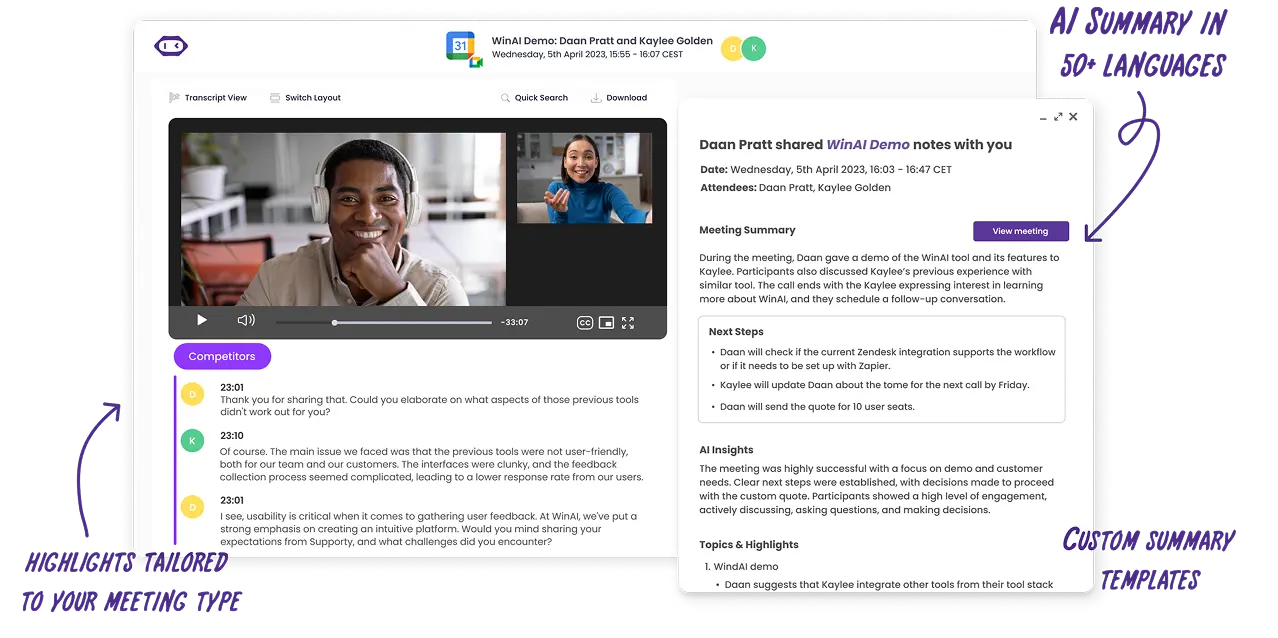
Und wenn Sie Spiele im Rahmen von Onboarding, Workshops oder einer virtuellen Konferenz einsetzen, finden Sie mit den durchsuchbaren Transkripten von MeetGeek schnell den Moment, in dem jemand eine großartige Idee, ein Hindernis oder einen überraschend nützlichen „Fun Fact“ geteilt hat, der in die Teamkultur gehört.
Was zählt als „Zoom-Spiel“?
Zoom-Spiele sind virtuelle Spiele, die Sie in einem Zoom-Meeting mit Funktionen spielen können, die Sie ohnehin schon haben, etwa Bildschirmfreigabe, Zoom-Chat, Reaktionen, Umfragen und Breakout-Räume. Breakout-Räume sind besonders nützlich, weil Sie die Gruppe für eine kurze Zusammenarbeit in kleine Teams aufteilen und anschließend alle wieder zurückholen können.
So wählen Sie schnell das richtige Spiel aus
Mit diesen drei Filtern stellen Sie sicher, dass die Spiele zum Ziel Ihres Zoom-Meetings passen:
- Dauer: 5 bis 10 Minuten (Energizer), 15 bis 25 Minuten (Teambindung), 30 bis 60 Minuten (ausführliche Aktivität)
- Gruppengröße: ganze Gruppe, Kleingruppen oder zwei Teams, die gegeneinander antreten
- Ziel: Lachen, Teamfähigkeit, Kommunikationsfähigkeit, kritisches Denken, Problemlösung oder kreatives Denken
| Spiel | Was Sie brauchen | Ideal für |
|---|---|---|
| Blitzschnitzeljagd | Kameras, Haushaltsgegenstände | Energie, schnelles Denken, Engagement |
| Meeting-Bingo | Bingokarten | Konzentration in langen Meetings |
| Zoom-Quizturnier | Fragen, Chat oder Umfragen | Freundschaftlicher Wettbewerb, Teambindung |
| Zwei Wahrheiten und eine Lüge | Chat | Vertrauensaufbau, Fun Facts |
| Pictionary | Whiteboard oder Zeichenwerkzeug | Kreativität, Kommunikation |
| Guess Who (Arbeitsgewohnheiten-Edition) | Kameras | Gruppendynamik, Zuhören |
| Lies meine Lippen | Kameras, Stummschaltung | Nonverbale Kommunikation |
| Das Zählspiel | Mikrofone | Koordination, Kommunikationsfähigkeit |
| Eine Gemeinsamkeit | Breakout-Räume | Teambindung |
| Würdest du lieber | Umfragen oder Reaktionen | Gesprächseinstiege |
| Bracket-Kampf | Bildschirmfreigabe, Umfragen | Entscheidungsfindung, Debatte |
| Pitche das absurde Produkt | Breakout-Räume | Kreatives Denken |
| Virtuelle Escape Rooms | Rätsel-Website, Bildschirmfreigabe | Problemlösung |
| Errate den Schreibtisch | Fotos, Bildschirmfreigabe | Persönliche Einblicke |
| Tabu | Chat oder Privatnachrichten | Klare Kommunikation |
| Scattergories | Chat | Schnelles Denken |
| Wessen Geschichte ist das | Chat | Teambindung |
| Multiplayer-Partyspiele | Freigegebener Spielbildschirm | Geselligkeit |
| Wette auf die Mehrheit | Umfragen | Gruppenmeinung, Debatte |
| Finde den Unterschied | Kameras | Beobachtungsgabe |
20 Zoom-Spiele mit Details, Ablauf und Zielen
1) Blitzschnitzeljagd
Dauer: 5 bis 10 Minuten
Gruppengröße: Ganze Gruppe oder kleine Teams
Ziel: Energie, schnelles Denken, unterhaltsame Aktivitäten
Die Blitzschnitzeljagd ist eines der wirkungsvollsten Zoom-Spiele, wenn Sie einen sofortigen Energieschub brauchen. Weil sie die Leute von ihren Stühlen holt, eignet sie sich besonders gut für Remote-Teams, die lange Online-Meetings oder mehrere Zoom-Calls hintereinander hinter sich haben. Das Spiel bringt Bewegung und Tempo in ein virtuelles Meeting, weckt so die Aufmerksamkeit wieder und verringert die Bildschirmmüdigkeit.
Das Spiel ist einfach, flexibel und funktioniert in einem kleinen Zoom-Meeting genauso gut wie in einem großen Videocall. Es ist auch eine gute Wahl für Gruppen mit unterschiedlichen Hierarchiestufen, weil alle unter denselben Bedingungen spielen.
So funktioniert's:
- Der Gastgeber nennt einen Gegenstand oder eine Kategorie, z. B. etwas Rotes, die Lieblingstasse oder einen Gegenstand, der für die Remote-Arbeit steht
- Die Teilnehmer flitzen los, holen den Gegenstand und kehren vor die Kamera zurück.
- Wer zuerst zurück ist, bekommt einen Punkt, oder die Gruppe stimmt per Reaktionen ab
- Optionale Nachfragen laden zu kurzen Geschichten oder persönlichen Einblicken ein
2) Meeting-Bingo
Dauer: Während des gesamten Meetings
Gruppengröße: Ganze Gruppe
Ziel: Konzentration, Engagement, spielerischer Wettbewerb
Meeting-Bingo ist ein klassisches Zoom-Spiel für längere virtuelle Besprechungen oder Online-Konferenzen, bei denen die Aufmerksamkeit gern nachlässt. Statt die Leute von der Tagesordnung abzulenken, läuft das Spiel unauffällig nebenher und sorgt dafür, dass die Teilnehmer aktiv zuhören.
Da niemand sprechen oder unterbrechen muss, eignet es sich gut für große virtuelle Teams und Meetings der Führungsebene. Es passt auch gut zu wiederkehrenden Teambesprechungen, in denen es bereits Insiderwitze und typische Muster gibt.
So funktioniert's:
- Verteilen Sie vor dem Zoom-Meeting digitale Bingokarten
- Auf den Feldern stehen typische Momente wie „Du bist stummgeschaltet“, Probleme bei der Bildschirmfreigabe oder Haustiere, die durchs Bild laufen
- Die Teilnehmer kreuzen ein Feld an, sobald der Moment eintritt
- Wer zuerst eine Reihe voll hat, schreibt BINGO in den Zoom-Chat
3) Zoom-Quizturnier
Dauer: 15 bis 30 Minuten
Gruppengröße: Ganze Gruppe oder zwei Teams
Ziel: Freundschaftlicher Wettbewerb, Teambindung
Ein Quiz gehört zu den besten Online-Spielen für die Arbeit, weil es Struktur und Spaß verbindet. Es eignet sich gut für Remote-Arbeitsumgebungen, Onboarding-Sitzungen und gesellige Zoom-Meetings, bei denen alle ohne Druck mitmachen sollen.
Ein Quiz lässt sich außerdem leicht an unterschiedliche Gruppengrößen anpassen und kann einzeln oder als freundschaftlicher Wettbewerb zwischen zwei Teams gespielt werden. Besonders wirksam ist es, um das Engagement in virtuellen Teams zu stärken, die nicht täglich miteinander zu tun haben.
So funktioniert's:
- Der Gastgeber bereitet 10 bis 15 Quizfragen vor
- Die Teilnehmer antworten über Chat, Umfragen oder Breakout-Räume
- Die Punkte werden während des Spiels notiert
- Die Gewinner werden am Ende bekannt gegeben
4) Zwei Wahrheiten und eine Lüge
Dauer: 10 bis 15 Minuten
Gruppengröße: Ganze Gruppe
Ziel: Vertrauen, persönliche Verbindung, Teambindung
Zwei Wahrheiten und eine Lüge ist ein einfaches Spiel, das schnell Nähe schafft, ohne jemanden in Verlegenheit zu bringen. Es ist besonders nützlich für neue Mitarbeiter, funktionsübergreifende virtuelle Teams oder jede Gruppe, die sich auf unkomplizierte Weise besser kennenlernen möchte.
Da das Spiel von Geschichten lebt, ergeben sich ganz von selbst Nachfragen und zwanglose Gespräche.
So funktioniert's:
- Jeder Teilnehmer macht drei Aussagen über sich
- Zwei Aussagen sind wahr und eine ist falsch
- Die Gruppe rät im Chat
- Die Person löst auf, was gelogen war, und beantwortet eine Nachfrage
5) Pictionary mit Bildschirmfreigabe
Dauer: 15 bis 20 Minuten
Gruppengröße: Zwei Teams oder eine ganze Gruppe
Ziel: Kreativität, Kommunikationsfähigkeit
Pictionary ist ein Klassiker, der sich mit Bildschirmfreigabe und Whiteboard-Tools hervorragend online spielen lässt. Es ist eines der zuverlässigsten Zoom-Spiele, um Menschen zum Lachen zu bringen und nebenbei klare Kommunikation zu üben.
Das Spiel eignet sich für kleine Teams ebenso wie für größere Gruppen, die auf Breakout-Räume verteilt sind, und es bezieht auch ruhigere Teammitglieder ein, die sich vielleicht lieber visuell ausdrücken.
So funktioniert's:
- Ein Teilnehmer erhält per Privatnachricht ein Wort oder einen Ausdruck
- Er oder sie zeichnet den Begriff auf einem freigegebenen Whiteboard oder mit einem Zeichenwerkzeug.
- Das eigene Team rät in Echtzeit im Zoom-Chat
- Jede Runde dauert etwa 60 Sekunden, bevor die Rollen wechseln
6) Guess Who (Arbeitsgewohnheiten-Edition)
Dauer: 15 Minuten
Gruppengröße: Ganze Gruppe
Ziel: Gruppendynamik, Zuhören, Aufmerksamkeit füreinander
Diese Version von Guess Who konzentriert sich auf Arbeitsgewohnheiten und Vorlieben statt auf das Aussehen und eignet sich daher für professionelle virtuelle Besprechungen und Remote-Teams. Sie fördert Neugier und aktives Zuhören, ohne persönliche Grenzen zu überschreiten.
Außerdem regt es Teams dazu an, darüber nachzudenken, wie gut sie einander jenseits der Jobtitel tatsächlich kennen.
So funktioniert's:
- Ein Teilnehmer wird heimlich ausgewählt
- Die Spieler stellen Ja-Nein-Fragen zu Gewohnheiten oder Arbeitsstil
- Teilnehmer, auf die die Antwort nicht zutrifft, schalten ihre Kamera aus
- Wer zuletzt noch zu sehen ist, ist die gesuchte Person
7) Lies meine Lippen
Dauer: 10 Minuten
Gruppengröße: Ganze Gruppe
Ziel: Nonverbale Kommunikation, Aufmerksamkeit
„Lies meine Lippen“ ist ein kurzes interaktives Spiel, das zeigt, welche Rolle die Körpersprache in Videocalls spielt. Es eignet sich gut als Energizer mitten im Meeting, wenn die Aufmerksamkeit nachlässt.
Da es auf visuellen Hinweisen beruht, bringt es die Teilnehmer dazu, sich auf den Bildschirm zu konzentrieren, statt nebenbei anderes zu erledigen.
So funktioniert's:
- Ein Teilnehmer schaltet sein Mikrofon stumm
- Er oder sie formt lautlos ein Wort oder einen Satz mit den Lippen
- Die Gruppe rät im Chat
- Wer zuerst richtig rät, gewinnt
8) Das Zählspiel
Dauer: 5 bis 10 Minuten
Gruppengröße: Kleine bis mittlere Gruppen
Ziel: Kommunikationsfähigkeit, Koordination
Das Zählspiel ist verblüffend einfach und zeigt sehr gut, wie Teams unter Unsicherheit kommunizieren. Am besten funktioniert es mit eingeschalteten Kameras und möglichst wenig Ablenkung.
Das Spiel wird häufig in Remote-Teams eingesetzt, um die Konzentration und den gemeinsamen Rhythmus zu stärken.
So funktioniert's:
- Die Gruppe muss von 1 bis 20 zählen
- Es wird keine Reihenfolge festgelegt, wer wann spricht
- Wenn zwei Personen gleichzeitig sprechen, beginnt die Gruppe von vorne
9) Eine Gemeinsamkeit
Dauer: 10 bis 15 Minuten
Gruppengröße: Kleine Gruppen
Ziel: Teambindung, Verbundenheit
„Eine Gemeinsamkeit“ ist eine der wirkungsvollsten Teambuilding-Aktivitäten für virtuelle Teams, die sich noch nicht gut kennen. Das Spiel schafft echte Verbindungen, ganz ohne erzwungene Eisbrecher.
So funktioniert's:
- Die Teilnehmer werden in Breakout-Räume mit vier bis sechs Personen aufgeteilt
- Jede Gruppe sucht eine unerwartete Gemeinsamkeit, die alle teilen.
- Die Teams kehren in den Hauptraum zurück und stellen ihre Antwort vor
10) Würdest du lieber
Dauer: 5 bis 10 Minuten
Gruppengröße: Ganze Gruppe
Ziel: Engagement, Gesprächsanlässe
„Würdest du lieber“ ist ein lockeres Online-Spiel, das sich für den Anfang oder das Ende eines Zoom-Meetings anbietet. Es braucht so gut wie keine Vorbereitung und lässt sich leicht an unterschiedliche Gruppengrößen anpassen.
So funktioniert's:
- Der Gastgeber stellt eine Entweder-oder-Frage
- Die Teilnehmer stimmen per Umfrage oder Reaktion ab
- Ein paar Freiwillige begründen ihre Wahl
11) Bracket-Kampf
Dauer: 10 bis 15 Minuten
Gruppengröße: Ganze Gruppe
Ziel: Freundschaftlicher Wettbewerb, Entscheidungsfindung, Engagement
Der Bracket-Kampf ist ein einfaches, aber sehr mitreißendes Zoom-Spiel, das sich gut für Teambesprechungen oder kleinere virtuelle Runden eignet. Besonders wirkungsvoll ist es, wenn Teams eine Pause von der strukturierten Arbeit brauchen, aber trotzdem ein Ziel vor Augen haben wollen.
Sie können den Turnierbaum an fast jedes Thema anpassen, z. B. an den besten Snack, den besten Film, das beste Produktivitätstool oder die beste Teamtradition. Da das Spiel auf Abstimmungen beruht, eignet es sich gut für große virtuelle Teams und Remote-Teams.
So funktioniert's:
- Der Gastgeber zeigt den Turnierbaum per Bildschirmfreigabe
- In jeder Runde treten zwei Optionen gegeneinander an
- Die Teilnehmer stimmen per Umfrage oder Reaktion ab
- Die Gewinner kommen eine Runde weiter, bis ein Sieger feststeht
12) Pitche das absurde Produkt
Dauer: 20 Minuten
Gruppengröße: Kleine Teams
Ziel: Kreatives Denken, Zusammenarbeit, Kommunikationsfähigkeit
„Pitche das absurde Produkt“ ist ein lustiges Spiel, das Fantasie mit Teamwork verbindet. Es eignet sich besonders gut für Umfelder, in denen Teams nur selten gemeinsam ein freies Brainstorming machen. Das Spiel fördert spielerisches Denken und trainiert zugleich echte Fähigkeiten wie Überzeugen und Präsentieren.
Da es Breakout-Räume nutzt, ist es ideal für kleine Teams innerhalb eines größeren Meetings.
So funktioniert's:
- Die Teilnehmer werden in Breakout-Räume aufgeteilt
- Jedes Team erfindet ein fiktives Produkt
- Die Teams legen einen Namen, einen Zweck und drei Funktionen fest
- Die Teams kehren in den Hauptraum zurück und pitchen ihr Produkt in 60 Sekunden
- Die Gruppe stimmt über den besten Pitch ab
13) Virtuelle Escape Rooms
Dauer: 30 bis 60 Minuten
Gruppengröße: Kleine Teams
Ziel: Problemlösung, kritisches Denken, Zusammenarbeit
Virtuelle Escape Rooms gehören zu den besten virtuellen Spielen für Teams, die Spaß an strukturierten Herausforderungen haben. Sie sind besonders beliebt für Teambuilding-Events, Onboarding-Sitzungen und längere virtuelle Konferenzen.
Escape Rooms fördern klare Kommunikation, gemeinsame Entscheidungen und logisches Denken. Sie eignen sich gut für Teams, die sich eine intensivere Zusammenarbeit wünschen, als kurze Eisbrecher sie bieten.
So funktioniert's:
- Der Gastgeber wählt einen Online-Escape-Room oder ein Rätselspiel aus
- Das Rätsel wird per Bildschirmfreigabe gezeigt
- Die Teams lösen die Aufgaben gemeinsam in Breakout-Räumen
- Die Teams melden ihre Fortschritte im Hauptraum
14) Errate den Schreibtisch
Dauer: 15 Minuten
Gruppengröße: Ganze Gruppe
Ziel: Persönliche Einblicke, Verbundenheit, Teambindung
„Errate den Schreibtisch“ ist ein entspanntes Spiel, das die Arbeit im Homeoffice menschlicher macht, weil es kleine Einblicke in den Alltag der anderen gibt. Am besten passt es zu Teams, in denen bereits ein gewisses Vertrauen besteht und die sich persönlich näherkommen möchten, ohne zu viel preiszugeben.
Besonders gut funktioniert das Spiel in lockeren Meetings oder internen Teamrunden.
So funktioniert's:
- Die Teilnehmer reichen vorab Fotos ihrer Schreibtische ein
- Der Gastgeber zeigt per Bildschirmfreigabe jeweils ein Bild
- Die Gruppe rät im Chat
- Der Besitzer gibt sich zu erkennen und erzählt vielleicht eine kurze Geschichte dazu
15) Tabu
Dauer: 15 bis 20 Minuten
Gruppengröße: Zwei Teams
Ziel: Kommunikationsfähigkeit, schnelles Denken
Tabu ist ein schnelles Spiel, bei dem die Spieler Begriffe klar erklären müssen, ohne die naheliegenden Wörter zu benutzen. Es ist eines der wirkungsvollsten Spiele, um die mündliche Kommunikation und das spontane Denken zu verbessern.
Da die Regeln einfach sind, eignet es sich gut für unterschiedliche Erfahrungsstufen und unterschiedliche Teamgrößen.
So funktioniert's:
- Ein Spieler erhält ein Wort und eine Liste verbotener Wörter per Privatnachricht
- Das eigene Team muss das Wort innerhalb von 60 Sekunden erraten
- Fällt ein verbotenes Wort, endet die Runde
- Die Teams wechseln sich ab
16) Scattergories
Dauer: 15 Minuten
Gruppengröße: Ganze Gruppe
Ziel: Schnelles Denken, kreatives Denken
Scattergories ist ein Wortspiel, das im Zoom-Chat gut funktioniert und kaum Vorbereitung braucht. Es ist ideal, um eine Gruppe in Schwung zu bringen, ganz ohne Bildschirmfreigabe oder Breakout-Räume.
Das Spiel spricht Teilnehmer an, die Spaß an Sprache, Kreativität und ein wenig Taktik haben.
So funktioniert's:
- Der Gastgeber gibt einen Buchstaben und mehrere Kategorien vor
- Die Teilnehmer haben zwei Minuten Zeit zum Nachdenken
- Alle schicken ihre Antworten gleichzeitig in den Chat
- Punkte gibt es für Antworten, die sonst niemand hat
17) Wessen Geschichte ist das
Dauer: 15 Minuten
Gruppengröße: Ganze Gruppe
Ziel: Teambindung, Empathie
Wessen Geschichte ist das? ist ein Erzählspiel, das Teams hilft, sich auf einer persönlicheren Ebene kennenzulernen. Es eignet sich gut für virtuelle Teams, die über oberflächlichen Austausch hinauskommen wollen.
Das Spiel fördert Zuhören, Neugier und respektvolle Diskussionen.
So funktioniert's:
- Die Teilnehmer reichen vor dem Meeting anonym kurze Geschichten ein
- Der Gastgeber liest eine Geschichte vor
- Die Gruppe rät im Chat, wer sie geschrieben hat
- Der Autor wird nur verraten, wenn er damit einverstanden ist
18) Multiplayer-Partyspiele
Dauer: 20 bis 30 Minuten
Gruppengröße: Ganze Gruppe
Ziel: Geselligkeit, Spaß
Multiplayer-Partyspiele eignen sich am besten für lockere Zoom-Calls wie eine virtuelle Happy Hour oder eine Teamfeier. Bei diesen Multiplayer-Spielen geht es eher um Lachen und gemeinsame Erlebnisse als um Leistung.
Sie sind besonders nützlich, wenn es darum geht, abzuschalten und sich auszutauschen.
So funktioniert's:
- Der Gastgeber gibt den Spielbildschirm frei
- Die Teilnehmer machen per Smartphone oder Browser mit
- Die Gruppe spielt mehrere kurze Runden.
19) Wette auf die Mehrheit
Dauer: 10 bis 15 Minuten
Gruppengröße: Ganze Gruppe
Ziel: Stimmungsbild der Gruppe, Diskussion, Engagement
„Wette auf die Mehrheit“ ist ein Tippspiel für Zoom, bei dem die Meinung der Gruppe und nicht die Leistung Einzelner im Vordergrund steht. Es eignet sich gut für große virtuelle Teams und vermeidet, dass einzelne Teilnehmer vorgeführt werden.
So funktioniert's:
- Der Gastgeber startet eine Umfrage
- Die Teilnehmer raten, welche Antwort am beliebtesten sein wird
- Die Ergebnisse werden aufgedeckt
- Für richtige Tipps gibt es Punkte
20) Finde den Unterschied
Dauer: 10 bis 15 Minuten
Gruppengröße: Zwei Teams
Ziel: Beobachtungsgabe, Aufmerksamkeit, Kommunikation
Finde den Unterschied ist ein visuelles interaktives Spiel, das sich gut für Videocalls eignet. Es bringt die Teilnehmer dazu, genau aufeinander zu achten, was in virtuellen Meetings oft zu kurz kommt.
So funktioniert's:
- Team A schaltet die Kameras aus und verändert drei Dinge
- Die Kameras werden wieder eingeschaltet
- Team B errät die Änderungen im Chat
- Die Teams tauschen die Rollen
Tipps für einen reibungslosen Ablauf von Zoom-Spielen
- Nutzen Sie Breakout-Räume, wenn im Spiel alle zu Wort kommen sollen.
- Geben Sie einen klaren Ablauf vor: Erklären Sie die Regeln, spielen Sie eine Proberunde und zählen Sie erst dann Punkte.
- Lassen Sie im Chat mitspielen: Der Zoom-Chat ist ideal für gleichzeitige Antworten und gemeinsames Raten und verhindert, dass man sich ins Wort fällt.
- Nutzen Sie die Bildschirmfreigabe für alles Visuelle (Bingo, Turnierbaum, Quizfolien).
- Schließen Sie mit einer kurzen Zusammenfassung und einem Abschlussbild ab: Machen Sie einen Screenshot der Siegerpose oder des schönsten Moments.
Und wenn die Runde nicht nur Spaß machen, sondern auch im Nachhinein nützlich sein soll, hält MeetGeek Aufzeichnung, Transkript und Highlights fest, sodass sich niemand den gesamten Zoom-Call noch einmal ansehen muss, um zu wissen, was passiert ist.
Machen Sie Spiele zum festen Teil Ihrer Meeting-Kultur (statt zur einmaligen Aktion)
Die besten Zoom-Spiele fühlen sich nicht nach „verordnetem Spaß“ an. Sie wirken wie ein kurzer Neustart, nach dem die Menschen in Online-Meetings besser miteinander sprechen, einander zuhören und zusammenarbeiten.
Suchen Sie sich oben eine Idee für Ihr nächstes Zoom-Meeting aus, spielen Sie 8 bis 12 Minuten und wechseln Sie das Format jede Woche. Mit der Zeit werden Sie merken, dass die Energie steigt, die Beziehungen enger werden und die Kommunikation im Remote-Team reibungsloser läuft.
Testen Sie MeetGeek kostenlos und halten Sie den Schwung vor, während und nach jedem Meeting aufrecht.
Häufig gestellte Fragen zu Zoom-Spielen
Was sind die besten Zoom-Spiele für Remote-Teams?
Die besten Zoom-Spiele für Remote-Teams sind einfach, interaktiv und ohne zusätzliche Tools für alle zugänglich. Spiele wie die Blitzschnitzeljagd, Quizrunden, Pictionary und „Würdest du lieber“ funktionieren besonders gut, weil sie sich wie von selbst in ein Zoom-Meeting einfügen und alle einbeziehen.
Wie helfen Zoom-Spiele bei Teambuilding und Kommunikation?
Zoom-Spiele unterstützen das Teambuilding, indem sie in einem virtuellen Meeting gemeinsame Erlebnisse schaffen, die über die Arbeitsaufgaben hinausgehen. Viele virtuelle Spiele fördern aktives Zuhören, schnelles Denken und die Beteiligung aller Teammitglieder, was mit der Zeit die Kommunikationsfähigkeit verbessert.
Wie lange sollten Spiele in einem Zoom-Meeting dauern?
Die meisten Zoom-Spiele funktionieren am besten, wenn sie je nach Ziel des Meetings zwischen 5 und 20 Minuten dauern. Kurze Spiele eignen sich ideal als Energizer zu Beginn eines Online-Meetings, während längere Spiele wie Quizturniere oder virtuelle Escape Rooms besser in eigens dafür angesetzte Teamtermine oder eine virtuelle Happy Hour passen.
Wenn die Spiele im Zeitrahmen bleiben, machen sie Spaß und lenken nicht vom eigentlichen Zweck des Zoom-Calls ab.







.avif)