



Le travail à distance est là pour durer, tout comme les réunions en ligne qui l'accompagnent. Le problème, c'est qu'une réunion Zoom peut vite se transformer en une mosaïque silencieuse de caméras, de micros coupés et de conversations parallèles qui se tiennent ailleurs.
C'est pourquoi les jeux à jouer sur Zoom fonctionnent si bien. Un jeu interactif bien choisi transforme un appel vidéo de routine en un moment ludique où les gens se parlent, se remarquent et tissent de vrais liens, en particulier dans les équipes à distance et les équipes virtuelles qui se retrouvent rarement dans la même pièce.
Et le moment est bien choisi. Selon Gallup, seuls 28 % des employés travaillant entièrement à distance se disent tout à fait d'accord avec l'affirmation selon laquelle ils se sentent liés à la mission ou à la raison d'être de leur organisation. Lorsque ce lien se distend, la communication devient plus difficile, la collaboration ralentit et même les bonnes équipes peuvent se sentir « à la dérive ».
Un petit jeu au cours d'une visioconférence ne réglera pas tout, mais il créera des moments d'attention, de confiance et d'énergie partagée qui se répercuteront sur le vrai travail.
Un petit mot sur MeetGeek avant de commencer (pour faciliter votre prochaine session)
Si vous organisez des réunions d'équipe qui incluent des jeux, vous aurez généralement besoin de deux choses par la suite :
- un récapitulatif simple (ce qui s'est passé, qui a gagné, ce que le groupe a décidé), et
- les éléments utiles qui surgissent par hasard pendant le jeu (enseignements sur l'équipe, points de friction, moments drôles à partager).
C'est exactement là que MeetGeek intervient.
Une fois MeetGeek connecté à Zoom, vous pouvez capturer automatiquement l'appel Zoom (enregistrement + transcription), puis obtenir un résumé généré par l'IA avec les points clés et les actions à mener, sans que personne n'ait à « se porter volontaire » pour prendre des notes au lieu de se joindre à la fête. C'est également pratique pour les collègues qui travaillent en asynchrone : ils peuvent parcourir les temps forts, faire des recherches dans la transcription et avoir le sentiment d'avoir participé à la session virtuelle, même s'ils n'ont pas pu y assister en direct.
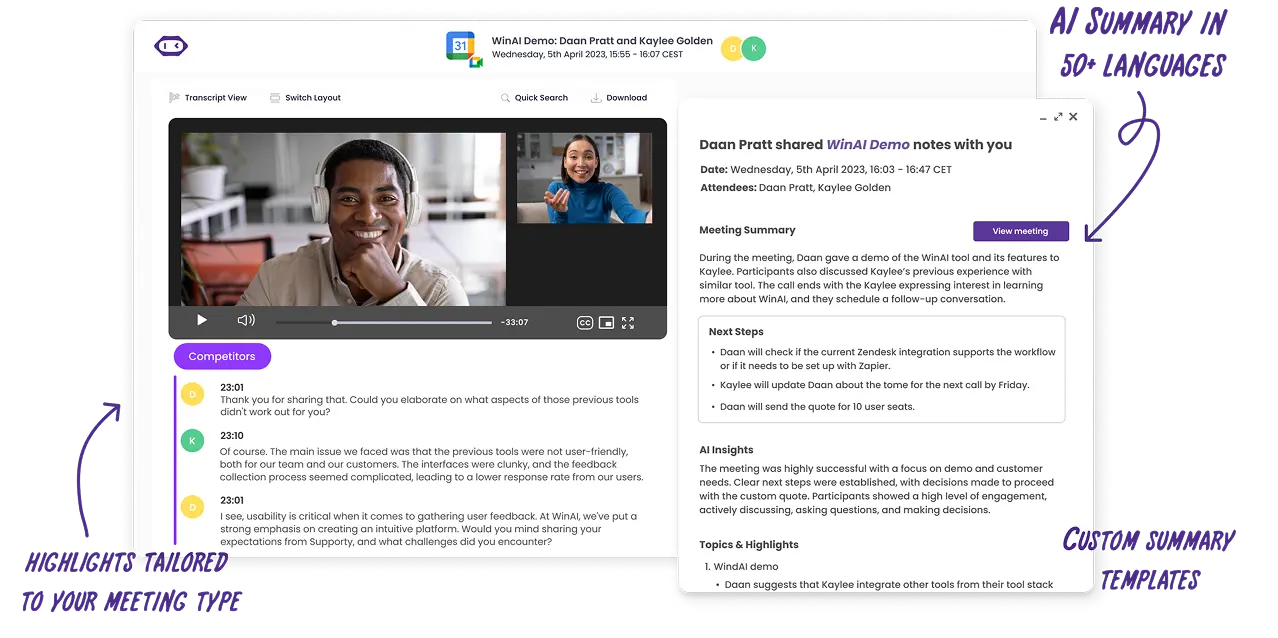
Et si vous organisez des jeux dans le cadre d'un parcours d'intégration, d'ateliers ou d'une conférence virtuelle, la recherche dans les transcriptions de MeetGeek vous permet de retrouver facilement le moment où quelqu'un a partagé une bonne idée, un point de blocage ou une « anecdote » étonnamment utile qui mérite d'entrer dans la culture d'équipe.
Qu'entend-on par « jeu Zoom » ?
Les jeux Zoom sont des jeux virtuels que vous pouvez animer dans une réunion Zoom à l'aide des fonctionnalités dont vous disposez déjà, comme le partage d'écran, le chat Zoom, les réactions, les sondages et les salles de petits groupes. Ces salles sont particulièrement utiles, car elles vous permettent de répartir les participants en petites équipes pour un travail collectif rapide, puis de réunir tout le monde quand vous êtes prêt.
Comment choisir le bon jeu (rapidement)
Appliquez ces trois filtres pour être sûr de choisir des jeux qui servent l'objectif de votre réunion Zoom :
- Durée : 5 à 10 minutes (regain d'énergie), 15 à 25 minutes (création de liens), 30 à 60 minutes (activité complète)
- Taille du groupe : groupe entier, petits groupes ou deux équipes en compétition
- Objectif : rires, cohésion d'équipe, compétences en communication, esprit critique, résolution de problèmes ou créativité
| Nom du jeu | Ce qu’il vous faut | Idéal pour |
|---|---|---|
| Chasse au trésor éclair | Caméras, objets du quotidien | Énergie, rapidité d’esprit, engagement |
| Bingo de visioconférence | Grilles de bingo | Concentration pendant les longues réunions |
| Tournoi de quiz Zoom | Questions, chat ou sondages | Compétition amicale, cohésion d’équipe |
| Deux vérités et un mensonge | Chat | Confiance, faits amusants |
| Pictionary | Tableau blanc ou outil de dessin | Créativité, communication |
| Guess Who (édition habitudes) | Caméras | Dynamique de groupe, écoute |
| Lis sur mes lèvres | Caméras, micro coupé | Communication non verbale |
| Le jeu de comptage | Micros | Coordination, compétences en communication |
| Quelque chose en commun | Salles de petits groupes | Cohésion d’équipe |
| Tu préfères | Sondages ou réactions | Amorces de conversation |
| Tournoi à élimination | Partage d’écran, sondages | Prise de décision, débat |
| Présentez le produit ridicule | Salles de petits groupes | Pensée créative |
| Escape games virtuels | Site d’énigmes, partage d’écran | Résolution de problèmes |
| Devinez le bureau | Photos, partage d’écran | Mieux se connaître |
| Tabou | Chat ou messages privés | Communication claire |
| Scattergories | Chat | Rapidité d’esprit |
| À qui est cette histoire | Chat | Cohésion d’équipe |
| Jeux d’ambiance multijoueurs | Écran de jeu partagé | Lien social |
| Pariez sur la foule | Sondages | Opinion du groupe, débat |
| Trouvez la différence | Caméras | Sens de l’observation |
20 jeux à jouer sur Zoom avec détails, mise en place et objectifs
1) Chasse au trésor éclair
Durée : 5 à 10 minutes
Taille du groupe : Groupe entier ou petites équipes
Objectif : Énergie, rapidité d'esprit, amusement
La chasse au trésor éclair est l'un des jeux les plus efficaces sur Zoom lorsque vous avez besoin d'un regain d'énergie immédiat. Comme elle oblige tout le monde à se lever de sa chaise, elle fonctionne particulièrement bien avec les équipes à distance qui sortent de longues réunions en ligne ou d'appels Zoom enchaînés. Ce jeu apporte du mouvement et un sentiment d'urgence à une réunion virtuelle, ce qui permet de relancer l'attention et de réduire la fatigue liée aux écrans.
Le jeu est simple, flexible et fonctionne aussi bien lors d'une petite session Zoom que lors d'une grande visioconférence. C'est également une excellente option pour les groupes mêlant différents niveaux d'ancienneté, puisque tout le monde joue sur un pied d'égalité.
Comment ça fonctionne :
- L'hôte annonce un objet ou une catégorie, par exemple un objet rouge, votre tasse préférée ou un objet qui représente le travail à distance
- Les participants font la course pour trouver l'objet et revenir devant la caméra
- La première personne de retour gagne un point, ou le groupe peut voter à l'aide des réactions
- En option, chacun peut ensuite raconter une courte anecdote ou partager quelque chose de personnel
2) Bingo de visioconférence
Durée : Tout au long de la réunion
Taille du groupe : Groupe entier
Objectif : Concentration, engagement, compétition légère
Le bingo de visioconférence est un classique des jeux Zoom, conçu pour les réunions virtuelles longues ou les conférences en ligne où l'attention a tendance à baisser. Au lieu de détourner les gens de l'ordre du jour, ce jeu se déroule discrètement en parallèle et maintient les participants dans une écoute active.
Comme il ne demande ni de prendre la parole ni d'interrompre qui que ce soit, il convient bien aux grandes équipes virtuelles et aux réunions de direction. Il s'intègre également parfaitement aux réunions d'équipe récurrentes, où des blagues et des habitudes partagées existent déjà.
Comment ça fonctionne :
- Partagez des grilles de bingo numériques avant la session Zoom
- Les cases reprennent des moments courants tels que « votre micro est coupé », les problèmes de partage d'écran ou l'apparition d'un animal de compagnie
- Les participants cochent les cases au fil des événements
- La première personne à compléter une ligne tape BINGO dans le chat Zoom
3) Tournoi de quiz Zoom
Durée : 15 à 30 minutes
Taille du groupe : Groupe entier ou deux équipes
Objectif : Compétition amicale, cohésion d'équipe
Le quiz est l'un des meilleurs jeux en ligne pour le travail, car il allie cadre et plaisir. Il fonctionne bien dans les environnements de travail à distance, les sessions d'intégration et les réunions Zoom conviviales où vous souhaitez faire participer tout le monde sans pression.
Le quiz s'adapte aussi facilement à différentes tailles de groupe et peut se jouer en individuel ou en deux équipes pour une compétition amicale. Il est particulièrement efficace pour renforcer l'engagement des équipes virtuelles dont les membres n'échangent pas au quotidien.
Comment ça fonctionne :
- L'hôte prépare 10 à 15 questions de quiz
- Les participants répondent via le chat, les sondages ou les salles de petits groupes
- Les points sont comptabilisés tout au long du jeu
- Les gagnants sont annoncés à la fin
4) Deux vérités et un mensonge
Durée : 10 à 15 minutes
Taille du groupe : Groupe entier
Objectif : Confiance, lien personnel, cohésion d'équipe
Deux vérités et un mensonge est un jeu simple qui crée rapidement du lien sans mettre personne sur la sellette. Il est particulièrement utile pour les nouvelles recrues, les équipes virtuelles transverses ou tout autre groupe qui a besoin d'un moyen simple d'apprendre à se connaître.
Comme le jeu repose sur des anecdotes, il amène naturellement des questions complémentaires et des conversations informelles en ligne.
Comment ça fonctionne :
- Chaque participant partage trois affirmations à son sujet
- Deux affirmations sont vraies et une est fausse
- Le groupe propose ses réponses dans le chat
- Le participant révèle le mensonge et répond à une question complémentaire
5) Pictionary avec le partage d'écran
Durée : 15 à 20 minutes
Taille du groupe : Deux équipes ou groupe entier
Objectif : Créativité, compétences en communication
Pictionary est un grand classique qui se transpose très bien en ligne grâce au partage d'écran et aux outils de tableau blanc. C'est l'une des valeurs sûres des jeux Zoom pour faire rire tout le monde tout en s'exerçant à communiquer clairement.
Ce jeu convient parfaitement aux petites équipes ou aux grands groupes répartis dans des salles de petits groupes, et il encourage la participation des membres de l'équipe plus réservés, qui préfèrent parfois s'exprimer visuellement.
Comment ça fonctionne :
- Un participant reçoit un mot ou une expression en privé
- Il le dessine à l'aide d'un tableau blanc ou d'un outil de dessin partagé
- Son équipe devine en temps réel dans le chat Zoom
- Chaque tour dure environ 60 secondes, puis les rôles tournent
6) Guess Who (édition habitudes de travail)
Durée : 15 minutes
Taille du groupe : Groupe entier
Objectif : Dynamique de groupe, écoute, attention aux autres
Cette version de Guess Who porte sur les habitudes et les préférences de travail plutôt que sur l'apparence, ce qui la rend adaptée aux réunions virtuelles professionnelles et aux équipes à distance. Elle encourage la curiosité et l'écoute active sans empiéter sur la vie privée.
Elle amène aussi les équipes à se demander à quel point leurs membres se connaissent vraiment, au-delà des intitulés de poste.
Comment ça fonctionne :
- Un participant est choisi en secret
- Les joueurs posent des questions auxquelles on répond par oui ou par non sur les habitudes ou le style de travail
- Les participants qui ne correspondent pas éteignent leur caméra
- La dernière personne encore visible est la bonne réponse
7) Lis sur mes lèvres
Durée : 10 minutes
Taille du groupe : Groupe entier
Objectif : Communication non verbale, attention
Lis sur mes lèvres est un court jeu interactif qui met en lumière le rôle du langage corporel dans les appels vidéo. Il fonctionne bien pour relancer l'énergie en milieu de réunion, quand l'attention commence à se relâcher.
Comme il repose sur des indices visuels, il incite les participants à rester concentrés sur l'écran plutôt qu'à faire plusieurs choses à la fois.
Comment ça fonctionne :
- Un participant coupe son micro
- Il articule en silence un mot ou une expression
- Le groupe propose ses réponses dans le chat
- La première bonne réponse l'emporte
8) Le jeu de comptage
Durée : 5 à 10 minutes
Taille du groupe : Petits et moyens groupes
Objectif : Compétences en communication, coordination
Le jeu de comptage est d'une simplicité trompeuse et se révèle très efficace pour montrer comment les équipes communiquent dans l'incertitude. Il fonctionne mieux caméras allumées et avec un minimum de distractions.
Ce jeu est souvent utilisé avec des équipes à distance pour renforcer la concentration et trouver un rythme commun.
Comment ça fonctionne :
- Le groupe doit compter de 1 à 20
- Aucun ordre de passage n'est défini
- Si deux personnes parlent en même temps, le groupe recommence
9) Quelque chose en commun
Durée : 10 à 15 minutes
Taille du groupe : Petits groupes
Objectif : Cohésion d'équipe, création de liens
Quelque chose en commun est l'une des activités de team building les plus efficaces pour les équipes virtuelles dont les membres se connaissent mal. Ce jeu crée de vrais liens sans recourir à des brise-glaces forcés.
Comment ça fonctionne :
- Les participants sont répartis dans des salles de petits groupes de quatre à six personnes
- Chaque groupe trouve un point commun inattendu partagé par tous ses membres
- Les équipes reviennent dans la salle principale pour présenter leur réponse
10) Tu préfères
Durée : 5 à 10 minutes
Taille du groupe : Groupe entier
Objectif : Engagement, conversation en ligne
Tu préfères est un jeu en ligne léger qui fonctionne bien en début ou en fin de réunion Zoom. Il ne demande pratiquement aucune préparation et s'adapte facilement à toutes les tailles de groupe.
Comment ça fonctionne :
- L'hôte pose une question à choix
- Les participants votent à l'aide de sondages ou de réactions
- Quelques volontaires expliquent leur raisonnement
11) Tournoi à élimination
Durée : 10 à 15 minutes
Taille du groupe : Groupe entier
Objectif : Compétition amicale, prise de décision, engagement
Le tournoi à élimination est un jeu Zoom simple mais très prenant, qui fonctionne bien en réunion d'équipe ou lors de sessions virtuelles plus légères. Ce jeu est particulièrement efficace lorsque les équipes ont besoin d'une pause dans le travail structuré, sans pour autant perdre le sentiment d'avoir un but.
Vous pouvez adapter le tableau du tournoi à presque tous les thèmes, comme le meilleur en-cas, le meilleur film, le meilleur outil de productivité ou la meilleure tradition d'équipe. Comme il repose sur le vote, il convient bien aux grandes équipes virtuelles et aux équipes à distance.
Comment ça fonctionne :
- L'hôte affiche le tableau du tournoi en partage d'écran
- Deux options s'affrontent à chaque tour
- Les participants votent à l'aide de sondages ou de réactions
- Les gagnants passent au tour suivant jusqu'à ce qu'il ne reste qu'un seul choix
12) Présentez le produit ridicule
Durée : 20 minutes
Taille du groupe : Petites équipes
Objectif : Pensée créative, collaboration et communication
Présentez le produit ridicule est un jeu amusant qui allie imagination et travail d'équipe. Il fonctionne particulièrement bien dans les environnements où les équipes ont rarement l'occasion de faire un brainstorming librement ensemble. Le jeu encourage une réflexion ludique tout en faisant travailler de vraies compétences comme la persuasion et la prise de parole.
Comme il s'appuie sur les salles de petits groupes, il est idéal pour les petites équipes au sein d'une réunion plus large.
Comment ça fonctionne :
- Les participants sont répartis dans des salles de petits groupes
- Chaque équipe invente un produit fictif
- Les équipes définissent un nom, une utilité et trois caractéristiques
- Les équipes reviennent dans la salle principale pour un pitch de 60 secondes
- Le groupe vote pour le meilleur pitch
13) Escape games virtuels
Durée : 30 à 60 minutes
Taille du groupe : Petites équipes
Objectif : Résolution de problèmes, esprit critique, collaboration
Les escape games virtuels font partie des meilleurs jeux virtuels pour les équipes qui aiment les défis structurés. Ils sont particulièrement appréciés lors des événements de team building, des sessions d'intégration et des conférences virtuelles plus longues.
Les escape games encouragent une communication claire, la prise de décision collective et le raisonnement logique. Ils conviennent bien aux équipes qui recherchent une expérience de collaboration plus poussée que de simples brise-glaces.
Comment ça fonctionne :
- L'hôte choisit un escape game ou un jeu d'énigmes en ligne
- L'énigme est affichée en partage d'écran
- Les équipes collaborent dans des salles de petits groupes pour résoudre les énigmes
- Les équipes font le point sur leur progression dans la salle principale
14) Devinez le bureau
Durée : 15 minutes
Taille du groupe : Groupe entier
Objectif : Mieux se connaître, liens, cohésion d'équipe
Devinez le bureau est un jeu détendu qui humanise le travail à distance en donnant un petit aperçu du cadre quotidien de chacun. Il fonctionne mieux avec les équipes qui ont déjà un certain niveau de confiance et qui souhaitent approfondir leurs liens personnels sans trop en dévoiler.
Ce jeu est particulièrement efficace lors de réunions informelles ou de moments conviviaux en équipe.
Comment ça fonctionne :
- Les participants soumettent des photos de leur bureau à l'avance
- L'hôte partage une image à la fois à l'aide du partage d'écran
- Le groupe propose ses réponses dans le chat
- Le propriétaire du bureau se dévoile et peut raconter une courte anecdote
15) Tabou
Durée : 15 à 20 minutes
Taille du groupe : Deux équipes
Objectif : Compétences en communication, rapidité d'esprit
Tabou est un jeu au rythme soutenu qui met les joueurs au défi d'expliquer clairement une idée sans recourir aux mots les plus évidents. C'est l'un des jeux les plus efficaces pour améliorer la communication orale et la vivacité d'esprit.
Comme ses règles sont simples, il fonctionne bien avec des niveaux d'expérience variés et des équipes de toutes tailles.
Comment ça fonctionne :
- Un joueur reçoit un mot et une liste de mots interdits par message privé
- Son équipe doit deviner le mot en 60 secondes
- Si un mot interdit est utilisé, le tour se termine
- Les équipes alternent les rôles
16) Scattergories
Durée : 15 minutes
Taille du groupe : Groupe entier
Objectif : Rapidité d'esprit, pensée créative
Scattergories est un jeu de lettres en ligne qui fonctionne bien dans le chat Zoom et ne demande qu'une préparation minimale. Il est idéal pour dynamiser un groupe sans avoir besoin du partage d'écran ni de salles de petits groupes.
Ce jeu plaît aux participants qui aiment les mots, la créativité et un soupçon de stratégie.
Comment ça fonctionne :
- L'hôte partage une lettre et plusieurs catégories
- Les participants ont deux minutes pour réfléchir
- Tout le monde envoie ses réponses en même temps dans le chat
- Les réponses uniques rapportent des points
17) À qui est cette histoire
Durée : 15 minutes
Taille du groupe : Groupe entier
Objectif : Cohésion d'équipe, empathie
À qui est cette histoire ? est un jeu fondé sur le récit qui aide les équipes à tisser des liens plus personnels. Il fonctionne bien avec les équipes virtuelles qui souhaitent dépasser les échanges superficiels.
Le jeu encourage l'écoute, la curiosité et les discussions respectueuses.
Comment ça fonctionne :
- Les participants envoient anonymement de courtes histoires avant la réunion
- L'hôte lit une histoire à haute voix
- Le groupe devine dans le chat qui l'a écrite
- L'auteur ne se dévoile que s'il le souhaite
18) Jeux d'ambiance multijoueurs
Durée : 20 à 30 minutes
Taille du groupe : Groupe entier
Objectif : Lien social, divertissement
Les jeux d'ambiance multijoueurs conviennent parfaitement aux appels Zoom décontractés, comme un happy hour virtuel ou une fête d'équipe. Ces jeux multijoueurs mettent l'accent sur le rire et l'expérience partagée plutôt que sur la performance.
Ils sont particulièrement utiles lorsque l'objectif est de se détendre et de passer un moment convivial.
Comment ça fonctionne :
- L'hôte partage l'écran de jeu
- Les participants rejoignent la partie depuis un téléphone ou un navigateur
- Le groupe joue plusieurs courtes parties
19) Pariez sur la foule
Durée : 10 à 15 minutes
Taille du groupe : Groupe entier
Objectif : Opinion du groupe, discussion, engagement
Pariez sur la foule est un jeu Zoom basé sur des pronostics qui met en avant l'opinion du groupe plutôt que les performances individuelles. Il fonctionne bien avec les grandes équipes virtuelles et évite de mettre un seul participant sur la sellette.
Comment ça fonctionne :
- L'hôte lance une question sous forme de sondage
- Les participants devinent quelle réponse sera la plus populaire
- Les résultats sont dévoilés
- Des points sont attribués pour les pronostics corrects
20) Trouvez la différence
Durée : 10 à 15 minutes
Taille du groupe : Deux équipes
Objectif : Observation, attention, communication
Trouvez la différence est un jeu visuel interactif qui fonctionne bien lors des appels vidéo. Il incite les participants à vraiment prêter attention les uns aux autres, ce que l'on néglige souvent dans les réunions virtuelles.
Comment ça fonctionne :
- L'équipe A éteint ses caméras et change trois choses
- Les caméras se rallument
- L'équipe B devine les changements dans le chat
- Les équipes inversent les rôles
Conseils pour animer des jeux Zoom sans malaise
- Utilisez les salles de petits groupes lorsque le jeu exige que chacun ait du temps de parole.
- Donnez un rythme clair : expliquez les règles, faites un tour d'essai, puis commencez à compter les points.
- Encouragez l'usage du chat : le chat Zoom est votre meilleur allié pour les réponses simultanées, les propositions du groupe et pour éviter les interruptions.
- Utilisez le partage d'écran pour tout ce qui est visuel (bingo, tableau de tournoi, diapositives de quiz).
- Terminez par un récapitulatif rapide et une photo finale : faites une capture d'écran de la pose gagnante ou du meilleur moment.
Et si vous voulez que la session soit amusante, mais aussi utile par la suite, MeetGeek peut capturer l'enregistrement, la transcription et les moments forts afin que personne n'ait à revisionner l'intégralité de l'appel Zoom pour se souvenir de ce qui s'est passé.
Intégrez les jeux à votre culture de réunion (et n'en faites pas une activité ponctuelle)
Les meilleurs jeux à jouer sur Zoom ne donnent pas l'impression d'un « amusement forcé ». Ils font plutôt l'effet d'une courte pause qui améliore la façon dont les gens parlent, écoutent et collaborent lors des réunions en ligne.
Choisissez l'une des idées ci-dessus pour votre prochaine réunion Zoom, consacrez-y 8 à 12 minutes et changez de format chaque semaine. Au fil du temps, vous constaterez plus d'énergie, des relations plus solides et une communication plus fluide dans le travail à distance.
Essayez MeetGeek gratuitement et entretenez cette dynamique avant, pendant et après chaque réunion.
Questions fréquemment posées sur les jeux à jouer sur Zoom
Quels sont les meilleurs jeux à jouer sur Zoom pour les équipes à distance ?
Les meilleurs jeux à jouer sur Zoom pour les équipes à distance sont simples, interactifs et accessibles sans outil supplémentaire. Des jeux comme la chasse au trésor éclair, les quiz, Pictionary et Tu préfères fonctionnent particulièrement bien, car ils s'intègrent naturellement à une réunion Zoom et permettent à tout le monde de participer.
Comment les jeux Zoom aident-ils à renforcer l'esprit d'équipe et la communication ?
Les jeux Zoom renforcent l'esprit d'équipe en créant, pendant une réunion virtuelle, des expériences partagées qui vont au-delà des tâches professionnelles. De nombreux jeux virtuels encouragent l'écoute active, la rapidité d'esprit et la participation de tous les membres de l'équipe, ce qui contribue à améliorer les compétences de communication au fil du temps.
Combien de temps faut-il consacrer aux jeux pendant une réunion Zoom ?
La plupart des jeux Zoom fonctionnent mieux lorsqu'ils durent entre 5 et 20 minutes, selon l'objectif de la réunion. Les jeux courts sont idéaux pour donner de l'énergie au début des réunions en ligne, tandis que les jeux plus longs, tels que les tournois de quiz ou les escape games virtuels, conviennent mieux aux sessions d'équipe dédiées ou à un happy hour virtuel.
Limiter la durée des jeux permet qu'ils restent amusants et ne détournent pas l'attention de l'objectif principal de l'appel Zoom.







.avif)