



Virtual work is here to stay, and so are the online meetings that come with it. The problem is that a Zoom meeting can easily turn into a quiet grid of cameras, muted mics, and side conversations happening somewhere else.
That’s why games to play on Zoom work so well. A well-picked interactive game turns a routine video call into a fun way to get people talking, noticing each other, and building real connections, especially for remote teams and virtual teams that rarely share the same room.
And the timing matters. Gallup has reported that only 28% of fully remote employees strongly agree they feel connected to their organization’s mission/purpose. When your connection drops, communication gets harder, collaboration gets slower, and even good teams can feel “drifty.”
A short game inside a virtual conference call won’t fix everything, but it will create moments of attention, trust, and shared energy that carry into actual work.
A quick MeetGeek note before we start (so your next session is easier)
If you’re running team meetings that include games, you’ll usually want two things afterward:
- a simple recap (what happened, who won, what the group decided), and
- the useful bits that accidentally show up during play (team insights, friction points, funny moments worth sharing).
That’s exactly where MeetGeek helps.
With MeetGeek connected to Zoom, you can automatically capture the Zoom call (recording + transcript), then get an AI summary with key points and action items, without someone “volunteering” to take notes instead of joining the fun. It’s also handy for async teammates: they can skim highlights, search the transcript, and still feel part of the virtual session, even if they couldn’t attend live.
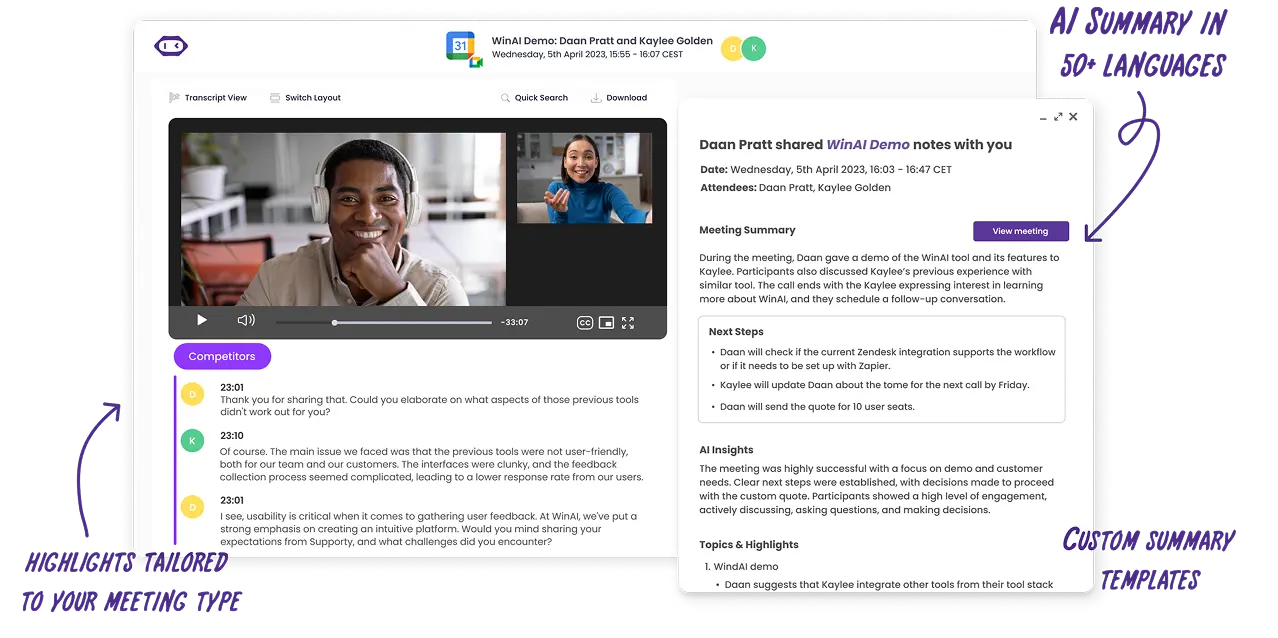
And if you’re running games as part of onboarding, workshops, or a virtual conference, MeetGeek’s searchable transcripts make it easy to find the moment someone shared a great idea, a blocker, or a surprisingly useful “fun fact” that belongs in team culture.
What counts as “Zoom games”?
Zoom games are virtual games you can run inside a Zoom meeting using features you already have, like screen sharing, Zoom chat, reactions, polls, and breakout rooms. Breakout rooms are especially useful because they let you split into small teams for quick collaboration, then bring everyone back when you’re ready.
How to pick the right game (fast)
Use these three filters when you want to make sure you play games that are helpful to your Zoom meeting goal:
- Time: 5–10 minutes (energizer), 15–25 minutes (bonding), 30–60 minutes (full activity)
- Group size: whole group, small groups, or two teams competing
- Goal: laughs, team bonding, communication skills, critical thinking, problem solving, or creative thinking
| Game name | What you need | Best for |
|---|---|---|
| Lightning scavenger hunt | Cameras, household items | Energy, quick thinking, engagement |
| Conference call bingo | Bingo cards | Focus during long meetings |
| Zoom trivia tournament | Questions, chat, or polls | Friendly competition, team bonding |
| Two truths and a lie | Chat | Trust building, fun facts |
| Pictionary | Whiteboard or drawing tool | Creativity, communication |
| Guess Who (habits edition) | Cameras | Group dynamics, listening |
| Read my lips | Cameras, mute | Nonverbal communication |
| The counting game | Microphones | Coordination, communication skills |
| Something in common | Breakout rooms | Team bonding |
| Would you rather | Polls or reactions | Conversation starters |
| Bracket battle | Screen sharing, polls | Decision making, debate |
| Pitch the ridiculous product | Breakout rooms | Creative thinking |
| Virtual escape rooms | Puzzle site, screen sharing | Problem solving |
| Guess the desk | Photos, screen sharing | Personal insights |
| Taboo | Chat or private messages | Clear communication |
| Scattergories | Chat | Quick thinking |
| Whose story is it | Chat | Team bonding |
| Multiplayer party games | Shared game screen | Social connection |
| Bet on the crowd | Polls | Group opinion, debate |
| Spot the difference | Cameras | Observation skills |
20 games to play on Zoom with details, setup, and goals
1) Lightning scavenger hunt
Time: 5 to 10 minutes
Group size: Whole group or small teams
Goal: Energy, quick thinking, fun activities
Lightning scavenger hunt is one of the most effective games to play on Zoom when you need an instant energy boost. Because it gets people out of their chairs, it works especially well for remote teams that have been sitting through long online meetings or back-to-back Zoom calls. This game adds movement and urgency to a virtual meeting, which helps reset attention and reduce screen fatigue.
The game is simple, flexible, and works just as well in a small Zoom session as it does in a large virtual conference call. It is also a great option for mixed seniority groups since everyone plays at the same level.
How it works:
- The host calls out an item or category, such as something red, your favorite mug, or an object that represents remote work
- Participants race to find the item and return to the camera
- The first person back earns a point, or the group can use reactions for a group vote
- Optional follow-ups invite short stories or personal insights
2) Conference call bingo
Time: Throughout the meeting
Group size: Whole group
Goal: Focus, engagement, light competition
Conference call bingo is a classic Zoom game designed for longer virtual meetings or online conferences where attention tends to drop. Instead of pulling people away from the agenda, this game runs quietly in parallel and keeps participants actively listening.
Because it does not require speaking or interrupting, it works well for large virtual teams and leadership meetings. It also fits nicely into recurring team meetings where shared jokes and patterns already exist.
How it works:
- Share digital bingo cards before the Zoom session
- Squares include common moments like “you are on mute,” screen sharing issues, or pets appearing
- Participants mark squares as events happen
- The first person to complete a line types BINGO in Zoom chat
3) Zoom trivia tournament
Time: 15 to 30 minutes
Group size: Whole group or two teams
Goal: Friendly competition, team bonding
A trivia game is one of the best online games for work because it balances structure and fun. It works well for remote work environments, onboarding sessions, and social Zoom meetings where you want participation without pressure.
Trivia also adapts easily to different group sizes and can be played as individuals or split into two teams for friendly competition. It is especially effective for improving engagement in virtual teams that do not interact daily.
How it works:
- The host prepares 10 to 15 trivia questions
- Participants answer using chat, polls, or breakout rooms
- Points are tracked throughout the game
- Winners are announced at the end
4) Two truths and a lie
Time: 10 to 15 minutes
Group size: Whole group
Goal: Trust, personal connection, team bonding
Two truths and a lie is a simple game that creates a connection quickly without putting people on the spot. It is especially useful for new hires, cross-functional virtual teams, or any group that needs a low-pressure way to learn about each other.
Because the game is story-driven, it naturally leads to follow-up questions and informal online conversations.
How it works:
- Each participant shares three statements about themselves
- Two statements are true, and one is false
- The group submits guesses in chat
- The speaker reveals the lie and answers one follow-up question
5) Pictionary using screen sharing
Time: 15 to 20 minutes
Group size: Two teams or whole group
Goal: Creativity, communication skills
Pictionary is a classic game that translates extremely well into an online version using screen sharing and whiteboard tools. It is one of the most reliable Zoom games for getting people laughing while also practicing clear communication.
This game works well for small teams or larger groups split into breakout rooms, and it encourages participation from quieter team members who may prefer visual expression.
How it works:
- One participant receives a word or phrase privately
- They draw it using a shared whiteboard or drawing tool
- Their team guesses in real time using Zoom chat
- Each round lasts about 60 seconds before rotating roles
6) Guess Who (work habits edition)
Time: 15 minutes
Group size: Whole group
Goal: Group dynamics, listening, awareness
This version of Guess Who focuses on work habits and preferences instead of appearance, making it suitable for professional virtual meetings and remote teams. It encourages curiosity and active listening without crossing personal boundaries.
It also helps teams reflect on how well they actually know each other beyond job titles.
How it works:
- One participant is secretly selected
- Players ask yes or no questions about habits or work style
- Participants who do not match turn off their cameras
- The last visible person is the answer
7) Read my lips
Time: 10 minutes
Group size: Whole group
Goal: Nonverbal communication, attention
Read my lips is a short interactive game that highlights the role of body language in video calls. It works well as a mid-meeting energizer when attention starts to drift.
Because it relies on visual cues, it encourages participants to stay focused on the screen rather than multitasking.
How it works:
- One participant mutes their microphone
- They silently mouth a word or phrase
- The group submits guesses in chat
- The first correct guess wins
8) The counting game
Time: 5 to 10 minutes
Group size: Small to medium groups
Goal: Communication skills, coordination
The counting game is deceptively simple and very effective for highlighting how teams communicate under uncertainty. It works best with cameras on and minimal distractions.
This game is often used with remote teams to build focus and shared rhythm.
How it works:
- The group must count from 1 to 20
- No speaking order is assigned
- If two people speak at the same time, the group starts over
9) Something in common
Time: 10 to 15 minutes
Group size: Small groups
Goal: Team bonding, connection
Something in common is one of the strongest team-building activities for virtual teams that do not know each other well. It creates meaningful connections without relying on forced icebreakers.
How it works:
- Participants are split into breakout rooms of four to six people
- Each group finds one unexpected thing they all share
- Teams return to the main room to present their answer
10) Would you rather
Time: 5 to 10 minutes
Group size: Whole group
Goal: Engagement, online conversation
Would you rather is a lightweight online game that works well at the start or end of a Zoom meeting. It requires almost no setup and is easy to adapt to different group sizes.
How it works:
- The host asks a choice-based question
- Participants vote using polls or reactions
- A few volunteers explain their reasoning
11) Bracket battle
Time: 10 to 15 minutes
Group size: Whole group
Goal: Friendly competition, decision making, engagement
Bracket battle is a simple but highly engaging Zoom game that works well during team meetings or lighter virtual sessions. This game is especially effective when teams need a break from structured work but still want a sense of purpose.
You can adapt the bracket to almost any theme, such as best snack, best movie, best productivity tool, or best team tradition. Because it relies on voting, it works well for large virtual teams and remote teams.
How it works:
- The host shares a bracket using screen sharing
- Two options compete in each round
- Participants vote using polls or reactions
- Winners advance until one final choice remains
12) Pitch the ridiculous product
Time: 20 minutes
Group size: Small teams
Goal: Creative thinking, collaboration, communication skills
Pitch the ridiculous product is a fun game that combines imagination with teamwork. It works particularly well for environments where teams rarely get to brainstorm freely together. The game encourages playful thinking while still practicing real skills like persuasion and presentation.
Because it uses breakout rooms, it is ideal for small teams within a larger meeting.
How it works:
- Participants are split into breakout rooms
- Each team invents a fictional product
- Teams define a name, purpose, and three features
- Teams return to the main room to pitch in 60 seconds
- The group votes on the best pitch
13) Virtual escape rooms
Time: 30 to 60 minutes
Group size: Small teams
Goal: Problem solving, critical thinking, collaboration
Virtual escape rooms are among the best virtual games for teams that enjoy structured challenges. They are especially popular for team building events, onboarding sessions, and longer virtual conferences.
Escape rooms encourage clear communication, shared decision-making, and logical thinking. They are well-suited for teams that want a deeper collaborative experience than short icebreakers.
How it works:
- The host selects an online escape room or puzzle experience
- The puzzle is shared using screen sharing
- Teams collaborate in breakout rooms to solve challenges
- Teams report progress back in the main room
14) Guess the desk
Time: 15 minutes
Group size: Whole group
Goal: Personal insights, connection, team bonding
Guess the desk is a relaxed game that helps humanize remote work by sharing small glimpses into people’s daily environments. It works best for teams that already have some level of trust and want to deepen personal connection without oversharing.
This game is particularly effective during casual meetings or internal team socials.
How it works:
- Participants submit photos of their desks ahead of time
- The host shares one image at a time using screen sharing
- The group submits guesses in chat
- The owner is revealed and may share a short story
15) Taboo
Time: 15 to 20 minutes
Group size: Two teams
Goal: Communication skills, quick thinking
Taboo is a fast-paced game that challenges players to explain ideas clearly without relying on obvious words. It is one of the most effective games for improving verbal communication and thinking on the spot.
Because the rules are simple, it works well for mixed experience levels and different team sizes.
How it works:
- One player receives a word and a list of forbidden words via private message
- Their team must guess the word within 60 seconds
- If a forbidden word is used, the round ends
- Teams rotate roles
16) Scattergories
Time: 15 minutes
Group size: Whole group
Goal: Quick thinking, creative thinking
Scattergories is a word-based online game that works well in Zoom chat and requires minimal setup. It is ideal for energizing a group without needing screen sharing or breakout rooms.
This game appeals to participants who enjoy language, creativity, and light strategy.
How it works:
- The host shares a letter and several categories
- Participants have two minutes to think
- Everyone submits answers at the same time in chat
- Unique answers score points
17) Whose story is it
Time: 15 minutes
Group size: Whole group
Goal: Team bonding, empathy
Whose story is it is a storytelling-based game that helps teams connect on a more personal level. It works well for virtual teams that want to move beyond surface-level interaction.
The game encourages listening, curiosity, and respectful discussion.
How it works:
- Participants submit short stories anonymously before the meeting
- The host reads one story aloud
- The group guesses who wrote it using chat
- The author is revealed only if they are comfortable
18) Multiplayer party games
Time: 20 to 30 minutes
Group size: Whole group
Goal: Social connection, fun
Multiplayer party games are best suited for casual Zoom calls, like a virtual happy hour or team celebration. These multiplayer games focus on laughter and shared experience rather than performance.
They are especially useful when the goal is to relax and socialize.
How it works:
- The host shares the game screen
- Participants join using a phone or browser
- The group plays several short rounds
19) Bet on the crowd
Time: 10 to 15 minutes
Group size: Whole group
Goal: Group insight, discussion, engagement
Bet on the crowd is a prediction-based Zoom game that highlights group opinion rather than individual performance. It works well for large virtual teams and avoids putting any single participant on the spot.
How it works:
- The host launches a poll question
- Participants guess which answer will be most popular
- Results are revealed
- Points are awarded for correct predictions
20) Spot the difference
Time: 10 to 15 minutes
Group size: Two teams
Goal: Observation, attention, communication
Spot the difference is a visual interactive game that works well on video calls. It encourages participants to pay close attention to each other, which is often overlooked in virtual meetings.
How it works:
- Team A turns off their cameras and changes three things
- Cameras turn back on
- Team B guesses the changes in chat
- Teams switch roles
Tips to run Zoom games without awkwardness
- Use breakout rooms when the game needs airtime for everyone.
- Set a clear pace: explain rules, do one practice round, then start scoring.
- Encourage chat play: Zoom chat is your best friend for simultaneous answers, group guesses, and avoiding interruptions.
- Use screen sharing for anything visual (bingo, bracket, trivia slides).
- End with a quick recap and a final image: take a screenshot of the winning pose or best moment.
And if you want the session to be fun and useful afterward, MeetGeek can capture the recording, transcript, and highlights so nobody has to replay the entire Zoom call to remember what happened.
Make games part of the meeting culture (not a one-off)
The best games to play on Zoom don’t feel like “forced fun.” They feel like a quick reset that improves the way people talk, listen, and collaborate in online meetings.
Pick one idea above for your next Zoom meeting, run it for 8–12 minutes, and rotate the format weekly. Over time, you’ll notice better energy, stronger relationships, and smoother communication across remote work.
Try MeetGeek for free and keep the momentum going before, during, and after every meeting.
Frequently asked questions about games to play on Zoom
What are the best games to play on Zoom for remote teams?
The best games to play on Zoom for remote teams are simple, interactive, and easy to join without extra tools. Games like lightning scavenger hunt, trivia games, Pictionary, and Would You Rather work especially well because they fit naturally into a Zoom meeting and keep everyone involved.
How do Zoom games help with team building and communication?
Zoom games support team building by creating shared experiences during a virtual meeting that go beyond work tasks. Many virtual games encourage active listening, quick thinking, and participation from all team members, which helps improve communication skills over time.
How long should you play games during a Zoom meeting?
Most Zoom games work best when they last between 5 and 20 minutes, depending on the goal of the meeting. Short games are ideal as energizers at the start of online meetings, while longer games like trivia tournaments or virtual escape rooms fit better in dedicated team sessions or a virtual happy hour.
Keeping games time-boxed ensures they stay fun and do not distract from the main purpose of the Zoom call.







.avif)