Ao clicar “Aceitar todos os cookies”, você concorda com o armazenamento de cookies em seu dispositivo para melhorar a navegação no site, analisar o uso do site e auxiliar em nossos esforços de marketing. Veja nosso Política de privacidade para obter mais informações.
MeetGeekBlogBest Interview Transcription Software: 5 Tools Compared
Back to Blog

Best Interview Transcription Software: 5 Tools Compared

Produtividade
Produtividade

Find the best interview transcription software for your workflow. Compare five top tools for transcription, summaries, editing, collaboration, and interview analysis.

Melania Ciocianu
August 20, 2026
/
5 min read
Table of content
Comece a usar o MeetGeek, o assistente de reuniões com IA
📝 AI-powered Meeting Note taker
✅ Free meeting recording & transcription
💬 Automated sharing of insights to other tools.
Cadastre-se gratuitamente
Share the knowledge with your circle
Copied

Interview transcription software turns recorded conversations into searchable text, saving researchers, recruiters, journalists, and other interviewers from replaying audio and typing everything manually.

The best option depends on what happens after transcription. Some tools focus on producing an accurate transcript from an audio file. Others add speaker identification, video editing, collaboration features, AI-generated summaries, or interview analysis.

In this guide, we compare five interview transcription tools based on their features, intended use cases, and feedback from real users.

TL;DR

  • Choose software based on what you need to do with the interview transcript, not transcription accuracy alone.
  • Otter.ai is useful when you want a live transcript while an interview is happening.
  • Descript stands out when transcription is part of an audio or video editing workflow.
  • Trint combines transcription with a collaborative editor for teams working with research interviews and recorded content.
  • MeetGeek goes beyond core transcription by turning interviews into structured notes, summaries, insights, and searchable knowledge.
  • OpenAI's Whisper is better suited to developers and teams that want a transcription model they can build into their own workflow.

Why interview transcription software matters

A one-hour interview creates an awkward problem: the conversation may be over, but much of the work has only started.

You might need to revisit an answer, find a specific quote, compare responses across multiple people, pull themes from research interviews, prepare meeting notes, or share findings with colleagues.

Doing that directly from audio and video recordings is slow. Even when you remember roughly when something was said, finding the exact spoken words can mean repeatedly scrubbing through an audio file.

Manual transcription creates an even bigger time commitment.

Interview transcription software changes the format of the information. Instead of working primarily with voice recordings, you get searchable text that can be reviewed, copied, analyzed, summarized, and shared.

Modern AI transcription tools can also handle tasks such as:

  • Speaker identification and speaker labels
  • AI-generated summaries
  • Filler words and repeated words
  • Search across transcripts
  • Multiple languages
  • Different export formats and subtitle formats
  • Sharing and collaboration
  • AI chat for asking questions about an interview
  • Identifying recurring topics and patterns

That distinction matters because the best interview transcription software isn't necessarily the product that simply generates text with the fewest errors.

The better question is: what do you need to do once you have the transcript?

What should you look for in interview transcription software?

Before comparing tools, consider the recording conditions and the job you need the transcript to do.

Transcription accuracy

Accuracy is the obvious starting point, but no automated transcript should automatically be treated as flawless.

Background noise, accents, industry terminology, multiple speakers talking at once, unclear audio, and names can all affect transcription accuracy.

Studio-quality audio will generally give transcription software an easier job than a noisy interview recorded in a public place.

If exact wording is critical, human transcription or human-powered transcription may still be worth considering. AI transcription prioritizes turnaround speed and scalability, while human transcription options are generally relevant when the cost of a transcription error is particularly high.

Speaker identification

A transcript becomes much harder to use if you can't tell who said what.

For interviews involving multiple people, look for software that separates speakers and applies speaker labels consistently. This becomes especially useful during qualitative research, where you may be comparing comments from several participants.

Interview analysis

Generating accurate transcripts is only the first step for many teams.

Researchers may need to identify patterns across qualitative data. Recruiters may need to pull out candidate responses from screening interviews. Journalists may need quotes and themes. Customer teams may want to compare feedback across longer interviews.

Features such as AI chat, an AI summary, searchable transcripts, and AI-generated summaries can substantially reduce the work that comes after transcription.

Import and recording options

Check how recordings get into the software.

Some products are designed around uploaded audio files and video files. Others can automatically capture interviews conducted through a Google Meet, Zoom, or Microsoft Teams integration. A mobile voice recorder can also be useful for in-person interviews.

The right workflow is the one that removes steps rather than adding them.

Export and collaboration

A transcript rarely stays in one tool forever.

Depending on your workflow, you might need text transcripts, subtitle formats, documents, or other export formats. Teams should also consider whether they can share transcripts, comment on them, and work together without creating multiple versions of the same file.

The 5 best interview transcription software tools

1. Otter.ai: Best for live interview transcription

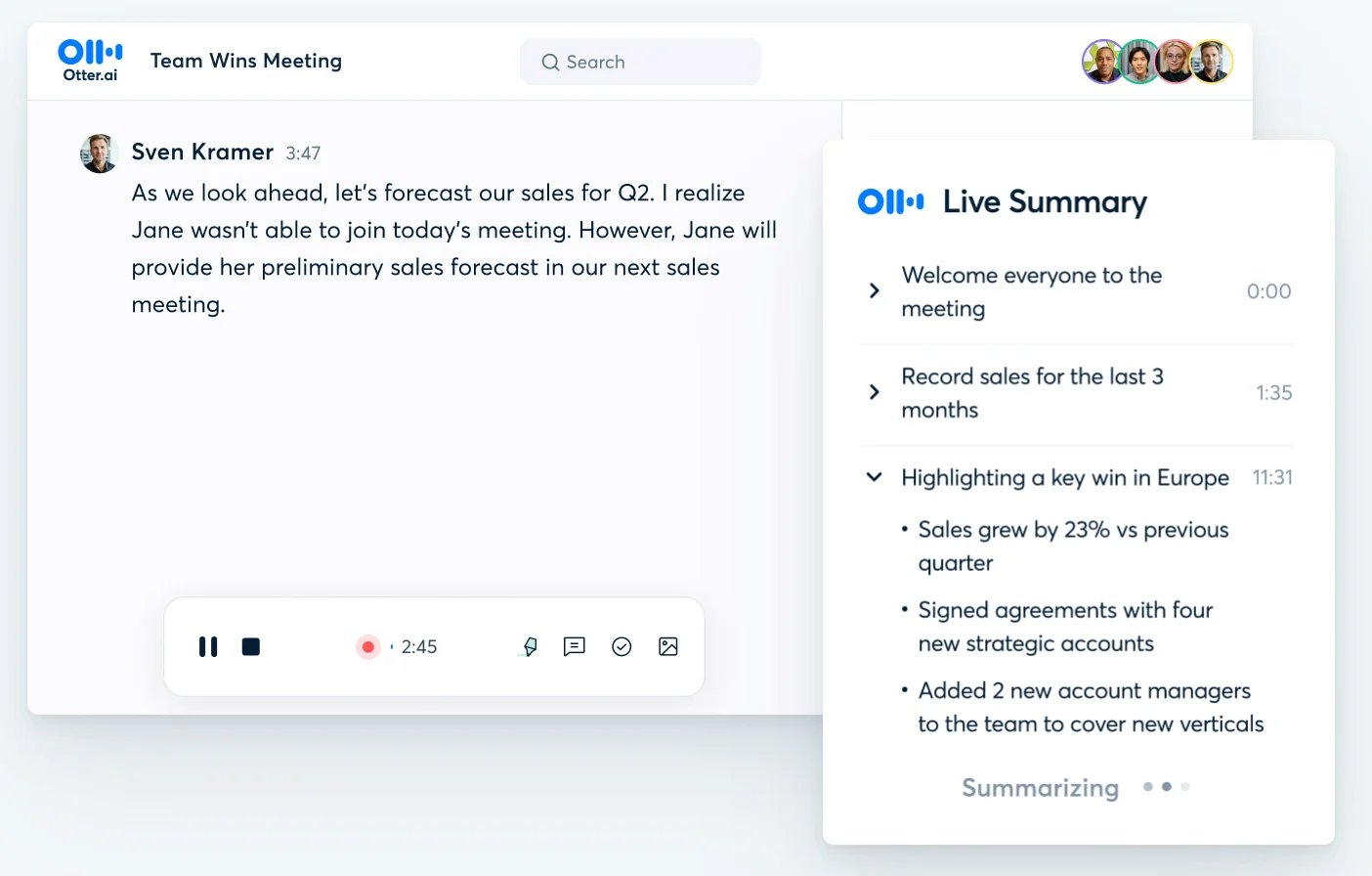
Otter.ai is one of the better-known AI transcription platforms and is particularly relevant when you want transcription to happen during the interview rather than after it.

It can create a live transcript as people speak, making it useful for journalists, recruiters, researchers, and other professionals who want searchable notes immediately after a conversation.

Otter also adds AI-generated summaries and other tools for working with the transcript after the interview.

Otter AI Live Summary interface

Best for: People who prioritize real-time transcription and meeting notes.

What stands out:

  • Live transcription
  • Speaker identification
  • AI summaries
  • Searchable transcripts
  • Support for recorded conversations and meetings
  • Collaboration features

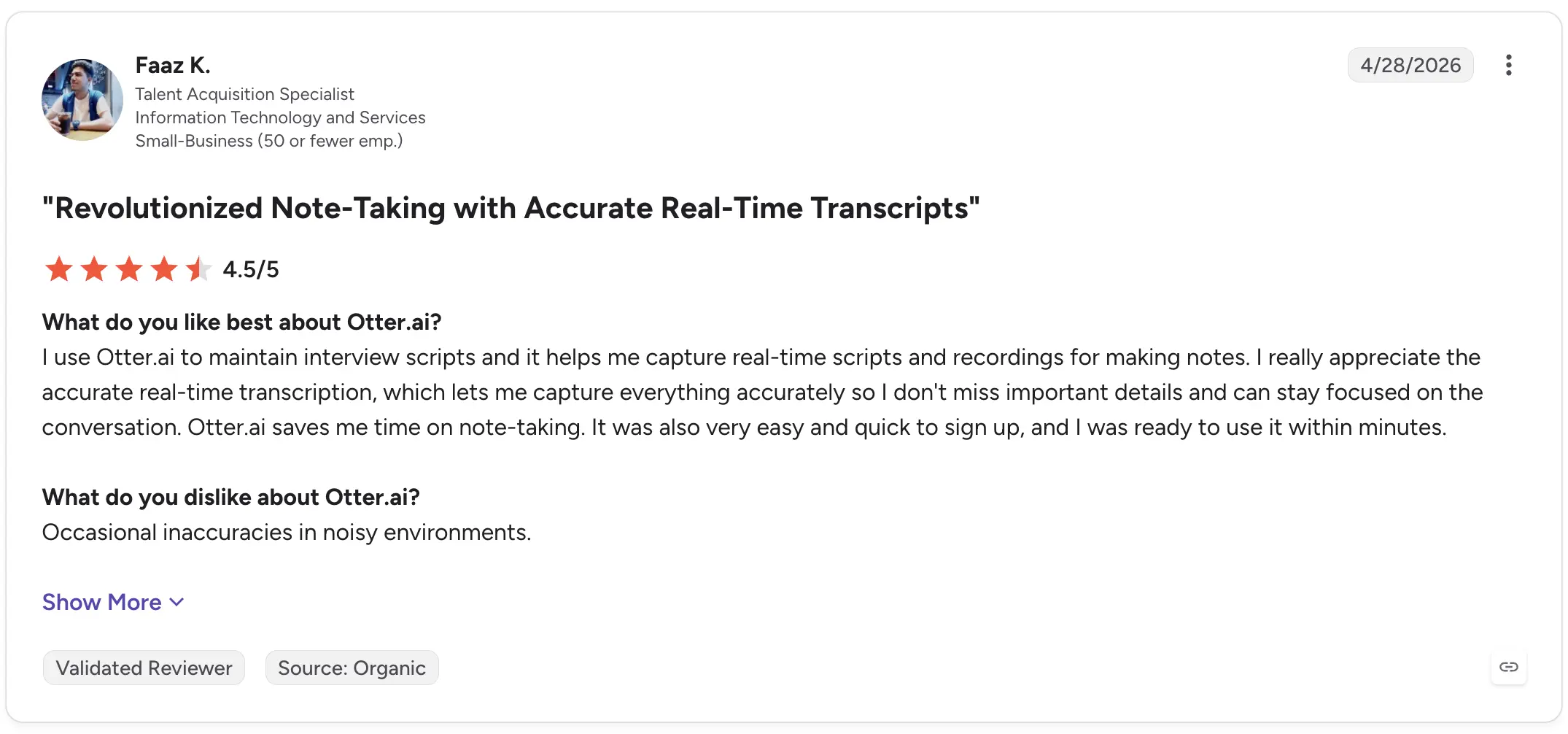
Faaz K., a Talent Acquisition Specialist, gave Otter.ai 4.5/5 on G2 in April 2026 and specifically described using it for interviews. He praised its real-time transcription for helping him capture details while staying focused on the conversation. His main criticism was occasional inaccuracies in noisy environments.

Otter AI G2 review

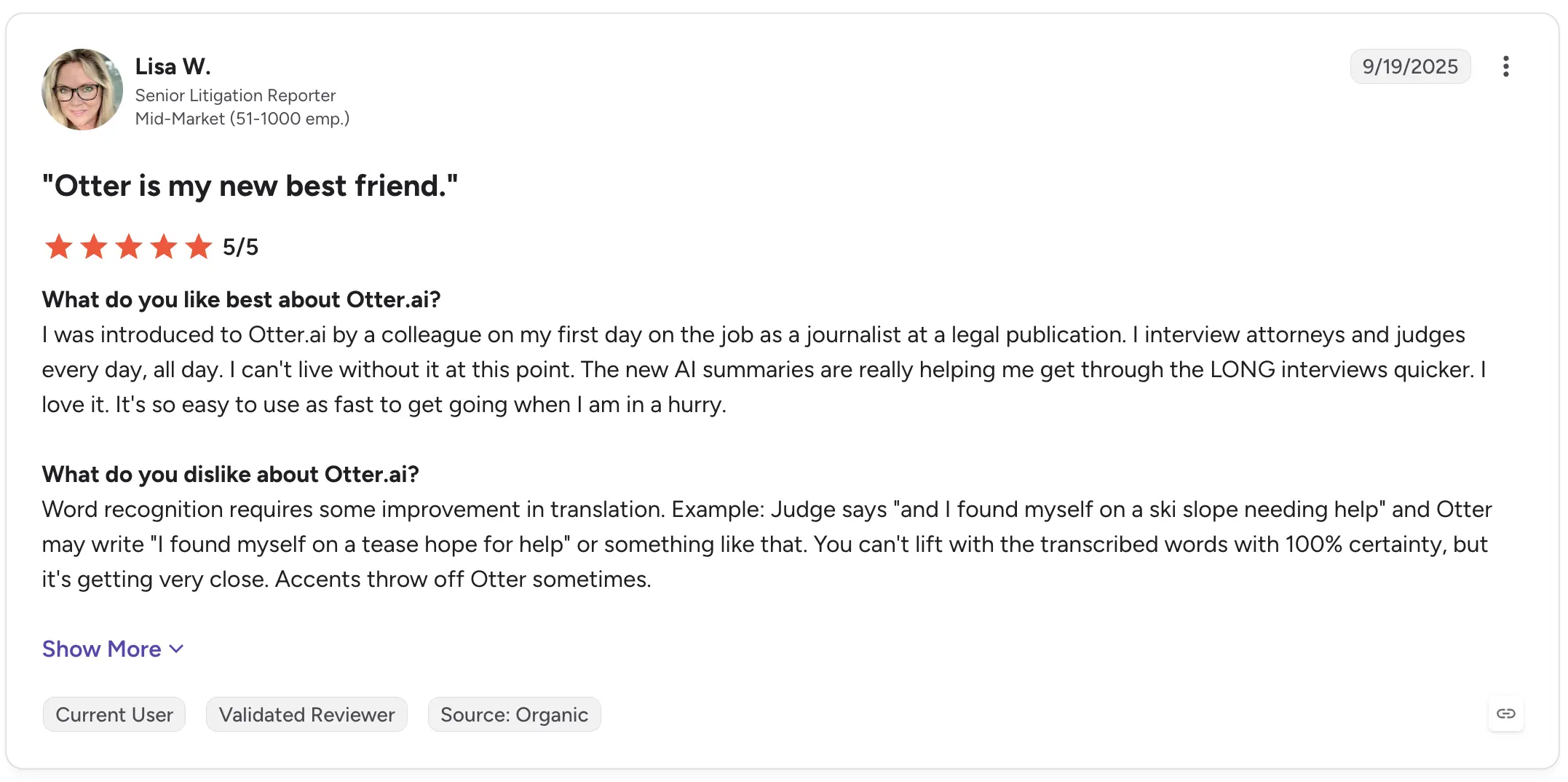
Lisa W., a Senior Litigation Reporter, rated it 5/5 and described using Otter for daily interviews with attorneys and judges. She highlighted the value of AI summaries for getting through long interviews faster, while also noting that word recognition isn't reliable enough to assume every phrase is correct and that accents can cause mistakes.

Otter AI G2 review

That is an important limitation to keep in mind with automated transcripts generally: convenient does not mean infallible.

2. Descript: Best for editing interview audio and video

Descript approaches transcription differently.

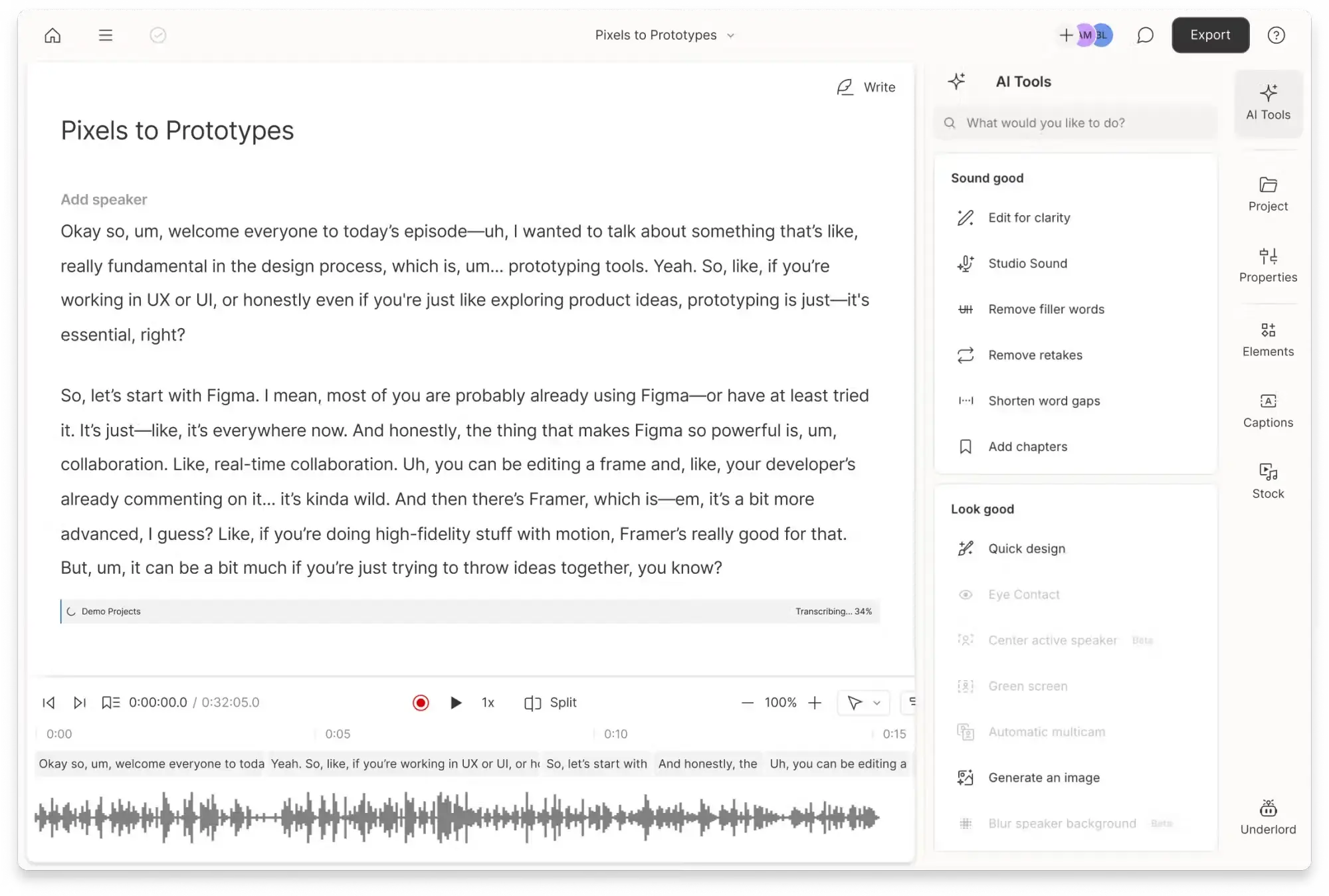
Rather than treating the transcript purely as a written record, it connects the transcript directly to the underlying audio or video. Editing text can, therefore, become part of editing the recording itself.

That makes Descript especially useful when an interview will eventually become a podcast, video, social clip, or other piece of published content.

Descript transcript of meeting with AI Tools bar on the right

Best for: Podcasters, video teams, journalists, and creators editing recorded interviews.

What stands out:

  • Audio and video transcription
  • Text-based media editing
  • Transcript and recording in the same workspace
  • Video and audio production features
  • Export workflows for further editing

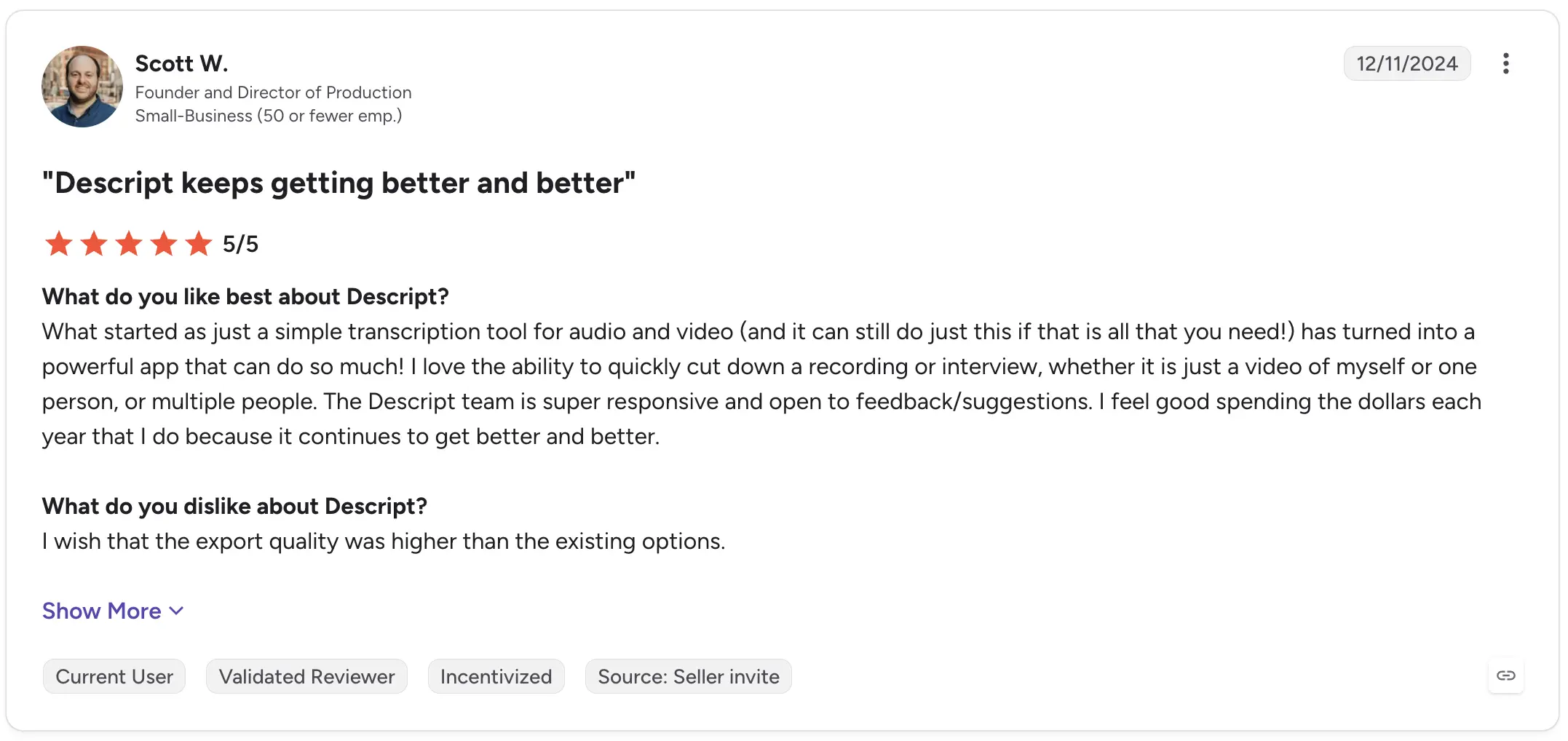
Scott W., a Founder and Director of Production, rated Descript 5/5 on G2. He described how the product had evolved beyond simple audio and video transcription and highlighted the ability to quickly cut down interviews and other recordings. His criticism focused on export quality rather than the core transcription workflow.

Descript G2 review

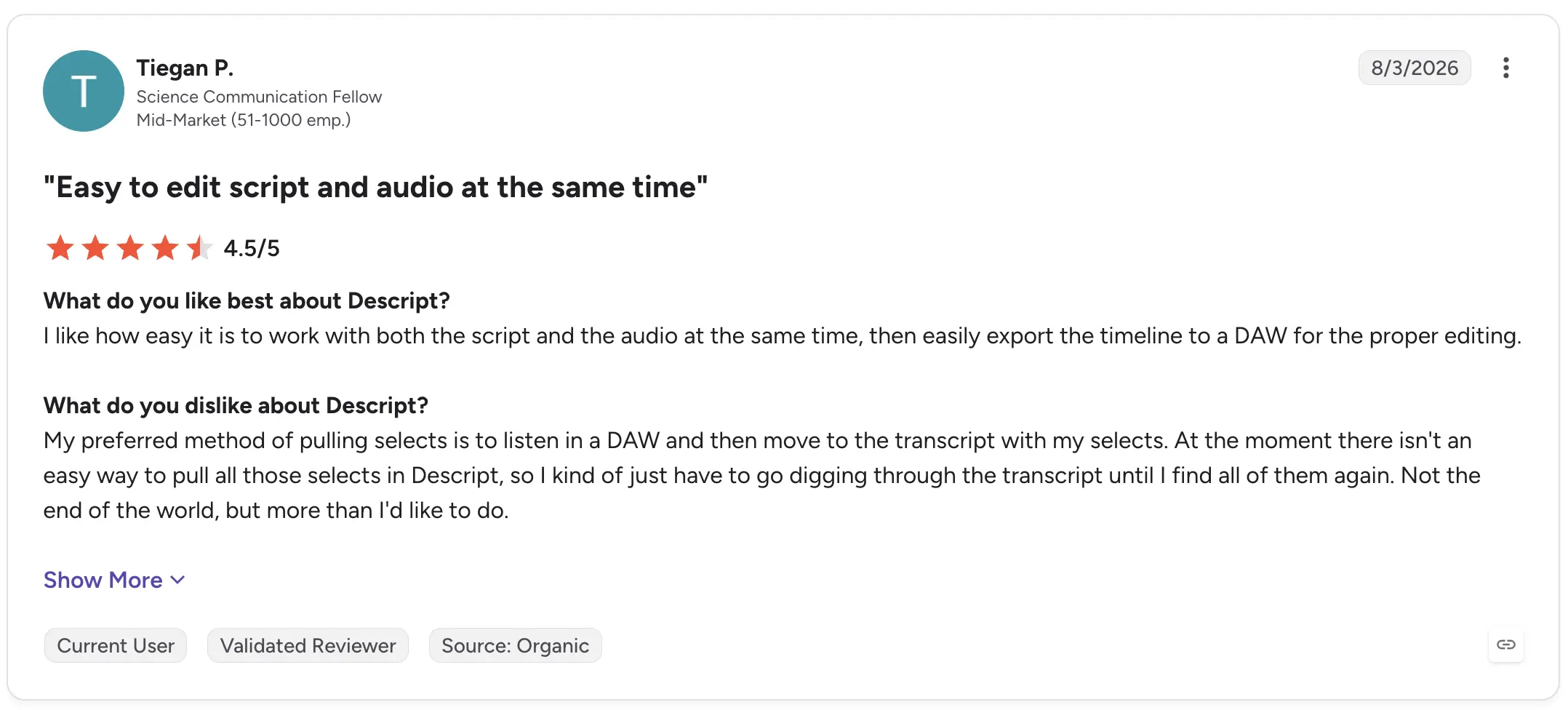
A more recent August 2026 review from Science Communication Fellow Tiegan P. rated Descript 4.5/5 and praised being able to edit the script and audio together before exporting the timeline to a DAW. Their main frustration was that their preferred workflow for pulling selects still required digging back through the transcript.

Descript G2 review

Descript, therefore, makes the most sense when the transcript isn't the final product, but part of the production process.

3. Trint: Best for collaborative transcript editing

Trint combines AI transcription with tools for reviewing, editing, and collaborating around recorded material.

That can make it particularly useful for research, media, and content teams where several people need to work with interview transcripts rather than one person simply downloading a text file.

Best for: Teams collaboratively reviewing interviews and recorded content.

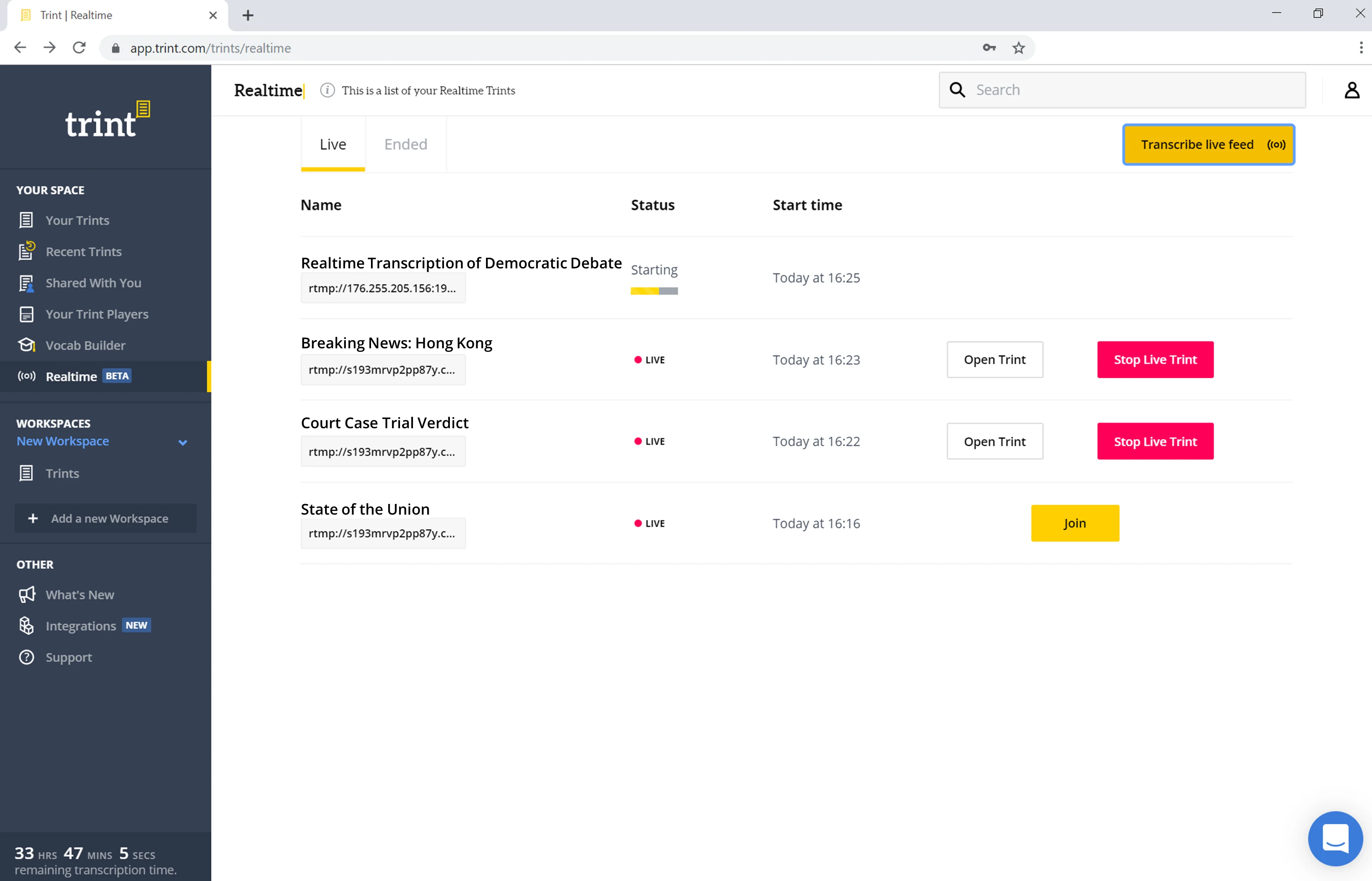
Trint interface showing Live Transcription in the Realtime tab

What stands out:

  • AI transcription
  • Collaborative editor
  • Audio and video workflows
  • Transcript review and markup
  • Tools suited to interview-based projects

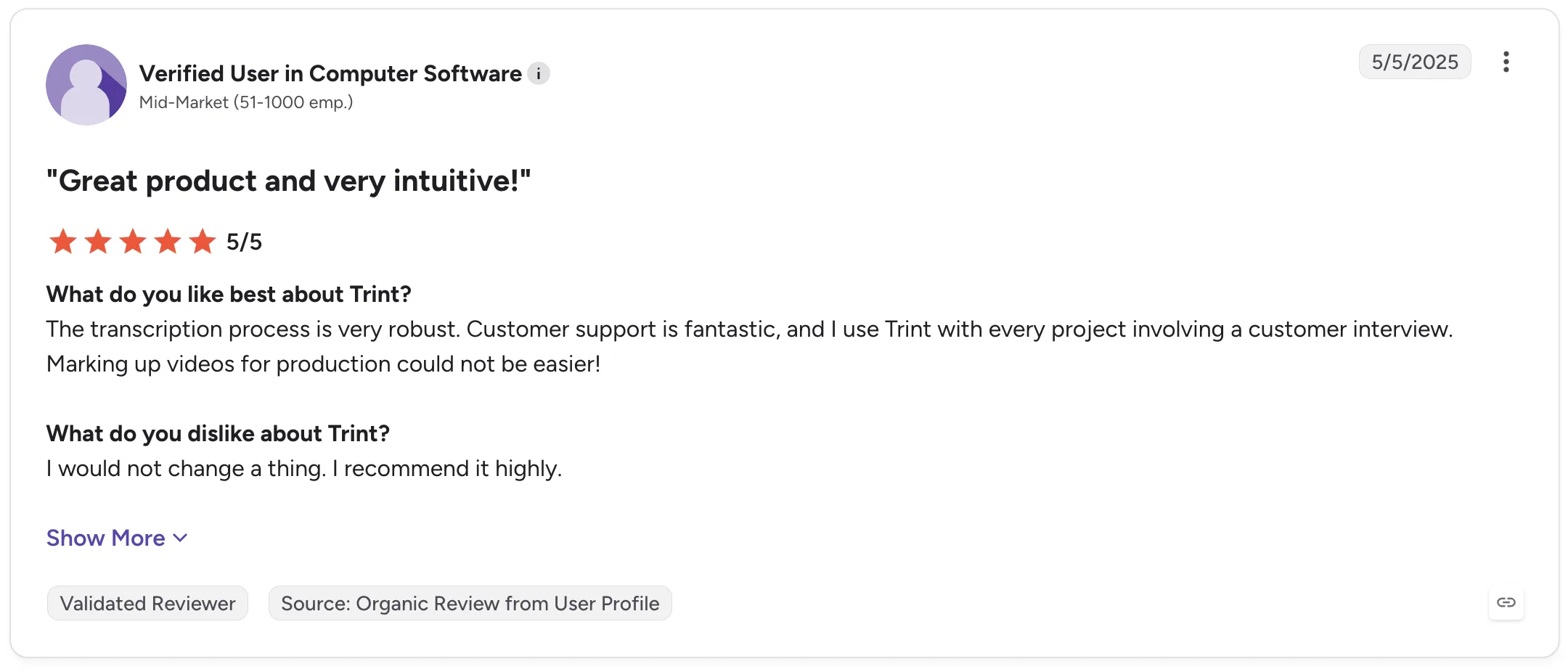
A verified G2 reviewer working at a mid-market computer software company rated Trint 5/5 in May 2025 and said they use it with every project involving a customer interview. They specifically praised its transcription process and ability to mark up videos for production.

Trint G2 review

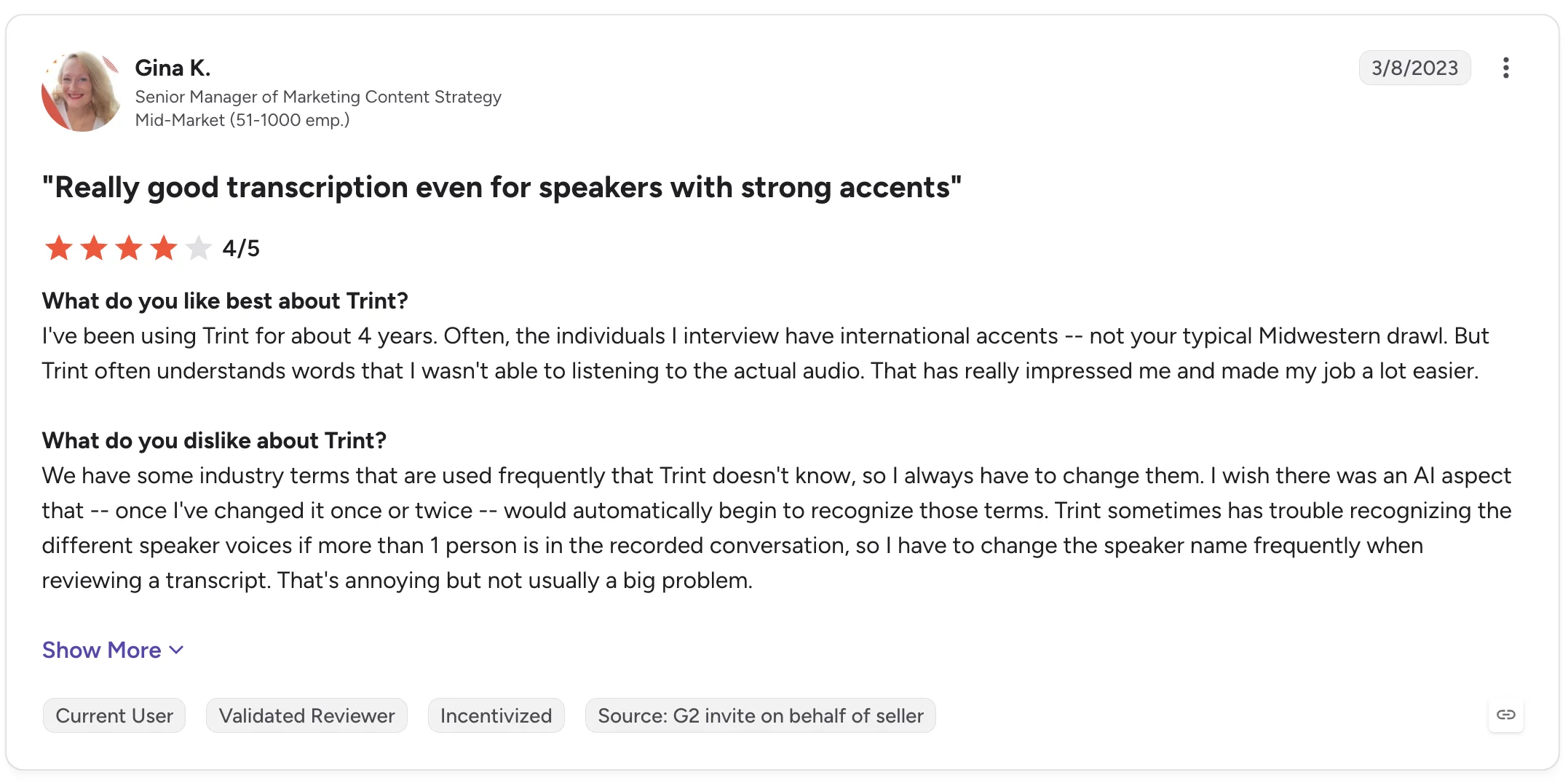
Gina K., a Senior Manager of Marketing Content Strategy, gave Trint 4/5 and highlighted its performance with interviewees who have strong international accents. Her review also points to two useful limitations: industry-specific terminology sometimes needs correcting, and distinguishing different speakers can require manual fixes.

Trint G2 review

Those details are worth considering if your research interviews contain specialized vocabulary or multiple people speaking.

4. MeetGeek: Best for turning interviews into structured insights

MeetGeek is a better fit when transcription is the beginning of the workflow rather than the end.

It can automatically record and transcribe interviews thanks to its Google Meet, Microsoft Teams, and Zoom integrations, on Discord and Webex through the Chrome extension, as well as process uploaded MP3 and MP4 recordings and in-person conversations captured through the mobile app.

The transcript then feeds into AI meeting notes, summaries, highlights, action items, and a searchable meeting knowledge base.

MeetGeek transcription and notes of Google Meet Demo meeting

For interview-heavy workflows, that means you can move from:

recording → transcript → summary → analysis → shared knowledge

Without manually moving the conversation between several AI note-taker tools.

MeetGeek supports speaker identification, timestamps, 100+ languages and dialects, and a custom dictionary for company jargon, unusual names, acronyms, and industry terminology. It can also tailor AI-generated summaries to the type of conversation, including interviews.

Its AI chat is particularly useful when you're dealing with multiple interview recordings. Instead of opening every transcript and starting from a blank page, you can ask questions about previous conversations and retrieve relevant information from them.

MeetGeek AI Chat

For qualitative research, MeetGeek’s AI chat can help with tasks such as finding recurring concerns, retrieving comments about a particular topic, or reviewing what different interviewees said before deeper analysis.

Teams can also share transcripts, recordings, summaries, and highlights, leave comments inside transcripts, and organize interviews into shared repositories.

Best for: Recruiting interviews, user research, customer interviews, and teams that need both transcription and structured post-interview analysis.

What stands out:

  • Automatic recording with Zoom, Microsoft Teams, and Google Meet integration
  • Uploaded audio and video transcription
  • Mobile recording for in-person interviews
  • Speaker identification
  • 100+ languages and dialects
  • Custom dictionary
  • AI-generated summaries and highlights
  • AI chat across meetings
  • Searchable interview knowledge base
  • Transcript comments and sharing
  • Conversation analytics

Real user feedback also reflects both sides of the product.

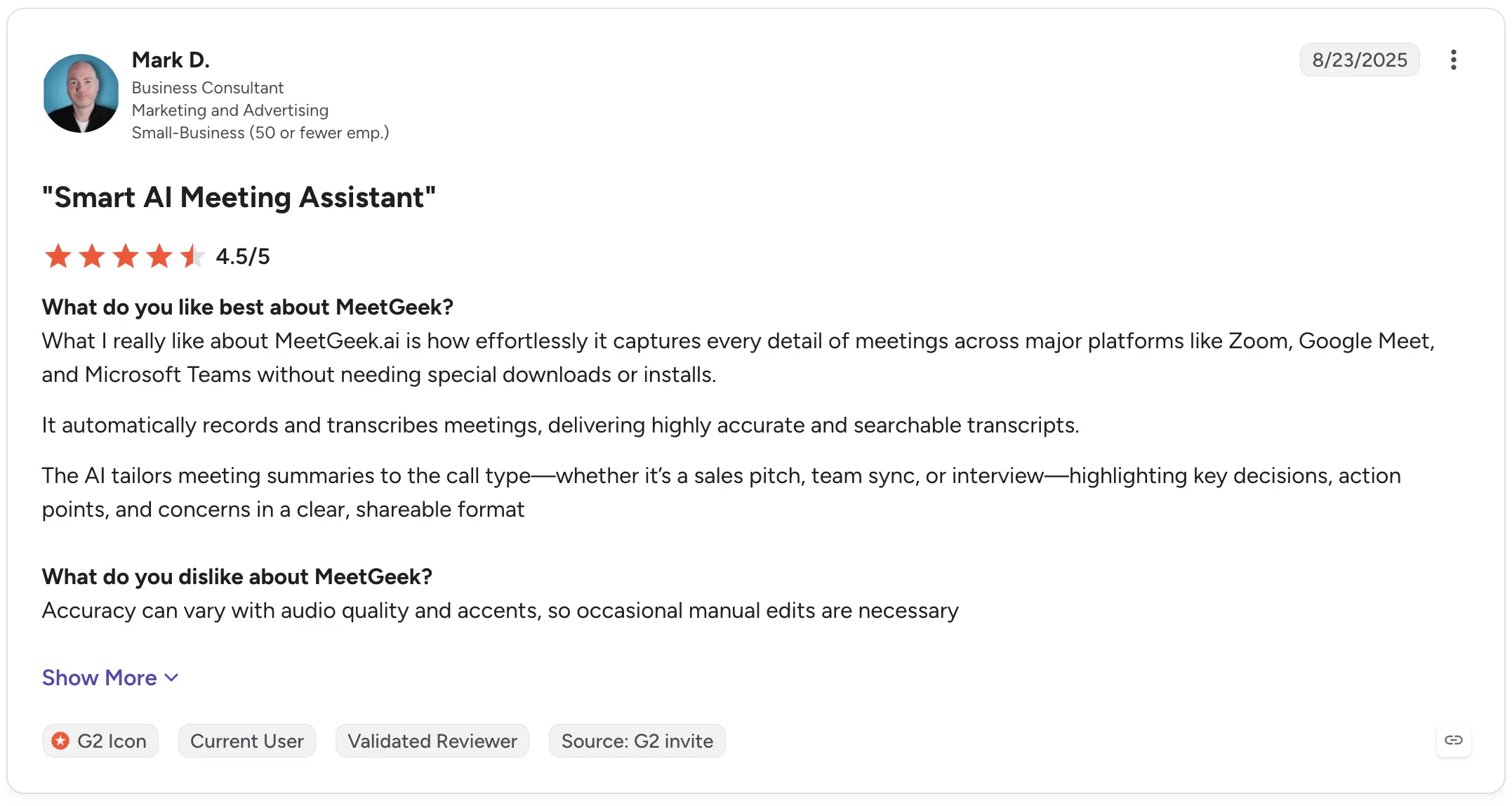
Mark D., a Business Consultant, rated MeetGeek 4.5/5 on G2 and praised its ability to automatically capture meetings and create searchable transcripts. He also specifically mentioned summaries adapting to different call types, including interviews. His criticism was that accuracy can vary depending on audio quality and accents, requiring occasional edits.

MeetGeek G2 review

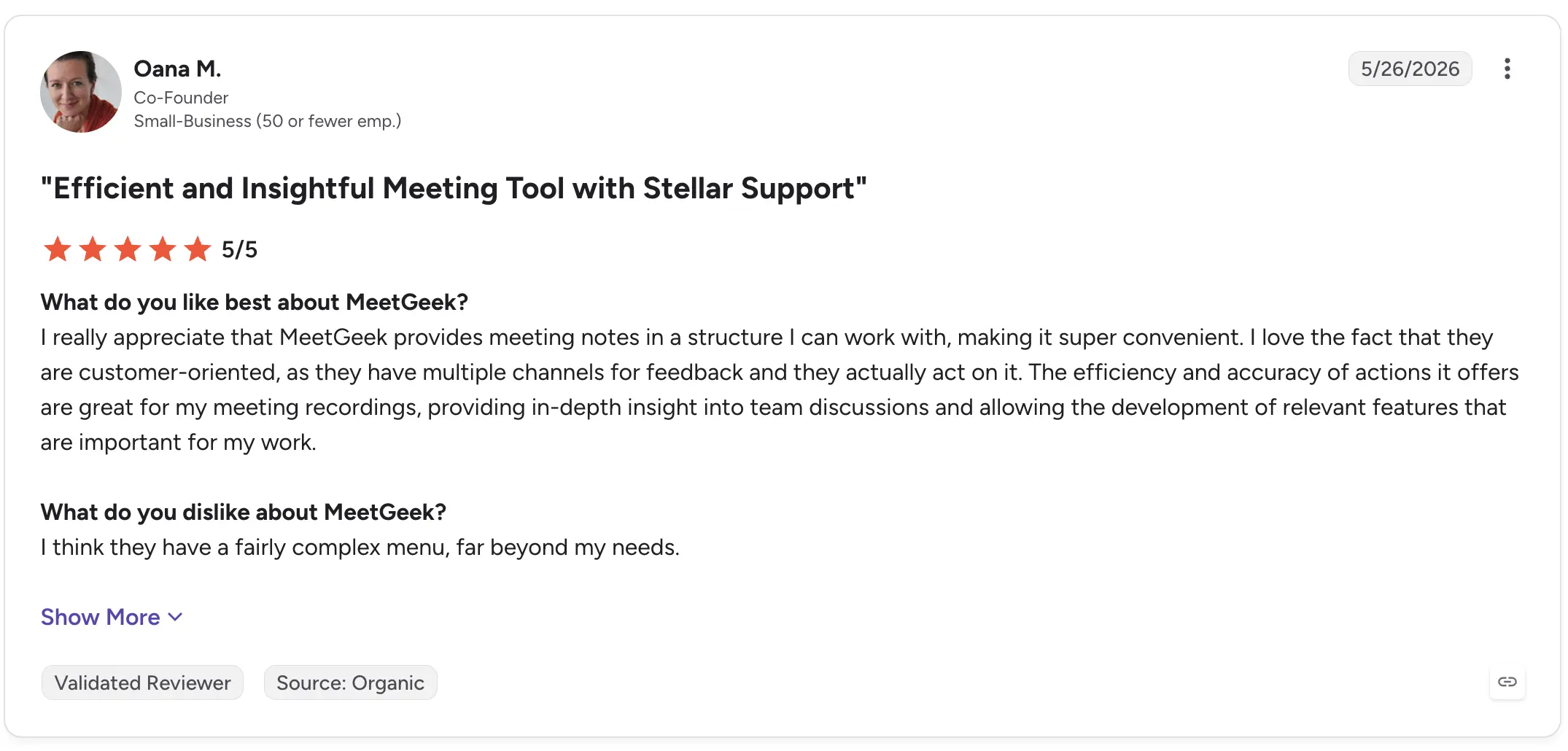
Oana M., a Co-Founder, rated MeetGeek 5/5 in May 2026 and highlighted the structure of its meeting notes and the depth of insights available from recordings. Her main criticism was that the menu contains more functionality than she personally needs.

MeetGeek G2 review

If your only requirement is converting an audio file into text, MeetGeek may offer more functionality than necessary. But when interviews need to become summaries, findings, shared knowledge, or follow-up work, those additional layers are the point.

5. OpenAI Whisper: Best for custom transcription workflows

OpenAI's Whisper is somewhat different from the other products on this list.

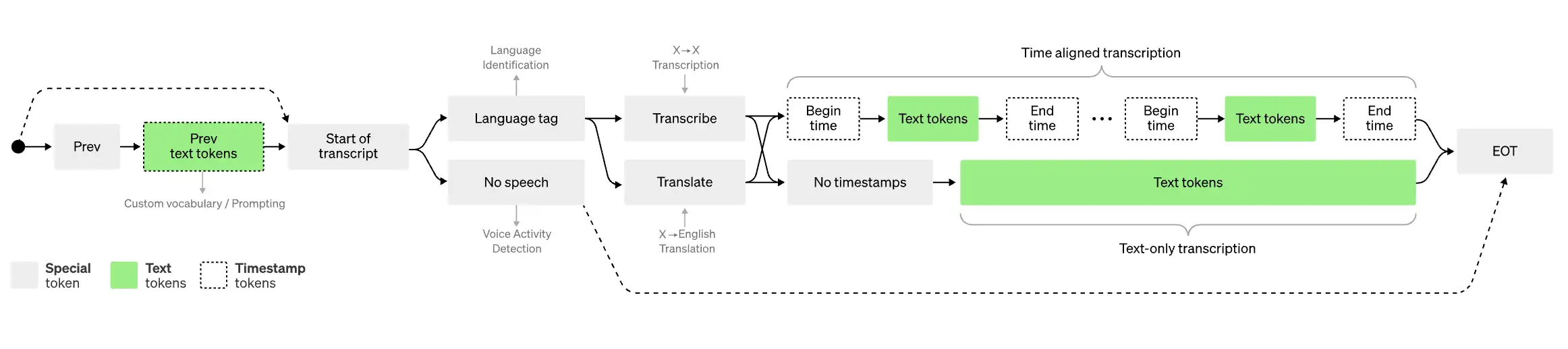
Whisper is fundamentally a speech recognition and transcription model rather than a complete interview management workspace. That makes it particularly interesting to developers and technical teams that want to build transcription into their own applications or workflows.

It can handle multilingual speech and is widely used as the transcription layer inside other AI-powered products.

Map with legend explaning how Whisper works

Best for: Developers and technical teams building their own transcription workflows.

What stands out:

  • Speech-to-text transcription model
  • Multiple languages
  • Can process audio recordings programmatically
  • Useful as a building block for custom AI tools
  • Flexible for technical implementations

This flexibility comes with a tradeoff: using a transcription model is not the same as buying software designed to manage interviews from recording through analysis.

If you need a polished collaborative editor, interview repository, meeting notes, or ready-made workflow for sharing transcripts, you will generally need to build or add those components yourself.

Recent G2 reviews also highlight the strengths and limitations of the core transcription.

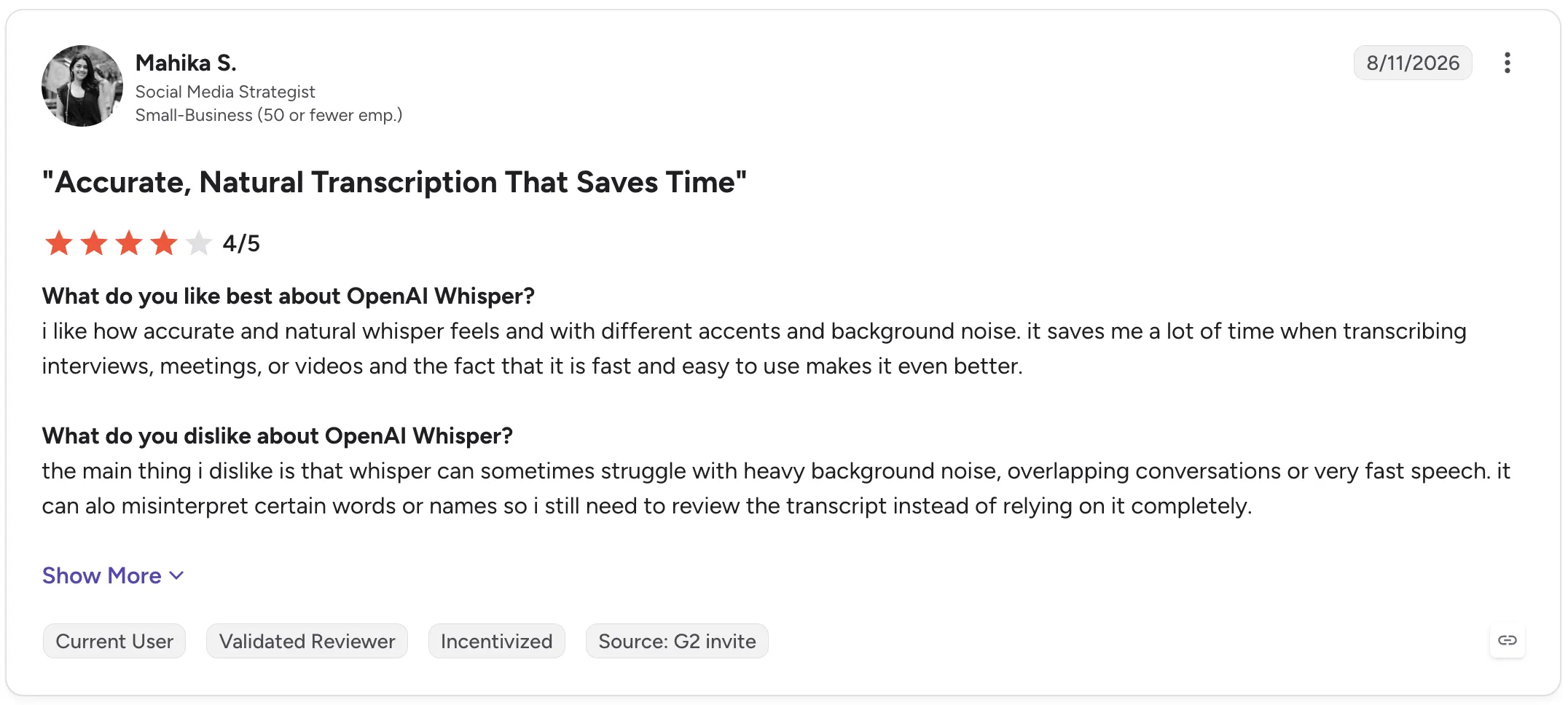
Mahika S., a Social Media Strategist, rated OpenAI Whisper 4/5 in August 2026, praising its accuracy across different accents and background noise and saying it saves time when transcribing interviews, meetings, and videos. She also reported problems with heavy background noise, overlapping conversations, fast speech, names, and occasional incorrect words.

OpenAI Whisper G2 review

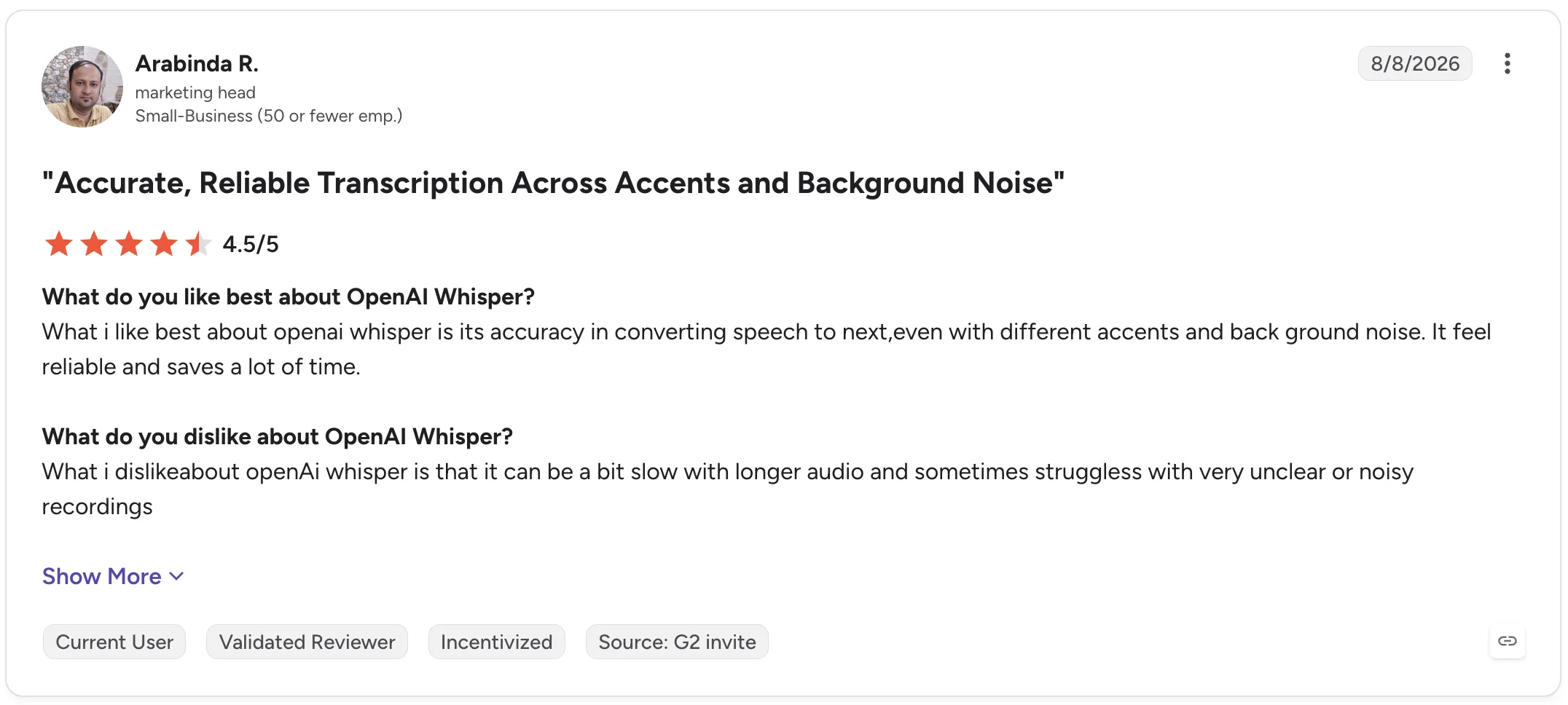
Arabinda R., a Marketing Head, gave Whisper 4.5/5 and similarly praised its reliability across accents and background noise. His criticism was that longer audio can take more time and unclear or noisy recordings can reduce performance.

OpenAI Whisper G2 review

Whisper is, therefore, compelling when you want control over the transcription layer itself. It is less compelling if you want an out-of-the-box workspace for managing the entire interview process.

Interview transcription software comparison

Tool Best for Live transcription AI summaries Interview analysis Collaboration
Otter.ai Live interview transcription Yes Yes Yes Yes
Descript Audio and video production No Yes Limited Yes
Trint Collaborative transcript editing Available workflows vary Yes Yes Yes
MeetGeek Interview insights and knowledge Yes Yes Yes Yes
OpenAI Whisper Custom transcription workflows Depends on implementation No native workspace Depends on implementation No native workspace

How to transcribe an interview

The exact process depends on whether your interview happens online, in person, or has already been recorded.

1. Get the clearest recording possible

Transcription starts with the audio.

Keep microphones close enough to capture clear speech, reduce background noise where possible, and avoid having multiple people speak simultaneously.

Even high-accuracy transcription software has less information to work with when voices are muffled, distant, or overlapping.

2. Record the interview or upload the existing file

If the interview has already happened, most transcription services let you simply upload an audio file or video file.

For online interviews, software designed to work with Google Meet, Zoom, or Microsoft Teams can remove this step by recording and transcribing the interview automatically.

For an in-person conversation, use a phone, dedicated voice recorder, or transcription app that supports offline recording.

3. Generate the transcript

Once the recording is available, the transcription software converts the audio into text.

Processing time depends on the tool, recording length, transcription model, and workflow. Some tools provide a live transcript, while others process the recording after the interview.

4. Review the transcript against the recording

Don't assume an AI transcript contains zero errors.

Review names, numbers, technical terminology, quotes you intend to publish, and passages where the audio was unclear.

Pay particular attention to sections with background noise, overlapping speakers, or rapid speech.

5. Clean up speaker labels and unnecessary speech

Depending on why you need the transcript, you may want to remove filler words, false starts, or repeated words.

For qualitative research, however, be careful not to clean the text so aggressively that you alter the interviewee's meaning.

Correct speaker labels as well, especially when multiple speakers have similar voices.

6. Export or analyze the interview

The transcript can now become an input for the rest of your work.

You might export it as text, create subtitle files, share it with colleagues, extract quotes, generate an AI summary, or use AI tools to identify patterns across several interviews.

This is where choosing software based solely on transcription accuracy can become limiting. The time saved after transcription can be just as important as the transcription time itself.

AI transcription vs human transcription: Which should you use?

AI and human transcription solve slightly different problems.

AI transcription prioritizes speed, cost, and scale. You can upload a recording and receive an automated transcript quickly, then search, summarize, or analyze it with other AI-powered features.

Human transcription prioritizes manual review and can be preferable when exact wording is critical.

For everyday research interviews, recruiting conversations, journalism, internal interviews, and customer research, AI transcription will often provide the more practical starting point, provided important passages are reviewed.

Human transcription services may make more sense for particularly sensitive or high-stakes material where a few errors could materially affect the outcome.

Security also matters in either case. Before uploading sensitive information, check how the transcription provider stores, processes, protects, and deletes recordings and transcripts.

Conclusion

Good interview transcription software should make recorded conversations easier to use, not simply turn audio into a wall of text.

Look at transcription accuracy, speaker identification, recording options, export formats, and language support, but also consider how much work remains once the transcription is finished.

If your interviews happen on Zoom, Google Meet, Microsoft Teams, or in person, MeetGeek can automatically record and transcribe them, create structured AI summaries, and turn past interviews into a searchable knowledge base your team can return to later.

Try MeetGeek for free and spend less time processing interviews after they end.

Key takeaways

  • Choose Otter.ai if a live transcript is central to how you conduct interviews.
  • Choose Descript if interviews become podcasts, videos, or other edited media.
  • Choose Trint if several people need to review and edit interview transcripts collaboratively.
  • Choose MeetGeek if you regularly conduct interviews and want recordings to automatically become searchable transcripts, structured summaries, insights, and reusable team knowledge.
  • Choose OpenAI Whisper if you have the technical resources to build your own workflow around a flexible transcription model.

Frequently asked questions

What is the best software to transcribe interviews?

The best choice depends on your workflow. Otter.ai is well-suited to live transcription; Descript to audio and video editing; Trint to collaborative transcript work; MeetGeek to transcription plus interview summaries and analysis; and OpenAI Whisper to custom technical implementations.

Can ChatGPT transcribe an interview?

ChatGPT can transcribe audio inputs and help analyze transcript content, but dedicated interview transcription software may provide additional workflows such as automatic meeting recording, speaker labels, collaborative editing, transcript libraries, and integrations.

OpenAI's Whisper is the company's speech recognition model specifically designed for converting audio into text.

How long does it take to transcribe a one-hour interview?

Automated AI transcription can process a one-hour interview far faster than manually typing it, although exact turnaround speed varies by service, file size, recording quality, and processing method. You should also budget time to review important passages for transcription errors.

What is the difference between transcription and interview analysis?

Transcription converts spoken words into text. Interview analysis interprets that text to identify themes, patterns, insights, quotes, answers, and relationships across one or more interviews.

The first creates the source material. The second helps you understand what that source material means.

Should I remove filler words from interview transcripts?

It depends on the purpose of the transcript. Removing filler words can make transcripts easier to read when you're creating articles, summaries, or internal notes. For qualitative research, preserve enough of the original speech to avoid changing meaning, tone, or context.

Article updated on 
August 20, 2026
Share the knowledge with your circle
Copied
Related posts

Best Interview Transcription Software: 5 Tools Compared

Find the best interview transcription software for your workflow. Compare five top tools for transcription, summaries, editing, collaboration, and interview analysis.

This is some text inside of a div block.

12 Best Remote Collaboration Tools for 2026

Compare 12 of the best remote collaboration tools for 2026 and find the right options for communication, projects, meetings, and async work.

This is some text inside of a div block.

Transcrição no Google Meet: As 7 Melhores IAs em 2026

Como cada ferramenta captura a chamada, se o Gemini já resolve o seu caso e o que o seu plano do Workspace realmente permite.

This is some text inside of a div block.

Pauta de Reunião de Equipe: Modelos e Exemplos

Modelos gratuitos de pauta de reunião de equipe, com tempo por tópico, responsáveis e itens de ação prontos para usar.

This is some text inside of a div block.

Software de Recrutamento: 7 Ferramentas de Automação para Testar

Descubra as melhores ferramentas de automação de recrutamento para reduzir trabalho manual e contratar mais rápido.

This is some text inside of a div block.

IA para Reuniões no Zoom: 8 Ferramentas Testadas (2026)

Como 8 ferramentas de IA para reuniões se conectam de verdade ao Zoom e o que cada uma faz quando você não é o anfitrião.

This is some text inside of a div block.

IA para Fazer Ata de Reunião Gratuito: 7 Ferramentas

Uma análise prática de sete IA gratuitas para fazer ata de reunião, incluindo quantas horas de reunião você realmente ganha antes de esbarrar no paywall.

This is some text inside of a div block.

Melhores Softwares de Recrutamento e Seleção em 2026

Compare os melhores softwares de recrutamento e seleção (ATS), veja para quem cada um serve e escolha o que combina com o seu processo seletivo.

This is some text inside of a div block.

Cargos Executivos: Funções, Estrutura e Equipe de Liderança

Conheça os cargos, as responsabilidades e as características de equipes executivas de sucesso, além de estratégias práticas para uma liderança mais forte.

This is some text inside of a div block.

Como Gravar no Celular: Tela, Áudio e Chamadas

Veja como gravar a tela, o áudio e as ligações no celular Android e iPhone, com apps, dicas de qualidade e o que diz a lei.

This is some text inside of a div block.

Como Fazer um Relatório: Tipos, Estrutura e Exemplo

Um relatório transforma informação complexa em conclusões claras. Veja os tipos, as seções essenciais, um exemplo e boas práticas para criar relatórios que poupam tempo.

This is some text inside of a div block.

Notas de Reunião no Claude: O Que Você Pode Criar e Como Conectar

Conecte suas notas de reunião ao Claude e transforme chamadas passadas em respostas, documentos finalizados e trabalho em várias etapas.

This is some text inside of a div block.

As 6 Melhores Alternativas ao Airgram em 2026

Compare as melhores alternativas ao Airgram para 2026, incluindo MeetGeek, Fireflies, Otter, tl;dv, Fellow e Sembly AI.

This is some text inside of a div block.

Ata de Reunião no ChatGPT: Benefícios, Usos e Configuração

Conecte as suas notas de reunião ao ChatGPT e transforme chamadas passadas em atas, respostas e automações instantâneas, em linguagem simples.

This is some text inside of a div block.

Como Digitar Mais Rápido: 15 Truques Que Funcionam

Quer digitar mais rápido e cometer menos erros? Descubra truques práticos de digitação, atalhos de teclado e ferramentas que o ajudam a trabalhar de forma mais inteligente.

This is some text inside of a div block.

As 10 Melhores Alternativas ao ChatGPT Para o Trabalho em 2026

Procurando uma alternativa ao ChatGPT? Compare as principais ferramentas de IA para pesquisa, reuniões, escrita, codificação, busca e produtividade em 2026.

This is some text inside of a div block.

9 Melhores Alternativas ao Calendly em 2026 (Testadas + Comparadas)

Cal.com, Acuity, Chili Piper e mais — as melhores alternativas ao Calendly em 2026, testadas e classificadas por caso de uso.

This is some text inside of a div block.

8 Melhores Extensões do Google Meet em 2026 (Testadas para Produtividade)

De notas de IA a cancelamento de ruído, aqui estão 8 extensões do Chrome que corrigem o que o Google Meet não faz nativamente.

This is some text inside of a div block.

Ferramentas de Produtividade de IA Que Realmente Usamos em Vendas e Marketing

Uma visão prática das ferramentas de produtividade de IA que usamos diariamente para reuniões, conteúdo, automação, fluxos de trabalho de vendas e trabalho em equipe.

This is some text inside of a div block.

Gemini vs. Google Assistant: Guia Completo de Comparação

Confuso sobre Gemini vs Google Assistant? Descubra as principais diferenças, o que o Google está mudando e qual assistente se adapta melhor a você.

This is some text inside of a div block.

Gerenciando Equipes Híbridas em 2026: Desafios Comuns e Como Superá-los

Lacunas na comunicação, atrito de fuso horário, deriva cultural — os quatro desafios que todo gestor híbrido enfrenta, e como resolvê-los.

This is some text inside of a div block.

MeetGeek vs tl;dv: Qual ferramenta de reunião de IA é ideal para sua equipe em 2026?

Características, preços, precisão e integrações em uma comparação lado a lado com um veredicto claro para as equipes de vendas, CS e operações.

This is some text inside of a div block.

Como Converter MP4 em Transcrição (Rápido & Preciso)

Aprenda a converter arquivos MP4 em transcrições, legendas e legendas precisas com ferramentas de IA para reuniões, webinars e entrevistas.

This is some text inside of a div block.

Serviço de Transcrição do Google em 2026: Análise Honesta e Melhor Alternativa

Google Meet, Cloud Speech-to-Text, Docs, Recorder — o que cada um faz, onde cada um falha e a melhor alternativa.

This is some text inside of a div block.

Coaching de Vendas com IA: Como as Equipes de Vendas Modernas Usam a IA para Fechar Mais Negócios

How AI sales coaching analyzes every call (not just the 3% a manager samples) and surfaces coachable moments by rep, stage, and objection type.

This is some text inside of a div block.

O ChatGPT Consegue Transcrever Áudio? Guia de 2026

Três formas de tirar uma transcrição do ChatGPT, e a que quase todo mundo tenta primeiro é a que a OpenAI menos documenta.

This is some text inside of a div block.

IA para Customer Success: O Guia Prático de 2026

Onde a IA se encaixa no dia a dia do CSM: os Quatro Rs, modelo de maturidade, ferramentas e as métricas que provam o ROI para o CFO.

This is some text inside of a div block.

Um guia completo da metodologia de vendas do MEDDIC

Descubra as vendas da MEDDIC, como elas ajudam a qualificar leads, entender os processos de decisão e melhorar as taxas de vitória em ciclos complexos de vendas B2B.

This is some text inside of a div block.

Como escrever uma mensagem de ausência temporária

Aprenda a escrever uma mensagem clara de ausência temporária, o que incluir e a usar exemplos prontos para copiar em qualquer situação.

This is some text inside of a div block.

Como cancelar sua assinatura do Zoom em 2026

Precisa cancelar sua assinatura do Zoom? Este guia explica exatamente como fazer isso no site da Zoom, na Apple App Store ou no Google Play, o que acontece após o cancelamento e como evitar cobranças extras.

This is some text inside of a div block.

MeetGeek vs Fellow: Comparação de notas de reuniões, agendas e automação

Comparando MeetGeek com Fellow? Veja como suas notas de reuniões, agendas, gravações e recursos de automação de IA diferem para encontrar a melhor opção para sua equipe.

This is some text inside of a div block.

Como gravar tela no Mac (com áudio, som do sistema e dicas profissionais)

Aprenda a gravar a tela no Mac usando ferramentas integradas, capturar áudio corretamente e ver quando o MeetGeek é a opção mais inteligente.

This is some text inside of a div block.

MeetGeek vs Krisp: Qual assistente de reunião de IA é ideal para sua equipe?

Comparação entre MeetGeek e Krisp: notas de IA, cancelamento de ruído, preços, integrações e recursos de gravação explicados com clareza.

This is some text inside of a div block.

Dicas de videoconferência para realizar reuniões virtuais bem-sucedidas

Aprenda dicas práticas de videoconferência que melhoram a qualidade, o engajamento e o acompanhamento do áudio e ajudam as equipes a se manterem alinhadas após as reuniões virtuais.

This is some text inside of a div block.

Webex vs Zoom: Qual plataforma de videoconferência se adapta melhor às suas reuniões?

Uma comparação clara entre Webex e Zoom, desde recursos e preços até segurança e integrações.

This is some text inside of a div block.

Como Levantar a Mão no Zoom em Qualquer Dispositivo

Veja como levantar a mão no Zoom pelo PC, celular, navegador ou telefone, com atalhos de teclado e por que o botão às vezes some.

This is some text inside of a div block.

Boas perguntas para fazer em uma entrevista que ajudam você a fazer a escolha certa

Saiba quais perguntas fazer, quando fazê-las e como usar entrevistas para decidir se uma função, uma equipe e uma empresa são realmente adequadas para você.

This is some text inside of a div block.

O que é o Modo Companion no Google Meet? Tudo o que você precisa saber

Continue lendo para obter um guia prático sobre como usar o Modo Companion no Google Meet para reuniões híbridas mais claras e equilibradas.

This is some text inside of a div block.

O que é uma reunião skip level? Como os líderes usam o pular de nível para melhorar a comunicação

Uma análise aprofundada das reuniões presenciais e de como elas ajudam os líderes a se conectarem com as equipes e obterem uma visão real.

This is some text inside of a div block.

O Que é um Agente de Voz de IA? Um Guia Prático de Como a IA de Voz Funciona

Este guia explica o que é um agente de voz de IA, como ele funciona, os benefícios que ele oferece e onde ele se encaixa melhor com equipes humanas.

This is some text inside of a div block.

Guia de reuniões stand-up: o que são e como administrá-las

Descubra o que torna uma reunião presencial realmente útil. Este guia explica como fazer stand-ups diários que permaneçam curtos, bloqueiem a superfície e mantenham as equipes alinhadas.

This is some text inside of a div block.

Tudo sobre o Microsoft Teams AI Interpreter + Como ir além da tradução

Descubra como o Microsoft Teams AI Interpreter funciona, onde ele é insuficiente e como ir além da tradução.

This is some text inside of a div block.

Melhor aplicativo de gravação de palestras em 2026:5 ferramentas que os alunos realmente usam

Vamos analisar em profundidade o que os alunos estão usando hoje em dia para gravar e organizar suas palestras, tanto online quanto offline.

This is some text inside of a div block.

Explicação do preço da Read AI para 2026: Valerá a pena para anotação de reuniões

Explore os preços de 2026 da Read AI, seus principais recursos e como ela lida com notas de reuniões, transcrições e insights para apoiar equipes modernas.

This is some text inside of a div block.

O que é uma base de conhecimento pesquisável e como ela funciona?

Explore como as bases de conhecimento pesquisáveis melhoram o acesso às informações e veja como o MeetGeek transforma suas reuniões em um centro de conhecimento rápido e confiável.

This is some text inside of a div block.

Como desfocar o fundo no Google Meet (guia simples para todos os dispositivos)

Descubra como desfocar seu plano de fundo no Google Meet em computadores e dispositivos móveis, usar efeitos visuais e obter uma aparência mais limpa e focada em cada chamada.

This is some text inside of a div block.

Como participar de reuniões do Teams com código: um guia passo a passo completo

Descubra como participar de reuniões do Microsoft Teams usando um código de reunião, além de outras opções, como um link ou convite. Este guia explica cada método de forma clara e passo a passo.

This is some text inside of a div block.

5 melhores alternativas do NoteGPT em 2026

Explore as 5 principais alternativas do NoteGPT que ajudam você a capturar insights importantes, transcrever conteúdo e aumentar a produtividade em fluxos de trabalho profissionais e de aprendizado.

This is some text inside of a div block.

O que é Perplexity AI? Um guia para o mecanismo de pesquisa baseado em IA que transforma a forma como encontramos informações

Neste artigo, examinaremos de perto o Perplexity AI, o que ele pode fazer por você em comparação com os mecanismos de pesquisa tradicionais e alguns de seus prós e contras.

This is some text inside of a div block.

tl;dv em 2026: É Seguro? Análise e 5 Alternativas

O que o tl;dv faz bem, o que a exposição de dados de 2026 realmente alcançou, e como isso muda a sua lista de opções.

This is some text inside of a div block.

Modo de gravação ChatGPT vs MeetGeek: aqui está tudo o que você precisa saber

Quer saber como o gravador ChatGPT se compara ao MeetGeek? Analisamos os recursos, a integração e a segurança de dados para gravar reuniões.

This is some text inside of a div block.

Preços da Fathom AI 2026: ainda vale a pena para equipes modernas?

Explore os preços da Fathom AI para 2026, incluindo recursos, limites e comparações de planos, além de como o MeetGeek oferece mais flexibilidade para equipes.

This is some text inside of a div block.

Agentes de reuniões de IA: como a IA autônoma está transformando o futuro do trabalho

Descubra como os agentes de reuniões com inteligência artificial estão redefinindo o futuro do trabalho, gerenciando agendamentos, acompanhamentos e até mesmo falando em seu nome para economizar tempo e transformar cada reunião em ação real.

This is some text inside of a div block.

Análise do Notta AI: Essa ferramenta de transcrição de IA vale a pena em 2026?

Leia esta análise aprofundada do Notta AI para ver se ele transcreve bem reuniões, lida com vários idiomas e fornece resumos de IA, além de onde é insuficiente em comparação com assistentes de reunião mais inteligentes.

This is some text inside of a div block.

Essas 4 ferramentas de IA para organizações sem fins lucrativos farão com que cada hora conte

Torne sua organização sem fins lucrativos mais eficiente com ferramentas de IA que reduzem o tempo administrativo, melhoram a colaboração e maximizam cada hora de impacto.

This is some text inside of a div block.

Alternativas ao Granola IA: As 5 Melhores Opções de 2026

Preços, limites de plano e número de idiomas conferidos na página oficial de cada fornecedor em julho de 2026.

This is some text inside of a div block.

E-mail de follow-up após a entrevista: como escrevê-lo, quando enviá-lo e o que dizer

Descubra como escrever um e-mail de acompanhamento eficaz após uma entrevista. Do tempo e dos modelos ao tom e à estrutura, este guia aborda tudo o que você precisa para se destacar e se manter memorável.

This is some text inside of a div block.

Preços da Tactiq 2026: Vale a Pena? Planos e Custos

Um olhar claro sobre cada plano da Tactiq, o que os créditos de IA realmente limitam e como os custos se somam para usuários individuais e equipes.

This is some text inside of a div block.

Significado da reunião ad hoc e como organizá-la

Descubra o verdadeiro significado de uma reunião ad hoc e aprenda como tornar as discussões espontâneas mais focadas e eficazes. Descubra quando mantê-los e gerenciá-los.

This is some text inside of a div block.

Etiqueta de reunião virtual: 15 regras essenciais para videochamadas profissionais

Descubra 15 regras e dicas essenciais de etiqueta para reuniões virtuais que mantêm as conversas focadas, profissionais e envolventes.

This is some text inside of a div block.

Como desfocar o fundo no Zoom: guia passo a passo

Descubra como usar o recurso de desfoque de fundo do Zoom para privacidade e foco, além de dicas, correções e quando mudar para planos de fundo virtuais.

This is some text inside of a div block.

Como Compartilhar Tela no Google Meet em Qualquer Aparelho

Aprenda o passo a passo para apresentar no computador e no celular, compartilhar uma guia com áudio e destravar o botão bloqueado.

This is some text inside of a div block.

Explicação do servidor MCP da MeetGeek: Como ele permite que assistentes de IA transformem reuniões

Veja como o servidor MCP da MeetGeek ajuda os assistentes de IA a transformar suas reuniões em insights inteligentes e acionáveis, tudo a partir de sua máquina local.

This is some text inside of a div block.

Como Mudar o Nome no Zoom no Computador, Celular e na Reunião

Atualize o nome de exibição que os outros participantes veem, de forma permanente no perfil ou apenas para uma única reunião.

This is some text inside of a div block.

IA para tomar notas para estudantes: as melhores ferramentas para estudar de forma mais inteligente em 2026

Um guia das melhores ferramentas de IA para fazer anotações para estudantes em 2026, com recursos, prós e contras para ajudar você a escolher o aplicativo certo para aprender.

This is some text inside of a div block.

Análise de preço do Descript em 2026: o que ela oferece, onde fica aquém e uma alternativa melhor

Uma análise mais detalhada dos níveis de preços do Descript, suas vantagens e desvantagens e por que o MeetGeek se destaca como uma escolha mais inteligente para criadores.

This is some text inside of a div block.

O Google Meet Tem Limite de Tempo? Duração por Plano

O Google publica uma duração diferente para contas gratuitas, edições Workspace e Google One. Veja cada uma delas.

This is some text inside of a div block.

Como transcrever memorandos de voz para texto (3 maneiras diferentes)

Neste artigo, você aprenderá a transcrever mensagens de voz de três maneiras diferentes, pesando os prós e os contras de cada opção.

This is some text inside of a div block.

Melhores alternativas de ClickUp para anotações com IA

Conheça as 5 melhores alternativas do ClickUp se quiser ir além da simples tomada de notas com IA e encontrar um assistente de reuniões abrangente.

This is some text inside of a div block.

O que é um resumo objetivo? Definição, exemplos e dicas

Resumos objetivos são essenciais quando você precisa de informações importantes de reuniões longas. Vamos discutir tudo sobre eles neste artigo!

This is some text inside of a div block.

Como Gravar Reunião no Google Meet: Todas as Opções

A gravação nativa do Google Meet exige plano pago e permissão de organizador. Veja todas as saídas, inclusive no Android.

This is some text inside of a div block.

Os 7 melhores aplicativos de anotações de reuniões em 2026

Procurando o melhor aplicativo de anotações de reuniões para a sua equipe? Analisamos os recursos, prós e contras dos 7 melhores no momento.

This is some text inside of a div block.

Como gravar um webinar do Zoom como anfitrião ou participante (2 métodos)

Neste artigo, analisaremos como gravar um webinar do Zoom como anfitrião ou participante usando a ferramenta integrada de gravação e de terceiros da Zoom com transcrição de IA.

This is some text inside of a div block.

7 melhores extensões do Chrome para vendedores

Neste artigo, exploraremos as melhores extensões do Chrome para representantes de vendas, com foco em ferramentas que melhoram a inteligência de reuniões, se integram aos CRMs e otimizam a produtividade.

This is some text inside of a div block.

Chrome Audio Capture: As Melhores Extensões e Gravadores (2026)

Comparamos as melhores extensões e ferramentas do Chrome para gravar áudio em 2026, de gravadores gratuitos a assistentes de reunião com IA.

This is some text inside of a div block.

7 melhores extensões de fala para texto do Chrome: comparação e recursos

Este guia detalha as 8 principais extensões de fala para texto do Chrome para 2025, analisando seus principais recursos, preços e casos de uso ideais para ajudar você a tomar uma decisão informada.

This is some text inside of a div block.

A sobrecarga de reuniões não é o problema real - é um design ruim de reuniões

Quando a sobrecarga de reuniões se torna óbvia, há algumas pequenas mudanças que podem transformar toda a sua cultura de reuniões.

This is some text inside of a div block.

Melhor software de inteligência conversacional em 2026

Ao aproveitar a IA, essas plataformas de inteligência conversacional fornecem a análise necessária para refinar as propostas de vendas ou de investidores, melhorar o treinamento e influenciar a receita.

This is some text inside of a div block.

Como adicionar notas de reunião ao Google Docs [3 maneiras fáceis]

Vamos explorar três maneiras de adicionar suas notas de reunião ao Google Docs, manual ou automaticamente.

This is some text inside of a div block.

Encontre a melhor alternativa ao Zoom em 2026

Procurando uma alternativa ao Zoom? Confira as melhores opções para 2026 e encontre a opção perfeita para suas reuniões!

This is some text inside of a div block.

Como Estender o Limite de Tempo do Zoom Grátis ou Pago

Precisa de mais tempo na sua reunião do Zoom? Descubra se o Zoom tem limite de tempo e aprenda a estender sua sessão facilmente.

This is some text inside of a div block.

Como instalar o Microsoft Teams para Mac (guia para iniciantes)

Configurar o Microsoft Teams no Mac é fácil! Siga nosso guia rápido para começar a colaborar sem problemas.

This is some text inside of a div block.

Como Gravar Chamadas do WhatsApp: 5 Métodos para Qualquer Dispositivo (2026)

Descubra a maneira mais fácil de gravar chamadas do WhatsApp com nossas instruções claras e passo a passo.

This is some text inside of a div block.

As 5 principais integrações para assistentes de reuniões de IA em 2026

Quer aumentar a produtividade de suas reuniões? Explore as principais integrações de IA de assistentes de reuniões de 2026 que se conectam perfeitamente às suas ferramentas e aplicativos favoritos.

This is some text inside of a div block.

7 maneiras pelas quais os assistentes de reunião de IA economizam tempo para as equipes de vendas em 2026

Saiba como os assistentes de reuniões com inteligência artificial transformam a produtividade de vendas em 2026, eliminando tarefas manuais, simplificando fluxos de trabalho e permitindo que os representantes se concentrem nas vendas.

This is some text inside of a div block.

Preços do Zoom em 2026: Planos, Complementos e Custos Reais

Uma explicação clara de cada plano, complemento e custo oculto do Zoom, com o preço anual real para equipes de cada tamanho.

This is some text inside of a div block.

O Teams Avisa Quando Alguém Tira Print? Como Tirar

Nenhum aviso, nenhum registro: veja o que o Teams mostra quando alguém tira print e o único recurso que bloqueia a captura.

This is some text inside of a div block.

Preços do Google Meet em 2026: Gratuito vs. Pago

Encontre o plano certo do Google Meet para sua equipe com nossas dicas claras e inteligentes de economia de custos.

This is some text inside of a div block.

Onde as gravações do Teams são armazenadas? Todos os locais, explicados

Quer saber onde suas gravações do Microsoft Teams vão parar? Aqui estão todas as opções de armazenamento claramente explicadas.

This is some text inside of a div block.

A Semana de Trabalho de 4 Dias: Como as Empresas estão Vencendo a Guerra de Talentos

Por que trabalhar menos pode ser a decisão mais inteligente para empresas que buscam produtividade, inovação e retenção de talentos.

This is some text inside of a div block.

Encontre o melhor aplicativo de fala para texto para trabalho em 2026 (gratuito e pago)

Procurando um aplicativo de voz para texto em 2026? Reunimos as principais opções para aumentar a produtividade e economizar tempo no trabalho.

This is some text inside of a div block.

Gerenciando riscos de segurança e conformidade relacionados aos tomadores de notas com IA

Mantenha suas reuniões baseadas em IA seguras e compatíveis! Saiba como gerenciar riscos de segurança e conformidade, proteger dados confidenciais e garantir a privacidade em suas reuniões virtuais.

This is some text inside of a div block.

Como escrever um e-mail de acompanhamento para uma reunião de negócios + modelos e instruções do ChatGPT

Aprenda a escrever acompanhamentos claros e profissionais de reuniões de negócios com modelos e instruções do ChatGPT para economizar tempo e impulsionar as respostas.

This is some text inside of a div block.

Microsoft Teams IA: Como Usar o Copilot no Teams

Aprenda a usar a IA do Microsoft Teams e o Copilot para transcrever, resumir e automatizar as notas das suas reuniões, passo a passo.

This is some text inside of a div block.

Como reservar minutos para uma reunião como um profissional [+ Modelo personalizável gratuito]

Faça sempre atas de reuniões perfeitas! Aprenda dicas de especialistas para capturar pontos-chave, rastrear itens de ação e impressionar sua equipe com habilidades profissionais de anotações.

This is some text inside of a div block.

Os 5 A's da comunicação eficaz: um guia de startups para uma melhor colaboração em equipe

O sucesso de uma startup não tem a ver apenas com ótimas ideias, mas com o quão bem sua equipe se comunica. Descubra a estrutura dos 5 A para melhorar a colaboração, reduzir o atrito e transformar conversas em ações.

This is some text inside of a div block.

Relatório de participação em reuniões de Teams: O que é e como usá-lo

Desmistifique o relatório de presença em reuniões de Teams! Saiba como acessá-lo, interpretá-lo e aproveitá-lo para monitorar o engajamento e melhorar suas reuniões virtuais sem esforço.

This is some text inside of a div block.

Como criar e usar o Google Meet Breakout Rooms

Domine as salas de descanso do Google Meet! Aprenda a criá-los, gerenciá-los e usá-los para promover a colaboração e o engajamento em suas reuniões virtuais.

This is some text inside of a div block.

Como Gravar um Vídeo no Zoom, Passo a Passo

Grave a si mesmo no Zoom pelo computador ou celular, com ou sem slides, e saiba onde os arquivos são salvos.

This is some text inside of a div block.

Mais de 30 KPIs de vendas a serem monitorados em 2026

Descubra os segredos do sucesso de vendas em 2026 com este guia de mais de 30 KPIs de vendas essenciais. Saiba o que acompanhar para impulsionar o desempenho e o crescimento da receita da sua equipe.

This is some text inside of a div block.
Junte-se a mais de 50.000 equipes em mais de 100 países

Melhore suas reuniões agora.

Configuração em dois minutos. Plano gratuito para sempre. Qualidade empresarial desde o primeiro dia. Transforme reuniões em uma experiência positiva e gratificante

Inscreva-se gratuitamente