


- Send a thank-you email within 24 hours of the interview, while the conversation is still fresh.
- For a status follow-up, wait until the date the interviewer gave you. If they gave none, wait about a week.
- Two unanswered check-ins is usually enough. After that, a short closing note is better than continuing to follow up.
- If the recruiter gives you a new date, wait for it. A competing offer with a deadline is one of the clearest reasons to follow up sooner.
The interview is over, and now you're refreshing your inbox and wondering whether writing again will help or hurt. It helps if you get the timing right. Send a thank-you email within 24 hours, then wait until the date the interviewer gave you, or about a week if they gave none, before you check in.
As a rule of thumb, stop after two unanswered check-ins. After that, a short note that keeps the door open usually does more for you than another reminder.
Below you'll find a table that matches your situation to the right email, six templates you can copy, and how to write your own if none of them fits.
Why a Follow-Up Email After an Interview Matters
Employers often interview several candidates with similar qualifications for the same role. A short, specific email keeps your name in front of the hiring team while they decide.
It also gives you a chance to:
- Reinforce your interest in the company and the role;
- Show that you value the interviewer's time;
- Expand on or clarify something from the conversation;
- Build rapport with the hiring manager or HR contact.
In a 2017 Robert Half survey of more than 300 HR managers at US companies, 80% said they took thank-you messages into account when deciding who to hire, yet respondents reported receiving them from only 24% of applicants.
This guide is about job interviews. If you need to follow up after a client call or a team meeting instead, see how to write a follow-up email after a meeting.
When to Follow Up After an Interview
Send your thank-you email within 24 hours, then wait until the date the interviewer gave you, or about a week (5 to 7 business days) if they gave none, before you check in. Leave roughly a week between unanswered check-ins. Two is usually enough.
Career advice sites disagree on the exact wait, from a few days to two weeks. The date the interviewer gives you is more useful than any general rule, because it reflects that company's process. So ask for it before the interview ends: "When do you expect to decide on next steps?"
From there, use this timeline.
1. Within 24 Hours: Send Your Thank-You Email
Send a short, appreciative message the same day or the next morning. It thanks the interviewer for their time and reinforces your interest while the conversation is still fresh. Keep it polite, concise, and error-free.
2. After Their Date or One Week: Ask About the Status
If the interviewer gave you a date, let it pass by a day or two before you write. If they didn't, wait about a week. Then send a short check-in that restates your interest and asks politely about the status of your application.
3. One Week Later: Send a Second Check-In
If there's still no response, one more short message is reasonable. Acknowledge that hiring timelines can vary and confirm that you're still available.
4. About a Week Later: Close the Loop
If the second check-in also goes unanswered, wait another week or so and send one final note. Thank them again, say you'd like to stay in touch about future roles, and put your energy into other applications.
Two unanswered check-ins is usually enough. A third reminder can start to read as pressure rather than interest, while a short closing note keeps the door open. If the recruiter replies with a new date at any point, that date replaces the timeline above.
Interview Follow-Up Email Templates for Every Stage

Find your situation in the table, then copy the matching email below and replace the details in brackets.
1. Thank-You Email Within 24 Hours
Subject: Thank you for the [Job Title] interview
Dear [Mr./Ms. Last Name],
It was a pleasure speaking with you about the [Job Title] position at [Company Name]. I enjoyed learning more about your team and [specific topic discussed].
I'm very interested in the role, and I think my experience with [relevant skill or area] would be useful for [project or goal they mentioned]. Please let me know if there's anything else I can send you.
Thank you again for your time.
Warm regards,
[Your Full Name]
[Your Contact Information]
[LinkedIn Profile]
2. Asking About Your Application Status
Subject: Checking in on my [Job Title] application
Hi [First Name],
I'm following up on my [Date] interview for the [Job Title] role. I'm still very interested in the position and wanted to check on the status of my application.
Thanks again for your time. I look forward to hearing from you.
Best regards,
[Your Name]
3. Second Check-In After No Response
Subject: Following up on the [Job Title] role, [Your Name]
Dear [Ms./Mr. Last Name],
I wanted to follow up again on the [Job Title] position I interviewed for on [Date]. I know these decisions can take time, and I'm still very interested in joining [Company Name] and working on [specific team or project mentioned].
If additional materials or references would help, I'm happy to send them.
Best regards,
[Your Name]
4. Reply When They Say There's No News Yet
When the recruiter answers that nothing has been decided, reply in the same thread the same day. Keep it short, and use the new date they give you for your next check-in.
Hi [First Name],
Thanks for the update. I appreciate you letting me know. I'm still very interested in the [Job Title] role and happy to wait for the team's decision.
Do you have a sense of when you expect to have more news? In the meantime, let me know if I can send anything else.
Best regards,
[Your Name]
5. Follow-Up When You Have Another Offer
A competing offer with a deadline is one of the clearest reasons to follow up earlier than planned. Be honest about the deadline, and say this company is still your preference only if it is.
Subject: Update on my timeline for the [Job Title] role
Hi [First Name],
I wanted to give you a quick update. I've received a job offer from another company and have been asked to respond by [Date].
The [Job Title] role at [Company Name] is still my first choice, so before I decide, I wanted to ask whether there's any update on your timeline. I understand if that isn't possible.
Thank you,
[Your Name]
6. Close the Loop After No Reply or a Rejection
Send this about a week after your second check-in goes unanswered.
Subject: Staying in touch regarding the [Job Title] role
Hi [First Name],
I wanted to thank you again for meeting with me about the [Job Title] role at [Company Name]. I'm still interested in working with your team, and if the role has already been filled, I'd be glad to stay in touch about future openings.
Thank you for considering my application.
Kind regards,
[Your Full Name]
If you received a rejection, don't wait a week. Reply in the same thread within a day or two, thank them for letting you know, and say you'd be happy to stay in touch about future opportunities.
How to Write an Effective Follow-Up Email
If none of the templates fits your situation, build your own message in six steps.
Step 1: Write a Clear Subject Line
The subject line is the first thing the recruiter sees. A good follow-up subject line names the role, and ideally you, so the recruiter can place your email before opening it. The table above has one for each stage.
If you already have an email thread with the recruiter, reply in that thread instead of starting a new one, so your message sits next to the earlier conversation. Avoid vague lines like "Checking in" or "Quick question" on their own, since they are easy to skip in a busy inbox.
Step 2: Start With a Polite Greeting
If you're on a first-name basis, start with "Hi [First Name]." If not, use "Dear Mr. [Last Name]" or "Dear Ms. [Last Name]." Always double-check the spelling of their name, since it's one of the easiest ways to show respect.
Step 3: Express Gratitude
The opening line should thank the interviewer for their time. Mention the date or type of interview to jog their memory.
Example: Thank you for taking the time to speak with me about the [Job Title] role at [Company Name]. I enjoyed learning more about the role and what your team is working on.
Step 4: Reference Your Conversation
Personalization helps your email stand out. Mention one thing you discussed during the interview, such as a project, a company initiative, or a challenge the team is working on. That detail reminds them of your specific conversation.
Step 5: State Your Purpose
Next, explain clearly why you're writing. This could be to:
- Reiterate your enthusiasm for the role;
- Ask about potential next steps;
- Provide additional information you forgot to mention;
- Attach requested materials, like a portfolio or references.
Keep this part to two short paragraphs at most.
Step 6: Close Your Message Professionally
End your email by restating your enthusiasm and showing that you're available for any next steps or questions.
Example: I'm excited about this opportunity and would enjoy working with your team. Please let me know if you need anything else from me. I look forward to hearing from you.
Wrap up with a courteous sign-off such as Kind regards, Warm regards, or Sincerely, and include your name, phone number, and LinkedIn profile link so the recruiter can easily get in touch.
Common Mistakes to Avoid
Writing a follow-up email is simple, but a few common pitfalls can hurt your chances:
- Rushing the message: proofread before you send, because typos undo the professionalism of your note;
- Sounding impatient: avoid phrases like "I haven't heard back" or "I need an answer soon" and keep your tone polite;
- Using a vague subject line: name the role so the email is easy to place;
- Forgetting to personalize: mention something specific from your conversation, since copy-paste messages are easy to spot;
- Sending too many emails: two unanswered check-ins is usually enough, followed by one note that closes the loop;
- Being overly casual: keep a respectful tone even on a first-name basis;
- Skipping the thank-you: include a clear thank-you somewhere in every message.
How MeetGeek Helps You Write a More Specific Follow-Up
Every template above works better with one specific detail from the conversation, and that detail is easy to forget after a long day of interviews.
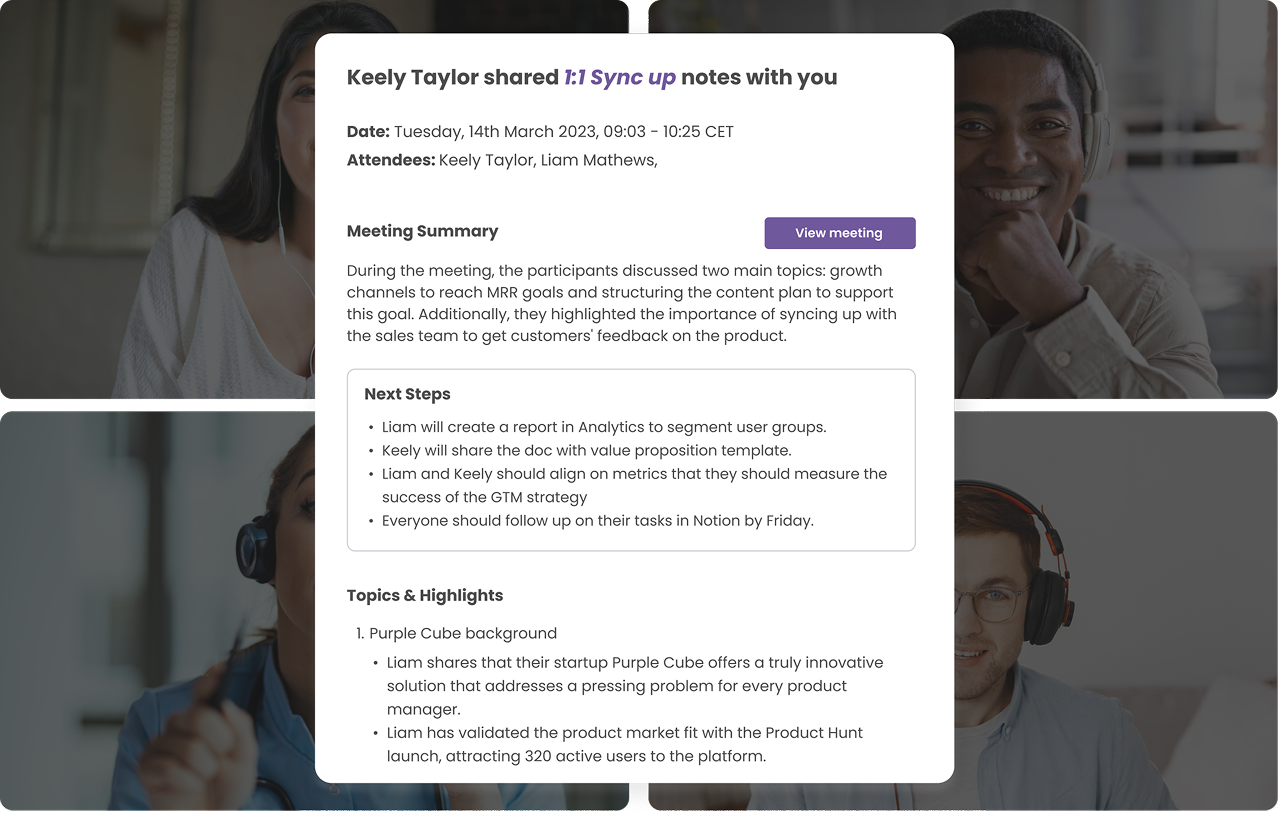
If you record your online interviews with MeetGeek (ask the interviewer for explicit consent first and follow any recording rules that apply), you can ask MeetGeek's AI Chat about the conversation, for example "What did the interviewer say the team's biggest challenge is?", and get the answer from the transcript instead of from memory. Chat with Meetings is available on every plan.
On Pro and higher plans, AI Chat can connect to Gmail, so you can ask it to draft a thank-you email from the interview, refine it, and send it from your inbox. Chat with Apps also works with Slack, Notion, Google Drive and Google Calendar, and MeetGeek can generate follow-up emails after any meeting, not only interviews.
Try it on your next interview and write your follow-up from what was actually said.
Frequently Asked Questions
1. When Is the Best Time to Send a Thank-You Email After an Interview?
Within 24 hours, ideally the same day, while the conversation is still fresh for both of you.
2. How Many Times Should I Follow Up After an Interview?
As a rule of thumb, send no more than two check-ins after your thank-you email, about a week apart, then a final note that closes the loop. If the recruiter replies with a new date, wait for that date before writing again.
3. Is It Okay to Send a Handwritten Thank-You Note Instead of an Email?
Yes, but email is usually the more practical choice because it arrives right away. In the same 2017 Robert Half survey, 94% of HR managers said email was an appropriate way to say thank you, and 86% said the same of a handwritten note. A handwritten note can still feel personal at a smaller or more traditional company, as long as it doesn't arrive after the decision.
4. What If I Notice a Mistake in My Follow-Up Message?
Don't panic. A small typo is easy to overlook. If you forgot an attachment or left out important details, send a brief correction email right away and acknowledge it politely.
5. What Should I Do If No One Replies at All?
Sometimes silence simply means the hiring process is moving slowly or the position has already been filled. After your final follow-up, move forward with other opportunities while keeping the door open for future contact.






.avif)