Haciendo clic «Aceptar todas las cookies», acepta el almacenamiento de cookies en su dispositivo para mejorar la navegación del sitio, analizar el uso del sitio y ayudar en nuestras iniciativas de marketing. Vea nuestro Política de privacidad para obtener más información.
MeetGeekBlogBest Interview Transcription Software: 5 Tools Compared
Back to Blog

Best Interview Transcription Software: 5 Tools Compared

Productividad
Productividad

Find the best interview transcription software for your workflow. Compare five top tools for transcription, summaries, editing, collaboration, and interview analysis.

Melania Ciocianu
August 20, 2026
/
5 min read
Table of content
Comienza con MeetGeek, el asistente de reuniones con IA
📝 AI-powered Meeting Note taker
✅ Free meeting recording & transcription
💬 Automated sharing of insights to other tools.
Regístrate gratis
Share the knowledge with your circle
Copied

Interview transcription software turns recorded conversations into searchable text, saving researchers, recruiters, journalists, and other interviewers from replaying audio and typing everything manually.

The best option depends on what happens after transcription. Some tools focus on producing an accurate transcript from an audio file. Others add speaker identification, video editing, collaboration features, AI-generated summaries, or interview analysis.

In this guide, we compare five interview transcription tools based on their features, intended use cases, and feedback from real users.

TL;DR

  • Choose software based on what you need to do with the interview transcript, not transcription accuracy alone.
  • Otter.ai is useful when you want a live transcript while an interview is happening.
  • Descript stands out when transcription is part of an audio or video editing workflow.
  • Trint combines transcription with a collaborative editor for teams working with research interviews and recorded content.
  • MeetGeek goes beyond core transcription by turning interviews into structured notes, summaries, insights, and searchable knowledge.
  • OpenAI's Whisper is better suited to developers and teams that want a transcription model they can build into their own workflow.

Why interview transcription software matters

A one-hour interview creates an awkward problem: the conversation may be over, but much of the work has only started.

You might need to revisit an answer, find a specific quote, compare responses across multiple people, pull themes from research interviews, prepare meeting notes, or share findings with colleagues.

Doing that directly from audio and video recordings is slow. Even when you remember roughly when something was said, finding the exact spoken words can mean repeatedly scrubbing through an audio file.

Manual transcription creates an even bigger time commitment.

Interview transcription software changes the format of the information. Instead of working primarily with voice recordings, you get searchable text that can be reviewed, copied, analyzed, summarized, and shared.

Modern AI transcription tools can also handle tasks such as:

  • Speaker identification and speaker labels
  • AI-generated summaries
  • Filler words and repeated words
  • Search across transcripts
  • Multiple languages
  • Different export formats and subtitle formats
  • Sharing and collaboration
  • AI chat for asking questions about an interview
  • Identifying recurring topics and patterns

That distinction matters because the best interview transcription software isn't necessarily the product that simply generates text with the fewest errors.

The better question is: what do you need to do once you have the transcript?

What should you look for in interview transcription software?

Before comparing tools, consider the recording conditions and the job you need the transcript to do.

Transcription accuracy

Accuracy is the obvious starting point, but no automated transcript should automatically be treated as flawless.

Background noise, accents, industry terminology, multiple speakers talking at once, unclear audio, and names can all affect transcription accuracy.

Studio-quality audio will generally give transcription software an easier job than a noisy interview recorded in a public place.

If exact wording is critical, human transcription or human-powered transcription may still be worth considering. AI transcription prioritizes turnaround speed and scalability, while human transcription options are generally relevant when the cost of a transcription error is particularly high.

Speaker identification

A transcript becomes much harder to use if you can't tell who said what.

For interviews involving multiple people, look for software that separates speakers and applies speaker labels consistently. This becomes especially useful during qualitative research, where you may be comparing comments from several participants.

Interview analysis

Generating accurate transcripts is only the first step for many teams.

Researchers may need to identify patterns across qualitative data. Recruiters may need to pull out candidate responses from screening interviews. Journalists may need quotes and themes. Customer teams may want to compare feedback across longer interviews.

Features such as AI chat, an AI summary, searchable transcripts, and AI-generated summaries can substantially reduce the work that comes after transcription.

Import and recording options

Check how recordings get into the software.

Some products are designed around uploaded audio files and video files. Others can automatically capture interviews conducted through a Google Meet, Zoom, or Microsoft Teams integration. A mobile voice recorder can also be useful for in-person interviews.

The right workflow is the one that removes steps rather than adding them.

Export and collaboration

A transcript rarely stays in one tool forever.

Depending on your workflow, you might need text transcripts, subtitle formats, documents, or other export formats. Teams should also consider whether they can share transcripts, comment on them, and work together without creating multiple versions of the same file.

The 5 best interview transcription software tools

1. Otter.ai: Best for live interview transcription

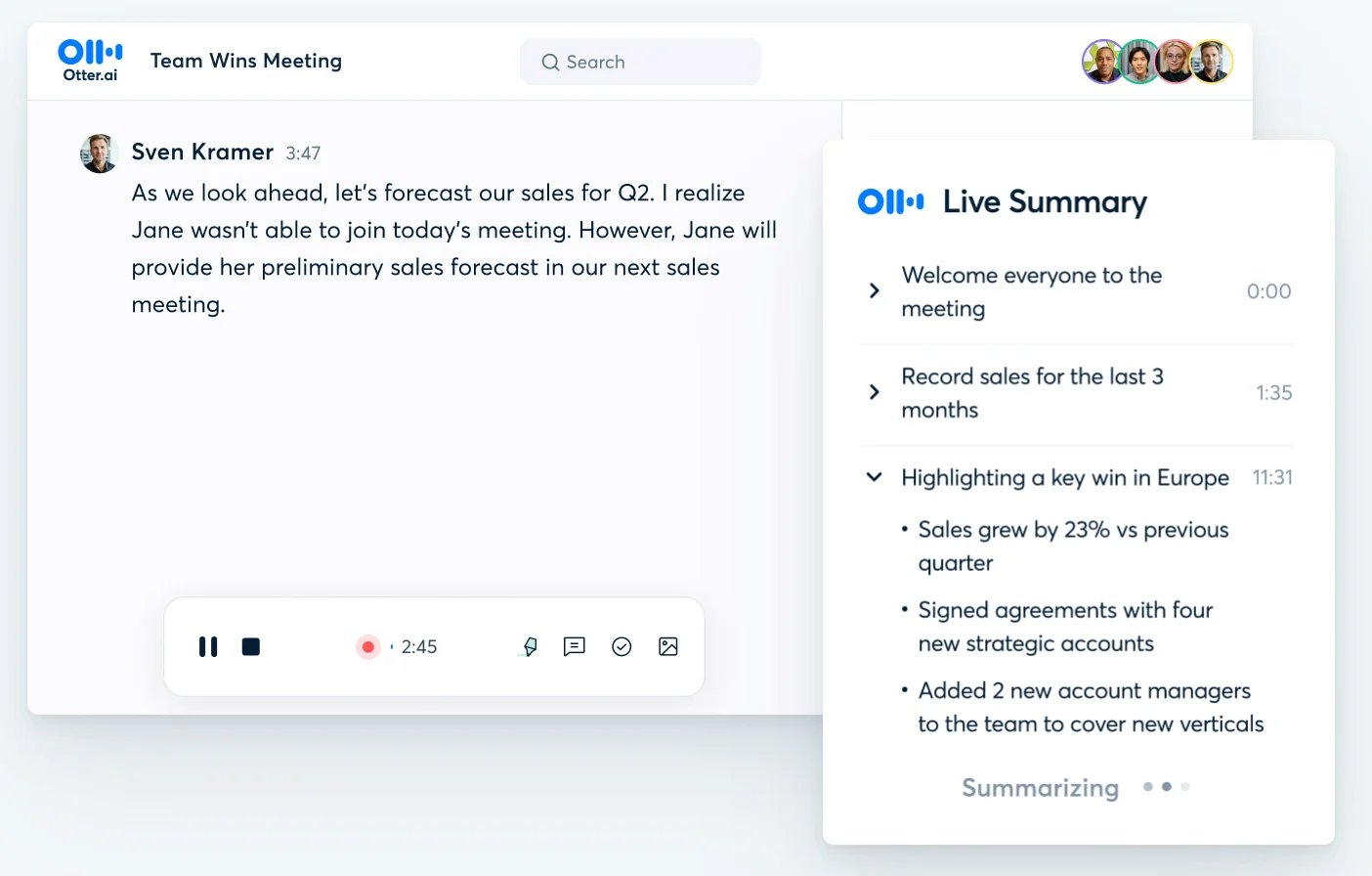
Otter.ai is one of the better-known AI transcription platforms and is particularly relevant when you want transcription to happen during the interview rather than after it.

It can create a live transcript as people speak, making it useful for journalists, recruiters, researchers, and other professionals who want searchable notes immediately after a conversation.

Otter also adds AI-generated summaries and other tools for working with the transcript after the interview.

Otter AI Live Summary interface

Best for: People who prioritize real-time transcription and meeting notes.

What stands out:

  • Live transcription
  • Speaker identification
  • AI summaries
  • Searchable transcripts
  • Support for recorded conversations and meetings
  • Collaboration features

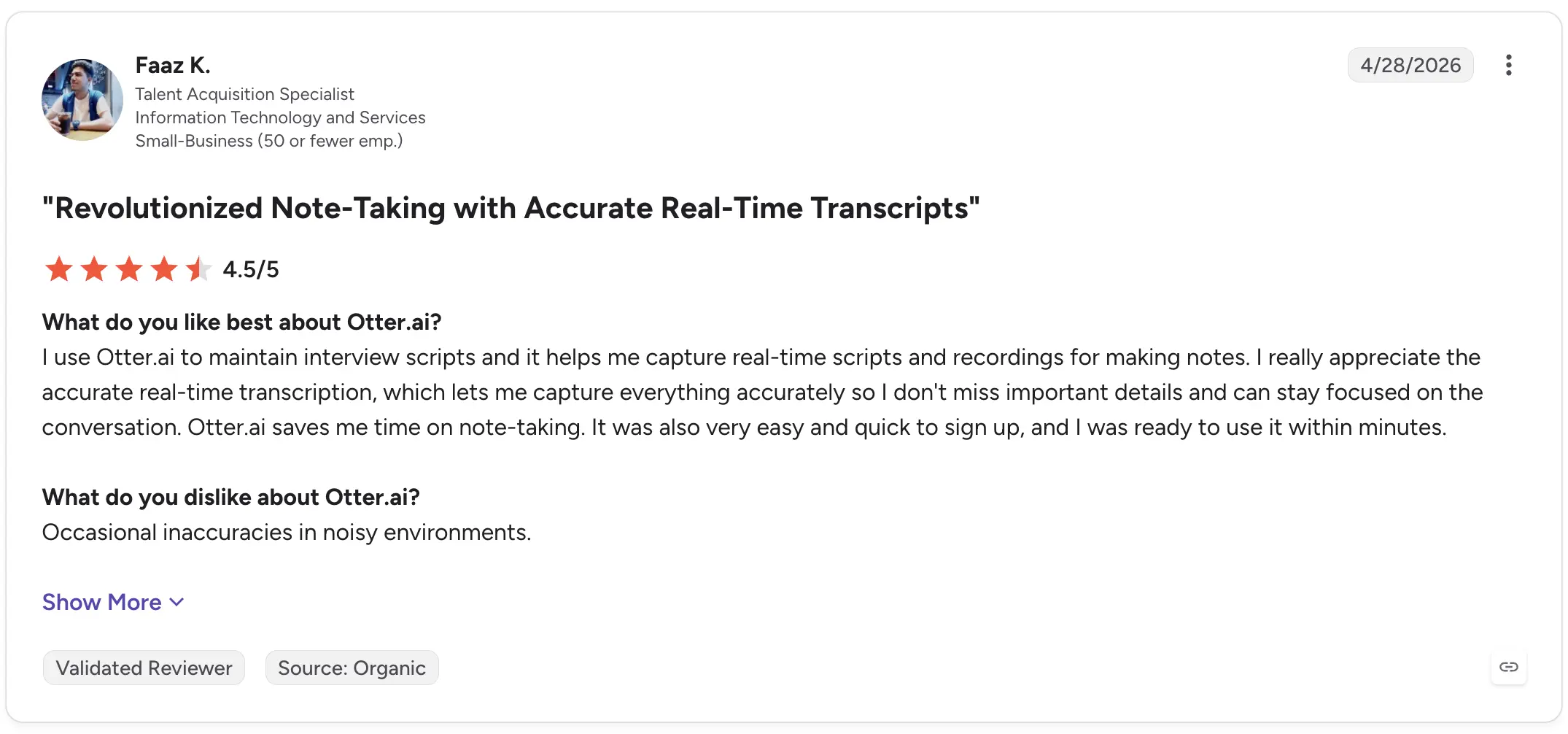
Faaz K., a Talent Acquisition Specialist, gave Otter.ai 4.5/5 on G2 in April 2026 and specifically described using it for interviews. He praised its real-time transcription for helping him capture details while staying focused on the conversation. His main criticism was occasional inaccuracies in noisy environments.

Otter AI G2 review

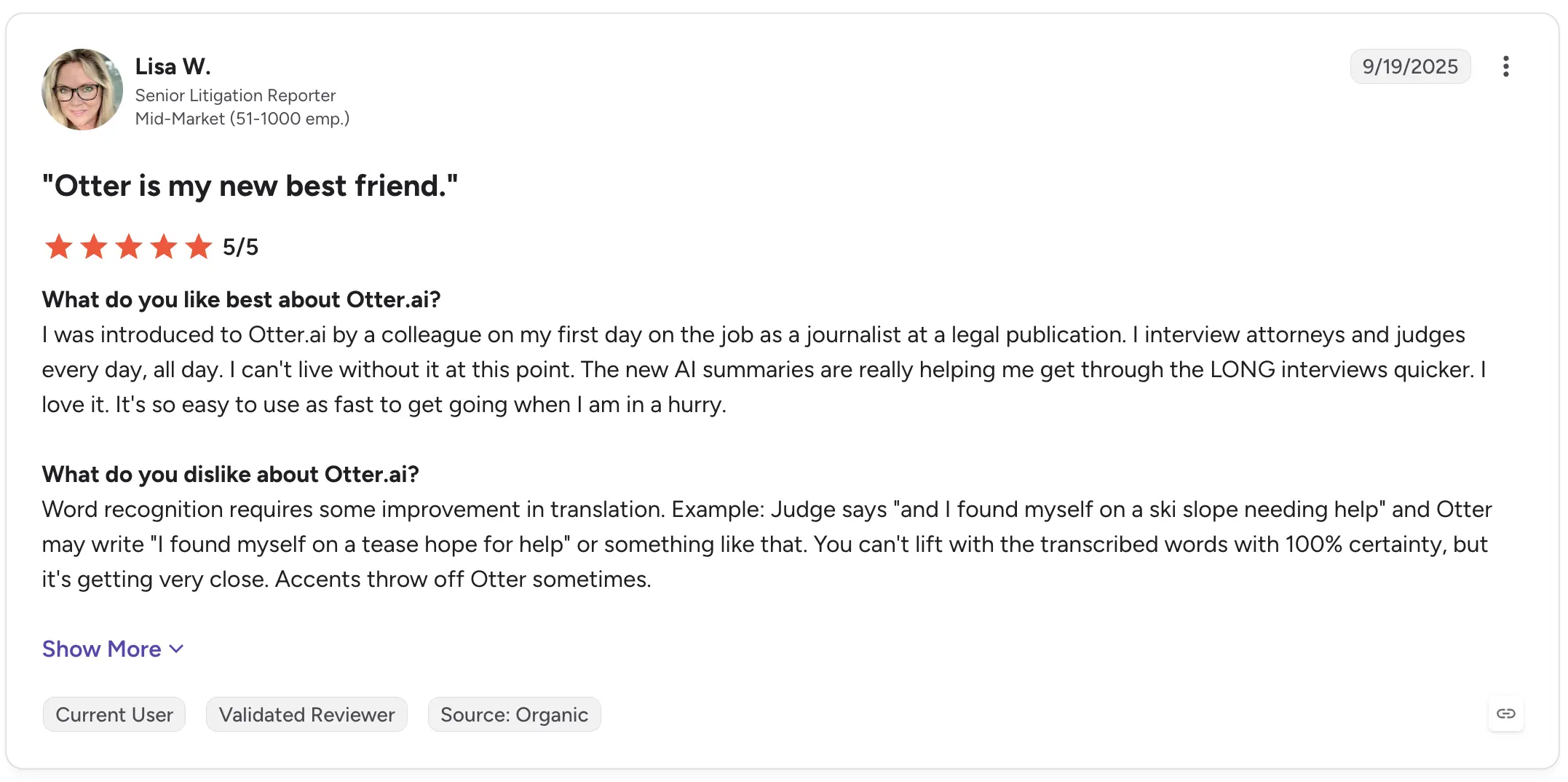
Lisa W., a Senior Litigation Reporter, rated it 5/5 and described using Otter for daily interviews with attorneys and judges. She highlighted the value of AI summaries for getting through long interviews faster, while also noting that word recognition isn't reliable enough to assume every phrase is correct and that accents can cause mistakes.

Otter AI G2 review

That is an important limitation to keep in mind with automated transcripts generally: convenient does not mean infallible.

2. Descript: Best for editing interview audio and video

Descript approaches transcription differently.

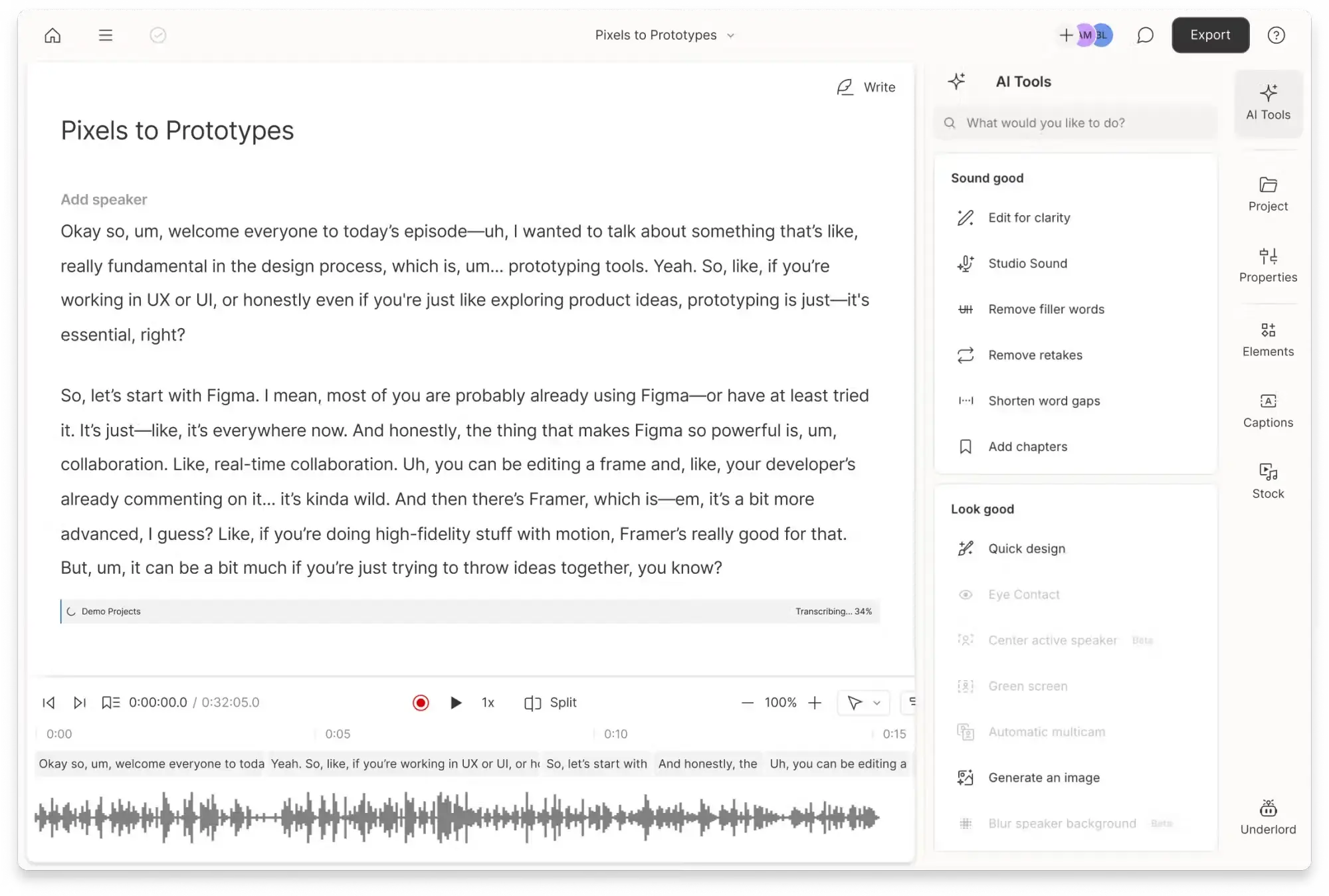
Rather than treating the transcript purely as a written record, it connects the transcript directly to the underlying audio or video. Editing text can, therefore, become part of editing the recording itself.

That makes Descript especially useful when an interview will eventually become a podcast, video, social clip, or other piece of published content.

Descript transcript of meeting with AI Tools bar on the right

Best for: Podcasters, video teams, journalists, and creators editing recorded interviews.

What stands out:

  • Audio and video transcription
  • Text-based media editing
  • Transcript and recording in the same workspace
  • Video and audio production features
  • Export workflows for further editing

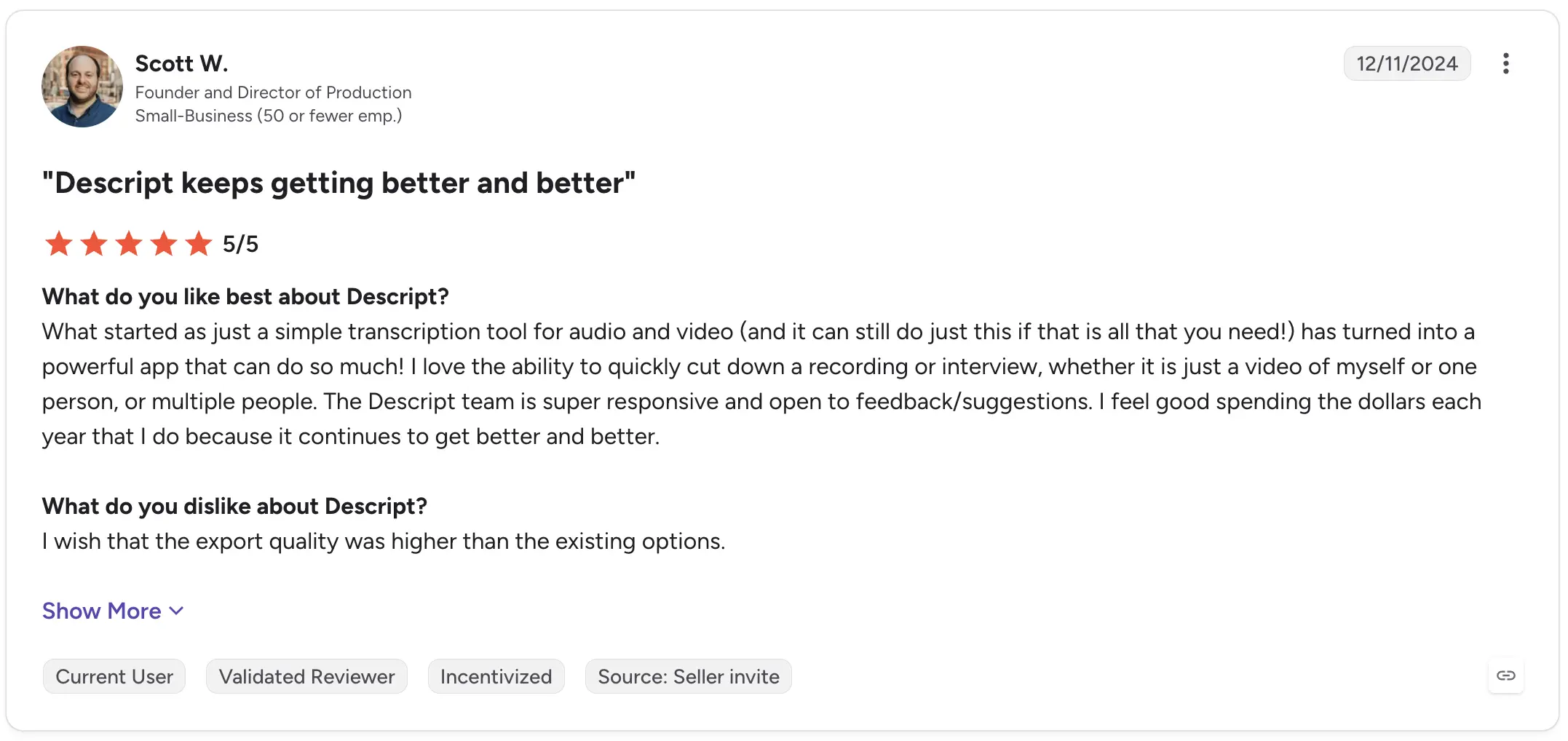
Scott W., a Founder and Director of Production, rated Descript 5/5 on G2. He described how the product had evolved beyond simple audio and video transcription and highlighted the ability to quickly cut down interviews and other recordings. His criticism focused on export quality rather than the core transcription workflow.

Descript G2 review

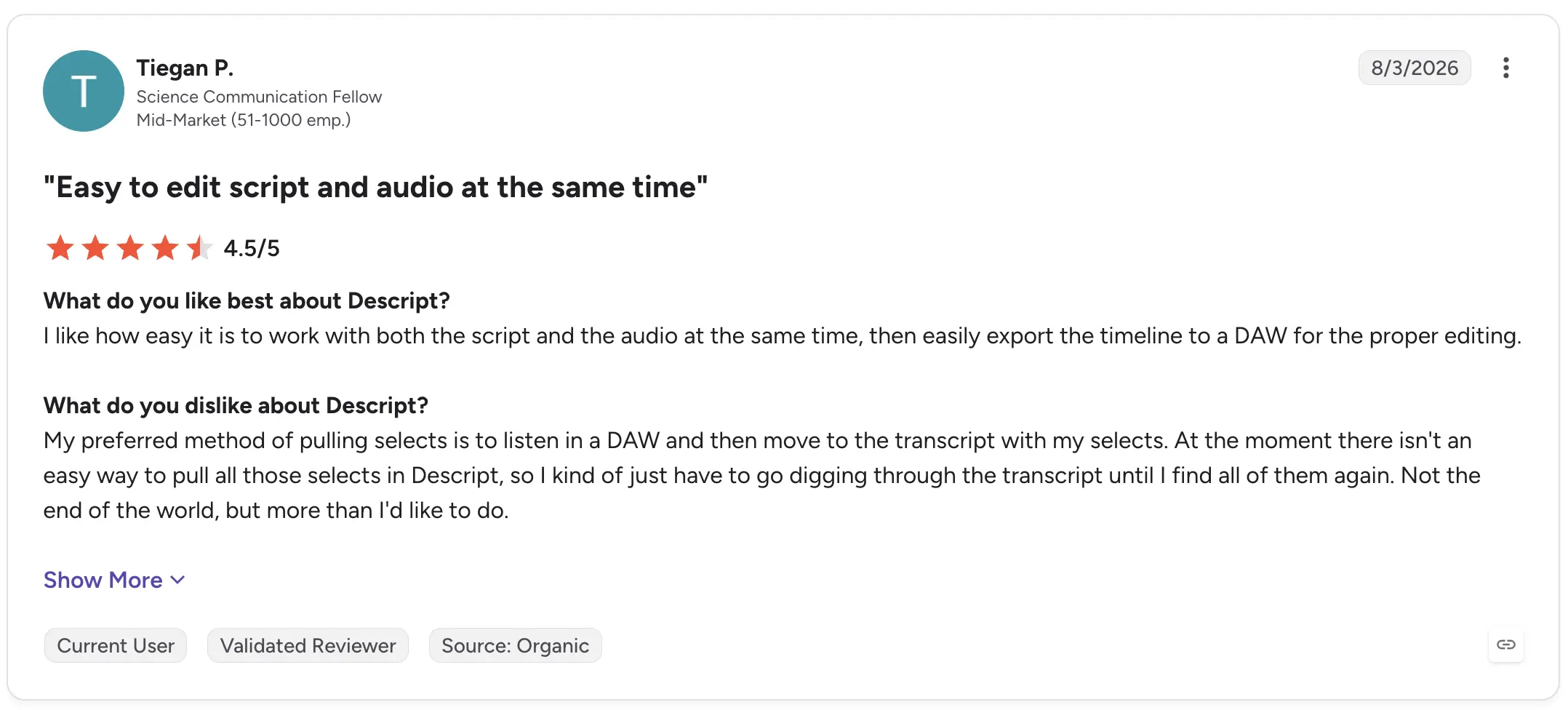
A more recent August 2026 review from Science Communication Fellow Tiegan P. rated Descript 4.5/5 and praised being able to edit the script and audio together before exporting the timeline to a DAW. Their main frustration was that their preferred workflow for pulling selects still required digging back through the transcript.

Descript G2 review

Descript, therefore, makes the most sense when the transcript isn't the final product, but part of the production process.

3. Trint: Best for collaborative transcript editing

Trint combines AI transcription with tools for reviewing, editing, and collaborating around recorded material.

That can make it particularly useful for research, media, and content teams where several people need to work with interview transcripts rather than one person simply downloading a text file.

Best for: Teams collaboratively reviewing interviews and recorded content.

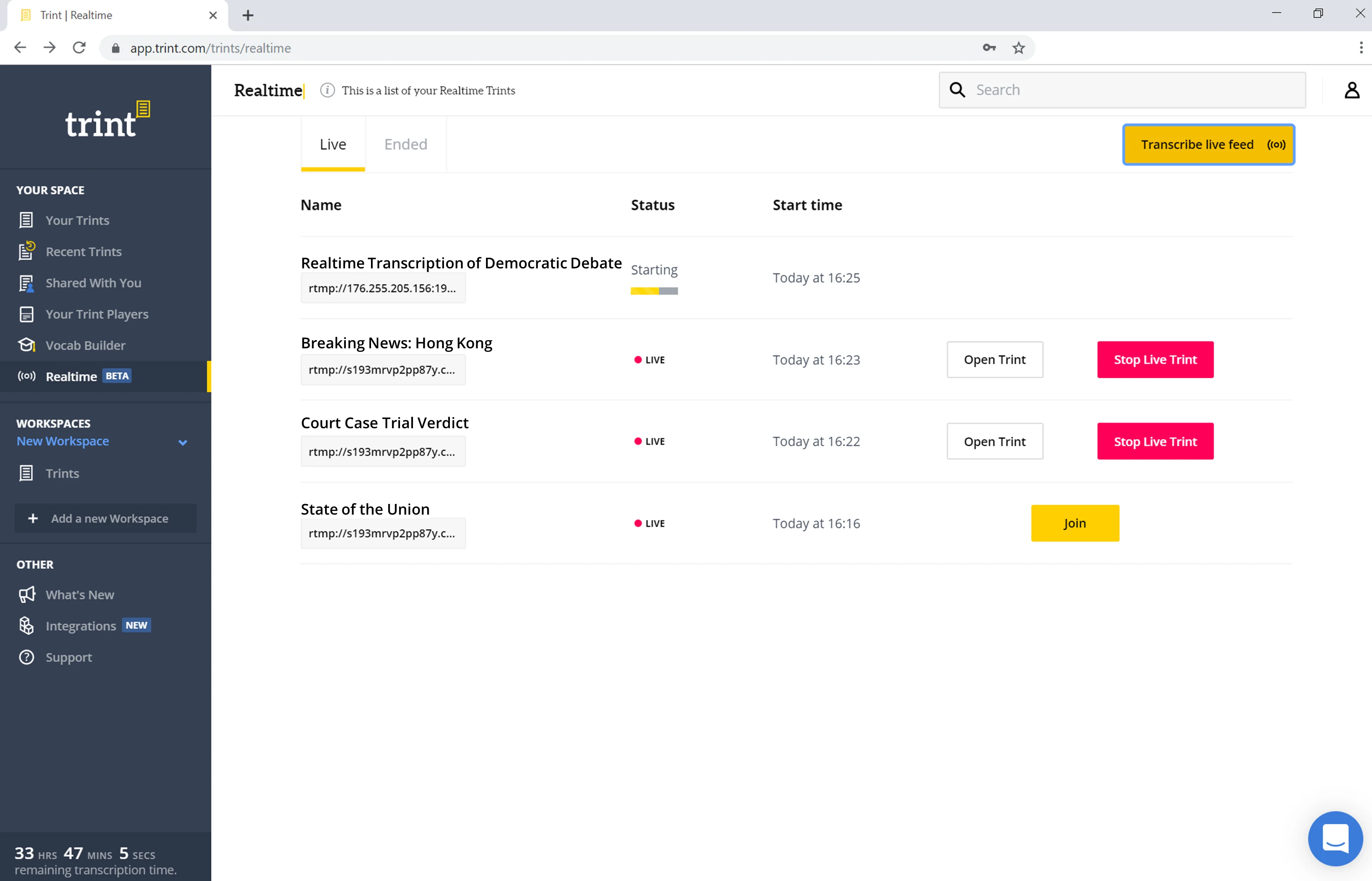
Trint interface showing Live Transcription in the Realtime tab

What stands out:

  • AI transcription
  • Collaborative editor
  • Audio and video workflows
  • Transcript review and markup
  • Tools suited to interview-based projects

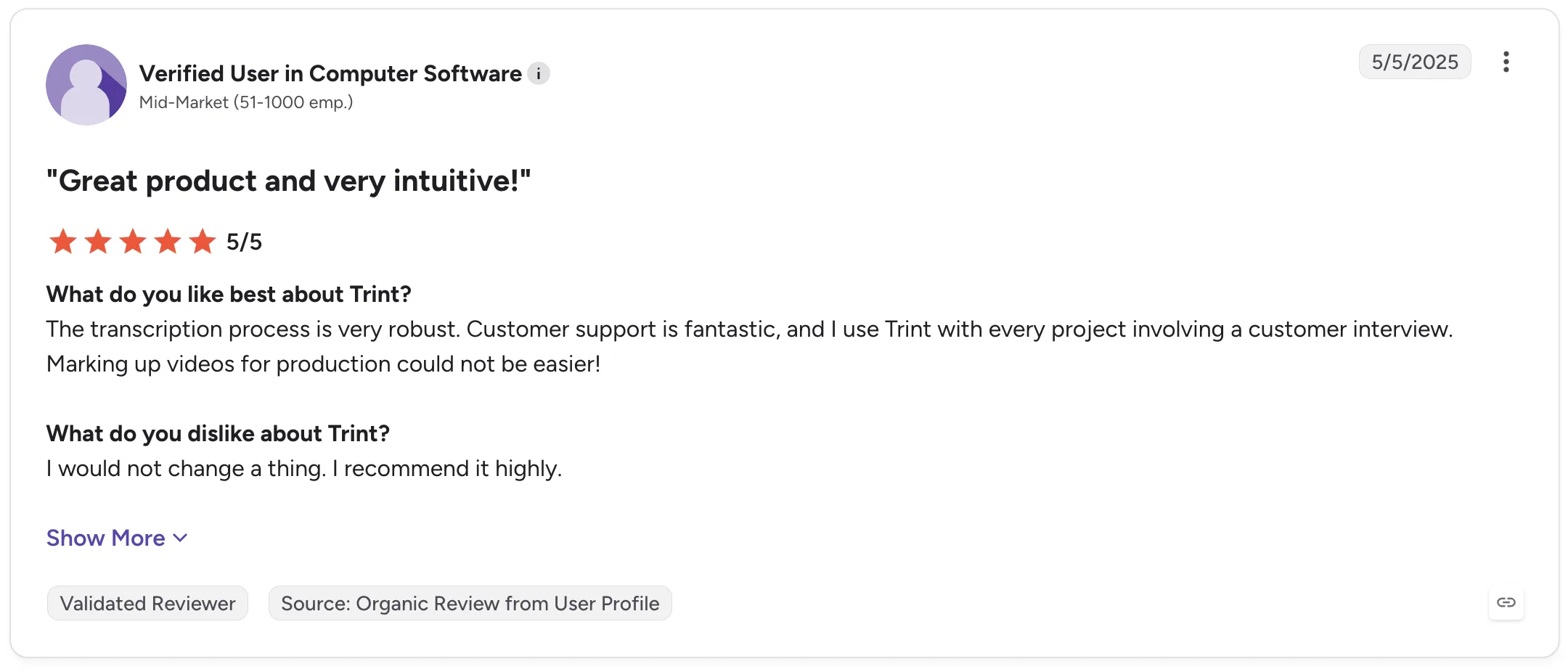
A verified G2 reviewer working at a mid-market computer software company rated Trint 5/5 in May 2025 and said they use it with every project involving a customer interview. They specifically praised its transcription process and ability to mark up videos for production.

Trint G2 review

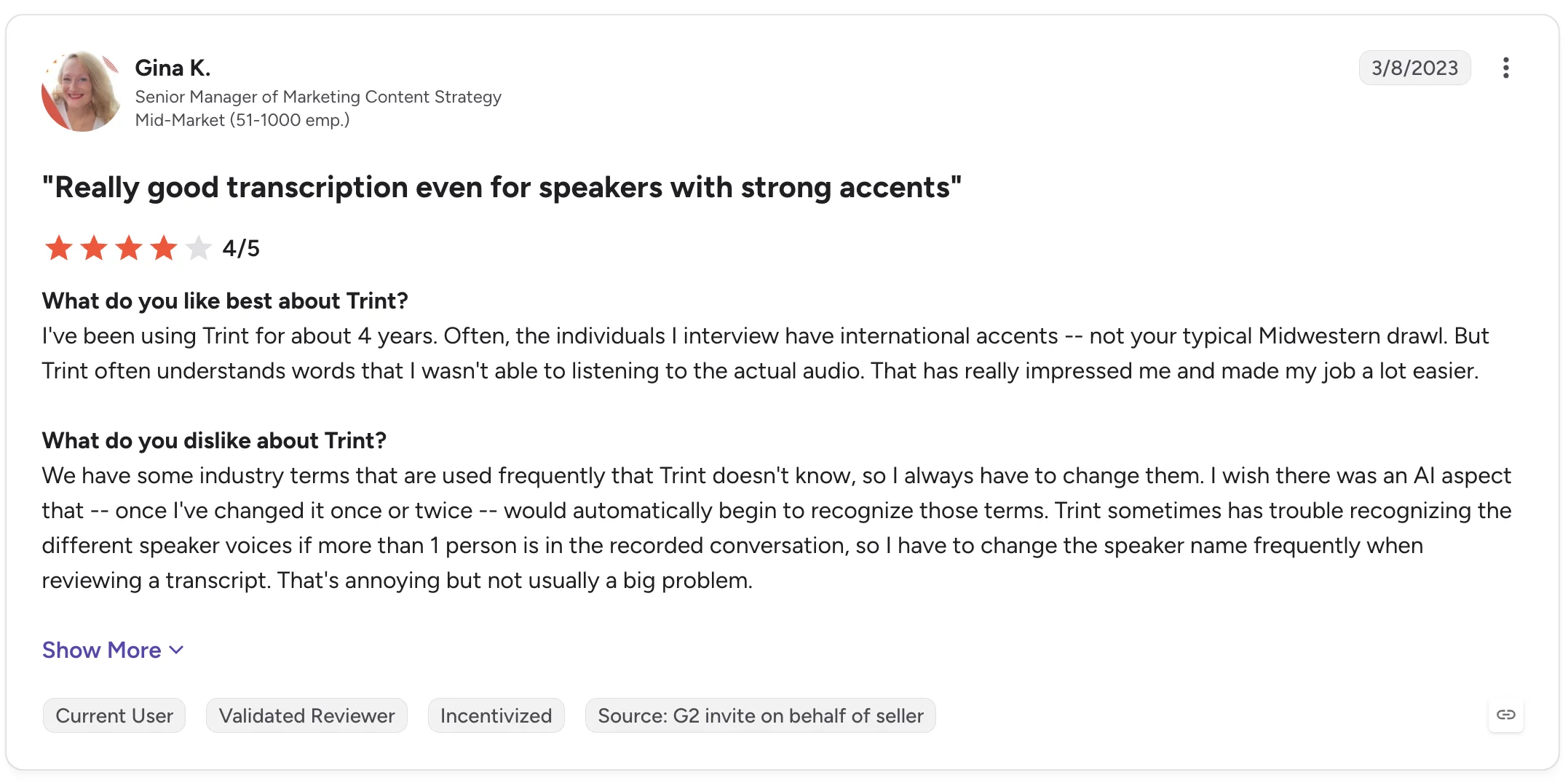
Gina K., a Senior Manager of Marketing Content Strategy, gave Trint 4/5 and highlighted its performance with interviewees who have strong international accents. Her review also points to two useful limitations: industry-specific terminology sometimes needs correcting, and distinguishing different speakers can require manual fixes.

Trint G2 review

Those details are worth considering if your research interviews contain specialized vocabulary or multiple people speaking.

4. MeetGeek: Best for turning interviews into structured insights

MeetGeek is a better fit when transcription is the beginning of the workflow rather than the end.

It can automatically record and transcribe interviews thanks to its Google Meet, Microsoft Teams, and Zoom integrations, on Discord and Webex through the Chrome extension, as well as process uploaded MP3 and MP4 recordings and in-person conversations captured through the mobile app.

The transcript then feeds into AI meeting notes, summaries, highlights, action items, and a searchable meeting knowledge base.

MeetGeek transcription and notes of Google Meet Demo meeting

For interview-heavy workflows, that means you can move from:

recording → transcript → summary → analysis → shared knowledge

Without manually moving the conversation between several AI note-taker tools.

MeetGeek supports speaker identification, timestamps, 100+ languages and dialects, and a custom dictionary for company jargon, unusual names, acronyms, and industry terminology. It can also tailor AI-generated summaries to the type of conversation, including interviews.

Its AI chat is particularly useful when you're dealing with multiple interview recordings. Instead of opening every transcript and starting from a blank page, you can ask questions about previous conversations and retrieve relevant information from them.

MeetGeek AI Chat

For qualitative research, MeetGeek’s AI chat can help with tasks such as finding recurring concerns, retrieving comments about a particular topic, or reviewing what different interviewees said before deeper analysis.

Teams can also share transcripts, recordings, summaries, and highlights, leave comments inside transcripts, and organize interviews into shared repositories.

Best for: Recruiting interviews, user research, customer interviews, and teams that need both transcription and structured post-interview analysis.

What stands out:

  • Automatic recording with Zoom, Microsoft Teams, and Google Meet integration
  • Uploaded audio and video transcription
  • Mobile recording for in-person interviews
  • Speaker identification
  • 100+ languages and dialects
  • Custom dictionary
  • AI-generated summaries and highlights
  • AI chat across meetings
  • Searchable interview knowledge base
  • Transcript comments and sharing
  • Conversation analytics

Real user feedback also reflects both sides of the product.

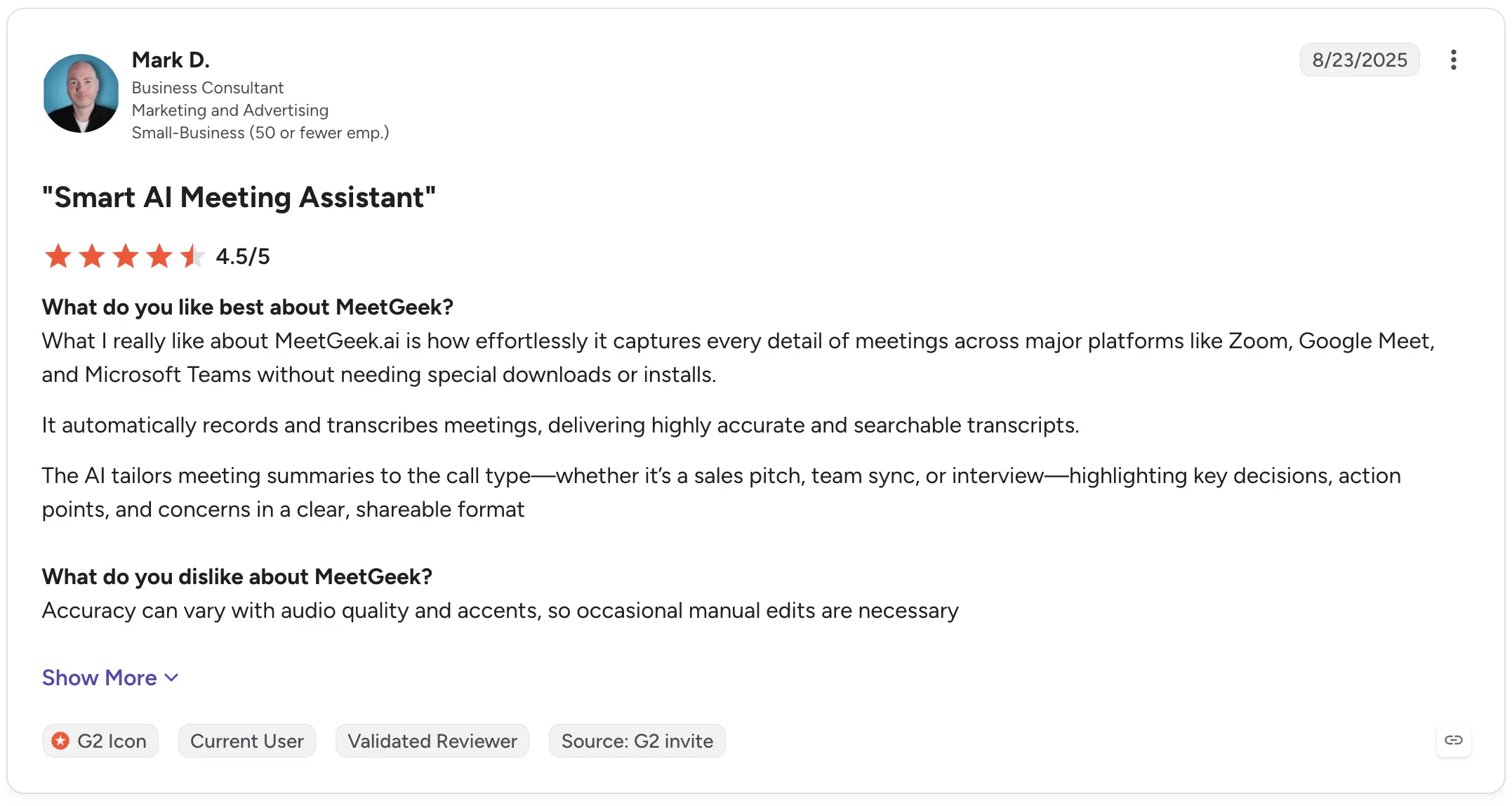
Mark D., a Business Consultant, rated MeetGeek 4.5/5 on G2 and praised its ability to automatically capture meetings and create searchable transcripts. He also specifically mentioned summaries adapting to different call types, including interviews. His criticism was that accuracy can vary depending on audio quality and accents, requiring occasional edits.

MeetGeek G2 review

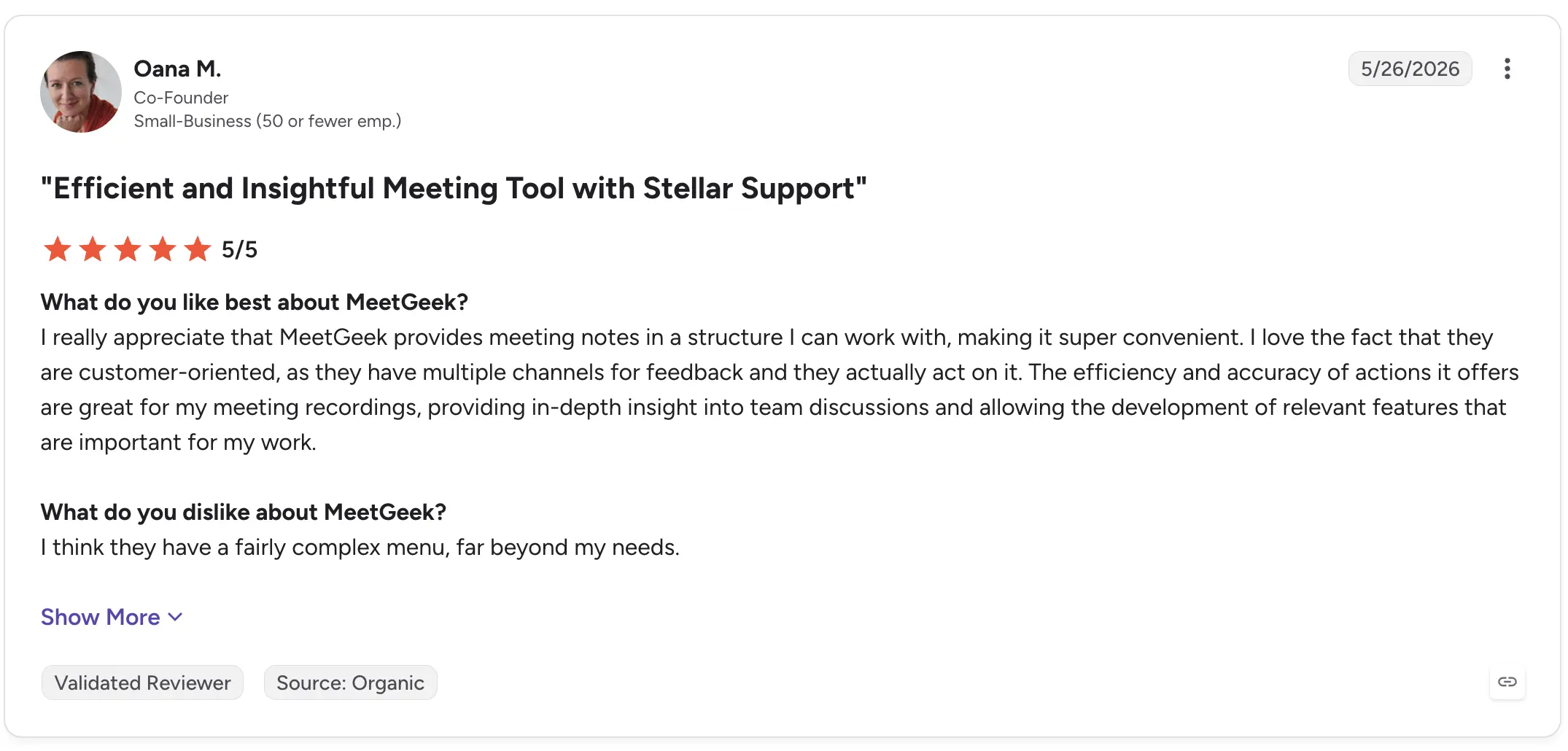
Oana M., a Co-Founder, rated MeetGeek 5/5 in May 2026 and highlighted the structure of its meeting notes and the depth of insights available from recordings. Her main criticism was that the menu contains more functionality than she personally needs.

MeetGeek G2 review

If your only requirement is converting an audio file into text, MeetGeek may offer more functionality than necessary. But when interviews need to become summaries, findings, shared knowledge, or follow-up work, those additional layers are the point.

5. OpenAI Whisper: Best for custom transcription workflows

OpenAI's Whisper is somewhat different from the other products on this list.

Whisper is fundamentally a speech recognition and transcription model rather than a complete interview management workspace. That makes it particularly interesting to developers and technical teams that want to build transcription into their own applications or workflows.

It can handle multilingual speech and is widely used as the transcription layer inside other AI-powered products.

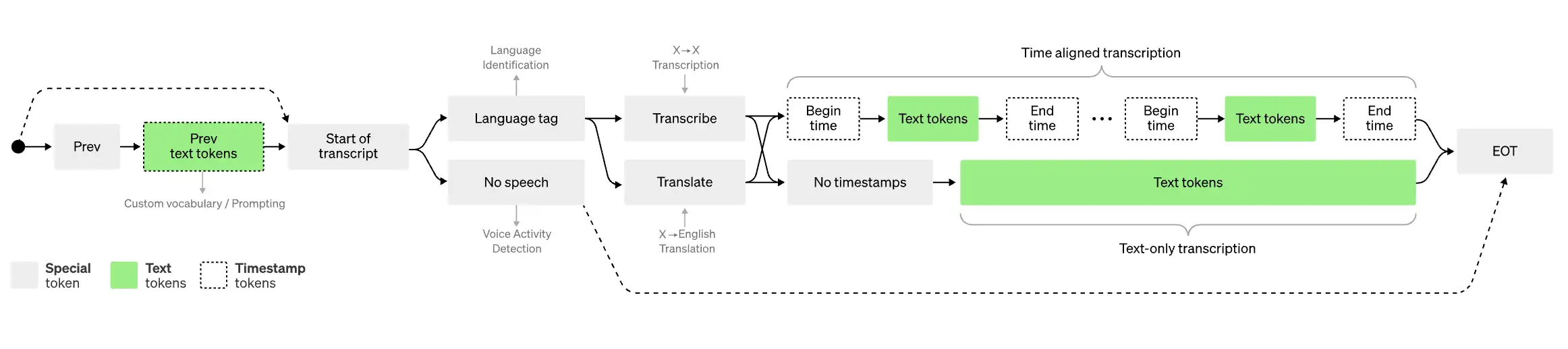
Map with legend explaning how Whisper works

Best for: Developers and technical teams building their own transcription workflows.

What stands out:

  • Speech-to-text transcription model
  • Multiple languages
  • Can process audio recordings programmatically
  • Useful as a building block for custom AI tools
  • Flexible for technical implementations

This flexibility comes with a tradeoff: using a transcription model is not the same as buying software designed to manage interviews from recording through analysis.

If you need a polished collaborative editor, interview repository, meeting notes, or ready-made workflow for sharing transcripts, you will generally need to build or add those components yourself.

Recent G2 reviews also highlight the strengths and limitations of the core transcription.

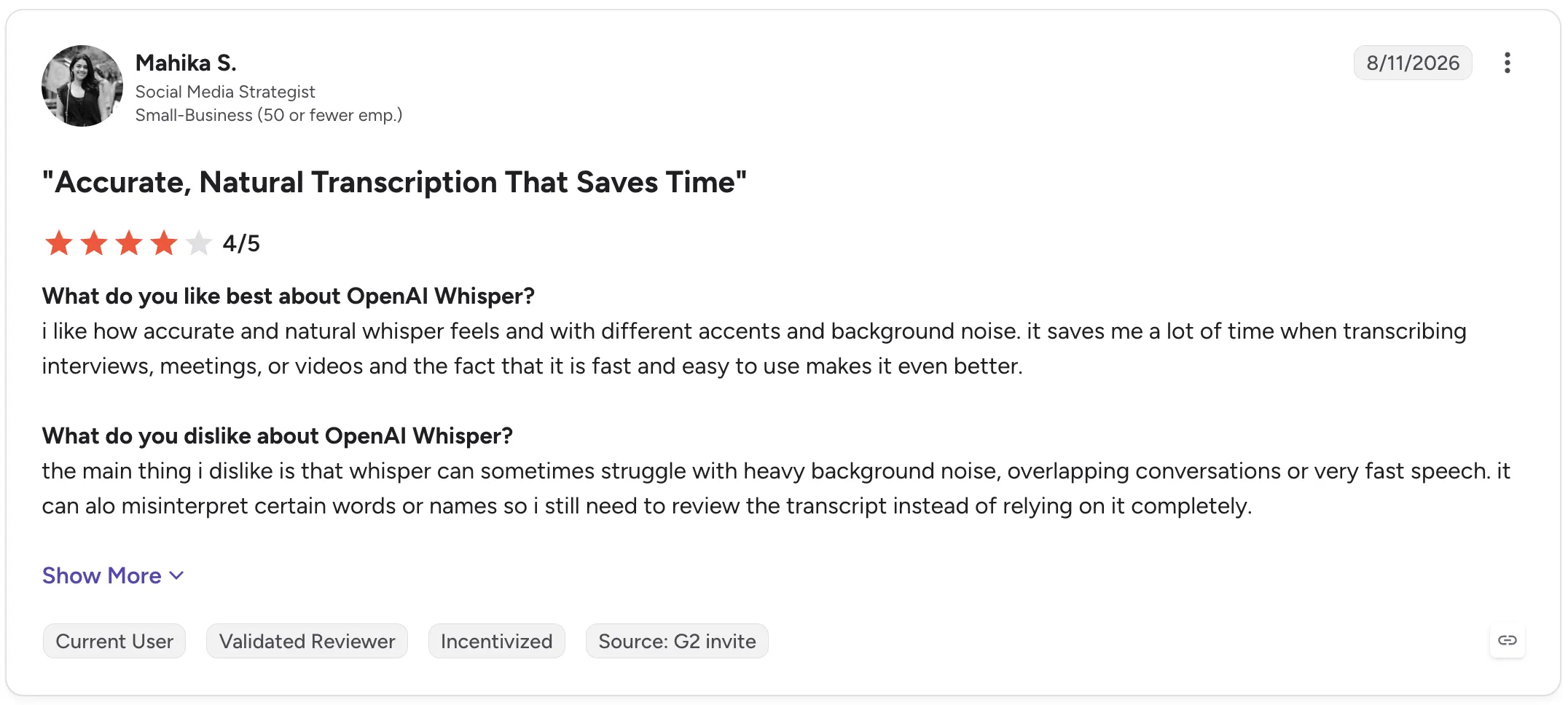
Mahika S., a Social Media Strategist, rated OpenAI Whisper 4/5 in August 2026, praising its accuracy across different accents and background noise and saying it saves time when transcribing interviews, meetings, and videos. She also reported problems with heavy background noise, overlapping conversations, fast speech, names, and occasional incorrect words.

OpenAI Whisper G2 review

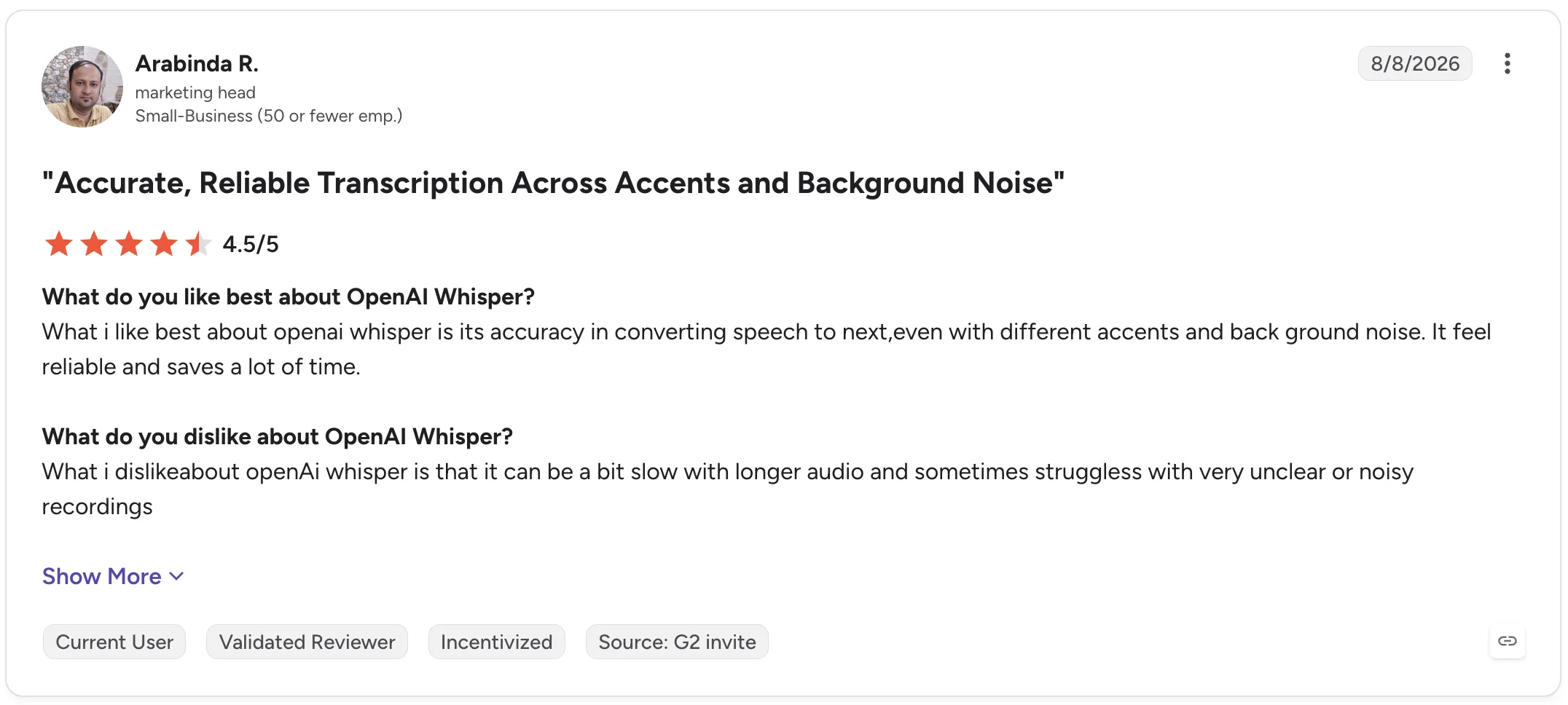
Arabinda R., a Marketing Head, gave Whisper 4.5/5 and similarly praised its reliability across accents and background noise. His criticism was that longer audio can take more time and unclear or noisy recordings can reduce performance.

OpenAI Whisper G2 review

Whisper is, therefore, compelling when you want control over the transcription layer itself. It is less compelling if you want an out-of-the-box workspace for managing the entire interview process.

Interview transcription software comparison

Tool Best for Live transcription AI summaries Interview analysis Collaboration
Otter.ai Live interview transcription Yes Yes Yes Yes
Descript Audio and video production No Yes Limited Yes
Trint Collaborative transcript editing Available workflows vary Yes Yes Yes
MeetGeek Interview insights and knowledge Yes Yes Yes Yes
OpenAI Whisper Custom transcription workflows Depends on implementation No native workspace Depends on implementation No native workspace

How to transcribe an interview

The exact process depends on whether your interview happens online, in person, or has already been recorded.

1. Get the clearest recording possible

Transcription starts with the audio.

Keep microphones close enough to capture clear speech, reduce background noise where possible, and avoid having multiple people speak simultaneously.

Even high-accuracy transcription software has less information to work with when voices are muffled, distant, or overlapping.

2. Record the interview or upload the existing file

If the interview has already happened, most transcription services let you simply upload an audio file or video file.

For online interviews, software designed to work with Google Meet, Zoom, or Microsoft Teams can remove this step by recording and transcribing the interview automatically.

For an in-person conversation, use a phone, dedicated voice recorder, or transcription app that supports offline recording.

3. Generate the transcript

Once the recording is available, the transcription software converts the audio into text.

Processing time depends on the tool, recording length, transcription model, and workflow. Some tools provide a live transcript, while others process the recording after the interview.

4. Review the transcript against the recording

Don't assume an AI transcript contains zero errors.

Review names, numbers, technical terminology, quotes you intend to publish, and passages where the audio was unclear.

Pay particular attention to sections with background noise, overlapping speakers, or rapid speech.

5. Clean up speaker labels and unnecessary speech

Depending on why you need the transcript, you may want to remove filler words, false starts, or repeated words.

For qualitative research, however, be careful not to clean the text so aggressively that you alter the interviewee's meaning.

Correct speaker labels as well, especially when multiple speakers have similar voices.

6. Export or analyze the interview

The transcript can now become an input for the rest of your work.

You might export it as text, create subtitle files, share it with colleagues, extract quotes, generate an AI summary, or use AI tools to identify patterns across several interviews.

This is where choosing software based solely on transcription accuracy can become limiting. The time saved after transcription can be just as important as the transcription time itself.

AI transcription vs human transcription: Which should you use?

AI and human transcription solve slightly different problems.

AI transcription prioritizes speed, cost, and scale. You can upload a recording and receive an automated transcript quickly, then search, summarize, or analyze it with other AI-powered features.

Human transcription prioritizes manual review and can be preferable when exact wording is critical.

For everyday research interviews, recruiting conversations, journalism, internal interviews, and customer research, AI transcription will often provide the more practical starting point, provided important passages are reviewed.

Human transcription services may make more sense for particularly sensitive or high-stakes material where a few errors could materially affect the outcome.

Security also matters in either case. Before uploading sensitive information, check how the transcription provider stores, processes, protects, and deletes recordings and transcripts.

Conclusion

Good interview transcription software should make recorded conversations easier to use, not simply turn audio into a wall of text.

Look at transcription accuracy, speaker identification, recording options, export formats, and language support, but also consider how much work remains once the transcription is finished.

If your interviews happen on Zoom, Google Meet, Microsoft Teams, or in person, MeetGeek can automatically record and transcribe them, create structured AI summaries, and turn past interviews into a searchable knowledge base your team can return to later.

Try MeetGeek for free and spend less time processing interviews after they end.

Key takeaways

  • Choose Otter.ai if a live transcript is central to how you conduct interviews.
  • Choose Descript if interviews become podcasts, videos, or other edited media.
  • Choose Trint if several people need to review and edit interview transcripts collaboratively.
  • Choose MeetGeek if you regularly conduct interviews and want recordings to automatically become searchable transcripts, structured summaries, insights, and reusable team knowledge.
  • Choose OpenAI Whisper if you have the technical resources to build your own workflow around a flexible transcription model.

Frequently asked questions

What is the best software to transcribe interviews?

The best choice depends on your workflow. Otter.ai is well-suited to live transcription; Descript to audio and video editing; Trint to collaborative transcript work; MeetGeek to transcription plus interview summaries and analysis; and OpenAI Whisper to custom technical implementations.

Can ChatGPT transcribe an interview?

ChatGPT can transcribe audio inputs and help analyze transcript content, but dedicated interview transcription software may provide additional workflows such as automatic meeting recording, speaker labels, collaborative editing, transcript libraries, and integrations.

OpenAI's Whisper is the company's speech recognition model specifically designed for converting audio into text.

How long does it take to transcribe a one-hour interview?

Automated AI transcription can process a one-hour interview far faster than manually typing it, although exact turnaround speed varies by service, file size, recording quality, and processing method. You should also budget time to review important passages for transcription errors.

What is the difference between transcription and interview analysis?

Transcription converts spoken words into text. Interview analysis interprets that text to identify themes, patterns, insights, quotes, answers, and relationships across one or more interviews.

The first creates the source material. The second helps you understand what that source material means.

Should I remove filler words from interview transcripts?

It depends on the purpose of the transcript. Removing filler words can make transcripts easier to read when you're creating articles, summaries, or internal notes. For qualitative research, preserve enough of the original speech to avoid changing meaning, tone, or context.

Article updated on 
August 20, 2026
Share the knowledge with your circle
Copied
Related posts

Best Interview Transcription Software: 5 Tools Compared

Find the best interview transcription software for your workflow. Compare five top tools for transcription, summaries, editing, collaboration, and interview analysis.

This is some text inside of a div block.

12 Best Remote Collaboration Tools for 2026

Compare 12 of the best remote collaboration tools for 2026 and find the right options for communication, projects, meetings, and async work.

This is some text inside of a div block.

Transcripción en Google Meet: Las 7 Mejores IAs de 2026

Cómo captura cada herramienta una llamada de Meet, si Gemini ya te basta y qué permiten de verdad tu plan y tu administrador.

This is some text inside of a div block.

Temas a Tratar en una Reunión de Equipo de Trabajo

Define los temas a tratar en tu reunión de equipo de trabajo con plantillas gratuitas de orden del día listas para usar.

This is some text inside of a div block.

Software de Reclutamiento: 7 Herramientas de Automatización para Probar

Descubre las mejores herramientas de automatización de reclutamiento para reducir el trabajo manual y contratar más rápido.

This is some text inside of a div block.

IA para Reuniones en Zoom: 8 Herramientas Probadas (2026)

Cómo se conectan realmente a Zoom 8 herramientas de IA para reuniones y qué hace cada una cuando no eres el anfitrión.

This is some text inside of a div block.

IA para Tomar Notas de Reuniones Gratis: 7 Opciones

Analizamos siete planes gratuitos de verdad de IA para tomar notas de reuniones, y sobre todo cuántas horas obtienes antes de tener que pagar.

This is some text inside of a div block.

Mejor Software de Reclutamiento (ATS) en 2026

Comparamos los mejores software de reclutamiento y selección: para quién es cada ATS, cuánto cuesta y cómo elegir el adecuado.

This is some text inside of a div block.

Equipo Directivo: Funciones, Estructura y Buenas Prácticas

Descubre las funciones, las responsabilidades y los rasgos de los equipos directivos de éxito, además de estrategias prácticas para un liderazgo más fuerte.

This is some text inside of a div block.

Cómo Grabar en el Móvil: Llamadas, Pantalla y Audio

Descubre cómo grabar llamadas, la pantalla y el audio en el móvil Android e iPhone, con apps, consejos de calidad y qué dice la ley.

This is some text inside of a div block.

Cómo Hacer un Informe: Tipos, Estructura y Ejemplo

Un informe convierte información compleja en conclusiones claras. Descubre los tipos, las secciones esenciales, un ejemplo y buenas prácticas para crear informes que ahorran tiempo.

This is some text inside of a div block.

Notas de Reunión en Claude: Qué Puedes Crear y Cómo Conectarlo

Conecta tus notas de reunión a Claude y convierte las llamadas pasadas en respuestas, documentos terminados y trabajo de varios pasos.

This is some text inside of a div block.

Las 6 Mejores Alternativas a Airgram en 2026

Compara las mejores alternativas a Airgram para 2026, incluyendo MeetGeek, Fireflies, Otter, tl;dv, Fellow y Sembly AI.

This is some text inside of a div block.

Notas de Reunión en ChatGPT: Beneficios y Configuración

Conecta tus notas de reunión a ChatGPT y convierte llamadas pasadas en respuestas, borradores y automatizaciones instantáneas, en lenguaje natural.

This is some text inside of a div block.

Cómo escribir más rápido: 15 trucos de mecanografía que funcionan

¿Quieres escribir más rápido y cometer menos errores? Descubre trucos prácticos de escritura, atajos de teclado y herramientas que te ayudarán a trabajar de forma más inteligente.

This is some text inside of a div block.

Las 10 mejores alternativas a ChatGPT para el trabajo en 2026

¿Buscas una alternativa a ChatGPT? Compara las mejores herramientas de IA para investigación, reuniones, escritura, codificación, búsqueda y productividad en 2026.

This is some text inside of a div block.

Las 9 Mejores Alternativas a Calendly en 2026 (Probadas y Comparadas)

Cal.com, Acuity, Chili Piper y más: las mejores alternativas a Calendly en 2026, probadas y clasificadas por caso de uso.

This is some text inside of a div block.

Las 8 Mejores Extensiones de Google Meet en 2026 (Probadas para la Productividad)

Desde notas con IA hasta cancelación de ruido, aquí tienes 8 extensiones de Chrome que solucionan lo que Google Meet no hace de forma nativa.

This is some text inside of a div block.

Herramientas de Productividad con IA Que Usamos en Ventas y Marketing

Una mirada práctica a las herramientas de productividad con IA que usamos a diario para reuniones, contenido, automatización, flujos de trabajo de ventas y trabajo en equipo.

This is some text inside of a div block.

Gemini vs. Google Assistant: Guía de comparación completa

¿Confundido con Gemini vs Google Assistant? Descubre las diferencias clave, qué está cambiando Google y qué asistente se adapta mejor a ti.

This is some text inside of a div block.

Gestión de Equipos Híbridos en 2026: Desafíos Comunes y Cómo Superarlos

Brechas de comunicación, fricción por zonas horarias, deriva cultural: los cuatro desafíos que enfrenta todo gerente híbrido y cómo resolverlos.

This is some text inside of a div block.

MeetGeek vs tl;dv: ¿Qué herramienta de reuniones con IA es la adecuada para su equipo en 2026?

Las características, los precios, la precisión y las integraciones se comparan en paralelo con un veredicto claro para los equipos de ventas, CS y operaciones.

This is some text inside of a div block.

Cómo Convertir MP4 a Transcripción (Rápido y Preciso)

Aprenda a convertir archivos MP4 en transcripciones, subtítulos y subtítulos precisos con herramientas de inteligencia artificial para reuniones, seminarios web y entrevistas.

This is some text inside of a div block.

Servicio de Transcripción de Google en 2026: Análisis Honesto y la Mejor Alternativa

Google Meet, Cloud Speech-to-Text, Docs, Recorder — qué hace cada uno, dónde se queda corto y la mejor alternativa.

This is some text inside of a div block.

Coaching de Ventas con IA: Cómo los Equipos de Ventas Modernos Utilizan la IA para Cerrar Más Negocios

Cómo el coaching de ventas de IA analiza cada llamada (no solo el 3% que toma como muestra un gerente) y muestra los momentos en los que se puede entrenar por representante, etapa y tipo de objeción.

This is some text inside of a div block.

¿ChatGPT Puede Transcribir Audio? Qué Funciona en 2026

Tres formas de sacar una transcripción de ChatGPT, y la que casi todos eligen primero es la que OpenAI menos documenta.

This is some text inside of a div block.

IA para Customer Success: La Guía Práctica para CSM

Dónde encaja la IA en el día real de un CSM: las Cuatro R (Renovaciones, Riesgo, Referencias y Revisiones), un modelo de madurez, un checklist de herramientas y las métricas que demuestran el ROI.

This is some text inside of a div block.

Una guía completa de la metodología de ventas de MEDDIC

Descubra las ventas de MEDDIC y cómo ayuda a calificar a los clientes potenciales, comprender los procesos de decisión y mejorar las tasas de ganancias en ciclos de ventas B2B complejos.

This is some text inside of a div block.

Cómo escribir un mensaje fuera de la oficina

Aprenda a escribir un mensaje claro para salir de la oficina, qué incluir y utilice ejemplos listos para copiar en cualquier situación.

This is some text inside of a div block.

Cómo cancelar su suscripción a Zoom en 2026

¿Necesitas cancelar tu suscripción a Zoom? Esta guía explica exactamente cómo hacerlo en el sitio web de Zoom, Apple App Store o Google Play, qué ocurre después de la cancelación y cómo evitar cargos de facturación adicionales.

This is some text inside of a div block.

MeetGeek vs. Fellow: comparación de las notas de las reuniones, las agendas y la automatización

¿Comparando MeetGeek con Fellow? Descubre en qué se diferencian sus notas de reuniones, agendas, grabaciones y funciones de automatización basadas en la IA para encontrar la que mejor se adapte a tu equipo.

This is some text inside of a div block.

Cómo grabar la pantalla en Mac (con audio, sonido del sistema y consejos profesionales)

Aprenda a grabar la pantalla en Mac con las herramientas integradas, a capturar el audio correctamente y a ver cuándo MeetGeek es la opción más inteligente.

This is some text inside of a div block.

MeetGeek vs Krisp: ¿Qué asistente de reuniones con IA es el adecuado para su equipo?

Comparación entre MeetGeek y Krisp: las notas de IA, la cancelación de ruido, los precios, las integraciones y las funciones de grabación se explican con claridad.

This is some text inside of a div block.

Consejos de videoconferencia para llevar a cabo reuniones virtuales exitosas

Obtenga consejos prácticos sobre videoconferencias que mejoran la calidad del audio, la participación y el seguimiento, y ayudan a los equipos a mantenerse alineados después de las reuniones virtuales.

This is some text inside of a div block.

Webex vs Zoom: ¿Qué plataforma de videoconferencia se adapta mejor a sus reuniones?

Una comparación clara entre Webex y Zoom, desde las funciones y los precios hasta la seguridad y las integraciones.

This is some text inside of a div block.

Cómo Levantar la Mano en Zoom en Cualquier Dispositivo

Guía paso a paso para levantar la mano en Zoom en la computadora, el celular o el navegador, además del atajo de teclado.

This is some text inside of a div block.

Las Mejores Preguntas para Hacer en una Entrevista

Aprenda qué preguntas hacer, cuándo hacerlas y cómo utilizar las entrevistas para decidir si un puesto, un equipo y una empresa son realmente adecuados para usted.

This is some text inside of a div block.

¿Qué es el modo Companion en Google Meet? Todo lo que necesitas saber

Sigue leyendo para obtener una guía práctica sobre cómo usar el modo Companion en Google Meet para que las reuniones híbridas sean más claras y equilibradas.

This is some text inside of a div block.

¿Qué es una reunión skip level? ¿Cómo utilizan los líderes los niveles de salto para mejorar la comunicación

Un análisis detallado de las reuniones skip level y de cómo ayudan a los líderes a conectarse con los equipos y obtener información real.

This is some text inside of a div block.

¿Qué es un Agente de Voz de IA? Una Guía Práctica Sobre Cómo Funciona Realmente la IA de Voz

Esta guía explica qué es un agente de voz de IA, cómo funciona, los beneficios que ofrece y dónde encaja mejor con los equipos humanos.

This is some text inside of a div block.

Guía para reuniones de stand-up: qué son y cómo llevarlas a cabo

Descubra qué hace que una reunión presencial sea realmente útil. En esta guía se explica cómo organizar reuniones de pie a diario que son breves, sacan a la luz los obstáculos y mantienen a los equipos alineados.

This is some text inside of a div block.

Todo sobre Microsoft Teams AI Interpreter + Cómo ir más allá de la traducción

Descubra cómo funciona Microsoft Teams AI Interpreter, dónde se queda corto y cómo ir más allá de la traducción.

This is some text inside of a div block.

La mejor aplicación de grabación de conferencias en 2026:5 herramientas que los estudiantes realmente usan

Analicemos en profundidad lo que los estudiantes utilizan hoy en día para grabar y organizar sus clases, tanto en línea como fuera de línea.

This is some text inside of a div block.

Precios de Read AI explicados para 2026: ¿Vale la pena para notas de reuniones?

Explore los precios de Read AI para 2026, sus funciones principales y cómo gestiona las notas de las reuniones, la transcripción y la información para apoyar a los equipos modernos.

This is some text inside of a div block.

¿Qué es una base de conocimientos con capacidad de búsqueda y cómo funciona?

Explore cómo las bases de conocimiento con capacidad de búsqueda mejoran el acceso a la información y vea cómo MeetGeek convierte sus reuniones en un centro de conocimiento rápido y confiable.

This is some text inside of a div block.

Cómo difuminar el fondo en Google Meet (guía sencilla para todos los dispositivos)

Descubre cómo difuminar el fondo en Google Meet para ordenadores y dispositivos móviles, utilizar efectos visuales y conseguir un aspecto más nítido y centrado en cada llamada.

This is some text inside of a div block.

Cómo unirse a una reunión de Teams con código: una guía completa paso a paso

Descubra cómo unirse a las reuniones de Microsoft Teams mediante un código de reunión y otras opciones, como un enlace o una invitación. En esta guía, se explican todos los métodos de forma clara y paso a paso.

This is some text inside of a div block.

Las 5 mejores alternativas de NoteGPT en 2026

Explore las 5 principales alternativas de NoteGPT que lo ayudan a capturar información clave, transcribir contenido y aumentar la productividad en los flujos de trabajo profesionales y de aprendizaje.

This is some text inside of a div block.

¿Qué es Perplexity AI? Una guía sobre el motor de búsqueda impulsado por la inteligencia artificial que transforma la forma en que encontramos información

En este artículo analizaremos de cerca Perplexity AI, lo que puede hacer por ti en comparación con los motores de búsqueda tradicionales y algunas de sus ventajas y desventajas.

This is some text inside of a div block.

tl;dv en 2026: ¿Es Seguro? Reseña y 5 Alternativas

Qué hace bien tl;dv, qué alcanzó de verdad la exposición de datos de 2026, y cómo eso cambia tu lista de opciones.

This is some text inside of a div block.

Modo de grabación de ChatGPT vs MeetGeek: aquí tienes todo lo que necesitas saber

¿Quieres saber cómo se compara la grabadora ChatGPT con MeetGeek? Analizamos las funciones, la integración y la seguridad de los datos para grabar reuniones.

This is some text inside of a div block.

Precios de Fathom AI para 2026: ¿sigue valiendo la pena para los equipos modernos?

Explore los precios de Fathom AI para 2026, incluidas las funciones, los límites y las comparaciones de planes, además de cómo MeetGeek ofrece más flexibilidad a los equipos.

This is some text inside of a div block.

Agentes de reuniones con IA: cómo la IA autónoma está transformando el futuro del trabajo

Descubra cómo los agentes de reuniones con IA están redefiniendo el futuro del trabajo: gestionan la programación, los seguimientos e incluso hablan en su nombre para ahorrar tiempo y convertir cada reunión en una acción real.

This is some text inside of a div block.

Revisión de Notta AI: ¿Vale la pena esta herramienta de transcripción de IA en 2026?

Lea esta revisión exhaustiva de Notta AI para ver qué tan bien transcribe las reuniones, maneja varios idiomas y ofrece resúmenes de inteligencia artificial, además de dónde se queda corta en comparación con los asistentes de reuniones más inteligentes.

This is some text inside of a div block.

Estas 4 herramientas de inteligencia artificial para organizaciones sin fines de lucro harán que cada hora cuente

Haga que su organización sin fines de lucro sea más eficiente con herramientas de inteligencia artificial que reducen el tiempo de administración, mejoran la colaboración y maximizan cada hora de impacto.

This is some text inside of a div block.

Alternativas a Granola IA: Las 5 Mejores Apps de 2026

Precios, límites de plan y número de idiomas comprobados en la página oficial de cada proveedor en julio de 2026.

This is some text inside of a div block.

Email de seguimiento después de la entrevista: cómo escribirlo, cuándo enviarlo y qué decir

Descubre cómo escribir un correo electrónico de seguimiento eficaz después de una entrevista. Desde el calendario y las plantillas hasta el tono y la estructura, esta guía cubre todo lo que necesitas para destacar y ser memorable.

This is some text inside of a div block.

Precios de Tactiq 2026: ¿Merece la Pena? Planes y Costes

Una mirada clara a cada plan de Tactiq, qué limitan de verdad los créditos de IA y cómo se acumulan los costes para usuarios individuales y equipos.

This is some text inside of a div block.

Significado de las reuniones ad hoc y cómo organizarlas

Descubra el verdadero significado de las reuniones ad hoc y aprenda a hacer que las discusiones espontáneas sean más enfocadas y efectivas. Descubra cuándo celebrarlas y gestionarlas.

This is some text inside of a div block.

Etiqueta de reunión virtual: 15 reglas esenciales para videollamadas profesionales

Descubra 15 reglas y consejos esenciales de etiqueta en las reuniones virtuales que mantienen las conversaciones enfocadas, profesionales y atractivas.

This is some text inside of a div block.

Cómo desenfocar el fondo en Zoom: guía paso a paso

Descubra cómo usar la función de fondo borroso de Zoom para mantener la privacidad y el enfoque, además de consejos, soluciones y cuándo cambiar a fondos virtuales.

This is some text inside of a div block.

Cómo Compartir Pantalla en Google Meet en Cualquier Dispositivo

Comparte pantalla en Google Meet en segundos: presenta una pestaña, ventana o toda la pantalla desde la computadora o el celular.

This is some text inside of a div block.

Explicación del servidor MCP de MeetGeek: cómo permite a los asistentes de IA transformar las reuniones

Descubra cómo el servidor MCP de MeetGeek ayuda a los asistentes de inteligencia artificial a convertir sus reuniones en información útil e inteligente, todo ello desde su máquina local.

This is some text inside of a div block.

Cómo Cambiar el Nombre en Zoom

Actualiza tu nombre para mostrar de forma permanente en tu perfil o solo para una reunión, desde el portal web, la app de escritorio o el móvil.

This is some text inside of a div block.

IA para tomar notas para estudiantes: las mejores herramientas para estudiar de forma más inteligente en 2026

Una guía sobre las mejores herramientas de inteligencia artificial para tomar notas para estudiantes en 2026, con funciones, ventajas y desventajas que le ayudarán a elegir la aplicación adecuada para el aprendizaje.

This is some text inside of a div block.

Descript Pricing Review 2026: qué ofrece, dónde se queda corto y una mejor alternativa

Un análisis más detallado de los niveles de precios de Descript, sus ventajas y desventajas y por qué MeetGeek se destaca como una opción más inteligente para los creadores.

This is some text inside of a div block.

¿Google Meet Tiene Límite de Tiempo? Duración por Plan

Google publica una duración distinta para las cuentas gratuitas, las ediciones Workspace y Google One. Aquí está cada una.

This is some text inside of a div block.

Cómo transcribir notas de voz a texto (3 formas diferentes)

En este artículo, aprenderás a transcribir notas de voz de tres maneras diferentes, sopesando las ventajas y desventajas de cada opción.

This is some text inside of a div block.

Las mejores alternativas de ClickUp para la toma de notas con IA

Conozca las 5 mejores alternativas de ClickUp si quiere ir más allá de la simple toma de notas con IA y encontrar un asistente de reuniones integral.

This is some text inside of a div block.

Qué es un resumen objetivo y cómo escribir uno para sus reuniones

Los resúmenes objetivos son imprescindibles cuando se necesita información clave de reuniones prolongadas. ¡Discutiremos todo sobre ellos en este artículo!

This is some text inside of a div block.

Cómo Grabar en Google Meet, con o sin Anfitrión

Google Meet limita la grabación a planes pagos y anfitriones. Acá están todas las alternativas, incluida la de Android.

This is some text inside of a div block.

Las 7 mejores apps para tomar notas de reuniones en 2026

¿Buscas la mejor app para tomar notas de reuniones para tu equipo? Analizamos las funciones, pros y contras de las 7 mejores del momento.

This is some text inside of a div block.

Cómo grabar un seminario web de Zoom como anfitrión o participante (2 métodos)

En este artículo, analizaremos cómo grabar un seminario web de Zoom como anfitrión o participante utilizando la herramienta de grabación integrada y de terceros de Zoom con transcripción mediante IA.

This is some text inside of a div block.

Las 7 mejores extensiones de Chrome para vendedores

En este artículo, analizaremos las mejores extensiones de Chrome para representantes de ventas y nos centraremos en las herramientas que mejoran la inteligencia de las reuniones, se integran con los CRM y optimizan la productividad.

This is some text inside of a div block.

Chrome Audio Capture: Las Mejores Extensiones y Grabadoras (2026)

Comparamos las mejores extensiones y herramientas de Chrome para grabar audio en 2026, desde grabadoras gratuitas hasta asistentes de reunión con IA.

This is some text inside of a div block.

Las 7 mejores extensiones de voz a texto para Chrome: comparación y características

En esta guía se desglosan las 8 principales extensiones de voz a texto de Chrome para 2025 y se analizan sus funciones principales, sus precios y los casos de uso ideales para ayudarte a tomar una decisión informada.

This is some text inside of a div block.

La sobrecarga de las reuniones no es el verdadero problema, el mal diseño de las reuniones sí

Cuando la sobrecarga de reuniones se hace evidente, hay algunos pequeños cambios que pueden transformar toda la cultura de las reuniones.

This is some text inside of a div block.

El mejor software de inteligencia conversacional en 2026

Al aprovechar la IA, estas plataformas de inteligencia conversacional proporcionan el análisis necesario para refinar las propuestas de venta o de inversión, mejorar la capacitación e influir en los ingresos.

This is some text inside of a div block.

Cómo añadir notas de reuniones a Google Docs [3 formas sencillas]

Exploremos tres formas de añadir las notas de una reunión a Google Docs: manual o automáticamente.

This is some text inside of a div block.

Encuentre la mejor alternativa a Zoom en 2026

¿Busca una alternativa a Zoom? ¡Eche un vistazo a las mejores opciones para 2026 y encuentre la opción perfecta para sus reuniones!

This is some text inside of a div block.

Límite de Tiempo de Zoom: Cuánto Dura y Cómo Ampliarlo

¿Necesitas más tiempo en tu reunión de Zoom? Aprende cuánto dura una reunión gratis y cómo ampliar el límite con esta guía.

This is some text inside of a div block.

Cómo instalar Microsoft Teams para Mac (Guía fácil de usar para principiantes)

¡Configurar Microsoft Teams en Mac es fácil! Sigue nuestra guía rápida para empezar a colaborar sin problemas.

This is some text inside of a div block.

Cómo Grabar Llamadas de WhatsApp: 5 Métodos para Cualquier Dispositivo (2026)

Descubre la forma más fácil de grabar llamadas de WhatsApp con nuestras instrucciones claras paso a paso.

This is some text inside of a div block.

Las 5 mejores integraciones para asistentes de reuniones con IA en 2026

¿Quiere aumentar la productividad de sus reuniones? Descubra las principales integraciones de asistentes de reuniones con inteligencia artificial de 2026, que se conectan sin problemas con sus herramientas y aplicaciones favoritas.

This is some text inside of a div block.

7 maneras en las que los asistentes de reuniones con IA ahorran tiempo a los equipos de ventas en 2026

Descubra cómo los asistentes de reuniones con inteligencia artificial transformarán la productividad de las ventas en 2026 al eliminar las tareas manuales, agilizar los flujos de trabajo y permitir que los representantes se centren en las ventas.

This is some text inside of a div block.

Precios de Zoom en 2026: Planes, Complementos y Costos Reales

Una explicación clara de cada plan, complemento y costo oculto de Zoom, con el precio anual real para equipos de cualquier tamaño.

This is some text inside of a div block.

¿Teams Avisa Si Tomas una Captura de Pantalla?

Teams no notifica las capturas de pantalla, pero desde noviembre de 2025 el organizador puede bloquearlas en tu reunión.

This is some text inside of a div block.

Precios de Google Meet en 2026: Gratis vs. de Pago

Encuentra el plan de Google Meet adecuado para tu equipo con nuestros desgloses claros y consejos inteligentes para ahorrar costes.

This is some text inside of a div block.

¿Dónde se almacenan las grabaciones de Teams? Explicación de todas las ubicaciones

¿Te preguntas dónde terminan tus grabaciones de Microsoft Teams? Aquí tienes todas las opciones de almacenamiento explicadas con claridad.

This is some text inside of a div block.

La semana Laboral de 4 Días: Cómo las Empresas están Ganando la Guerra del Talento

Por qué trabajar menos puede ser la decisión más inteligente para las empresas que buscan la productividad, la innovación y la retención del talento.

This is some text inside of a div block.

Encuentre la mejor aplicación de voz a texto para el trabajo en 2026 (gratuita y de pago)

¿Buscas una aplicación de voz a texto en 2026? Hemos reunido las mejores opciones para aumentar la productividad y ahorrar tiempo en el trabajo.

This is some text inside of a div block.

Gestión de los riesgos de seguridad y cumplimiento relacionados con las personas que toman notas con IA

¡Mantenga sus reuniones impulsadas por IA de forma segura y compatible! Aprenda a gestionar los riesgos de seguridad y cumplimiento, proteger los datos confidenciales y garantizar la privacidad en sus reuniones virtuales.

This is some text inside of a div block.

Cómo escribir un correo electrónico de seguimiento de una reunión de negocios, plantillas y mensajes de ChatGPT

Aprenda a escribir un seguimiento claro y profesional de las reuniones de negocios con plantillas e instrucciones de ChatGPT para ahorrar tiempo y aumentar las respuestas.

This is some text inside of a div block.

Microsoft Teams IA: Cómo Usar Copilot en Teams

Aprende a activar y usar Copilot en Microsoft Teams para transcribir, resumir y tomar notas de tus reuniones automáticamente.

This is some text inside of a div block.

Cómo tomar actas para una reunión como un profesional [+ Plantilla personalizable gratuita]

¡Tome actas de reuniones impecables en todo momento! Aprenda los consejos de los expertos para captar los puntos clave, hacer un seguimiento de las acciones e impresionar a su equipo con habilidades profesionales para tomar notas.

This is some text inside of a div block.

Las 5 A de la comunicación eficaz: una guía para empresas emergentes para mejorar la colaboración en equipo

El éxito de una startup no se basa solo en las grandes ideas, sino en la forma en que su equipo se comunica bien. Descubre el marco de las 5 A para mejorar la colaboración, reducir la fricción y convertir las conversaciones en acciones.

This is some text inside of a div block.

Informe de asistencia de Microsoft Teams: qué es y cómo usarlo

¡Desmitifique el informe de asistencia de Microsoft Teams! Aprenda a acceder a él, interpretarlo y aprovecharlo para hacer un seguimiento de la participación y mejorar sus reuniones virtuales sin esfuerzo.

This is some text inside of a div block.

Cómo crear y usar las salas para grupos pequeños de Google Meet

¡Domina las salas para grupos pequeños de Google Meet! Aprenda a crearlas, administrarlas y usarlas para fomentar la colaboración y la participación en sus reuniones virtuales.

This is some text inside of a div block.

Cómo Grabar un Video en Zoom, Paso a Paso

Graba una clase, una presentación o una actualización en video tú solo, y descubre dónde se guardan los archivos y qué límite evitar.

This is some text inside of a div block.

Más de 30 KPI de ventas de los que hacer un seguimiento en 2026

Descubra los secretos del éxito de ventas en 2026 con esta guía de más de 30 KPI de ventas esenciales. Descubre qué debes controlar para impulsar el rendimiento y el crecimiento de los ingresos de tu equipo.

This is some text inside of a div block.
Únete a más de 50,000 equipos en más de 100 países

Mejora tus reuniones ahora.

Configuración en dos minutos. Plan gratuito para siempre. Calidad empresarial desde el primer día. Convierte tus reuniones en una experiencia positiva y gratificante

Regístrate gratis