


Software für Interview-Transkription wandelt aufgezeichnete Gespräche in durchsuchbaren Text um. Das erspart Forschern, Recruitern, Journalisten und anderen Interviewern das wiederholte Anhören von Audioaufnahmen und das manuelle Abtippen.
Die beste Option hängt davon ab, was nach der Transkription passiert. Manche Tools konzentrieren sich darauf, ein präzises Transkript aus einer Audiodatei zu erstellen. Andere bieten zusätzlich Sprechererkennung, Videobearbeitung, Funktionen für die Zusammenarbeit, KI-generierte Zusammenfassungen oder Interviewanalysen.
In diesem Leitfaden vergleichen wir fünf Tools für die Interview-Transkription anhand ihrer Funktionen, ihrer Anwendungsbereiche und des Feedbacks echter Nutzer.
Kurz gefasst
- Wählen Sie Ihre Software danach aus, was Sie mit dem Interview-Transkript machen möchten, und nicht allein nach der Transkriptionsgenauigkeit.
- Otter.ai ist nützlich, wenn Sie während eines laufenden Interviews ein Live-Transkript benötigen.
- Descript überzeugt, wenn die Transkription Teil eines Audio- oder Videobearbeitungs-Workflows ist.
- Trint kombiniert Transkription mit einem kollaborativen Editor für Teams, die mit Forschungsinterviews und aufgezeichneten Inhalten arbeiten.
- MeetGeek geht über die reine Transkription hinaus und wandelt Interviews in strukturierte Notizen, Zusammenfassungen, Erkenntnisse und durchsuchbares Wissen um.
- OpenAIs Whisper eignet sich besser für Entwickler und Teams, die ein Transkriptionsmodell suchen, das sie in ihren eigenen Workflow integrieren können.
Warum Software für die Transkription von Interviews wichtig ist
Ein einstündiges Interview bringt ein unangenehmes Problem mit sich: Das Gespräch ist zwar vorbei, aber die eigentliche Arbeit hat gerade erst begonnen.
Vielleicht müssen Sie eine Antwort noch einmal anhören, ein bestimmtes Zitat finden, Antworten verschiedener Personen vergleichen, Themen aus Forschungsinterviews herausarbeiten, Meeting-Notizen vorbereiten oder Ergebnisse mit Kollegen teilen.
Direkt mit Audio- und Videoaufnahmen ist das mühsam. Selbst wenn Sie ungefähr wissen, wann etwas gesagt wurde, müssen Sie die Audiodatei oft immer wieder vor- und zurückspulen, um den genauen Wortlaut zu finden.
Die manuelle Transkription kostet noch mehr Zeit.
Software für die Interview-Transkription bringt die Informationen in eine andere Form. Statt vor allem mit Sprachaufnahmen zu arbeiten, erhalten Sie durchsuchbaren Text, den Sie prüfen, kopieren, analysieren, zusammenfassen und teilen können.
Moderne KI-Transkriptionstools können zudem Aufgaben übernehmen wie:
- Sprechererkennung und Sprecherzuordnung
- KI-generierte Zusammenfassungen
- Umgang mit Füllwörtern und Wortwiederholungen
- Durchsuchbare Transkripte
- Unterstützung mehrerer Sprachen
- Verschiedene Export- und Untertitelformate
- Teilen und Zusammenarbeit
- KI-Chat für Fragen zu einem Interview
- Erkennen wiederkehrender Themen und Muster
Diese Unterscheidung ist wichtig, denn die beste Software für Interview-Transkription ist nicht unbedingt das Produkt, das einfach nur den Text mit den wenigsten Fehlern liefert.
Die bessere Frage lautet: Was müssen Sie tun, sobald das Transkript vorliegt?
Worauf sollten Sie bei einer Software für Interview-Transkription achten?
Bevor Sie verschiedene Tools vergleichen, sollten Sie die Aufnahmebedingungen und den Verwendungszweck des Transkripts berücksichtigen.
Transkriptionsgenauigkeit
Genauigkeit ist der offensichtliche Ausgangspunkt, aber kein automatisches Transkript sollte pauschal als fehlerfrei gelten.
Hintergrundgeräusche, Akzente, Fachterminologie, mehrere gleichzeitig sprechende Personen, schlechte Tonqualität und Eigennamen können die Genauigkeit der Transkription beeinträchtigen.
Mit einer Aufnahme in Studioqualität hat es Transkriptionssoftware in der Regel deutlich leichter als mit einem verrauschten Interview, das an einem öffentlichen Ort aufgenommen wurde.
Wenn es auf den exakten Wortlaut ankommt, kann eine manuelle oder von Menschen unterstützte Transkription sinnvoll sein. KI-Transkription setzt auf Schnelligkeit und Skalierbarkeit, während menschliche Transkriptionsdienste vor allem dann infrage kommen, wenn ein Transkriptionsfehler besonders teuer wäre.
Sprechererkennung
Ein Transkript ist nur schwer zu nutzen, wenn nicht erkennbar ist, wer was gesagt hat.
Bei Interviews mit mehreren Personen sollten Sie auf Software achten, die Sprecher voneinander trennt und einheitliche Sprecherlabels vergibt. Das hilft besonders in der qualitativen Forschung, wenn Sie Kommentare verschiedener Teilnehmer vergleichen möchten.
Interviewanalyse
Die Erstellung präziser Transkripte ist für viele Teams nur der erste Schritt.
Forscher müssen unter Umständen Muster in qualitativen Daten erkennen. Recruiter wollen vielleicht die Antworten von Kandidaten aus Screening-Interviews herausziehen. Journalisten brauchen Zitate und Themen. Kundenteams möchten womöglich Feedback aus längeren Interviews vergleichen.
Funktionen wie KI-Chat, KI-Zusammenfassungen, durchsuchbare Transkripte und KI-generierte Zusammenfassungen können den Arbeitsaufwand nach der Transkription erheblich reduzieren.
Import- und Aufnahmeoptionen
Prüfen Sie, wie Aufnahmen in die Software gelangen.
Manche Produkte basieren auf hochgeladenen Audio- und Videodateien. Andere können Interviews dank Google Meet-, Zoom- oder Microsoft Teams-Integration automatisch aufzeichnen. Ein mobiles Aufnahmegerät kann zudem für persönliche Interviews nützlich sein.
Der richtige Workflow ist der, der Ihnen Arbeitsschritte erspart, statt neue zu schaffen.
Export und Zusammenarbeit
Ein Transkript bleibt selten für immer in einem einzigen Tool.
Je nach Arbeitsweise benötigen Sie möglicherweise Texttranskripte, Untertitelformate, Dokumente oder andere Exportformate. Teams sollten zudem prüfen, ob sie Transkripte teilen, kommentieren und gemeinsam bearbeiten können, ohne dabei mehrere Versionen derselben Datei zu erzeugen.
Die 5 besten Software-Tools für die Interview-Transkription
1. Otter.ai: Am besten geeignet für die Live-Transkription von Interviews
Otter.ai ist eine der bekannteren KI-Transkriptionsplattformen und besonders dann interessant, wenn die Transkription bereits während des Interviews und nicht erst im Nachhinein erfolgen soll.
Es erstellt schon während des Gesprächs ein Live-Transkript und ist damit nützlich für Journalisten, Recruiter, Forscher und andere Fachleute, die direkt nach einem Gespräch durchsuchbare Notizen benötigen.
Otter bietet zudem KI-generierte Zusammenfassungen und weitere Funktionen für die Arbeit mit dem Transkript nach dem Interview.
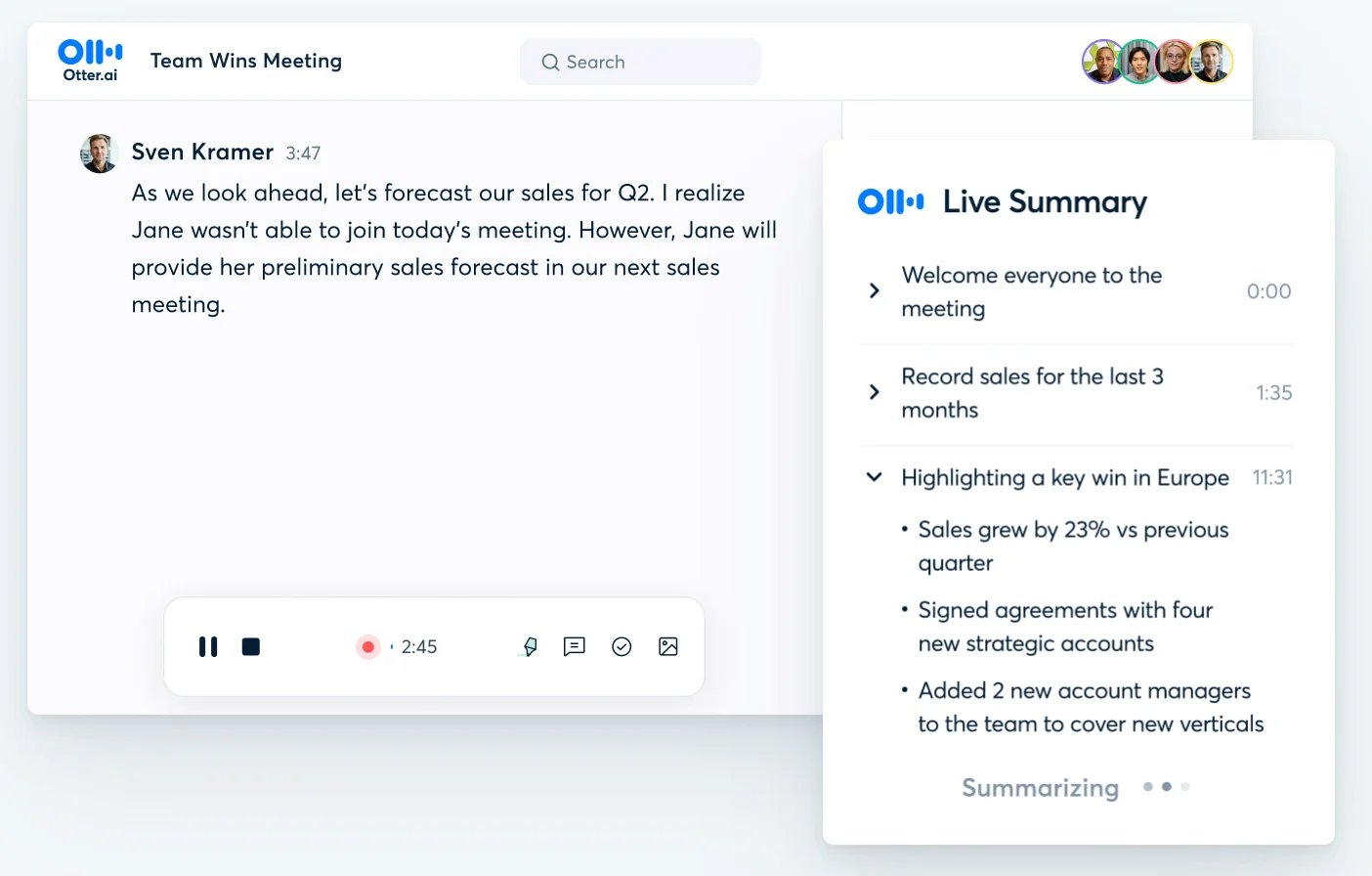
Ideal für: Alle, die Wert auf Echtzeit-Transkription und Meeting-Notizen legen.
Wichtigste Funktionen:
- Live-Transkription
- Sprechererkennung
- KI-Zusammenfassungen
- Durchsuchbare Transkripte
- Unterstützung für aufgezeichnete Gespräche und Meetings
- Funktionen für die Zusammenarbeit
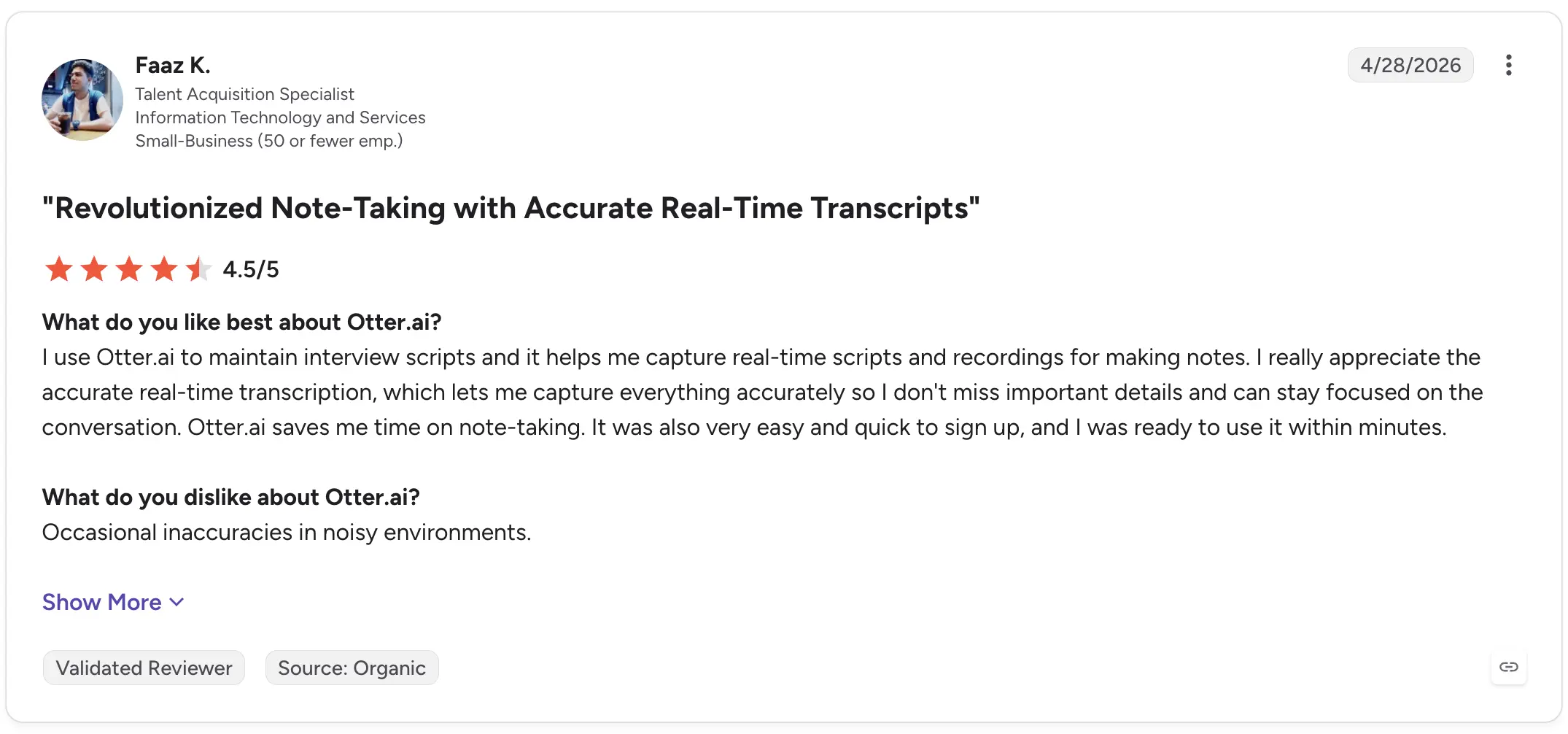
Faaz K., ein Talent-Acquisition-Spezialist, bewertete Otter.ai im April 2026 auf G2 mit 4,5 von 5 Sternen und hob besonders den Einsatz bei Vorstellungsgesprächen hervor. Er lobte die Echtzeit-Transkription, da sie ihm helfe, Details festzuhalten und sich gleichzeitig voll auf das Gespräch zu konzentrieren. Sein einziger Kritikpunkt waren gelegentliche Ungenauigkeiten in lauten Umgebungen.
Lisa W., eine leitende Gerichtsprotokollführerin, bewertete das Tool mit 5/5 und beschrieb, wie sie Otter für ihre täglichen Interviews mit Anwälten und Richtern nutzt. Sie hob hervor, wie wertvoll KI-Zusammenfassungen sind, um lange Interviews schneller durchzuarbeiten, merkte jedoch an, dass die Worterkennung nicht zuverlässig genug ist, um sich auf jede Formulierung zu verlassen, und dass Akzente zu Fehlern führen können.
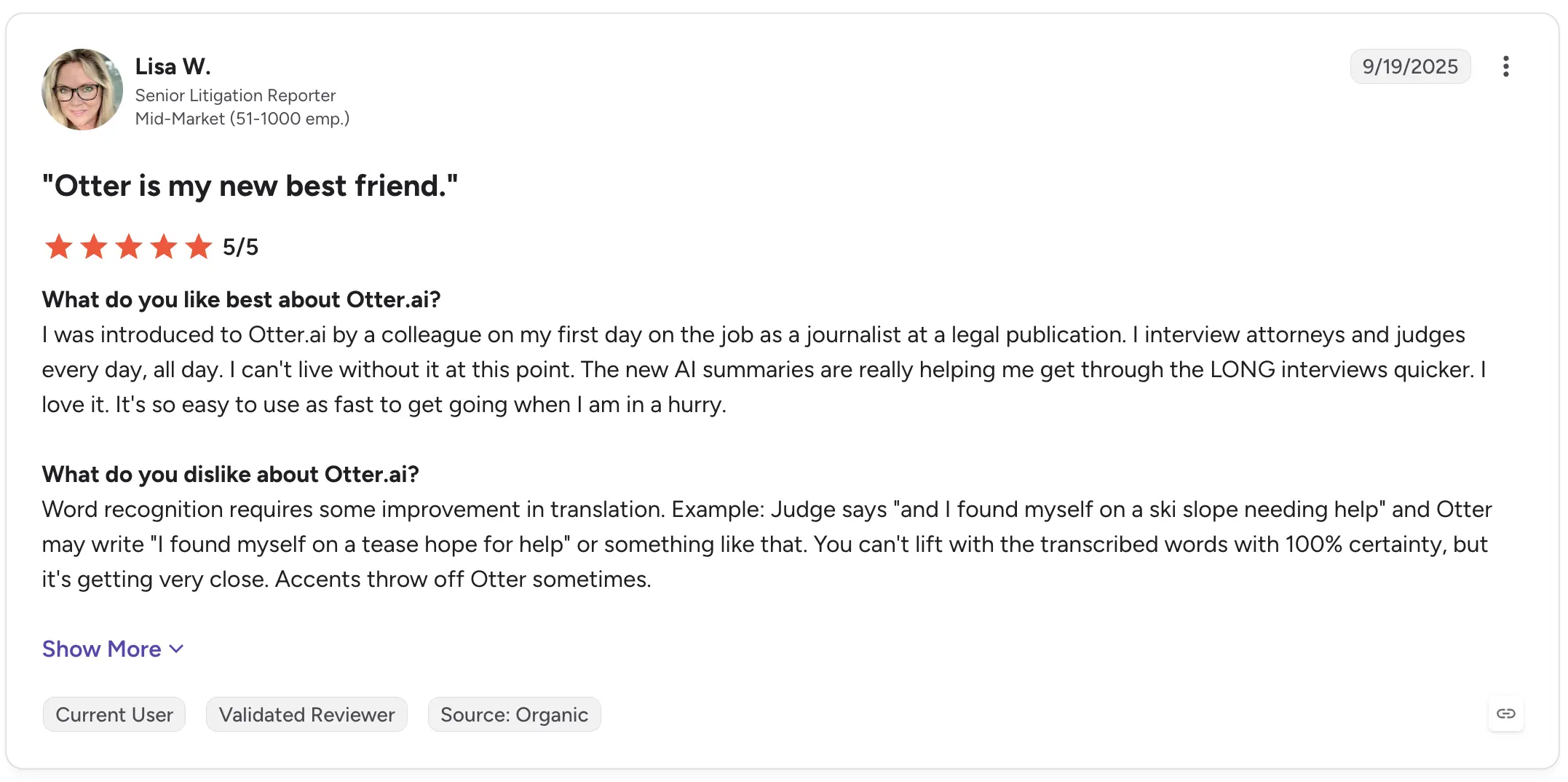
Das ist eine wichtige Einschränkung, die man bei automatischen Transkripten generell im Hinterkopf behalten sollte: Bequemlichkeit bedeutet nicht Unfehlbarkeit.
2. Descript: Am besten geeignet für die Audio- und Videobearbeitung von Interviews
Descript geht bei der Transkription einen anderen Weg.
Anstatt das Transkript rein als schriftliches Protokoll zu behandeln, verknüpft es dieses direkt mit der zugrunde liegenden Audio- oder Videodatei. Wer den Text bearbeitet, bearbeitet damit zugleich die Aufnahme selbst.
Das macht Descript besonders nützlich, wenn aus einem Interview später ein Podcast, ein Video, ein Social-Media-Clip oder ein anderer veröffentlichter Inhalt werden soll.
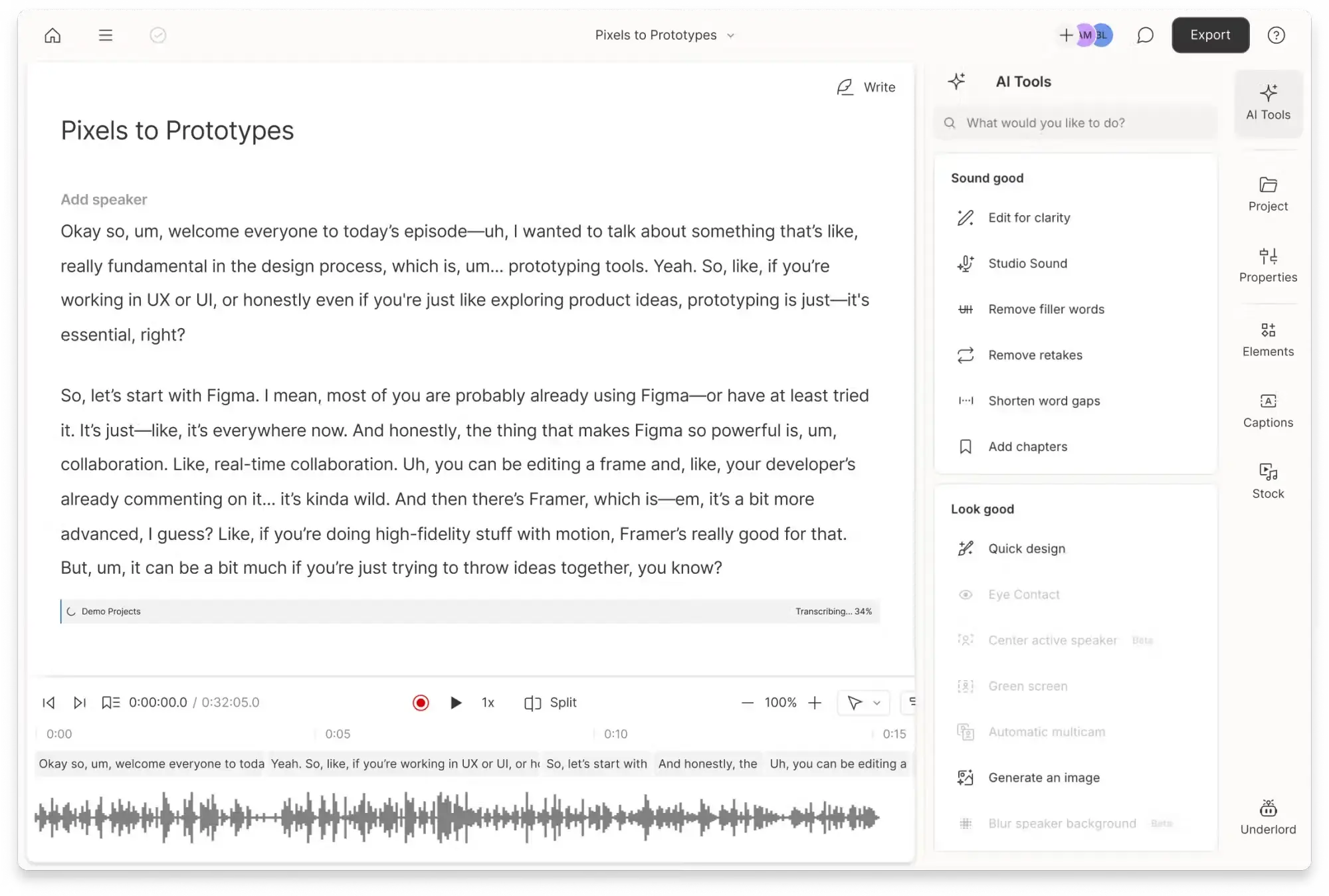
Ideal für: Podcaster, Videoteams, Journalisten und Creator, die aufgezeichnete Interviews bearbeiten.
Wichtigste Funktionen:
- Audio- und Videotranskription
- Textbasierte Medienbearbeitung
- Transkript und Aufnahme im selben Arbeitsbereich
- Funktionen für die Video- und Audioproduktion
- Export-Workflows für die weitere Bearbeitung
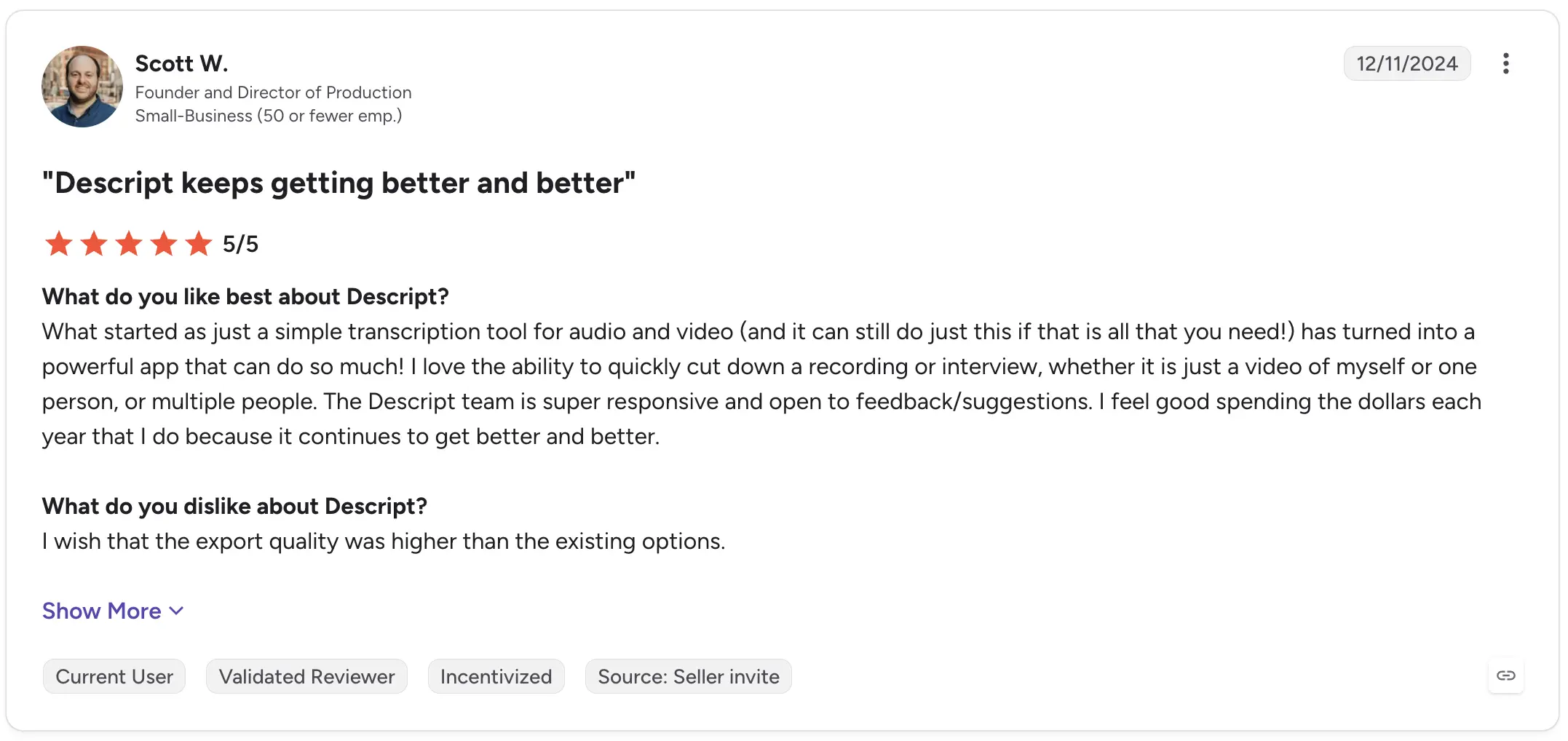
Scott W., Gründer und Produktionsleiter, bewertete Descript auf G2 mit 5/5. Er beschrieb, wie sich das Produkt über die einfache Audio- und Videotranskription hinaus entwickelt hat, und hob die Möglichkeit hervor, Interviews und andere Aufnahmen schnell zu kürzen. Seine Kritik bezog sich eher auf die Exportqualität als auf den eigentlichen Transkriptions-Workflow.
In einer neueren Bewertung vom August 2026 vergab Science Communication Fellow Tiegan P. 4,5/5 für Descript und lobte die Möglichkeit, Skript und Audio gemeinsam zu bearbeiten, bevor die Timeline in eine DAW exportiert wird. Ihr Hauptkritikpunkt war, dass sie für ihren bevorzugten Workflow zum Auswählen von Clips noch immer das Transkript durchsuchen musste.
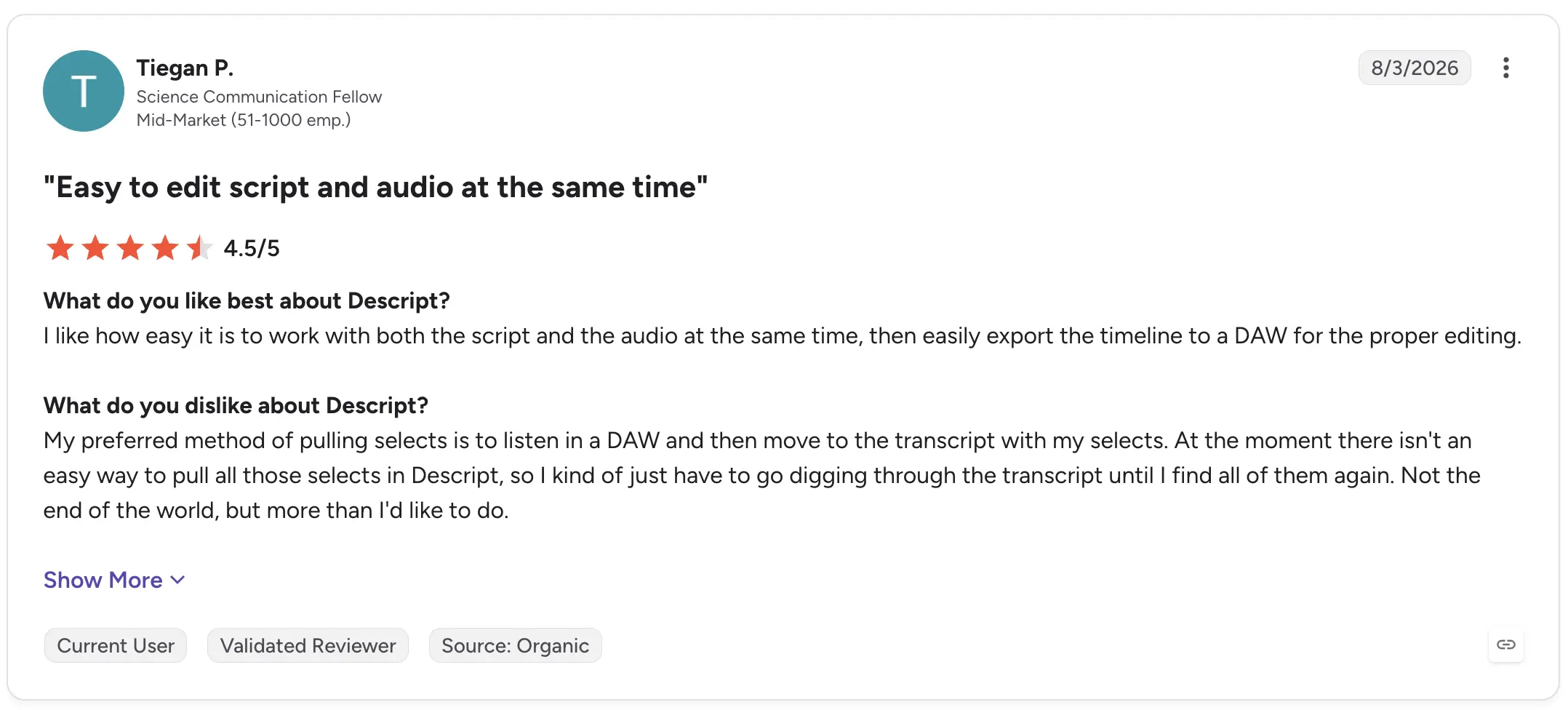
Descript ist daher besonders sinnvoll, wenn das Transkript nicht das Endprodukt, sondern Teil des Produktionsprozesses ist.
3. Trint: Am besten geeignet für die gemeinsame Bearbeitung von Transkripten
Trint kombiniert KI-Transkription mit Funktionen zum Überprüfen, Bearbeiten und gemeinsamen Arbeiten an aufgezeichnetem Material.
Das macht es besonders nützlich für Forschungs-, Medien- und Content-Teams, in denen mehrere Personen mit Interview-Transkripten arbeiten und nicht nur eine Person eine Textdatei herunterlädt.
Ideal für: Teams, die gemeinsam Interviews und aufgezeichnete Inhalte auswerten.
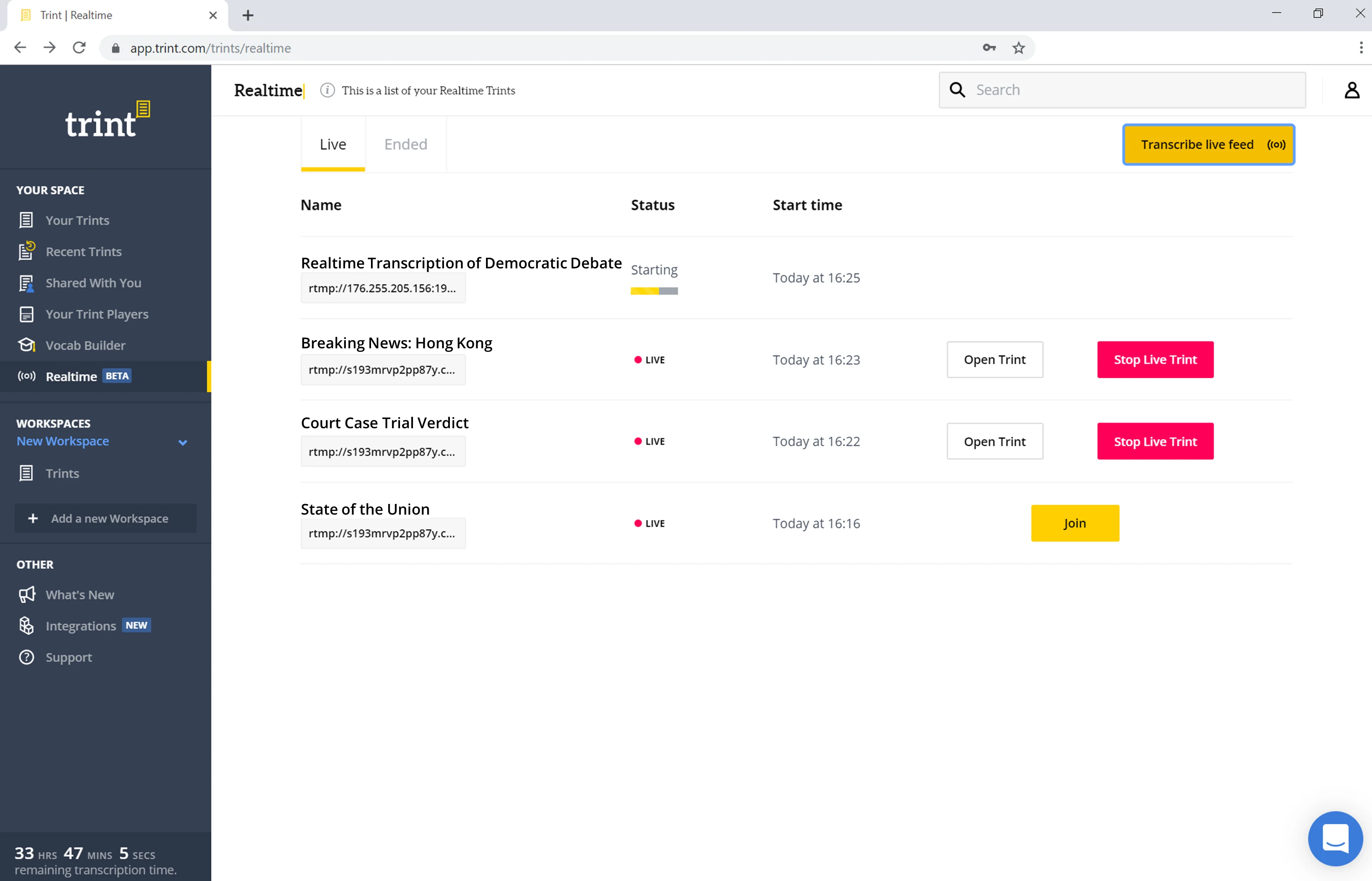
Wichtigste Funktionen:
- KI-Transkription
- Kollaborativer Editor
- Audio- und Video-Workflows
- Überprüfung und Markierung von Transkripten
- Tools für interviewbasierte Projekte
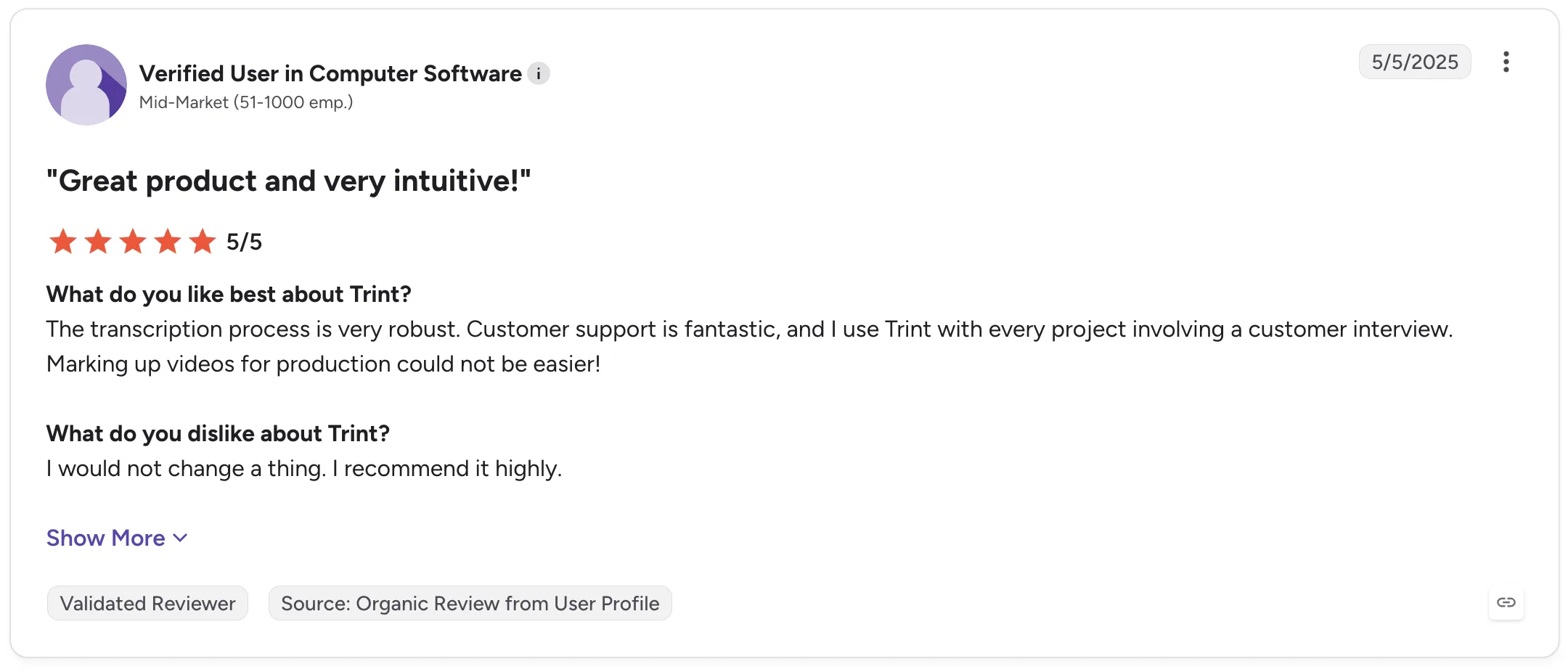
Ein verifizierter G2-Rezensent bei einem mittelständischen Softwareunternehmen bewertete Trint im Mai 2025 mit 5/5 und gab an, es bei jedem Projekt einzusetzen, zu dem ein Kundeninterview gehört. Besonders gelobt wurden der Transkriptionsprozess und die Möglichkeit, Videos für die Produktion zu markieren.
Gina K., Senior Manager of Marketing Content Strategy, bewertete Trint mit 4/5 und hob die Leistung bei Interviewpartnern mit starkem Akzent hervor. Ihre Bewertung weist zudem auf zwei aufschlussreiche Einschränkungen hin: Fachbegriffe müssen manchmal korrigiert werden und die Unterscheidung verschiedener Sprecher erfordert gelegentlich manuelle Nachbesserungen.
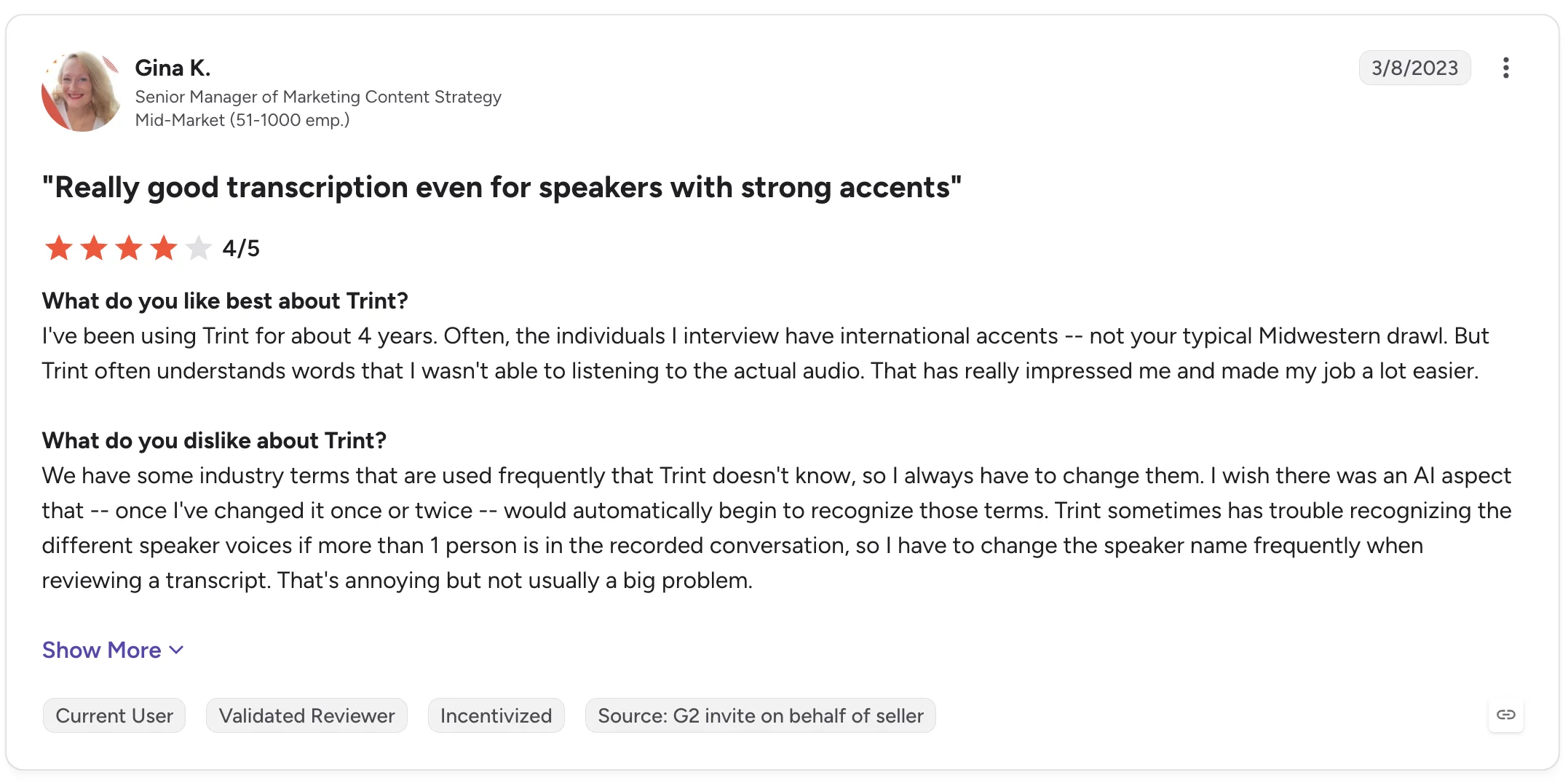
Diese Details sollten Sie berücksichtigen, wenn Ihre Forschungsinterviews Fachvokabular enthalten oder mehrere Personen zu Wort kommen.
4. MeetGeek: Am besten geeignet, um Interviews in strukturierte Erkenntnisse zu verwandeln
MeetGeek ist die bessere Wahl, wenn die Transkription den Anfang und nicht das Ende Ihres Workflows bildet.
Dank der Integrationen für Google Meet, Microsoft Teams und Zoom sowie für Discord und Webex via Chrome-Erweiterung kann das Tool Interviews automatisch aufzeichnen und transkribieren. Zudem lassen sich hochgeladene MP3- und MP4-Dateien sowie persönliche Gespräche, die über die mobile App aufgenommen wurden, verarbeiten.
Das Transkript fließt dann direkt in KI-Meeting-Notizen, Zusammenfassungen, Highlights, Aufgabenlisten und eine durchsuchbare Wissensdatenbank für Meetings ein.
%20(2).webp)
Für Workflows mit vielen Interviews bedeutet das, dass Sie die Schritte
Aufnahme → Transkript → Zusammenfassung → Analyse → geteiltes Wissen
durchlaufen können, ohne das Gespräch manuell zwischen verschiedenen KI-Notiz-Tools hin- und herschieben zu müssen.
MeetGeek unterstützt Sprechererkennung, Zeitstempel, über 100 Sprachen und Dialekte sowie ein benutzerdefiniertes Wörterbuch für Firmenjargon, ungewöhnliche Namen, Akronyme und Fachbegriffe. Zudem lassen sich KI-generierte Zusammenfassungen an die Art des Gesprächs anpassen, einschließlich Interviews.
Der KI-Chat ist besonders nützlich, wenn Sie mit mehreren Interviewaufzeichnungen arbeiten. Anstatt jedes Transkript einzeln zu öffnen und bei null anzufangen, können Sie zu früheren Gesprächen Fragen stellen und relevante Informationen daraus abrufen.
.webp)
Für die qualitative Forschung hilft der KI-Chat von MeetGeek zum Beispiel dabei, wiederkehrende Anliegen zu erkennen, Kommentare zu bestimmten Themen abzurufen oder die Aussagen verschiedener Interviewpartner vor einer tiefergehenden Analyse zusammenzufassen.
Teams können Transkripte, Aufzeichnungen, Zusammenfassungen und Highlights teilen, Kommentare direkt in Transkripten hinterlassen und Interviews in gemeinsamen Repositories organisieren.
Ideal für: Recruiting-Interviews, Nutzerforschung, Kundeninterviews sowie Teams, die sowohl Transkription als auch eine strukturierte Analyse nach den Interviews benötigen.
Wichtigste Funktionen:
- Automatische Aufzeichnung dank Zoom-, Microsoft Teams- und Google Meet-Integration
- Transkription von hochgeladenen Audio- und Videodateien
- Mobile Aufzeichnung für persönliche Interviews
- Sprechererkennung
- Über 100 Sprachen und Dialekte
- Benutzerdefiniertes Wörterbuch
- KI-generierte Zusammenfassungen und Highlights
- Meetingübergreifender KI-Chat
- Durchsuchbare Wissensdatenbank für Interviews
- Kommentieren und Teilen von Transkripten
- Gesprächsanalyse
Das Feedback echter Nutzer zeigt beide Seiten des Produkts.
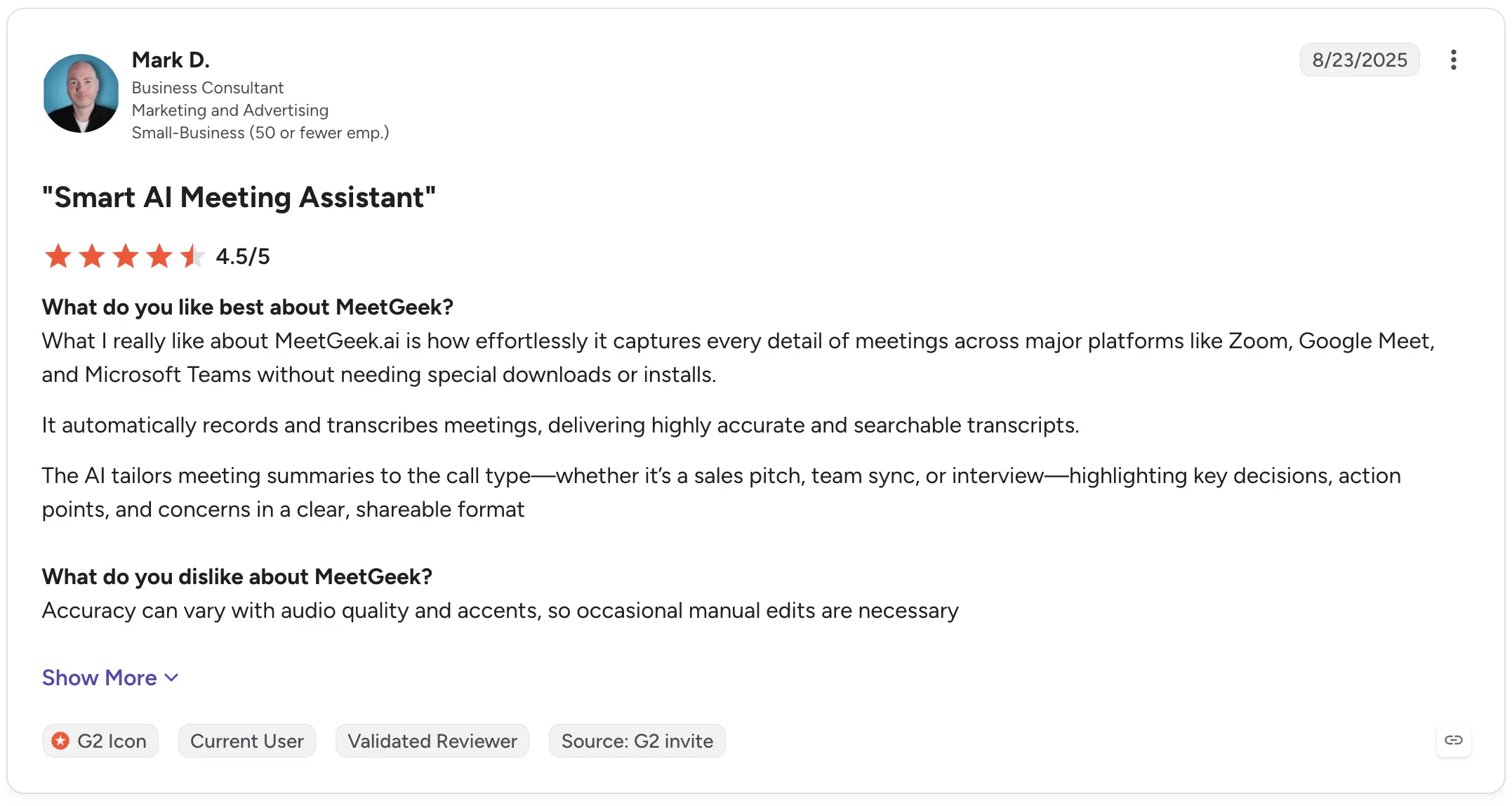
Mark D., Unternehmensberater, bewertete MeetGeek auf G2 mit 4,5/5 und lobte die Fähigkeit, Meetings automatisch aufzuzeichnen und durchsuchbare Transkripte zu erstellen. Er hob besonders hervor, dass sich die Zusammenfassungen an verschiedene Gesprächsarten, einschließlich Interviews, anpassen. Als Kritikpunkt nannte er, dass die Genauigkeit je nach Audioqualität und Akzenten variieren kann, was gelegentliche Korrekturen erforderlich macht.
Oana M., Mitgründerin, bewertete MeetGeek im Mai 2026 mit 5/5 und betonte die Struktur der Meeting-Notizen sowie die Tiefe der Erkenntnisse, die aus den Aufzeichnungen gewonnen werden können. Ihr Hauptkritikpunkt war, dass das Menü mehr Funktionen enthält, als sie persönlich benötigt.
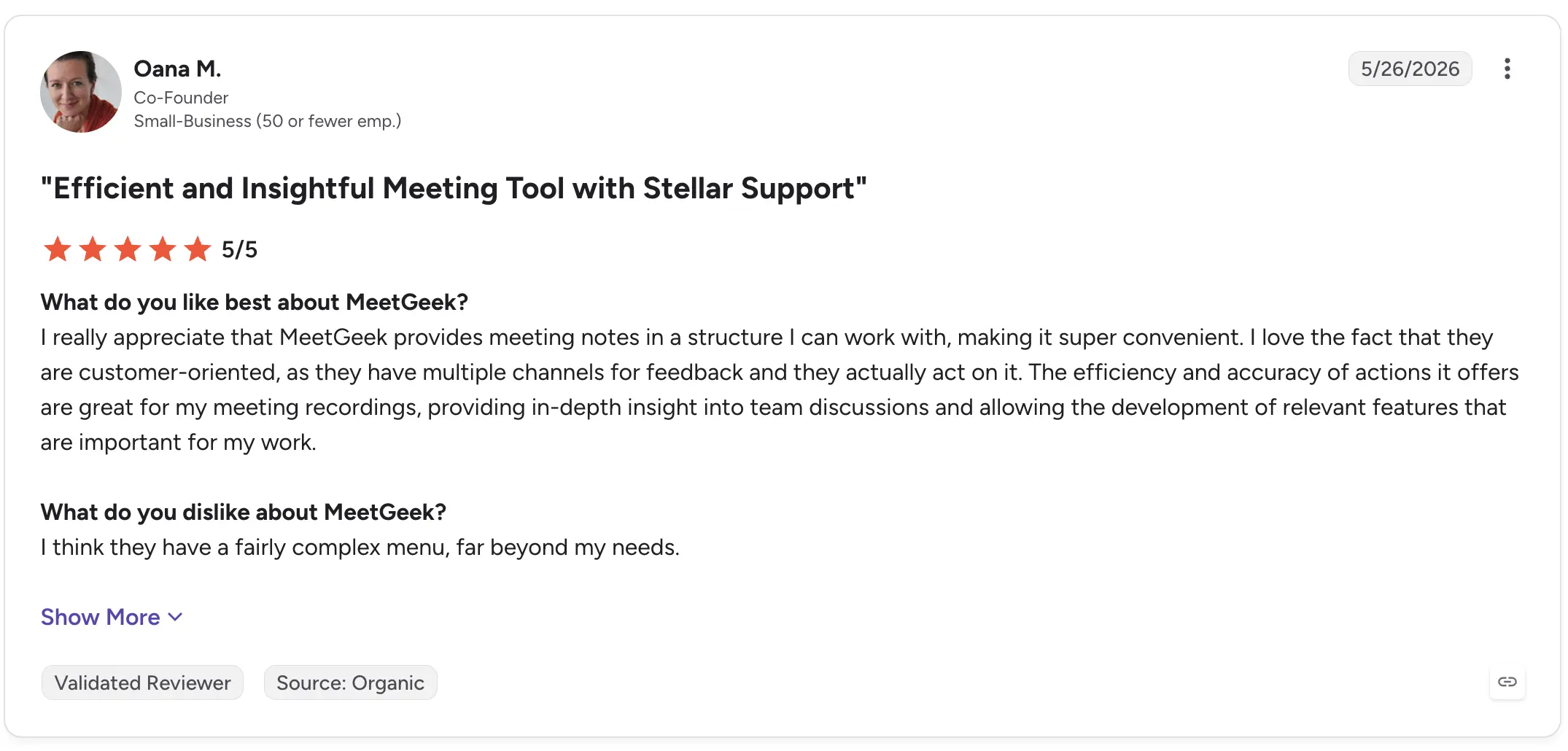
Wenn Sie lediglich eine Audiodatei in Text umwandeln möchten, bietet MeetGeek möglicherweise mehr Funktionen als nötig. Doch wenn aus Interviews Zusammenfassungen, Erkenntnisse, geteiltes Wissen oder Nachbereitungen werden sollen, kommt es genau auf diese zusätzlichen Funktionen an.
5. OpenAI Whisper: Die beste Wahl für individuelle Transkriptions-Workflows
OpenAIs Whisper unterscheidet sich grundlegend von den anderen Produkten in dieser Liste.
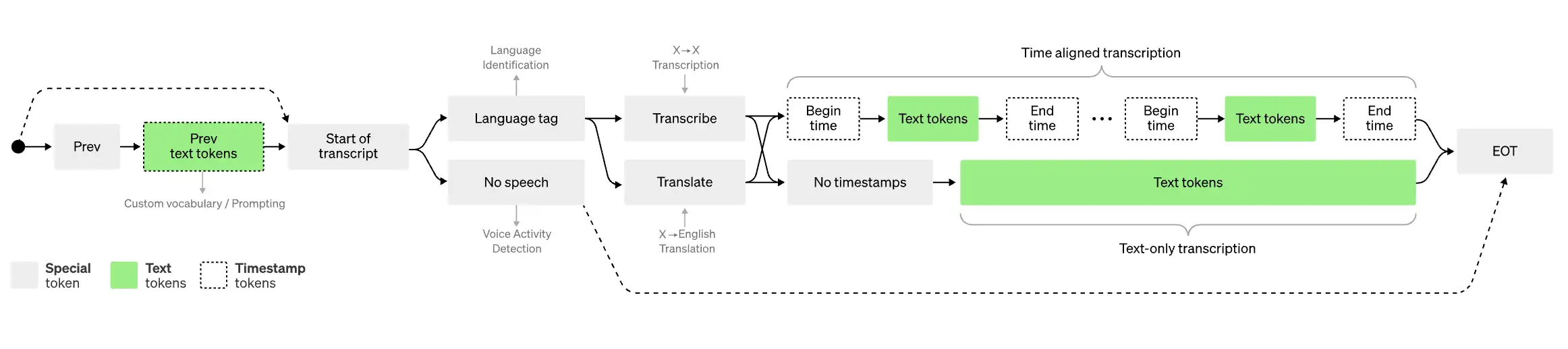
Whisper ist im Kern ein Modell zur Spracherkennung und Transkription und kein vollständiger Arbeitsbereich für das Interview-Management. Das macht es besonders interessant für Entwickler und technische Teams, die Transkriptionsfunktionen in ihre eigenen Anwendungen oder Workflows integrieren möchten.
Es verarbeitet mehrsprachige Audiodaten und wird häufig als Transkriptions-Engine in anderen KI-basierten Produkten eingesetzt.
Ideal für: Entwickler und technische Teams, die ihre eigenen Transkriptions-Workflows aufbauen.
Wichtigste Funktionen:
- Speech-to-Text-Transkriptionsmodell
- Unterstützung mehrerer Sprachen
- Programmatische Verarbeitung von Audioaufnahmen
- Nützlicher Baustein für maßgeschneiderte KI-Tools
- Flexibel bei der technischen Umsetzung
Diese Flexibilität hat ihren Preis: Die Nutzung eines Transkriptionsmodells ist nicht mit dem Kauf einer Software vergleichbar, die speziell dafür entwickelt wurde, Interviews von der Aufnahme bis zur Analyse zu verwalten.
Wenn Sie einen ausgefeilten kollaborativen Editor, ein Interview-Archiv, Meeting-Notizen oder fertige Workflows zum Teilen von Transkripten benötigen, müssen Sie diese Komponenten in der Regel selbst bauen oder ergänzen.
Aktuelle G2-Bewertungen zeigen zudem die Stärken und Schwächen der eigentlichen Transkription.
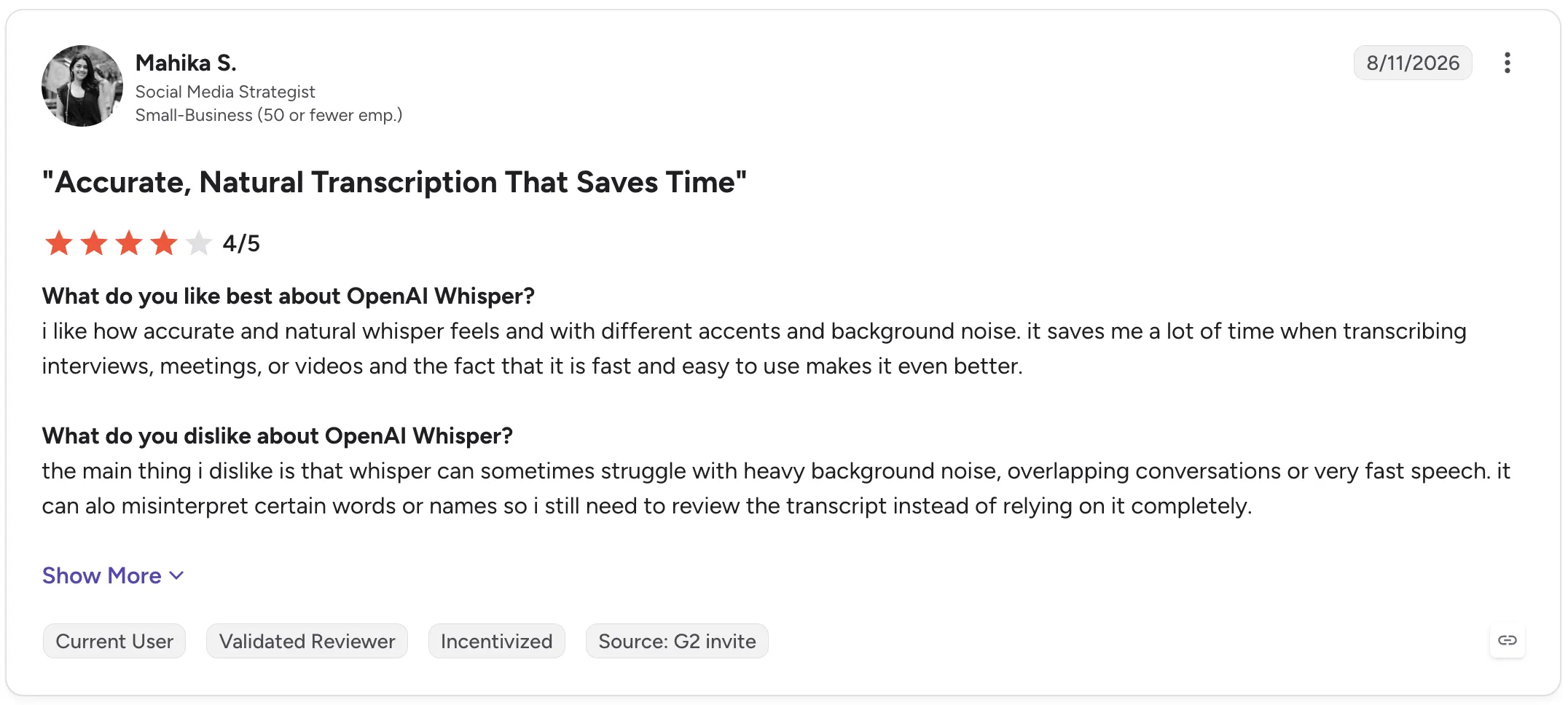
Mahika S., Social-Media-Strategin, bewertete OpenAI Whisper im August 2026 mit 4/5 und lobte die Genauigkeit bei verschiedenen Akzenten und Hintergrundgeräuschen. Sie merkte an, dass es Zeit bei der Transkription von Interviews, Meetings und Videos spart. Sie berichtete jedoch auch von Problemen bei starken Hintergrundgeräuschen, sich überschneidenden Gesprächen, schnellem Sprechtempo, Eigennamen und gelegentlich falsch erkannten Wörtern.
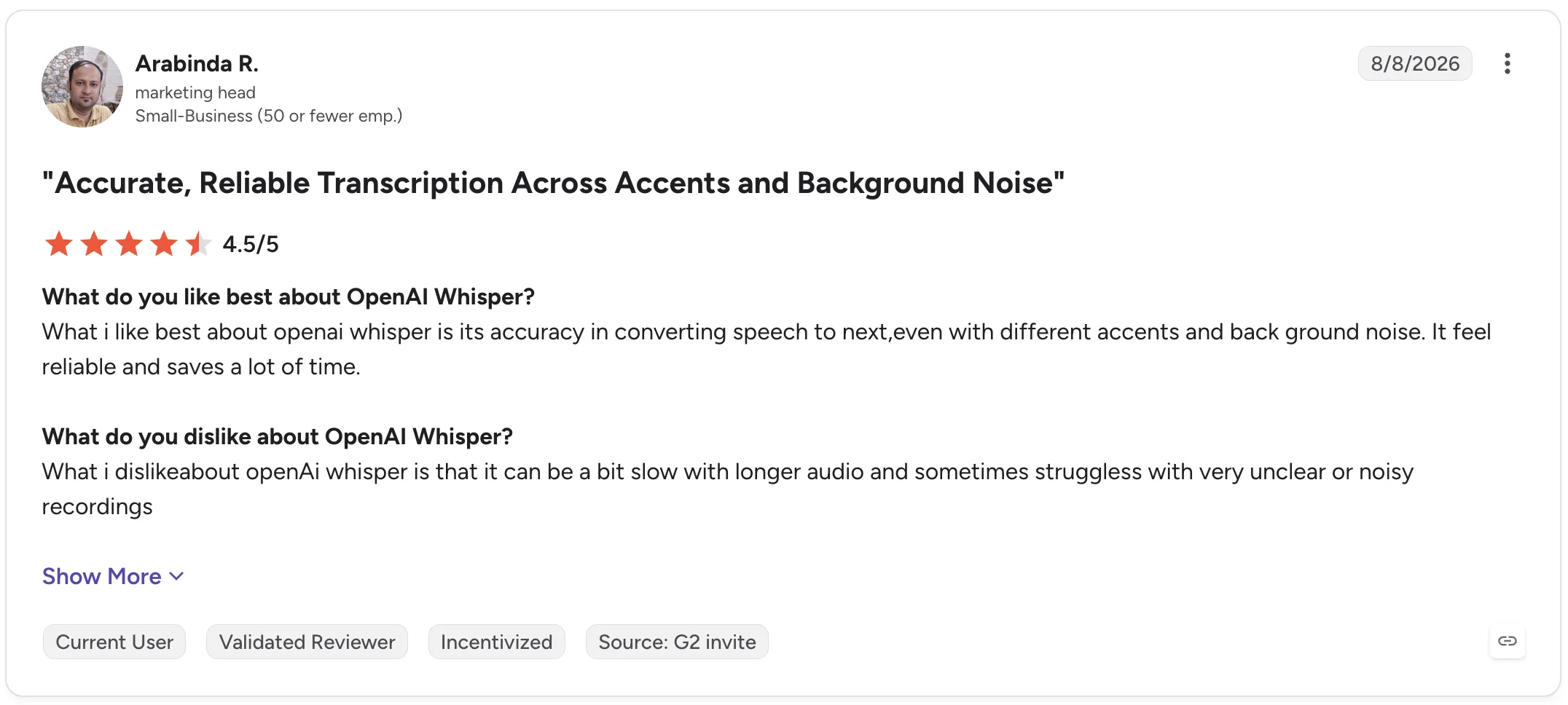
Arabinda R., Marketingleiter, gab Whisper 4,5/5 und lobte ebenfalls die Zuverlässigkeit bei unterschiedlichen Akzenten und Hintergrundgeräuschen. Er kritisierte jedoch, dass längere Audioaufnahmen mehr Zeit in Anspruch nehmen können und unklare oder verrauschte Aufnahmen die Leistung beeinträchtigen.
Whisper ist daher eine überzeugende Wahl, wenn Sie die volle Kontrolle über die Transkriptionsebene selbst behalten möchten. Es ist weniger geeignet, wenn Sie eine sofort einsatzbereite Arbeitsumgebung für die Verwaltung des gesamten Interviewprozesses suchen.
Software für Interview-Transkription im Vergleich
| Tool | Ideal für | Live-Transkription | KI-Zusammenfassungen | Interviewanalyse | Zusammenarbeit |
|---|---|---|---|---|---|
| Otter.ai | Live-Transkription von Interviews | Ja | Ja | Ja | Ja |
| Descript | Audio- und Videoproduktion | Nein | Ja | Eingeschränkt | Ja |
| Trint | Gemeinsame Bearbeitung von Transkripten | Je nach Workflow unterschiedlich | Ja | Ja | Ja |
| MeetGeek | Erkenntnisse und Wissen aus Interviews | Ja | Ja | Ja | Ja |
| OpenAI Whisper | Individuelle Transkriptions-Workflows | Abhängig von der Implementierung | Kein eigener Arbeitsbereich | Abhängig von der Implementierung | Kein eigener Arbeitsbereich |
So transkribieren Sie ein Interview
Wie Sie genau vorgehen, hängt davon ab, ob Ihr Interview online oder vor Ort stattfindet oder bereits als Aufnahme vorliegt.
1. Sorgen Sie für eine möglichst klare Aufnahme
Die Transkription beginnt mit dem Ton.
Platzieren Sie die Mikrofone so nah, dass die Sprache deutlich aufgenommen wird, reduzieren Sie Hintergrundgeräusche, wo immer es geht, und vermeiden Sie, dass mehrere Personen gleichzeitig sprechen.
Selbst eine sehr genaue Transkriptionssoftware hat weniger Informationen zur Verfügung, wenn Stimmen gedämpft klingen, weit entfernt sind oder sich überlagern.
2. Zeichnen Sie das Interview auf oder laden Sie die vorhandene Datei hoch
Wenn das Interview bereits stattgefunden hat, können Sie bei den meisten Transkriptionsdiensten einfach eine Audio- oder Videodatei hochladen.
Bei Online-Interviews kann Software, die für Google Meet, Zoom oder Microsoft Teams entwickelt wurde, diesen Schritt überflüssig machen, indem sie das Interview automatisch aufzeichnet und transkribiert.
Für ein persönliches Gespräch nutzen Sie ein Smartphone, ein eigenes Diktiergerät oder eine Transkriptions-App, die Offline-Aufnahmen unterstützt.
3. Erstellen Sie das Transkript
Sobald die Aufnahme vorliegt, wandelt die Transkriptionssoftware den Ton in Text um.
Wie lange die Verarbeitung dauert, hängt vom Tool, von der Länge der Aufnahme, vom Transkriptionsmodell und vom Workflow ab. Manche Tools liefern ein Live-Transkript, andere verarbeiten die Aufnahme erst nach dem Interview.
4. Gleichen Sie das Transkript mit der Aufnahme ab
Gehen Sie nicht davon aus, dass ein KI-Transkript fehlerfrei ist.
Prüfen Sie Namen, Zahlen, Fachbegriffe, Zitate, die Sie veröffentlichen möchten, und Passagen, in denen der Ton undeutlich war.
Achten Sie besonders auf Abschnitte mit Hintergrundgeräuschen, sich überschneidenden Sprechern oder schnellem Sprechtempo.
5. Bereinigen Sie Sprecherlabels und überflüssige Äußerungen
Je nachdem, wofür Sie das Transkript benötigen, möchten Sie vielleicht Füllwörter, abgebrochene Satzanfänge oder Wortwiederholungen entfernen.
In der qualitativen Forschung sollten Sie den Text allerdings nicht so stark glätten, dass sich der Sinn dessen verändert, was die befragte Person gesagt hat.
Korrigieren Sie auch die Sprecherlabels, vor allem wenn mehrere Sprecher ähnliche Stimmen haben.
6. Exportieren oder analysieren Sie das Interview
Das Transkript kann nun zur Grundlage für Ihre weitere Arbeit werden.
Sie können es als Text exportieren, Untertiteldateien erstellen, es mit Kollegen teilen, Zitate herausziehen, eine KI-Zusammenfassung erstellen oder mit KI-Tools Muster über mehrere Interviews hinweg erkennen.
An dieser Stelle stößt man an Grenzen, wenn man die Software allein nach der Transkriptionsgenauigkeit ausgewählt hat. Die Zeit, die Sie nach der Transkription sparen, kann genauso wichtig sein wie die Dauer der Transkription selbst.
KI-Transkription oder menschliche Transkription: Was sollten Sie nutzen?
KI-Transkription und menschliche Transkription lösen leicht unterschiedliche Probleme.
Bei der KI-Transkription stehen Geschwindigkeit, Kosten und Skalierbarkeit im Vordergrund. Sie laden eine Aufnahme hoch, erhalten schnell ein automatisches Transkript und können es anschließend mit weiteren KI-Funktionen durchsuchen, zusammenfassen oder analysieren.
Bei der menschlichen Transkription steht die manuelle Prüfung im Vordergrund. Sie kann die bessere Wahl sein, wenn es auf den exakten Wortlaut ankommt.
Für alltägliche Forschungsinterviews, Recruiting-Gespräche, journalistische Arbeit, interne Interviews und Kundenforschung ist die KI-Transkription oft der praktischere Ausgangspunkt, sofern wichtige Passagen überprüft werden.
Menschliche Transkriptionsdienste können bei besonders sensiblem oder folgenreichem Material sinnvoller sein, bei dem schon wenige Fehler das Ergebnis wesentlich beeinflussen könnten.
In beiden Fällen spielt auch die Sicherheit eine Rolle. Bevor Sie sensible Informationen hochladen, prüfen Sie, wie der Transkriptionsanbieter Aufnahmen und Transkripte speichert, verarbeitet, schützt und löscht.
Fazit
Eine gute Software für Interview-Transkription sollte aufgezeichnete Gespräche leichter nutzbar machen und nicht einfach nur Ton in eine Textwüste verwandeln.
Achten Sie auf Transkriptionsgenauigkeit, Sprechererkennung, Aufnahmeoptionen, Exportformate und unterstützte Sprachen, aber bedenken Sie auch, wie viel Arbeit noch bleibt, wenn die Transkription abgeschlossen ist.
Ob Ihre Interviews über Zoom, Google Meet, Microsoft Teams oder vor Ort stattfinden: MeetGeek kann sie automatisch aufzeichnen und transkribieren, strukturierte KI-Zusammenfassungen erstellen und frühere Interviews in eine durchsuchbare Wissensdatenbank verwandeln, auf die Ihr Team später zurückgreifen kann.
Testen Sie MeetGeek kostenlos und verbringen Sie weniger Zeit mit der Nachbearbeitung Ihrer Interviews.
Das Wichtigste in Kürze
- Wählen Sie Otter.ai, wenn ein Live-Transkript für Ihre Art der Interviewführung zentral ist.
- Wählen Sie Descript, wenn aus Ihren Interviews Podcasts, Videos oder andere bearbeitete Medien entstehen.
- Wählen Sie Trint, wenn mehrere Personen Interview-Transkripte gemeinsam prüfen und bearbeiten müssen.
- Wählen Sie MeetGeek, wenn Sie regelmäßig Interviews führen und aus den Aufnahmen automatisch durchsuchbare Transkripte, strukturierte Zusammenfassungen, Erkenntnisse und wiederverwendbares Teamwissen entstehen sollen.
- Wählen Sie OpenAI Whisper, wenn Sie über die technischen Ressourcen verfügen, um rund um ein flexibles Transkriptionsmodell einen eigenen Workflow aufzubauen.
Häufig gestellte Fragen
Welche Software eignet sich am besten, um Interviews zu transkribieren?
Die beste Wahl hängt von Ihrem Workflow ab. Otter.ai eignet sich gut für die Live-Transkription, Descript für die Audio- und Videobearbeitung, Trint für die gemeinsame Arbeit an Transkripten, MeetGeek für Transkription samt Zusammenfassungen und Analyse von Interviews und OpenAI Whisper für individuelle technische Implementierungen.
Kann ChatGPT ein Interview transkribieren?
ChatGPT kann Audioeingaben transkribieren und bei der Analyse von Transkripten helfen. Eine spezialisierte Software für Interview-Transkription bietet jedoch unter Umständen zusätzliche Workflows wie die automatische Aufzeichnung von Meetings, Sprecherlabels, gemeinsame Bearbeitung, Transkript-Bibliotheken und Integrationen.
Whisper ist das Spracherkennungsmodell von OpenAI, das speziell dafür entwickelt wurde, Audio in Text umzuwandeln.
Wie lange dauert es, ein einstündiges Interview zu transkribieren?
Eine automatische KI-Transkription verarbeitet ein einstündiges Interview weitaus schneller, als Sie es von Hand abtippen könnten. Wie schnell genau, hängt allerdings vom Dienst, von der Dateigröße, der Aufnahmequalität und der Verarbeitungsmethode ab. Planen Sie außerdem Zeit ein, um wichtige Passagen auf Transkriptionsfehler zu prüfen.
Was ist der Unterschied zwischen Transkription und Interviewanalyse?
Die Transkription wandelt gesprochene Worte in Text um. Die Interviewanalyse wertet diesen Text aus, um Themen, Muster, Erkenntnisse, Zitate, Antworten und Zusammenhänge in einem oder mehreren Interviews zu erkennen.
Die erste liefert das Ausgangsmaterial. Die zweite hilft Ihnen zu verstehen, was dieses Ausgangsmaterial bedeutet.
Sollte ich Füllwörter aus Interview-Transkripten entfernen?
Das hängt vom Verwendungszweck des Transkripts ab. Das Entfernen von Füllwörtern kann Transkripte lesbarer machen, wenn Sie Artikel, Zusammenfassungen oder interne Notizen erstellen. Für die qualitative Forschung sollten Sie jedoch möglichst viel vom ursprünglichen Wortlaut beibehalten, um Bedeutung, Tonfall oder Kontext nicht zu verfälschen.





.avif)