By clicking “Accept All Cookies”, you agree to the storing of cookies on your device to enhance site navigation, analyze site usage, and assist in our marketing efforts. View our Privacy Policy for more information.
MeetGeekBlogBest Interview Transcription Software: 5 Tools Compared
Back to Blog

Best Interview Transcription Software: 5 Tools Compared

Productivity
Productivity

Find the best interview transcription software for your workflow. Compare five top tools for transcription, summaries, editing, collaboration, and interview analysis.

Melania Ciocianu
August 20, 2026
/
5 min read
Table of content
Get started with MeetGeek AI Meeting Assistant:
📝 AI-powered Meeting Note taker
✅ Free meeting recording & transcription
💬 Automated sharing of insights to other tools.
Sign Up for Free
Share the knowledge with your circle
Copied

Interview transcription software turns recorded conversations into searchable text, saving researchers, recruiters, journalists, and other interviewers from replaying audio and typing everything manually.

The best option depends on what happens after transcription. Some tools focus on producing an accurate transcript from an audio file. Others add speaker identification, video editing, collaboration features, AI-generated summaries, or interview analysis.

In this guide, we compare five interview transcription tools based on their features, intended use cases, and feedback from real users.

TL;DR

  • Choose software based on what you need to do with the interview transcript, not transcription accuracy alone.
  • Otter.ai is useful when you want a live transcript while an interview is happening.
  • Descript stands out when transcription is part of an audio or video editing workflow.
  • Trint combines transcription with a collaborative editor for teams working with research interviews and recorded content.
  • MeetGeek goes beyond core transcription by turning interviews into structured notes, summaries, insights, and searchable knowledge.
  • OpenAI's Whisper is better suited to developers and teams that want a transcription model they can build into their own workflow.

Why interview transcription software matters

A one-hour interview creates an awkward problem: the conversation may be over, but much of the work has only started.

You might need to revisit an answer, find a specific quote, compare responses across multiple people, pull themes from research interviews, prepare meeting notes, or share findings with colleagues.

Doing that directly from audio and video recordings is slow. Even when you remember roughly when something was said, finding the exact spoken words can mean repeatedly scrubbing through an audio file.

Manual transcription creates an even bigger time commitment.

Interview transcription software changes the format of the information. Instead of working primarily with voice recordings, you get searchable text that can be reviewed, copied, analyzed, summarized, and shared.

Modern AI transcription tools can also handle tasks such as:

  • Speaker identification and speaker labels
  • AI-generated summaries
  • Filler words and repeated words
  • Search across transcripts
  • Multiple languages
  • Different export formats and subtitle formats
  • Sharing and collaboration
  • AI chat for asking questions about an interview
  • Identifying recurring topics and patterns

That distinction matters because the best interview transcription software isn't necessarily the product that simply generates text with the fewest errors.

The better question is: what do you need to do once you have the transcript?

What should you look for in interview transcription software?

Before comparing tools, consider the recording conditions and the job you need the transcript to do.

Transcription accuracy

Accuracy is the obvious starting point, but no automated transcript should automatically be treated as flawless.

Background noise, accents, industry terminology, multiple speakers talking at once, unclear audio, and names can all affect transcription accuracy.

Studio-quality audio will generally give transcription software an easier job than a noisy interview recorded in a public place.

If exact wording is critical, human transcription or human-powered transcription may still be worth considering. AI transcription prioritizes turnaround speed and scalability, while human transcription options are generally relevant when the cost of a transcription error is particularly high.

Speaker identification

A transcript becomes much harder to use if you can't tell who said what.

For interviews involving multiple people, look for software that separates speakers and applies speaker labels consistently. This becomes especially useful during qualitative research, where you may be comparing comments from several participants.

Interview analysis

Generating accurate transcripts is only the first step for many teams.

Researchers may need to identify patterns across qualitative data. Recruiters may need to pull out candidate responses from screening interviews. Journalists may need quotes and themes. Customer teams may want to compare feedback across longer interviews.

Features such as AI chat, an AI summary, searchable transcripts, and AI-generated summaries can substantially reduce the work that comes after transcription.

Import and recording options

Check how recordings get into the software.

Some products are designed around uploaded audio files and video files. Others can automatically capture interviews conducted through a Google Meet, Zoom, or Microsoft Teams integration. A mobile voice recorder can also be useful for in-person interviews.

The right workflow is the one that removes steps rather than adding them.

Export and collaboration

A transcript rarely stays in one tool forever.

Depending on your workflow, you might need text transcripts, subtitle formats, documents, or other export formats. Teams should also consider whether they can share transcripts, comment on them, and work together without creating multiple versions of the same file.

The 5 best interview transcription software tools

1. Otter.ai: Best for live interview transcription

Otter.ai is one of the better-known AI transcription platforms and is particularly relevant when you want transcription to happen during the interview rather than after it.

It can create a live transcript as people speak, making it useful for journalists, recruiters, researchers, and other professionals who want searchable notes immediately after a conversation.

Otter also adds AI-generated summaries and other tools for working with the transcript after the interview.
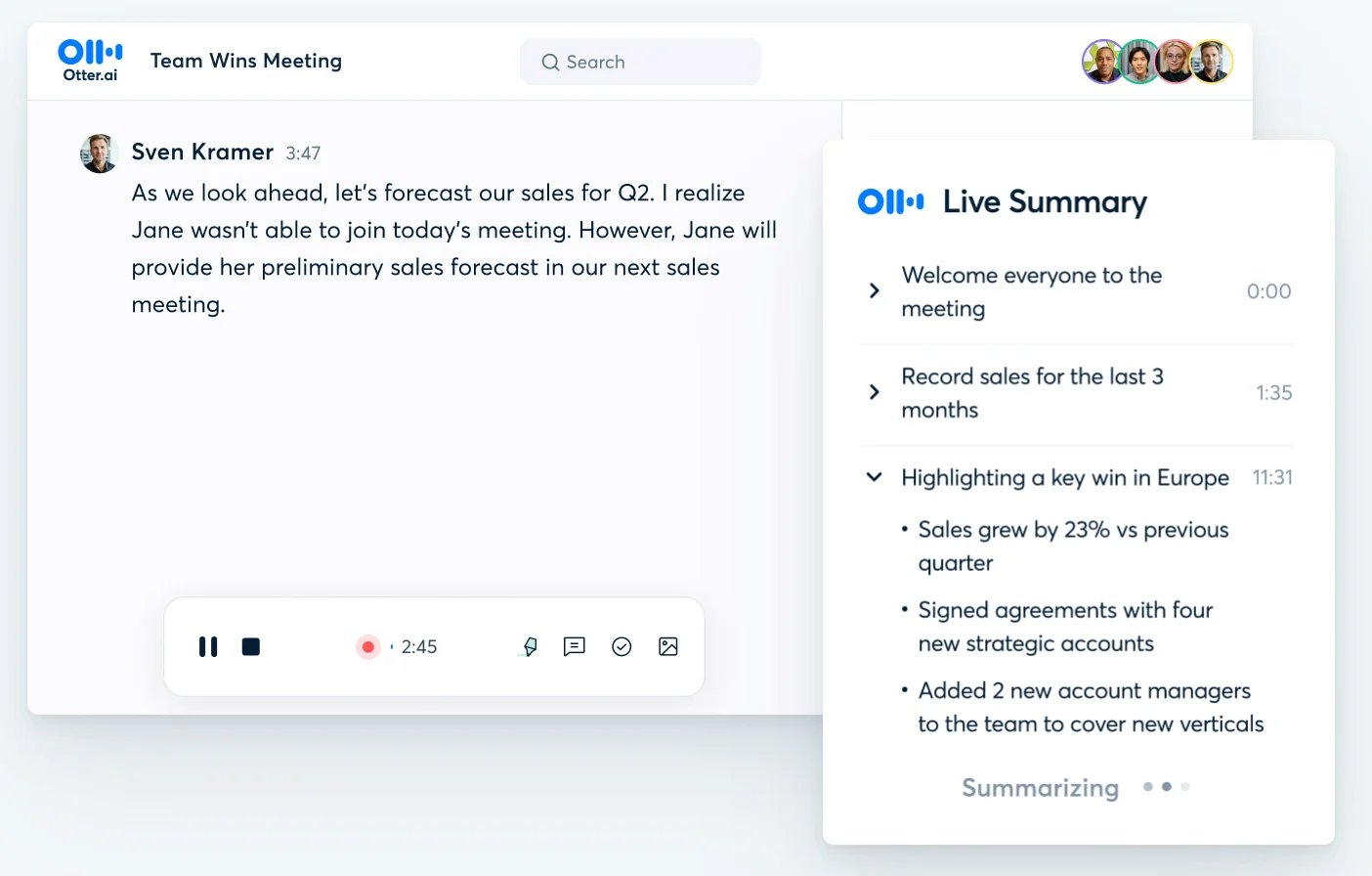
Otter AI Live Summary interface

Best for: People who prioritize real-time transcription and meeting notes.

What stands out:

  • Live transcription
  • Speaker identification
  • AI summaries
  • Searchable transcripts
  • Support for recorded conversations and meetings
  • Collaboration features

Faaz K., a Talent Acquisition Specialist, gave Otter.ai 4.5/5 on G2 in April 2026 and specifically described using it for interviews. He praised its real-time transcription for helping him capture details while staying focused on the conversation. His main criticism was occasional inaccuracies in noisy environments.
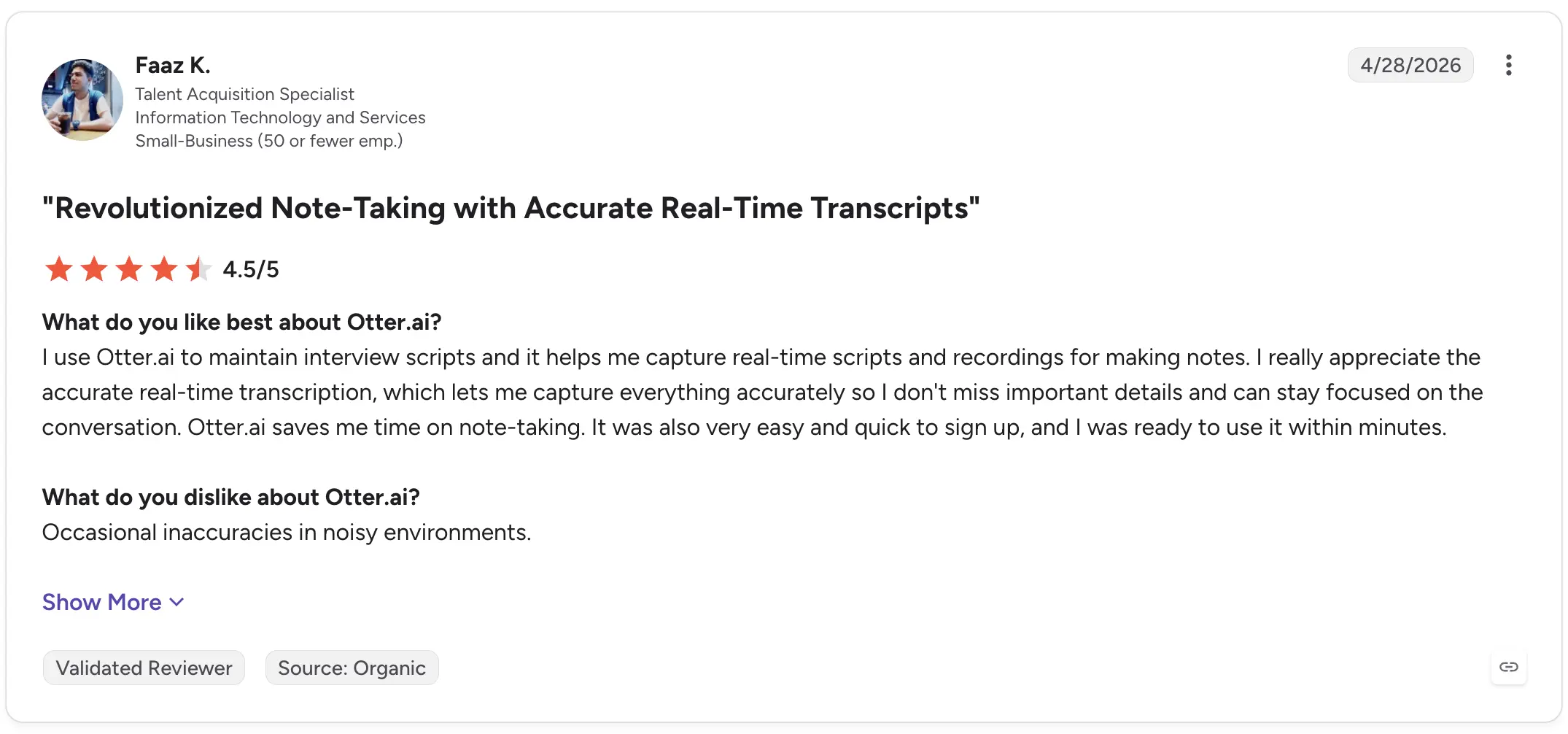
Otter AI G2 review

Lisa W., a Senior Litigation Reporter, rated it 5/5 and described using Otter for daily interviews with attorneys and judges. She highlighted the value of AI summaries for getting through long interviews faster, while also noting that word recognition isn't reliable enough to assume every phrase is correct and that accents can cause mistakes.
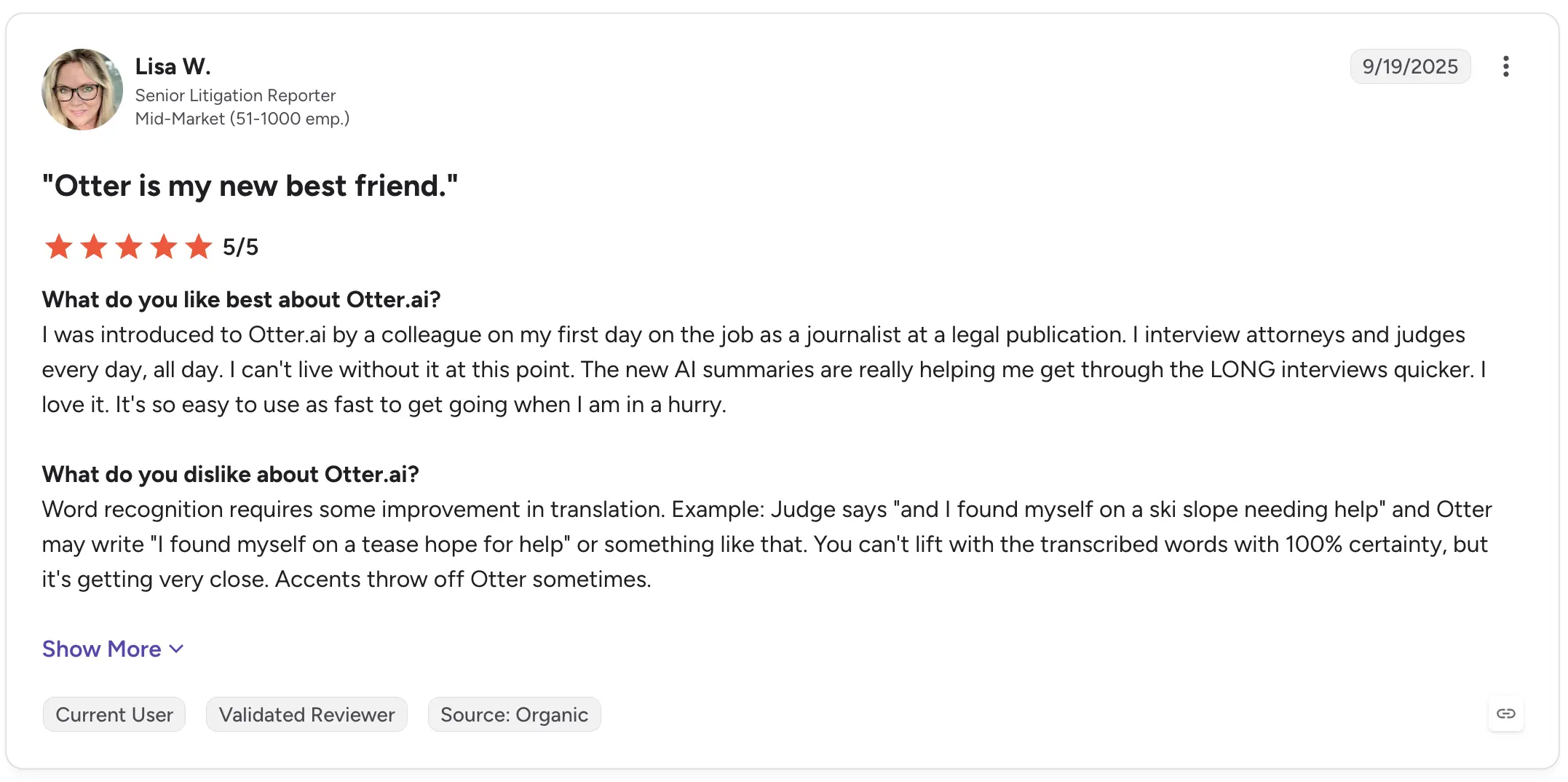
Otter AI G2 review

That is an important limitation to keep in mind with automated transcripts generally: convenient does not mean infallible.

2. Descript: Best for editing interview audio and video

Descript approaches transcription differently.

Rather than treating the transcript purely as a written record, it connects the transcript directly to the underlying audio or video. Editing text can, therefore, become part of editing the recording itself.

That makes Descript especially useful when an interview will eventually become a podcast, video, social clip, or other piece of published content.
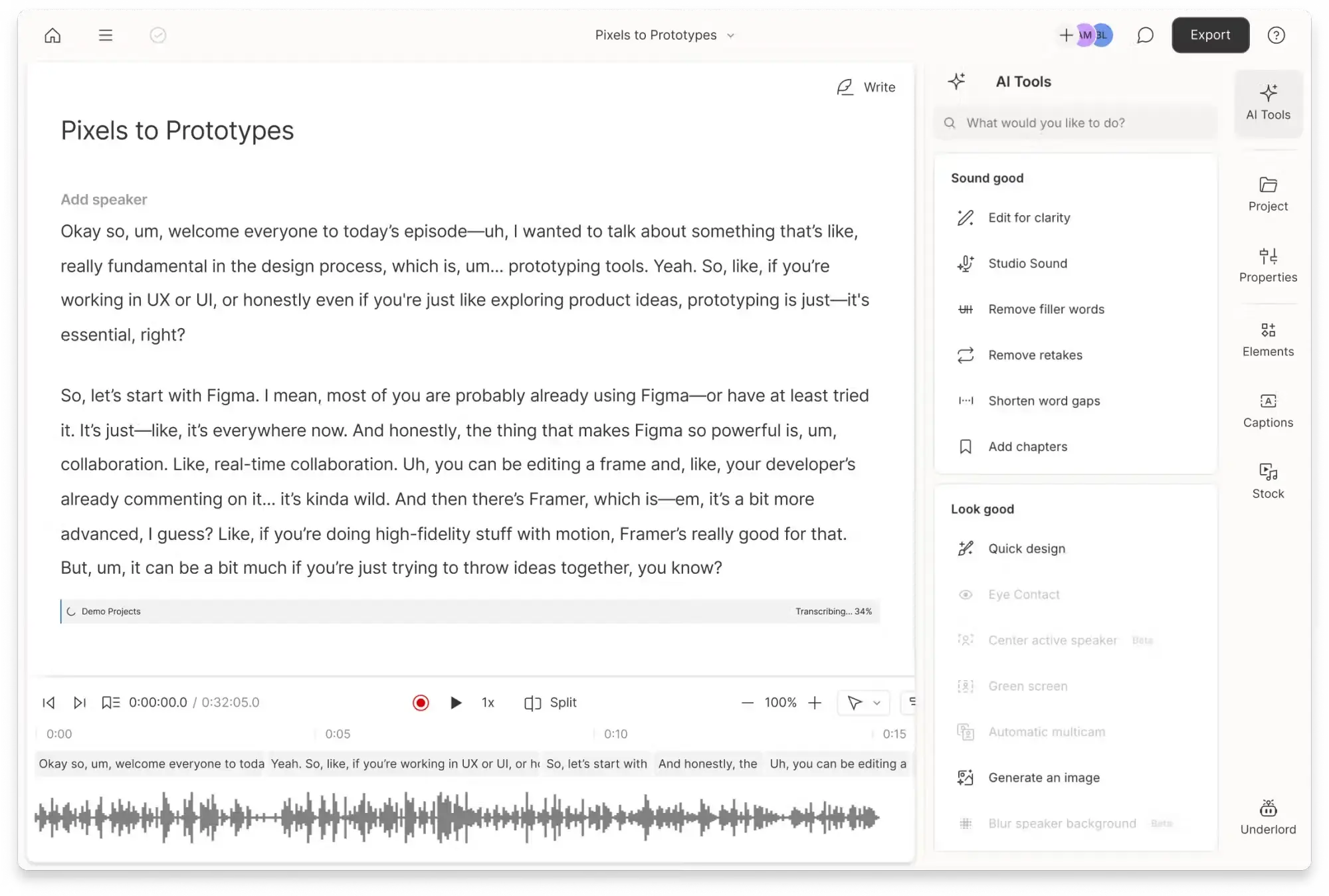
Descript transcript of meeting with AI Tools bar on the right

Best for: Podcasters, video teams, journalists, and creators editing recorded interviews.

What stands out:

  • Audio and video transcription
  • Text-based media editing
  • Transcript and recording in the same workspace
  • Video and audio production features
  • Export workflows for further editing

Scott W., a Founder and Director of Production, rated Descript 5/5 on G2. He described how the product had evolved beyond simple audio and video transcription and highlighted the ability to quickly cut down interviews and other recordings. His criticism focused on export quality rather than the core transcription workflow.
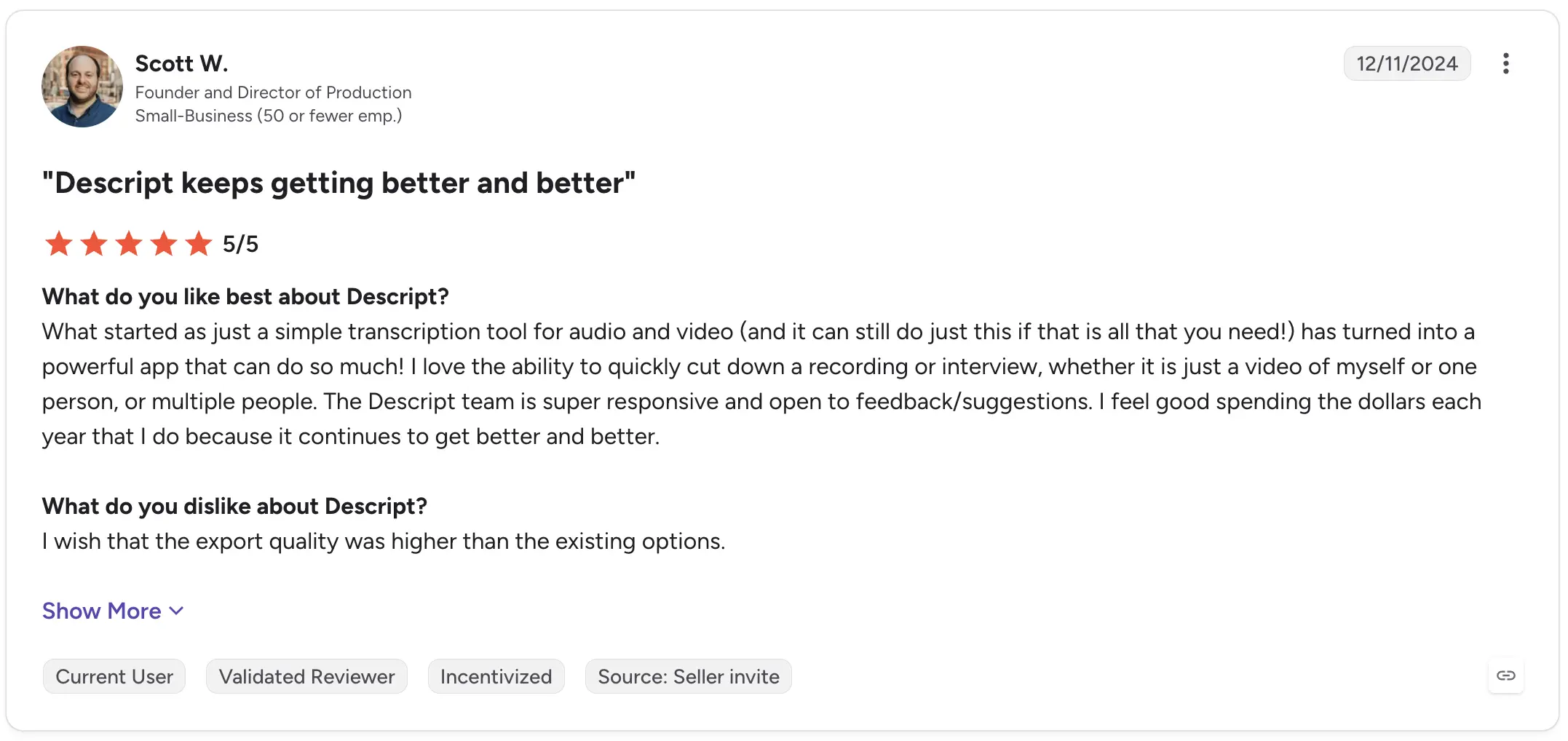
Descript G2 review

A more recent August 2026 review from Science Communication Fellow Tiegan P. rated Descript 4.5/5 and praised being able to edit the script and audio together before exporting the timeline to a DAW. Their main frustration was that their preferred workflow for pulling selects still required digging back through the transcript.
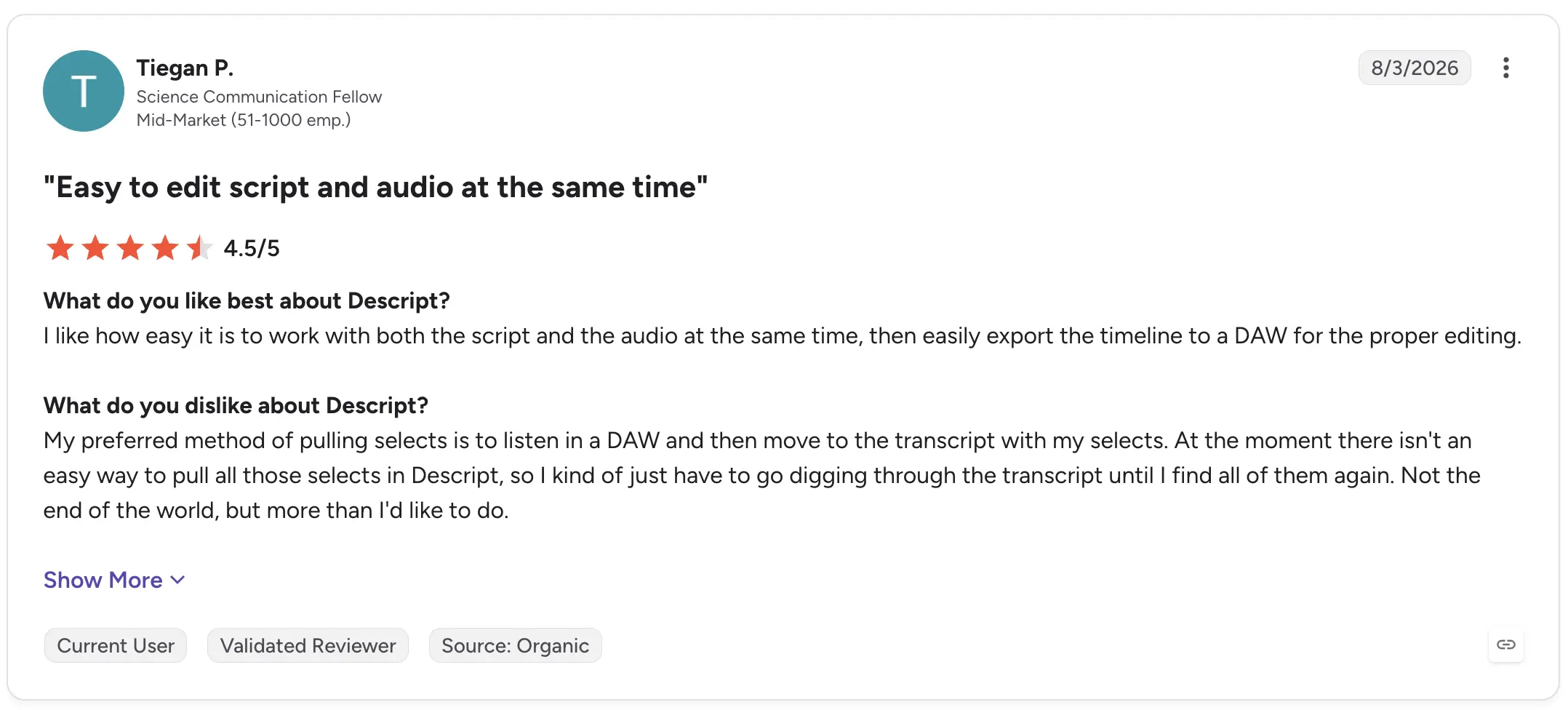
Descript G2 review

Descript, therefore, makes the most sense when the transcript isn't the final product, but part of the production process.

3. Trint: Best for collaborative transcript editing

Trint combines AI transcription with tools for reviewing, editing, and collaborating around recorded material.

That can make it particularly useful for research, media, and content teams where several people need to work with interview transcripts rather than one person simply downloading a text file.

Best for: Teams collaboratively reviewing interviews and recorded content.
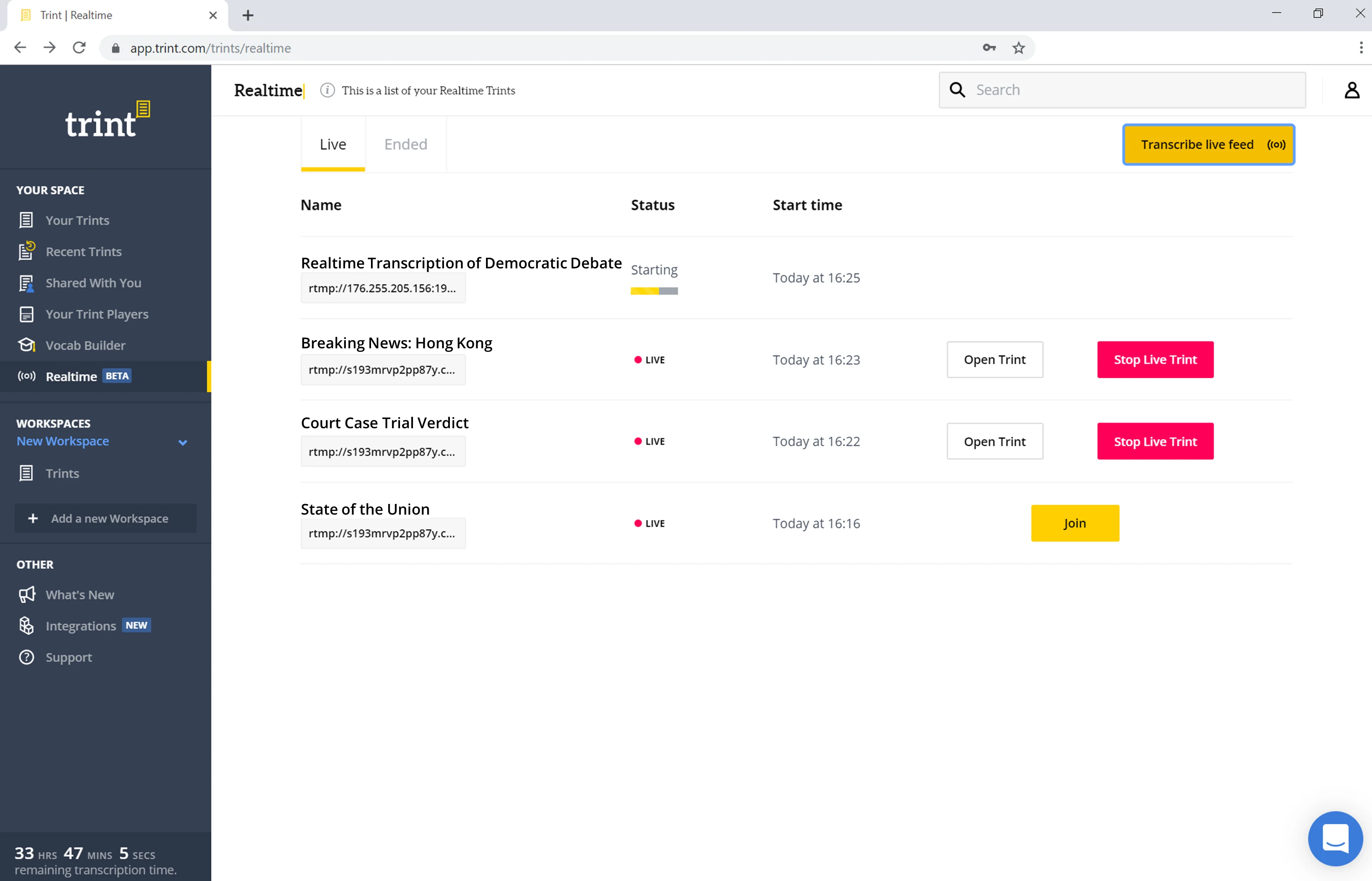
Trint interface showing Live Transcription in the Realtime tab

What stands out:

  • AI transcription
  • Collaborative editor
  • Audio and video workflows
  • Transcript review and markup
  • Tools suited to interview-based projects

A verified G2 reviewer working at a mid-market computer software company rated Trint 5/5 in May 2025 and said they use it with every project involving a customer interview. They specifically praised its transcription process and ability to mark up videos for production.
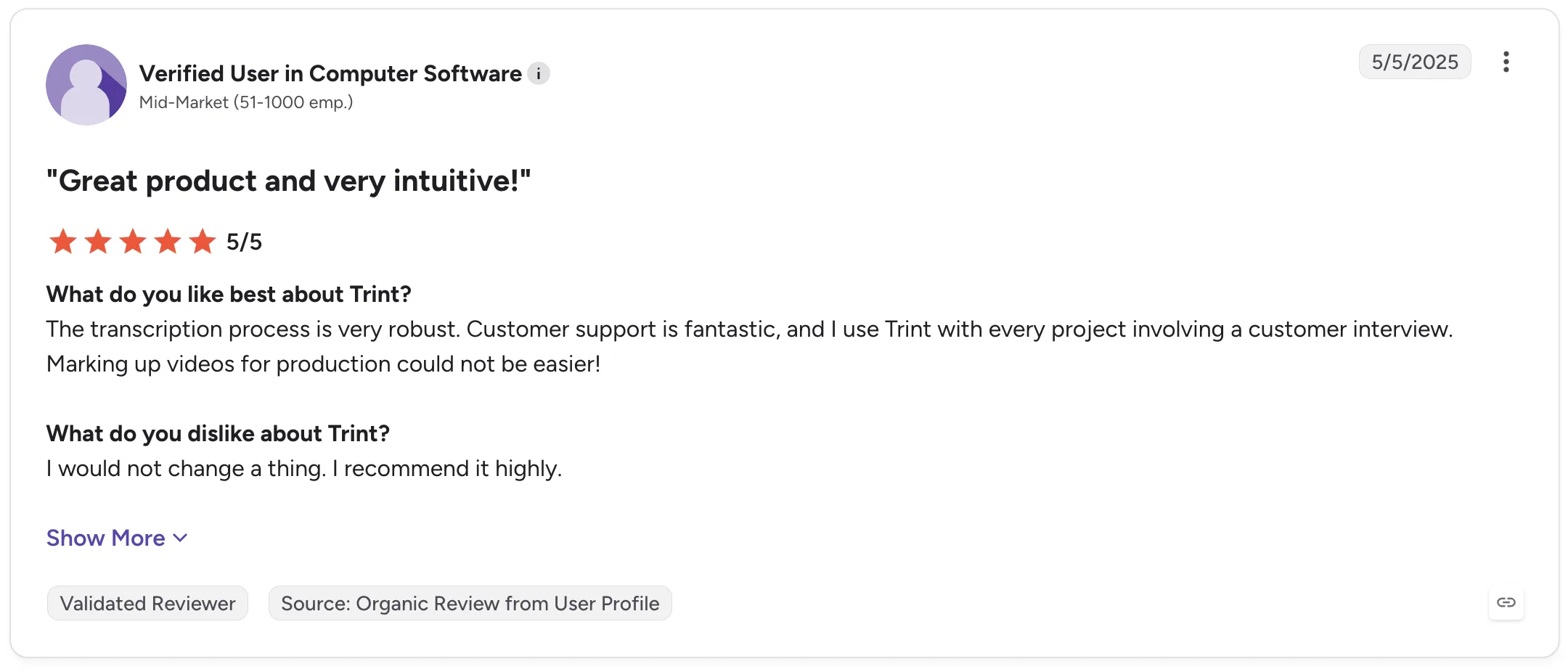
Trint G2 review

Gina K., a Senior Manager of Marketing Content Strategy, gave Trint 4/5 and highlighted its performance with interviewees who have strong international accents. Her review also points to two useful limitations: industry-specific terminology sometimes needs correcting, and distinguishing different speakers can require manual fixes.
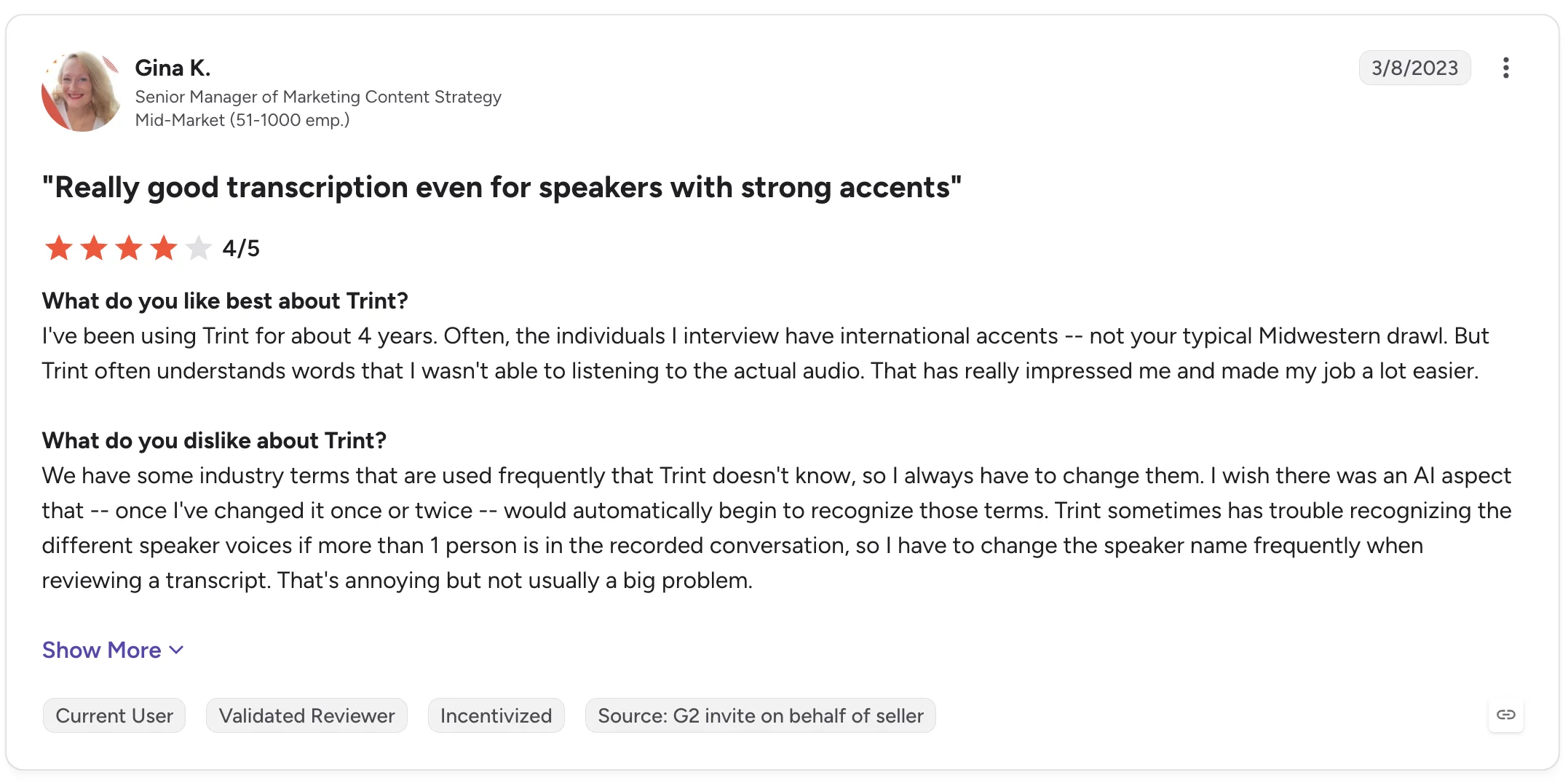
Trint G2 review

Those details are worth considering if your research interviews contain specialized vocabulary or multiple people speaking.

4. MeetGeek: Best for turning interviews into structured insights

MeetGeek is a better fit when transcription is the beginning of the workflow rather than the end.

It can automatically record and transcribe interviews thanks to its Google Meet, Microsoft Teams, and Zoom integrations, on Discord and Webex through the Chrome extension, as well as process uploaded MP3 and MP4 recordings and in-person conversations captured through the mobile app.

The transcript then feeds into AI meeting notes, summaries, highlights, action items, and a searchable meeting knowledge base.

MeetGeek transcription and notes of Google Meet Demo meeting

For interview-heavy workflows, that means you can move from:

recording → transcript → summary → analysis → shared knowledge

Without manually moving the conversation between several AI note-taker tools.

MeetGeek supports speaker identification, timestamps, 100+ languages and dialects, and a custom dictionary for company jargon, unusual names, acronyms, and industry terminology. It can also tailor AI-generated summaries to the type of conversation, including interviews.

Its AI chat is particularly useful when you're dealing with multiple interview recordings. Instead of opening every transcript and starting from a blank page, you can ask questions about previous conversations and retrieve relevant information from them.

MeetGeek AI Chat

For qualitative research, MeetGeek’s AI chat can help with tasks such as finding recurring concerns, retrieving comments about a particular topic, or reviewing what different interviewees said before deeper analysis.

Teams can also share transcripts, recordings, summaries, and highlights, leave comments inside transcripts, and organize interviews into shared repositories.

Best for: Recruiting interviews, user research, customer interviews, and teams that need both transcription and structured post-interview analysis.

What stands out:

  • Automatic recording with Zoom, Microsoft Teams, and Google Meet integration
  • Uploaded audio and video transcription
  • Mobile recording for in-person interviews
  • Speaker identification
  • 100+ languages and dialects
  • Custom dictionary
  • AI-generated summaries and highlights
  • AI chat across meetings
  • Searchable interview knowledge base
  • Transcript comments and sharing
  • Conversation analytics

Real user feedback also reflects both sides of the product.

Mark D., a Business Consultant, rated MeetGeek 4.5/5 on G2 and praised its ability to automatically capture meetings and create searchable transcripts. He also specifically mentioned summaries adapting to different call types, including interviews. His criticism was that accuracy can vary depending on audio quality and accents, requiring occasional edits.
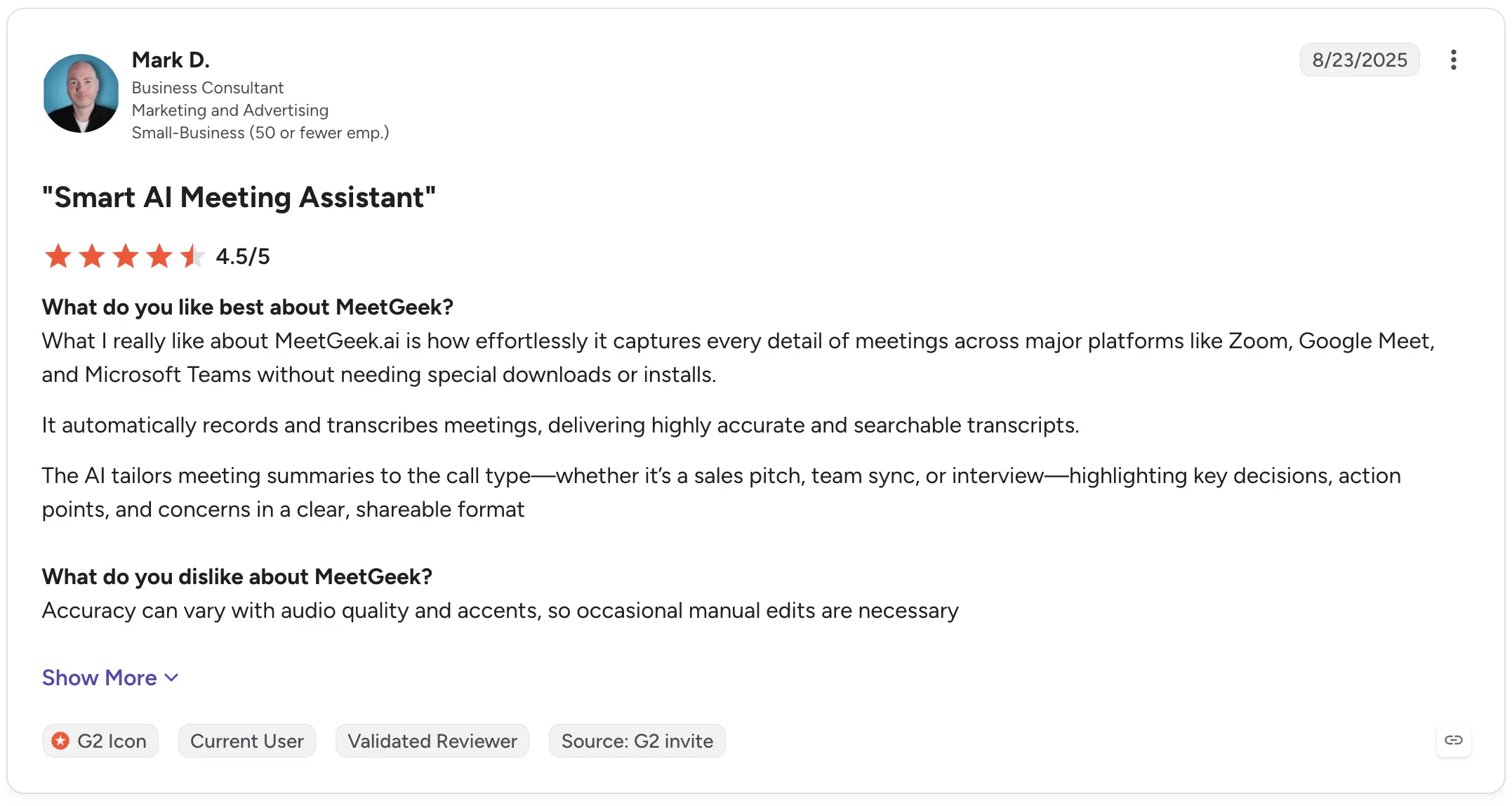
MeetGeek G2 review

Oana M., a Co-Founder, rated MeetGeek 5/5 in May 2026 and highlighted the structure of its meeting notes and the depth of insights available from recordings. Her main criticism was that the menu contains more functionality than she personally needs.
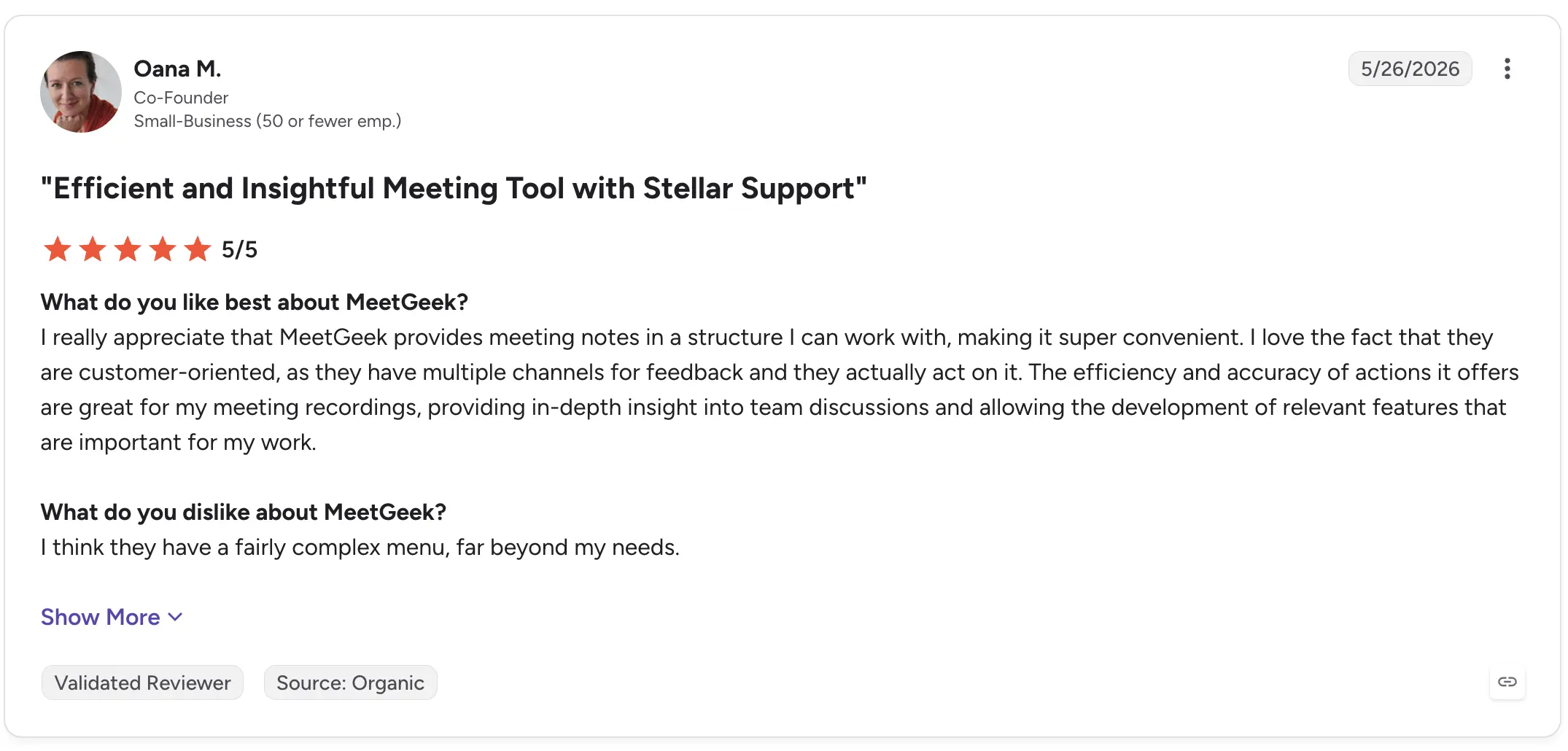
MeetGeek G2 review

If your only requirement is converting an audio file into text, MeetGeek may offer more functionality than necessary. But when interviews need to become summaries, findings, shared knowledge, or follow-up work, those additional layers are the point.

5. OpenAI Whisper: Best for custom transcription workflows

OpenAI's Whisper is somewhat different from the other products on this list.

Whisper is fundamentally a speech recognition and transcription model rather than a complete interview management workspace. That makes it particularly interesting to developers and technical teams that want to build transcription into their own applications or workflows.

It can handle multilingual speech and is widely used as the transcription layer inside other AI-powered products.
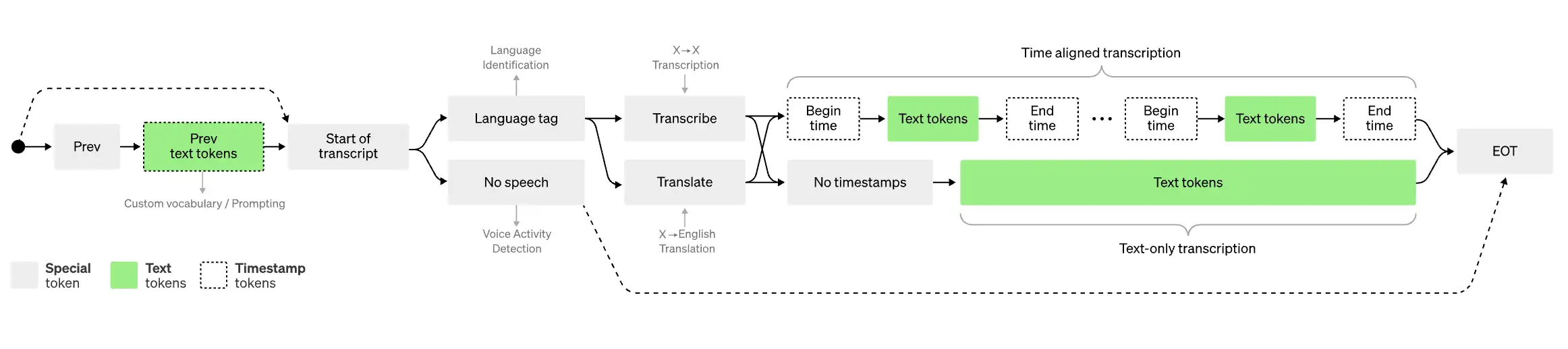
Map with legend explaning how Whisper works

Best for: Developers and technical teams building their own transcription workflows.

What stands out:

  • Speech-to-text transcription model
  • Multiple languages
  • Can process audio recordings programmatically
  • Useful as a building block for custom AI tools
  • Flexible for technical implementations

This flexibility comes with a tradeoff: using a transcription model is not the same as buying software designed to manage interviews from recording through analysis.

If you need a polished collaborative editor, interview repository, meeting notes, or ready-made workflow for sharing transcripts, you will generally need to build or add those components yourself.

Recent G2 reviews also highlight the strengths and limitations of the core transcription.

Mahika S., a Social Media Strategist, rated OpenAI Whisper 4/5 in August 2026, praising its accuracy across different accents and background noise and saying it saves time when transcribing interviews, meetings, and videos. She also reported problems with heavy background noise, overlapping conversations, fast speech, names, and occasional incorrect words.
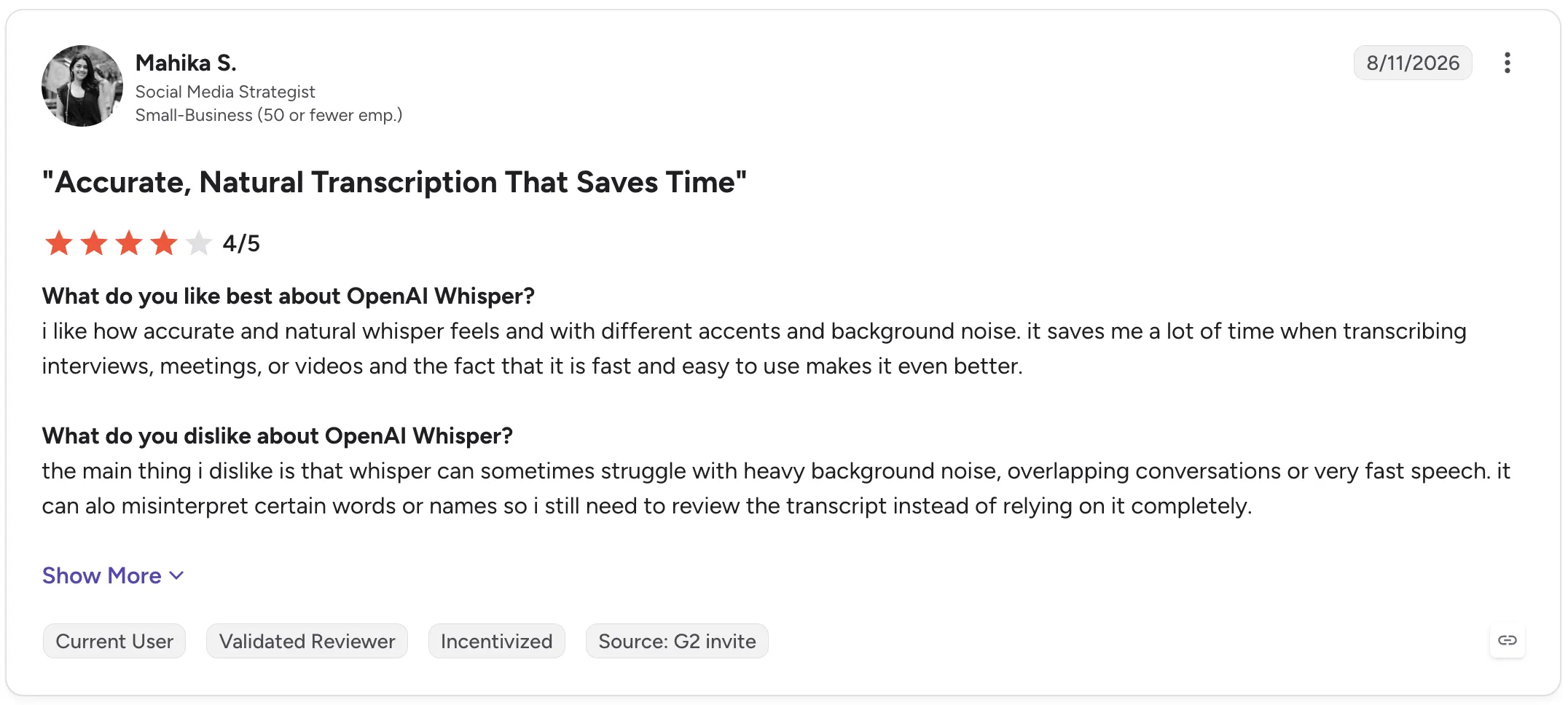
OpenAI Whisper G2 review

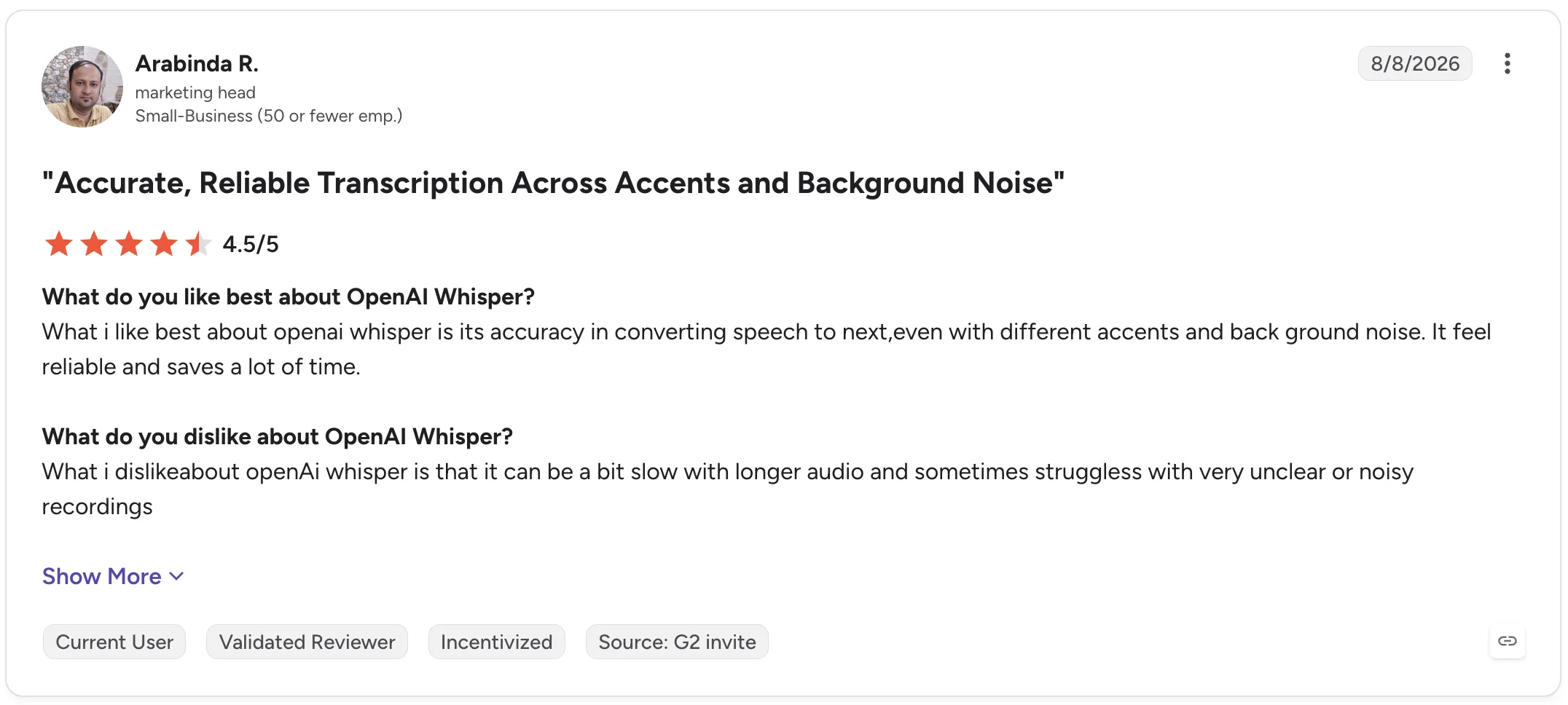
Arabinda R., a Marketing Head, gave Whisper 4.5/5 and similarly praised its reliability across accents and background noise. His criticism was that longer audio can take more time and unclear or noisy recordings can reduce performance.
OpenAI Whisper G2 review

Whisper is, therefore, compelling when you want control over the transcription layer itself. It is less compelling if you want an out-of-the-box workspace for managing the entire interview process.

Interview transcription software comparison

Tool Best for Live transcription AI summaries Interview analysis Collaboration
Otter.ai Live interview transcription Yes Yes Yes Yes
Descript Audio and video production No Yes Limited Yes
Trint Collaborative transcript editing Available workflows vary Yes Yes Yes
MeetGeek Interview insights and knowledge Yes Yes Yes Yes
OpenAI Whisper Custom transcription workflows Depends on implementation No native workspace Depends on implementation No native workspace

How to transcribe an interview

The exact process depends on whether your interview happens online, in person, or has already been recorded.

1. Get the clearest recording possible

Transcription starts with the audio.

Keep microphones close enough to capture clear speech, reduce background noise where possible, and avoid having multiple people speak simultaneously.

Even high-accuracy transcription software has less information to work with when voices are muffled, distant, or overlapping.

2. Record the interview or upload the existing file

If the interview has already happened, most transcription services let you simply upload an audio file or video file.

For online interviews, software designed to work with Google Meet, Zoom, or Microsoft Teams can remove this step by recording and transcribing the interview automatically.

For an in-person conversation, use a phone, dedicated voice recorder, or transcription app that supports offline recording.

3. Generate the transcript

Once the recording is available, the transcription software converts the audio into text.

Processing time depends on the tool, recording length, transcription model, and workflow. Some tools provide a live transcript, while others process the recording after the interview.

4. Review the transcript against the recording

Don't assume an AI transcript contains zero errors.

Review names, numbers, technical terminology, quotes you intend to publish, and passages where the audio was unclear.

Pay particular attention to sections with background noise, overlapping speakers, or rapid speech.

5. Clean up speaker labels and unnecessary speech

Depending on why you need the transcript, you may want to remove filler words, false starts, or repeated words.

For qualitative research, however, be careful not to clean the text so aggressively that you alter the interviewee's meaning.

Correct speaker labels as well, especially when multiple speakers have similar voices.

6. Export or analyze the interview

The transcript can now become an input for the rest of your work.

You might export it as text, create subtitle files, share it with colleagues, extract quotes, generate an AI summary, or use AI tools to identify patterns across several interviews.

This is where choosing software based solely on transcription accuracy can become limiting. The time saved after transcription can be just as important as the transcription time itself.

AI transcription vs human transcription: Which should you use?

AI and human transcription solve slightly different problems.

AI transcription prioritizes speed, cost, and scale. You can upload a recording and receive an automated transcript quickly, then search, summarize, or analyze it with other AI-powered features.

Human transcription prioritizes manual review and can be preferable when exact wording is critical.

For everyday research interviews, recruiting conversations, journalism, internal interviews, and customer research, AI transcription will often provide the more practical starting point, provided important passages are reviewed.

Human transcription services may make more sense for particularly sensitive or high-stakes material where a few errors could materially affect the outcome.

Security also matters in either case. Before uploading sensitive information, check how the transcription provider stores, processes, protects, and deletes recordings and transcripts.

Conclusion

Good interview transcription software should make recorded conversations easier to use, not simply turn audio into a wall of text.

Look at transcription accuracy, speaker identification, recording options, export formats, and language support, but also consider how much work remains once the transcription is finished.

If your interviews happen on Zoom, Google Meet, Microsoft Teams, or in person, MeetGeek can automatically record and transcribe them, create structured AI summaries, and turn past interviews into a searchable knowledge base your team can return to later.

Try MeetGeek for free and spend less time processing interviews after they end.

Key takeaways

  • Choose Otter.ai if a live transcript is central to how you conduct interviews.
  • Choose Descript if interviews become podcasts, videos, or other edited media.
  • Choose Trint if several people need to review and edit interview transcripts collaboratively.
  • Choose MeetGeek if you regularly conduct interviews and want recordings to automatically become searchable transcripts, structured summaries, insights, and reusable team knowledge.
  • Choose OpenAI Whisper if you have the technical resources to build your own workflow around a flexible transcription model.

Frequently asked questions

What is the best software to transcribe interviews?

The best choice depends on your workflow. Otter.ai is well-suited to live transcription; Descript to audio and video editing; Trint to collaborative transcript work; MeetGeek to transcription plus interview summaries and analysis; and OpenAI Whisper to custom technical implementations.

Can ChatGPT transcribe an interview?

ChatGPT can transcribe audio inputs and help analyze transcript content, but dedicated interview transcription software may provide additional workflows such as automatic meeting recording, speaker labels, collaborative editing, transcript libraries, and integrations.

OpenAI's Whisper is the company's speech recognition model specifically designed for converting audio into text.

How long does it take to transcribe a one-hour interview?

Automated AI transcription can process a one-hour interview far faster than manually typing it, although exact turnaround speed varies by service, file size, recording quality, and processing method. You should also budget time to review important passages for transcription errors.

What is the difference between transcription and interview analysis?

Transcription converts spoken words into text. Interview analysis interprets that text to identify themes, patterns, insights, quotes, answers, and relationships across one or more interviews.

The first creates the source material. The second helps you understand what that source material means.

Should I remove filler words from interview transcripts?

It depends on the purpose of the transcript. Removing filler words can make transcripts easier to read when you're creating articles, summaries, or internal notes. For qualitative research, preserve enough of the original speech to avoid changing meaning, tone, or context.

Article updated on 
August 20, 2026
Share the knowledge with your circle
Copied
Related posts

Best Interview Transcription Software: 5 Tools Compared

Find the best interview transcription software for your workflow. Compare five top tools for transcription, summaries, editing, collaboration, and interview analysis.

This is some text inside of a div block.

12 Best Remote Collaboration Tools for 2026

Compare 12 of the best remote collaboration tools for 2026 and find the right options for communication, projects, meetings, and async work.

This is some text inside of a div block.

Best AI Note Taker for Google Meet in 2026

How each tool captures a Meet call, whether Gemini already covers you, and what your Workspace tier and admin actually allow.

This is some text inside of a div block.

Staff Meeting Agenda Template: Free Examples

Use these free staff meeting agenda templates and examples to keep team meetings focused, assign action items, and make every meeting more productive.

This is some text inside of a div block.

Recruitment Automation Tools: 7 Platforms to Try

We compared 7 platforms that automate sourcing, screening, scheduling, and interview documentation, and where each one fits.

This is some text inside of a div block.

Best AI Note Taker for Zoom: 8 Tools Tested (2026)

How 8 AI note takers actually connect to Zoom, and what each one does when you are not the meeting host.

This is some text inside of a div block.

7 Best Free AI Meeting Note Takers in 2026 (Tested)

A hands-on look at seven free plans, including how many meeting hours you actually get before the paywall starts.

This is some text inside of a div block.

Best Applicant Tracking Systems for Growing Teams

Explore the best applicant tracking systems, see who each ATS is best for, and learn how to choose the right one for your hiring process.

This is some text inside of a div block.

Executive Team: Roles, Structure, and Best Practices

Discover the roles, responsibilities, and traits of successful executive teams, plus practical strategies for building stronger leadership.

This is some text inside of a div block.

How to Record on Phone: iPhone and Android Guide

Discover how to record phone calls, voice notes, and screen activity on Android and iPhone, with tools, tips, and legal guidance.

This is some text inside of a div block.

What Is a Summary Report? Examples, Templates & Tips

A summary report helps turn complex information into clear insights. Learn the different types, essential sections, examples, and best practices for creating reports that save time and support better decision-making.

This is some text inside of a div block.

Meeting Notes in Claude: What You Can Build and How to Connect

Connect your meeting notes to Claude and turn past calls into answers, finished documents, and multi-step work.

This is some text inside of a div block.

The 6 Best Airgram Alternatives in 2026

Compare the best Airgram alternatives for 2026, including MeetGeek, Fireflies, Otter, tl;dv, Fellow, and Sembly AI.

This is some text inside of a div block.

Meeting Notes in ChatGPT: Benefits, Uses, and Setup

Connect your meeting notes to ChatGPT and turn past calls into instant answers, drafts, and automations, in plain language.

This is some text inside of a div block.

How To Type Faster: 15 Typing Hacks That Work

Want to type faster and make fewer mistakes? Discover practical typing hacks, keyboard shortcuts, and tools that help you work smarter.

This is some text inside of a div block.

10 Best ChatGPT Alternatives For Work In 2026

Looking for a ChatGPT alternative? Compare the top AI tools for research, meetings, writing, coding, search, and productivity in 2026.

This is some text inside of a div block.

9 Best Calendly Alternatives in 2026 (Tested + Compared)

Cal.com, Acuity, Chili Piper, and more — the best Calendly alternatives in 2026, tested and ranked by use case.

This is some text inside of a div block.

8 Best Google Meet Extensions in 2026 (Tested for Productivity)

From AI notes to noise cancellation, here are 8 Chrome extensions that fix what Google Meet doesn’t do natively.

This is some text inside of a div block.

AI Productivity Tools We Actually Use in Sales and Marketing

A practical look at the AI productivity tools we use daily for meetings, content, automation, sales workflows, and teamwork.

This is some text inside of a div block.

Gemini vs. Google Assistant: Full Comparison Guide

Confused about Gemini vs Google Assistant? Learn the key differences, what Google is changing, and which assistant fits you best.

This is some text inside of a div block.

Managing Hybrid Teams in 2026: Common Challenges and How to Overcome Them

Communication gaps, time-zone friction, culture drift — the four challenges every hybrid manager faces, and how to solve them.

This is some text inside of a div block.

MeetGeek vs tl;dv: Which AI Meeting Tool Is Right for Your Team in 2026?

Features, pricing, accuracy, integrations on a side-by-side comparison with a clear verdict for sales, CS, and ops teams.

This is some text inside of a div block.

How to Convert MP4 to Transcript (Fast & Accurate)

Learn how to convert MP4 files into accurate transcripts, subtitles, and captions with AI tools for meetings, webinars, and interviews.

This is some text inside of a div block.

Google Transcription Service in 2026: Honest Review and Best Alternative

Google Meet, Cloud Speech-to-Text, Docs, Recorder — what each does, where each falls short, and the better alternative.

This is some text inside of a div block.

AI Sales Coaching: How Modern Sales Teams Use AI to Close More Deals

How AI sales coaching analyzes every call (not just the 3% a manager samples) and surfaces coachable moments by rep, stage, and objection type.

This is some text inside of a div block.

Can ChatGPT Transcribe Audio? What Works in 2026

Three ways to get a transcript out of ChatGPT, and the one most people reach for is the one OpenAI documents least.

This is some text inside of a div block.

AI for Customer Success: The 2026 Playbook

Where AI plugs into the CSM day (Renewals, Risk, References, Reviews) plus a maturity model and a 10-item checklist for choosing tools.

This is some text inside of a div block.

A Complete Guide to the MEDDIC Sales Methodology

Discover MEDDIC sales, how it helps qualify leads, understand decision processes, and improve win rates across complex B2B sales cycles.

This is some text inside of a div block.

How To Write an Out of Office Message

Learn how to write a clear out of office message, what to include, and use ready-to-copy examples for any situation.

This is some text inside of a div block.

How To Cancel Your Zoom Subscription in 2026

Need to cancel your Zoom subscription? This guide explains exactly how to do it on the Zoom website, Apple App Store, or Google Play, what happens after cancellation, and how to avoid extra billing charges.

This is some text inside of a div block.

MeetGeek vs Fellow: Comparing Meeting Notes, Agendas, and Automation

Comparing MeetGeek vs Fellow? See how their AI meeting notes, agendas, recordings, and automation features differ to find the best fit for your team.

This is some text inside of a div block.

How to Screen Record on Mac (With Audio, System Sound & Pro Tips)

Learn how to screen record on Mac using built-in tools, capture audio correctly, and see when MeetGeek is the smarter option.

This is some text inside of a div block.

MeetGeek vs Krisp: Which AI Meeting Assistant Is Right for Your Team?

MeetGeek vs Krisp compared: AI notes, noise cancellation, pricing, integrations, and recording features explained clearly.

This is some text inside of a div block.

Video Conference Tips for Running Successful Virtual Meetings

Learn practical video conference tips that improve audio quality, engagement, and follow-through, and help teams stay aligned after virtual meetings.

This is some text inside of a div block.

Webex vs Zoom: Which Video Conferencing Platform Fits Your Meetings Best?

A clear comparison of Webex vs Zoom, from features and pricing to security and integrations.

This is some text inside of a div block.

How to Raise Hand in Zoom on Any Device

A device-by-device guide to Zoom's raise hand feature, including keyboard shortcuts and what to do when the button goes missing.

This is some text inside of a div block.

Good Questions to Ask in an Interview That Help You Make the Right Choice

Learn which questions to ask, when to ask them, and how to use interviews to decide if a role, team, and company are truly right for you.

This is some text inside of a div block.

What is Companion Mode in Google Meet? Everything You Need to Know

Read on for a practical guide to using Companion Mode in Google Meet for clearer, more balanced hybrid meetings.

This is some text inside of a div block.

What Is a Skip-Level Meeting? How Leaders Use Skip-Levels to Improve Communication

An in-depth look at skip-level meetings and how they help leaders connect with teams and gain real insight.

This is some text inside of a div block.

What Is an AI Voice Agent? A Practical Guide to How Voice AI Really Works

This guide explains what an AI voice agent is, how it works, the benefits it offers, and where it fits best alongside human teams.

This is some text inside of a div block.

Stand-Up Meeting Guide: What They Are and How to Run Them

Discover what makes a stand-up meeting actually useful. This guide explains how to run daily stand-ups that stay short, surface blockers, and keep teams aligned.

This is some text inside of a div block.

Everything About Microsoft Teams AI Interpreter + How to Go Beyond Translation

Find out how Microsoft Teams AI Interpreter works, where it falls short, and how to go beyond translation.

This is some text inside of a div block.

Best Lecture Recording App in 2026: 5 Tools Students Actually Use

Let’s take an in-depth look at what students are using nowadays to record and organize their lectures, both online and offline.

This is some text inside of a div block.

Read AI Pricing Explained for 2026: Is It Worth It for Meeting Notes

Explore Read AI’s 2026 pricing, its core features, and how it handles meeting notes, transcription, and insights to support modern teams.

This is some text inside of a div block.

What Is a Searchable Knowledge Base and How Does It Work?

Explore how searchable knowledge bases improve access to information and see how MeetGeek turns your meetings into a fast, reliable knowledge hub.

This is some text inside of a div block.

How to Blur Background in Google Meet (Simple Guide for All Devices)

Discover how to blur your background in Google Meet on desktop and mobile, use visual effects, and get a cleaner, more focused look in every call.

This is some text inside of a div block.

How to Join Teams Meeting With Code: A Complete Step-by-Step Guide

Find out how to join Microsoft Teams meetings using a meeting code, as well as other options like a link or invite. This guide explains every method in a clear, step-by-step way.

This is some text inside of a div block.

5 Best NoteGPT Alternatives in 2026

Explore the top 5 NoteGPT alternatives that help you capture key insights, transcribe content, and boost productivity across learning and professional workflows.

This is some text inside of a div block.

What Is Perplexity AI? A Guide to the AI-Powered Search Engine Transforming How We Find Information

In this article we’ll take a close look at Perplexity AI, what it can do for you compared to traditional search engines, and some of its pros and cons.

This is some text inside of a div block.

tl;dv Review 2026: Is It Still Safe? + 5 Alternatives

What tl;dv does well, what the 2026 metadata exposure actually reached, and how the answer changes your shortlist.

This is some text inside of a div block.

ChatGPT Record Mode vs MeetGeek: Here's Everything You Need to Know

Curious how the ChatGPT recorder compares to MeetGeek? We looked at features, integration, and data security for recording meetings.

This is some text inside of a div block.

Fathom AI Pricing 2026: Is It Still Worth It for Modern Teams?

Explore Fathom AI pricing for 2026, including features, limits, and plan comparisons, plus how MeetGeek offers more flexibility for teams.

This is some text inside of a div block.

AI Meeting Agents: How Autonomous AI Is Transforming the Future of Work

Discover how AI meeting agents are redefining the future of work—handling scheduling, follow-ups, and even speaking on your behalf to save time and turn every meeting into real action.

This is some text inside of a div block.

Notta AI Review: Is This AI Transcription Tool Worth It in 2026?

Read this in-depth Notta AI review to see how well it transcribes meetings, handles multiple languages, and delivers AI summaries, plus where it falls short compared to smarter meeting assistants.

This is some text inside of a div block.

These 5 AI Tools for Nonprofits Will Make Every Hour Count

Make your nonprofit more efficient with AI tools that cut admin time, improve collaboration, and maximize every hour of impact.

This is some text inside of a div block.

Granola AI Alternatives: The 5 Best Note Takers in 2026

Prices, plan limits and language counts checked against each vendor's own pricing page and our comparison data in July 2026.

This is some text inside of a div block.

Follow-Up Email After Interview: How to Write It, When to Send It, and What to Say

Discover how to write an effective follow-up email after an interview. From timing and templates to tone and structure, this guide covers everything you need to stand out and stay memorable.

This is some text inside of a div block.

Tactiq Pricing 2026: Is It Worth It? Plans & Costs

A clear look at every Tactiq plan, what AI credits really limit, and how the costs add up for solo users and teams.

This is some text inside of a div block.

Ad Hoc Meeting Meaning and How to Run One

Discover the true ad hoc meeting meaning and learn how to make spontaneous discussions more focused and effective. Find out when to hold and manage them.

This is some text inside of a div block.

Virtual Meeting Etiquette: 15 Essential Rules for Professional Video Calls

Discover 15 essential virtual meeting etiquette rules and tips that keep conversations focused, professional, and engaging.

This is some text inside of a div block.

How to Blur Background in Zoom: Step-by-Step Guide

Discover how to use Zoom’s blur background feature for privacy and focus, plus tips, fixes, and when to switch to virtual backgrounds.

This is some text inside of a div block.

How to Share Screen on Google Meet on Any Device

A step-by-step guide to presenting a tab, window, or full screen on Google Meet, with audio, on desktop and mobile.

This is some text inside of a div block.

MeetGeek’s MCP Server Explained: How It Enables AI Assistants to Transform Meetings

See how MeetGeek’s MCP Server helps AI assistants turn your meetings into smart, actionable insights, all from your local machine.

This is some text inside of a div block.

How to Change Your Name on Zoom (Before and During a Call)

A step-by-step guide for desktop, web, and mobile, including how to rename yourself mid-call and stop your name from reverting.

This is some text inside of a div block.

Note-Taking AI for Students: The Best Tools to Study Smarter in 2026

A guide to the best AI note-taking tools for students in 2026, with features, pros, and cons to help you choose the right app for learning.

This is some text inside of a div block.

Descript Pricing Review 2026: What It Offers, Where It Falls Short, and a Better Alternative

A closer look at Descript’s pricing tiers, their trade-offs, and why MeetGeek stands out as a smarter choice for creators.

This is some text inside of a div block.

Google Meet Time Limit: Free vs Paid Plans (2026)

Google publishes a different meeting length for free accounts, Workspace editions and Google One. Here is each one.

This is some text inside of a div block.

How To Transcribe Voice Memos To Text (3 Different Ways)

In this article, you’ll learn how to transcribe voice memos in three different ways, weighing the pros and cons of each option.

This is some text inside of a div block.

Best ClickUp Alternatives for AI Note Taking

Learn about the best 5 ClickUp alternatives if you want to go beyond simple AI note-taking and find a comprehensive meeting assistant.

This is some text inside of a div block.

What Is an Objective Summary? Definition, Examples & Tips

Objective summaries are a must when you need key information from lengthy meetings. We’ll discuss all about them in this article!

This is some text inside of a div block.

How to Record a Google Meet, With or Without the Host

Google Meet limits recording to paid plans and hosts by default. Here is every way around that, including on Android.

This is some text inside of a div block.

8 Best Meeting Note-Taking Apps in 2026

Looking for the best meeting note-taking app for your team? We break down the features, pros, and cons of the 8 best ones right now.

This is some text inside of a div block.

How to Record a Zoom Webinar as a Host or Participant (2 Methods)

In this article, we will review how to record a Zoom webinar as host or participant using Zoom’s built-in recording and third-party tool with AI transcription.

This is some text inside of a div block.

7 Best Chrome Extensions for Salespeople and AMs

In this article, we will explore the best Chrome extensions for sales reps, focusing on tools that improve meeting intelligence, integrate with CRMs, and optimize productivity.

This is some text inside of a div block.

Best Chrome Audio Capture & Recorder Extensions (2026)

Compare the top Chrome extensions and tools for recording tab audio in 2026, from free recorders to full AI meeting assistants.

This is some text inside of a div block.

7 Best Speech to Text Chrome Extensions: Comparison & Features

This guide breaks down the top 8 speech-to-text Chrome extensions for 2025, reviewing their key features, pricing, and ideal use cases to help you make an informed decision.

This is some text inside of a div block.

Meeting Overload Isn’t the Real Problem - Bad Meeting Design Is

When meeting overload becomes obvious, there are soma small changes that can transform your entire meeting culture.

This is some text inside of a div block.

Best Conversation Intelligence Software in 2026

By leveraging AI, these conversational intelligence platforms provide the analysis needed to refine sales or investor pitches, improve coaching, and influence revenue.

This is some text inside of a div block.

How to Add Meeting Notes to Google Docs [3 Easy Ways]

Let's explore 3 ways of how to add your meeting notes to Google Docs - manually or automatically.

This is some text inside of a div block.

Find the Best Zoom Alternative in 2026

Looking for a Zoom alternative? Check out the best options for 2026 and find the perfect fit for your meetings!

This is some text inside of a div block.

How to Extend the Zoom Time Limit: Paid & Free Solutions

Need more time for your Zoom meeting? Learn how to easily extend your session with this simple guide.

This is some text inside of a div block.

Microsoft Teams for Mac: How to Download, Install & Use It (2026)

Setting up Microsoft Teams on Mac is easy! Follow our quick guide to start collaborating seamlessly.

This is some text inside of a div block.

How to Record WhatsApp Calls on Any Device (2026)

Discover the easiest way to record WhatsApp calls with our clear, step-by-step instructions.

This is some text inside of a div block.

Top 5 Integrations for AI Meeting Assistants in 2026

Looking to boost your meeting productivity? Explore the top AI meeting assistant integrations of 2026 that seamlessly connect with your favorite tools and apps.

This is some text inside of a div block.

7 Ways AI Meeting Assistants Save Time for Sales Teams in 2026

Learn how AI meeting assistants transform sales productivity in 2026 by eliminating manual tasks, streamlining workflows, and enabling reps to focus on selling.

This is some text inside of a div block.

Zoom Pricing in 2026: Plans, Add-Ons and Real Costs

A plain-English breakdown of every Zoom Workplace plan, add-on and hidden cost, with the real yearly price for teams of each size.

This is some text inside of a div block.

Does Microsoft Teams Notify Screenshots? What It Detects

Teams stays silent when you screenshot, but since November 2025 organizers can block captures outright.

This is some text inside of a div block.

Google Meet Pricing in 2026: Free vs. Paid Plans Compared

Find the right Google Meet plan for your team with our clear breakdown and smart cost-saving tips.

This is some text inside of a div block.

Where Are Teams Recordings Stored? All Locations, Explained

Wondering where your Microsoft Teams recordings end up? Here’s every storage option clearly explained.

This is some text inside of a div block.

The 4-Day Workweek: How Companies Are Winning the Talent War

Why working less might be the smartest move for companies chasing productivity, innovation, and talent retention.

This is some text inside of a div block.

Find the Best Speech to Text App for Work in 2026 (Free & Paid)

Looking for a speech to text app in 2026? We’ve rounded up top picks to boost productivity and save time at work.

This is some text inside of a div block.

Managing Security and Compliance Risks Related to AI Note-Takers

Keep your AI-powered meetings secure and compliant! Learn how to manage security and compliance risks, protect sensitive data, and ensure privacy in your virtual meetings.

This is some text inside of a div block.

How to Write a Business Meeting Follow-Up Email + Templates & ChatGPT Prompts

Learn how to write clear, professional business meeting follow-ups with templates and ChatGPT prompts to save time and boost responses.

This is some text inside of a div block.

Microsoft Teams AI: How to Use Copilot in Meetings

A step-by-step guide to Teams Copilot for meetings, plus how MeetGeek adds recording, 100+ languages and follow-ups across platforms.

This is some text inside of a div block.

How to Take Minutes for a Meeting Like a Pro [+ Free Customizable Template]

Take flawless meeting minutes every time! Learn expert tips to capture key points, track action items, and impress your team with professional note-taking skills.

This is some text inside of a div block.

The 5 A's of Effective Communication: A Startup Guide to Better Team Collaboration

Startup success isn’t just about great ideas—it’s about how well your team communicates. Discover the 5 A’s framework to improve collaboration, reduce friction, and turn conversations into action.

This is some text inside of a div block.

Teams Meeting Attendance Report: What It Is & How to Use It

Demystify the Teams Meeting Attendance Report! Learn how to access, interpret, and leverage it to track engagement and improve your virtual meetings effortlessly.

This is some text inside of a div block.

How to Create & Use Google Meet Breakout Rooms

Master Google Meet breakout rooms! Learn how to create, manage, and use them to foster collaboration and engagement in your virtual meetings.

This is some text inside of a div block.

How to Record Yourself on Zoom, Step by Step

A step-by-step guide to recording yourself on Zoom, on your own or while presenting slides, locally or to the cloud.

This is some text inside of a div block.

30+ Sales KPIs to Track in 2026

Unlock the secrets to sales success in 2026 with this guide to over 30 essential sales KPIs. Learn what to track to drive your team’s performance and revenue growth.

This is some text inside of a div block.
Join 50,000+ teams across 100+ countries

Upgrade your meetings now.

Two-minute setup. Free forever foundation. Enterprise-grade from day one. Turn meetings into a positive and rewarding experience

Sign up for free