

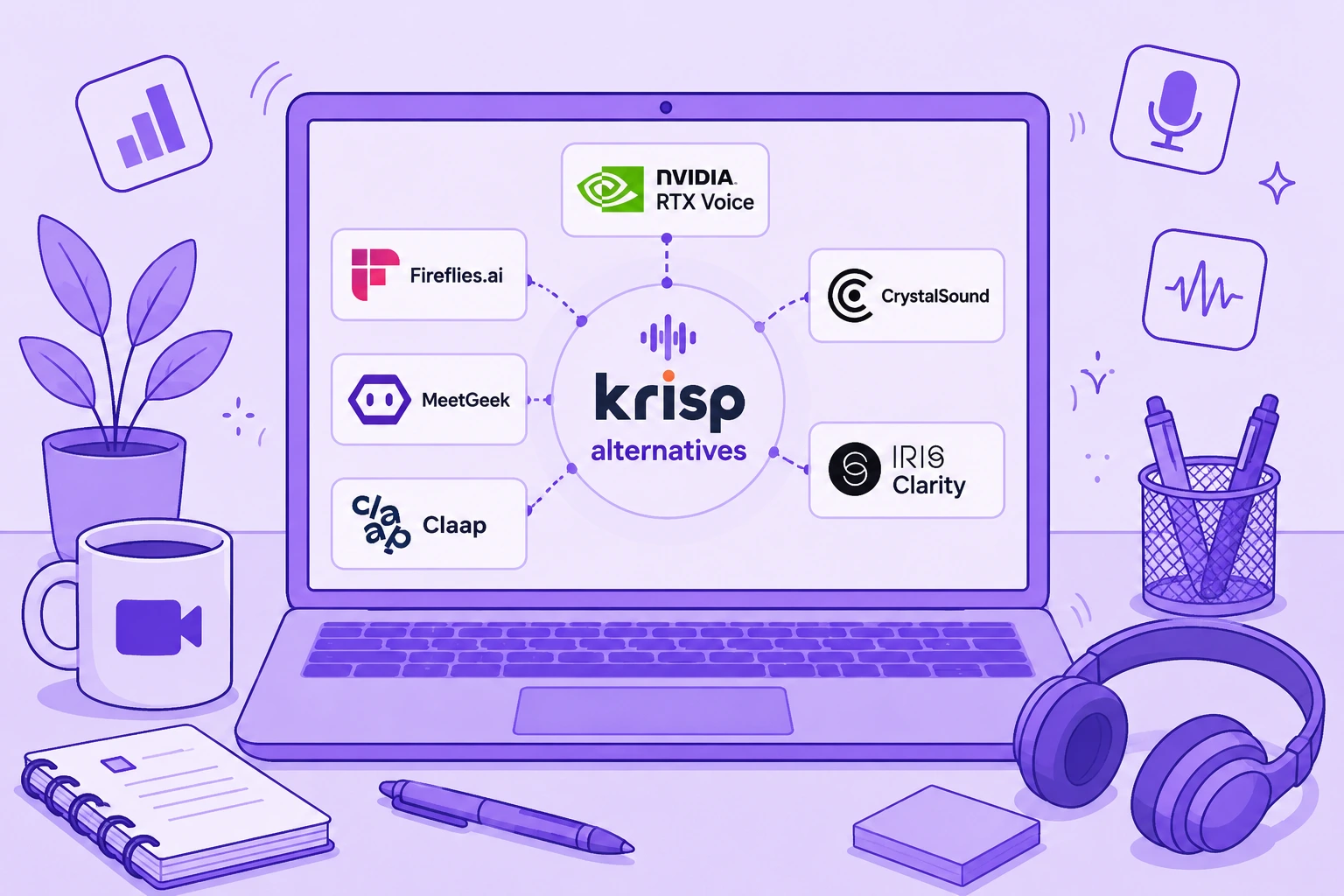

O Krisp ainda é uma das ferramentas mais fortes de cancelamento de ruído com IA em tempo real. Ele consegue reduzir o ruído de fundo do seu microfone e do áudio recebido, funciona com as principais ferramentas de comunicação e hoje combina supressão de ruído com transcrição, gravação, anotações de reunião com IA, conversão de sotaque e resumos automáticos.
O Krisp hoje acumula várias funções ao mesmo tempo, então nenhuma alternativa sozinha substitui tudo o que ele faz.
Se a sua prioridade é eliminar o ruído de fundo durante reuniões ao vivo, o NVIDIA RTX Voice ou o CrystalSound podem ser a opção mais adequada. Se você usa o Krisp principalmente como assistente de reunião com IA, Fireflies.ai, MeetGeek e Claap vão muito mais longe em anotações de reunião, inteligência de conversas, colaboração e automação de fluxos de trabalho.
Este guia compara seis das melhores alternativas ao Krisp com base no que elas realmente substituem, nos seus principais recursos, nas limitações e nos preços atuais.
TL;DR: quais são as melhores alternativas ao Krisp?
| Alternativa ao Krisp | Melhor para | Preço inicial |
|---|---|---|
| NVIDIA RTX Voice | Supressão de ruído em tempo real gratuita para quem tem GPUs NVIDIA compatíveis | Gratuito |
| Fireflies.ai | Inteligência de reuniões, busca e fluxos de trabalho conectados ao CRM | Gratuito |
| MeetGeek | Anotações de reunião com IA, automação, análises e 10.000+ integrações | Gratuito |
| CrystalSound | Cancelamento de ruído e melhoria de áudio dedicados | US$ 12/usuário/mês |
| Claap | Colaboração em reuniões com foco em vídeo e fluxos de receita | Gratuito |
| IRIS Clarity | Cancelamento de ruído bidirecional para equipes que atendem clientes e call centers | £ 9,50/usuário/mês |
O que importa mesmo é decidir o que você quer substituir no Krisp.
O que é o Krisp AI?
O Krisp AI começou com cancelamento de ruído em tempo real e continua especialmente bom em reduzir sons que distraem durante videochamadas e ligações telefônicas.
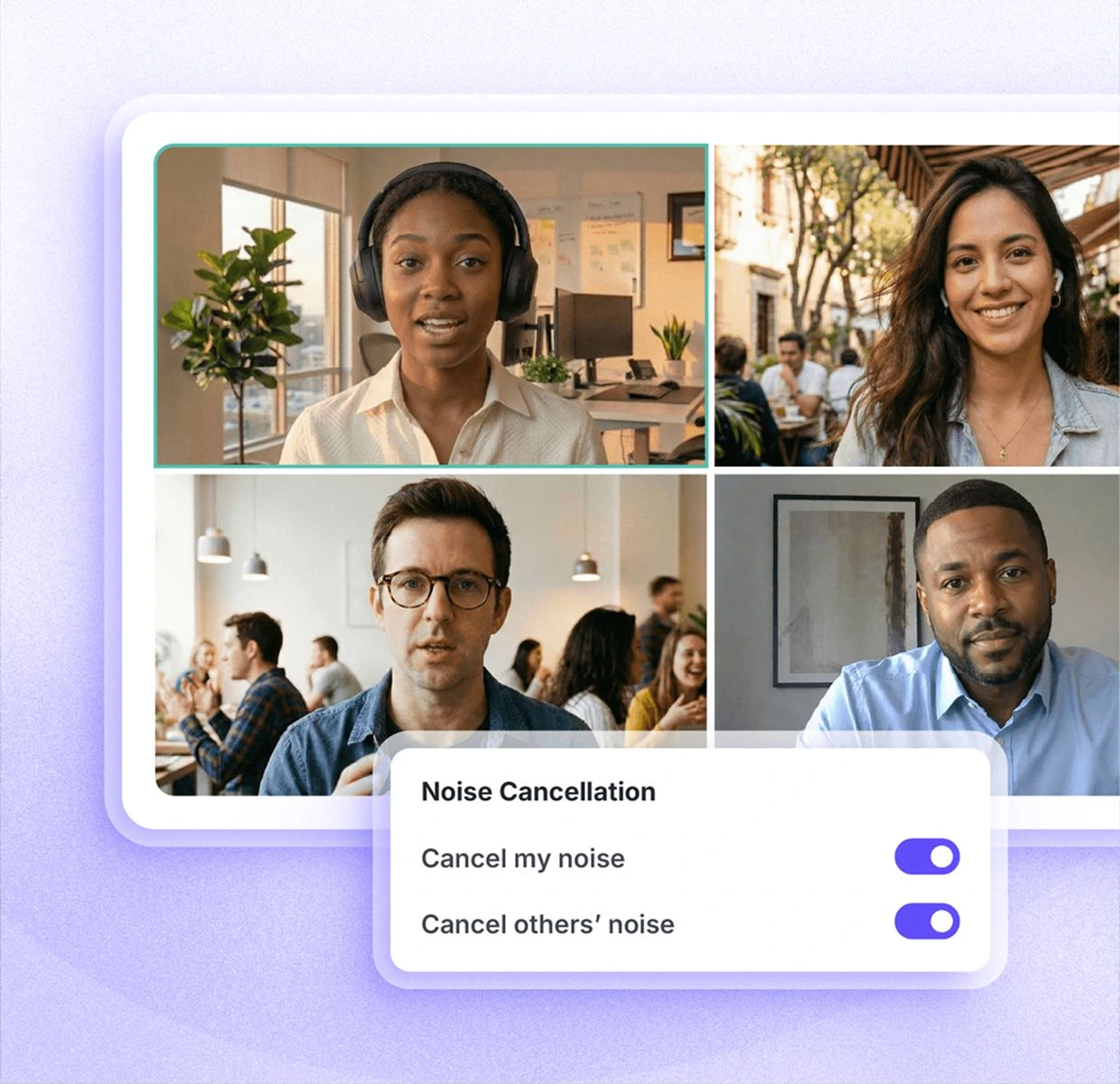
Em vez de estar embutido em um único aplicativo de comunicação, o Krisp cria um microfone e um alto-falante virtuais que podem ficar entre seus dispositivos de áudio físicos e plataformas como Zoom, Microsoft Teams e Google Meet. Assim ele pode processar a entrada do seu microfone e, dependendo da configuração, também o áudio recebido.
Seu conjunto de recursos atual vai muito além da supressão de ruído básica.
O Krisp inclui:
- Cancelamento de ruído ilimitado nos planos pagos
- Remoção de ruído de fundo e de eco com IA
- Transcrição e gravação de áudio
- Gravação de vídeo
- Resumos e itens de ação gerados por IA
- AI Chat
- Transcrições e resumos multilíngues em 16+ idiomas
- Conversão de sotaque
- Suporte a reuniões presenciais
- Pastas e tags para reuniões
- Vocabulário personalizado
- Integrações com ferramentas como Slack, Notion, Zapier, Teams, HubSpot, Pipedrive, Salesforce e ConnectWise
- Integrações via API e MCP
- Administração de equipe e controles de segurança
Hoje o Krisp oferece um teste gratuito de sete dias com acesso a transcrição ilimitada, cancelamento de ruído ilimitado, gravação de áudio e vídeo e anotações com IA.
Depois disso, o Core custa US$ 16 por usuário por mês e o Advanced custa US$ 30 por usuário por mês, ambos na cobrança mensal. O preço do Enterprise é personalizado.
Para quem trabalha em casa com barulho de ventilador, cachorros latindo, obras ou outros sons ambientes por perto, o Krisp pode ser muito útil. A capacidade de remover ruídos indesejados em tempo real ainda é o motivo pelo qual muita gente escolhe a ferramenta.
Por que você pode precisar de uma alternativa ao Krisp?
Há uma diferença entre dizer que o Krisp tem limitações e dizer que o Krisp é um produto ruim.
A segunda não é verdade.
O Krisp tem nota 4,7/5 no G2, e seu cancelamento de ruído resolve um problema bem real para trabalhadores remotos, equipes que atendem clientes e call centers. Se a clareza do áudio durante conversas ao vivo é a sua principal preocupação, trocar de ferramenta pode nem fazer sentido.
Ainda assim, há algumas situações em que os usuários podem querer comparar alternativas ao Krisp AI.
1. Você quer uma opção gratuita ou mais barata
O Krisp não tem mais o plano gratuito permanente com que muitos usuários antigos se cadastraram no começo. Hoje ele oferece um teste gratuito de sete dias antes dos planos pagos, que começam em US$ 16 por usuário por mês.
Essa mudança de preço frustrou parte dos usuários.
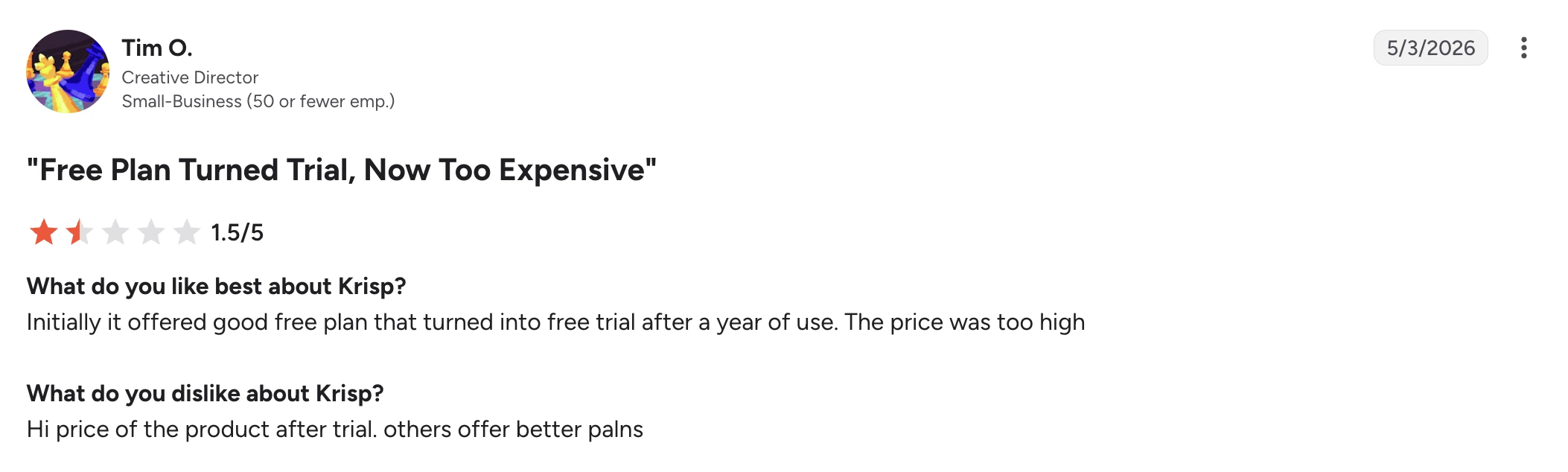
Em uma avaliação no G2 de maio de 2026, Tim O., diretor de criação em uma pequena empresa, deu nota 1,5/5 ao Krisp. Ele disse que gostou do plano gratuito no começo, mas que o plano acabou virando um teste e que achou alto demais o preço cobrado depois.
Isso não quer dizer que o Krisp seja caro perto de qualquer alternativa. Mas, se você só precisa de supressão de ruído básica, pagar por um pacote de reuniões com IA mais amplo pode ser desnecessário.
2. A confiabilidade importa mais do que a lista de recursos
Um assistente de reunião com IA só serve se a reunião realmente aparecer no seu histórico depois.
Alguns usuários relatam problemas com reuniões que somem ou transcrições que falham.
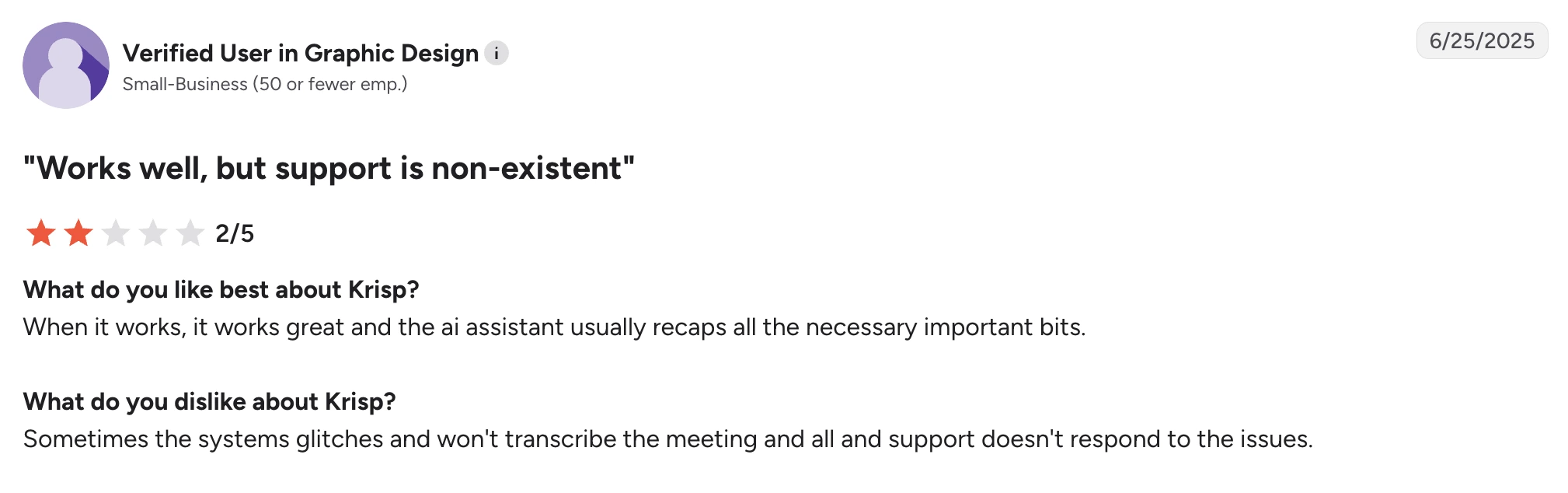
Um usuário verificado de uma pequena empresa de design gráfico escreveu em uma avaliação no G2 de junho de 2025 que o Krisp funciona bem quando funciona e que o assistente de IA em geral captura as partes importantes. A queixa era que o sistema às vezes deixava de transcrever uma reunião e que o suporte demorava a ajudar.
Outro usuário verificado de uma pequena empresa de software relatou um problema parecido em uma avaliação no G2 de abril de 2025. O avaliador gostou da transcrição em si, mas disse que algumas reuniões que pareciam ter sido gravadas sumiram depois do histórico de reuniões.
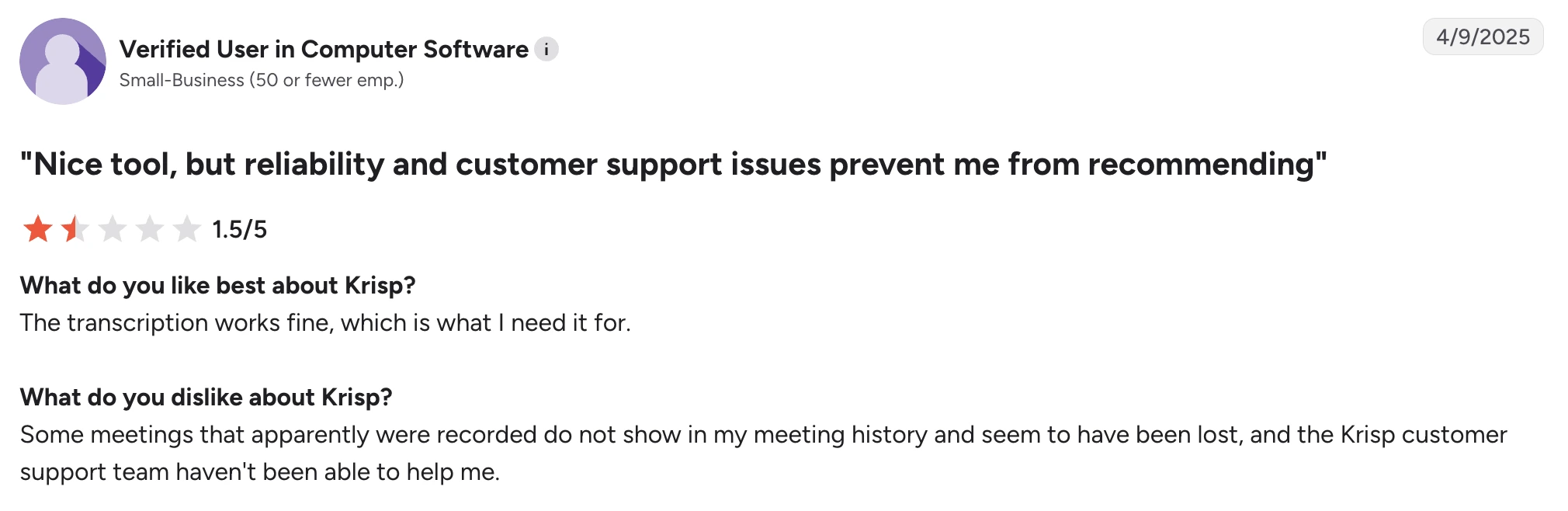
São relatos individuais, e não uma prova de que o problema atinge todo mundo, mas pesam se ter um registro confiável de cada reunião for inegociável para você.
3. Você precisa de mais inteligência de reuniões
O Krisp hoje entrega bastante coisa além da remoção de ruído, incluindo anotações de reunião geradas por IA, resumos, itens de ação, AI Chat e integrações.
Ainda assim, algumas alternativas vão bem mais fundo na inteligência de reuniões.
Talvez você precise pesquisar em reuniões passadas, analisar equipes inteiras, acompanhar sinais de vendas, mandar insights direto para o seu CRM, criar fluxos de trabalho a partir do que foi dito nas reuniões ou fazer perguntas a uma base de conhecimento pesquisável com o histórico de todas elas. Nesses casos, uma plataforma feita para inteligência de reuniões atende melhor do que o Krisp.
Isso vale ainda mais se você raramente trabalha em ambientes barulhentos. Nesse caso, o cancelamento de ruído em tempo real talvez não seja o recurso que deve definir qual ferramenta de reuniões você assina.
4. Você precisa de cobertura de idiomas mais ampla
O Krisp lista hoje transcrições e resumos em 16+ idiomas.
Isso basta para muitas equipes, mas empresas que atuam em vários países podem precisar de bem mais do que isso.
O Fireflies oferece transcrição em 100+ idiomas. O MeetGeek também suporta 100+ idiomas e inclui detecção automática de idioma.
A cobertura de idiomas importa ainda mais quando se espera que uma única plataforma dê conta de ligações de vendas, entrevistas, reuniões com clientes e conversas internas em várias regiões.
5. O cancelamento de ruído se comporta de forma diferente em cada configuração
O cancelamento de ruído com IA sempre exige uma escolha: o software precisa decidir qual som pertence a quem fala e qual som deve ser removido.
Isso fica mais difícil quando a fala se sobrepõe a barulhos altos e repentinos.
Em uma avaliação no G2 de maio de 2026, V K. elogiou o Krisp por cancelar o barulho de uma obra próxima e descreveu a configuração inicial como fácil. A queixa foi bem específica: com fones de ouvido, o som às vezes cortava.
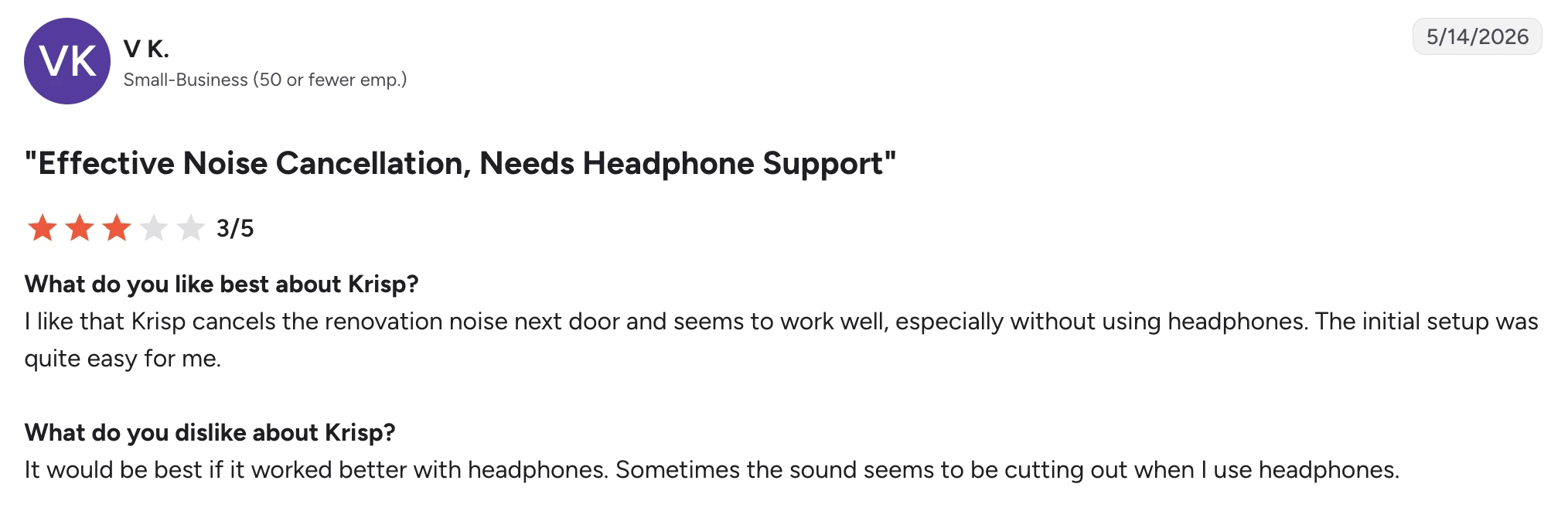
Mais uma vez, é um bom exemplo de por que a escolha não se resume a “Krisp bom” ou “Krisp ruim”. O mesmo avaliador considerou o cancelamento de ruído eficaz.
Seu microfone, seus fones de ouvido, o uso de CPU, as configurações de supressão de ruído, a acústica da sala e o tipo de ruído de fundo influenciam o resultado.
Muitos filtros de ruído identificam o barulho constante de um ventilador com mais facilidade do que barulhos repentinos que se sobrepõem à fala. Se a clareza da voz é especialmente importante, teste algumas ferramentas com o seu próprio headset e no seu ambiente de trabalho real, em vez de supor que o nível mais forte de redução de ruído vai dar automaticamente a melhor qualidade de áudio.
As 6 melhores alternativas ao Krisp
1. NVIDIA RTX Voice: melhor alternativa gratuita ao Krisp para supressão de ruído
O NVIDIA RTX Voice é uma das alternativas mais próximas do Krisp se o recurso que você realmente quer substituir é o cancelamento de ruído em tempo real.
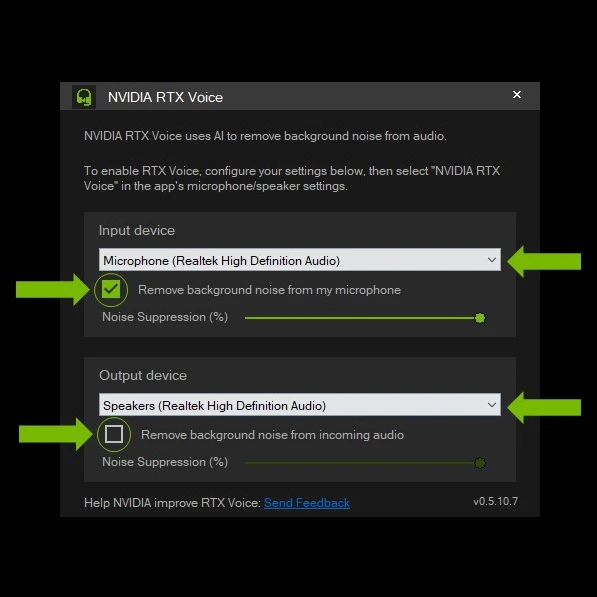
Ele não é um assistente de reunião com IA. Você não vai ter anotações de reunião, resumos, itens de ação, busca entre reuniões nem inteligência de conversas.
O que você ganha é supressão de ruído com IA tanto no seu microfone quanto no áudio recebido, sem pagar uma assinatura mensal.
Isso deixa o RTX Voice especialmente atraente para trabalhadores remotos, streamers, gamers e profissionais que já têm uma placa de vídeo NVIDIA e não precisam do restante dos recursos de gestão de reuniões do Krisp.
Como o NVIDIA RTX Voice se compara ao Krisp?
O NVIDIA RTX Voice é a alternativa mais próxima desta lista se você usa o Krisp principalmente para cancelamento de ruído, mas, em troca, ele substitui só essa parte do Krisp.
As duas ferramentas podem remover o ruído de fundo da entrada do microfone e do áudio recebido em tempo real, então dão conta de distrações como teclado, ventilador e outros ruídos do ambiente durante as chamadas. As duas também funcionam em vários aplicativos de comunicação, em vez de prender a supressão de ruído a uma única plataforma de videoconferência.
A maior diferença está no hardware e no escopo. O Krisp é um software independente que combina cancelamento de ruído com transcrição, gravação, anotações de reunião com IA, resumos e conversão de sotaque. O RTX Voice usa uma GPU NVIDIA compatível para processar o áudio e não oferece nenhum desses recursos de assistente de reunião.
É no custo que o RTX Voice leva vantagem. O software em si é gratuito, o que o torna uma forma bem mais barata de ter cancelamento de ruído se você já tem hardware NVIDIA compatível. Nas GPUs RTX mais novas, o NVIDIA Broadcast amplia o RTX Voice com remoção de ruído, remoção do eco da sala e recursos de vídeo como planos de fundo virtuais.
Escolha o NVIDIA RTX Voice em vez do Krisp se você já tem uma GPU NVIDIA compatível e só precisa de supressão de ruído em tempo real. Escolha o Krisp se quiser cancelamento de ruído e um assistente de reunião com IA no mesmo produto.
Prós do NVIDIA RTX Voice
- Software gratuito, sem assinatura recorrente
- Supressão de ruído com IA em tempo real
- Filtra o microfone e o áudio recebido
- Boa opção para reduzir o ruído de fundo durante reuniões ao vivo
- Funciona em várias plataformas de videoconferência
- Integra-se ao NVIDIA Broadcast
- Ganha remoção do eco da sala e efeitos de vídeo por meio dessa integração
- Útil para chamadas, streaming, jogos e criação de conteúdo
Contras do NVIDIA RTX Voice
- Exige uma placa de vídeo NVIDIA GTX ou RTX compatível
- É voltado para Windows e não é uma opção prática para a maioria dos usuários de Mac
- Não gera anotações de reunião com IA, transcrições nem resumos de reunião
- Como o processamento é feito na GPU, a experiência depende muito do seu hardware
- Não serve se o seu principal motivo para substituir o Krisp é inteligência de reuniões, e não supressão de ruído
Preços do NVIDIA RTX Voice
O NVIDIA RTX Voice é gratuito para baixar e usar, mas exige uma placa de vídeo NVIDIA compatível.
2. Fireflies.ai: melhor para inteligência de reuniões pesquisável
O Fireflies é uma alternativa forte ao Krisp quando o cancelamento de ruído já não é o problema principal que você quer resolver.
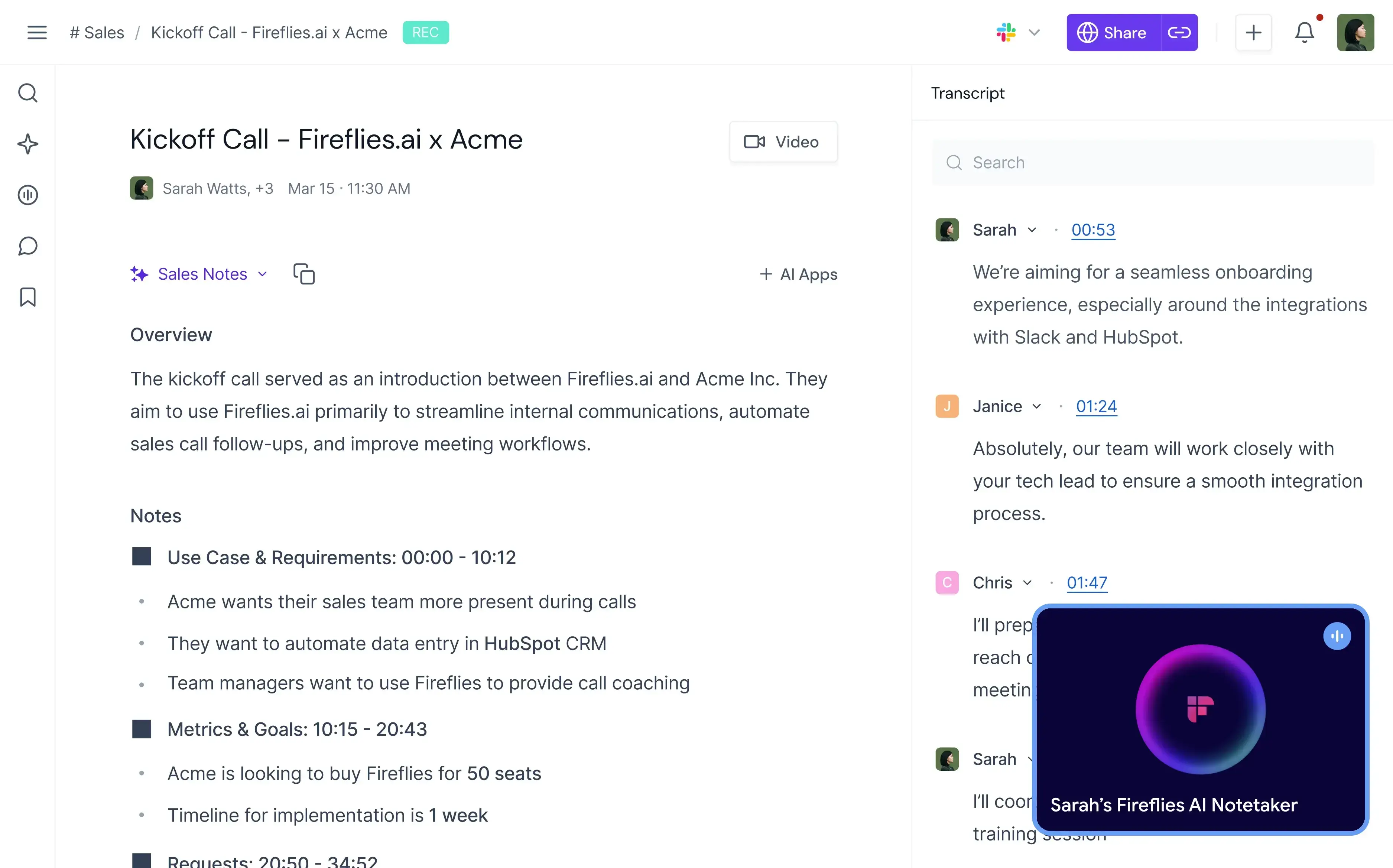
O Krisp melhora o que as pessoas ouvem durante a reunião. O Fireflies se volta sobretudo para o que a sua organização pode fazer com a conversa depois.
Ele grava e transcreve reuniões, produz resumos ilimitados com IA, permite pesquisar conversas, identifica temas e tarefas e oferece inteligência de conversas e análises de equipe nos planos superiores.
Por isso ele é particularmente útil para vendas, recrutamento, sucesso do cliente e outras equipes que precisam transformar reuniões ao vivo em informação estruturada.
Como o Fireflies se compara ao Krisp?
Fireflies e Krisp se sobrepõem em transcrição, gravação, resumos com IA, busca em reuniões e integrações, mas as prioridades de cada um são bem diferentes.
O Krisp sai claramente na frente quando o que importa é a qualidade do áudio durante a chamada ao vivo. Seu cancelamento de ruído em tempo real pode remover o ruído de fundo enquanto você fala e filtrar o áudio recebido, algo que o Fireflies não foi feito para substituir. O Krisp também oferece conversão de sotaque, outro recurso voltado a melhorar a própria conversa ao vivo.
O Fireflies vai mais longe quando você começa a analisar o que foi dito. Ele suporta transcrição em 100+ idiomas, contra 16+ do Krisp, e o plano Business acrescenta inteligência de conversas e análises de equipe. As equipes podem acompanhar temas, tarefas, perguntas, sentimento e tempo de fala de cada participante, em vez de apenas guardar a transcrição e o resumo de cada reunião.
Há também uma diferença em como os dois produtos se encaixam nos fluxos de trabalho do negócio. Os dois oferecem integrações e acesso via API, mas o Fireflies é bem mais voltado a transformar conversas em dados pesquisáveis para vendas e outras equipes que atendem clientes.
Os preços de entrada são parecidos: o Krisp Core custa US$ 16/usuário/mês e o Fireflies Pro custa US$ 18/usuário/mês na cobrança mensal. A tabela de preços do Fireflies ainda traz um plano gratuito permanente, enquanto o Krisp hoje oferece um teste gratuito de sete dias.
O Fireflies faz mais sentido que o Krisp quando inteligência de conversas, suporte a mais idiomas e dados de reunião pesquisáveis pesam mais do que o cancelamento de ruído. O Krisp continua sendo a melhor escolha se melhorar o som das chamadas ao vivo é um dos seus requisitos principais.
Prós do Fireflies.ai
- Transcrição e resumos com IA ilimitados
- Suporte a 100+ idiomas
- Detecção automática de idioma
- Transcrição em tempo real
- Histórico de reuniões pesquisável
- Inteligência de conversas no Business
- Análises de sentimento, temas, perguntas e participantes
- Aplicativos para desktop e celular
- Opções de gravação por bot ou por extensão do Chrome
- Upload de arquivos de áudio e vídeo
- Acesso via API
- Muitas integrações nos planos pagos
Contras do Fireflies.ai
- Não substitui o cancelamento de ruído com IA em tempo real do Krisp
- Algumas das análises mais úteis exigem o plano Business
- O armazenamento é limitado nos planos Free e Pro
- Os recursos de IA usam um sistema de créditos além do plano contratado
- Equipes que buscam principalmente melhor qualidade de áudio podem acabar pagando por recursos de que não precisam
Preços do Fireflies.ai
No plano mensal:
- Free: US$ 0
- Pro: US$ 18/usuário/mês
- Business: US$ 29/usuário/mês
- Enterprise: US$ 39/usuário/mês, apenas na cobrança anual
Quer saber mais sobre o Fireflies.ai? Leia nossa comparação entre MeetGeek e Fireflies.ai!
3. MeetGeek: melhor para automação de reuniões e inteligência de equipe
O MeetGeek é uma boa alternativa ao Krisp quando você gosta do caminho que o Krisp tomou como assistente de reunião, mas quer uma plataforma pensada de ponta a ponta para a captura, a análise, a organização e a automação de reuniões.
%20(2).webp)
Ele não é um substituto direto do cancelamento de ruído do Krisp.
O que o MeetGeek substitui é a parte de anotações e gestão de reuniões das ferramentas que você usa hoje. Ele grava e transcreve reuniões ao vivo automaticamente, gera resumos e itens de ação com IA, organiza reuniões passadas em uma base de conhecimento pesquisável, analisa conversas e consegue disparar fluxos de trabalho nas ferramentas que a sua equipe já usa.
Como o MeetGeek se compara ao Krisp?
MeetGeek e Krisp cobrem gravação, transcrição, anotações de reunião geradas por IA, resumos, AI Chat, reuniões presenciais e integrações. A principal diferença é que o Krisp coloca a melhoria do áudio ao vivo ao lado do assistente de reunião, enquanto o MeetGeek vai muito mais longe em inteligência e automação de reuniões.
O Krisp é a melhor escolha se reduzir o ruído de fundo faz parte do problema que o software precisa resolver. O MeetGeek não oferece cancelamento de ruído em tempo real nem conversão de sotaque no estilo do Krisp.
O MeetGeek leva vantagem quando a reunião precisa virar dados úteis para o negócio. Ele transcreve em 100+ idiomas, contra 16+ do Krisp, grava com e sem bot e traz análises de reunião individuais e de equipe, análise de sentimento e engajamento, resumos personalizados, sinais de vendas e AI Chat sobre reuniões passadas.
A diferença de integrações também é relevante. O Krisp oferece integrações com ferramentas importantes como HubSpot, Slack, Notion, Zapier, Teams, Salesforce e Pipedrive, além de integrações via API e MCP.
O MeetGeek conecta os dados das reuniões a 10.000+ integrações e suporta Zapier, Make, n8n, API e MCP. Seus Agentes de Voz com IA e fluxos de trabalho podem cuidar das reuniões e depois usar o conteúdo delas para disparar a etapa seguinte, como atualizar sistemas ou repassar informações relevantes para outra equipe.
O MeetGeek também tem um plano gratuito permanente, enquanto o Krisp oferece um teste de sete dias. Os primeiros planos pagos têm preços parecidos na cobrança mensal: o MeetGeek Pro custa US$ 15,99/usuário/mês e o Krisp Core custa US$ 16/usuário/mês.
O MeetGeek é a opção mais forte se você quer análises de reunião mais profundas, automação, cobertura de idiomas mais ampla e mais formas de ligar os resultados das reuniões ao resto do seu fluxo de trabalho. Fique com o Krisp se você também precisa de cancelamento de ruído em tempo real ou conversão de sotaque dentro do mesmo aplicativo.
Se quiser uma visão mais completa, veja nosso artigo de comparação entre MeetGeek e Krisp!
Prós do MeetGeek
- Transcrição em 100+ idiomas
- Detecção automática de idioma
- Resumos com IA ilimitados
- Opções de gravação sem bot
- Suporte no celular para reuniões presenciais
- AI Chat e busca entre reuniões
- Análises detalhadas de reuniões
- Inteligência de conversas
- Modelos de reunião personalizados
- Sales Mode para conversas com clientes
- Automação de fluxos de trabalho com IA
- 10.000+ integrações
- Acesso via API e MCP
- Plano gratuito disponível
Contras do MeetGeek
- Não oferece cancelamento de ruído em tempo real no estilo do Krisp
- O plano Free é limitado a três horas de transcrição por mês
- A gravação de vídeo em HD exige o Business
- Alguns recursos de colaboração em equipe e de análise exigem o Business
- Recursos de nível Enterprise, como SSO e SCIM, não estão disponíveis nos planos inferiores
Preços do MeetGeek
No plano mensal:
- Basic: gratuito
- Pro: US$ 15,99/usuário/mês
- Business: US$ 27/usuário/mês
- Enterprise: preço personalizado
4. CrystalSound: melhor alternativa ao Krisp para cancelamento de ruído dedicado
O CrystalSound é a alternativa mais direta ao Krisp nesta lista para quem ainda tem a qualidade do áudio como preocupação principal.
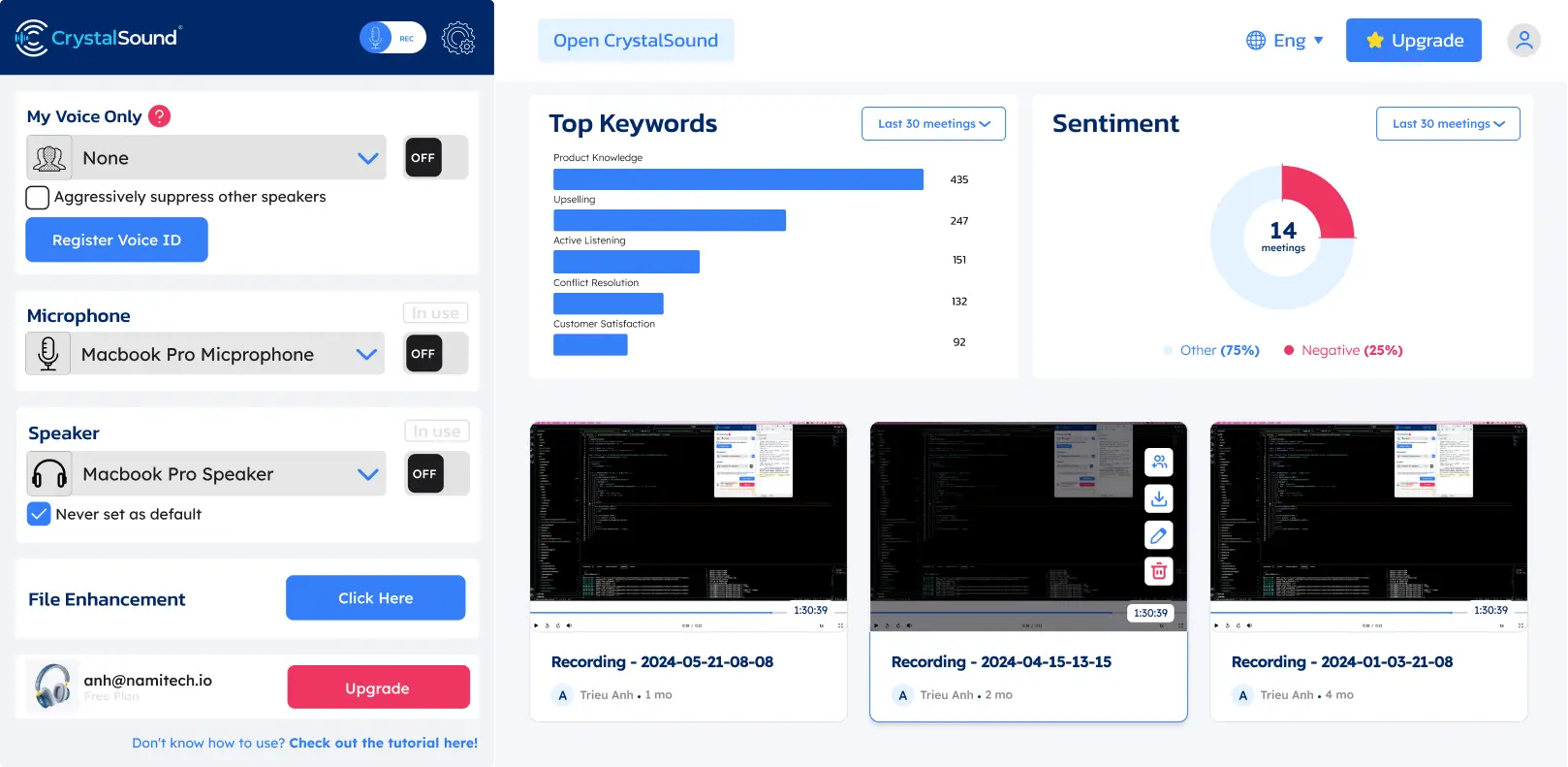
Assim como o Krisp, ele foi criado em torno do cancelamento de ruído com IA em tempo real, em vez de tratar a supressão de ruído como um recurso pequeno dentro de uma plataforma de videoconferência.
O CrystalSound atua nos dois lados da chamada, reduzindo o ruído do seu microfone e o de quem está falando com você, o que ajuda quando você não tem como controlar o ambiente do outro lado. O que o separa do Krisp é a profundidade dos seus controles de áudio, e não o fato de filtrar nas duas direções.
Como o CrystalSound se compara ao Krisp?
O CrystalSound concorre com o Krisp na redução de ruído de forma bem mais direta do que o Fireflies, o MeetGeek ou o Claap.
Os dois produtos oferecem cancelamento de ruído ilimitado nos planos pagos e podem processar o ruído dos dois lados da conversa. O CrystalSound traz especificamente cancelamento de ruído bidirecional, processamento My Voice Only, supressão de eco acústico, remoção do eco da sala, remoção de ruído residual e nível ajustável de redução de ruído. O Krisp também foca em remover o ruído de fundo das conversas ao vivo e oferece cancelamento de eco.
A diferença está em até onde cada produto vai além do processamento de áudio.
O Krisp evoluiu para um assistente de reunião com IA bem mais amplo. Seus planos pagos incluem transcrição, gravação de áudio e vídeo, resumos e itens de ação com IA, AI Chat, organização de reuniões, integrações e suporte a reuniões presenciais. O CrystalSound continua bastante focado em melhorar a clareza da voz e o áudio gravado. Suas atas inteligentes de reunião, títulos automáticos, análise de palavras-chave e análise de sentimento estão listados hoje como indisponíveis, e a gravação de chamadas na nuvem ainda está em preview.
O CrystalSound sai mais barato se esses recursos extras de reunião não forem necessários. O Premium custa US$ 12/usuário/mês, contra US$ 16/usuário/mês do Krisp Core na cobrança mensal.
O CrystalSound custa menos por mês e serve para quem quer principalmente redução de ruído e melhoria de áudio dedicadas. O Krisp vale a diferença se você quiser cancelamento de ruído combinado com um assistente de reunião com IA mais desenvolvido.
Prós do CrystalSound
- Cancelamento de ruído ilimitado
- Cancelamento de ruído bidirecional
- Modo My Voice Only
- Nível ajustável de redução de ruído
- Remoção do eco da sala
- Supressão de eco acústico
- Voz em estéreo de alta definição
- Melhoria de arquivos de áudio
- Aumento do volume do microfone
- Modo de processamento com baixo consumo de energia
- Gestão de licenças da equipe
- Boa opção para ambientes barulhentos
Contras do CrystalSound
- Menos maduro como assistente de reunião com IA do que o Krisp, o Fireflies, o MeetGeek ou o Claap
- As atas inteligentes de reunião estão indisponíveis no momento
- As análises de palavras-chave e de sentimento estão indisponíveis no momento
- A gravação de chamadas na nuvem ainda aparece como preview
- Você ainda pode precisar de outra ferramenta para anotações de reunião com IA, histórico de reuniões pesquisável ou automação de fluxos de trabalho
Preços do CrystalSound
No plano mensal:
- Premium: US$ 12/usuário/mês
- Elite: US$ 29/usuário/mês, em breve
- Enterprise: preço personalizado
Há um teste gratuito de 7 dias para o plano Premium.
5. Claap: melhor para colaboração em reuniões com foco em vídeo
O Claap é uma boa alternativa ao Krisp para equipes que se importam menos com a remoção de ruído em tempo real e mais com transformar reuniões e vídeos gravados em trabalho colaborativo.
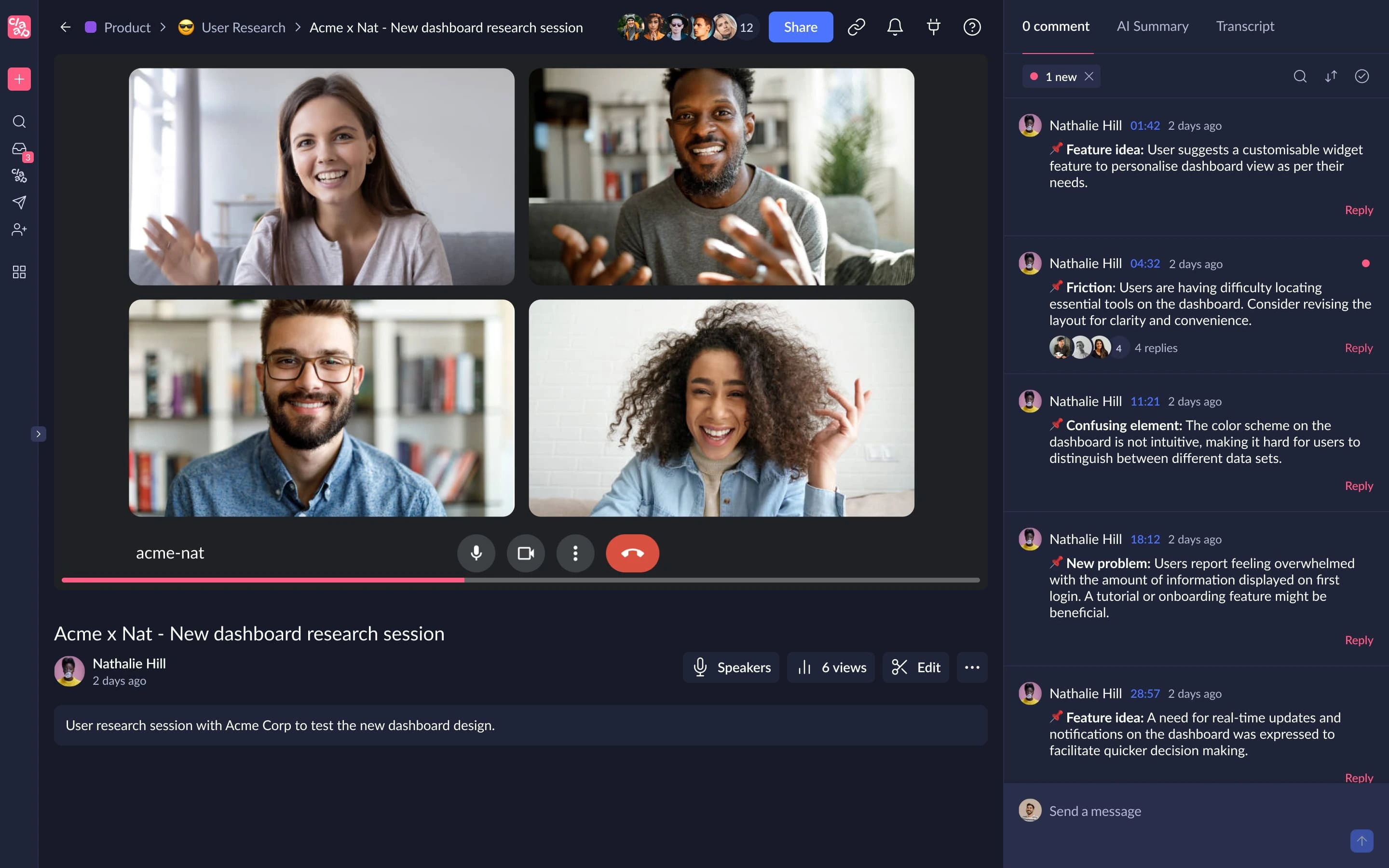
Ele combina gravação de reuniões com transcrição, resumos com IA, edição de vídeo, comentários, espaços de trabalho compartilhados, coaching com IA e fluxos de CRM.
Em comparação com o Krisp, a diferença é fácil de resumir: o Krisp parte do processamento de áudio, enquanto o Claap parte das conversas gravadas e da colaboração em vídeo.
Como o Claap se compara ao Krisp?
Claap e Krisp gravam reuniões, transcrevem conversas, geram resumos com IA e oferecem ferramentas para organizar e compartilhar o que aconteceu. A diferença está entre melhorar o áudio ao vivo, de um lado, e a colaboração em vídeo com inteligência de reuniões, do outro.
O Krisp melhora a reunião enquanto ela acontece. O cancelamento de ruído, a remoção de eco e a conversão de sotaque do Krisp foram feitos para melhorar a clareza da voz durante as chamadas. O Claap não tem uma camada equivalente de cancelamento de ruído em tempo real.
Em compensação, o Claap explora muito melhor a reunião gravada. Ele une a captura da reunião à gravação de tela e câmera, edição de vídeo com IA, junção de vídeos, anotações, comentários, respostas em vídeo, notas colaborativas e espaços de trabalho compartilhados. Por isso ele atende melhor as equipes que usam vídeo gravado para comunicação assíncrona, além das reuniões ao vivo.
A cobertura de idiomas é outra diferença. O Claap oferece transcrições em 99 idiomas, contra 16+ do Krisp. Seus planos superiores ainda acrescentam coaching com IA, enriquecimento automático do CRM, insights de negociações, e-mails gerados por IA e a possibilidade de fazer perguntas sobre várias reuniões.
O ponto negativo é o preço. O Krisp Core custa US$ 16/usuário/mês, enquanto o Claap Pro custa € 30/licença/mês na cobrança mensal. Por isso o Claap só compensa se os recursos extras de colaboração e vídeo forem mesmo usados.
O Claap se encaixa melhor que o Krisp quando as reuniões gravadas fazem parte de um fluxo mais amplo de colaboração em vídeo, vendas ou comunicação assíncrona. O Krisp segue como a melhor escolha se você se importa mais em melhorar o áudio das chamadas ao vivo e quer as anotações de reunião como recurso adicional, e não como centro da plataforma.
Prós do Claap
- Transcrição em 99 idiomas
- Sincronização com calendário e chamadas de conferência
- Resumos com IA e modelos personalizados
- Gravação de tela e câmera
- Edição de vídeo com IA
- Anotações e comentários colaborativos em vídeo
- IA sobre várias reuniões no Business
- Enriquecimento de CRM
- E-mails gerados por IA
- Coaching com IA
- Insights de negociações
- Acesso via API e MCP
- Suporte a Zapier, Make e n8n
- Plano gratuito disponível
Contras do Claap
- Não substitui o cancelamento de ruído em tempo real do Krisp
- O plano gratuito é limitado a 10 vídeos e 300 minutos de gravação no total
- O Pro inclui apenas 1.000 minutos de transcrição e gravação por mês
- O Business custa muito mais que o Krisp Core
- Seu conjunto de recursos pode ser exagerado se você só quer um áudio mais limpo nas chamadas
Preços do Claap
No plano mensal:
- Basic: gratuito
- Pro: € 30/licença/mês
- Business: € 60/licença/mês
- Enterprise: preço personalizado
6. IRIS Clarity: melhor para equipes que precisam de cancelamento de ruído nos dois lados da chamada
O IRIS Clarity é uma das alternativas mais próximas do Krisp se o cancelamento de ruído em si é a sua prioridade, principalmente quando o ruído de fundo vem dos dois lados da conversa.
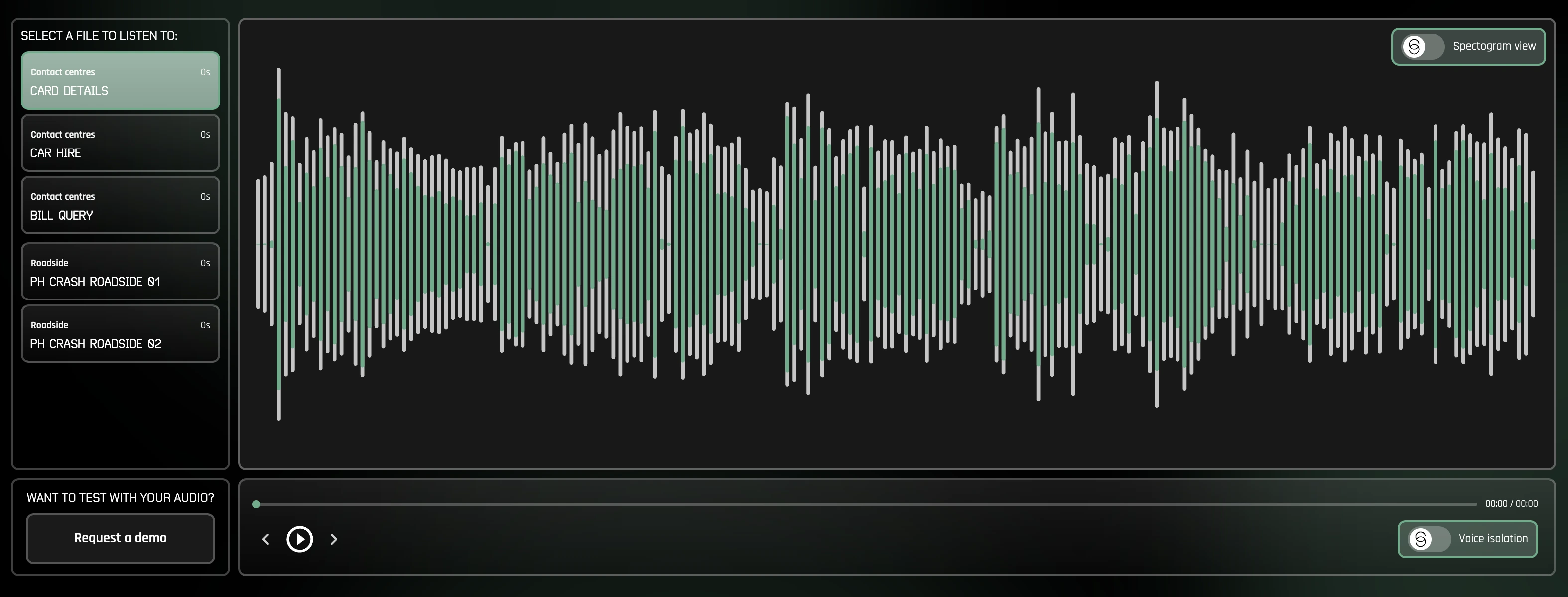
Seu principal recurso é o cancelamento de ruído bidirecional e ilimitado. Em vez de remover só o ruído de fundo ao redor do seu microfone, o IRIS Clarity isola as vozes tanto no áudio que sai quanto no que chega. Isso pesa muito para as equipes que atendem clientes e call centers, em que o funcionário pode estar em um ambiente controlado, mas o cliente liga de algum lugar barulhento.
Ao contrário do Krisp, o IRIS Clarity mantém o foco no isolamento de voz e não tenta também ser um assistente de reunião com IA. Ele não concorre com os recursos de transcrição, anotações de reunião com IA, resumos, gravação ou conversão de sotaque do Krisp. O que ele entrega é um produto de redução de ruído mais especializado que o Krisp, com gestão de equipe, análises e recursos de implantação corporativa.
Como o IRIS Clarity se compara ao Krisp?
IRIS Clarity e Krisp oferecem cancelamento de ruído bidirecional em tempo real, então qualquer um dos dois pode ajudar a tirar distrações do seu microfone e do áudio recebido. Os dois também funcionam como aplicativos independentes, em vez de limitar a supressão de ruído a uma única plataforma de comunicação.
A principal diferença está no escopo.
O Krisp combina cancelamento de ruído com um conjunto crescente de recursos de reunião, incluindo transcrição, resumos com IA, itens de ação, gravação de áudio e vídeo, AI Chat, conversão de sotaque e integrações. O IRIS Clarity tem um foco bem mais estreito: deixar as vozes mais fáceis de ouvir.
Esse foco mais estreito vem com recursos pensados para organizações que gerenciam áudio em equipes maiores. O IRIS Clarity oferece análises por sessão e por usuário/licença, exportação de dados em CSV, perfis de aplicativo gerenciados pela TI, detecção do toque de chamada, gravação de chamadas para diagnóstico, SSO e provisionamento automático de usuários. Seu plano Enterprise ainda oferece licenciamento por uso simultâneo e onboarding assistido.
O IRIS Clarity funciona tanto no Windows quanto no Mac, então, diferentemente do NVIDIA RTX Voice, não exige uma GPU NVIDIA compatível.
Vá de IRIS Clarity se você quer uma ferramenta especializada em isolamento de voz, principalmente para equipes que atendem clientes ou call centers que precisam remover o ruído dos dois lados da conversa. O Krisp faz mais sentido se você quer cancelamento de ruído junto com transcrição, anotações de reunião com IA, gravação e outros recursos de assistente de reunião.
Prós do IRIS Clarity
- Cancelamento de ruído bidirecional ilimitado
- Remove o ruído do áudio que sai e do que chega
- Modelos mais recentes de isolamento de voz inclusos
- Aplicativos para Windows e Mac
- Recursos de gestão de equipe
- Análises por sessão e por usuário/licença
- Exportação das análises em CSV
- Perfis de aplicativo gerenciados pela TI
- SSO e provisionamento automático de usuários
- Não exige hardware NVIDIA específico
Contras do IRIS Clarity
- Não gera anotações de reunião nem resumos com IA
- Não oferece transcrição nem conversão de sotaque como as do Krisp
- Mais especializado do que ferramentas que combinam supressão de ruído com recursos de produtividade em reuniões
- O Enterprise exige no mínimo 100 usuários e compromisso anual
Preços do IRIS Clarity
No plano mensal:
- Professional: £ 9,50/usuário/mês
- Enterprise: preço personalizado, exige no mínimo 100 usuários e compromisso anual
Há um teste gratuito de 14 dias para o plano Professional.
Como as melhores alternativas ao Krisp se comparam?
Nenhuma alternativa desta lista substitui todos os recursos do Krisp.
| Ferramenta | Cancelamento de ruído em tempo real | Anotações de reunião com IA | Suporte a idiomas | Melhor uso |
|---|---|---|---|---|
| Krisp AI | Sim | Sim | 16+ | Cancelamento de ruído mais assistência nas reuniões |
| NVIDIA RTX Voice | Sim | Não | N/D | Supressão de ruído em tempo real com apoio do hardware |
| Fireflies.ai | Não | Sim | 100+ | Inteligência de reuniões pesquisável |
| MeetGeek | Não | Sim | 100+ | Automação da gestão de reuniões, análises e fluxos de trabalho |
| CrystalSound | Sim | Limitado | Não divulgado | Redução de ruído bidirecional dedicada |
| Claap | Não | Sim | 99 | Colaboração em reuniões com foco em vídeo |
| IRIS Clarity | Sim | Não | N/D | Isolamento de voz bidirecional para equipes e call centers |
Se você procura o que mais se aproxima do que o Krisp faz com o áudio, comece por NVIDIA RTX Voice, IRIS Clarity ou CrystalSound.
Se o assistente de reunião com IA ficou mais importante para você do que a supressão de ruído, compare Fireflies, MeetGeek e Claap.
A melhor alternativa ao Krisp depende do que você quer substituir
O Krisp é difícil de substituir por um único produto porque hoje ele cobre várias funções.
Para cancelamento de ruído com IA em tempo real, o NVIDIA RTX Voice é uma ótima opção gratuita para quem usa Windows com hardware compatível, enquanto o CrystalSound oferece um supressor de ruído dedicado com filtragem bidirecional, remoção do eco da sala e controles de áudio avançados.
Para inteligência de reuniões, a comparação muda.
O Fireflies é forte em conversas pesquisáveis e fluxos de receita. O Claap une a captura de reuniões à colaboração assíncrona em vídeo. O MeetGeek se concentra em transformar reuniões ao vivo em transcrições, resumos com IA, análises, conhecimento pesquisável e fluxos de trabalho automatizados em 10.000+ integrações.
A escolha certa, portanto, depende menos de achar a ferramenta com a lista de recursos mais longa e mais de identificar onde o Krisp deixou de servir ao seu fluxo de trabalho.
Se você está procurando alternativas ao Krisp AI por causa do que acontece depois da reunião, experimente o MeetGeek gratuitamente para gravar, transcrever, resumir, analisar e conectar suas reuniões automaticamente ao resto do seu trabalho.
Principais conclusões
- O Krisp continua sendo uma boa escolha para cancelamento de ruído em tempo real, principalmente se você também quer transcrição, anotações com IA, gravação e conversão de sotaque na mesma ferramenta.
- O NVIDIA RTX Voice é a melhor opção se você só precisa de supressão de ruído e já tem uma GPU NVIDIA compatível, já que o software é gratuito.
- O Fireflies.ai é mais indicado para equipes que priorizam inteligência de conversas, transcrições pesquisáveis e fluxos de reunião conectados ao CRM.
- O MeetGeek é uma alternativa mais forte que o Krisp para equipes que querem transformar reuniões em trabalho concreto por meio de resumos com IA, análises, busca entre reuniões, automação e 10.000+ integrações.
- O CrystalSound é a alternativa mais próxima para melhoria de áudio dedicada, com cancelamento de ruído bidirecional, remoção de eco e redução de ruído ajustável.
- O Claap faz mais sentido quando as gravações de reunião fazem parte de um fluxo mais amplo de colaboração em vídeo, com edição, comentários, coaching com IA e recursos de CRM.
- O IRIS Clarity é uma opção especializada para equipes que atendem clientes e call centers que precisam de cancelamento de ruído bidirecional ilimitado, gestão de equipe e análises focadas em áudio.
- A alternativa certa depende do que você quer substituir: a melhoria do áudio ao vivo ou a inteligência e a automação pós-reunião.
Perguntas frequentes
1. Qual é a melhor alternativa gratuita ao Krisp?
O NVIDIA RTX Voice é uma das melhores alternativas gratuitas ao Krisp para supressão de ruído em tempo real, se o seu computador tiver uma placa de vídeo NVIDIA compatível. Para anotações de reunião com IA, e não cancelamento de ruído, Fireflies e MeetGeek oferecem planos gratuitos.
2. Existe alternativa ao Krisp para remover o ruído de fundo?
Sim. NVIDIA RTX Voice e CrystalSound oferecem cancelamento de ruído com IA em tempo real. Você também pode usar a supressão de ruído nativa do Microsoft Teams, do Zoom e de outras plataformas de videoconferência, se não precisar de um filtro de ruído que valha para todo o sistema.
3. O Krisp AI é melhor que o NVIDIA Broadcast?
Nenhum dos dois é melhor em termos absolutos: eles resolvem problemas de áudio parecidos, mas com requisitos diferentes. O Krisp funciona como software independente de redução de ruído, sem exigir uma GPU NVIDIA, enquanto o NVIDIA Broadcast usa hardware NVIDIA compatível e combina remoção de ruído com recursos de vídeo, como planos de fundo virtuais. O NVIDIA Broadcast pode valer mais a pena se você já tem hardware compatível.
4. Qual alternativa ao Krisp é melhor para anotações de reunião com IA?
MeetGeek, Fireflies e Claap são opções mais fortes quando as anotações de reunião com IA importam mais do que o cancelamento de ruído. O MeetGeek é especialmente indicado para equipes que também precisam de análises de reunião, IA sobre várias reuniões, automação de fluxos de trabalho e integrações, enquanto o Fireflies se destaca em inteligência de conversas e o Claap une anotações à colaboração em vídeo.
5. Posso usar uma alternativa ao Krisp no Google Meet e no Microsoft Teams?
Sim. O NVIDIA RTX Voice pode funcionar como microfone virtual nos aplicativos de comunicação compatíveis, incluindo o Microsoft Teams. Fireflies e MeetGeek gravam e transcrevem reuniões no Google Meet e no Microsoft Teams, enquanto o CrystalSound foi feito para oferecer cancelamento de ruído em várias ferramentas de comunicação, sem se limitar a uma única plataforma de conferência.






.avif)