


Krisp sigue siendo una de las herramientas más sólidas de cancelación de ruido con IA en tiempo real. Reduce el ruido de fondo de tu micrófono y del audio entrante, funciona con las herramientas de comunicación más usadas y hoy combina la supresión de ruido con transcripción, grabación, notas de reunión con IA, conversión de acento y resúmenes de reuniones.
Como Krisp hoy cumple varias funciones a la vez, ninguna alternativa por sí sola lo reemplaza por completo.
Si tu prioridad es eliminar el ruido de fondo durante las reuniones en vivo, NVIDIA RTX Voice o CrystalSound pueden ajustarse mejor a lo que necesitas. Si usas Krisp principalmente como asistente de reuniones con IA, Fireflies.ai, MeetGeek y Claap ofrecen bastante más en notas de reunión, inteligencia conversacional, colaboración y automatización del flujo de trabajo.
Esta guía compara seis de las mejores alternativas a Krisp según lo que reemplazan en realidad, sus funciones clave, sus limitaciones y sus precios actuales.
TL;DR: ¿Cuáles son las mejores alternativas a Krisp?
| Alternativa a Krisp | Ideal para | Precio inicial |
|---|---|---|
| NVIDIA RTX Voice | Supresión de ruido en tiempo real y gratuita para quienes tienen una GPU NVIDIA compatible | Gratis |
| Fireflies.ai | Inteligencia de reuniones, búsqueda y flujos de trabajo conectados al CRM | Gratis |
| MeetGeek | Notas de reunión con IA, automatización, analíticas y más de 10,000 integraciones | Gratis |
| CrystalSound | Cancelación de ruido dedicada y mejora del audio | US$ 12/usuario/mes |
| Claap | Colaboración en reuniones centrada en video y flujos de trabajo de ingresos | Gratis |
| IRIS Clarity | Cancelación de ruido bidireccional para equipos de atención al cliente y call centers | £9.50/usuario/mes |
Lo importante es decidir qué quieres reemplazar de Krisp.
¿Qué es Krisp AI?
Krisp AI empezó con la cancelación de ruido en tiempo real y sigue siendo especialmente eficaz para reducir los sonidos que distraen durante videollamadas y llamadas telefónicas.
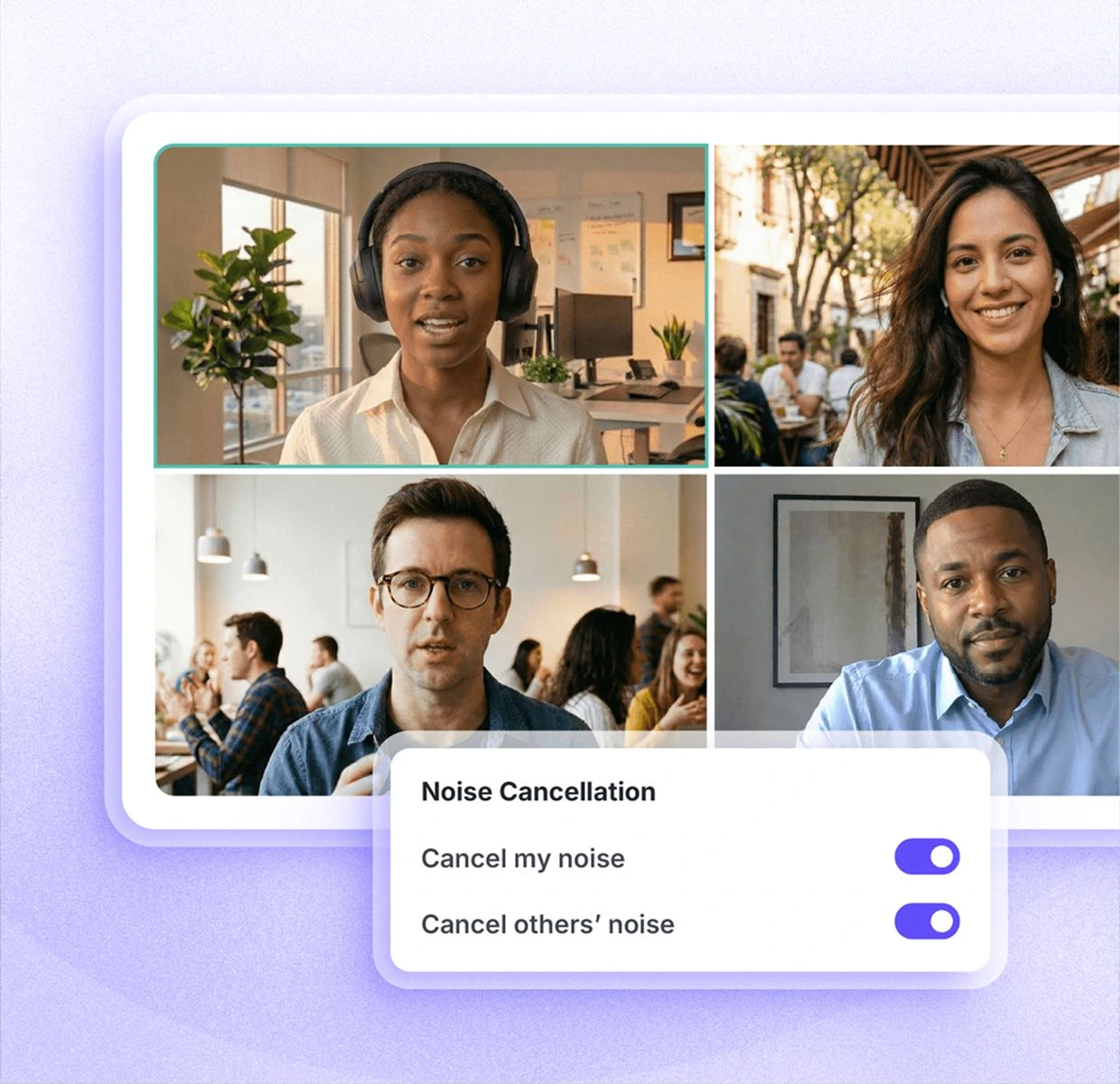
En lugar de integrarse en una sola aplicación de comunicación, Krisp crea un micrófono virtual y una salida de audio virtual que se colocan entre tus dispositivos de audio físicos y plataformas como Zoom, Microsoft Teams y Google Meet. Así procesa la entrada de tu micrófono y, según la configuración, también el audio entrante.
Su conjunto actual de funciones va mucho más allá de la supresión de ruido básica.
Krisp incluye:
- Cancelación de ruido ilimitada en los planes de pago
- Eliminación de ruido de fondo y de eco con IA
- Transcripción y grabación de audio
- Grabación de video
- Resúmenes y tareas pendientes generados con IA
- AI Chat
- Transcripciones y resúmenes multilingües en más de 16 idiomas
- Conversión de acento
- Compatibilidad con reuniones presenciales
- Carpetas y etiquetas para reuniones
- Vocabulario personalizado
- Integraciones con herramientas como Slack, Notion, Zapier, Teams, HubSpot, Pipedrive, Salesforce y ConnectWise
- Integraciones con API y MCP
- Administración de equipos y controles de seguridad
Krisp ofrece actualmente una prueba gratuita de siete días con acceso a transcripción ilimitada, cancelación de ruido ilimitada, grabación de audio y video, y notas con IA.
Después, Core cuesta US$ 16 por usuario al mes y Advanced cuesta US$ 30 por usuario al mes, ambos con facturación mensual. El precio de Enterprise es personalizado.
Para alguien que trabaja desde casa con el ruido de un ventilador, perros que ladran, ruido de obra u otros sonidos del entorno, Krisp puede resultar muy útil. Su capacidad de eliminar el ruido no deseado en tiempo real sigue siendo la razón por la que muchas personas lo eligen desde el principio.
¿Por qué podrías necesitar una alternativa a Krisp?
Hay una diferencia entre decir que Krisp tiene limitaciones y decir que Krisp es un mal producto.
Lo segundo no sería cierto.
Krisp tiene una calificación de 4.7/5 en G2 y su cancelación de ruido resuelve un problema muy real para quienes trabajan de forma remota, para los equipos de atención al cliente y para los call centers. Si tu preocupación principal es la claridad del audio durante las conversaciones en vivo, quizá no tenga ningún sentido cambiar de herramienta.
Aun así, hay situaciones en las que conviene comparar alternativas a Krisp AI.
1. Quieres una opción gratuita o más económica
Krisp ya no tiene el plan gratuito permanente al que se suscribieron en su momento algunos usuarios de larga data. Hoy ofrece una prueba gratuita de siete días y después los planes de pago arrancan en US$ 16 por usuario al mes.
Ese cambio de precios molestó a algunos usuarios.
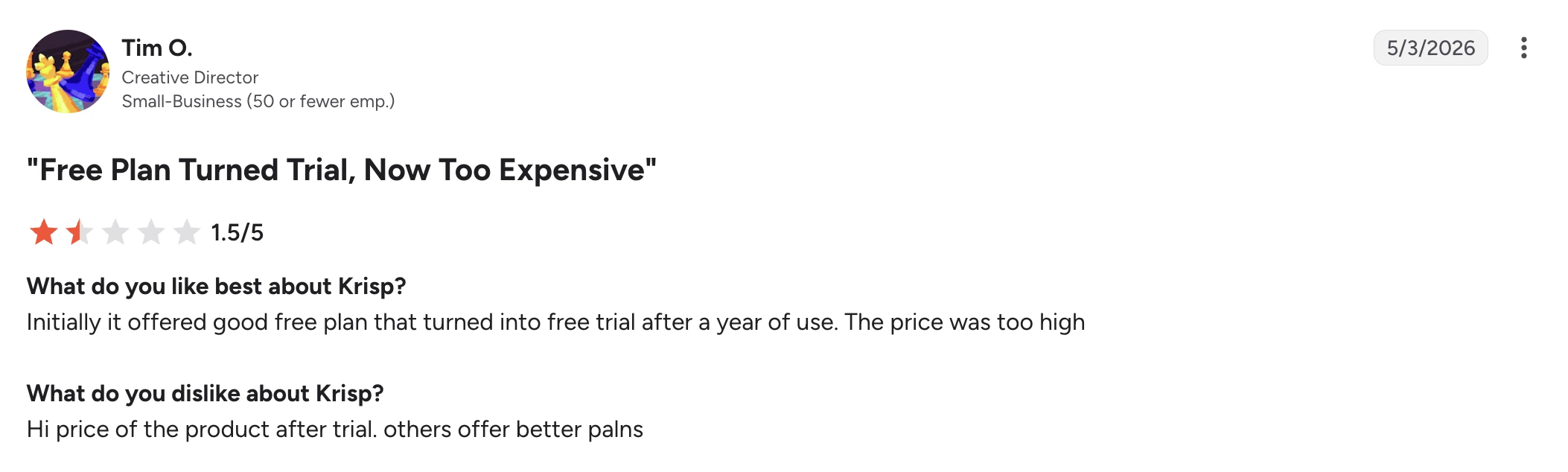
En una reseña de G2 de mayo de 2026, Tim O., director creativo en una pequeña empresa, le dio a Krisp 1.5/5. Contó que al principio le gustaba el plan gratuito, pero que con el tiempo ese plan pasó a ser una prueba y le pareció que lo que había que pagar después era demasiado.
Eso no significa que Krisp sea caro en comparación con todas las alternativas. Sin embargo, si solo necesitas supresión de ruido básica, pagar por un paquete de reuniones con IA más amplio puede ser innecesario.
2. La confiabilidad importa más que la lista de funciones
Un asistente de reuniones con IA solo sirve si después la reunión aparece de verdad en tu historial.
Algunos usuarios reportan problemas con reuniones que no quedan registradas o transcripciones que fallan.
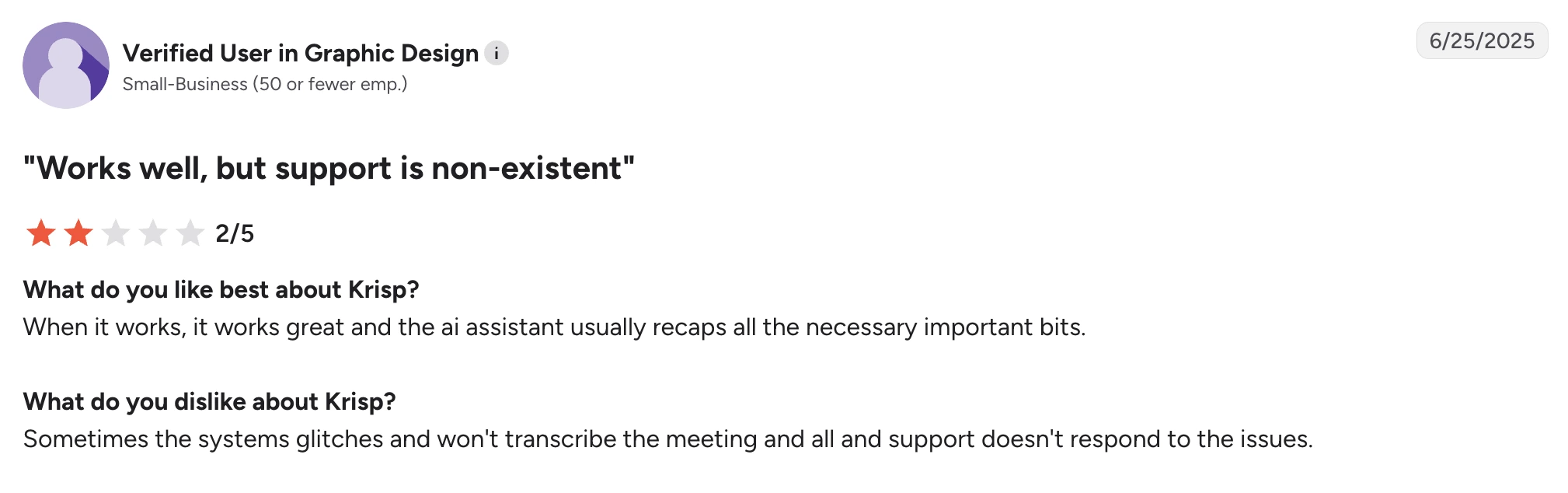
Un usuario verificado de una pequeña empresa de diseño gráfico escribió en una reseña de G2 de junio de 2025 que Krisp funciona bien cuando funciona y que el asistente de IA suele capturar lo importante. Lo que le frustró fue que el sistema a veces no transcribía una reunión y le costó conseguir ayuda del soporte.
Otro usuario verificado de una pequeña empresa de software reportó un problema parecido en una reseña de G2 de abril de 2025. Le gustaba la transcripción en sí, pero comentó que algunas reuniones que al parecer se habían grabado después desaparecieron del historial de reuniones.
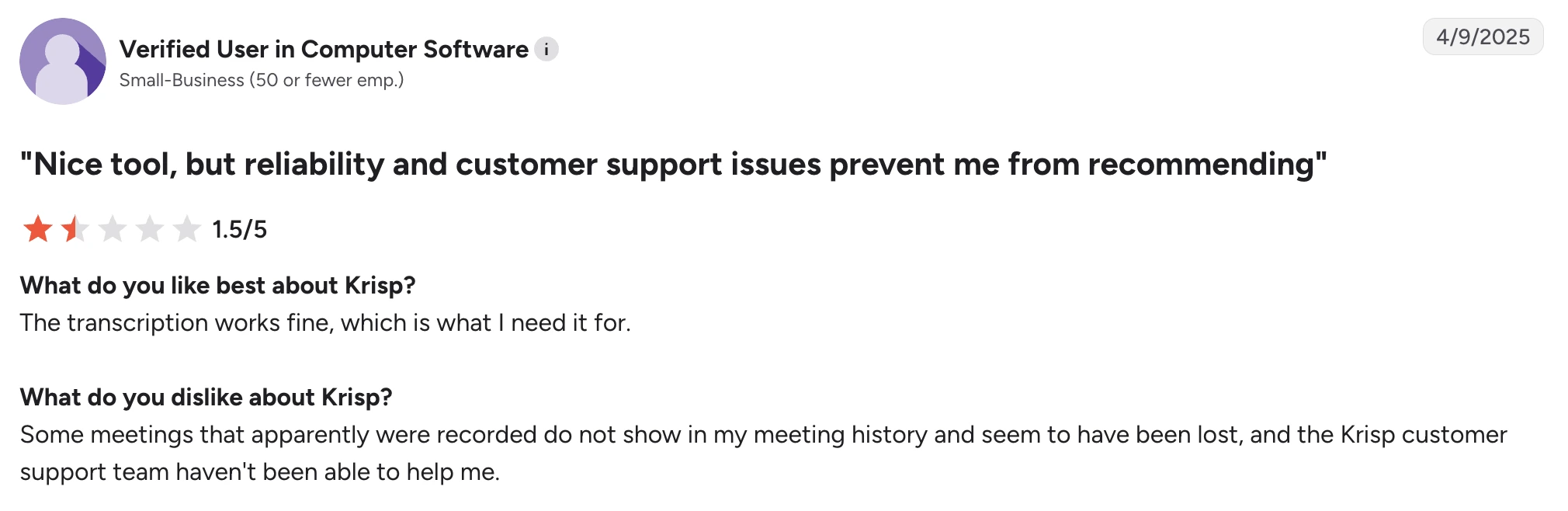
Son reportes de usuarios individuales y no una prueba de que el problema afecte a todo el mundo, pero pesan si contar con registros confiables de tus reuniones es un requisito innegociable de tu flujo de trabajo.
3. Necesitas funciones de inteligencia de reuniones más amplias
Krisp hoy ofrece mucho más que la eliminación de ruido: incluye notas de reunión generadas con IA, resúmenes, tareas pendientes, AI Chat e integraciones.
Sin embargo, algunas alternativas trabajan la inteligencia de reuniones con mucha más profundidad.
Si tus prioridades incluyen buscar dentro de reuniones anteriores, analizar equipos completos, dar seguimiento a señales de ventas, enviar hallazgos a tu CRM de forma automática, crear flujos de trabajo a partir del contenido de las reuniones o consultar tus reuniones pasadas como una base de conocimiento con búsqueda centralizada, quizá te convenga una plataforma de inteligencia de reuniones hecha para eso.
Esto es especialmente relevante si rara vez trabajas en entornos ruidosos. En ese caso, la cancelación de ruido en tiempo real quizá no sea la función que decida qué herramienta de reuniones pagas.
4. Necesitas cobertura de más idiomas
Hoy Krisp anuncia transcripciones y resúmenes en más de 16 idiomas.
A muchos equipos les alcanza, pero las empresas que operan en varios países pueden necesitar bastantes más.
Fireflies admite transcripción en más de 100 idiomas. MeetGeek también admite más de 100 idiomas e incluye detección automática del idioma.
La cobertura de idiomas se vuelve especialmente importante cuando se espera que una sola plataforma cubra llamadas de ventas, entrevistas, reuniones con clientes y conversaciones internas en varias regiones.
5. La cancelación de ruido se comporta distinto según la configuración
La cancelación de ruido con IA siempre implica un equilibrio: el software tiene que decidir qué sonido es la voz de quien habla y qué sonido hay que eliminar.
Eso se complica cuando la voz se superpone con ruidos fuertes y repentinos.
En una reseña de G2 de mayo de 2026, V K. elogió a Krisp por cancelar el ruido de una obra cercana y describió la configuración inicial como sencilla. Su queja fue mucho más acotada: al usar audífonos, a veces el sonido se le cortaba.
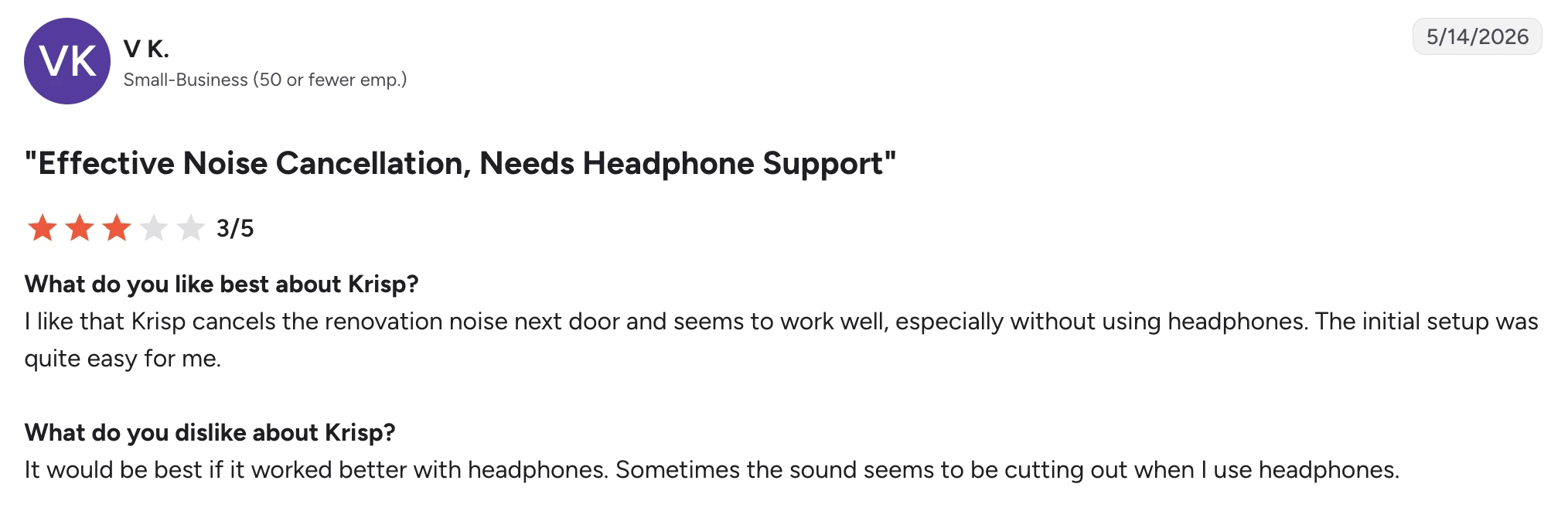
De nuevo, es un buen ejemplo de por qué la decisión no se reduce a si Krisp es bueno o malo. El mismo usuario consideró que su cancelación de ruido era efectiva.
Tu micrófono, tus audífonos, el uso de CPU, los ajustes de supresión de ruido, la acústica de la sala y el tipo de ruido de fondo influyen en el resultado.
Para muchos filtros de ruido, el zumbido constante de un ventilador es más fácil de identificar que los ruidos repentinos que se superponen con la voz. Si la claridad de la voz te importa mucho, prueba varias herramientas con tus propios audífonos y en tu entorno real de trabajo, en lugar de dar por hecho que el nivel más alto de reducción de ruido te dará automáticamente la mejor calidad de audio.
Las 6 mejores alternativas a Krisp
1. NVIDIA RTX Voice: la mejor alternativa gratuita a Krisp para supresión de ruido
NVIDIA RTX Voice es una de las alternativas más cercanas a Krisp si lo que en realidad quieres reemplazar es la cancelación de ruido en tiempo real.
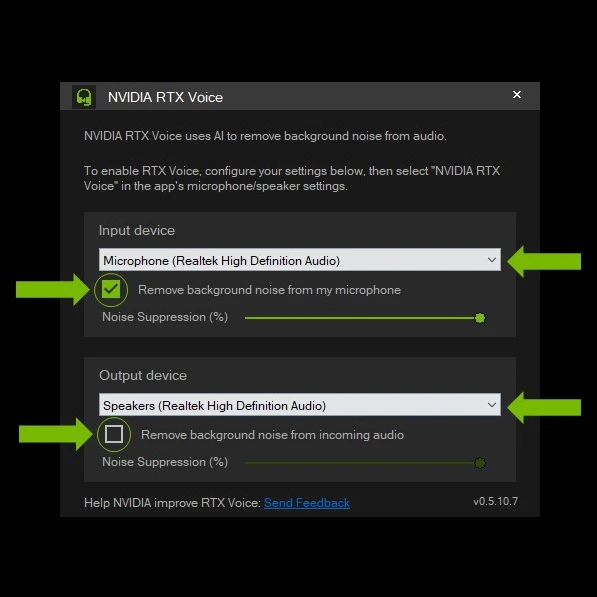
No es un asistente de reuniones con IA. No vas a tener notas de reunión, resúmenes, tareas pendientes, búsqueda entre reuniones ni inteligencia conversacional.
Lo que sí obtienes es supresión de ruido con IA tanto para tu micrófono como para el audio entrante, sin pagar una suscripción mensual de software.
Eso hace que RTX Voice resulte especialmente atractivo para quienes trabajan de forma remota, para streamers, gamers y profesionales que ya tienen una tarjeta gráfica NVIDIA y no necesitan el resto de las funciones de gestión de reuniones de Krisp.
¿Cómo se compara NVIDIA RTX Voice con Krisp?
NVIDIA RTX Voice es la alternativa más cercana de esta lista si usas Krisp sobre todo para cancelar ruido, aunque solo reemplaza esa parte de Krisp.
Las dos herramientas eliminan el ruido de fondo de la entrada de tu micrófono y del audio entrante en tiempo real, así que ayudan con distracciones como el sonido del teclado, el ruido de un ventilador u otros sonidos del entorno durante las llamadas. Ambas funcionan además con distintas aplicaciones de comunicación, en lugar de limitar la supresión de ruido a una sola plataforma de videoconferencia.
La mayor diferencia está en el hardware y en el alcance. Krisp es una solución de software independiente que combina cancelación de ruido con transcripción, grabación, notas de reunión con IA, resúmenes y conversión de acento. RTX Voice usa una GPU NVIDIA compatible para procesar el audio y no ofrece ninguna de esas funciones de asistente de reuniones.
Donde RTX Voice lleva ventaja es en el costo. El software es gratuito, así que resulta mucho más barato activar la cancelación de ruido si ya tienes hardware NVIDIA compatible. En las GPU RTX más recientes, NVIDIA Broadcast amplía lo que hace RTX Voice con Noise Removal, su función de supresión de ruido, además de eliminación del eco de la sala y funciones de video como los fondos virtuales.
Elige NVIDIA RTX Voice en lugar de Krisp si ya tienes una GPU NVIDIA compatible y solo necesitas supresión de ruido en tiempo real. Elige Krisp si quieres cancelación de ruido y un asistente de reuniones con IA en el mismo producto.
Ventajas de NVIDIA RTX Voice
- Software gratuito, sin suscripción recurrente
- Supresión de ruido con IA en tiempo real
- Filtra el micrófono y el audio entrante
- Buena opción para reducir el ruido de fondo en las reuniones en vivo
- Funciona en varias plataformas de videoconferencia
- Se integra con NVIDIA Broadcast
- NVIDIA Broadcast suma eliminación del eco de la sala y efectos de video
- Útil para llamadas, streaming, videojuegos y creación de contenido
Desventajas de NVIDIA RTX Voice
- Requiere una tarjeta gráfica NVIDIA GTX o RTX compatible
- Está pensado para Windows y no es una opción práctica para la mayoría de los usuarios de Mac
- No genera notas de reunión con IA, transcripciones ni resúmenes de reuniones
- Como el procesamiento ocurre en la GPU, la experiencia depende mucho de tu hardware
- No sirve si tu motivo principal para reemplazar Krisp es la inteligencia de reuniones y no la supresión de ruido
Precios de NVIDIA RTX Voice
NVIDIA RTX Voice se descarga y se usa gratis, pero requiere una tarjeta gráfica NVIDIA compatible.
2. Fireflies.ai: la mejor opción para inteligencia de reuniones con búsqueda
Fireflies es una buena alternativa a Krisp cuando la cancelación de ruido ya no es el problema principal que intentas resolver.
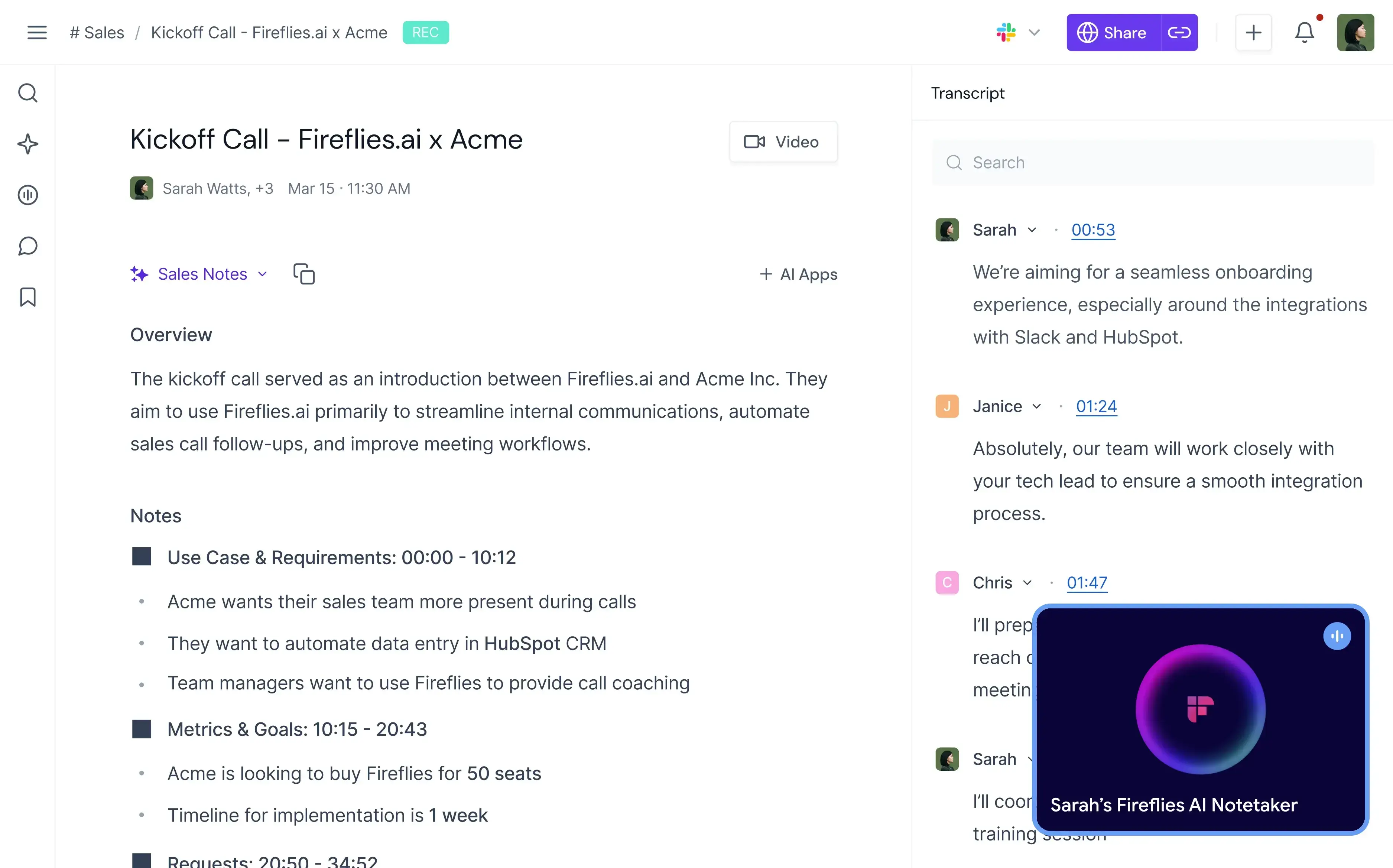
Krisp mejora lo que la gente escucha durante la reunión. Fireflies se concentra mucho más en lo que tu organización puede hacer con esa conversación después.
Graba y transcribe reuniones, genera resúmenes con IA ilimitados, permite buscar dentro de las conversaciones, detecta temas y tareas, y suma inteligencia conversacional y analíticas de equipo en los planes superiores.
Por eso resulta especialmente útil para equipos de ventas, reclutamiento, éxito del cliente y otros que necesitan convertir las reuniones en vivo en información estructurada.
¿Cómo se compara Fireflies con Krisp?
Fireflies y Krisp coinciden en transcripción, grabación, resúmenes con IA, búsqueda de reuniones e integraciones, pero sus prioridades son bastante distintas.
Krisp lleva una ventaja clara cuando lo que importa es la calidad del audio durante la llamada en vivo. Su cancelación de ruido en tiempo real elimina el ruido de fondo mientras hablas y filtra el audio entrante, algo que Fireflies no está diseñado para reemplazar. Krisp también ofrece conversión de acento, otra función pensada para mejorar la conversación en vivo.
Fireflies va más lejos cuando empiezas a analizar lo que se dijo. Admite transcripción en más de 100 idiomas frente a los más de 16 de Krisp y su plan Business suma inteligencia conversacional y analíticas de equipo. Los equipos pueden dar seguimiento a temas, tareas, preguntas, sentimiento y tiempo de habla de cada participante, en vez de quedarse solo con la transcripción y el resumen de cada reunión.
También cambia la forma en que cada producto encaja en los flujos de trabajo de una empresa. Los dos ofrecen integraciones y acceso por API, pero Fireflies apunta con mucha más decisión a convertir las conversaciones en datos consultables para ventas y otros equipos de cara al cliente.
Los precios de entrada son parecidos: Krisp Core cuesta US$ 16/usuario/mes y Fireflies Pro cuesta US$ 18/usuario/mes con facturación mensual. El catálogo de precios de Fireflies también incluye un plan gratuito permanente, mientras que Krisp hoy ofrece una prueba gratuita de siete días.
Fireflies tiene más sentido que Krisp cuando la inteligencia conversacional, la compatibilidad con más idiomas y los datos de reuniones con búsqueda te importan más que la cancelación de ruido. Krisp conserva la ventaja si mejorar el sonido de las llamadas en vivo es uno de tus requisitos principales.
Ventajas de Fireflies.ai
- Transcripción y resúmenes con IA ilimitados
- Admite más de 100 idiomas
- Detección automática del idioma
- Transcripción en tiempo real
- Historial de reuniones con búsqueda
- Inteligencia conversacional en Business
- Analíticas de sentimiento, temas, preguntas y participantes
- Aplicaciones para computadora y celular
- Grabación con bot o con extensión de Chrome
- Carga de archivos de audio y video
- Acceso por API
- Amplias integraciones en los planes de pago
Desventajas de Fireflies.ai
- No reemplaza la cancelación de ruido con IA en tiempo real de Krisp
- Varias de las analíticas más útiles requieren el plan Business
- El almacenamiento es limitado en Free y en Pro
- Las funciones de IA usan un sistema de créditos aparte del plan contratado
- Los equipos que solo buscan mejor calidad de audio podrían estar pagando por funciones que no necesitan
Precios de Fireflies.ai
Con facturación mensual:
- Free: US$ 0
- Pro: US$ 18/usuario/mes
- Business: US$ 29/usuario/mes
- Enterprise: US$ 39/usuario/mes, solo con facturación anual
¿Quieres saber más sobre Fireflies.ai? ¡Lee nuestra comparación entre MeetGeek y Fireflies.ai!
3. MeetGeek: la mejor opción para automatización de reuniones e inteligencia de equipo
MeetGeek es una buena alternativa a Krisp cuando te gusta el giro hacia asistente de reuniones que dio Krisp, pero quieres una plataforma diseñada específicamente para capturar, analizar, organizar y automatizar reuniones.
%20(2).webp)
No es un reemplazo directo de la cancelación de ruido de Krisp.
Lo que MeetGeek reemplaza es la parte de toma de notas y gestión de reuniones. Graba y transcribe automáticamente las reuniones en vivo, genera resúmenes con IA y tareas pendientes, organiza las reuniones pasadas en una base de conocimiento con búsqueda, analiza las conversaciones y puede activar flujos de trabajo en las herramientas que tu equipo ya usa.
¿Cómo se compara MeetGeek con Krisp?
MeetGeek y Krisp cubren grabación, transcripción, notas de reunión generadas con IA, resúmenes, AI Chat, reuniones presenciales e integraciones. La diferencia principal es que Krisp pone la mejora del audio en vivo junto a su asistente de reuniones, mientras que MeetGeek profundiza en inteligencia de reuniones y automatización.
Krisp es la mejor opción si reducir el ruido de fondo forma parte del problema que necesitas resolver con el software. MeetGeek no ofrece cancelación de ruido en tiempo real ni conversión de acento como las de Krisp.
MeetGeek lleva ventaja cuando la reunión en sí tiene que convertirse en datos útiles para el negocio. Admite más de 100 idiomas de transcripción frente a los más de 16 de Krisp, ofrece grabación con bot y sin bot, y aporta analíticas de reuniones individuales y de equipo, análisis de sentimiento y de participación, resúmenes personalizados, señales de ventas y AI Chat sobre las reuniones pasadas.
La diferencia en integraciones también pesa. Krisp se conecta con herramientas importantes como HubSpot, Slack, Notion, Zapier, Teams, Salesforce y Pipedrive, además de ofrecer integraciones con API y MCP.
MeetGeek conecta los datos de tus reuniones con más de 10,000 integraciones y es compatible con Zapier, Make, n8n, API y MCP. Sus agentes de voz con IA y sus flujos de trabajo pueden hacerse cargo de las reuniones y luego usar lo que se dijo en ellas para activar el trabajo siguiente, como actualizar sistemas o compartir información relevante con otro equipo.
MeetGeek también tiene un plan gratuito permanente, mientras que Krisp ofrece una prueba de siete días. Sus primeros planes de pago cuestan casi lo mismo con facturación mensual: MeetGeek Pro cuesta US$ 15.99/usuario/mes y Krisp Core cuesta US$ 16/usuario/mes.
MeetGeek es la opción más sólida si quieres analíticas de reuniones más profundas, automatización, cobertura de más idiomas y más formas de conectar los resultados de tus reuniones con el resto de tu flujo de trabajo. Quédate con Krisp si además necesitas cancelación de ruido en tiempo real o conversión de acento dentro de la misma aplicación.
Si quieres una mirada más completa, ¡revisa nuestro artículo con la comparación entre MeetGeek y Krisp!
Ventajas de MeetGeek
- Transcripción en más de 100 idiomas
- Detección automática del idioma
- Resúmenes con IA ilimitados
- Opciones de grabación sin bot
- Compatible con reuniones presenciales desde el celular
- AI Chat y búsqueda entre reuniones
- Analíticas detalladas de reuniones
- Inteligencia conversacional
- Plantillas de reunión personalizadas
- Sales Mode para conversaciones con clientes
- Automatización de flujos de trabajo con IA
- Más de 10,000 integraciones
- Acceso a API y MCP
- Plan gratuito disponible
Desventajas de MeetGeek
- No ofrece cancelación de ruido en tiempo real como la de Krisp
- El plan Free se limita a tres horas de transcripción al mes
- La grabación de video en HD requiere Business
- Algunas funciones de colaboración en equipo y de analíticas requieren Business
- Las capacidades Enterprise como SSO y SCIM no están disponibles en los planes inferiores
Precios de MeetGeek
Con facturación mensual:
- Basic: Gratis
- Pro: US$ 15.99/usuario/mes
- Business: US$ 27/usuario/mes
- Enterprise: Precio personalizado
4. CrystalSound: la mejor alternativa a Krisp para cancelación de ruido dedicada
CrystalSound es la alternativa a Krisp más directa de esta lista para quienes siguen preocupados sobre todo por la calidad del audio.
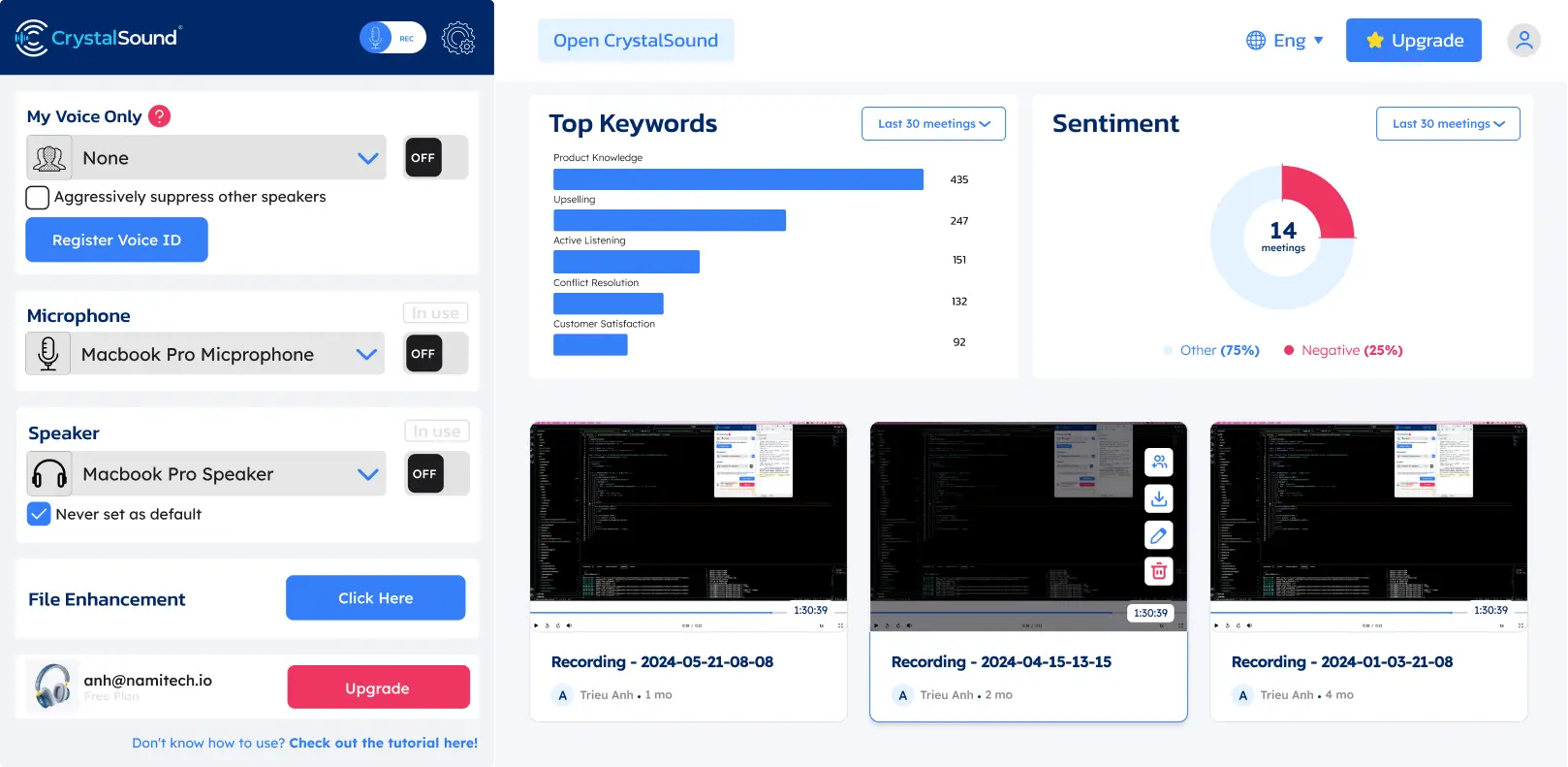
Al igual que Krisp, CrystalSound está pensado para la cancelación de ruido con IA en tiempo real y no trata la supresión de ruido como una función menor dentro de una plataforma de videoconferencia.
CrystalSound trabaja sobre los dos lados de la llamada: reduce el ruido de tu micrófono y también el de la persona que te habla, algo que puede ser útil cuando no puedes controlar el entorno del otro lado. Lo que lo separa de Krisp es la profundidad de sus controles de audio, no el hecho de que filtre en las dos direcciones.
¿Cómo se compara CrystalSound con Krisp?
CrystalSound compite con Krisp en reducción de ruido de forma mucho más directa que Fireflies, MeetGeek o Claap.
Los dos productos ofrecen cancelación de ruido ilimitada en sus planes de pago y procesan el ruido de ambos lados de la conversación. CrystalSound incluye, en particular, cancelación de ruido bidireccional, procesamiento My Voice Only, supresión de eco acústico, eliminación del eco de la sala, eliminación de ruido residual y un nivel de reducción de ruido ajustable. Krisp también se enfoca en quitar el ruido de fondo de las conversaciones en vivo y ofrece cancelación de eco.
La diferencia está en hasta dónde llega cada producto más allá del procesamiento de audio.
Krisp evolucionó hacia un asistente de reuniones con IA mucho más amplio. Sus planes de pago incluyen transcripción, grabación de audio y video, resúmenes con IA y tareas pendientes, AI Chat, organización de reuniones, integraciones y compatibilidad con reuniones presenciales. CrystalSound, en cambio, se concentra casi por completo en mejorar la claridad de la voz y el audio grabado. Sus minutas inteligentes de reuniones, los títulos automáticos, el análisis de palabras clave y el análisis de sentimiento aparecen hoy como no disponibles, y la grabación de llamadas en la nube sigue en versión preliminar.
CrystalSound sale más barato si esas funciones adicionales de reuniones no te hacen falta. Premium cuesta US$ 12/usuario/mes frente a los US$ 16/usuario/mes de Krisp Core con facturación mensual.
CrystalSound cuesta menos al mes y encaja si lo que buscas es sobre todo reducción de ruido y mejora del audio dedicadas. Krisp vale la diferencia si quieres cancelación de ruido junto con un asistente de reuniones con IA más desarrollado.
Ventajas de CrystalSound
- Cancelación de ruido ilimitada
- Cancelación de ruido bidireccional
- Modo My Voice Only
- Nivel de reducción de ruido ajustable
- Eliminación del eco de la sala
- Supresión de eco acústico
- Voz en estéreo de alta definición
- Mejora de archivos de audio
- Aumento del volumen del micrófono
- Modo de procesamiento de bajo consumo
- Gestión de licencias para equipos
- Buena opción para entornos ruidosos
Desventajas de CrystalSound
- Menos maduro como asistente de reuniones con IA que Krisp, Fireflies, MeetGeek o Claap
- Las minutas inteligentes de reuniones no están disponibles por ahora
- El análisis de palabras clave y el de sentimiento no están disponibles por ahora
- La grabación de llamadas en la nube sigue marcada como versión preliminar
- Puede que aún necesites otra herramienta para las notas de reunión con IA, el historial de reuniones con búsqueda o la automatización de flujos de trabajo
Precios de CrystalSound
Con facturación mensual:
- Premium: US$ 12/usuario/mes
- Elite: US$ 29/usuario/mes, próximamente
- Enterprise: Precio personalizado
Hay una prueba gratuita de 7 días para el plan Premium.
5. Claap: la mejor opción para colaboración en reuniones centrada en video
Claap es una buena alternativa a Krisp para los equipos a los que les importa menos eliminar ruido en tiempo real y más convertir las reuniones y el video grabado en trabajo colaborativo.
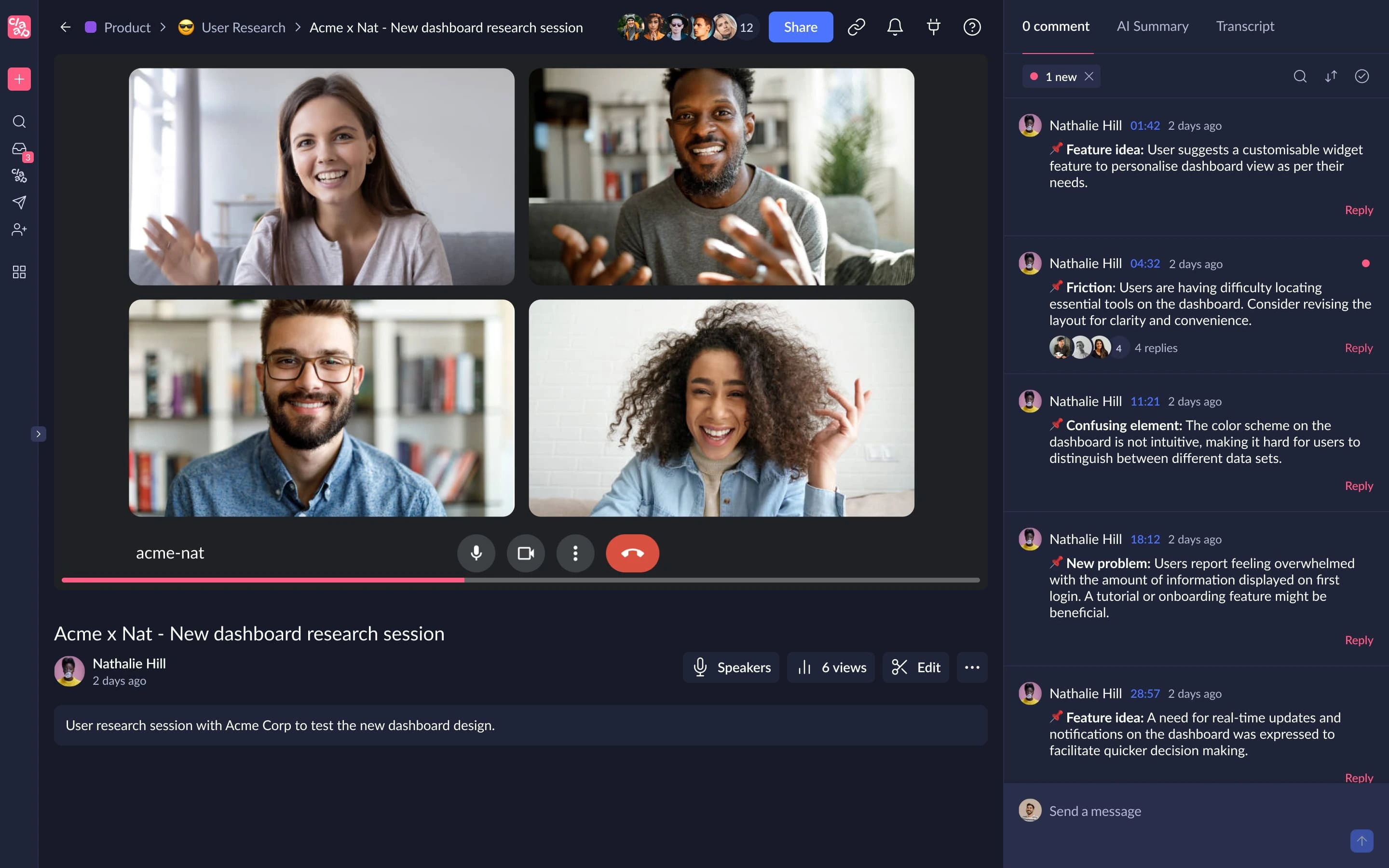
Combina la grabación de reuniones con transcripción, resúmenes con IA, edición de video, comentarios, espacios de trabajo compartidos, coaching con IA y flujos de trabajo de CRM.
Frente a Krisp, la diferencia se resume fácilmente: Krisp parte del procesamiento de audio y Claap parte de las conversaciones grabadas y la colaboración en video.
¿Cómo se compara Claap con Krisp?
Claap y Krisp graban reuniones, transcriben conversaciones, generan resúmenes con IA y ofrecen herramientas para organizar y compartir lo que pasó. La diferencia es que Krisp trabaja sobre el audio en vivo y Claap, sobre la colaboración en video y la inteligencia de reuniones.
Krisp mejora la reunión mientras ocurre. Su cancelación de ruido, la eliminación de eco y la conversión de acento buscan mejorar la claridad de la voz durante las llamadas. Claap no ofrece una capa equivalente de cancelación de ruido en tiempo real.
Claap, en cambio, aprovecha mejor la reunión ya grabada. Une la captura de reuniones con la grabación de pantalla y cámara, la edición de video con IA, la combinación de videos, las anotaciones, los comentarios, las respuestas en video, las notas colaborativas y los espacios de trabajo compartidos. Eso lo hace más adecuado para equipos que, además de sus reuniones en vivo, usan video grabado para comunicarse de forma asincrónica.
La cobertura de idiomas es otra diferencia. Claap admite transcripciones en 99 idiomas, frente a los más de 16 de Krisp. Sus planes superiores también suman coaching con IA, enriquecimiento automático del CRM, información sobre oportunidades de venta, correos generados con IA y la posibilidad de hacer preguntas sobre varias reuniones a la vez.
El punto en contra es el precio. Krisp Core cuesta US$ 16/usuario/mes, mientras que Claap Pro cuesta €30/licencia/mes con facturación mensual. Por eso Claap tiene más sentido cuando de verdad vas a aprovechar sus capacidades adicionales de colaboración y video.
Claap encaja mejor que Krisp cuando las reuniones grabadas forman parte de un flujo de trabajo más amplio de colaboración en video, ventas o comunicación asincrónica. Krisp sigue siendo la mejor opción si te importa más mejorar el audio de las llamadas en vivo y quieres las notas de reunión como una función extra y no como el centro de la plataforma.
Ventajas de Claap
- Transcripción en 99 idiomas
- Sincronización con el calendario y las llamadas de conferencia
- Resúmenes con IA y plantillas personalizadas
- Grabación de pantalla y cámara
- Edición de video con IA
- Anotaciones y comentarios colaborativos en video
- IA sobre varias reuniones en Business
- Enriquecimiento del CRM
- Correos generados con IA
- Coaching con IA
- Información sobre oportunidades de venta
- Acceso a API y MCP
- Compatibilidad con Zapier, Make y n8n
- Plan gratuito disponible
Desventajas de Claap
- No reemplaza la cancelación de ruido en tiempo real de Krisp
- El plan gratuito tiene un tope de 10 videos y 300 minutos de grabación en total
- Pro incluye solo 1,000 minutos de transcripción y grabación al mes
- Business cuesta bastante más que Krisp Core
- Su conjunto de funciones puede quedarte grande si solo necesitas un micrófono más limpio para tus llamadas
Precios de Claap
Con facturación mensual:
- Basic: Gratis
- Pro: €30/licencia/mes
- Business: €60/licencia/mes
- Enterprise: Precio personalizado
6. IRIS Clarity: la mejor opción para equipos que necesitan cancelación de ruido en los dos lados de la llamada
IRIS Clarity es una de las alternativas a Krisp más cercanas si tu prioridad es la cancelación de ruido en sí, sobre todo cuando el ruido de fondo llega desde los dos lados de la conversación.
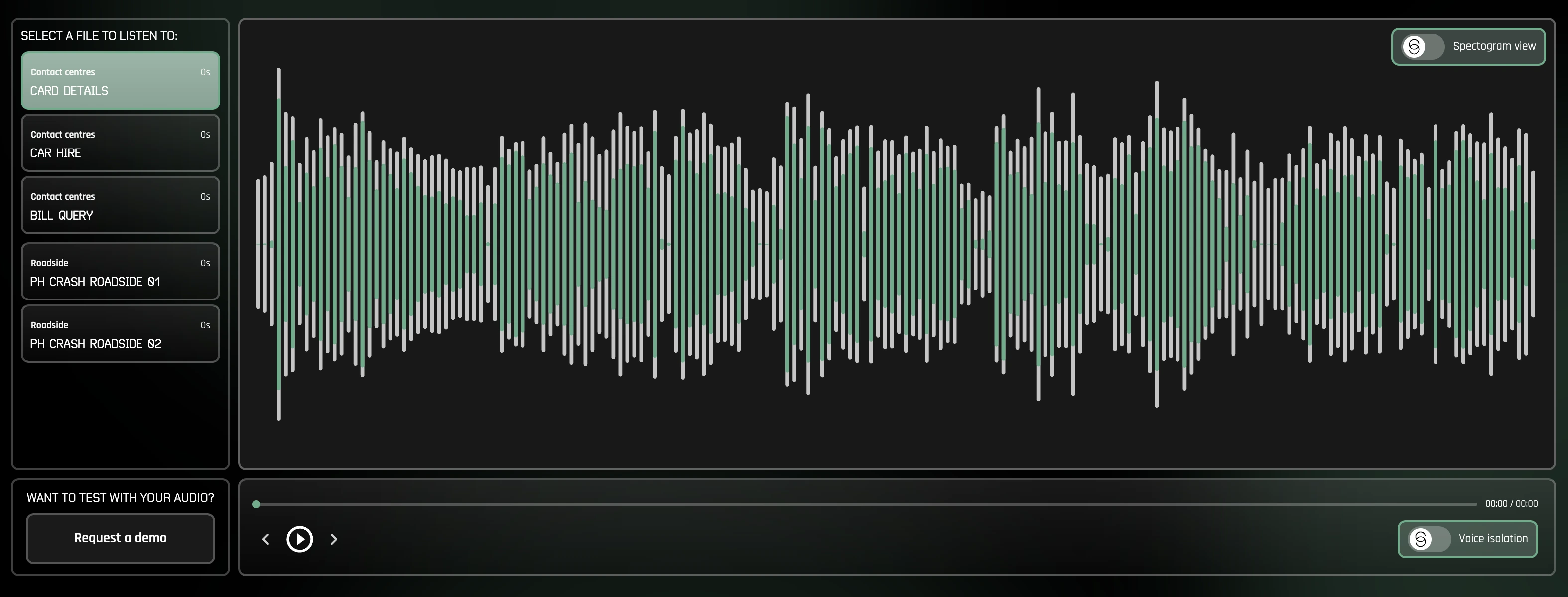
Su función principal es la cancelación de ruido bidireccional e ilimitada. En lugar de quitar solo el ruido de fondo alrededor de tu micrófono, IRIS Clarity aísla las voces tanto en el audio que sale como en el que entra. Eso resulta muy útil para equipos de atención al cliente y call centers, donde el empleado puede estar en un entorno controlado, pero el cliente llama desde un lugar ruidoso.
A diferencia de Krisp, IRIS Clarity se mantiene enfocada en el aislamiento de voz y no intenta funcionar también como asistente de reuniones con IA. No compite con la transcripción, las notas de reunión con IA, los resúmenes, la grabación ni la conversión de acento de Krisp. Lo que ofrece es un producto de reducción de ruido más especializado, con gestión de equipos, analíticas y funciones de despliegue empresarial.
¿Cómo se compara IRIS Clarity con Krisp?
IRIS Clarity y Krisp ofrecen cancelación de ruido bidireccional en tiempo real, así que cualquiera de las dos ayuda a quitar distracciones de tu micrófono y del audio entrante. Ambas funcionan además como aplicaciones independientes, en vez de limitar la supresión de ruido a una sola plataforma de comunicación.
La diferencia principal es su alcance.
Krisp combina la cancelación de ruido con un conjunto creciente de funciones de reuniones: transcripción, resúmenes con IA, tareas pendientes, grabación de audio y video, AI Chat, conversión de acento e integraciones. IRIS Clarity se concentra en algo mucho más acotado: hacer que las voces se escuchen mejor.
Ese enfoque más acotado trae funciones pensadas específicamente para organizaciones que gestionan el audio de equipos grandes. IRIS Clarity ofrece analíticas de sesiones y de usuarios/estaciones, exportaciones de datos en CSV, perfiles de aplicación administrados por TI, detección de tonos de llamada, grabación de llamadas para diagnóstico, SSO y aprovisionamiento automático de usuarios. Su plan Enterprise también admite licencias concurrentes y onboarding acompañado.
IRIS Clarity funciona en Windows y en Mac, así que, a diferencia de NVIDIA RTX Voice, no requiere una GPU NVIDIA compatible.
IRIS Clarity es la indicada si quieres una herramienta especializada en aislamiento de voz, sobre todo para equipos de cara al cliente o call centers que necesitan quitar el ruido de los dos lados de la conversación. Krisp tiene más sentido si quieres cancelación de ruido junto con transcripción, notas de reunión con IA, grabación y otras funciones de asistente de reuniones.
Ventajas de IRIS Clarity
- Cancelación de ruido bidireccional ilimitada
- Quita el ruido del audio que sale y del que entra
- Incluye los modelos de aislamiento de voz más recientes
- Aplicaciones para Windows y Mac
- Funciones de gestión de equipos
- Analíticas de sesiones y de usuarios/estaciones
- Exportación de analíticas en CSV
- Perfiles de aplicación administrados por TI
- SSO y aprovisionamiento automático de usuarios
- No requiere hardware NVIDIA especializado
Desventajas de IRIS Clarity
- No genera notas de reunión ni resúmenes con IA
- No ofrece transcripción ni conversión de acento como las de Krisp
- Más especializada que las herramientas que combinan supresión de ruido con funciones de productividad para reuniones
- Enterprise exige un mínimo de 100 usuarios y un compromiso anual
Precios de IRIS Clarity
Con facturación mensual:
- Professional: £9.50/usuario/mes
- Enterprise: Precio personalizado, con un mínimo de 100 usuarios y compromiso anual
Hay una prueba gratuita de 14 días para el plan Professional.
¿Cómo se comparan las mejores alternativas a Krisp?
Ninguna alternativa de esta lista reemplaza todas las funciones de Krisp.
| Herramienta | Cancelación de ruido en tiempo real | Notas de reunión con IA | Idiomas admitidos | Mejor uso |
|---|---|---|---|---|
| Krisp AI | Sí | Sí | 16+ | Cancelación de ruido más asistencia en las reuniones |
| NVIDIA RTX Voice | Sí | No | N/A | Supresión de ruido en tiempo real apoyada en el hardware |
| Fireflies.ai | No | Sí | 100+ | Inteligencia de reuniones con búsqueda |
| MeetGeek | No | Sí | 100+ | Automatización de la gestión de reuniones, analíticas y flujos de trabajo |
| CrystalSound | Sí | Limitadas | No lo publica | Reducción de ruido bidireccional dedicada |
| Claap | No | Sí | 99 | Colaboración en reuniones centrada en video |
| IRIS Clarity | Sí | No | N/A | Aislamiento de voz bidireccional para equipos y call centers |
Si buscas lo más parecido a la funcionalidad de audio principal de Krisp, empieza por NVIDIA RTX Voice, IRIS Clarity o CrystalSound.
Si el asistente de reuniones con IA ya te importa más que la supresión de ruido, conviene que compares Fireflies, MeetGeek y Claap.
La mejor alternativa a Krisp depende de qué quieras reemplazar
Krisp es difícil de reemplazar con un solo producto porque hoy cubre varias tareas.
Para la cancelación de ruido con IA en tiempo real, NVIDIA RTX Voice les da a los usuarios de Windows con equipo compatible una buena opción gratuita, mientras que CrystalSound ofrece software dedicado de reducción de ruido con filtrado bidireccional, eliminación del eco de la sala y controles de audio avanzados.
Para la inteligencia de reuniones, la comparación cambia.
Fireflies destaca cuando necesitas buscar dentro de tus conversaciones y conectarlas con los procesos comerciales. Claap une la captura de reuniones con la colaboración en video asincrónica. MeetGeek se enfoca en convertir las reuniones en vivo en transcripciones, resúmenes con IA, analíticas, conocimiento que puedes consultar y flujos de trabajo automatizados a través de más de 10,000 integraciones.
Por eso la decisión correcta depende menos de encontrar la herramienta con la lista de funciones más larga y más de identificar en qué punto Krisp dejó de encajar en tu flujo de trabajo.
Si estás explorando alternativas a Krisp AI porque quieres mejores flujos de trabajo después de las reuniones, prueba MeetGeek gratis: graba y transcribe tus reuniones, resúmelas, analízalas y conéctalas automáticamente con el resto de tu trabajo.
Puntos clave
- Krisp sigue siendo una buena opción para la cancelación de ruido en tiempo real, sobre todo si además quieres transcripción, notas con IA, grabación y conversión de acento en la misma herramienta.
- NVIDIA RTX Voice encaja mejor si solo necesitas supresión de ruido y ya tienes una GPU NVIDIA compatible, porque el software es gratuito.
- Fireflies.ai les funciona mejor a los equipos que priorizan la inteligencia conversacional, las transcripciones con búsqueda y los flujos de trabajo de reuniones conectados al CRM.
- MeetGeek es una alternativa más sólida para los equipos que quieren convertir sus reuniones en trabajo concreto mediante resúmenes con IA, analíticas, búsqueda entre reuniones, automatización y más de 10,000 integraciones.
- CrystalSound es la alternativa más cercana para mejorar el audio de forma dedicada, con cancelación de ruido bidireccional, eliminación de eco y reducción de ruido ajustable.
- Claap tiene más sentido cuando las grabaciones de reuniones forman parte de un flujo de trabajo más amplio de colaboración en video, con edición, comentarios, coaching con IA y funciones de CRM.
- IRIS Clarity es una opción especializada para equipos de atención al cliente y call centers que necesitan cancelación de ruido bidireccional ilimitada, gestión de equipos y analíticas centradas en el audio.
- La alternativa correcta depende de qué quieras reemplazar: la mejora del audio en vivo o la inteligencia y la automatización posteriores a la reunión.
Preguntas frecuentes
1. ¿Cuál es la mejor alternativa gratuita a Krisp?
NVIDIA RTX Voice es una de las mejores alternativas gratuitas a Krisp para la supresión de ruido en tiempo real si tu computadora tiene una tarjeta gráfica NVIDIA compatible. Si lo que buscas son notas de reunión con IA y no cancelación de ruido, Fireflies y MeetGeek ofrecen planes gratuitos.
2. ¿Existe una alternativa a Krisp para eliminar el ruido de fondo?
Sí. NVIDIA RTX Voice y CrystalSound ofrecen cancelación de ruido con IA en tiempo real. También puedes usar la supresión de ruido integrada en Microsoft Teams, Zoom y otras plataformas de videoconferencia si no necesitas filtrar el ruido en todo el sistema.
3. ¿Krisp AI es mejor que NVIDIA Broadcast?
Resuelven problemas de audio parecidos, pero tienen requisitos distintos. Krisp funciona como software independiente de reducción de ruido y no necesita una GPU NVIDIA, mientras que NVIDIA Broadcast usa hardware NVIDIA compatible y combina la eliminación de ruido con funciones de video como los fondos virtuales. NVIDIA Broadcast puede convenirte más si ya tienes hardware compatible.
4. ¿Qué alternativa a Krisp es mejor para las notas de reunión con IA?
MeetGeek, Fireflies y Claap son opciones más sólidas cuando las notas de reunión con IA importan más que la cancelación de ruido. A MeetGeek le sacan más provecho los equipos que además necesitan analíticas de reuniones, IA que cruza varias reuniones, automatización de flujos de trabajo e integraciones; Fireflies destaca en inteligencia conversacional; y Claap une las notas con la colaboración en video.
5. ¿Puedo usar una alternativa a Krisp para Google Meet y Microsoft Teams?
Sí. NVIDIA RTX Voice funciona como micrófono virtual en las aplicaciones de comunicación compatibles, incluida Microsoft Teams. Fireflies y MeetGeek graban y transcriben reuniones de Google Meet y Microsoft Teams, mientras que CrystalSound está diseñado para dar cancelación de ruido en distintas herramientas de comunicación y no se limita a una sola plataforma de conferencias.





.avif)