

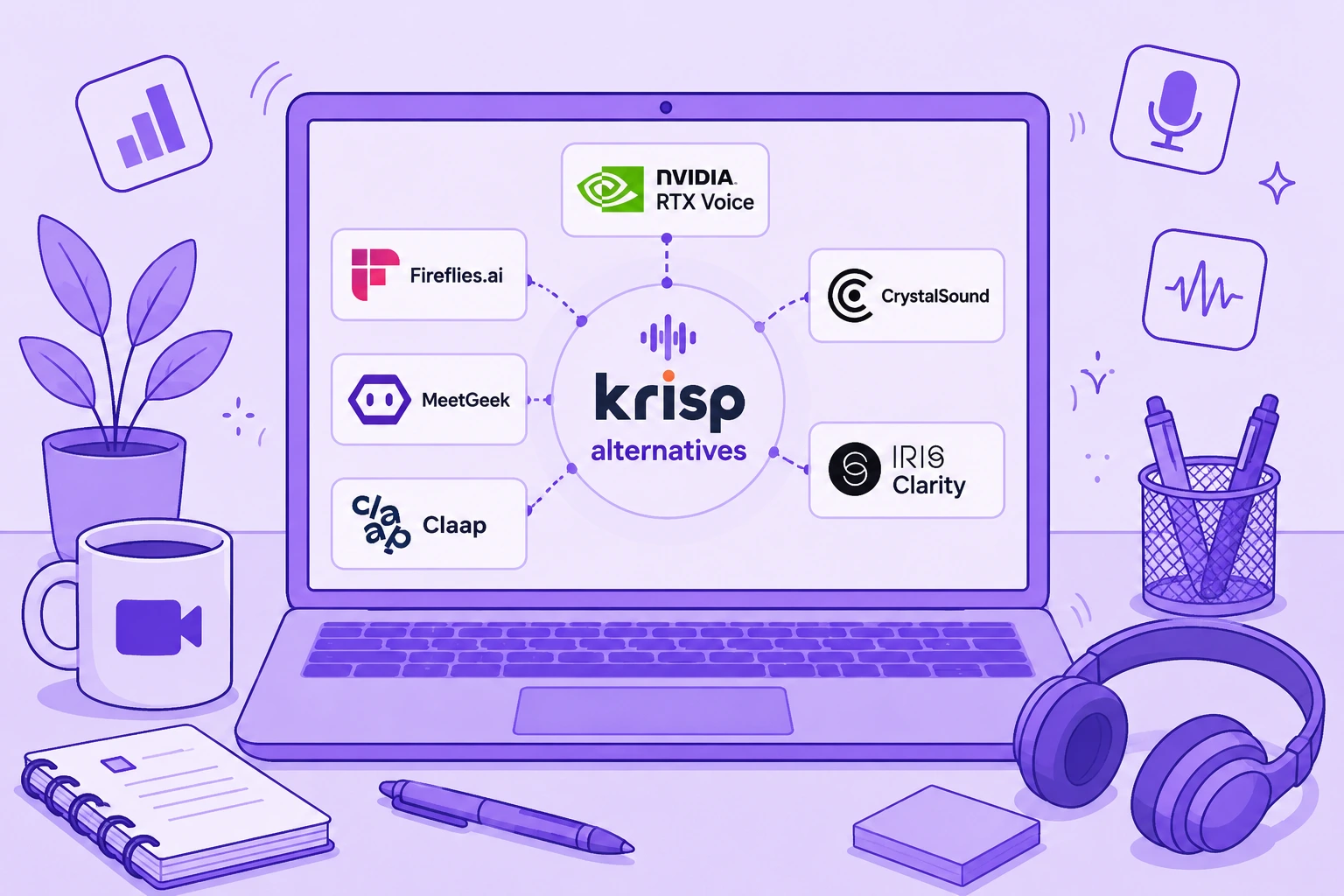

Krisp reste l'un des outils les plus performants en matière de suppression du bruit par IA en temps réel. Il peut atténuer le bruit de fond capté par votre micro comme celui de l'audio entrant, fonctionne avec les principaux outils de communication et associe désormais la réduction de bruit à la transcription, à l'enregistrement, aux comptes rendus de réunion générés par IA, à la conversion d'accent et aux résumés de réunion.
Krisp cumulant désormais plusieurs fonctions, aucune alternative ne le remplace entièrement à elle seule.
Si votre priorité est d'éliminer le bruit de fond pendant vos réunions en direct, NVIDIA RTX Voice ou CrystalSound correspondront sans doute mieux à votre besoin. Si vous utilisez surtout Krisp comme assistant de réunion IA, Fireflies.ai, MeetGeek et Claap vont beaucoup plus loin en matière de comptes rendus de réunion, d'intelligence conversationnelle, de collaboration et d'automatisation des flux de travail.
Ce guide compare six des meilleures alternatives à Krisp : ce qu'elles remplacent réellement, leurs fonctionnalités clés, leurs limites et leurs tarifs actuels.
TL;DR : quelles sont les meilleures alternatives à Krisp ?
| Alternative à Krisp | Idéal pour | Prix de départ |
|---|---|---|
| NVIDIA RTX Voice | Suppression du bruit gratuite et en temps réel pour les personnes équipées d'un GPU NVIDIA compatible | Gratuit |
| Fireflies.ai | Intelligence de réunion, recherche et flux de travail connectés au CRM | Gratuit |
| MeetGeek | Comptes rendus de réunion générés par IA, automatisation, analyses et 10 000+ intégrations | Gratuit |
| CrystalSound | Suppression du bruit et amélioration audio dédiées | 12 $US/utilisateur/mois |
| Claap | Collaboration autour des réunions centrée sur la vidéo et flux de travail commerciaux | Gratuit |
| IRIS Clarity | Suppression du bruit bidirectionnelle pour les équipes en contact client et les centres d'appels | 9,50 £/utilisateur/mois |
L'essentiel est de savoir ce que vous voulez remplacer dans Krisp.
Qu'est-ce que Krisp AI ?
Krisp AI a débuté avec la suppression du bruit en temps réel et reste particulièrement efficace pour atténuer les sons parasites pendant les appels vidéo et téléphoniques.
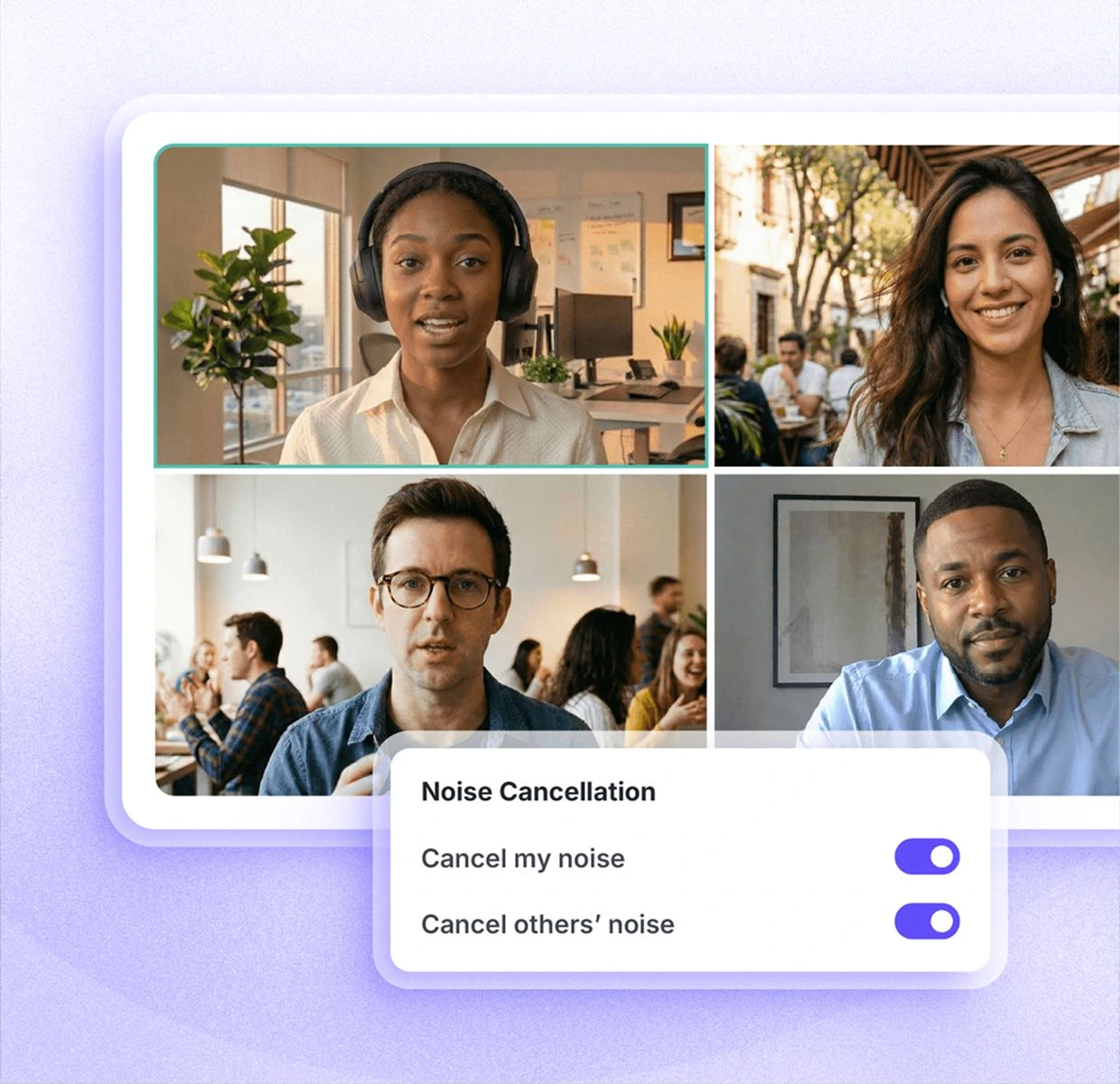
Plutôt que d'être intégré à une seule application de communication, Krisp crée un microphone et un haut-parleur virtuels qui s'intercalent entre vos périphériques audio physiques et des plateformes comme Zoom, Microsoft Teams ou Google Meet. Il peut ainsi traiter le signal de votre micro et, selon la configuration, l'audio entrant.
Ses fonctionnalités actuelles vont bien au-delà d'une simple réduction de bruit.
Krisp propose :
- Suppression du bruit illimitée sur les offres payantes
- Élimination du bruit de fond et de l'écho par IA
- Transcription et enregistrement audio
- Enregistrement vidéo
- Résumés et actions à mener générés par IA
- AI Chat
- Transcriptions et résumés multilingues dans plus de 16 langues
- Conversion d'accent
- Prise en charge des réunions en présentiel
- Dossiers et étiquettes de réunion
- Vocabulaire personnalisé
- Intégrations avec des outils comme Slack, Notion, Zapier, Teams, HubSpot, Pipedrive, Salesforce et ConnectWise
- Intégrations API et MCP
- Administration d'équipe et contrôles de sécurité
Krisp propose actuellement un essai gratuit de sept jours donnant accès à la transcription illimitée, à la suppression du bruit illimitée, à l'enregistrement audio et vidéo ainsi qu'aux notes générées par IA.
Ensuite, l'offre Core revient à 16 $US par utilisateur et par mois, et l'offre Advanced à 30 $US par utilisateur et par mois, toutes deux en facturation mensuelle. Le tarif Enterprise est établi sur devis.
Pour qui travaille chez soi avec un ventilateur en marche, des chiens qui aboient, un chantier à côté ou d'autres bruits ambiants, Krisp peut se révéler très utile. Sa capacité à éliminer les bruits indésirables en temps réel reste la première raison pour laquelle beaucoup l'adoptent.
Pourquoi chercher une alternative à Krisp ?
Reconnaître les limites de Krisp ne revient pas à en faire un mauvais produit.
La seconde idée serait fausse.
Krisp affiche une note de 4,7/5 sur G2, et sa suppression du bruit répond à un problème bien réel pour les télétravailleurs, les équipes en contact client et les centres d'appels. Si la clarté audio pendant les conversations en direct est votre préoccupation principale, changer d'outil n'a peut-être aucun intérêt.
Cela dit, dans certaines situations, il peut être utile de comparer les alternatives à Krisp AI.
1. Vous cherchez une option gratuite ou moins chère
Krisp ne propose plus la version gratuite permanente à laquelle certains utilisateurs de longue date s'étaient inscrits au départ. L'outil offre aujourd'hui un essai gratuit de sept jours, après quoi les offres payantes démarrent à 16 $US par utilisateur et par mois.
Ce changement de tarification a déçu une partie des utilisateurs.
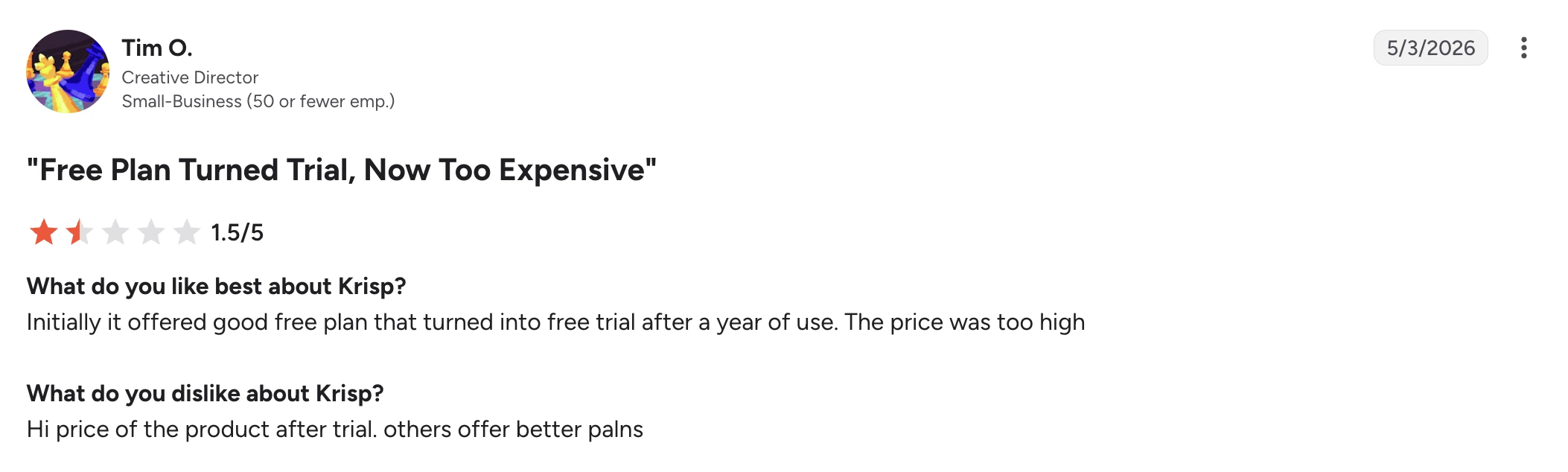
Dans un avis G2 de mai 2026, Tim O., directeur de création dans une petite entreprise, a attribué à Krisp la note de 1,5/5. Il explique avoir d'abord apprécié l'offre gratuite, avant de la voir se transformer en essai limité, et juge le prix demandé ensuite trop élevé.
Krisp n'est pas pour autant plus cher que toutes les alternatives. En revanche, si vous avez seulement besoin d'une réduction de bruit basique, payer pour un ensemble d'outils de réunion IA plus large n'a sans doute pas lieu d'être.
2. La fiabilité compte plus que la liste des fonctionnalités
Un assistant de réunion IA n'est utile que si la réunion figure bien dans votre historique une fois terminée.
Certains utilisateurs signalent des réunions manquantes ou des transcriptions qui échouent.
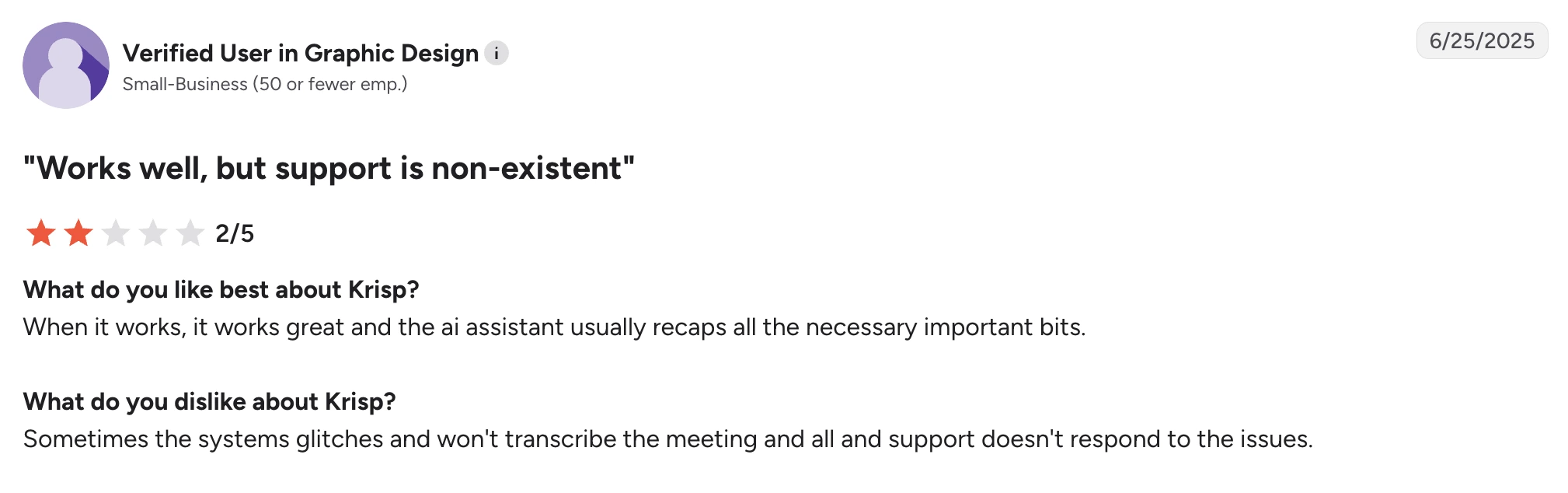
Un utilisateur vérifié d'une petite entreprise du secteur du graphisme écrivait dans un avis G2 de juin 2025 que Krisp fonctionne bien quand il fonctionne et que l'assistant IA capte en général l'essentiel. Sa frustration venait d'ailleurs : il arrivait que le système ne transcrive pas une réunion, et il a eu du mal à obtenir de l'aide auprès du support.
Un autre utilisateur vérifié d'une petite entreprise du secteur logiciel a fait état d'un problème comparable dans un avis G2 d'avril 2025. Il appréciait la transcription en elle-même, mais indiquait que certaines réunions apparemment enregistrées avaient ensuite disparu de l'historique des réunions.
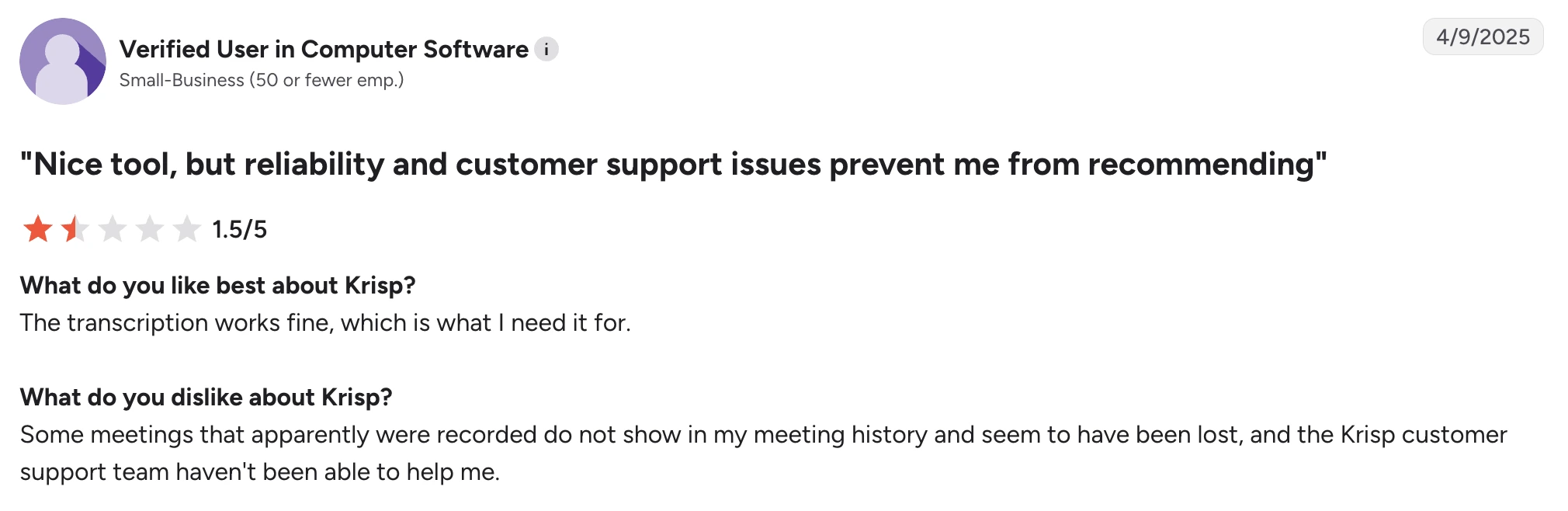
Ce sont des témoignages individuels, pas la preuve que le problème touche tout le monde. Ils comptent malgré tout si un historique de réunions fiable est indispensable à votre flux de travail.
3. Vous avez besoin d'une intelligence de réunion plus poussée
Krisp ne se limite plus à l'élimination du bruit : comptes rendus de réunion générés par IA, résumés, actions à mener, AI Chat et intégrations.
Certaines alternatives sont toutefois nettement plus fortes sur le volet intelligence de réunion.
Si votre priorité est de fouiller vos réunions passées, d'analyser des équipes entières, de suivre des signaux commerciaux, d'envoyer automatiquement les informations clés vers votre CRM, de créer des automatisations à partir du contenu des réunions ou d'interroger une base de connaissances consultable et centralisée, une plateforme d'intelligence de réunion conçue pour cela sera plus adaptée.
C'est d'autant plus vrai si vous travaillez rarement dans un environnement bruyant. Dans ce cas, la suppression du bruit en temps réel n'est peut-être pas le critère qui doit dicter votre choix d'outil.
4. Vous avez besoin d'une couverture linguistique plus large
Krisp annonce aujourd'hui des transcriptions et des résumés dans plus de 16 langues.
C'est suffisant pour beaucoup d'équipes, mais les entreprises présentes dans plusieurs pays pourraient avoir besoin de bien davantage.
Fireflies prend en charge la transcription dans plus de 100 langues. MeetGeek en gère également plus de 100 et détecte automatiquement la langue parlée.
La couverture linguistique devient déterminante lorsqu'une seule plateforme doit couvrir les appels commerciaux, les entretiens, les rendez-vous clients et les échanges internes dans plusieurs régions.
5. La suppression du bruit ne réagit pas de la même façon selon les configurations
La suppression du bruit par IA implique toujours un compromis : le logiciel doit décider quel son appartient à la personne qui parle et quel son doit disparaître.
L'exercice se complique quand la parole se superpose à des bruits forts et soudains.
Dans un avis G2 de mai 2026, V K. salue Krisp pour sa capacité à effacer le bruit d'un chantier voisin, et trouve l'installation simple. Son reproche est plus ciblé : au casque, le son se coupait parfois.
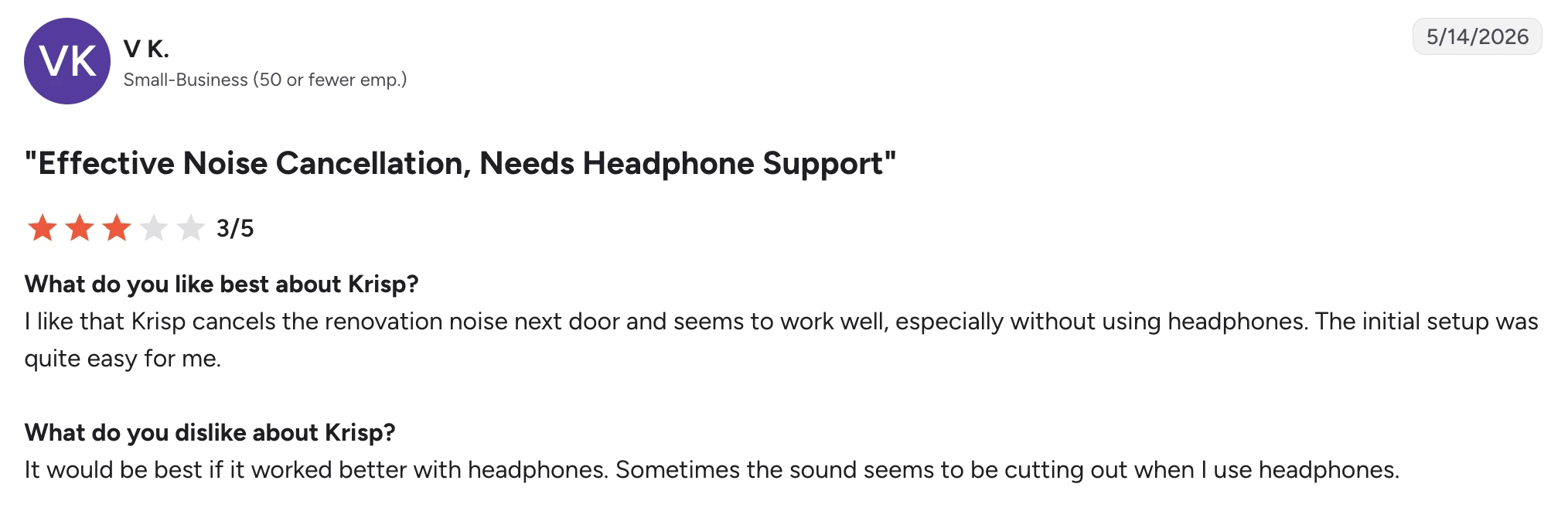
Là encore, l'exemple montre bien que le choix ne se résume pas à « Krisp, c'est bien » ou « Krisp, c'est nul ». Ce même utilisateur jugeait la suppression du bruit efficace.
Votre micro, votre casque, la charge du processeur, les réglages de réduction de bruit, l'acoustique de la pièce et le type de bruit de fond pèsent tous sur le résultat.
La plupart des filtres repèrent plus facilement le ronronnement régulier d'un ventilateur qu'un bruit soudain qui se superpose à la voix. Si la clarté vocale compte particulièrement pour vous, testez plusieurs outils avec votre propre casque et dans votre environnement de travail réel. Le niveau de réduction de bruit le plus élevé ne donne pas forcément la meilleure qualité audio.
Les 6 meilleures alternatives à Krisp
1. NVIDIA RTX Voice : la meilleure alternative gratuite à Krisp pour la suppression du bruit
NVIDIA RTX Voice figure parmi les alternatives les plus proches de Krisp si la fonctionnalité que vous cherchez vraiment à remplacer est la suppression du bruit en temps réel.
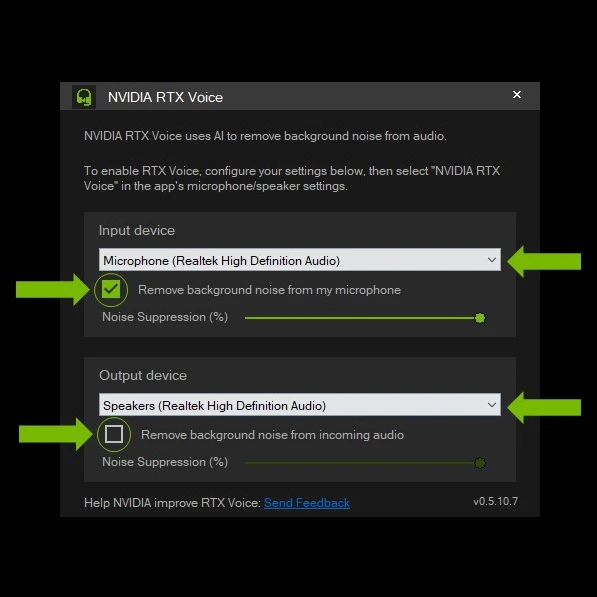
Ce n'est pas un assistant de réunion IA. Vous n'y trouverez ni comptes rendus de réunion, ni résumés, ni actions à mener, ni recherche transversale entre réunions, ni intelligence conversationnelle.
En revanche, vous bénéficiez d'une réduction de bruit par IA sur votre micro comme sur l'audio entrant, sans abonnement logiciel mensuel.
RTX Voice séduit donc particulièrement les télétravailleurs, les streamers, les joueurs et les professionnels qui possèdent déjà une carte graphique NVIDIA et n'ont pas besoin des autres fonctions de gestion de réunion de Krisp.
Comment NVIDIA RTX Voice se compare-t-il à Krisp ?
NVIDIA RTX Voice est l'alternative la plus proche de cette liste si vous utilisez Krisp avant tout pour la suppression du bruit. La contrepartie : il ne remplace que cette partie de Krisp.
Les deux outils peuvent éliminer en temps réel le bruit de fond sur le signal du micro et sur l'audio entrant, ce qui aide face aux distractions comme le cliquetis du clavier, le souffle d'un ventilateur ou d'autres bruits ambiants pendant les appels. Ils fonctionnent aussi avec l'ensemble de vos applications de communication, sans lier la réduction de bruit à une seule plateforme de visioconférence.
La principale différence tient au matériel et au périmètre. Krisp est une solution logicielle autonome qui réunit suppression du bruit, transcription, enregistrement, comptes rendus de réunion générés par IA, résumés et conversion d'accent. RTX Voice s'appuie sur un GPU NVIDIA compatible pour traiter l'audio et n'offre aucune de ces fonctions d'assistant de réunion.
C'est sur le coût que RTX Voice prend l'avantage. Le logiciel est gratuit, ce qui en fait un moyen bien moins cher d'activer la suppression du bruit si vous disposez déjà d'un matériel NVIDIA compatible. Sur les GPU RTX récents, NVIDIA Broadcast dépasse RTX Voice : en plus de la réduction de bruit (Noise Removal), il assure la suppression de l'écho de la pièce et des fonctions vidéo comme les arrière-plans virtuels.
Préférez NVIDIA RTX Voice à Krisp si vous possédez déjà un GPU NVIDIA compatible et n'avez besoin que d'une réduction de bruit en temps réel. Préférez Krisp si vous voulez la suppression du bruit et un assistant de réunion IA dans un même produit.
Points forts de NVIDIA RTX Voice
- Logiciel gratuit, sans abonnement récurrent
- Réduction de bruit par IA en temps réel
- Filtre le micro et l'audio entrant
- Très efficace pour atténuer le bruit de fond pendant les réunions en direct
- Compatible avec plusieurs plateformes de visioconférence
- S'intègre à NVIDIA Broadcast
- NVIDIA Broadcast ajoute la suppression de l'écho de la pièce et des effets vidéo
- Utile pour les appels, le streaming, le jeu et la création de contenu
Points faibles de NVIDIA RTX Voice
- Nécessite une carte graphique NVIDIA GTX ou RTX compatible
- Centré sur Windows, donc pratiquement inutilisable pour la plupart des utilisateurs Mac
- Ne produit ni comptes rendus de réunion générés par IA, ni transcriptions, ni résumés de réunion
- Le traitement par GPU rend l'expérience très dépendante de votre matériel
- Inadapté si vous remplacez Krisp pour l'intelligence de réunion plutôt que pour la réduction de bruit
Tarifs de NVIDIA RTX Voice
NVIDIA RTX Voice se télécharge et s'utilise gratuitement, mais exige une carte graphique NVIDIA compatible.
2. Fireflies.ai : idéal pour une intelligence de réunion consultable
Fireflies constitue une solide alternative à Krisp quand la suppression du bruit n'est plus le problème que vous cherchez à résoudre en priorité.
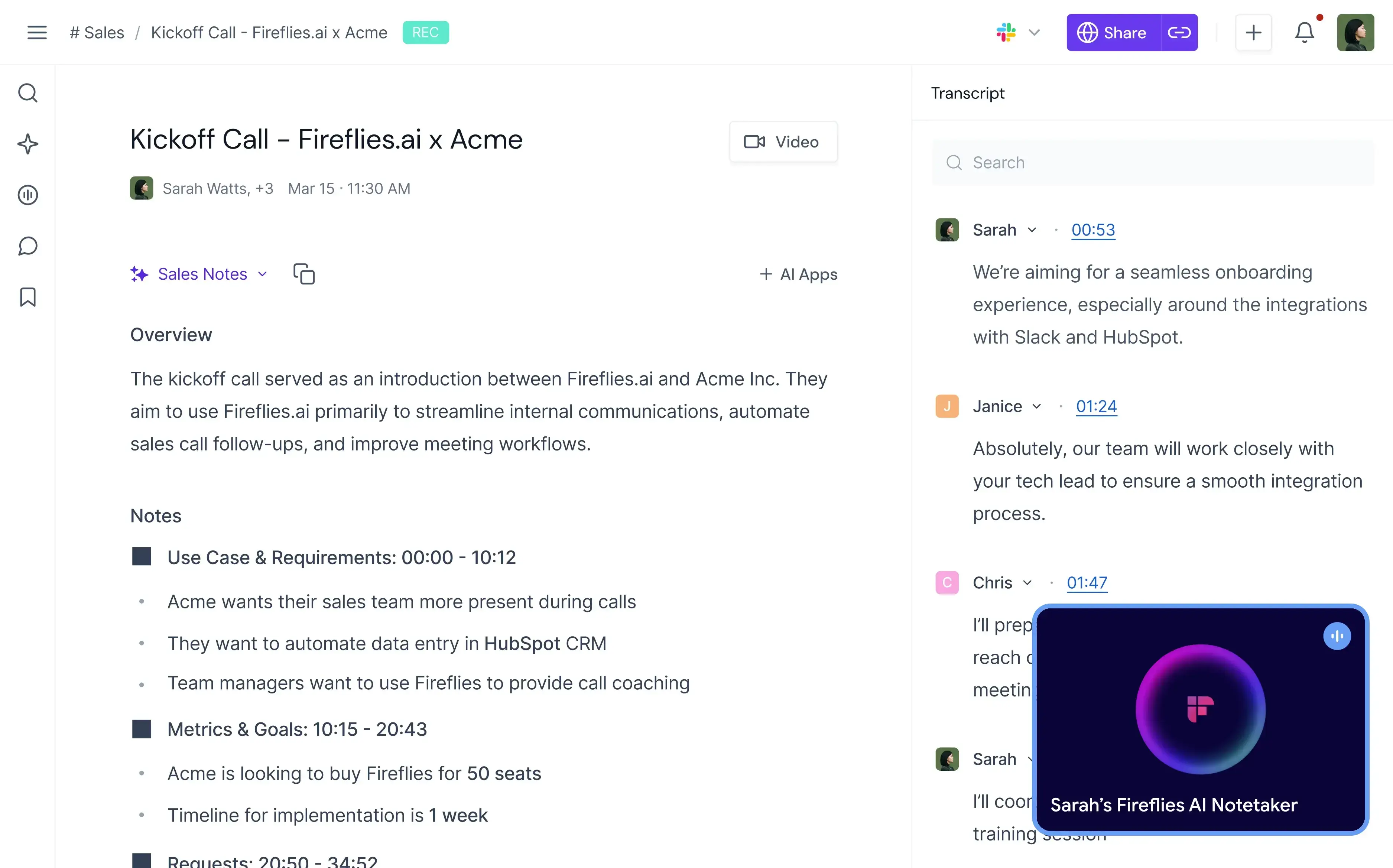
Krisp améliore ce que l'on entend pendant la réunion. Fireflies mise bien davantage sur ce que votre organisation peut faire de la conversation ensuite.
L'outil enregistre et transcrit les réunions, produit des résumés IA illimités, permet de faire des recherches dans les conversations, repère les sujets et les tâches, et ajoute l'intelligence conversationnelle et des analyses d'équipe sur les offres supérieures.
Il rend donc de grands services aux équipes commerciales, au recrutement, à la réussite client et à toutes les équipes qui doivent transformer des réunions en informations structurées.
Comment Fireflies se compare-t-il à Krisp ?
Fireflies et Krisp se recoupent sur la transcription, l'enregistrement, les résumés IA, la recherche dans les réunions et les intégrations, mais leurs priorités diffèrent nettement.
Krisp l'emporte nettement dès que la qualité audio pendant l'appel en direct entre en jeu. Sa suppression du bruit en temps réel peut effacer le bruit de fond pendant que vous parlez et filtrer l'audio entrant, ce que Fireflies n'a pas vocation à remplacer. Krisp assure aussi la conversion d'accent, une autre fonction destinée à améliorer la conversation elle-même.
Fireflies se distingue dès qu'il s'agit d'analyser ce qui s'est dit. Il prend en charge la transcription dans plus de 100 langues, quand Krisp en gère plus de 16, et son offre Business ajoute l'intelligence conversationnelle et les analyses d'équipe. Les équipes peuvent suivre les sujets, les tâches, les questions, le sentiment et le temps de parole de chacun, au lieu de se contenter d'une transcription et d'un résumé par réunion.
Les deux produits s'insèrent aussi différemment dans les flux de travail de l'entreprise. L'un et l'autre offrent des intégrations et un accès API, mais Fireflies est davantage tourné vers la transformation des conversations en données consultables pour les équipes commerciales et les autres équipes en contact client.
Les tarifs d'entrée de gamme sont proches : Krisp Core coûte 16 $US/utilisateur/mois et Fireflies Pro 18 $US/utilisateur/mois en facturation mensuelle. La grille tarifaire de Fireflies comprend en plus une offre gratuite permanente, là où Krisp propose aujourd'hui un essai gratuit de sept jours.
Fireflies se justifie davantage que Krisp quand l'intelligence conversationnelle, une couverture linguistique plus large et des données de réunion consultables comptent plus que la suppression du bruit. Krisp garde l'avantage si améliorer le son des appels en direct fait partie de vos exigences principales.
Points forts de Fireflies.ai
- Transcription et résumés IA illimités
- Prise en charge de plus de 100 langues
- Détection automatique de la langue
- Transcription en temps réel
- Historique des réunions consultable
- Intelligence conversationnelle sur l'offre Business
- Analyses du sentiment, des sujets, des questions et des intervenants
- Applications pour ordinateur et mobile
- Enregistrement via bot ou extension Chrome
- Import de fichiers audio et vidéo
- Accès à l'API
- Nombreuses intégrations sur les offres payantes
Points faibles de Fireflies.ai
- Ne remplace pas la suppression du bruit par IA en temps réel de Krisp
- Certaines des analyses les plus utiles exigent l'offre Business
- Stockage limité sur les offres Free et Pro
- Les fonctions IA reposent sur un système de crédits qui s'ajoute à l'offre souscrite
- Les équipes qui veulent surtout une meilleure qualité audio risquent de payer pour des fonctions dont elles n'ont pas l'usage
Tarifs de Fireflies.ai
En facturation mensuelle :
- Free : 0 $US
- Pro : 18 $US/utilisateur/mois
- Business : 29 $US/utilisateur/mois
- Enterprise : 39 $US/utilisateur/mois, en facturation annuelle uniquement
Envie d'en savoir plus sur Fireflies.ai ? Lisez notre comparatif MeetGeek vs Fireflies.ai !
3. MeetGeek : idéal pour l'automatisation des réunions et l'intelligence d'équipe
MeetGeek est une bonne alternative si le virage assistant de réunion pris par Krisp vous plaît, mais que vous voulez une plateforme nettement plus centrée sur la captation, l'analyse, l'organisation et l'automatisation des réunions.
%20(2).webp)
Ce n'est pas un remplaçant direct de la suppression du bruit de Krisp.
MeetGeek intervient plutôt sur la prise de notes IA et la gestion des réunions. Il enregistre et transcrit automatiquement les réunions en direct, génère des résumés IA et des actions à mener, range les réunions passées dans une base de connaissances consultable, analyse les conversations et peut déclencher des automatisations dans les outils que votre équipe utilise déjà.
Comment MeetGeek se compare-t-il à Krisp ?
MeetGeek et Krisp couvrent tous deux l'enregistrement, la transcription, les comptes rendus de réunion générés par IA, les résumés, l'AI Chat, les réunions en présentiel et les intégrations. La différence principale : Krisp place l'amélioration audio en direct à côté de son assistant de réunion, là où MeetGeek mise avant tout sur l'intelligence de réunion et l'automatisation.
Krisp reste le meilleur choix si réduire le bruit de fond fait partie du problème à résoudre. MeetGeek n'offre ni suppression du bruit en temps réel comparable à celle de Krisp, ni conversion d'accent.
MeetGeek prend l'avantage lorsque la réunion doit se transformer en données exploitables pour l'entreprise. Il gère plus de 100 langues de transcription, contre plus de 16 pour Krisp, permet l'enregistrement avec ou sans bot, et fournit des analyses de réunion individuelles et collectives, l'analyse du sentiment et de l'engagement, des résumés personnalisés, des signaux commerciaux et l'AI Chat sur l'ensemble des réunions passées.
L'écart est également net sur les intégrations. Krisp se connecte à des outils majeurs comme HubSpot, Slack, Notion, Zapier, Teams, Salesforce et Pipedrive, et propose des intégrations API et MCP.
MeetGeek relie les données de réunion à 10 000+ intégrations et prend en charge Zapier, Make, n8n, l'API et MCP. Ses AI Voice Agents et ses flux de travail peuvent gérer les réunions, puis s'appuyer sur ce qui s'y est dit pour agir : mettre à jour vos systèmes ou transmettre les informations utiles à une autre équipe.
MeetGeek propose par ailleurs une offre gratuite permanente, quand Krisp s'en tient à un essai de sept jours. Leurs premières offres payantes sont à des tarifs comparables en facturation mensuelle : 15,99 $US/utilisateur/mois pour MeetGeek Pro et 16 $US/utilisateur/mois pour Krisp Core.
MeetGeek est l'option la plus solide si vous voulez des analyses de réunion plus poussées, de l'automatisation, une couverture linguistique plus large et davantage de moyens de relier les résultats de vos réunions au reste de vos processus. Restez sur Krisp si vous avez aussi besoin de la suppression du bruit en temps réel ou de la conversion d'accent dans la même application.
Pour aller plus loin, consultez notre article comparatif MeetGeek vs Krisp !
Points forts de MeetGeek
- Transcription dans plus de 100 langues
- Détection automatique de la langue
- Résumés IA illimités
- Options d'enregistrement sans bot
- Application mobile pour les réunions en présentiel
- AI Chat et recherche transversale entre réunions
- Analyses de réunion détaillées
- Intelligence conversationnelle
- Modèles de réunion personnalisés
- Sales Mode pour les échanges avec les clients
- Automatisation des flux de travail par IA
- 10 000+ intégrations
- Accès API et MCP
- Offre gratuite disponible
Points faibles de MeetGeek
- Pas de suppression du bruit en temps réel comme chez Krisp
- L'offre gratuite est limitée à trois heures de transcription par mois
- L'enregistrement vidéo HD nécessite l'offre Business
- Certaines fonctions de collaboration d'équipe et d'analyse nécessitent l'offre Business
- Les fonctions d'entreprise comme le SSO et le SCIM ne sont pas disponibles sur les offres inférieures
Tarifs de MeetGeek
En facturation mensuelle :
- Basic : Gratuit
- Pro : 15,99 $US/utilisateur/mois
- Business : 27 $US/utilisateur/mois
- Enterprise : Tarif sur devis
4. CrystalSound : la meilleure alternative à Krisp pour une suppression du bruit dédiée
CrystalSound est l'alternative à Krisp la plus directe de cette liste pour les utilisateurs dont la qualité audio reste la préoccupation première.
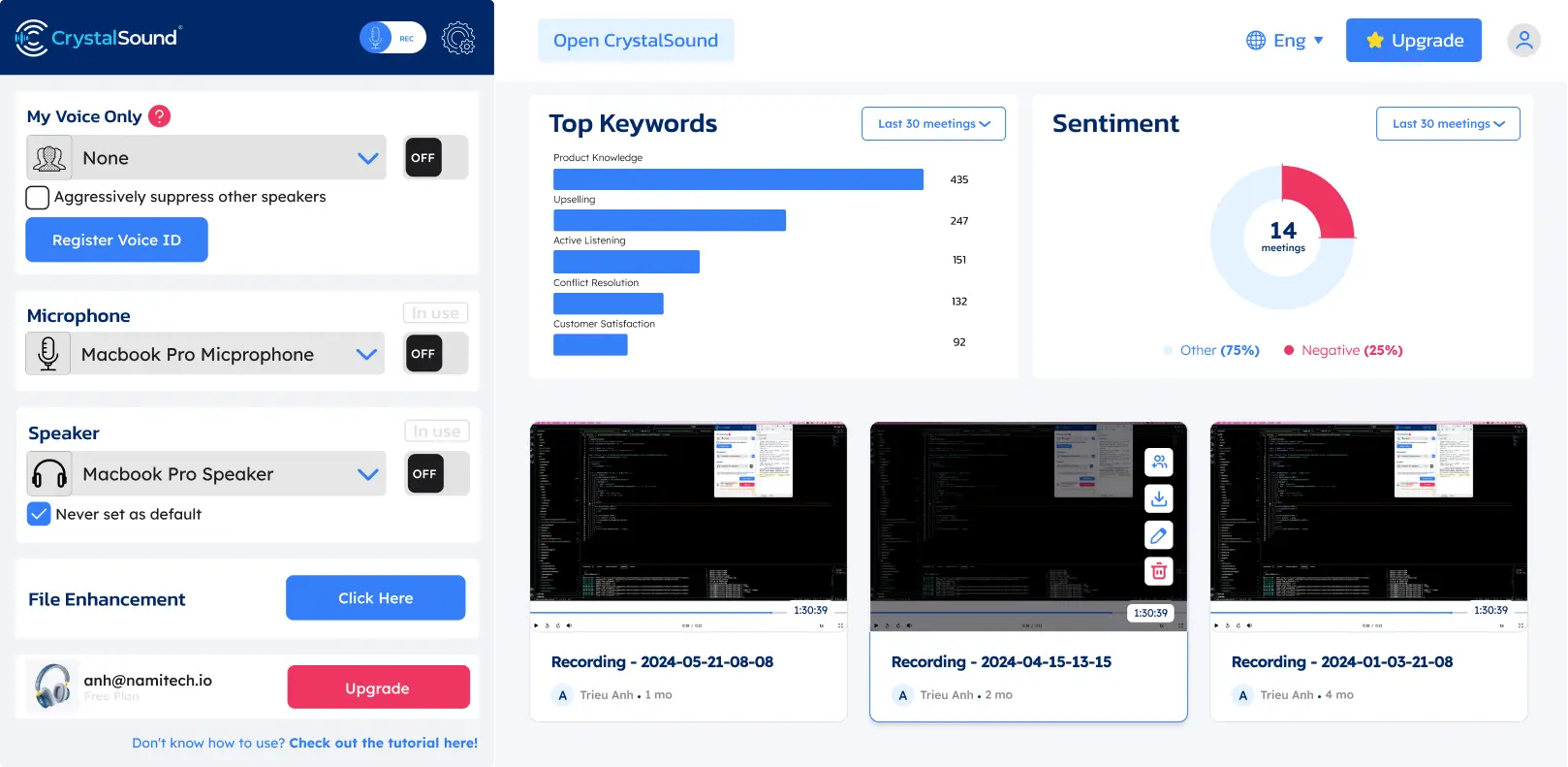
Comme Krisp, il est bâti autour de la suppression du bruit par IA en temps réel, qui n'est pas ici une petite fonction glissée dans une plateforme de visioconférence.
CrystalSound agit des deux côtés de l'appel : il atténue le bruit venant de votre micro comme celui de votre interlocuteur, ce qui peut être utile quand vous n'avez aucune prise sur l'environnement à l'autre bout de la ligne. Ce qui le distingue de Krisp, c'est la finesse de ses réglages audio, plus que le fait de filtrer dans les deux sens.
Comment CrystalSound se compare-t-il à Krisp ?
Sur la réduction de bruit, CrystalSound rivalise bien plus directement avec Krisp que Fireflies, MeetGeek ou Claap.
Les deux produits proposent une suppression du bruit illimitée sur leurs offres payantes et traitent le bruit des deux côtés de la conversation. CrystalSound réunit notamment la suppression du bruit bidirectionnelle, le traitement My Voice Only, la suppression de l'écho acoustique, l'élimination de l'écho de la pièce, le retrait du bruit résiduel et un niveau de réduction de bruit réglable. Krisp mise lui aussi sur l'élimination du bruit de fond pendant les conversations en direct et assure également la suppression de l'écho.
La différence tient à ce que chaque produit apporte au-delà du traitement audio.
Krisp est devenu un assistant de réunion IA nettement plus complet. Ses offres payantes incluent la transcription, l'enregistrement audio et vidéo, les résumés IA et les actions à mener, l'AI Chat, l'organisation des réunions, les intégrations et la prise en charge des réunions en présentiel. CrystalSound, lui, reste centré sur la clarté de la voix et la qualité de l'audio enregistré. Ses comptes rendus de réunion intelligents, ses titres automatiques, son analyse de mots-clés et son analyse de sentiment sont pour l'instant annoncés comme non disponibles, et l'enregistrement des appels dans le cloud est encore en préversion.
CrystalSound revient moins cher si ces fonctions de réunion supplémentaires ne vous sont pas nécessaires. L'offre Premium coûte 12 $US/utilisateur/mois, contre 16 $US/utilisateur/mois pour Krisp Core en facturation mensuelle.
CrystalSound coûte moins cher par mois et convient si vous voulez avant tout une réduction de bruit et une amélioration audio dédiées. Krisp vaut la différence si vous voulez la suppression du bruit associée à un assistant de réunion IA plus abouti.
Points forts de CrystalSound
- Suppression du bruit illimitée
- Suppression du bruit bidirectionnelle
- Mode My Voice Only
- Niveau de réduction de bruit réglable
- Suppression de l'écho de la pièce
- Suppression de l'écho acoustique
- Voix stéréo haute définition
- Amélioration des fichiers audio
- Amplification du volume du micro
- Mode de traitement économe en énergie
- Gestion des licences d'équipe
- Très adapté aux environnements bruyants
Points faibles de CrystalSound
- Moins abouti comme assistant de réunion IA que Krisp, Fireflies, MeetGeek ou Claap
- Les comptes rendus de réunion intelligents ne sont pas encore disponibles
- L'analyse de mots-clés et de sentiment reste indisponible
- L'enregistrement des appels dans le cloud est encore annoncé comme étant en préversion
- Un autre outil peut rester nécessaire pour les comptes rendus de réunion générés par IA, un historique de réunions consultable ou l'automatisation des flux de travail
Tarifs de CrystalSound
En facturation mensuelle :
- Premium : 12 $US/utilisateur/mois
- Elite : 29 $US/utilisateur/mois, bientôt disponible
- Enterprise : Tarif sur devis
Un essai gratuit de 7 jours est proposé sur l'offre Premium.
5. Claap : idéal pour une collaboration autour des réunions centrée sur la vidéo
Claap est une bonne alternative à Krisp pour les équipes moins attachées à l'élimination du bruit en temps réel qu'à la transformation des réunions et des vidéos enregistrées en travail collaboratif.
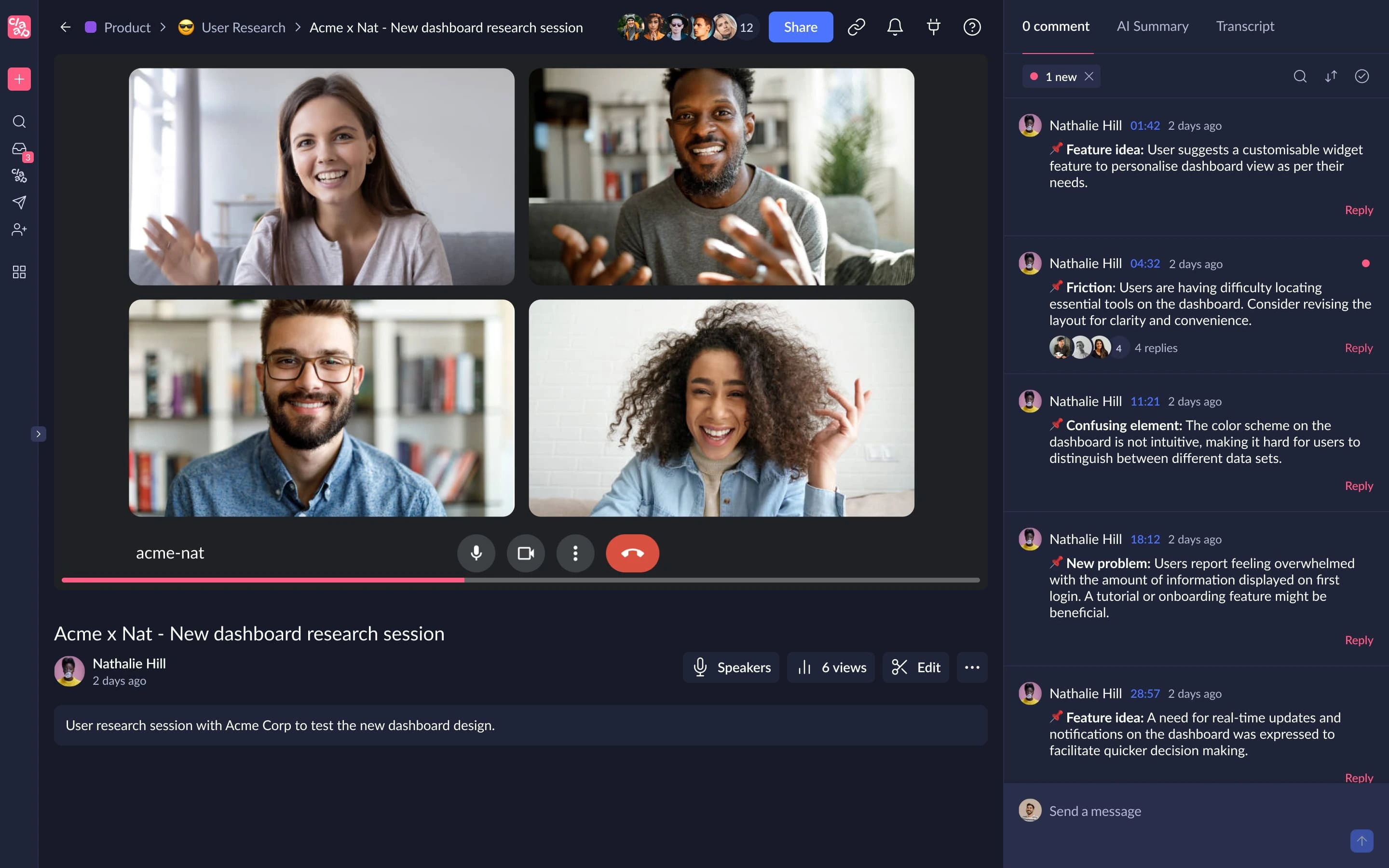
Il associe l'enregistrement des réunions à la transcription, aux résumés IA, au montage vidéo, aux commentaires, aux espaces de travail partagés, au coaching IA et aux flux de travail CRM.
Face à Krisp, la différence se résume simplement : Krisp part du traitement audio, quand Claap part des conversations enregistrées et de la collaboration vidéo.
Comment Claap se compare-t-il à Krisp ?
Claap et Krisp enregistrent tous deux les réunions, transcrivent les conversations, génèrent des résumés IA et donnent les moyens d'organiser et de partager ce qui s'est dit. Là où ils divergent : l'audio en direct d'un côté, la collaboration vidéo et l'intelligence de réunion de l'autre.
Krisp améliore la réunion pendant qu'elle se déroule. Sa suppression du bruit, son élimination de l'écho et sa conversion d'accent visent la clarté de la voix pendant les appels. Claap n'offre pas de couche équivalente de suppression du bruit en temps réel.
Claap prend en revanche le dessus sur la réunion enregistrée elle-même. Il combine la captation des réunions avec l'enregistrement de l'écran et de la caméra, le montage vidéo assisté par IA, l'assemblage de séquences, les annotations, les commentaires, les réponses en vidéo, les notes collaboratives et les espaces de travail partagés. Il convient donc mieux aux équipes qui utilisent la vidéo enregistrée pour communiquer en asynchrone, en plus des réunions en direct.
La couverture linguistique constitue une autre différence. Claap transcrit dans 99 langues, là où Krisp s'arrête à plus de 16. Ses offres supérieures ajoutent le coaching IA, l'enrichissement automatique du CRM, des indicateurs sur les opportunités commerciales, des e-mails rédigés par IA et la possibilité d'interroger plusieurs réunions à la fois.
La contrepartie est le prix. Krisp Core coûte 16 $US/utilisateur/mois, alors que Claap Pro revient à 30 €/licence/mois en facturation mensuelle. Claap se justifie donc surtout si ses capacités supplémentaires de collaboration et de vidéo sont réellement exploitées.
Claap convient mieux que Krisp quand vos réunions enregistrées s'inscrivent dans un flux de travail plus large de collaboration vidéo, de vente ou de communication asynchrone. Krisp reste préférable si vous tenez surtout à améliorer l'audio des appels en direct et voyez les comptes rendus de réunion comme un complément plutôt que comme le cœur de la plateforme.
Points forts de Claap
- Transcription dans 99 langues
- Synchronisation avec l'agenda et les visioconférences
- Résumés IA et modèles personnalisés
- Enregistrement de l'écran et de la caméra
- Montage vidéo assisté par IA
- Annotations et commentaires vidéo collaboratifs
- IA multiréunions sur l'offre Business
- Enrichissement du CRM
- E-mails rédigés par IA
- Coaching IA
- Indicateurs sur les opportunités commerciales
- Accès API et MCP
- Prise en charge de Zapier, Make et n8n
- Offre gratuite disponible
Points faibles de Claap
- Ne remplace pas la suppression du bruit en temps réel de Krisp
- L'offre gratuite est plafonnée à 10 vidéos et 300 minutes d'enregistrement au total
- L'offre Pro n'inclut que 1 000 minutes de transcription et d'enregistrement par mois
- L'offre Business coûte nettement plus cher que Krisp Core
- Son éventail de fonctions peut être surdimensionné si vous voulez seulement un micro plus propre pendant vos appels
Tarifs de Claap
En facturation mensuelle :
- Basic : Gratuit
- Pro : 30 €/licence/mois
- Business : 60 €/licence/mois
- Enterprise : Tarif sur devis
6. IRIS Clarity : idéal pour les équipes qui ont besoin d'une suppression du bruit des deux côtés de l'appel
IRIS Clarity compte parmi les alternatives à Krisp les plus proches si la suppression du bruit est votre priorité, en particulier lorsque le bruit de fond vient des deux côtés de la conversation.
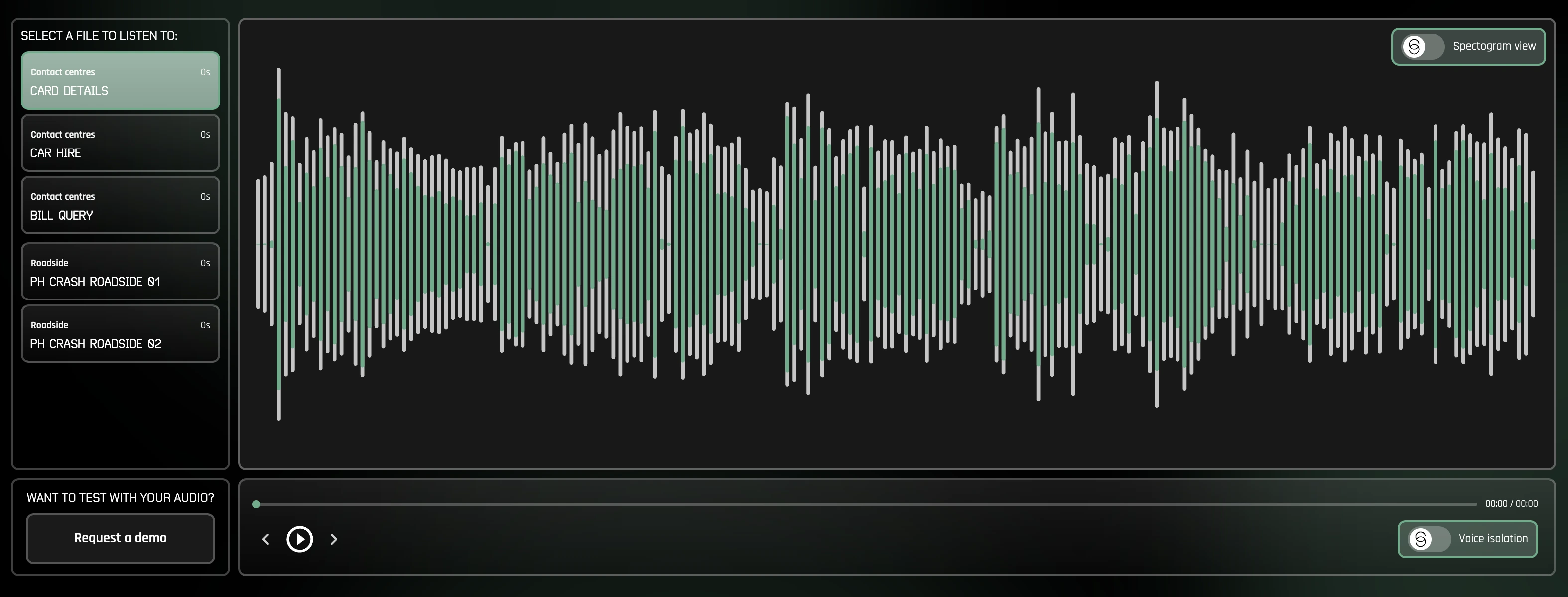
Sa fonction principale est une suppression du bruit illimitée et bidirectionnelle. Au lieu de se contenter d'effacer le bruit autour de votre micro, IRIS Clarity isole les voix dans l'audio sortant comme dans l'audio entrant. L'outil prend donc tout son sens pour les équipes en contact client et les centres d'appels, où le collaborateur travaille souvent dans un environnement maîtrisé, alors que le client, lui, appelle d'un endroit bruyant.
Contrairement à Krisp, IRIS Clarity s'en tient à l'isolation de la voix et ne cherche pas à faire aussi office d'assistant de réunion IA. Il ne rivalise pas avec la transcription, les comptes rendus de réunion générés par IA, les résumés, l'enregistrement ou la conversion d'accent de Krisp. Il offre à la place un produit de réduction de bruit plus spécialisé, doté de la gestion d'équipe, d'analyses et de fonctions de déploiement en entreprise.
Comment IRIS Clarity se compare-t-il à Krisp ?
IRIS Clarity et Krisp assurent l'un et l'autre une suppression du bruit bidirectionnelle en temps réel : chacun supprime les bruits parasites sur votre micro comme sur l'audio entrant. Les deux fonctionnent aussi comme des applications autonomes, sans cantonner la réduction de bruit à une seule plateforme de communication.
La principale différence tient à leur périmètre.
Krisp associe la suppression du bruit à un ensemble croissant de fonctions de réunion : transcription, résumés IA, actions à mener, enregistrement audio et vidéo, AI Chat, conversion d'accent et intégrations. IRIS Clarity vise un objectif beaucoup plus étroit : rendre les voix plus audibles.
Cette spécialisation s'accompagne de fonctions pensées pour les organisations qui gèrent l'audio de grandes équipes. IRIS Clarity fournit des analyses par session, par utilisateur et par licence, des exports de données CSV, des profils d'application administrés par le service informatique, la détection des sonneries, l'enregistrement d'appels à des fins de diagnostic, le SSO et le provisionnement automatique des utilisateurs. Son offre Enterprise prend également en charge les licences simultanées et un accompagnement au démarrage.
IRIS Clarity fonctionne aussi bien sous Windows que sous Mac : contrairement à NVIDIA RTX Voice, il n'exige pas de GPU NVIDIA compatible.
IRIS Clarity est le bon choix si vous cherchez un outil spécialisé dans l'isolation de la voix, en particulier pour des équipes en contact client ou des centres d'appels qui doivent retirer le bruit des deux côtés de la conversation. Krisp est plus indiqué si vous voulez la suppression du bruit accompagnée de la transcription, des comptes rendus de réunion générés par IA, de l'enregistrement et d'autres fonctions d'assistant de réunion.
Points forts d'IRIS Clarity
- Suppression du bruit bidirectionnelle et illimitée
- Retire le bruit de l'audio sortant comme de l'audio entrant
- Derniers modèles d'isolation de la voix inclus
- Applications Windows et Mac
- Fonctions de gestion d'équipe
- Analyses par session, par utilisateur et par licence
- Exports CSV des analyses
- Profils d'application administrés par le service informatique
- SSO et provisionnement automatique des utilisateurs
- Aucun matériel NVIDIA spécifique requis
Points faibles d'IRIS Clarity
- Ne fournit ni comptes rendus de réunion générés par IA, ni résumés
- Pas de transcription ni de conversion d'accent comme chez Krisp
- Plus spécialisé que les outils qui combinent réduction de bruit et fonctions de productivité en réunion
- L'offre Enterprise exige au moins 100 utilisateurs et un engagement annuel
Tarifs d'IRIS Clarity
En facturation mensuelle :
- Professional : 9,50 £/utilisateur/mois
- Enterprise : Tarif sur devis, à partir de 100 utilisateurs et avec engagement annuel
Un essai gratuit de 14 jours est proposé sur l'offre Professional.
Comment se comparent les meilleures alternatives à Krisp ?
Aucune alternative de cette liste ne remplace toutes les fonctions de Krisp.
| Outil | Suppression du bruit en temps réel | Comptes rendus de réunion par IA | Langues prises en charge | Usage idéal |
|---|---|---|---|---|
| Krisp AI | Oui | Oui | 16+ | Suppression du bruit et assistance en réunion |
| NVIDIA RTX Voice | Oui | Non | N/A | Réduction de bruit en temps réel assurée par le matériel |
| Fireflies.ai | Non | Oui | 100+ | Intelligence de réunion consultable |
| MeetGeek | Non | Oui | 100+ | Automatisation de la gestion des réunions, analyses et flux de travail |
| CrystalSound | Oui | Limité | Non communiqué | Réduction de bruit bidirectionnelle dédiée |
| Claap | Non | Oui | 99 | Collaboration autour des réunions centrée sur la vidéo |
| IRIS Clarity | Oui | Non | N/A | Isolation vocale bidirectionnelle pour les équipes et les centres d'appels |
Pour retrouver au plus près les fonctions audio essentielles de Krisp, commencez par NVIDIA RTX Voice, IRIS Clarity ou CrystalSound.
Si l'assistant de réunion IA compte désormais plus pour vous que la réduction de bruit, comparez plutôt Fireflies, MeetGeek et Claap.
La meilleure alternative à Krisp dépend de ce que vous voulez remplacer
Krisp est difficile à remplacer par un seul produit, car il remplit désormais plusieurs rôles.
Pour la suppression du bruit par IA en temps réel, NVIDIA RTX Voice offre aux utilisateurs Windows compatibles une excellente option gratuite, tandis que CrystalSound propose un logiciel de réduction de bruit dédié, avec filtrage bidirectionnel, suppression de l'écho de la pièce et réglages audio avancés.
Sur l'intelligence de réunion, la comparaison change de nature.
Fireflies excelle sur les conversations consultables et les flux de travail commerciaux. Claap associe la captation des réunions à la collaboration vidéo asynchrone. MeetGeek, lui, transforme les réunions en direct en transcriptions, résumés IA, analyses, connaissances consultables et flux de travail automatisés grâce à 10 000+ intégrations.
Le bon choix ne consiste donc pas à trouver l'outil doté de la plus longue liste de fonctions, mais à identifier ce qui, dans Krisp, ne correspond plus à votre façon de travailler.
Si vous explorez les alternatives à Krisp AI pour améliorer ce qui se passe après vos réunions, essayez MeetGeek gratuitement et laissez-le enregistrer, transcrire, résumer et analyser automatiquement vos réunions, avant de relier le tout au reste de votre travail.
À retenir
- Krisp reste un excellent choix pour la suppression du bruit en temps réel, surtout si vous voulez aussi la transcription, les notes IA, l'enregistrement et la conversion d'accent dans le même outil.
- NVIDIA RTX Voice est le meilleur choix si vous n'avez besoin que de la réduction de bruit et possédez déjà un GPU NVIDIA compatible, puisque le logiciel est gratuit.
- Fireflies.ai convient mieux aux équipes qui privilégient l'intelligence conversationnelle, des transcriptions consultables et des flux de travail de réunion connectés au CRM.
- MeetGeek est une alternative plus solide pour les équipes qui veulent transformer leurs réunions en actions concrètes, grâce aux résumés IA, aux analyses, à la recherche transversale entre réunions, à l'automatisation et à 10 000+ intégrations.
- CrystalSound est l'alternative la plus proche pour une amélioration audio dédiée, avec suppression du bruit bidirectionnelle, élimination de l'écho et réduction de bruit réglable.
- Claap se justifie davantage quand les enregistrements de réunion s'inscrivent dans un flux de travail de collaboration vidéo plus large, avec montage, commentaires, coaching IA et fonctions CRM.
- IRIS Clarity est une option spécialisée pour les équipes en contact client et les centres d'appels qui ont besoin d'une suppression du bruit bidirectionnelle illimitée, de la gestion d'équipe et d'analyses centrées sur l'audio.
- La bonne alternative dépend de ce que vous voulez remplacer : l'amélioration de l'audio en direct, ou l'intelligence et l'automatisation après la réunion.
Questions fréquentes
1. Quelle est la meilleure alternative gratuite à Krisp ?
NVIDIA RTX Voice figure parmi les meilleures alternatives gratuites à Krisp pour la réduction de bruit en temps réel, à condition que votre ordinateur dispose d'une carte graphique NVIDIA compatible. Si vous cherchez des comptes rendus de réunion générés par IA plutôt que la suppression du bruit, Fireflies et MeetGeek proposent chacun une offre gratuite.
2. Existe-t-il une alternative à Krisp pour éliminer le bruit de fond ?
Oui. NVIDIA RTX Voice et CrystalSound assurent l'un comme l'autre une suppression du bruit par IA en temps réel. Vous pouvez aussi utiliser la réduction de bruit intégrée à Microsoft Teams, Zoom et aux autres plateformes de visioconférence si un filtrage à l'échelle du système ne vous est pas nécessaire.
3. Krisp AI est-il meilleur que NVIDIA Broadcast ?
Les deux répondent à des problèmes audio similaires, mais leurs prérequis diffèrent. Krisp fonctionne comme un logiciel de réduction de bruit autonome, sans GPU NVIDIA, tandis que NVIDIA Broadcast s'appuie sur du matériel NVIDIA compatible et associe l'élimination du bruit à des fonctions vidéo comme les arrière-plans virtuels. NVIDIA Broadcast peut offrir un meilleur rapport qualité-prix si vous possédez déjà le matériel pris en charge.
4. Quelle alternative à Krisp choisir pour les comptes rendus de réunion générés par IA ?
MeetGeek, Fireflies et Claap sont de meilleures options dès lors que les comptes rendus de réunion générés par IA comptent plus que la suppression du bruit. MeetGeek convient particulièrement aux équipes qui veulent aussi des analyses de réunion, une IA transversale entre réunions, l'automatisation des flux de travail et des intégrations. Fireflies brille sur l'intelligence conversationnelle, et Claap associe les comptes rendus à la collaboration vidéo.
5. Puis-je utiliser une alternative à Krisp pour Google Meet et Microsoft Teams ?
Oui. NVIDIA RTX Voice s'utilise comme microphone virtuel dans les applications de communication prises en charge, dont Microsoft Teams. Fireflies comme MeetGeek enregistrent et transcrivent les réunions Google Meet et Microsoft Teams, alors que CrystalSound est conçu pour supprimer le bruit dans l'ensemble de vos outils de communication, sans se limiter à une seule plateforme de visioconférence.






.avif)