

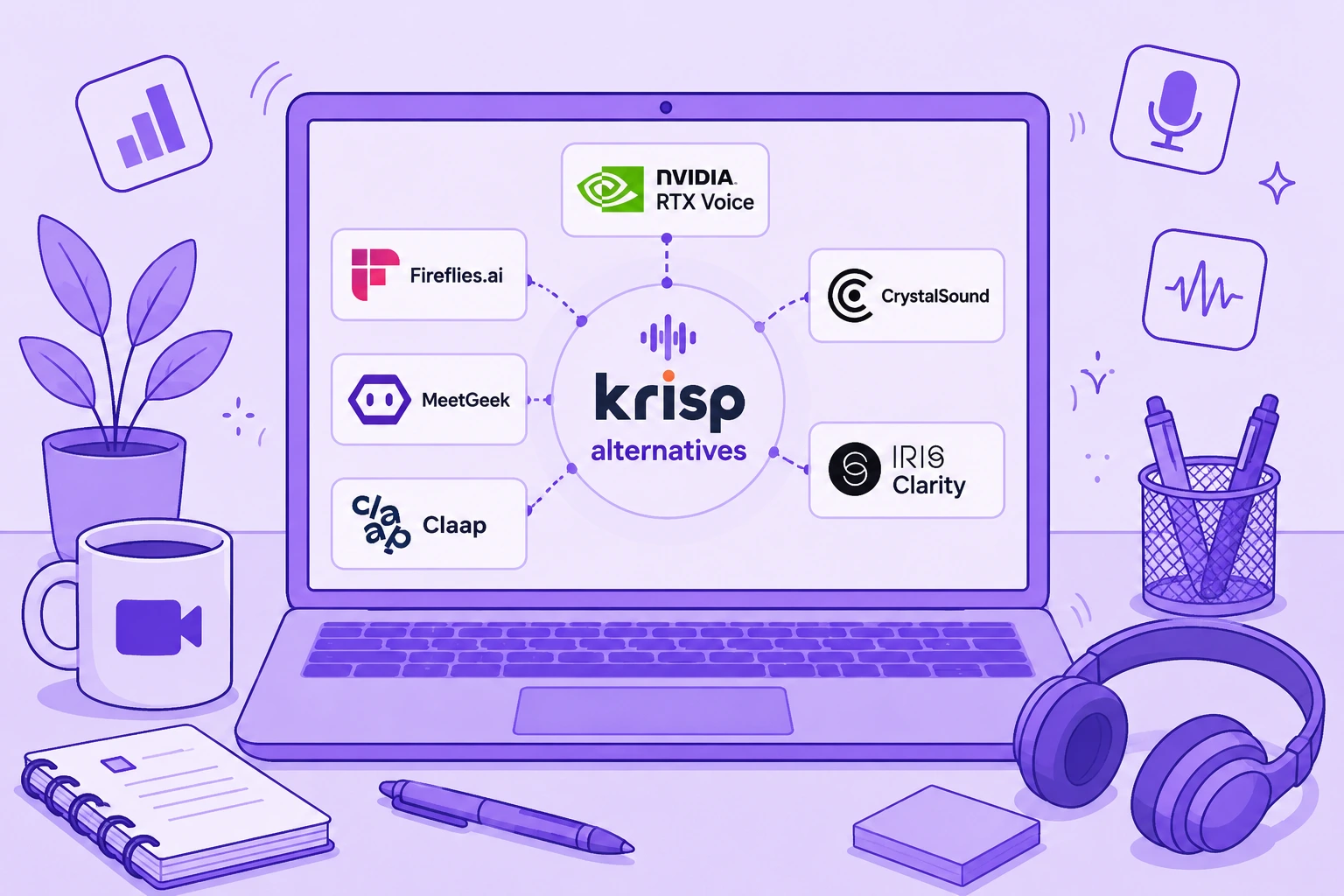

Krisp ist nach wie vor eines der stärksten Tools für KI-gestützte Geräuschunterdrückung in Echtzeit. Es kann Hintergrundgeräusche aus Ihrem Mikrofon und aus dem eingehenden Audio reduzieren, funktioniert mit den gängigen Kommunikationstools und kombiniert Rauschunterdrückung inzwischen mit Transkription, Aufzeichnung, KI-Meeting-Notizen, Akzentumwandlung und Meeting-Zusammenfassungen.
Weil Krisp inzwischen mehrere Aufgaben gleichzeitig erfüllt, ersetzt keine einzelne Alternative das gesamte Paket.
Wenn es Ihnen vor allem darum geht, Hintergrundgeräusche in laufenden Meetings zu entfernen, passen NVIDIA RTX Voice oder CrystalSound womöglich besser. Nutzen Sie Krisp hauptsächlich als KI-Meeting-Assistenten, gehen Fireflies.ai, MeetGeek und Claap bei Meeting-Notizen, Conversation Intelligence, Zusammenarbeit und Workflow-Automatisierung deutlich weiter.
Dieser Leitfaden vergleicht sechs der besten Krisp-Alternativen: was sie tatsächlich ersetzen, welche Funktionen sie bieten, wo ihre Grenzen liegen und was sie aktuell kosten.
TL;DR: Was sind die besten Krisp-Alternativen?
| Krisp-Alternative | Am besten geeignet für | Einstiegspreis |
|---|---|---|
| NVIDIA RTX Voice | Kostenlose Rauschunterdrückung in Echtzeit für alle mit kompatibler NVIDIA-GPU | Kostenlos |
| Fireflies.ai | Meeting Intelligence, Suche und Workflows mit CRM-Anbindung | Kostenlos |
| MeetGeek | KI-Meeting-Notizen, Automatisierung, Analysen und 10.000+ Integrationen | Kostenlos |
| CrystalSound | Spezialisierte Geräuschunterdrückung und Audio-Optimierung | 12 $/Nutzer/Monat |
| Claap | Video-first Zusammenarbeit rund um Meetings und Umsatz-Workflows | Kostenlos |
| IRIS Clarity | Bidirektionale Geräuschunterdrückung für kundennahe Teams und Callcenter | 9,50 £/Nutzer/Monat |
Entscheidend ist die Frage, was Sie an Krisp ersetzen wollen.
Was ist Krisp AI?
Krisp AI hat mit Geräuschunterdrückung in Echtzeit angefangen und ist beim Herausfiltern störender Geräusche in Videocalls und Telefonaten weiterhin besonders stark.
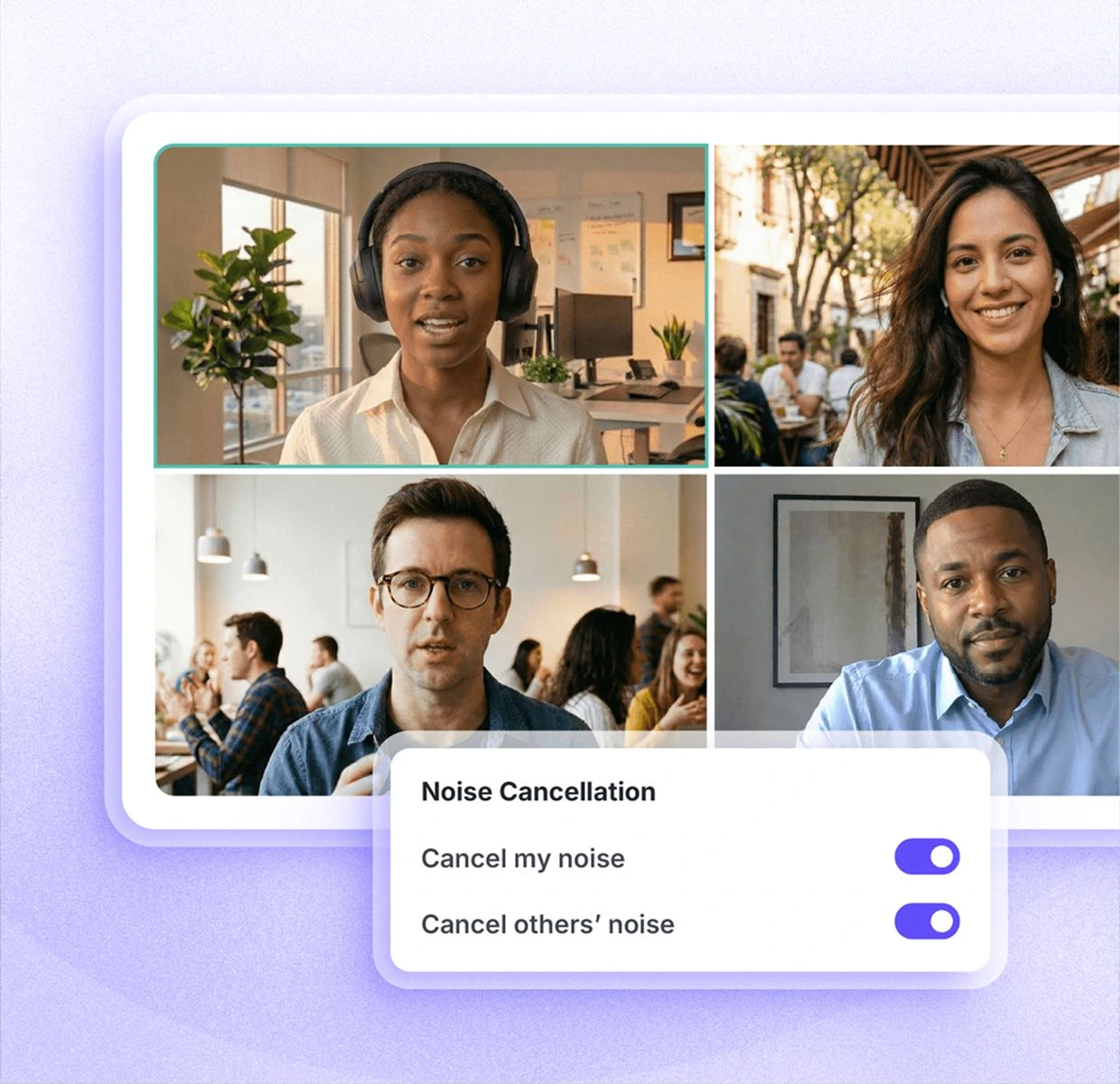
Krisp steckt nicht in einer einzelnen Kommunikations-App, sondern erstellt ein virtuelles Mikrofon und einen virtuellen Lautsprecher, die zwischen Ihre physischen Audiogeräte und Plattformen wie Zoom, Microsoft Teams und Google Meet geschaltet werden. So verarbeitet die Software Ihr Mikrofonsignal und, je nach Konfiguration, auch das eingehende Audio.
Der aktuelle Funktionsumfang geht weit über einfache Rauschunterdrückung hinaus.
Krisp umfasst:
- Unbegrenzte Geräuschunterdrückung in den kostenpflichtigen Tarifen
- KI-gestützte Entfernung von Hintergrundgeräuschen und Echo
- Transkription und Audioaufzeichnung
- Videoaufzeichnung
- KI-Zusammenfassungen und Action Items
- AI Chat
- Mehrsprachige Transkripte und Zusammenfassungen in 16+ Sprachen
- Akzentumwandlung
- Unterstützung für Meetings vor Ort
- Meeting-Ordner und Tags
- Individuelles Vokabular
- Integrationen mit Tools wie Slack, Notion, Zapier, Teams, HubSpot, Pipedrive, Salesforce und ConnectWise
- API- und MCP-Integrationen
- Teamverwaltung und Sicherheitseinstellungen
Krisp bietet derzeit eine siebentägige kostenlose Testphase mit unbegrenzter Transkription, unbegrenzter Geräuschunterdrückung, Audio- und Videoaufzeichnung sowie KI-Notizen.
Danach kostet Core 16 $ pro Nutzer und Monat, Advanced 30 $ pro Nutzer und Monat, jeweils bei monatlicher Abrechnung. Die Enterprise-Preise werden individuell festgelegt.
Wer im Homeoffice mit Lüftergeräuschen, bellenden Hunden, Baulärm oder anderen Umgebungsgeräuschen zu tun hat, kann enorm von Krisp profitieren. Dass die Software störende Geräusche in Echtzeit entfernt, ist nach wie vor der Grund, aus dem sich viele überhaupt erst dafür entscheiden.
Warum brauchen Sie vielleicht eine Krisp-Alternative?
Krisp hat Schwächen, keine Frage. Etwas anderes ist es, Krisp deshalb ein schlechtes Produkt zu nennen.
Das wäre schlicht falsch.
Krisp hat auf G2 eine Bewertung von 4,7/5, und die Geräuschunterdrückung löst ein echtes Problem für Remote-Mitarbeitende, kundennahe Teams und Callcenter. Wenn es Ihnen in erster Linie um klaren Klang im laufenden Gespräch geht, lohnt sich ein Wechsel womöglich gar nicht.
Es gibt allerdings einige Situationen, in denen Nutzer Alternativen zu Krisp AI vergleichen möchten.
1. Sie möchten eine kostenlose oder günstigere Lösung
Die dauerhaft kostenlose Version, für die sich manche langjährigen Nutzer ursprünglich angemeldet haben, gibt es bei Krisp nicht mehr. Aktuell steht eine siebentägige kostenlose Testphase bereit, danach beginnen die kostenpflichtigen Tarife bei 16 $ pro Nutzer und Monat.
Diese Preisänderung hat manche Nutzer verärgert.
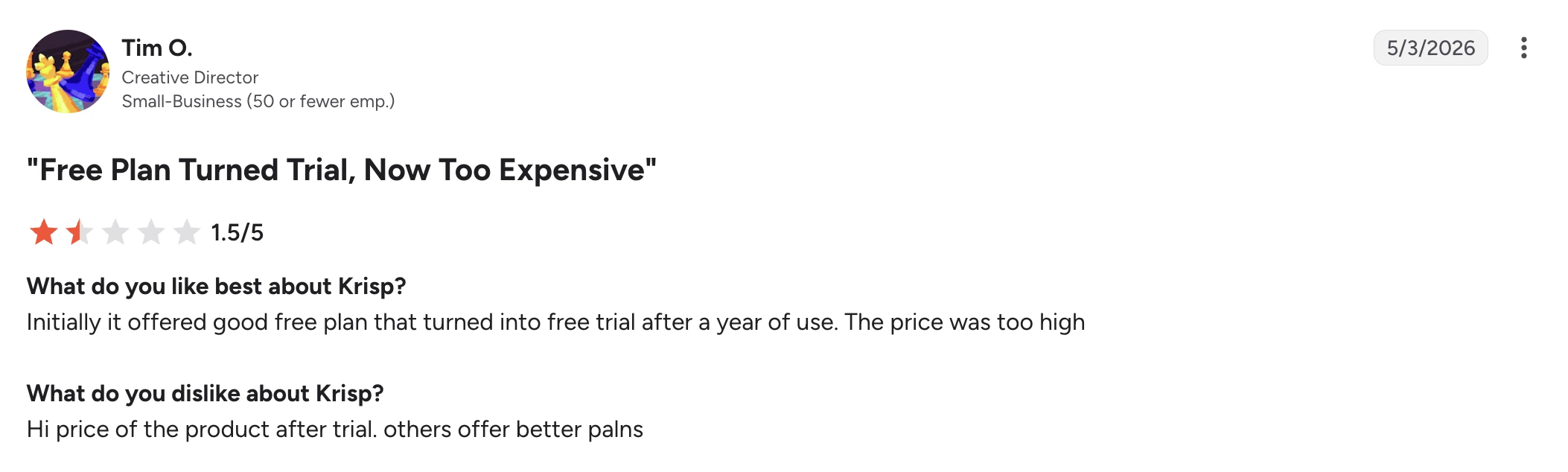
In einer G2-Bewertung vom Mai 2026 gab Tim O., Creative Director in einem Kleinunternehmen, Krisp 1,5/5. Er habe den kostenlosen Tarif anfangs gemocht, doch daraus sei irgendwann eine Testphase geworden, und den Preis danach halte er für zu hoch.
Das heißt nicht, dass Krisp im Vergleich zu jeder Alternative teuer wäre. Wenn Sie aber nur eine einfache Rauschunterdrückung brauchen, ist ein umfassendes KI-Meeting-Paket unter Umständen überflüssig.
2. Zuverlässigkeit zählt mehr als die Funktionsliste
Ein KI-Meeting-Assistent nützt nur dann etwas, wenn das Meeting hinterher auch wirklich im Verlauf auftaucht.
Einige Nutzer berichten von fehlenden Meetings oder gescheiterten Transkriptionen.
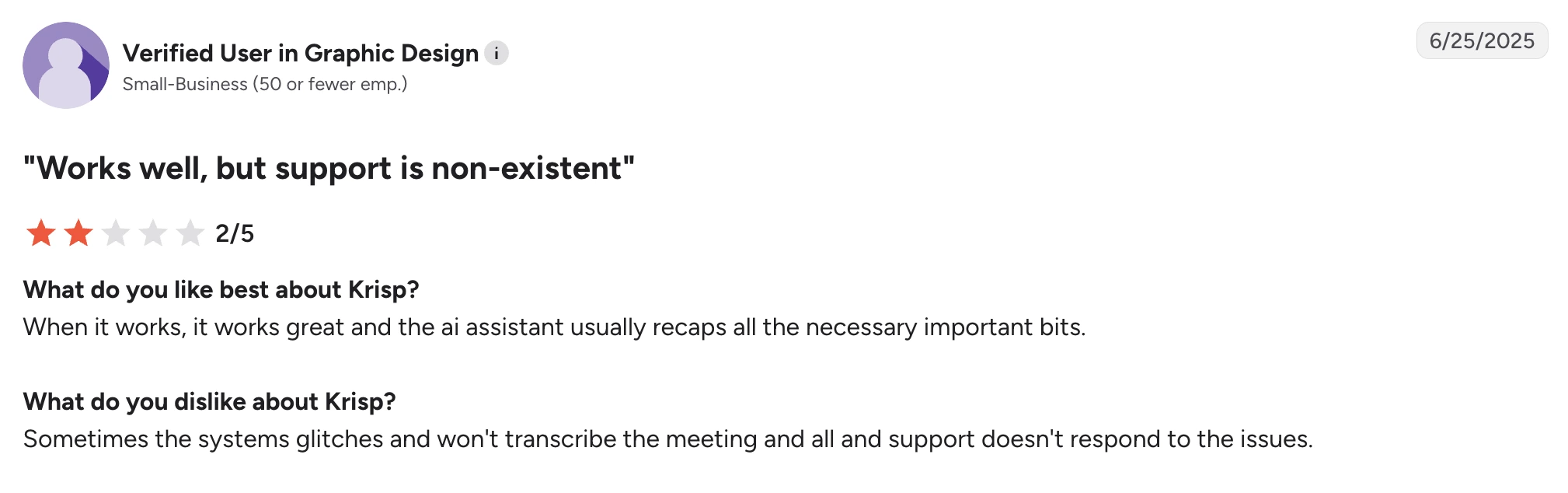
Ein verifizierter Nutzer eines Kleinunternehmens aus dem Bereich Grafikdesign schrieb in einer G2-Bewertung vom Juni 2025, Krisp funktioniere gut, wenn es funktioniere, und der KI-Assistent erfasse die wichtigen Punkte im Großen und Ganzen. Der Ärger galt etwas anderem: Gelegentlich habe das System ein Meeting nicht transkribiert, und Hilfe vom Support sei nur schwer zu bekommen gewesen.
Ein zweiter verifizierter Nutzer eines Kleinunternehmens aus dem Bereich Computersoftware berichtete in einer G2-Bewertung vom April 2025 von einem ähnlichen Problem. Die Transkription selbst fand er gut, doch seien einige Meetings später aus dem Verlauf verschwunden, obwohl sie offenbar aufgezeichnet worden waren.
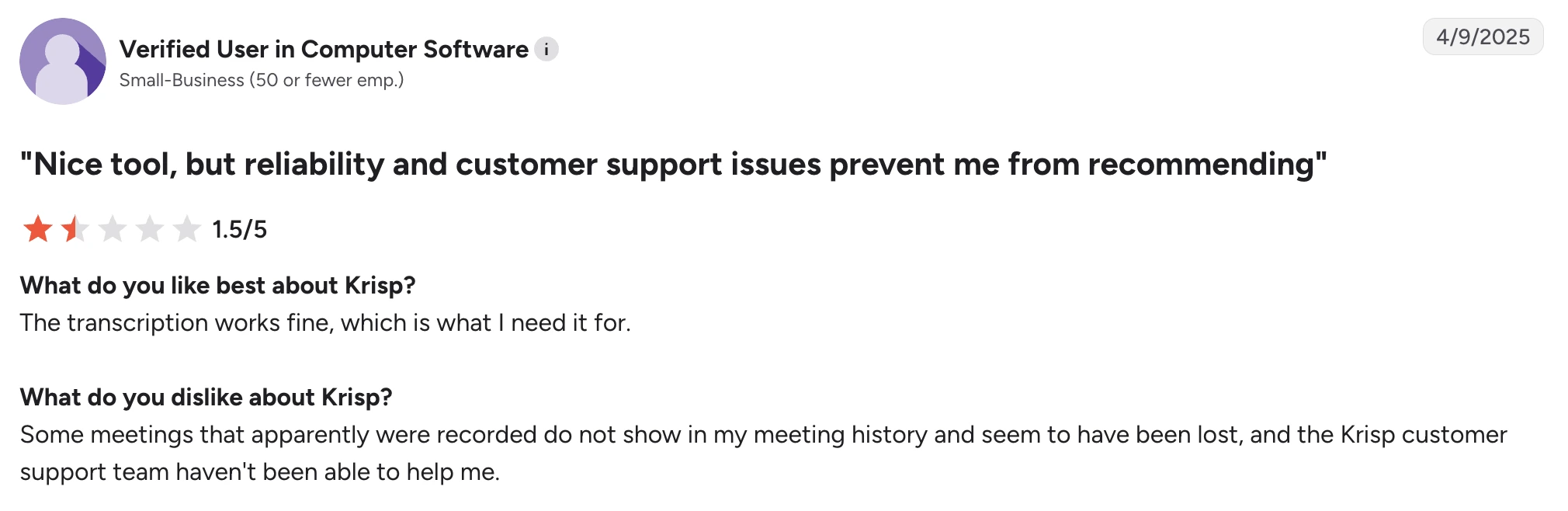
Das sind einzelne Nutzerberichte und kein Beleg dafür, dass alle betroffen sind. Wichtig sind sie trotzdem, wenn verlässliche Meeting-Protokolle in Ihrem Workflow nicht verhandelbar sind.
3. Sie brauchen umfassendere Meeting Intelligence
Krisp bietet inzwischen weit mehr als das Entfernen von Geräuschen, darunter KI-generierte Meeting-Notizen, Zusammenfassungen, Action Items, AI Chat und Integrationen.
Bei der Meeting Intelligence können einige Alternativen allerdings erheblich mehr.
Wenn Sie vergangene Meetings durchsuchen, ganze Teams auswerten, Vertriebssignale verfolgen, Erkenntnisse automatisch in Ihr CRM übertragen, aus Meeting-Inhalten Workflows erstellen oder Fragen an eine zentrale, durchsuchbare Wissensdatenbank für Meetings stellen wollen, ist eine spezialisierte Meeting-Intelligence-Plattform vermutlich die bessere Wahl.
Besonders relevant ist das, wenn Sie selten in lauten Umgebungen arbeiten. Dann sollte Geräuschunterdrückung in Echtzeit vermutlich nicht die Funktion sein, die darüber entscheidet, für welches Meeting-Tool Sie zahlen.
4. Sie brauchen eine breitere Sprachabdeckung
Krisp gibt derzeit 16+ Sprachen für Transkripte und Zusammenfassungen an.
Für viele Teams reicht das. Unternehmen, die in mehreren Ländern arbeiten, brauchen unter Umständen deutlich mehr.
Fireflies unterstützt Transkription in 100+ Sprachen. MeetGeek unterstützt ebenfalls 100+ Sprachen und erkennt die Sprache automatisch.
Besonders wichtig wird die Sprachabdeckung, wenn eine einzige Plattform Vertriebsgespräche, Interviews, Kundenmeetings und interne Gespräche über mehrere Regionen hinweg abdecken soll.
5. Geräuschunterdrückung verhält sich je nach Setup unterschiedlich
KI-Geräuschunterdrückung bedeutet immer einen Kompromiss: Die Software muss entscheiden, welche Anteile des Signals zur sprechenden Person gehören und welche verschwinden sollen.
Schwieriger wird das, wenn Sprache und plötzliche laute Geräusche zusammenfallen.
In einer G2-Bewertung vom Mai 2026 lobte V K. Krisp dafür, dass es Renovierungslärm in der Nachbarschaft herausfilterte, und beschrieb die Einrichtung als einfach. Kritik gab es nur an einem Punkt: Bei der Nutzung von Kopfhörern habe der Ton manchmal ausgesetzt.
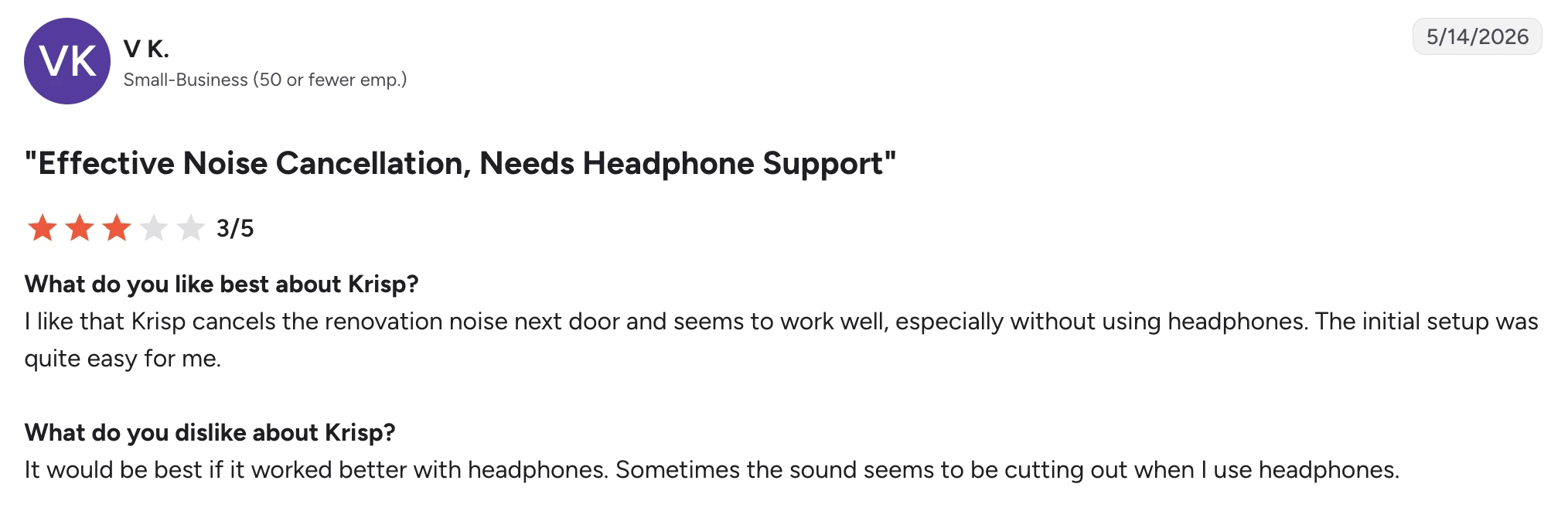
Auch das zeigt gut, warum die Entscheidung nicht einfach auf „Krisp ist gut“ oder „Krisp ist schlecht“ hinausläuft. Dieselbe Person hielt die Geräuschunterdrückung für wirksam und hatte trotzdem ein Problem mit dem Ton.
Das Ergebnis hängt von Ihrem Mikrofon, Ihren Kopfhörern, der CPU-Auslastung, den Einstellungen zur Rauschunterdrückung, der Raumakustik und der Art der Hintergrundgeräusche ab.
Gleichmäßiges Lüfterrauschen erkennen viele Geräuschfilter leichter als plötzliche Geräusche, die sich mit Sprache überlagern. Wenn Ihnen eine klare Stimme besonders wichtig ist, testen Sie ein paar Tools mit Ihrem echten Headset und in Ihrer echten Arbeitsumgebung, statt davon auszugehen, dass die stärkste Stufe der Rauschunterdrückung automatisch die beste Audioqualität liefert.
Die 6 besten Krisp-Alternativen
1. NVIDIA RTX Voice: Beste kostenlose Krisp-Alternative für Rauschunterdrückung
NVIDIA RTX Voice gehört zu den Alternativen, die Krisp am nächsten kommen, wenn Sie eigentlich nur die Geräuschunterdrückung in Echtzeit ersetzen wollen.
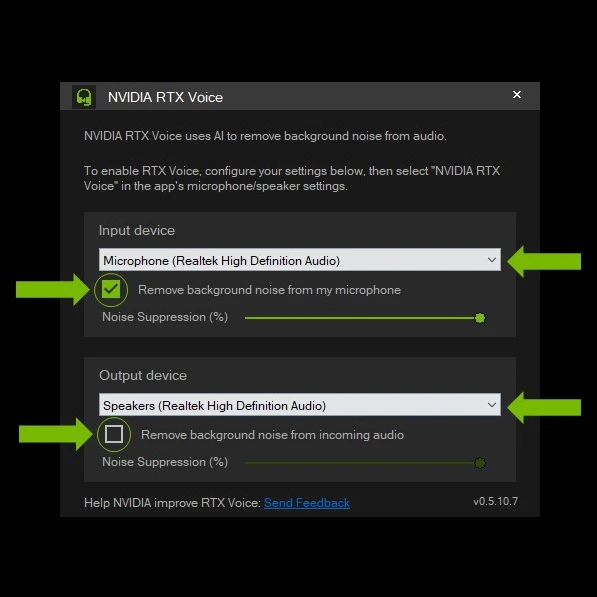
Ein KI-Meeting-Assistent ist es nicht. Meeting-Notizen, Zusammenfassungen, Action Items, meetingübergreifende Suche oder Conversation Intelligence bekommen Sie damit nicht.
Was Sie bekommen, ist KI-gestützte Rauschunterdrückung für Ihr Mikrofon und das eingehende Audio, ganz ohne monatliches Software-Abo.
Damit ist RTX Voice besonders interessant für Remote-Mitarbeitende, Streamer, Gamer und alle, die ohnehin eine NVIDIA-Grafikkarte besitzen und den Rest der Meeting-Funktionen von Krisp nicht brauchen.
Wie schneidet NVIDIA RTX Voice im Vergleich zu Krisp ab?
NVIDIA RTX Voice ist die nächstliegende Alternative, wenn Sie Krisp vor allem wegen der Geräuschunterdrückung nutzen. Der Haken: Es ersetzt eben nur diesen Teil von Krisp.
Beide Tools können Hintergrundgeräusche aus Ihrem Mikrofonsignal und dem eingehenden Audio in Echtzeit entfernen und so gegen Störungen wie Tastaturgeräusche, Lüfterrauschen oder andere Umgebungsgeräusche während eines Calls helfen. Beide funktionieren außerdem über verschiedene Kommunikations-Apps hinweg, statt die Rauschunterdrückung an eine einzige Videokonferenz-Plattform zu binden.
Der größte Unterschied liegt bei Hardware und Umfang. Krisp ist eine eigenständige Softwarelösung, die Geräuschunterdrückung mit Transkription, Aufzeichnung, KI-Meeting-Notizen, Zusammenfassungen und Akzentumwandlung verbindet. RTX Voice nutzt für die Audioverarbeitung eine kompatible NVIDIA-GPU und bietet keine dieser Assistenzfunktionen.
Beim Preis liegt RTX Voice vorn. Die Software selbst ist kostenlos und damit ein deutlich günstigerer Weg zur Geräuschunterdrückung, sofern Sie bereits passende NVIDIA-Hardware besitzen. Auf neueren RTX-GPUs erweitert NVIDIA Broadcast das Ganze um Noise Removal, das Entfernen von Raumhall und Videofunktionen wie virtuelle Hintergründe.
Entscheiden Sie sich für NVIDIA RTX Voice statt Krisp, wenn Sie bereits eine kompatible NVIDIA-GPU haben und nur Rauschunterdrückung in Echtzeit brauchen. Nehmen Sie Krisp, wenn Sie Geräuschunterdrückung und einen KI-Meeting-Assistenten im selben Produkt haben wollen.
Vorteile von NVIDIA RTX Voice
- Kostenlose Software ohne laufendes Abo
- KI-Rauschunterdrückung in Echtzeit
- Filtert Mikrofon und eingehendes Audio
- Starke Option, um Hintergrundgeräusche in laufenden Meetings zu reduzieren
- Funktioniert mit mehreren Videokonferenz-Plattformen
- Integration mit NVIDIA Broadcast
- NVIDIA Broadcast ergänzt das Entfernen von Raumhall und Videoeffekte
- Nützlich für Calls, Streaming, Gaming und die Content-Erstellung
Nachteile von NVIDIA RTX Voice
- Setzt eine kompatible NVIDIA-Grafikkarte der GTX- oder RTX-Reihe voraus
- Auf Windows ausgerichtet und für die meisten Mac-Nutzer keine praktikable Option
- Erstellt keine KI-Meeting-Notizen, Transkripte oder Meeting-Zusammenfassungen
- Die Verarbeitung läuft über die GPU, das Ergebnis hängt also stark von Ihrer Hardware ab
- Ungeeignet, wenn Sie Krisp vor allem wegen Meeting Intelligence und nicht wegen der Rauschunterdrückung ersetzen wollen
Preise von NVIDIA RTX Voice
NVIDIA RTX Voice lässt sich kostenlos herunterladen und nutzen, setzt aber eine kompatible NVIDIA-Grafikkarte voraus.
2. Fireflies.ai: Am besten für durchsuchbare Meeting Intelligence
Fireflies ist eine starke Krisp-Alternative, wenn Geräuschunterdrückung nicht mehr das Hauptproblem ist, das Sie lösen wollen.
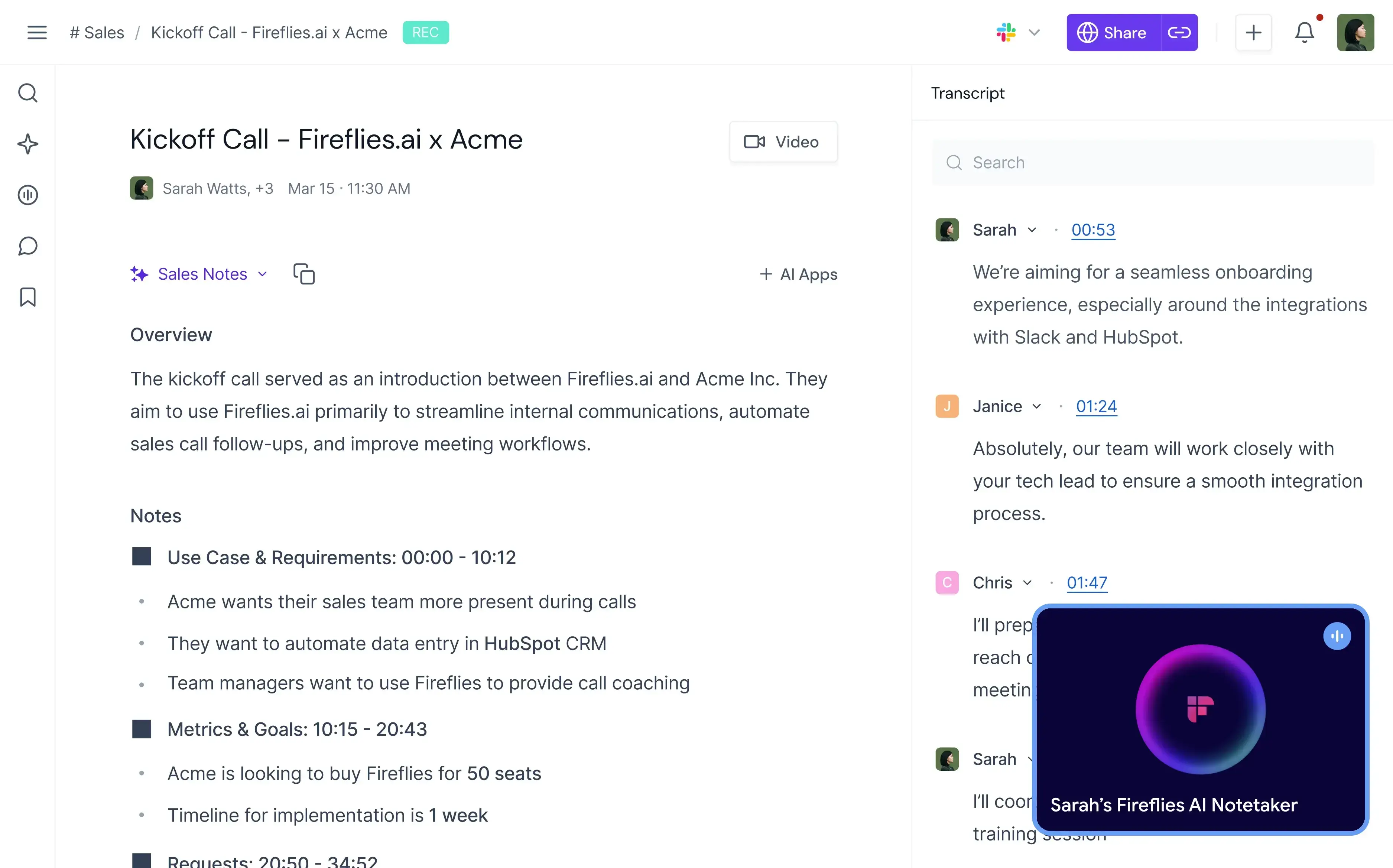
Krisp verbessert, was die Teilnehmenden während des Meetings hören. Fireflies konzentriert sich viel stärker darauf, was Ihr Unternehmen hinterher mit dem Gespräch anfangen kann.
Fireflies nimmt Meetings auf und transkribiert sie, erstellt unbegrenzt KI-Zusammenfassungen, ermöglicht die Suche in vergangenen Gesprächen, erkennt Themen und Aufgaben und bietet in den höheren Tarifen Conversation Intelligence sowie Team-Analysen.
Davon profitieren in erster Linie Vertrieb, Recruiting, Customer Success und andere Teams, die aus Meetings strukturierte Informationen gewinnen müssen.
Wie schneidet Fireflies im Vergleich zu Krisp ab?
Fireflies und Krisp überschneiden sich bei Transkription, Aufzeichnung, KI-Zusammenfassungen, Meeting-Suche und Integrationen, setzen aber recht unterschiedliche Schwerpunkte.
Krisp hat klar die Nase vorn, wenn es um die Audioqualität im laufenden Gespräch geht. Seine Geräuschunterdrückung in Echtzeit kann Hintergrundgeräusche entfernen, während Sie sprechen, und das eingehende Audio filtern. Dafür ist Fireflies nicht gemacht. Krisp bietet zudem Akzentumwandlung, eine weitere Funktion, die das laufende Gespräch selbst verbessern soll.
Sobald es um die Auswertung des Gesagten geht, dreht sich das Bild. Fireflies unterstützt Transkription in 100+ Sprachen gegenüber 16+ bei Krisp, und der Business-Tarif ergänzt Conversation Intelligence und Team-Analysen. Teams verfolgen damit Themen, Aufgaben, Fragen, Stimmung und Redeanteile, statt nur Transkript und Zusammenfassung jedes Meetings aufzubewahren.
Auch bei der Einbindung in Geschäftsprozesse unterscheiden sich die beiden. Beide bieten Integrationen und API-Zugang, doch Fireflies ist stärker darauf ausgerichtet, Gespräche in durchsuchbare Daten für Vertrieb und andere kundennahe Teams zu verwandeln.
Beim Einstieg liegen die Preise dicht beieinander: Krisp Core kostet 16 $/Nutzer/Monat, Fireflies Pro 18 $/Nutzer/Monat bei monatlicher Abrechnung. Bei den Fireflies-Preisen gibt es außerdem einen dauerhaft kostenlosen Tarif, während Krisp derzeit eine siebentägige kostenlose Testphase anbietet.
Für Fireflies spricht mehr als für Krisp, wenn Conversation Intelligence, eine breitere Sprachabdeckung und durchsuchbare Meeting-Daten wichtiger sind als Geräuschunterdrückung. Krisp bleibt die bessere Wahl, wenn guter Klang in laufenden Calls zu Ihren Hauptanforderungen zählt.
Vorteile von Fireflies.ai
- Unbegrenzte Transkription und KI-Zusammenfassungen
- Unterstützt 100+ Sprachen
- Automatische Erkennung der Sprache
- Transkription in Echtzeit
- Durchsuchbarer Meeting-Verlauf
- Conversation Intelligence in Business
- Analysen zu Stimmung, Themen, Fragen und Sprechenden
- Desktop- und Mobile-Apps
- Aufzeichnung per Bot oder Chrome-Erweiterung
- Upload von Audio- und Videodateien
- API-Zugang
- Umfangreiche Integrationen in den kostenpflichtigen Tarifen
Nachteile von Fireflies.ai
- Ersetzt die KI-Geräuschunterdrückung in Echtzeit von Krisp nicht
- Einige der nützlichsten Analysen setzen den Business-Tarif voraus
- Der Speicherplatz ist in Free und Pro begrenzt
- KI-Funktionen laufen zusätzlich zum Tarif über ein Credit-System
- Teams, denen es nur um bessere Audioqualität geht, zahlen am Ende für Funktionen, die sie nicht brauchen
Preise von Fireflies.ai
Bei monatlicher Abrechnung:
- Free: 0 $
- Pro: 18 $/Nutzer/Monat
- Business: 29 $/Nutzer/Monat
- Enterprise: 39 $/Nutzer/Monat, nur bei jährlicher Abrechnung
Sie möchten mehr über Fireflies.ai erfahren? Lesen Sie unseren Vergleich MeetGeek vs. Fireflies.ai!
3. MeetGeek: Am besten für Meeting-Automatisierung und Team Intelligence
MeetGeek ist eine gute Krisp-Alternative, wenn Ihnen die Richtung gefällt, die Krisp als Meeting-Assistent eingeschlagen hat, Sie aber eine Plattform wollen, die konsequenter auf das Erfassen, Auswerten, Organisieren und Automatisieren von Meetings ausgelegt ist.
%20(2).webp)
Ein direkter Ersatz für die Geräuschunterdrückung von Krisp ist es nicht.
MeetGeek ersetzt stattdessen den Teil Ihres Stacks, der für Notizen und die Organisation von Meetings zuständig ist. Das Tool zeichnet Meetings automatisch auf und transkribiert sie, erstellt KI-Zusammenfassungen und Action Items, bündelt vergangene Meetings in einer durchsuchbaren Wissensdatenbank, wertet Gespräche aus und kann Workflows in den Tools auslösen, die Ihr Team ohnehin nutzt.
Wie schneidet MeetGeek im Vergleich zu Krisp ab?
MeetGeek und Krisp decken beide Aufzeichnung, Transkription, KI-generierte Meeting-Notizen, Zusammenfassungen, AI Chat, Meetings vor Ort und Integrationen ab. Der wesentliche Unterschied: Krisp ergänzt seinen Meeting-Assistenten um Audio-Optimierung in Echtzeit, während MeetGeek bei Meeting Intelligence und Automatisierung deutlich mehr abdeckt.
Krisp ist die bessere Wahl, wenn das Reduzieren von Hintergrundgeräuschen mit zu den Problemen gehört, die die Software lösen soll. MeetGeek bietet weder eine Geräuschunterdrückung in Echtzeit im Stil von Krisp noch eine Akzentumwandlung.
MeetGeek ist im Vorteil, sobald aus dem Meeting brauchbare Geschäftsdaten werden sollen. Die Plattform unterstützt 100+ Transkriptionssprachen gegenüber 16+ bei Krisp, bietet Aufzeichnung mit und ohne Bot und liefert Analysen für einzelne Personen und ganze Teams, Stimmungs- und Engagement-Auswertungen, individuelle Zusammenfassungen, Vertriebssignale sowie AI Chat über vergangene Meetings hinweg.
Auch bei den Integrationen ist der Unterschied deutlich. Krisp bietet Integrationen mit großen Tools wie HubSpot, Slack, Notion, Zapier, Teams, Salesforce und Pipedrive sowie API- und MCP-Integrationen.
MeetGeek verbindet Meeting-Daten mit 10.000+ Integrationen und unterstützt Zapier, Make, n8n, API und MCP. Die KI-Voice-Agents und Workflows können die Nachbereitung von Meetings übernehmen und aus dem Besprochenen die nächsten Schritte anstoßen, etwa das Aktualisieren von Systemen oder das Weitergeben relevanter Informationen an ein anderes Team.
MeetGeek hat außerdem einen dauerhaft kostenlosen Tarif, Krisp dagegen eine siebentägige Testphase. Die jeweils ersten kostenpflichtigen Tarife liegen bei monatlicher Abrechnung dicht beieinander: MeetGeek Pro kostet 15,99 $/Nutzer/Monat, Krisp Core 16 $/Nutzer/Monat.
MeetGeek ist die stärkere Option, wenn Sie tiefere Meeting-Analysen, Automatisierung, eine breitere Sprachabdeckung und mehr Möglichkeiten wollen, Meeting-Ergebnisse mit dem Rest Ihres Workflows zu verbinden. Bleiben Sie bei Krisp, wenn Sie zusätzlich Geräuschunterdrückung in Echtzeit oder Akzentumwandlung in derselben App brauchen.
Wenn Sie es genauer wissen wollen, lesen Sie unseren Artikel MeetGeek vs. Krisp im Vergleich!
Vorteile von MeetGeek
- Transkription in 100+ Sprachen
- Automatische Erkennung der Sprache
- Unbegrenzte KI-Zusammenfassungen
- Aufzeichnung auch ohne Bot
- Mobile Unterstützung für Meetings vor Ort
- AI Chat und meetingübergreifende Suche
- Detaillierte Meeting-Analysen
- Conversation Intelligence
- Individuelle Meeting-Vorlagen
- Sales Mode für kundennahe Gespräche
- KI-Workflow-Automatisierung
- 10.000+ Integrationen
- API- und MCP-Zugang
- Kostenloser Tarif verfügbar
Nachteile von MeetGeek
- Bietet keine Geräuschunterdrückung in Echtzeit im Stil von Krisp
- Der kostenlose Tarif ist auf drei Transkriptionsstunden pro Monat begrenzt
- HD-Videoaufzeichnung setzt Business voraus
- Einige Funktionen für Team-Zusammenarbeit und Analysen setzen Business voraus
- Enterprise-Funktionen wie SSO und SCIM gibt es in den niedrigeren Tarifen nicht
Preise von MeetGeek
Bei monatlicher Abrechnung:
- Basic: Kostenlos
- Pro: 15,99 $/Nutzer/Monat
- Business: 27 $/Nutzer/Monat
- Enterprise: Preis auf Anfrage
4. CrystalSound: Beste Krisp-Alternative für spezialisierte Geräuschunterdrückung
CrystalSound ist auf dieser Liste die direkteste Krisp-Alternative für alle, denen es weiterhin in erster Linie um Audioqualität geht.
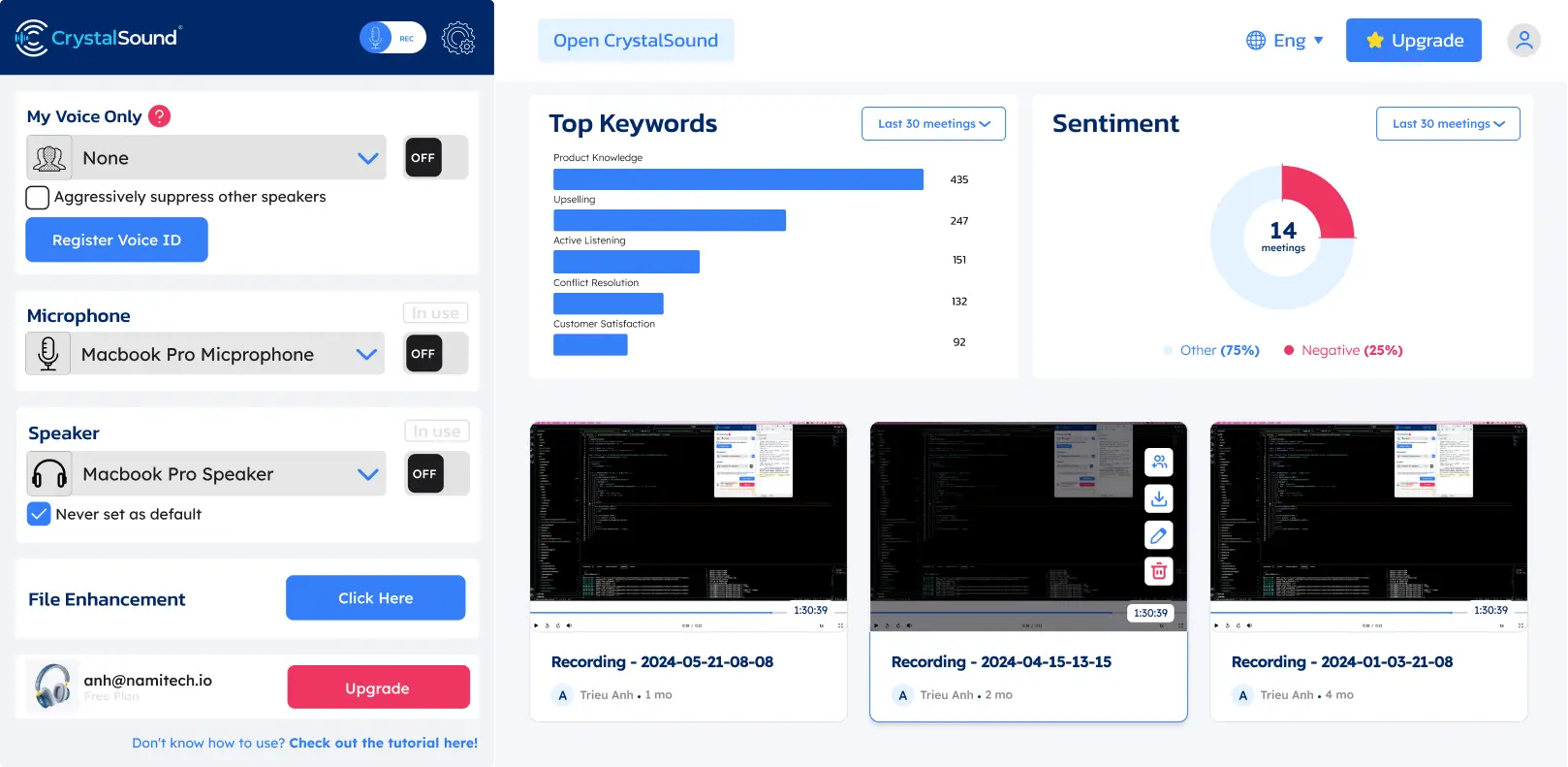
Wie Krisp ist es konsequent auf KI-Geräuschunterdrückung in Echtzeit ausgelegt und behandelt Rauschunterdrückung nicht als kleine Zusatzfunktion einer Videokonferenz-Plattform.
CrystalSound arbeitet auf beiden Seiten des Gesprächs und reduziert Geräusche aus Ihrem Mikrofon ebenso wie die Ihres Gegenübers, was nützlich sein kann, wenn Sie die Umgebung am anderen Ende der Leitung nicht beeinflussen können. Von Krisp unterscheidet es sich weniger durch die Filterung in beide Richtungen als durch die Tiefe der Audio-Einstellungen.
Wie schneidet CrystalSound im Vergleich zu Krisp ab?
Bei der Geräuschreduzierung konkurriert CrystalSound weit direkter mit Krisp als Fireflies, MeetGeek oder Claap.
Beide Produkte bieten in ihren kostenpflichtigen Tarifen unbegrenzte Geräuschunterdrückung und verarbeiten Störgeräusche von beiden Seiten eines Gesprächs. Im Einzelnen bietet CrystalSound bidirektionale Geräuschunterdrückung, die Verarbeitung My Voice Only, akustische Echounterdrückung, das Entfernen von Raumhall und Restrauschen sowie eine einstellbare Stufe der Rauschunterdrückung. Auch Krisp konzentriert sich darauf, Hintergrundgeräusche aus laufenden Gesprächen zu entfernen, und bietet ebenfalls Echounterdrückung.
Der Unterschied liegt darin, wie weit die beiden Produkte über die reine Audioverarbeitung hinausgehen.
Krisp hat sich zu einem deutlich breiteren KI-Meeting-Assistenten entwickelt. Die kostenpflichtigen Tarife umfassen Transkription, Audio- und Videoaufzeichnung, KI-Zusammenfassungen und Action Items, AI Chat, die Organisation von Meetings, Integrationen und Unterstützung für Meetings vor Ort. CrystalSound bleibt viel stärker auf klare Stimmen und aufgezeichnetes Audio fokussiert. Smarte Meeting-Protokolle, automatische Titel, Keyword-Analyse und Stimmungsanalyse führt der Anbieter derzeit als nicht verfügbar, und die Anrufaufzeichnung in der Cloud befindet sich noch in der Preview.
CrystalSound ist dabei günstiger, was sich vor allem dann auszahlt, wenn Sie diese zusätzlichen Meeting-Funktionen nicht brauchen. Premium kostet 12 $/Nutzer/Monat, Krisp Core dagegen 16 $/Nutzer/Monat bei monatlicher Abrechnung.
CrystalSound kostet im Monat weniger und passt, wenn Sie hauptsächlich spezialisierte Geräuschreduzierung und Audio-Optimierung suchen. Krisp ist den Aufpreis wert, wenn Sie Geräuschunterdrückung zusammen mit einem ausgereifteren KI-Meeting-Assistenten wollen.
Vorteile von CrystalSound
- Unbegrenzte Geräuschunterdrückung
- Bidirektionale Geräuschunterdrückung
- Modus My Voice Only
- Einstellbare Stufe der Rauschunterdrückung
- Entfernen von Raumhall
- Akustische Echounterdrückung
- Stimmwiedergabe in HD-Stereo
- Optimierung von Audiodateien
- Anhebung der Mikrofonlautstärke
- Stromsparender Verarbeitungsmodus
- Verwaltung von Team-Lizenzen
- Gute Wahl für laute Umgebungen
Nachteile von CrystalSound
- Als KI-Meeting-Assistent weniger ausgereift als Krisp, Fireflies, MeetGeek oder Claap
- Smarte Meeting-Protokolle sind derzeit nicht verfügbar
- Keyword- und Stimmungsanalyse sind derzeit nicht verfügbar
- Die Anrufaufzeichnung in der Cloud ist weiterhin als Preview gekennzeichnet
- Für KI-generierte Meeting-Notizen, einen durchsuchbaren Meeting-Verlauf oder Workflow-Automatisierung brauchen Sie weiterhin ein zweites Tool
Preise von CrystalSound
Bei monatlicher Abrechnung:
- Premium: 12 $/Nutzer/Monat
- Elite: 29 $/Nutzer/Monat, in Kürze verfügbar
- Enterprise: Preis auf Anfrage
Für den Premium-Tarif gibt es eine kostenlose Testphase von 7 Tagen.
5. Claap: Am besten für Video-first Zusammenarbeit rund um Meetings
Claap ist eine gute Krisp-Alternative für Teams, denen das Entfernen von Geräuschen in Echtzeit weniger wichtig ist als die Frage, wie aus Meetings und aufgezeichneten Videos gemeinsame Arbeit entsteht.
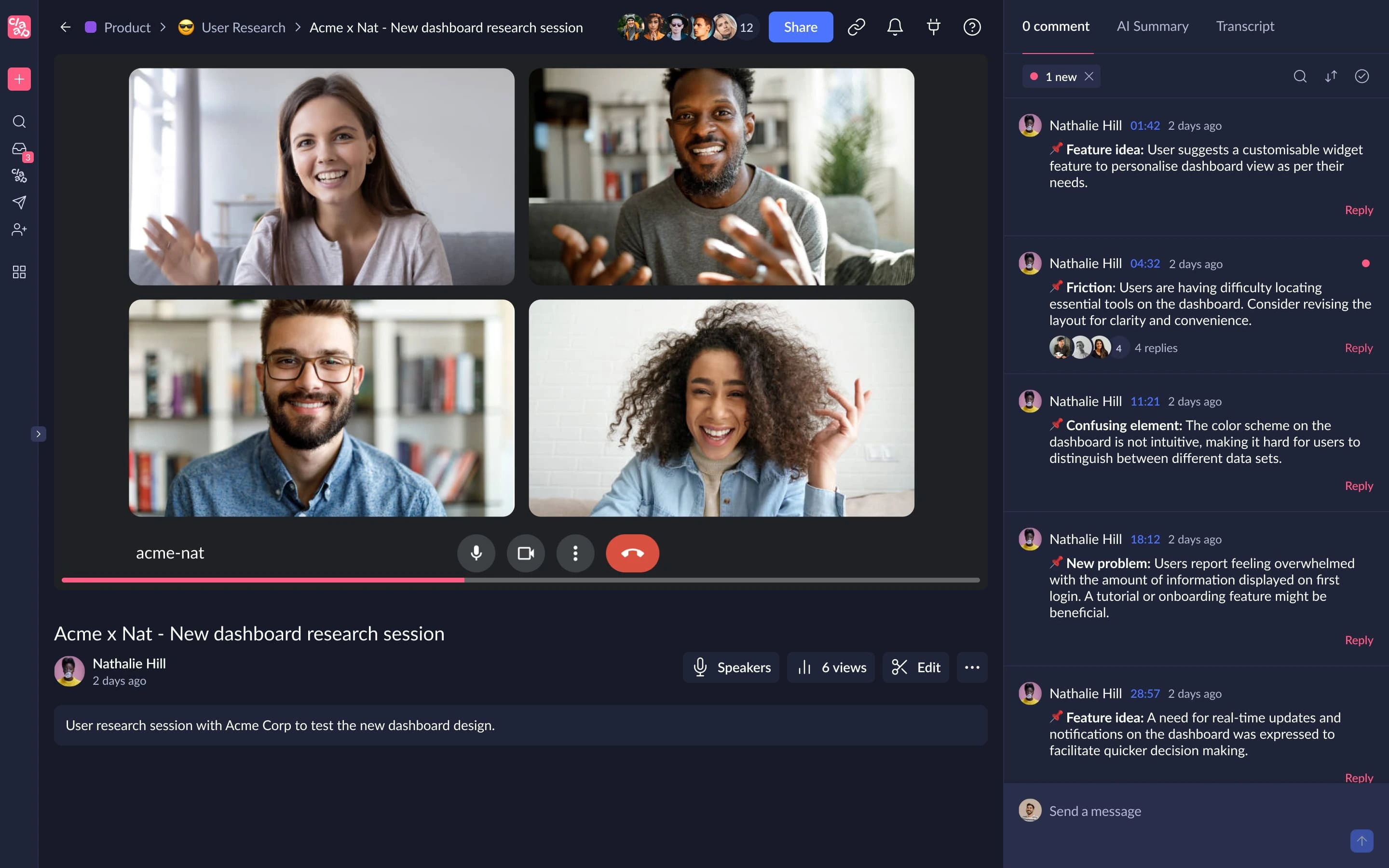
Claap verbindet die Meeting-Aufzeichnung mit Transkription, KI-Zusammenfassungen, Videobearbeitung, Kommentaren, gemeinsamen Workspaces, KI-Coaching und CRM-Workflows.
Der Unterschied zu Krisp lässt sich leicht zusammenfassen: Krisp beginnt bei der Audioverarbeitung, Claap bei aufgezeichneten Gesprächen und der Zusammenarbeit per Video.
Wie schneidet Claap im Vergleich zu Krisp ab?
Claap und Krisp zeichnen beide Meetings auf, transkribieren Gespräche, erstellen KI-Zusammenfassungen und bieten Werkzeuge, um das Geschehene hinterher zu ordnen und zu teilen. Der Unterschied liegt zwischen Live-Audio auf der einen und Video-Zusammenarbeit und Meeting Intelligence auf der anderen Seite.
Krisp verbessert das Meeting, während es läuft. Geräuschunterdrückung, Echo-Entfernung und Akzentumwandlung sollen die Stimmen im Call klarer machen. Eine vergleichbare Ebene für Geräuschunterdrückung in Echtzeit bietet Claap nicht.
Beim aufgezeichneten Meeting selbst spielt Claap dafür seine Stärken aus. Die Plattform verbindet die Meeting-Aufnahme mit Bildschirm- und Kameraaufzeichnung, KI-gestützter Videobearbeitung, dem Zusammenfügen von Videos, Anmerkungen, Kommentaren, Videoantworten, gemeinsamen Notizen und geteilten Workspaces. Damit eignet es sich besser für Teams, die Videos nicht nur als Mitschnitt von Live-Meetings, sondern auch für asynchrone Kommunikation nutzen.
Auch die Sprachabdeckung unterscheidet sich. Claap unterstützt Transkripte in 99 Sprachen, Krisp in 16+. In den höheren Tarifen kommen KI-Coaching, automatische CRM-Anreicherung, Deal Insights, KI-generierte E-Mails und die Möglichkeit hinzu, Fragen über mehrere Meetings hinweg zu stellen.
Anders sieht es beim Preis aus. Krisp Core kostet 16 $/Nutzer/Monat, Claap Pro dagegen 30 €/Lizenz/Monat bei monatlicher Abrechnung. Claap lohnt sich daher vor allem dann, wenn die zusätzlichen Funktionen für Zusammenarbeit und Video auch wirklich genutzt werden.
Claap passt besser als Krisp, wenn aufgezeichnete Meetings Teil eines größeren Workflows für Video-Zusammenarbeit, Vertrieb oder asynchrone Kommunikation sind. Für Krisp entscheiden Sie sich, wenn Ihnen besseres Audio in laufenden Calls wichtiger ist und Meeting-Notizen eher eine Zusatzfunktion als das Herzstück der Plattform sein sollen.
Vorteile von Claap
- Transkription in 99 Sprachen
- Synchronisierung mit Kalender und Telefonkonferenzen
- KI-Zusammenfassungen und individuelle Vorlagen
- Bildschirm- und Kameraaufzeichnung
- KI-gestützte Videobearbeitung
- Gemeinsame Anmerkungen und Kommentare im Video
- Meetingübergreifende KI in Business
- CRM-Anreicherung
- KI-generierte E-Mails
- KI-Coaching
- Deal Insights
- API- und MCP-Zugang
- Unterstützung für Zapier, Make und n8n
- Kostenloser Tarif verfügbar
Nachteile von Claap
- Ersetzt die Geräuschunterdrückung in Echtzeit von Krisp nicht
- Der kostenlose Tarif ist auf 10 Videos und insgesamt 300 Aufzeichnungsminuten begrenzt
- Pro enthält nur 1.000 Transkriptions- und Aufzeichnungsminuten pro Monat
- Business kostet deutlich mehr als Krisp Core
- Der Funktionsumfang kann überdimensioniert sein, wenn Sie nur ein sauberes Mikrofon für Calls brauchen
Preise von Claap
Bei monatlicher Abrechnung:
- Basic: Kostenlos
- Pro: 30 €/Lizenz/Monat
- Business: 60 €/Lizenz/Monat
- Enterprise: Preis auf Anfrage
6. IRIS Clarity: Am besten für Teams, die Geräuschunterdrückung auf beiden Seiten des Gesprächs brauchen
IRIS Clarity gehört zu den nächstliegenden Krisp-Alternativen, wenn die Geräuschunterdrückung selbst Ihre Priorität ist, besonders wenn der Lärm von beiden Seiten eines Gesprächs kommt.
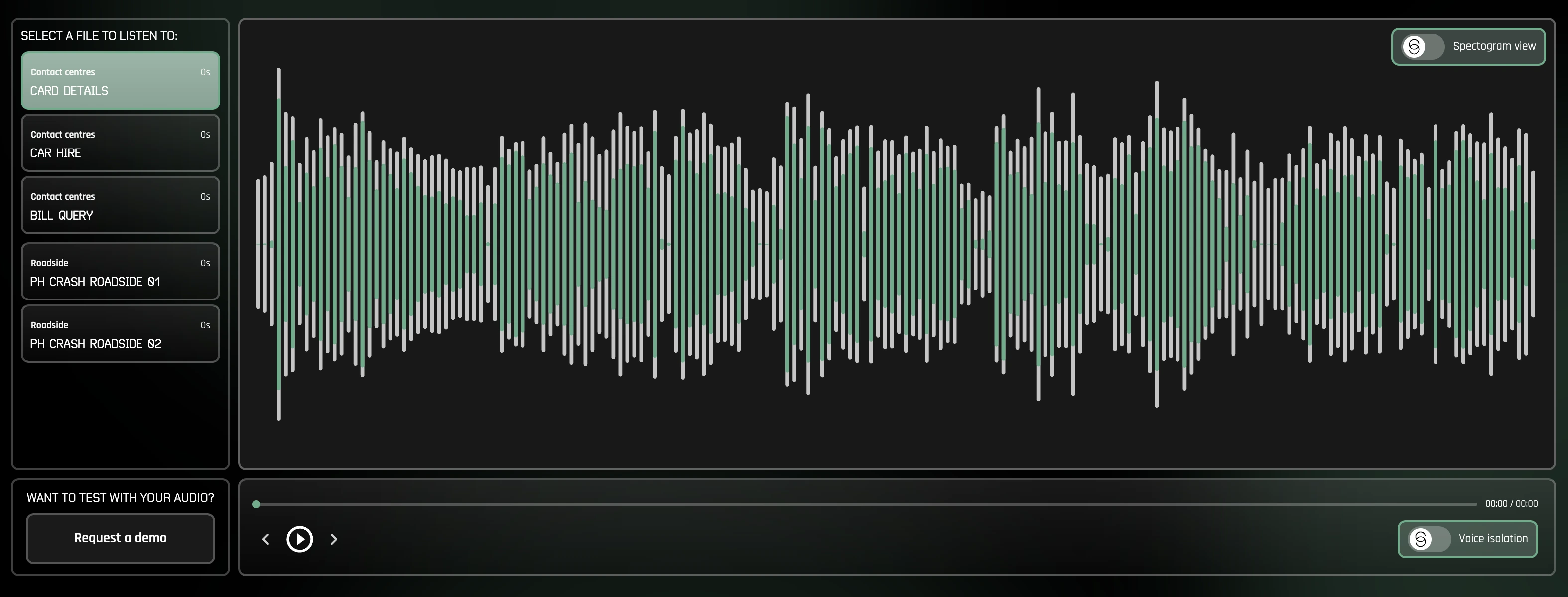
Hauptfunktion ist die unbegrenzte, bidirektionale Geräuschunterdrückung. IRIS Clarity entfernt nicht nur Hintergrundgeräusche rund um Ihr eigenes Mikrofon, sondern isoliert Stimmen im ausgehenden wie im eingehenden Audio. Das ist besonders für kundennahe Teams und Callcenter relevant, in denen Mitarbeitende zwar in einer kontrollierten Umgebung arbeiten, der Kunde aber von einem lauten Ort aus anruft.
Anders als Krisp bleibt IRIS Clarity bei der Stimmisolierung und versucht nicht, nebenbei ein KI-Meeting-Assistent zu sein. Mit Transkription, KI-Meeting-Notizen, Zusammenfassungen, Aufzeichnung oder Akzentumwandlung von Krisp konkurriert es nicht. Stattdessen bekommen Sie ein spezialisierteres Produkt zur Geräuschreduzierung mit Teamverwaltung, Analysen und Funktionen für den Enterprise-Rollout.
Wie schneidet IRIS Clarity im Vergleich zu Krisp ab?
IRIS Clarity und Krisp bieten beide bidirektionale Geräuschunterdrückung in Echtzeit, beide können also helfen, Störgeräusche aus Ihrem Mikrofon und dem eingehenden Audio zu entfernen. Beide laufen außerdem als eigenständige Anwendungen, statt die Rauschunterdrückung auf eine einzige Kommunikationsplattform zu beschränken.
Der wesentliche Unterschied liegt im Umfang.
Krisp verbindet Geräuschunterdrückung mit einer wachsenden Sammlung von Meeting-Funktionen: Transkription, KI-Zusammenfassungen, Action Items, Audio- und Videoaufzeichnung, AI Chat, Akzentumwandlung und Integrationen. IRIS Clarity ist viel enger darauf ausgerichtet, Stimmen verständlicher zu machen.
Innerhalb dieses engeren Fokus gibt es Funktionen, die sich gezielt an größere Organisationen richten. IRIS Clarity liefert Analysen zu Sessions sowie zu Nutzern und Arbeitsplätzen, CSV-Datenexporte, von der IT verwaltete App-Profile, Klingelton-Erkennung, diagnostische Anrufaufzeichnung, SSO und die automatische Bereitstellung von Nutzerkonten. Der Enterprise-Tarif unterstützt zudem parallele Lizenzen und ein begleitetes Onboarding.
IRIS Clarity gibt es außerdem für Windows und Mac und setzt anders als NVIDIA RTX Voice keine kompatible NVIDIA-GPU voraus.
Zu IRIS Clarity greifen Sie, wenn Sie ein spezialisiertes Werkzeug zur Stimmisolierung suchen, besonders für kundennahe Teams oder Callcenter, die Geräusche auf beiden Seiten des Gesprächs entfernen müssen. Krisp ergibt mehr Sinn, wenn Sie Geräuschunterdrückung zusammen mit Transkription, KI-Meeting-Notizen, Aufzeichnung und weiteren Assistenzfunktionen wollen.
Vorteile von IRIS Clarity
- Unbegrenzte bidirektionale Geräuschunterdrückung
- Entfernt Geräusche aus ausgehendem und eingehendem Audio
- Neueste Modelle zur Stimmisolierung inklusive
- Anwendungen für Windows und Mac
- Funktionen für die Teamverwaltung
- Analysen zu Sessions sowie zu Nutzern und Arbeitsplätzen
- CSV-Export der Analysen
- Von der IT verwaltete App-Profile
- SSO und automatische Bereitstellung von Nutzerkonten
- Keine spezielle NVIDIA-Hardware nötig
Nachteile von IRIS Clarity
- Erstellt keine KI-generierten Meeting-Notizen oder Zusammenfassungen
- Bietet keine Transkription oder Akzentumwandlung wie Krisp
- Spezialisierter als Tools, die Rauschunterdrückung mit Produktivitätsfunktionen für Meetings verbinden
- Enterprise setzt mindestens 100 Nutzer und eine Jahreslaufzeit voraus
Preise von IRIS Clarity
Bei monatlicher Abrechnung:
- Professional: 9,50 £/Nutzer/Monat
- Enterprise: Preis auf Anfrage, mindestens 100 Nutzer und Jahreslaufzeit erforderlich
Für den Professional-Tarif gibt es eine kostenlose Testphase von 14 Tagen.
Wie schneiden die besten Krisp-Alternativen im Vergleich ab?
Keine Alternative in dieser Liste ersetzt jede einzelne Funktion von Krisp.
| Tool | Geräuschunterdrückung in Echtzeit | KI-Meeting-Notizen | Unterstützte Sprachen | Idealer Einsatz |
|---|---|---|---|---|
| Krisp AI | Ja | Ja | 16+ | Geräuschunterdrückung plus Meeting-Assistenz |
| NVIDIA RTX Voice | Ja | Nein | Nicht zutreffend | Rauschunterdrückung in Echtzeit über die Hardware |
| Fireflies.ai | Nein | Ja | 100+ | Durchsuchbare Meeting Intelligence |
| MeetGeek | Nein | Ja | 100+ | Automatisierte Meeting-Organisation, Analysen und Workflows |
| CrystalSound | Ja | Eingeschränkt | Nicht angegeben | Spezialisierte bidirektionale Geräuschreduzierung |
| Claap | Nein | Ja | 99 | Video-first Zusammenarbeit rund um Meetings |
| IRIS Clarity | Ja | Nein | Nicht zutreffend | Bidirektionale Stimmisolierung für Teams und Callcenter |
Wenn Sie die Audio-Kernfunktionen von Krisp möglichst genau ersetzen wollen, beginnen Sie mit NVIDIA RTX Voice, IRIS Clarity oder CrystalSound.
Ist Ihnen der KI-Meeting-Assistent inzwischen wichtiger als die Rauschunterdrückung, vergleichen Sie stattdessen Fireflies, MeetGeek und Claap.
Die beste Krisp-Alternative hängt davon ab, was Sie ersetzen wollen
Krisp lässt sich schwer durch ein einziges Produkt ersetzen, weil es inzwischen mehrere Aufgaben übernimmt.
Für KI-Geräuschunterdrückung in Echtzeit bietet NVIDIA RTX Voice Windows-Nutzern mit passender Hardware eine starke kostenlose Option, während CrystalSound eine spezialisierte Software zur Geräuschreduzierung mit bidirektionaler Filterung, dem Entfernen von Raumhall und erweiterten Audio-Einstellungen liefert.
Bei der Meeting Intelligence sieht der Vergleich anders aus.
Fireflies ist stark bei durchsuchbaren Gesprächen und Umsatz-Workflows. Claap verbindet die Meeting-Aufnahme mit asynchroner Video-Zusammenarbeit. MeetGeek macht aus Meetings Transkripte, KI-Zusammenfassungen, Analysen, durchsuchbares Wissen und automatisierte Workflows über 10.000+ Integrationen.
Die richtige Wahl hängt deshalb weniger davon ab, welches Tool die längste Funktionsliste hat, als davon, wo Krisp nicht mehr zu Ihrem Workflow passt.
Wenn bessere Abläufe nach dem Meeting der Grund sind, aus dem Sie sich nach Alternativen zu Krisp AI umsehen, testen Sie MeetGeek kostenlos und lassen Sie Ihre Meetings automatisch aufzeichnen, transkribieren, zusammenfassen, auswerten und mit dem Rest Ihrer Arbeit verbinden.
Wichtigste Erkenntnisse
- Krisp ist weiterhin eine starke Wahl für Geräuschunterdrückung in Echtzeit, vor allem wenn Sie Transkription, KI-Notizen, Aufzeichnung und Akzentumwandlung im selben Tool haben wollen.
- NVIDIA RTX Voice passt am besten, wenn Sie nur Rauschunterdrückung brauchen und bereits eine kompatible NVIDIA-GPU besitzen, denn die Software ist kostenlos.
- Fireflies.ai eignet sich besser für Teams, für die Conversation Intelligence, durchsuchbare Transkripte und Meeting-Workflows mit CRM-Anbindung im Vordergrund stehen.
- MeetGeek ist die stärkere Alternative für Teams, die aus Meetings konkrete Arbeit machen wollen, über KI-Zusammenfassungen, Analysen, meetingübergreifende Suche, Automatisierung und 10.000+ Integrationen.
- CrystalSound kommt einer spezialisierten Audio-Optimierung am nächsten, mit bidirektionaler Geräuschunterdrückung, Echo-Entfernung und einstellbarer Rauschunterdrückung.
- Claap ergibt vor allem dann Sinn, wenn Meeting-Aufzeichnungen Teil eines größeren Workflows für Video-Zusammenarbeit sind, mit Bearbeitung, Kommentaren, KI-Coaching und CRM-Funktionen.
- IRIS Clarity ist die spezialisierte Option für kundennahe Teams und Callcenter, die unbegrenzte bidirektionale Geräuschunterdrückung, Teamverwaltung und audiofokussierte Analysen brauchen.
- Welche Alternative die richtige ist, hängt davon ab, was Sie ersetzen wollen: besseres Audio im laufenden Gespräch oder Auswertung und Automatisierung nach dem Meeting.
Häufig gestellte Fragen
1. Was ist die beste kostenlose Krisp-Alternative?
NVIDIA RTX Voice gehört zu den besten kostenlosen Krisp-Alternativen für Rauschunterdrückung in Echtzeit, sofern in Ihrem Rechner eine kompatible NVIDIA-Grafikkarte steckt. Geht es Ihnen um KI-Meeting-Notizen statt um Geräuschunterdrückung, bieten Fireflies und MeetGeek beide kostenlose Tarife.
2. Gibt es eine Alternative zu Krisp, um Hintergrundgeräusche zu entfernen?
Ja. NVIDIA RTX Voice und CrystalSound bieten beide KI-Geräuschunterdrückung in Echtzeit. Wenn Sie keine systemweite Geräuschfilterung brauchen, nutzen Sie alternativ die integrierte Rauschunterdrückung von Microsoft Teams, Zoom und anderen Videokonferenz-Plattformen.
3. Ist Krisp AI besser als NVIDIA Broadcast?
Beide lösen ähnliche Audioprobleme, stellen aber unterschiedliche Anforderungen. Krisp arbeitet als eigenständige Software zur Geräuschreduzierung und braucht keine NVIDIA-GPU, während NVIDIA Broadcast kompatible NVIDIA-Hardware nutzt und die Geräuschentfernung mit Videofunktionen wie virtuellen Hintergründen verbindet. Wenn Sie die passende Hardware bereits besitzen, kann NVIDIA Broadcast das bessere Preis-Leistungs-Verhältnis bieten.
4. Welche Krisp-Alternative eignet sich am besten für KI-Meeting-Notizen?
MeetGeek, Fireflies und Claap sind die stärkeren Optionen, wenn KI-Meeting-Notizen wichtiger sind als Geräuschunterdrückung. MeetGeek passt besonders zu Teams, die zusätzlich Meeting-Analysen, meetingübergreifende KI, Workflow-Automatisierung und Integrationen brauchen. Fireflies ist stark bei Conversation Intelligence, und Claap verbindet Notizen mit Video-Zusammenarbeit.
5. Kann ich eine Krisp-Alternative für Google Meet und Microsoft Teams nutzen?
Ja. NVIDIA RTX Voice kann in unterstützten Kommunikations-Apps als virtuelles Mikrofon arbeiten, darunter Microsoft Teams. Fireflies und MeetGeek zeichnen Meetings in Google Meet und Microsoft Teams auf und transkribieren sie, und CrystalSound ist darauf ausgelegt, Geräuschunterdrückung über verschiedene Kommunikationstools hinweg zu bieten, statt auf eine einzige Konferenzplattform beschränkt zu sein.






.avif)