


Haben Sie sich jemals gefragt, warum manche Meetings fesselnd und produktiv sind, während andere sich wie Zeitverschwendung anfühlen? Das Geheimnis liegt darin, die verschiedenen Arten von Meetings und ihre spezifischen Ziele zu verstehen.
Egal, ob Sie ein Brainstorming leiten, ein Status-Update durchführen oder ein Teambuilding-Event veranstalten: Zu wissen, was Sie erwartet und wie Sie sich vorbereiten können, macht den entscheidenden Unterschied.
In diesem Artikel stellen wir 15 verschiedene Meeting-Arten vor, erläutern ihre Besonderheiten und geben Expertentipps, damit Sie das Beste aus jedem Termin herausholen. Legen wir los und verändern wir Ihre Herangehensweise an Meetings!
Was Sie vor allen Arten von Meetings beachten sollten
Vor nicht allzu langer Zeit waren persönliche Treffen die Norm, während Remote- und Hybrid-Meetings deutlich seltener waren. Diese dienten meist dem Informationsaustausch mit Teams oder Kunden an entfernten Standorten oder mit externen Dienstleistern.
Heute sind virtuelle Meetings ein fester Bestandteil des Alltags. Selbst Unternehmen, die ins Büro zurückgekehrt sind, halten regelmäßig hybride Meetings ab, bei denen einige Teilnehmer aus dem Homeoffice zugeschaltet werden.
Tatsächlich gilt es heute als äußerst ineffizient, sich ausschließlich auf persönliche Treffen zu verlassen. Da Ihre Mitarbeiter an vielfältigeren Meetings teilnehmen als je zuvor, ist es entscheidend, die Relevanz und Produktivität jedes einzelnen Termins zu maximieren.
Andernfalls riskieren Sie, in einen endlosen Kreislauf aus unproduktiven Meetingszu geraten.
Arten von Team-Meetings, die jeder braucht
Dies sind die Arten von Team-Meetings, die Sie benötigen:
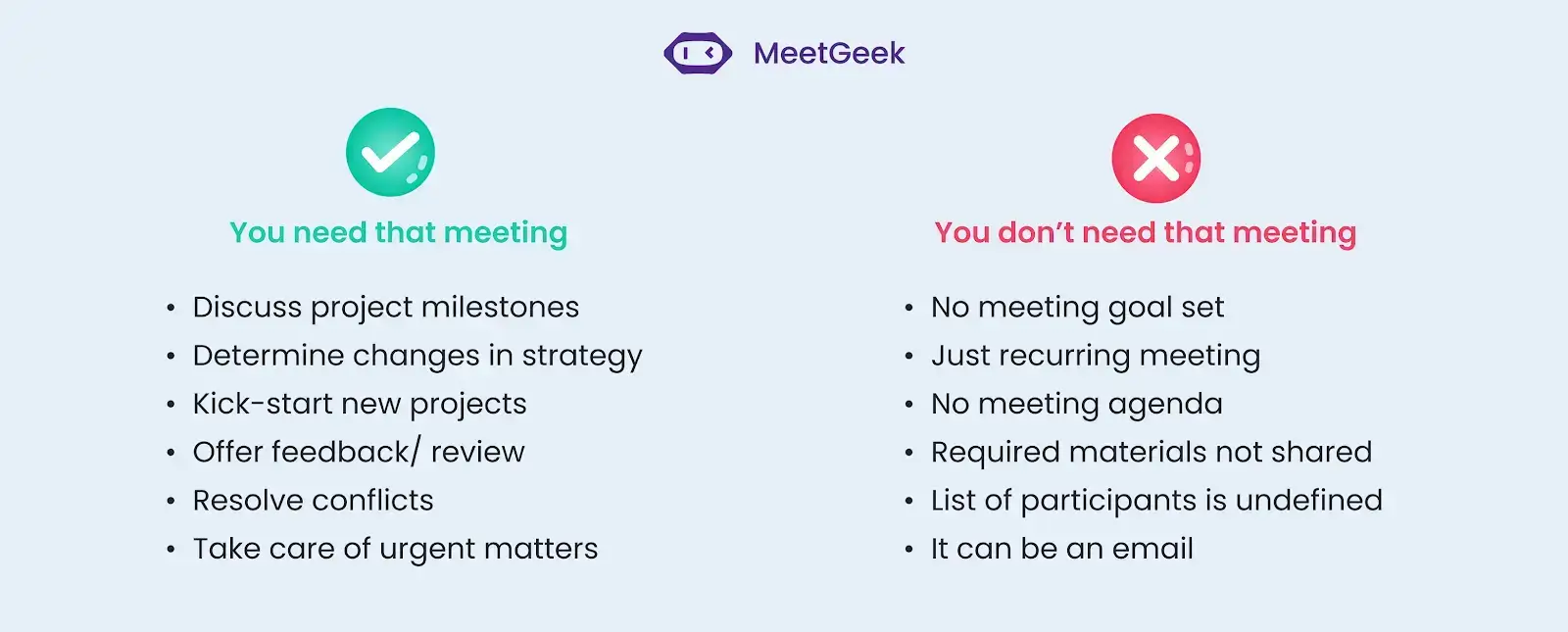
- Meetings zur Überprüfung des Projektfortschritts, um sicherzustellen, dass die Ziele erreicht werden
- Meetings zur Erörterung von Änderungen der Unternehmensstrategie und deren Auswirkungen auf einzelne Projekte
- Meetings zur Planung und Organisation eines neuen Projekts oder zur Erstellung einer Projektschätzung
- Meetings zum Geben und Empfangen von Feedback zu einem Projekt oder zur Arbeit einer Einzelperson
- Meetings zur Ansprache und Lösung von Konflikten, die innerhalb eines Teams oder Projekts entstanden sind
- Meetings zur schnellen Klärung und Lösung dringender Probleme, die sofortiges Handeln erfordern
Arten von Team-Meetings, die Sie nicht brauchen
Das sind die Arten von Team-Meetings, die Sie nicht brauchen:
- Meetings ohne klares Ziel sind oft unproduktiv
- Wiederkehrende Meetings ohne konkrete Agenda oder Zielsetzung können zur Zeitverschwendung werden
- Meetings ohne Agenda können schnell vom Thema abweichen und zu keinen konkreten Ergebnissen führen
- Wenn die Teilnehmer keinen rechtzeitigen Zugriff auf die notwendigen Unterlagen haben, sollte das Meeting besser verschoben werden
- Ein Meeting mit unklarer Teilnehmerliste kann zu Verwirrung und mangelnder Produktivität führen
- Wenn Informationen effektiv per E-Mail oder Slack-Nachricht kommuniziert werden können, tun Sie das, anstatt das Meeting anzusetzen
Hier sind drei Tipps für produktive Meetings:
- Erstellen Sie eine Agenda
- Pünktlich starten & kurz halten
- Die richtigen Leute an einen Tisch bringen
1. Erstellen Sie eine Agenda
Eine Agenda ist mehr als nur ein Diskussionsleitfaden. Sie macht den entscheidenden Unterschied zwischen sinnlosen Meetings und solchen, die wirklich motivierend und produktiv sind.
Eine gute Agenda hilft Ihrem Team, die Ziele im Blick zu behalten und schneller Ergebnisse zu erzielen. Zusammenarbeit und Produktivität lassen sich durch den Einsatz verschiedener Arten von Meeting-Agenden steigern, die den Gesprächsrahmen basierend auf Zielen, Teilnehmerkreis und Format des Meetings festlegen.
2. Pünktlich starten & kurz halten
Meetings werden produktiver, wenn Sie allen einen festen Zeitrahmen vorgeben und einem optimalen Meeting-Rhythmusfolgen. Als Führungskraft ist Pünktlichkeit ein Muss, wenn Sie andere dazu inspirieren möchten, die Zeit aller Beteiligten zu respektieren.
In diesem Zusammenhang gilt: Je kürzer Ihre Meetings sind, desto wahrscheinlicher ist es, dass die Teilnehmer erscheinen und aufmerksam sind. Lange Meetings können Ihr Team überfordern, insbesondere wenn sie häufig stattfinden. Dies kann dazu führen, dass die Teilnehmer erschöpft sind und das Interesse verlieren, während wichtige Informationen besprochen werden.
Planen Sie 40 Minuten für wöchentliche und monatliche Meetings ein und 60 Minuten für zweiwöchentliche und vierteljährliche Meetings. Für eine Jahreshauptversammlung sollten Sie je nach Größe Ihres Unternehmens 2–4 Stunden einplanen.
3. Die richtigen Leute am Tisch
Um ein überfülltes Meeting zu vermeiden, legen Sie fest, welche Mitarbeiter teilnehmen müssen. Ein Meeting zur Entscheidungsfindung sollte beispielsweise nur die wichtigsten Stakeholder umfassen. Ein Innovationsmeeting hingegen erfordert möglicherweise die Anwesenheit von Fachexperten, Entscheidungsträgern und technischem Support-Personal. Bei einem Ausschusstreffen müssen die Teilnehmer von der Geschäftsführung oder dem Vorstand ausgewählt werden.

Bildquelle: freepik.com
Dies stellt sicher, dass die Anwesenden einen sinnvollen Beitrag leisten können und gehört werden. Der einfachste Weg hierfür ist, alle Fragen aufzulisten, auf die Sie während des Meetings Antworten benötigen. Wer diese beantworten kann, braucht einen Platz am Tisch.
So machen Sie jede Art von Meeting mit MeetGeek effektiv
Haben Sie sich schon einmal Gedanken darüber gemacht, wie Sie jede Art von Meeting effektiver gestalten können, um sicherzustellen, dass Diskussionen produktiv sind, Entscheidungen gut dokumentiert werden und Folgemaßnahmen klar definiert sind?
Die Antwort ist einfach: MeetGeek. Diese KI-Plattform zur Meeting-Automatisierung wurde entwickelt, um die Effektivität verschiedener Meeting-Typen durch leistungsstarke Funktionen zu steigern, die Planung, Durchführung und Nachbereitung optimieren.
Egal, ob Sie tägliche Standups, wöchentliche Reviews oder strategische Management-Meetings durchführen, MeetGeek hilft Ihnen dabei, jede Sitzung produktiv und wertvoll zu gestalten.
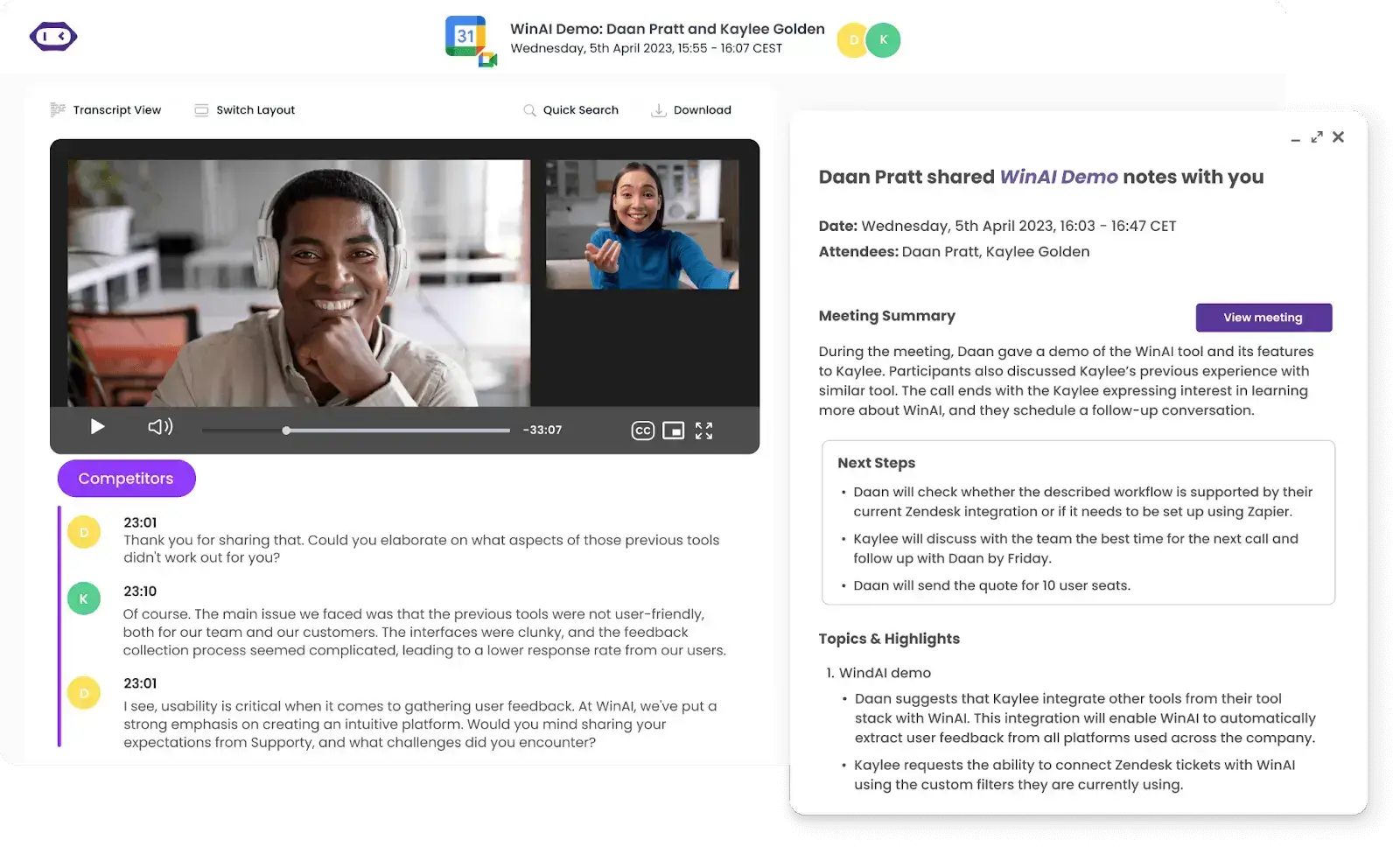
Hier sind die Funktionen, die MeetGeek für jede Art von Meeting bietet:
- Meeting-Aufzeichnung und Transkription: Mit MeetGeek wird jedes Meeting automatisch aufgezeichnet und transkribiert, sodass Teammitglieder die Diskussionen bequem nachverfolgen und ihre Ziele aufeinander abstimmen können.
- Erkennung von Kernpunkten und Aufgaben: MeetGeek nutzt fortschrittliche KI, um Kernpunkte und Aufgaben während Meetings zu identifizieren und hervorzuheben, damit sich Teams auf das Wesentliche konzentrieren können, ohne lange Aufzeichnungen durchsuchen zu müssen.
- Teilbare Meeting-Zusammenfassungen: Nach jedem Meeting erstellt MeetGeek prägnante, teilbare Zusammenfassungen, die einfach an Teammitglieder in verteilten oder Remote-Teams weitergegeben werden können, damit alle auf dem gleichen Stand bleiben.
- Integrationen mit CRM- und Kollaborationstools: MeetGeek lässt sich nahtlos in eine Vielzahl von CRM- und Kollaborationstoolsintegrieren, sodass Erkenntnisse aus Ihren Meetings schnell in Ihren Arbeitsablauf einfließen.
- Durchsuchbare Transkripte: Sparen Sie Zeit und steigern Sie Ihre Produktivität mit durchsuchbaren Transkripten, um Zeit und Energie für wichtigere Aufgaben zu gewinnen.
- Zeitgestempelte Notizen und Kommentare: Die zeitgestempelten Notizen und Kommentare von MeetGeek ermöglichen es Teammitgliedern, asynchrone Diskussionen zu führen und Feedback zu bestimmten Meeting-Abschnitten zu geben.
- Effiziente Nachbereitung: Richten Sie Workflows ein, die den Teilnehmern KI-generierte Zusammenfassungeninklusive Aufgaben und zentraler Erkenntnisse innerhalb weniger Minuten nach Gesprächsende per E-Mail senden, um den Schwung beizubehalten.
Was ist mit persönlichen Treffen? Die mobile App von MeetGeek zeichnet Ihre Live-Interaktionen auf und stellt präzise Meeting-Aufzeichnungen und Transkripte innerhalb weniger Minuten direkt in Ihrem Konto bereit.
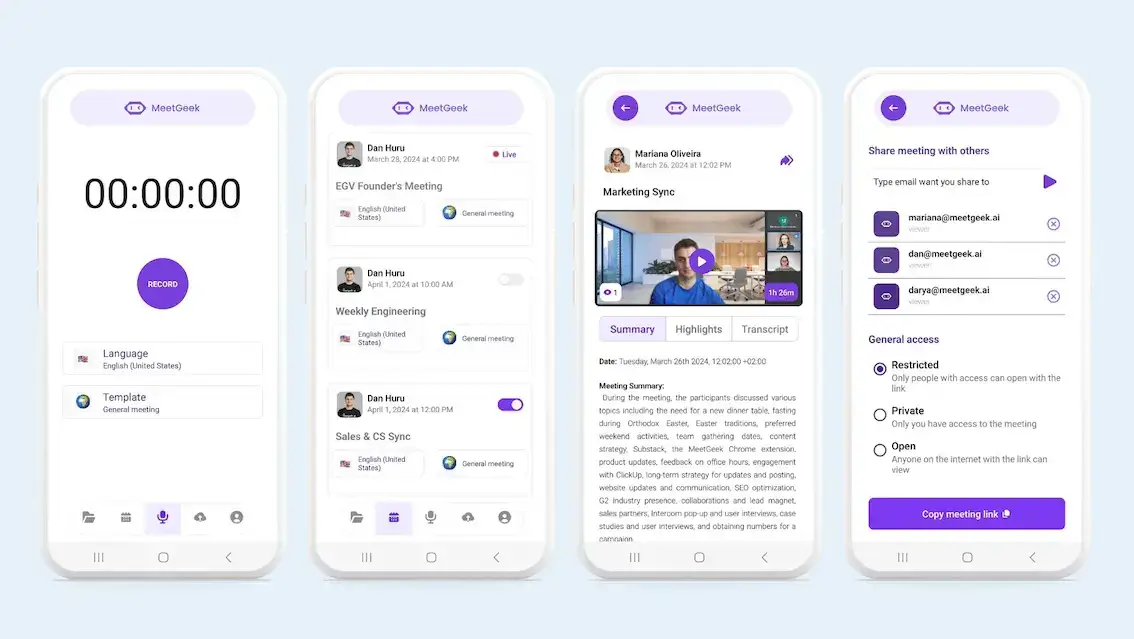
So stellen Sie sicher, dass Sie und Ihr Team unabhängig von Format, Art und Inhalt eines Meetings keine wichtigen Informationen verpassen.
CTA
15 Meeting-Arten: Unterschiede und Tipps
Wenn Meeting-Formate nicht sinnvoll eingesetzt werden, rauben sie wertvolle Zeit in einem ohnehin schon vollen Terminkalender. Für effektive und effiziente Meetings ist ein strukturierter Ansatz erforderlich.
Hier sind 15 Meeting-Arten und ihre Besonderheiten:
- Tägliche Meetings
- Wöchentliche Meetings
- Projekt-Kick-off-Meetings
- Planungsmeetings
- Einzelgespräche
- Informationsmeetings
- Problemlösungsmeetings
- Entscheidungsmeetings
- Status-Updates
- Retrospektiven
- Vorstandssitzungen
- Kundengespräche
- Teambuilding-Meetings
- Management-Meetings
- Onboarding-Meetings
1. Tägliche Meetings
Tägliche Meetings sind in der Regel kurze Abstimmungen zwischen den wichtigsten Projektbeteiligten zu Beginn des Arbeitstages.
Tägliche Check-in-Meetings sind meist kurz und prägnant. In Teams, die nach der agilen Methode arbeiten, werden sie auch als „Daily Standups“ bezeichnet – der Fokus liegt hierbei auf den Mitarbeitenden und ihrer Zusammenarbeit.
Dabei besprechen die Teilnehmenden den Vortag, aufgetretene Probleme und die für den aktuellen Tag anstehenden Aufgaben. Besonders in vollständig remote arbeitenden Teams dient dieses Meeting dazu, sich morgens kurz abzustimmen und den Fokus für den Arbeitstag zu setzen.
Hier sind einige bewährte Methoden für Daily Standups:
- Halten Sie Ihre Daily Standups immer zur gleichen Tageszeit ab (und bei Präsenztreffen am selben Ort).
- Fassen Sie sich kurz.
- Definieren Sie klar den Zweck des Standup-Meetings.
- Wechseln Sie bei jedem Meeting die Moderation, um eine aktive Teilnahme zu fördern.
2. Wöchentliche Meetings
Im Gegensatz zu den kurzen und fokussierten täglichen Meetings bieten wöchentliche Team-Meetings einen umfassenderen Überblick über den Projektverlauf und ermöglichen tiefergehende Diskussionen. In agilen Teams finden diese oft als „wöchentliche Retrospektiven“ oder „wöchentliche Reviews“ statt.
Dabei reflektiert das Team die Erfolge der Woche, identifiziert Herausforderungen und plant gemeinsam die kommende Woche. Diese Art von Meeting ist entscheidend, um die Dynamik aufrechtzuerhalten, die Teamarbeit zu koordinieren und sicherzustellen, dass alle auf dem gleichen Stand sind.
Hier sind einige bewährte Methoden für wöchentliche Meetings:
- Planen Sie jedes wöchentliche Meeting immer am selben Tag zur gleichen Zeit ein.
- Fördern Sie eine offene Kommunikation und stellen Sie sicher, dass alle Teammitglieder zu Wort kommen.
- Gehen Sie die Erfolge und Herausforderungen der vergangenen Woche durch und setzen Sie klare Ziele für die kommende Woche.
- Halten Sie das Meeting in einem angemessenen Zeitrahmen, um die Aufmerksamkeit hochzuhalten und Ermüdung zu vermeiden.
3. Projekt-Kick-off-Meetings
Ein erfolgreiches Projekt-Kick-off-Meeting ist entscheidend für den Beginn jeder Zusammenarbeit. Diese Art von Meeting ist nützlich, um den Gruppenzusammenhalt zu stärken und sicherzustellen, dass alle Beteiligten einen allgemeinen Überblick über das Projekt haben.
Die Beteiligten sollten sich ihrer Rollen und Verantwortlichkeiten sowie des Projektplans, der Ziele und der Abläufe bewusst sein, bevor sie mit der Arbeit beginnen.
Das sollten Sie bei Projekt-Kick-off-Meetings tun:
- Bereiten Sie einige Kennenlernspiele vor dem Kick-off-Meeting vor. So können sich die Teilnehmer untereinander bekannt machen, bevor sie zusammenarbeiten.
- Geben Sie den Leuten die Möglichkeit, Fragen zu stellen und Bedenken bezüglich des Projekts zu äußern.
- Halten Sie Ihre Kick-off-Meetings ab, bevor die Arbeit beginnt. So weiß jeder genau, was als Nächstes zu tun ist und wie man sich optimal mit den anderen abstimmt.
4. Planungsmeetings
Ein Projektplanungsmeeting wird in der Regel von einem Teamleiter oder Manager geleitet und konzentriert sich darauf, den Plan für das gesamte Projekt den Teammitgliedern, anderen Managern oder Kunden vorzustellen.
Die besprochenen Informationen umfassen häufig den Zeitplan des gesamten Projekts, detailliert mit Aufgaben, Meilensteinen, Kosten und anderen Ressourcen.
Obwohl es meist als Präsentation strukturiert ist, können die Teilnehmer in Planungsmeetings dem Projektmanager auch dabei helfen, bei Bedarf Anpassungen auf Basis ihrer Expertise vorzunehmen.
Hier sind einige Tipps für Planungsmeetings:
- Stellen Sie sicher, dass jeder seine Verantwortlichkeiten kennt.
- Nutzen Sie die unterschiedlichen Perspektiven der Teilnehmer, indem Sie die kreativsten Ideen aufgreifen.
- Geben Sie sich Mühe, im Voraus eine Meeting-Agenda mit konkreten Themen und Vorgehensweisen zu erstellen.
5. Einzelgespräche
Einzelgespräche sind persönliche Treffen zwischen einer Führungskraft und einem einzelnen Teammitglied, die dazu dienen, die Kommunikation zu fördern, Feedback zu geben und die berufliche Entwicklung zu unterstützen.
Im Gegensatz zu Gruppentreffen bieten Einzelgespräche einen geschützten Rahmen, in dem Mitarbeiter offen über ihre Erfahrungen, Herausforderungen und beruflichen Ziele sprechen können. Führungskräfte können diese Zeit nutzen, um individuelles Feedback zu geben, die Leistung zu besprechen und persönliche Ziele zu vereinbaren.

In Remote- oder Hybrid-Teams sind Einzelgespräche noch wichtiger, da sie helfen, die durch die räumliche Distanz entstandene Lücke zu schließen und eine kontinuierliche, offene Kommunikation sicherzustellen.
Hier sind einige bewährte Methoden für Einzelgespräche:
- Bereiten Sie eine Agenda-Vorlagevor, bleiben Sie aber flexibel, um auf die unmittelbaren Anliegen des Mitarbeiters eingehen zu können.
- Hören Sie aktiv und einfühlsam zu und geben Sie dem Mitarbeiter Raum, frei zu sprechen.
- Geben Sie konstruktives Feedback und würdigen Sie Erfolge.
- Setzen Sie klare, erreichbare Ziele und knüpfen Sie an frühere Gespräche an, um den Fortschritt zu verfolgen.
6. Informationsaustausch-Meeting
Diese Meetings dienen dazu, tief in bestimmte Themen einzutauchen, wie etwa Updates, innovative Vorschläge, Verfahren, technische Details, Vorgehensweisen usw.
Da der Zweck des Meetings darin besteht, Wissen zu teilen, gibt der Gastgeber in der Regel seinen Bildschirm frei und geht die Materialien Schritt für Schritt durch.
Hier sind einige Tipps für produktive Meetings zum Wissensaustausch:
- Warten Sie mit dem Ansprechen von Bedenken, bis alle Informationen präsentiert wurden.
- Nutzen Sie visuelle Hilfsmittel wie Folien oder Diagramme, um das Verständnis und die Merkfähigkeit zu verbessern.
- Planen Sie Zeit für Fragen und Klärungen ein, um sicherzustellen, dass alle auf dem gleichen Stand sind.
- Fassen Sie die wichtigsten Erkenntnisse am Ende des Meetings zusammen und stellen Sie bei Bedarf weiterführende Materialien bereit.
7. Brainstorming- / Problemlösungs-Meetings
Brainstorming ist eine Technik zur gemeinsamen Problemlösung. Für jedes Team sind Brainstorming-Meetings ein wichtiger Bestandteil des kollaborativen Prozesses.
Durch gezielte Ideenfindung können Teams kreative Lösungen für verschiedene Probleme im Arbeitsalltag finden sowie innovative Vorschläge für die zukünftige Entwicklung erarbeiten.

Unabhängig vom Meeting-Format können Sie kreativ werden. Whiteboard-Apps, bearbeitbare Dokumente, Präsentationsfolien, Designtools, digitale Haftnotizen und ähnliche Software können ein Problemlösungs-Meeting erst richtig effektiv machen.
Hier sind ein paar Tipps für Brainstorming-Meetings:
- Schließen Sie unrealistische Ideen direkt aus dem Brainstorming aus.
- Stellen Sie sicher, dass jedes Teammitglied weiß, was zu tun ist. Geben Sie vor, wie viele Optionen ausprobiert werden sollen, bevor das nächste Problem angegangen wird.
- Setzen Sie eine Frist für die Lösungsfindung und nutzen Sie eine Vorlage für Brainstorming-Meetings. Das motiviert Ihre Kollegen, sich auf konkrete Ergebnisse zu konzentrieren.
8. Entscheidungsmeetings
Wie wir alle schon mehrfach in unserer Laufbahn erlebt haben, ist Planung keine exakte Wissenschaft. Selbst die einfachsten Lösungen können durch Hindernisse, unvorhergesehene Situationen oder neue Informationen beeinflusst werden.
In solchen Situationen müssen Entscheidungen meist unter Zeitdruck getroffen werden. Bei Entscheidungsmeetings geht es darum, Aufgaben festzulegen und mit klaren Handlungsanweisungen aus dem Meeting zu gehen. Am Ende sollte jeder Teilnehmer die nächsten praktischen Schritte kennen.
Das sollten Sie vor Entscheidungsmeetings beachten:
- Wählen Sie die Leitung für das Entscheidungsmeeting sorgfältig aus. Stellen Sie sicher, dass diese Person offen für jedes Feedback ist.
- Bedenken Sie, dass es möglich ist, dass nicht jeder mit den getroffenen Entscheidungen einverstanden ist.
- Planen Sie Zeit ein, um zu besprechen, wie die Teammitglieder die Entscheidungen in die Tat umsetzen werden.
- Dokumentieren Sie alle relevanten Aspekte des Entscheidungsprozesses gründlich, damit sie später nachvollziehbar sind.
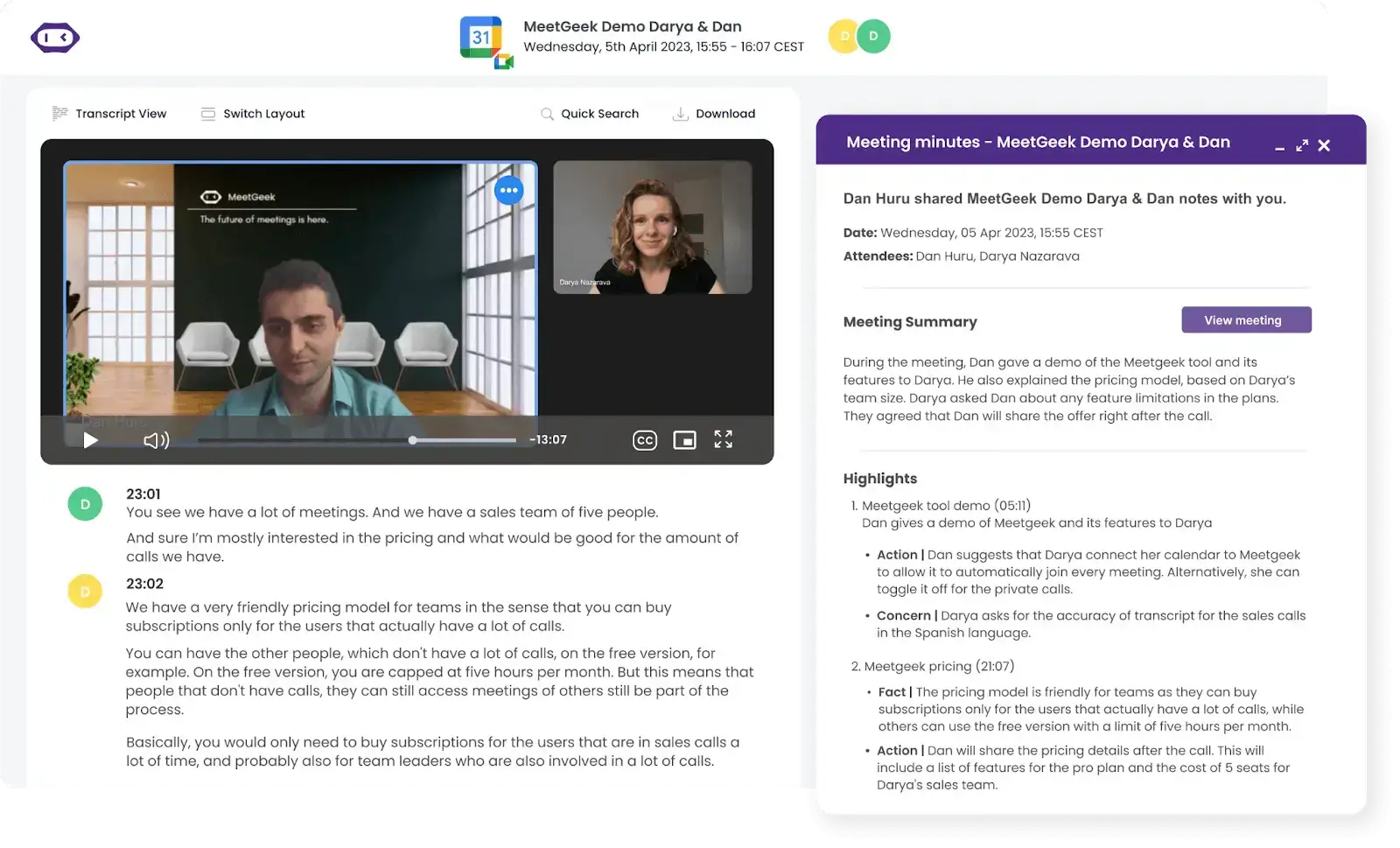
PROFI-TIPP: Da wir wissen, dass es nicht immer einfach ist, während der Meetings Notizen zu machen, MeetGeek kommt Ihnen zu Hilfe. Unser Tool wurde speziell dafür entwickelt, dass Sie sich voll und ganz auf Ihre Meetings konzentrieren können, während wir uns um die mühsame Protokollführung kümmern.
9. Status-Meetings
Status-Meetings dienen der regelmäßigen Überprüfung des Projektfortschritts. Da es sich um eine gängige Meeting-Art handelt, werden sie in der Regel vom Projektleiter moderiert.
Die Diskussionen dienen dazu, den Projektstand abzugleichen, Probleme zu beheben, Pläne bei Bedarf anzupassen und die nächsten Schritte zu besprechen. Im Gegensatz zu täglichen Meetings decken Status-Updates längere Zeiträume ab, sind daher komplexer und erfordern eine gründlichere Vorbereitung.
Hier sind einige Tipps für Status-Meetings:
- Geben Sie einigen Leistungsträgern die Möglichkeit, ihre Eindrücke darüber zu teilen, was für das Projekt gut funktioniert hat.
- Vergewissern Sie sich, dass das gemeinsame Ziel noch einmal verdeutlicht wird, und planen Sie Zeit für Fragen ein.
- Ermutigen Sie die Teammitglieder, kurze Updates zu ihrer Arbeit zu geben und dabei auf eventuelle Probleme hinzuweisen.
- Nutzen Sie ein kollaboratives Tool oder Dashboard, um den Fortschritt visuell zu verfolgen und die Diskussion zu erleichtern.
10. Retrospektiven
Diese finden am Ende eines Projekts statt. Das Ziel einer Retrospektive ist es, Meinungen zur Gesamterfahrung auszutauschen, neu gewonnene Erkenntnisse zu teilen und Feedback zu geben.
Bei der Arbeit im Homeoffice oder in hybriden Teams gibt es weniger Transparenz und Einblick in die Aktivitäten der anderen.
In Retrospektiven können die Teilnehmer teilen, was sie in den vergangenen Wochen oder Monaten bei der Arbeit gelernt haben. Dies hilft dabei, Fehler der Vergangenheit zu vermeiden, potenzielle Lösungen für zukünftige Anforderungen zu erkennen sowie den Fokus auf Reflexion und Wachstum zu legen.
Für agile Teams sind Retrospektiven eine zentrale Praxis, die meist am Ende jedes Sprints stattfindet, um sicherzustellen, dass sich das Team kontinuierlich weiterentwickelt und verbessert.
Hier sind einige Tipps für bessere Retrospektiven:
- Planen Sie Ihre Retrospektiven am Ende jedes Projektzyklus oder Sprints ein.
- Schaffen Sie eine sichere und offene Umgebung, in der sich alle Teammitglieder wohl dabei fühlen, ehrliches Feedback zu geben.
- Nutzen Sie strukturierte Formate wie „Start, Stop, Continue“ oder „Was lief gut, was lief nicht gut,“, um die Diskussion zu leiten.
- Halten Sie die wichtigsten Erkenntnisse und Aufgaben fest und stellen Sie sicher, dass diese in den folgenden Zyklen weiterverfolgt werden.
11. Vorstandssitzungen
Diese Art von formellem Meeting bringt den Vorstand einer Organisation zusammen. Sie finden in der Regel in regelmäßigen Abständen oder bei Bedarf statt, um wichtige Themen zu besprechen, die Leistung zu bewerten und die rechtlichen Angelegenheiten des Gremiums zu regeln.
Im Gegensatz zu informellen Meetings sind das Quorum, die Verfahren und die Rollen für eine Vorstandssitzung in den Betriebsvereinbarungen der Organisation festgelegt. Ein Vorsitzender leitet in der Regel diese Sitzungen.
So gestalten Sie eine effektive Vorstandssitzung:
- Konzentrieren Sie sich auf die Struktur des Meetings. Eine Vorstandssitzung ist ein wichtiger Bestandteil der Unternehmensstruktur, muss aber keine Zeitverschwendung sein.
- Fördern Sie eine klare Entscheidungsfindung, indem Sie Punkte zusammenfassen und bei Bedarf förmliche Anträge einfordern.
- Achten Sie darauf, dass sich die Diskussionen zwischen den Vorstandsmitgliedern auf strategische Fragen konzentrieren und nicht auf operative Details.
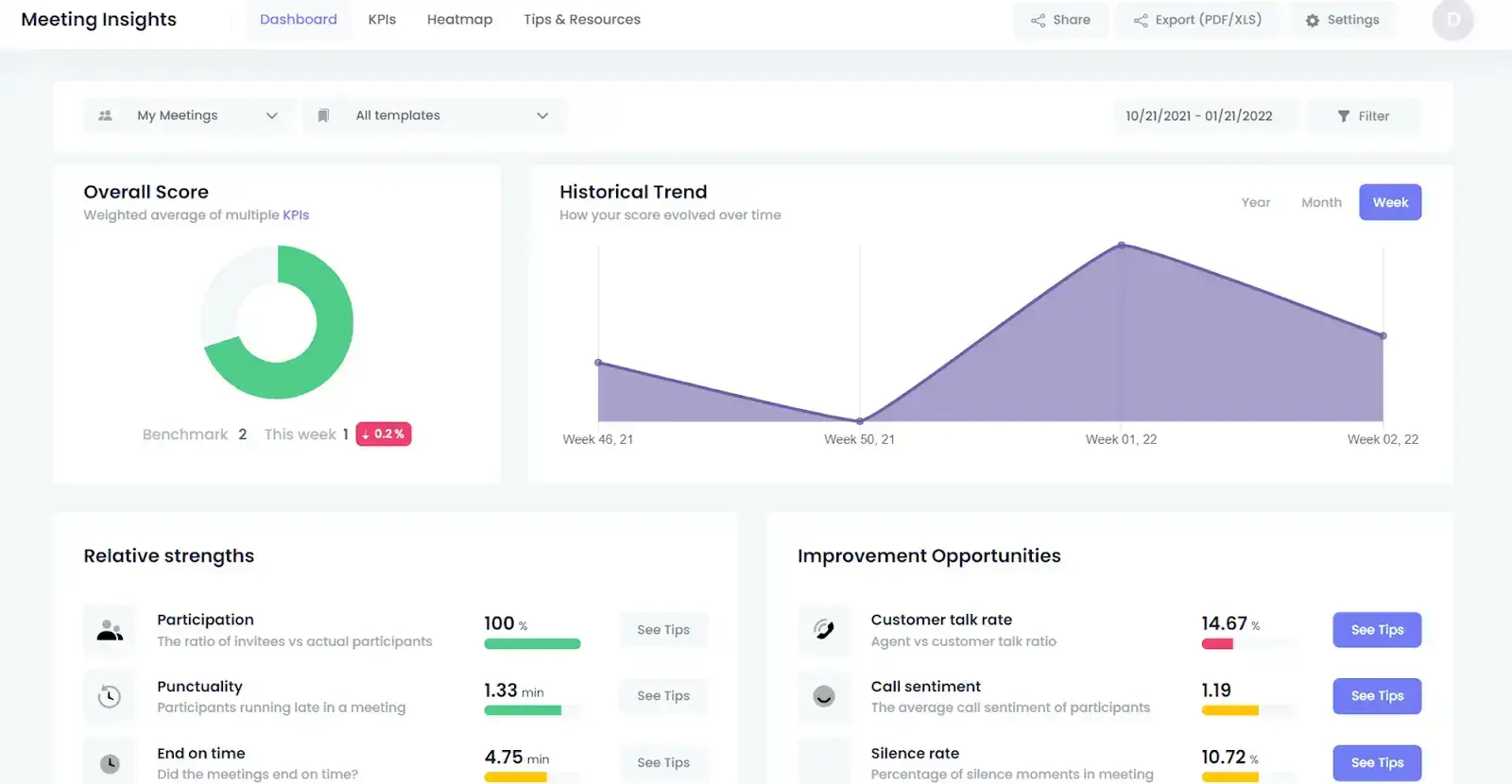
- Finden Sie ein erfahrenes Protokollführungsteam oder nutzen Sie ein Tool wie MeetGeek , das Sie bei der Erfassung aller notwendigen Daten, einschließlich der Meeting-KPIs, unterstützt.
12. Kundengespräche
Egal, ob Sie im B2C- oder B2B-Bereich tätig sind: Gespräche mit Kunden und Stakeholdern sind für fast alle Unternehmensbereiche wertvoll.
Durch das Abhalten von Kundengesprächen und Interviews können wir die Bedürfnisse unserer Kunden besser verstehen und sind so optimal auf alle damit verbundenen Aufgaben vorbereitet. Geschäftstermine mit Kunden finden zwar seltener statt als andere Besprechungen, sind aber ebenso relevant.

Je nach Tätigkeit des Teams können solche Meetings dazu dienen, Feedback einzuholen, Genehmigungen zu erhalten, Pläne vorzustellen oder Vorschläge zu unterbreiten.
Für ein produktives Kundengespräch sollten Sie Folgendes beachten:
- Informieren Sie sich vor dem Termin über alle Teilnehmer, um Gemeinsamkeiten zu finden und böse Überraschungen zu vermeiden.
- Verstehen Sie die Ziele und Herausforderungen des Kunden, um relevante Lösungen und Impulse zu liefern.
- Bereiten Sie alle notwendigen Dokumente, Berichte oder Präsentationen vor und senden Sie diese vorab zu.
- Um Bedenken auszuräumen und sicherzustellen, dass Sie und Ihr Kunde am selben Strang ziehen, sollten Sie nach dem Meeting und während des gesamten Projekts regelmäßig nachfassen.
- Sorgen Sie für eine optimale Umgebung, um ein produktives Meeting zu gewährleisten.
13. Teambuilding-Meetings
Im Gegensatz zu Status-Updates oder Retrospektiven stehen bei Teambuilding-Meetings Aktivitäten und Gespräche im Vordergrund, die den zwischenmenschlichen Zusammenhalt fördern, statt sich auf projektspezifische Ergebnisse zu konzentrieren.
Sie beinhalten oft spannende Übungen, die das gesamte Team dazu anregen, auf neue und unterhaltsame Weise zusammenzuarbeiten. Wenn Ihr Team remote oder hybrid arbeitet, kann dieses Meeting-Format das Gemeinschaftsgefühl stärken und sicherstellen, dass sich alle Teammitglieder einbezogen und wertgeschätzt fühlen. Ganz gleich, ob das Teambuilding vor Ort oder an einem externen Standort stattfindet, die Zusammenarbeit mit einer Reisebuchungsplattform vereinfacht die Reiseplanung für Ihr Team.
Hier sind einige bewährte Tipps für Ihr nächstes Teambuilding-Meeting:
- Planen Sie abwechslungsreiche Aktivitäten, die unterschiedliche Interessen und Stärken innerhalb des Teams ansprechen.
- Fördern Sie die Teilnahme und stellen Sie sicher, dass die Aktivitäten inklusiv und für alle Teammitglieder zugänglich sind.
- Konzentrieren Sie sich darauf, durch interaktive Übungen Vertrauen, Kommunikation und Zusammenarbeit zu stärken.
- Führen Sie im Anschluss ein kurzes Gespräch, um die Aktivitäten zu reflektieren und Feedback für zukünftige Teambuilding-Events zu sammeln.
- Integrieren Sie Teambuilding- Aktivitäten in Ihre regelmäßigen Meetings.
14. Management-Meetings
Management-Meetings sind ein hervorragendes Instrument, um strategische Ziele zu steuern, übergeordnete Themen zu diskutieren und wichtige Entscheidungen zu treffen, die sich auf die Teams auswirken.
Für Führungskräfte dienen diese formellen Meetings als Plattform, um Updates auszutauschen, Herausforderungen zu besprechen und die Zusammenarbeit zwischen verschiedenen Abteilungen zu koordinieren.
Hier sind einige Tipps für ein effektives Management-Meeting:
- Fördern Sie eine offene und ehrliche Kommunikation unter allen Teilnehmern.
- Planen Sie Zeit für jede Führungskraft ein, um Updates zu ihrer Abteilung oder ihren Projekten zu geben.
- Konzentrieren Sie sich auf strategische Fragen und Entscheidungen, die den Input des gesamten Management-Teams erfordern, anstatt auf alltägliche Routineaufgaben.
- Dokumentieren Sie wichtige Entscheidungen und Aufgabenund stellen Sie sicher, dass vereinbarte Maßnahmen nachverfolgt werden.
15. Onboarding-Meetings
Wenn neue Mitarbeiter zum Team stoßen, sind Onboarding-Meetings sind ein Standardverfahren, um neue Mitarbeiter in das Unternehmen zu integrieren. Sie bieten den Mitarbeitern die notwendigen Informationen und Werkzeuge und legen den Grundstein für ihren Erfolg in der neuen Rolle. Um diese Prozesse effizient zu verwalten, prüfen viele Unternehmen verschiedene HR-Softwarelösungen, einschließlich Alternativen zu bekannten Anbietern wie Zoho. Wenn Sie über einen Wechsel nachdenken, finden Sie hier einige Zoho-Alternativen , die möglicherweise besser zu Ihren Anforderungen passen.
Darüber hinaus bieten sie die perfekte Gelegenheit, Feedback von neuen Mitarbeitern zum Einstellungs- und Onboarding-Prozess einzuholen, um diesen kontinuierlich zu verbessern und für zukünftige Mitarbeiter noch effektiver zu gestalten.
Hier sind einige Tipps für Onboarding-Meetings:
- Planen Sie die Onboarding-Meetings zeitnah nach dem Eintrittsdatum des neuen Mitarbeiters.
- Stellen Sie den neuen Mitarbeiter dem Team und den wichtigsten Ansprechpartnern im Unternehmen vor.
- Geben Sie einen Überblick über die Rolle, die Verantwortlichkeiten und die ersten Aufgaben des neuen Mitarbeiters.
- Bleiben Sie durch regelmäßige Check-ins in Kontakt, um die fortlaufende Integration und Entwicklung des neuen Mitarbeiters zu unterstützen.
Häufig gestellte Fragen
1. Was sind die drei Meeting-Stile?
Die drei primären Meeting-Stile sind:
- Informative Meetings: Diese Meetings dienen dem Austausch von Informationen und Updates. Sie werden häufig für Ankündigungen, Status-Updates und Fortschrittsberichte genutzt. Dies kann in Form einer Mitarbeiterversammlung, eines Briefings oder eines Projekt-Updates geschehen.
- Diskussionsrunden: Bei diesen Meetings stehen der Ideenaustausch, Brainstorming und die gemeinsame Problemlösung im Vordergrund. Beispiele hierfür sind Brainstorming-Sitzungen, Strategietreffen und Workshops.
- Entscheidungsmeetings: Das Ziel dieser Meetings ist es, Entscheidungen zu spezifischen Themen oder Strategien zu treffen. Sie sind so strukturiert, dass Optionen bewertet, Vor- und Nachteile abgewogen und ein Konsens oder eine endgültige Entscheidung erzielt werden. Beispiele hierfür sind Vorstandssitzungen, Aktionärsversammlungen, Ausschusssitzungen und Planungstreffen.
2. Was ist eine Meeting-Struktur?
Eine Meeting-Struktur bezeichnet den organisierten Meeting-Rahmen oder die Vorlage, innerhalb derer ein Meeting durchgeführt wird. Sie umfasst die Agenda, Rollen, Zeitvorgaben und Prozesse, die durch das Meeting führen.
Hier sind die wichtigsten Bestandteile einer Meeting-Struktur:
- Agenda: Ein detaillierter Ablaufplan der zu behandelnden Themen, inklusive Zeitvorgaben für jeden Punkt
- Rollen: Klar definierte Rollen wie Moderator, Protokollführer und Zeitwächter, um einen reibungslosen Ablauf zu gewährleisten
- Ziele: Spezifische Ergebnisse oder Ziele, die mit dem Meeting erreicht werden sollen
- Prozess: Definierte Verfahren für Diskussionen, Entscheidungsfindungen und Folgemaßnahmen.
- Zeitmanagement: Geplante Start- und Endzeiten sowie Zeitlimits für jeden Tagesordnungspunkt, damit das Meeting im Zeitplan bleibt.
3. Was ist die beste Anordnung für ein Meeting?
Die optimale Anordnung hängt vom Zweck und Stil des Meetings ab. Hier sind einige effektive Varianten:
- Konferenzstil: Die Teilnehmer sitzen an einem rechteckigen oder ovalen Tisch. Dies fördert den direkten Austausch und die Kommunikation von Angesicht zu Angesicht.
- U-Form: Die Tische sind in U-Form angeordnet, wobei die offene Seite zu einem Bildschirm oder dem Vortragenden zeigt. So können sich die Teilnehmer gegenseitig und den Referenten sehen, was die Interaktion und das Engagement fördert.
- Theaterbestuhlung: Die Stühle sind in Reihen nach vorne zum Sprecher oder Bildschirm ausgerichtet. Dies maximiert die Sitzplatzkapazität und stellt sicher, dass alle Teilnehmer den Vortragenden gut sehen und hören können. Denken Sie an Bürgerversammlungen.
- Klassenzimmerstil: Tische und Stühle sind in Reihen nach vorne ausgerichtet. Dies bietet Platz für Unterlagen und Arbeitsmaterialien und unterstützt eine Lernumgebung.
Machen Sie jede Art von Meeting effektiver mit einem Meeting-Assistenten
Damit Meetings jeder Art effektiv sind, ist es wichtig, alle relevanten Informationen korrekt zu speichern. Beschlossene Maßnahmen, geteilte Informationen, Aufgaben und Ideen sollten für die spätere Verwendung festgehalten werden.
Dies erleichtert nicht nur die Nachbereitung des Meetings, sondern hilft auch dabei, Informationen an Personen weiterzugeben, die nicht teilnehmen konnten.
Eine KI-Plattform zur Meeting-Automatisierung wie MeetGeek hilft Ihnen dabei. Der virtuelle Meeting-Assistent nimmt an Ihren Besprechungen teil, um Gespräche aufzuzeichnen, Notizen zu machen, Highlights zu speichern und ein Transkript des Gesprächs zu erstellen.








.avif)