En cliquant « Accepter tous les cookies », vous acceptez le stockage de cookies sur votre appareil afin d'améliorer la navigation sur le site, d'analyser l'utilisation du site et de contribuer à nos efforts de marketing. Consultez notre Politique de confidentialité pour plus d'informations.
MeetGeekBlogRead AI Pricing Explained for 2026: Is It Worth It for Meeting Notes
Back to Blog

Read AI Pricing Explained for 2026: Is It Worth It for Meeting Notes

Productivité
Productivité

Explore Read AI’s 2026 pricing, its core features, and how it handles meeting notes, transcription, and insights to support modern teams.

Melania Ciocianu
December 10, 2025
/
5 min read
Table of content
Get started with MeetGeek AI Meeting Assistant:
📝 AI-powered Meeting Note taker
✅ Free meeting recording & transcription
💬 Automated sharing of insights to other tools.
Sign Up for Free
Share the knowledge with your circle
Copied

AI assistants are becoming part of everyday work, from capturing meeting notes to answering key questions after a busy week of calls. Read AI is one of the tools gaining traction thanks to its automated meeting transcription, summary generation, and AI-powered search that scans your meeting data, emails, and messages, and connected apps.

But as more teams try Read AI, pricing limits, the bot-joining experience, and unclear upgrade paths often create friction. For companies balancing Google Meet, Microsoft Teams, in-person meetings, and a packed calendar, the question becomes: Do the Read AI plans deliver enough value for the cost?

This article breaks down each Read AI pricing tier and highlights real advantages, limitations, and a possible alternative.

Read AI overview: how it fits into your daily workflow

Read AI is designed as an AI copilot that connects to your Google Calendar, Outlook, and communication tools. Once connected, it can automatically join meetings, transcribe the conversation, and generate notes, action items, and meeting reports.

Across both online and in-person meetings, users rely on Read AI to:

  • Capture spoken conversations
  • Generate actionable insights and notes afterward
  • Provide AI-powered search through Search Copilot
  • Track past transcripts, messages, and content history
  • Suggest follow-up tasks
  • Connect with CRMs and tools like Slack, Notion, and HubSpot contacts

The idea is simple: remove manual note-taking so you can focus on the talk, not the typing.

However, the execution depends heavily on the pricing plan.

Read AI pricing breakdown: what each plan includes

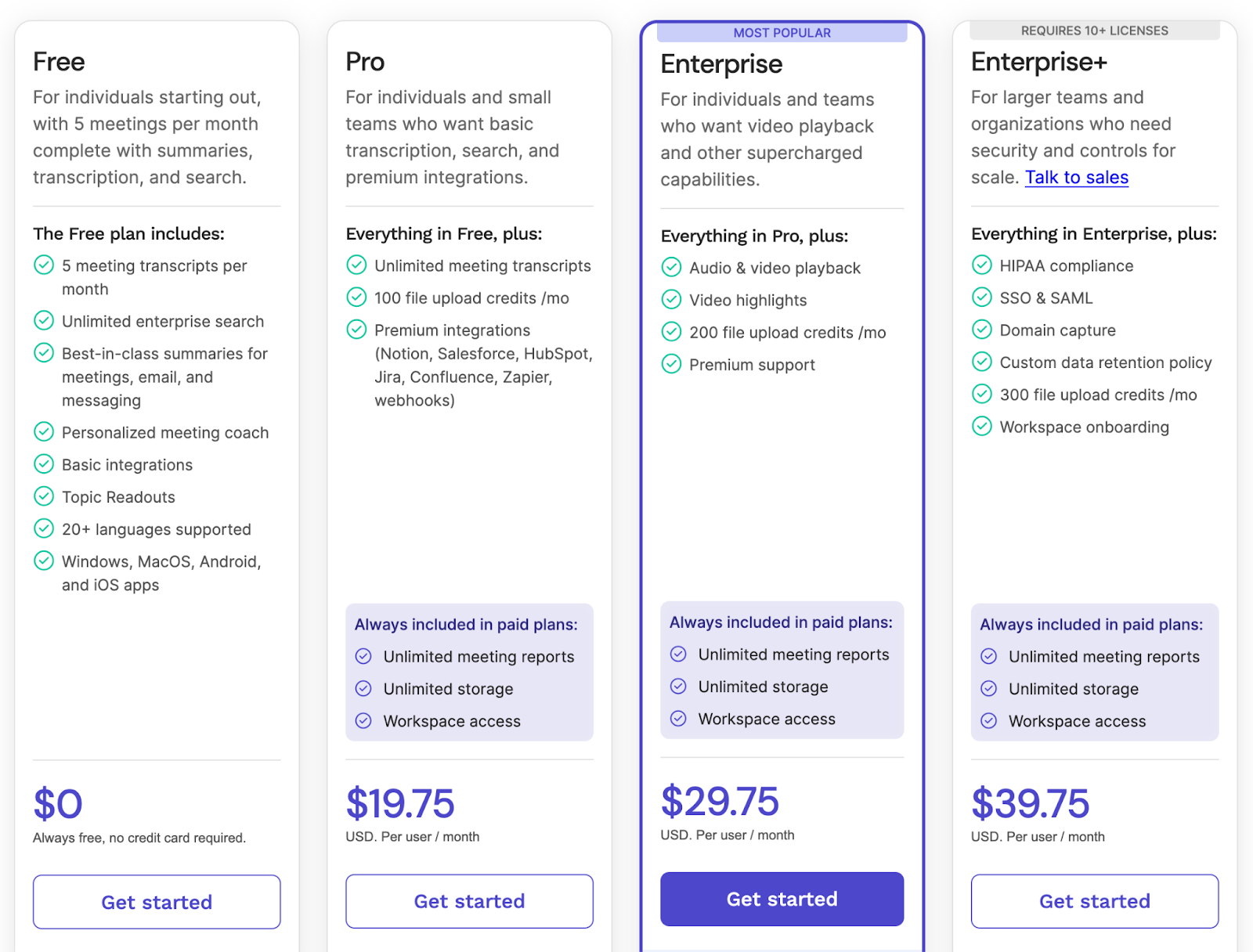
Read AI offers four main tiers: Free, Pro, Enterprise, and Enterprise+. Each plan unlocks different levels of recording, AI functionality, and integrations.

1. Read AI Free Plan

The Free plan gives new users 5 captured meetings per month. It includes:

  • 5 meeting transcripts and summaries per month
  • Unlimited enterprise search
  • Summaries for meetings, emails, and messages
  • Personalized meeting coach
  • Basic integrations
  • Topic Readouts
  • Support for 20+ languages
  • Apps for Windows, MacOS, iOS, and Android app

Where it falls short

  • Only 5 reports make it difficult to assess Read AI in real company settings
  • No advanced integrations
  • No video playback
  • Limited control over how and when the bot joins calls

This tier works if you simply want to test how Read AI handles meeting reports and key details. But once you hit that 5-meeting limit, you must upgrade, making the Free plan tough for any team trying to test workflows across new meetings, daily stand-ups, or customer calls.

2. Read AI Pro Plan — $19.75 per user/month

The Pro plan is designed for individuals or small teams who want unlimited meeting transcripts and access to premium integrations.

You get everything in Free, plus:

  • Unlimited transcripts and meeting reports
  • 100 file upload credits per month
  • Premium integrations (Notion, Salesforce, HubSpot, Confluence, Jira, Zapier, webhooks)
  • Unlimited storage and workspace access

This plan is for people who attend multiple meetings per week and need consistent summaries, reminders, and CRM-connected action items.

Where it falls short

The biggest drawback isn’t the feature list; it’s the method of capture.

Read AI relies heavily on a bot joining your Google Meet, Microsoft Teams, or Zoom calls. Many participants find this disruptive, and some companies report the bot joining calls after they tried to disable it. In environments where privacy matters, this leads to friction and mistrust.

3. Read AI Enterprise Plan — $29.75 per user/month (Requires 10+ licenses)

Enterprise is suited for teams that need advanced playback and highlight tools.

Includes everything in Pro, plus:

  • Audio & video playback
  • Video highlights
  • 200 upload credits
  • Premium support

Useful for reviewing lengthy client calls or handling training sessions.

Where it falls short

  • Video playback can feel clunky across tabs
  • Speaker detection struggles in in-person meetings
  • Requires a 10-seat minimum, limiting access for smaller teams

4. Read AI Enterprise+ Plan — $39.75 per user/month

Built for larger organizations that need compliance and strict policy controls.

You get everything in Enterprise, plus:

  • HIPAA
  • SSO & SAML
  • Domain capture
  • Custom data retention
  • 300 upload credits
  • Workspace onboarding

A good fit for regulated industries.

Where it falls short

Organizations report issues with:

  • File download reliability
  • Playback usability
  • Limited customization
  • High reliance on upload-credit systems
  • Higher costs compared to alternatives

Why MeetGeek is a strong alternative

Read AI gives users useful tools for meeting reports, summaries, and AI-powered search, and it works across Google Meet, Microsoft Teams, Zoom, and mobile apps. It also offers a browser extension and cross-platform support.

But if your goal is to capture conversations accurately, turn them into structured meeting notes, and access transcripts without dealing with limits or credit systems, MeetGeek provides a more practical experience.

MeetGeek focuses on clarity, accuracy, and predictable workflows. It offers flexible options that fit a wide range of meeting formats, including in-person meetings, online calls, interviews, and internal discussions. Every conversation becomes easy to access, review, and follow up on.

Reliable transcription accuracy

MeetGeek supports more than 60 languages and understands different accents, speaking styles, and technical vocabulary. 

It handles situations where people talk over each other, where background noise appears, or where multiple participants share complex information. This helps teams save time and use their transcripts immediately instead of needing major corrections.

Flexible meeting capture

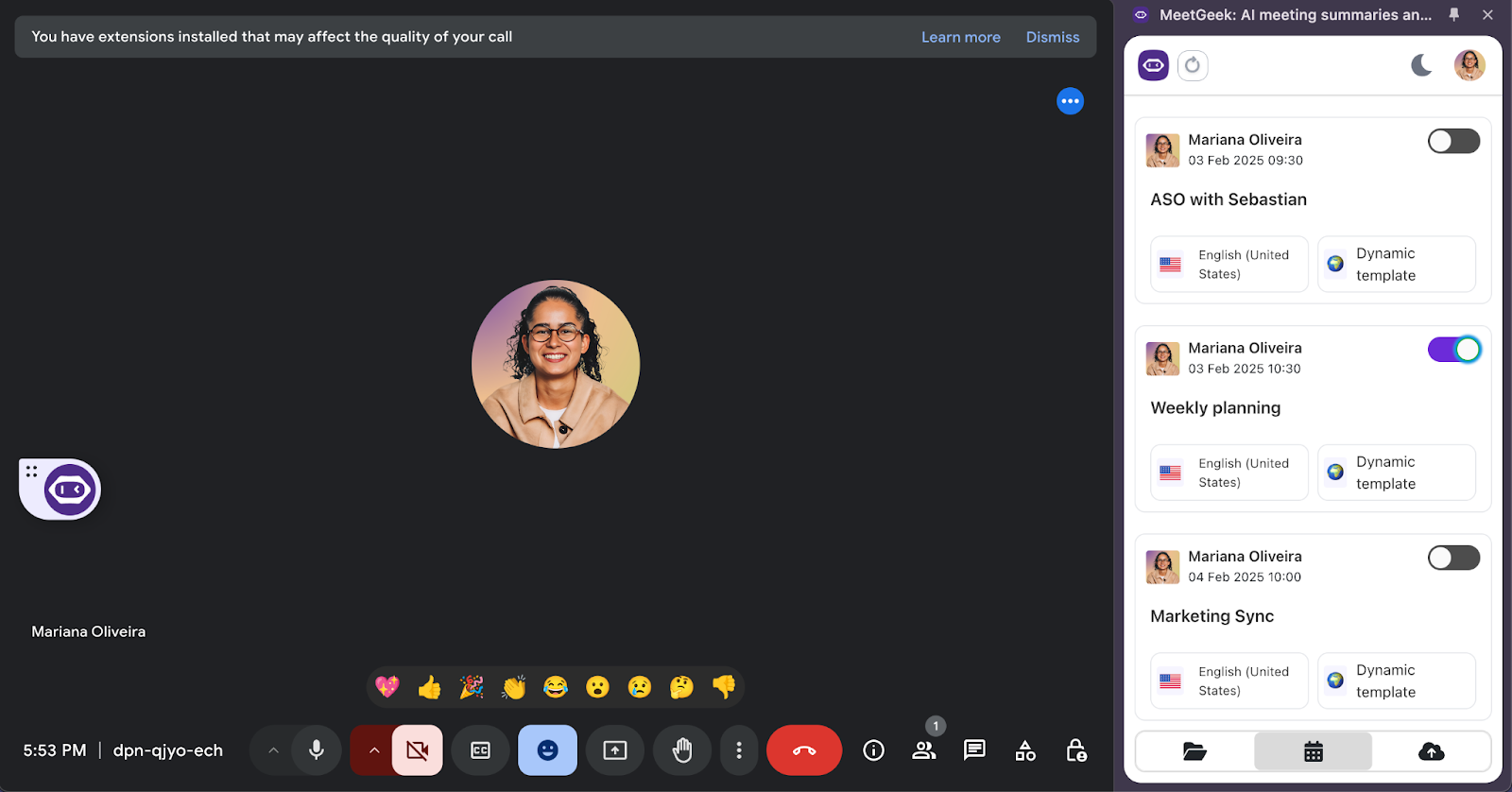
MeetGeek can capture meetings in multiple ways. The calendar assistant can automatically join Google Meet or Microsoft Teams calls, the browser extension supports recording on other platforms, and the desktop app can record any online meeting with full accuracy. 

For in-person meetings, the mobile app captures conversations smoothly so key details are never lost. This flexibility is ideal for teams that move between meeting types during a busy week.

Actionable summaries

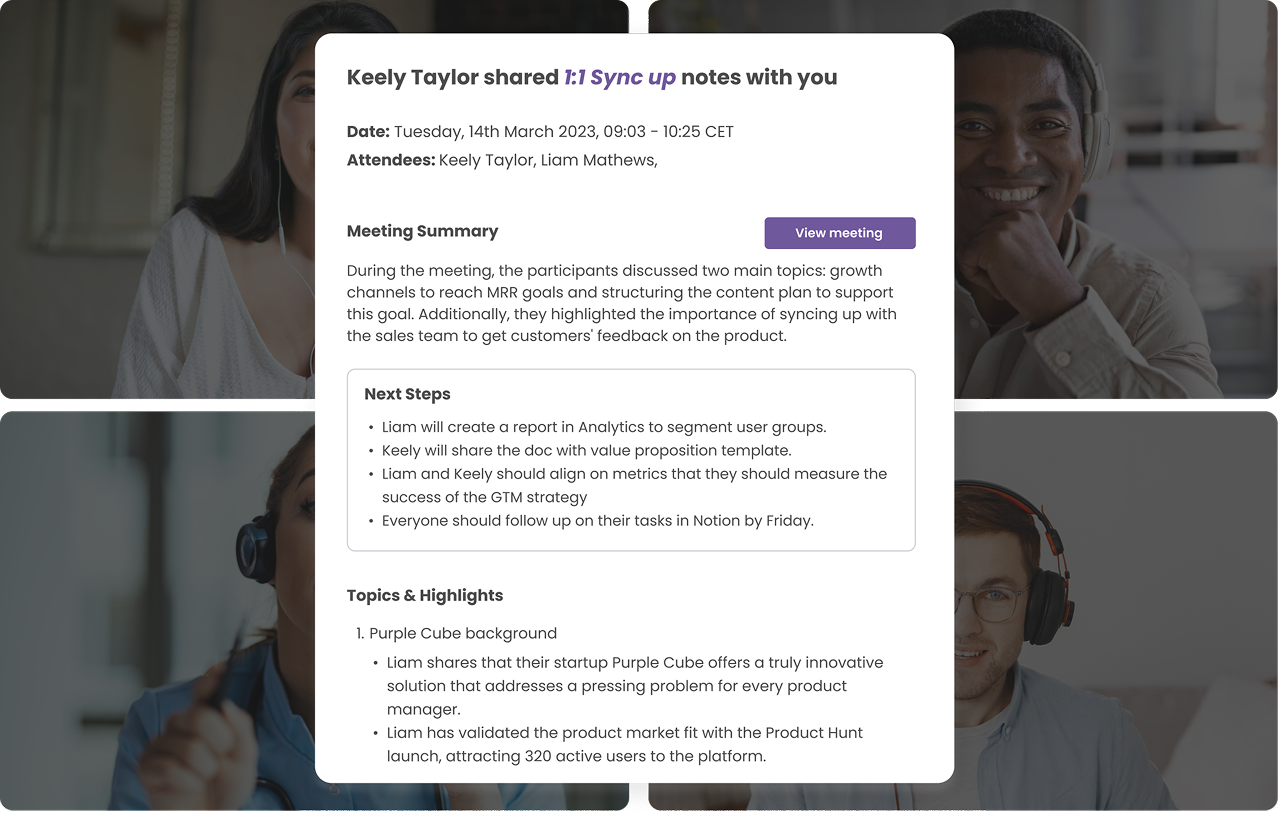
Every meeting comes with a structured summary that includes notes, action items, insights, and clear answers to what was discussed, keeping team members up to date. 

These summaries adapt to the format of the meeting, whether you are running a coaching session, a sales call, an internal update, or an interview. Teams can follow up quickly without rewatching recordings or digging through long transcripts.

Searchable conversation library

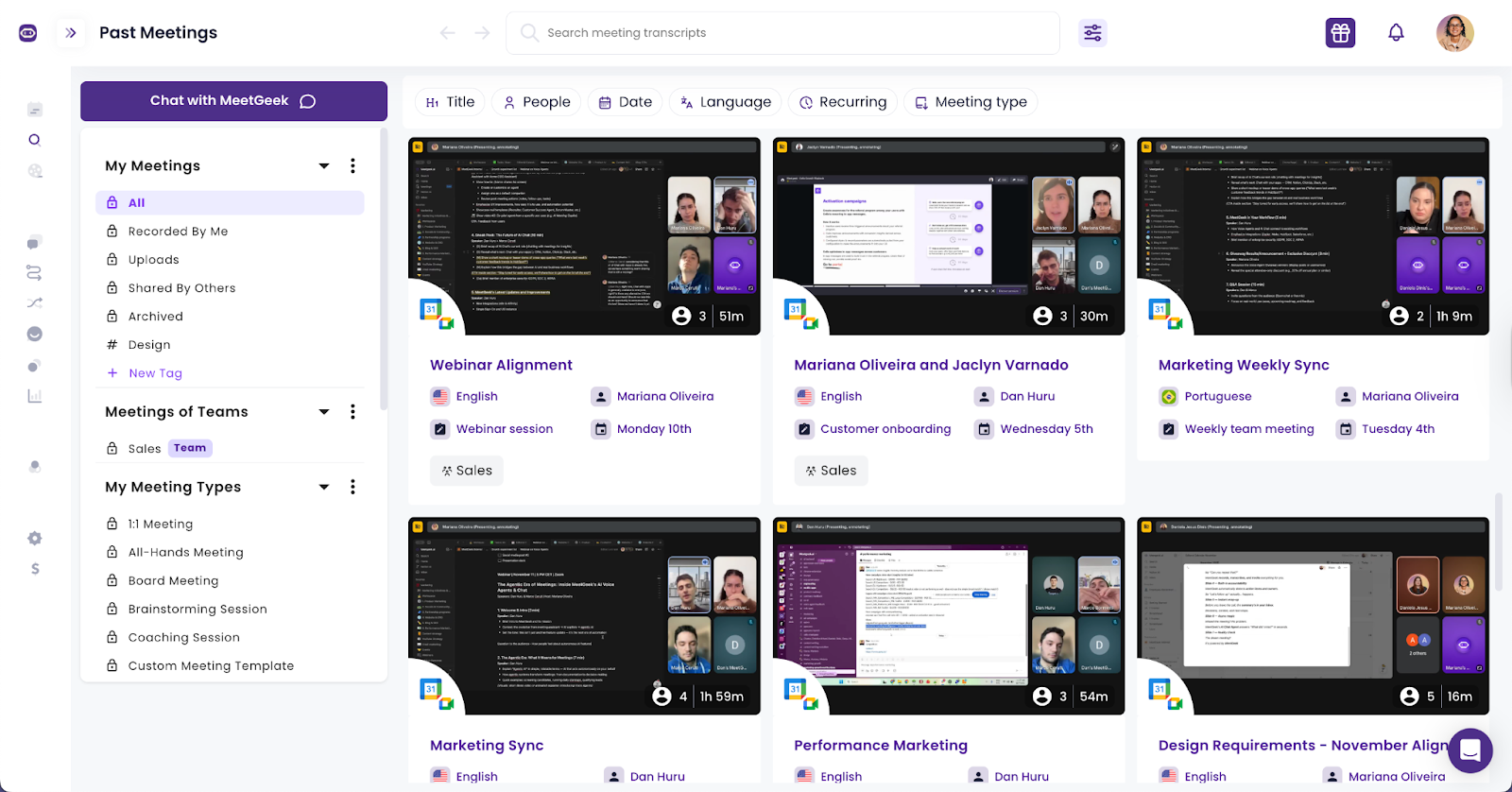
MeetGeek creates a searchable knowledge base where meeting transcripts, ideas, questions, and decisions become easy to find. Users can search with direct keywords or simply ask a question that helps them make sense of the data. 

The system returns time-stamped answers and references, helping teams track progress and access meeting data without scanning the entire transcript. This makes it easier to work smarter and maintain a clean meeting history.

Communication insights

MeetGeek includes insights that help teams understand how their conversations unfold. You can review talk-time balance, interruptions, pacing, and participation. 

These insights make it easier to understand how meetings are structured and offer suggestions and advice for improvement where it matters.

Integrations with everyday tools

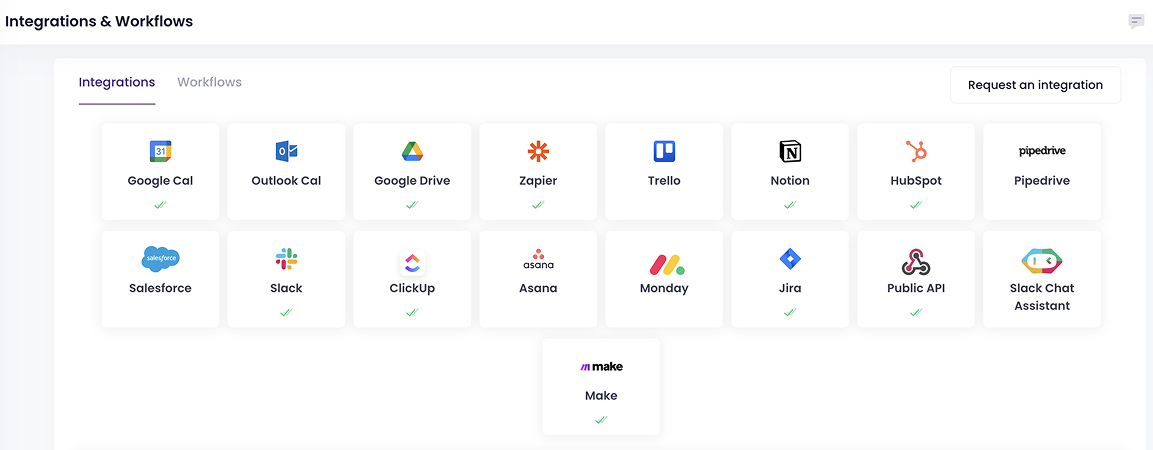
MeetGeek connects with more than 8,000 apps, including Salesforce, HubSpot contacts, Google Docs, Slack, Notion, and dozens of project management tools. 

Meeting notes and action items flow directly into your existing workflow so teams can follow up without copying and pasting. This keeps work organized and consistent across the company.

Security across all plans

MeetGeek includes SOC 2, GDPR, HIPAA, and CCPA compliance across all paid plans. Companies handling sensitive data can work confidently without needing enterprise-only upgrades or special requests. Security stays consistent whether a team is on Pro, Business, or Enterprise.

MeetGeek pricing

While Read AI charges based on upload credits and bot-driven automation, MeetGeek keeps pricing simple, predictable, and designed for people who want to work smarter with their meeting data.

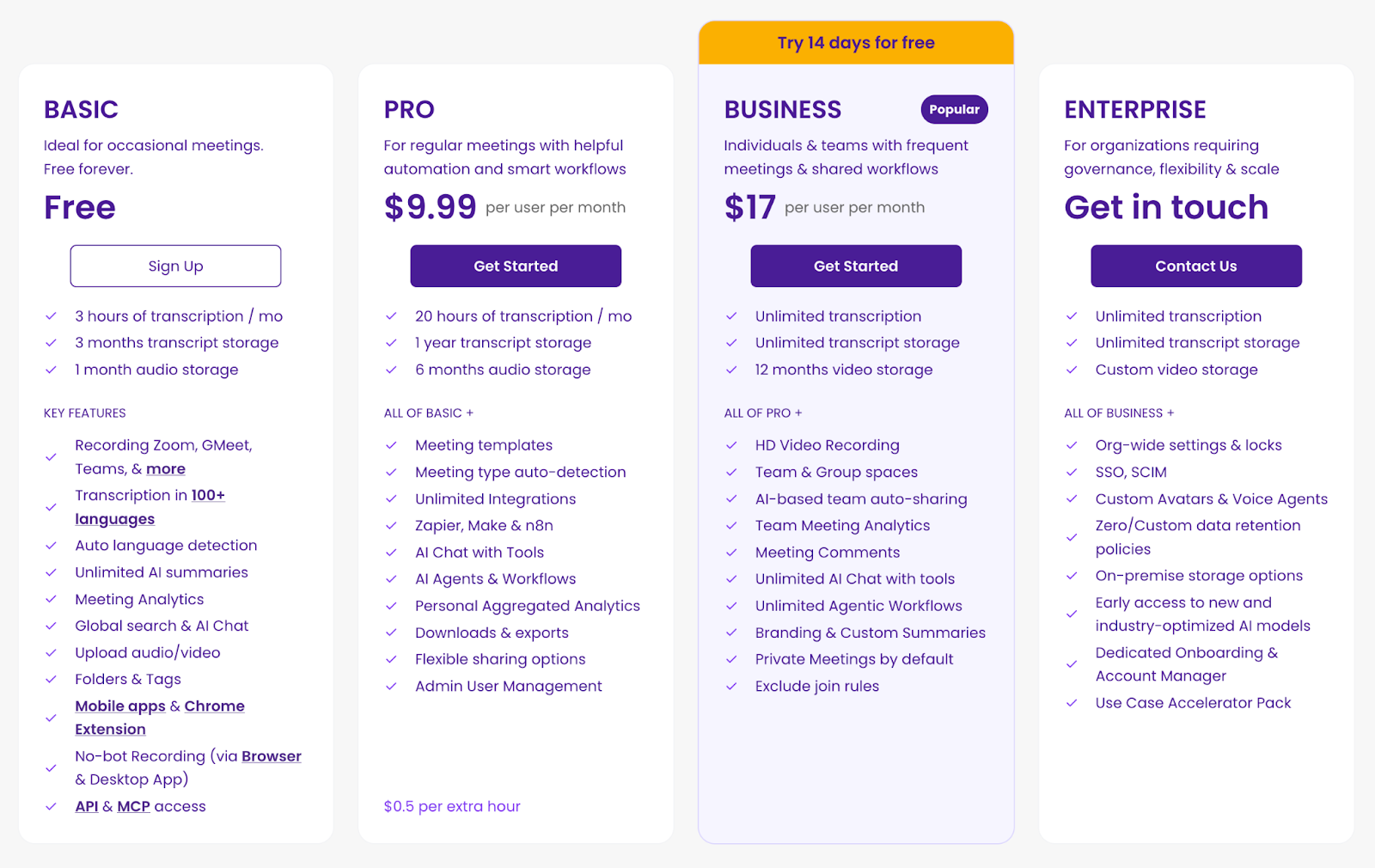
MeetGeek offers four tiers:

Basic Plan (Free)

The Basic plan is ideal for individuals or small team pilots who want to try accurate meeting transcription without running into limitations on meeting reports.

It includes:

  • 3 hours of transcription each month
  • 3 months of transcript storage and 1 month of audio storage
  • Unlimited AI summaries for every meeting
  • Recording support for Zoom, Google Meet, Microsoft Teams, and more
  • Transcription in 100+ languages with automatic language detection
  • Meeting analytics to understand how conversations unfold
  • Global search and AI chat
  • Audio and video uploads
  • Folders and tags to organize meeting data
  • No bot recording using the browser or desktop app
  • Mobile apps and a Chrome extension
  • API and MCP access for deeper customization

This free tier gives you enough flexibility to capture real meetings, explore workflows, and access essential notes without hidden restrictions.

Pro Plan — $9.99 per user per month (billed annually)

The Pro plan supports professionals who handle frequent meetings, manage shifting schedules, or need reliable workflows when new meetings appear throughout the week.

It includes everything in Basic, plus:

  • 20 hours of transcription per month
  • 1 year of transcript storage
  • 6 months of audio storage
  • Meeting templates for consistent documentation
  • Automatic detection of meeting types
  • Unlimited integrations
  • Zapier, Make, and n8n support
  • AI chat connected to tools
  • AI agents and customizable workflows
  • Personal aggregated analytics
  • Downloadable assets and export options
  • Flexible sharing settings
  • Admin and user management
  • 0.50 dollars per additional hour

This plan is a strong option for users who want reliable insights, organized notes, and smooth follow-up across all their conversations.

Business Plan — $17 per user per month (billed annually)

The Business plan is MeetGeek’s most widely adopted tier, designed for teams that run frequent meetings and rely on shared collaboration and automated processes.

It includes everything in Pro, plus:

  • Unlimited transcription
  • Unlimited transcript storage
  • 12 months of video storage
  • HD video recording
  • Team and group spaces for shared workflows
  • AI-based auto-sharing of meeting content
  • Team-level meeting analytics
  • In meeting comments
  • Unlimited AI chat with tools
  • Unlimited agentic workflows
  • Custom branding and personalized summaries
  • Private meetings enabled by default
  • Exclude join rules for flexible capture

This tier supports teams that need to track decisions, keep participants aligned, integrate tools like Slack and CRMs, and maintain clarity across all communication.

Enterprise Plan — custom pricing

The Enterprise plan is built for organizations requiring governance, security, and flexibility at scale, especially those with multi-department workflows or sensitive data environments.

It includes everything in Business, plus:

  • Custom video storage configurations
  • Organization-wide settings and administrative locks
  • SSO and SCIM for identity management
  • Custom avatars and voice agents
  • Zero or custom data retention policies
  • On-premises storage options
  • Early access to advanced and industry-optimized AI models
  • Dedicated onboarding support
  • Dedicated account manager
  • A use case accelerator pack for rapid deployment

This plan provides full control for enterprises that need consistent standards, robust compliance, and optimized meeting processes across the entire organization.

Read AI vs MeetGeek comparison

Category Read AI MeetGeek
Recording method Bot joins meetings automatically on Google Meet, Microsoft Teams, and Zoom. Also supports file uploads. The calendar assistant can join meetings. Browser capture, desktop capture, mobile recording, and manual upload available.
Visibility in meetings Bot appears as a meeting participant and requires host admission depending on platform settings. Can capture without a visible participant when using browser or desktop capture. The calendar assistant can join as a participant if preferred.
Meeting transcription Yes, with high accuracy across languages and platforms. Yes, with strong accuracy across online and in-person meetings.
Meeting notes Yes, including summaries and topic readouts. Yes, with structured summaries that adapt to meeting type.
Action items Yes, generated automatically. Yes, with clear context and time-stamped references.
Search AI-powered search across transcripts, emails, messages, CRM data, and connected applications through Search Copilot. AI-powered question-based search focused on meeting data, transcripts, and time-stamped insights.
In person meetings Supported through the mobile app, but speaker identification may vary depending on the environment. Strong support with speaker detection that improves over time.
Integrations Integrates with Notion, Salesforce, HubSpot, Slack, Jira, Confluence, and more. Integrates with more than 8000 tools, including CRMs, Slack, project apps, and knowledge platforms.
Storage model Unlimited storage on paid plans. Upload credits limit monthly file uploads for transcripts and media. Predictable storage based on each plan with no upload credit system.
Apps Desktop, web, Chrome extension, iOS app, Android app. Desktop, web, Chrome extension, Comet extension, mobile app.
Governance Enterprise Plus includes HIPAA, SSO, SAML, domain capture, and data retention controls. Strong security across all plans, including SOC 2, GDPR, CCPA, HIPAA.
Best fit Users who want an AI copilot that searches meetings, emails, and messages across multiple data sources. Teams who want clear summaries, flexible recording, predictable pricing, and meeting-focused workflows.

Which meeting tool is a stronger choice?

Choosing between Read AI and MeetGeek depends on how your team wants to handle meeting transcription and meeting notes. Read AI works best for users who want an AI copilot that blends meeting transcripts with emails and messages and provides a wide pool of data to search through.

It can be useful for someone who needs to analyze patterns across many communication channels, although it can feel overwhelming when the goal is to focus on one meeting and follow up on what was said.

MeetGeek is built for teams that want clarity without adding unnecessary steps to the process. It allows users to capture meetings without a bot, which makes private conversations more comfortable. It organizes transcripts, summaries, ideas, and insights in a way that helps teams decide what is important. It reduces the time needed to search for information and makes the workflow easier to manage.

For companies that want predictable pricing, flexible recording options, and meeting data that stays clean and focused, MeetGeek provides a practical and scalable solution. If you're still wondering how much it can improve your meetings, try it for free and see how quickly productivity increases.

Frequently asked questions

Is Read AI free to use?

Yes. Read AI has a Free plan with 5 meeting transcripts per month, basic features, and access to its apps. But the limits make it hard for teams to evaluate the tool in real workflows.

What does Read AI do?

Read AI joins meetings, creates meeting notes, generates summaries, detects action items, and provides AI-powered search across meetings, emails and messages, CRMs, and files.

Why is Read AI joining my meeting?

Because the Read Assistant bot is enabled in your calendar. When you first set it up it will request permissions, and once connected, it automatically joins upcoming meetings unless settings are manually adjusted, which some users report difficulty doing.

Is Read AI safe to use?

Read AI offers standard security features, and Enterprise+ includes HIPAA and SSO. However, companies concerned about privacy or unexpected bot participation may prefer tools like MeetGeek that offer more transparent and controllable capture options.

Article updated on 
December 10, 2025
Share the knowledge with your circle
Copied
Related posts

Read AI Pricing Explained for 2026: Is It Worth It for Meeting Notes

Explore Read AI’s 2026 pricing, its core features, and how it handles meeting notes, transcription, and insights to support modern teams.

This is some text inside of a div block.

What Is a Searchable Knowledge Base and How Does It Work?

Explore how searchable knowledge bases improve access to information and see how MeetGeek turns your meetings into a fast, reliable knowledge hub.

This is some text inside of a div block.

How to Blur Background in Google Meet (Simple Guide for All Devices)

Discover how to blur your background in Google Meet on desktop and mobile, use visual effects, and get a cleaner, more focused look in every call.

This is some text inside of a div block.

Comment rejoindre Teams Meeting avec Code : un guide complet étape par étape

Découvrez comment participer à des réunions Microsoft Teams à l'aide d'un code de réunion, ainsi que d'autres options, telles qu'un lien ou une invitation. Ce guide explique chaque méthode de manière claire, étape par étape.

This is some text inside of a div block.

Les 5 meilleures alternatives à NoteGPT en 2025

Explorez les 5 meilleures alternatives à NoteGPT qui vous aident à capturer des informations clés, à transcrire du contenu et à augmenter la productivité dans les flux de travail professionnels et d'apprentissage.

This is some text inside of a div block.

Qu'est-ce que Perplexity AI? Un guide sur le moteur de recherche alimenté par l'IA qui transforme la façon dont nous trouvons l'information

Dans cet article, nous allons examiner de près Perplexity AI, ce qu'elle peut faire pour vous par rapport aux moteurs de recherche traditionnels, ainsi que certains de ses avantages et inconvénients.

This is some text inside of a div block.

Les meilleures alternatives à tl;dv pour rationaliser vos réunions

Découvrez les meilleures alternatives à tl;dv et explorez et comparez leurs fonctionnalités pour choisir l'outil de réunion IA adapté à votre organisation.

This is some text inside of a div block.

Mode d'enregistrement ChatGPT contre MeetGeek : voici tout ce que vous devez savoir

Vous voulez savoir comment l'enregistreur ChatGPT se compare à MeetGeek ? Nous avons examiné les fonctionnalités, l'intégration et la sécurité des données pour l'enregistrement des réunions.

This is some text inside of a div block.

Tarification de Fathom AI 2025 : cela en vaut-il toujours la peine pour les équipes modernes ?

Découvrez les tarifs de Fathom AI pour 2025, y compris les fonctionnalités, les limites et les comparaisons de forfaits, ainsi que la manière dont MeetGeek offre plus de flexibilité aux équipes.

This is some text inside of a div block.

AI Meeting Agents : comment l'IA autonome transforme l'avenir du travail

Découvrez comment les agents de réunion dotés d'IA redéfinissent l'avenir du travail en gérant la planification, les suivis et même en parlant en votre nom pour gagner du temps et transformer chaque réunion en action concrète.

This is some text inside of a div block.

Notta AI Review : cet outil de transcription basé sur l'IA en vaut-il la peine en 2025 ?

Lisez cette revue approfondie de Notta AI pour découvrir dans quelle mesure l'IA transcrit les réunions, gère plusieurs langues et fournit des résumés d'IA, ainsi que ses lacunes par rapport à des assistants de réunion plus intelligents.

This is some text inside of a div block.

Ces 4 outils d'IA pour les organisations à but non lucratif feront en sorte que chaque heure compte

Rendez votre organisation à but non lucratif plus efficace grâce à des outils d'IA qui réduisent le temps consacré à l'administration, améliorent la collaboration et maximisent chaque heure d'impact.

This is some text inside of a div block.

Granola AI note des alternatives : les meilleures options à essayer en 2025

Explorez les meilleures alternatives à Granola AI Notes pour 2025 grâce à des outils plus intelligents qui vont au-delà de la transcription, en offrant automatisation, informations et collaboration.

This is some text inside of a div block.

Courriel de suivi après l'entretien : comment le rédiger, quand l'envoyer et quoi dire

Découvrez comment rédiger un e-mail de suivi efficace après un entretien. Du calendrier aux modèles, en passant par le ton et la structure, ce guide couvre tout ce dont vous avez besoin pour vous démarquer et rester mémorable.

This is some text inside of a div block.

Revue des prix de Tactiq 2025 : plans, limites et meilleure alternative

Explorez les derniers plans tarifaires de Tactiq et découvrez comment ils se comparent à l'assistant de réunion tout-en-un de MeetGeek.

This is some text inside of a div block.

Signification d'une réunion ad hoc et comment en organiser une

Découvrez le véritable sens des réunions ad hoc et apprenez à rendre les discussions spontanées plus ciblées et plus efficaces. Découvrez quand les conserver et les gérer.

This is some text inside of a div block.

Etiquette des réunions virtuelles : règles essentielles pour le professionnalisme

Dans cet article, nous allons explorer 15 conseils pratiques sur l'étiquette des réunions virtuelles pour vous aider à organiser des réunions en ligne plus fluides et plus professionnelles.

This is some text inside of a div block.

Comment flouter l'arrière-plan dans Zoom : guide étape par étape

Découvrez comment utiliser la fonction d'arrière-plan flou de Zoom pour plus de confidentialité et de concentration, ainsi que des conseils, des correctifs et quand passer aux arrière-plans virtuels.

This is some text inside of a div block.

Comment partager un écran sur Google Meet : un guide simple étape par étape

Découvrez comment partager votre écran sur Google Meet en suivant des étapes claires pour ordinateur, iPhone, iPad et Android.

This is some text inside of a div block.

Le serveur MCP de MeetGeek expliqué : comment il permet aux assistants IA de transformer les réunions

Découvrez comment le serveur MCP de MeetGeek aide les assistants IA à transformer vos réunions en informations intelligentes et exploitables, le tout à partir de votre machine locale.

This is some text inside of a div block.

Comment changer de nom sur Zoom (avant et après avoir rejoint une réunion)

Découvrez comment modifier votre nom Zoom étape par étape sur n'importe quel appareil, ainsi que des conseils pour les hôtes, les salles d'attente et la résolution des problèmes.

This is some text inside of a div block.

L'IA de prise de notes pour les étudiants : les meilleurs outils pour étudier plus intelligemment en 2025

Un guide des meilleurs outils de prise de notes IA pour les étudiants en 2025, avec des fonctionnalités, des avantages et des inconvénients pour vous aider à choisir la bonne application pour apprendre.

This is some text inside of a div block.

L'examen des prix de Descript 2025 : ce qu'il propose, ses lacunes et une meilleure alternative

Examinons de plus près les niveaux de tarification de Descript, leurs compromis et les raisons pour lesquelles MeetGeek se distingue en tant que choix plus intelligent pour les créateurs.

This is some text inside of a div block.

Limite de temps de Google Meet : tout ce que vous devez savoir

Dans cet article, vous apprendrez tout ce que vous devez savoir sur les limites de temps de Google Meet et sur la manière de les dépasser.

This is some text inside of a div block.

Comment transcrire des mémos vocaux en texte (3 manières différentes)

Dans cet article, vous allez apprendre à transcrire des mémos vocaux de trois manières différentes, en évaluant les avantages et les inconvénients de chaque option.

This is some text inside of a div block.

Meilleures alternatives à ClickUp pour la prise de notes par IA

Découvrez les 5 meilleures alternatives à ClickUp si vous souhaitez aller au-delà de la simple prise de notes par IA et trouver un assistant de réunion complet.

This is some text inside of a div block.

Qu'est-ce qu'un résumé objectif et comment en rédiger un pour vos réunions

Les résumés objectifs sont indispensables lorsque vous avez besoin d'informations clés issues de longues réunions. Nous en parlerons dans cet article !

This is some text inside of a div block.

Comment enregistrer un Google Meet : toutes les options expliquées

Dans cet article, nous expliquons comment enregistrer un Google Meet de manière native et à l'aide d'outils tiers tels que MeetGeek

This is some text inside of a div block.

Les 7 meilleures applications de prise de notes de réunion du moment

Vous recherchez la meilleure application de prise de notes de réunion pour votre équipe ? Nous détaillons les caractéristiques, les avantages et les inconvénients des 7 meilleurs du moment.

This is some text inside of a div block.

Comment enregistrer un webinaire Zoom en tant qu'hôte ou participant (2 méthodes)

Dans cet article, nous verrons comment enregistrer un webinaire Zoom en tant qu'hôte ou participant à l'aide de l'outil d'enregistrement intégré de Zoom et de l'outil tiers avec transcription IA.

This is some text inside of a div block.

7 meilleures extensions Chrome pour les vendeurs

Dans cet article, nous allons explorer les meilleures extensions Chrome pour les commerciaux, en nous concentrant sur les outils qui améliorent l'intelligence des réunions, s'intègrent aux CRM et optimisent la productivité.

This is some text inside of a div block.

Les meilleurs outils et extensions de capture audio pour Chrome en 2025 [Comparaison]

Nous aborderons une gamme d'options, allant des enregistreurs de base aux plateformes avancées proposant des transcriptions, des résumés et des intégrations fluides.

This is some text inside of a div block.

La surcharge de réunions n'est pas le vrai problème, mais une mauvaise conception des réunions

Lorsque la surcharge de réunions devient évidente, quelques petits changements peuvent transformer l'ensemble de votre culture de réunion.

This is some text inside of a div block.

Le meilleur logiciel d'intelligence conversationnelle pour le coaching et l'analyse des réunions en 2025

En tirant parti de l'IA, ces plateformes d'intelligence conversationnelle fournissent les analyses nécessaires pour affiner les arguments de vente ou d'investissement, améliorer le coaching et influencer les revenus.

This is some text inside of a div block.

Comment ajouter des notes de réunion à Google Docs [3 méthodes simples]

Explorons trois manières d'ajouter vos notes de réunion à Google Docs, manuellement ou automatiquement.

This is some text inside of a div block.

Trouvez la meilleure alternative au Zoom en 2025

Vous recherchez une alternative à Zoom ? Découvrez les meilleures options pour 2025 et trouvez la solution idéale pour vos réunions !

This is some text inside of a div block.

Comment prolonger la limite de temps de Zoom : solutions payantes et gratuites

Vous avez besoin de plus de temps pour votre réunion Zoom ? Découvrez comment prolonger facilement votre session grâce à ce guide simple.

This is some text inside of a div block.

Comment installer Microsoft Teams pour Mac (guide convivial pour débutants)

Il est facile de configurer Microsoft Teams sur Mac ! Suivez notre guide rapide pour commencer à collaborer en toute fluidité.

This is some text inside of a div block.

Comment enregistrer des appels WhatsApp, étape par étape

Découvrez le moyen le plus simple d'enregistrer des appels WhatsApp grâce à nos instructions claires, étape par étape.

This is some text inside of a div block.

Les 5 meilleures intégrations pour les assistants de réunion basés sur l'IA en 2025

Vous souhaitez améliorer la productivité de vos réunions ? Découvrez les meilleures intégrations d'assistants de réunion IA de 2025 qui se connectent de manière fluide à vos outils et applications préférés.

This is some text inside of a div block.

7 façons dont les assistants de réunion dotés d'IA peuvent faire gagner du temps aux équipes commerciales en 2025

Découvrez comment les assistants de réunion dotés d'intelligence artificielle transformeront la productivité des ventes en 2025 en éliminant les tâches manuelles, en rationalisant les flux de travail et en permettant aux commerciaux de se concentrer sur les ventes.

This is some text inside of a div block.

Tous les plans tarifaires Zoom expliqués et leurs alternatives

Consultez une liste claire de tous les plans tarifaires de Zoom, ainsi que des conseils intelligents pour économiser ou utiliser des fonctionnalités gratuitement.

This is some text inside of a div block.

Puis-je prendre une capture d'écran dans Teams ? Réponses à vos questions

Vous vous demandez comment prendre une capture d'écran dans Teams ? Nous analysons ce qui fonctionne, ce qui ne fonctionne pas et ce qu'il faut surveiller.

This is some text inside of a div block.

Tarifs et forfaits Google Meet, simplifiés

Trouvez le forfait Google Meet qui convient à votre équipe grâce à notre analyse claire et à nos conseils intelligents pour économiser des coûts.

This is some text inside of a div block.

Où sont stockés les enregistrements des équipes? Toutes les localisations, expliquées

Vous vous demandez où finissent vos enregistrements Microsoft Teams ? Voici toutes les options de stockage clairement expliquées.

This is some text inside of a div block.

La semaine de travail de 4 jours : comment les entreprises gagnent la guerre des talents

Pourquoi travailler moins est peut-être la solution la plus intelligente pour les entreprises qui recherchent la productivité, l'innovation et la rétention des talents.

This is some text inside of a div block.

Trouvez la meilleure application de synthèse vocale pour le travail en 2025 (gratuite et payante)

Vous recherchez une application de synthèse vocale en 2025 ? Nous avons rassemblé les meilleurs choix pour améliorer la productivité et gagner du temps au travail.

This is some text inside of a div block.

Gestion des risques de sécurité et de conformité liés à l'IA pour les preneurs de notes

Assurez la sécurité et la conformité de vos réunions alimentées par l'IA ! Apprenez à gérer les risques de sécurité et de conformité, à protéger les données sensibles et à garantir la confidentialité de vos réunions virtuelles.

This is some text inside of a div block.

Comment rédiger un e-mail de suivi d'une réunion d'affaires + modèles et invites ChatGPT

Apprenez à rédiger des suivis de réunions d'affaires clairs et professionnels à l'aide de modèles et d'instructions ChatGPT pour gagner du temps et améliorer les réponses.

This is some text inside of a div block.

Comment utiliser Microsoft Teams AI pour les réunions

Apprenez à automatiser les notes, à améliorer la collaboration entre les équipes et l'échange de connaissances, et à rendre les réunions Teams plus productives grâce à des fonctionnalités basées sur l'IA.

This is some text inside of a div block.

Comment rédiger le procès-verbal d'une réunion comme un pro [+ Modèle personnalisable gratuit]

Réalisez des comptes rendus de réunion impeccables à chaque fois ! Découvrez des conseils d'experts pour saisir les points clés, suivre les mesures à prendre et impressionner votre équipe grâce à ses compétences professionnelles en matière de prise de notes.

This is some text inside of a div block.

Les 5 A d'une communication efficace : un guide de démarrage pour une meilleure collaboration en équipe

Le succès d'une start-up n'est pas seulement une question de bonnes idées, mais aussi de la qualité de la communication au sein de votre équipe. Découvrez le cadre des 5 A pour améliorer la collaboration, réduire les frictions et transformer les conversations en actions.

This is some text inside of a div block.

Rapport de présence aux réunions des équipes : qu'est-ce que c'est et comment l'utiliser

Démystifiez le rapport de présence aux réunions des équipes ! Apprenez à y accéder, à l'interpréter et à en tirer parti pour suivre l'engagement et améliorer vos réunions virtuelles sans effort.

This is some text inside of a div block.

Comment créer et utiliser Google Meet Breakout Rooms

Maîtrisez les salles de réunion Google Meet ! Apprenez à les créer, à les gérer et à les utiliser pour favoriser la collaboration et l'engagement lors de vos réunions virtuelles.

This is some text inside of a div block.

Comment vous enregistrer sur Zoom, étape par étape

Maîtrisez l'art de l'enregistrement sur Zoom grâce à notre guide simple. Apprenez à enregistrer vos réunions ou vos notes personnelles sans effort.

This is some text inside of a div block.

Plus de 30 indicateurs de performance clés des ventes à suivre en 2025

Découvrez les secrets de la réussite des ventes en 2025 grâce à ce guide contenant plus de 30 indicateurs de performance clés de vente essentiels. Découvrez ce qu'il faut suivre pour améliorer les performances de votre équipe et augmenter ses revenus.

This is some text inside of a div block.

Comment créer une transcription Zoom : 3 méthodes

Découvrez comment créer facilement des transcriptions Zoom grâce à notre guide sur trois méthodes simples, idéales pour capturer chaque point de discussion clé.

This is some text inside of a div block.

Trouvez le modèle d'évaluation des performances des employés idéal

Découvrez les meilleurs modèles d'évaluation des performances des employés pour rationaliser votre processus d'évaluation et améliorer la productivité au travail.

This is some text inside of a div block.

Plus de 60 meilleures citations de motivation pour votre équipe de vente en 2025

À la recherche de motivation pour les ventes ? Trouvez les meilleures offres de vente pour 2025 afin de responsabiliser votre équipe, d'encourager un état d'esprit positif et de permettre à chacun de se concentrer sur l'atteinte de ses objectifs.

This is some text inside of a div block.

Comment gérer de manière professionnelle tout conflit d'horaire

Apprenez à gérer les conflits d'horaires de manière professionnelle. Ce guide propose des conseils pratiques pour gérer les chevauchements, replanifier les réunions et entretenir des relations solides.

This is some text inside of a div block.

Guide facile d'installation de Zoom pour Windows

Vous êtes nouveau sur Zoom ? Suivez ce guide simple pour installer Zoom sur votre ordinateur Windows. Configurez-vous en un rien de temps et commencez à participer à des réunions en toute simplicité. Parfait pour les débutants.

This is some text inside of a div block.

Comment générer des notes de réunion ChatGPT [+invites ChatGPT gratuites]

Découvrez des étapes simples pour générer des notes de réunion avec ChatGPT. Suivez ce guide pour saisir les points clés, les mesures à prendre et plus encore pour des enregistrements de réunions organisés et efficaces.

This is some text inside of a div block.

Les 7 meilleures alternatives au Loom à tisser en 2025

Découvrez les 7 meilleures alternatives au Loom à tisser en 2025. Trouvez les meilleurs outils pour la messagerie vidéo et la collaboration en équipe.

This is some text inside of a div block.

Microsoft Teams contre Zoom: qu'est-ce qui fonctionne le mieux en 2025 ?

Découvrez ce qui vous convient le mieux en 2025 : Zoom ou Microsoft Teams ? Comparez les fonctionnalités et faites le meilleur choix pour vos besoins !

This is some text inside of a div block.

Land More Appointments With a Meeting QR Codes

Read this handbook to learn all about meeting QR Codes. Dive into their practical use cases, benefits, and step-by-step instructions to create these for your needs.

This is some text inside of a div block.

Fireflies vs. Otter: Which One’s the Best

Compare Fireflies.AI and Otter.AI to find out which meeting transcription tool fits your needs best. Explore features, pricing, and more to make the right choice!

This is some text inside of a div block.

How to Make the Most of the Zoom AI Companion as Your AI Meeting Assistant

Learn how to use Zoom AI Companion features to enhance your meetings, save time, and boost productivity with helpful features and tips for a smoother workflow.

This is some text inside of a div block.

How to Use the Google Meet AI Note-Taker

Learn how to make the most of Google Meet’s AI note-taker to automatically capture meeting details, stay organized, and save time on follow-ups and summaries!

This is some text inside of a div block.

Where Do Zoom Recordings Go? 3 Places You Should Check

Find out where your Zoom recordings are stored with this easy guide. Learn how to locate, access, and manage your recorded meetings in just a few simple steps.

This is some text inside of a div block.

Every Way You Can Transcribe Audio to Text: A Comparative Guide

Explore the best ways to transcribe audio to text, covering options to suit every need and budget. Simplify your approach to productivity today!

This is some text inside of a div block.

The 10 Most Effective Types of Note-Taking

Unveiling the top 10 note-taking methods to skyrocket your productivity. Don't miss out on these game-changing strategies!

This is some text inside of a div block.

What Is Conversation Intelligence & Why You Need It

Learn how conversation intelligence can change how you do business and what tools to look for by reading this article!

This is some text inside of a div block.

9 Tips to Achieve Ultimate Meeting Productivity

Are you tired of being stuck in an endless cycle of unproductive meetings? Follow our 9 tips to help you achieve maximum meeting productivity!

This is some text inside of a div block.

How to Send a Teams Meeting Invite from Any Device

Discover how to invite people to your Teams meetings in only a few steps with this guide!

This is some text inside of a div block.

How to Switch to and from DST Using a Time Zone Meeting Planner

Unlock seamless time transitions with a time zone meeting planner! Effortlessly switch between DST and standard time. Plan better, stress less!

This is some text inside of a div block.

How to Write a “Thank You” Email After a Sales Meeting with Examples

Learn to craft compelling thank you emails after sales meetings with examples, to accelerate deals and foster strong client relationships.

This is some text inside of a div block.

How Do I Share My Google Calendar for Better Collaboration?

Are you getting the most out of your Google Calendar app? Learn how to share your Google Calendar with others to boost your productivity here!

This is some text inside of a div block.

15 Tips to Run Effective Team Meetings

Team meetings are an important tool for motivating your team and driving success. Learn how to plan and execute effective meetings that inspire and engage your team!

This is some text inside of a div block.

5 conseils pour prendre de bonnes notes de réunion et pourquoi utiliser un assistant de réunion virtuel

Avez-vous du mal à prendre des notes lors des réunions de votre équipe ? Suivez ces 5 conseils pour passer à la science et réussir votre prochaine réunion !

This is some text inside of a div block.

Best Sales Training Software in 2025: Pros, Cons & Pricing

Uncover the leading sales training software of 2025 with our analysis on their advantages, disadvantages, and pricing options.

This is some text inside of a div block.

12 Effective Sales Team Management Strategies

Discover 12 powerful strategies for managing your sales team more effectively. Boost productivity, enhance teamwork, and drive sales success!

This is some text inside of a div block.

How to Schedule a Zoom Meeting in Outlook on Any Device

Learn to schedule Zoom meetings in Outlook across devices with our step-by-step guide. Streamline your planning process for efficient meetings.

This is some text inside of a div block.

How to Ace Remote Closing in 2025: Top Tips & Strategies

Discover how to stand out in the remote closing industry with these expert-approved tips and strategies!

This is some text inside of a div block.

How to Record a Teams Meeting with any Microsoft 365 Subscription

Discover our easy-to-follow steps for recording a Teams Meeting. Effortlessly save discussions, presentations, and collaborative sessions to never miss out on important details again!

This is some text inside of a div block.

How to Record Google Meet Sessions without Special Permissions in 2025

Discover how to easily record a Google Meet in our comprehensive guide. Read this article to never worry about missing important information again!

This is some text inside of a div block.

How Sales Call Recording Can Help Your Team Close More Deals

Sales call recording is a game-changer for any sales team. Read this article to discover how it can help sales reps and managers alike refine their sales process and close more deals!

This is some text inside of a div block.

How to Create a Killer Talk Track Your Sales Team Will Use

A good talk track is a tried and tested way to engage potential customers in conversation and boost your sales. Here’s what you need to know!

This is some text inside of a div block.

Essential Productivity Tools for Customer Success Managers

15 best tools for calendaring, emailing, customer success activities, project management, and meetings gathered by our partner Custify

This is some text inside of a div block.

Como Gerar uma Transcrição do Microsoft Teams como um Usuário Padrão

Desbloqueie o poder de cada palavra falada em suas reuniões com nosso guia para Transcrição do Microsoft Teams – clareza total em todas as conversas!

This is some text inside of a div block.

How to Generate a Podcast Transcript: A Complete Guide

Discover easy steps to generate a podcast transcript with this comprehensive guide. Boost accessibility and engagement for your audience today!

This is some text inside of a div block.

How to Generate a Microsoft Teams Transcription as a Standard User

Unlock the power of every word spoken in your meetings with our guide to Microsoft Teams Transcription – perfect clarity in every conversation!

This is some text inside of a div block.

How to Create AI Notion Meeting Notes, Automatically

Read this article to learn how to hack notion meeting notes with minimal effort on your part — in only a few steps!

This is some text inside of a div block.

15 Effective Leadership Goals for Team Leaders

Discover 15 effective leadership goals that can help team leaders enhance their skills and improve team performance.

This is some text inside of a div block.

Managing Remote Teams: 25 Tips & Best Practices

If you want to succeed at managing remote teams, there are several guidelines you must follow. Read this article to find out what they are!

This is some text inside of a div block.

How to Create the Ultimate Interview Transcript in 2025

Unlock the secrets to creating the ultimate interview transcript: expert tips on accuracy, formatting, and technology for flawless documentation.

This is some text inside of a div block.

How to Take Interview Notes Like A Pro [+ Interview Notes Template]

Master the art of interview note-taking to enhance your skills and capture crucial details. Get the expert tips you need to boost your interview performance here!

This is some text inside of a div block.

How to Start a Consulting Business in 10 Steps (+Tips)

If you've been thinking about how to start a consulting business for a while, you're in the right spot! Read this to learn everything you need to know & more.

This is some text inside of a div block.

12 Proven Tactics to Increase Productivity in Sales

Want to boost your productivity in sales, increase your conversion rate and close more deals? Read this to reach peak efficiency within your sales team!

This is some text inside of a div block.

Why You Need to Set Meeting Goals and How to Do That

The first step to a successful meeting is defining your meeting goals. Read this article to learn how high-performing teams do this!

This is some text inside of a div block.

How to Build the Best Remote Team In 2025

Working efficiently while in a remote status is now a necessity. Let's explore some hacks that can be applied by your company today.

This is some text inside of a div block.

Commencez avec MeetGeek

Transformez les réunions d'un mal nécessaire en une expérience positive et enrichissante
Commencez gratuitement
Aucune carte de crédit n'est requise.