


AI assistants are becoming part of everyday work, from capturing meeting notes to answering key questions after a busy week of calls. Read AI is one of the tools gaining traction thanks to its automated meeting transcription, summary generation, and AI-powered search that scans your meeting data, emails, and messages, and connected apps.
But as more teams try Read AI, pricing limits, the bot-joining experience, and unclear upgrade paths often create friction. For companies balancing Google Meet, Microsoft Teams, in-person meetings, and a packed calendar, the question becomes: Do the Read AI plans deliver enough value for the cost?
This article breaks down each Read AI pricing tier and highlights real advantages, limitations, and a possible alternative.
Read AI overview: how it fits into your daily workflow
Read AI is designed as an AI copilot that connects to your Google Calendar, Outlook, and communication tools. Once you connect Read AI, it can automatically join meetings, transcribe the conversation, and generate notes, action items, and meeting reports.
Across both online and in-person meetings, users rely on Read AI to:
- Capture spoken conversations
- Generate actionable insights and notes afterward
- Provide AI-powered search through Search Copilot
- Become better speakers with the help of AI coaching
- Track past transcripts, messages, and content history
- Suggest follow-up tasks
- Connect with CRMs and tools like Slack, Notion, and HubSpot contacts
The idea is simple: remove manual note-taking so you can focus on the talk, not the typing.
However, the execution depends heavily on the pricing plan.
Read AI pricing breakdown: what each plan includes
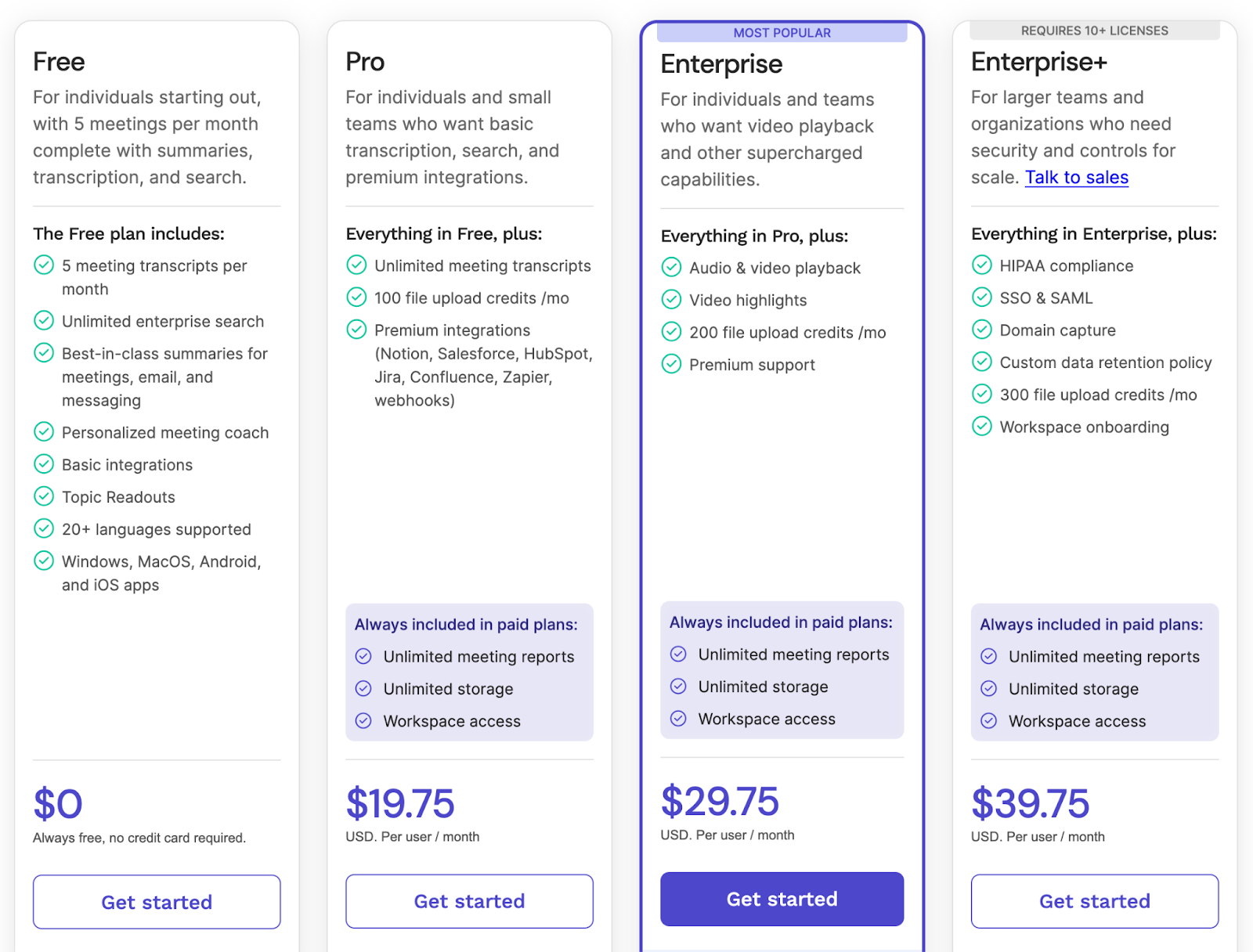
Read AI offers four main tiers: Free, Pro, Enterprise, and Enterprise+. Each plan unlocks different levels of recording, AI functionality, and integrations.
1. Read AI Free Plan
The Free plan gives new users 5 captured meetings per month. It includes:
- 5 meeting transcripts and summaries per month
- Unlimited enterprise search
- Summaries for meetings, emails, and messages
- Personalized meeting coach
- Basic integrations
- Topic Readouts
- Support for 20+ languages
- Apps for Windows, MacOS, iOS, and Android app
Where it falls short
- Only 5 reports make it difficult to assess Read AI in real company settings
- No advanced integrations
- No video playback
- Limited control over how and when the bot joins calls
This tier works if you simply want to test how Read AI handles meeting reports and key details. But once you hit that 5-meeting limit, you must upgrade, making the Free plan tough for any team trying to test workflows across new meetings, daily stand-ups, or customer calls.
2. Read AI Pro Plan — $19.75 per user/month
The Pro plan is designed for individuals or small teams who want unlimited meeting transcripts and access to premium integrations.
You get everything in Free, plus:
- Unlimited transcripts and meeting reports
- 100 file upload credits per month
- Premium integrations (Notion, Salesforce, HubSpot, Confluence, Jira, Zapier, webhooks)
- Unlimited storage and workspace access
This plan is for people who attend multiple meetings per week and need consistent summaries, reminders, and CRM-connected action items.
Where it falls short
The biggest drawback isn’t the feature list; it’s the method of capture.
Read AI relies heavily on a bot joining your Google Meet, Microsoft Teams, or Zoom calls. Many participants find this disruptive, and some companies report the bot joining calls after they tried to disable it. In environments where privacy matters, this leads to friction and mistrust.
3. Read AI Enterprise Plan — $29.75 per user/month (Requires 10+ licenses)
Enterprise is suited for teams that need advanced playback and highlight tools.
Includes everything in Pro, plus:
- Audio & video playback
- Video highlights
- 200 upload credits
- Premium support
Useful for reviewing lengthy client calls or handling training sessions.
Where it falls short
- Video playback can feel clunky across tabs
- Speaker detection struggles in in-person meetings
- Requires a 10-seat minimum, limiting access for smaller teams
4. Read AI Enterprise+ Plan — $39.75 per user/month
Built for larger organizations that need compliance and strict policy controls.
You get everything in Enterprise, plus:
- HIPAA
- SSO & SAML
- Domain capture
- Custom data retention
- 300 upload credits
- Workspace onboarding
A good fit for regulated industries.
Where it falls short
Organizations report issues with:
- File download reliability
- Playback usability
- Limited customization
- High reliance on upload-credit systems
- Higher costs compared to alternatives
Why MeetGeek is a strong alternative
Read AI gives users useful tools for meeting reports, summaries, and AI-powered search, and it works across Google Meet, Microsoft Teams, Zoom, and mobile apps. It also offers a browser extension and cross-platform support.
But if your goal is to capture important conversations accurately, turn them into structured AI meeting notes, and access transcripts without dealing with limits or credit systems, MeetGeek provides a more practical experience.
MeetGeek focuses on clarity, accuracy, and predictable workflows. It offers flexible options that fit a wide range of meeting formats, including in-person meetings, online calls, interviews, and internal discussions. Every conversation becomes easy to access, review, and follow up on.
Reliable transcription accuracy
MeetGeek supports more than 100 languages and understands different accents, speaking styles, and technical vocabulary.

It handles situations where people talk over each other, where background noise appears, or where multiple participants share complex information. This helps teams save time and use their transcripts immediately instead of needing major corrections.
Flexible meeting capture
MeetGeek can capture meetings in multiple ways. The calendar assistant can automatically join Google Meet or Microsoft Teams calls, the browser extension supports recording on other platforms, and the desktop app can record any online meeting with full accuracy.
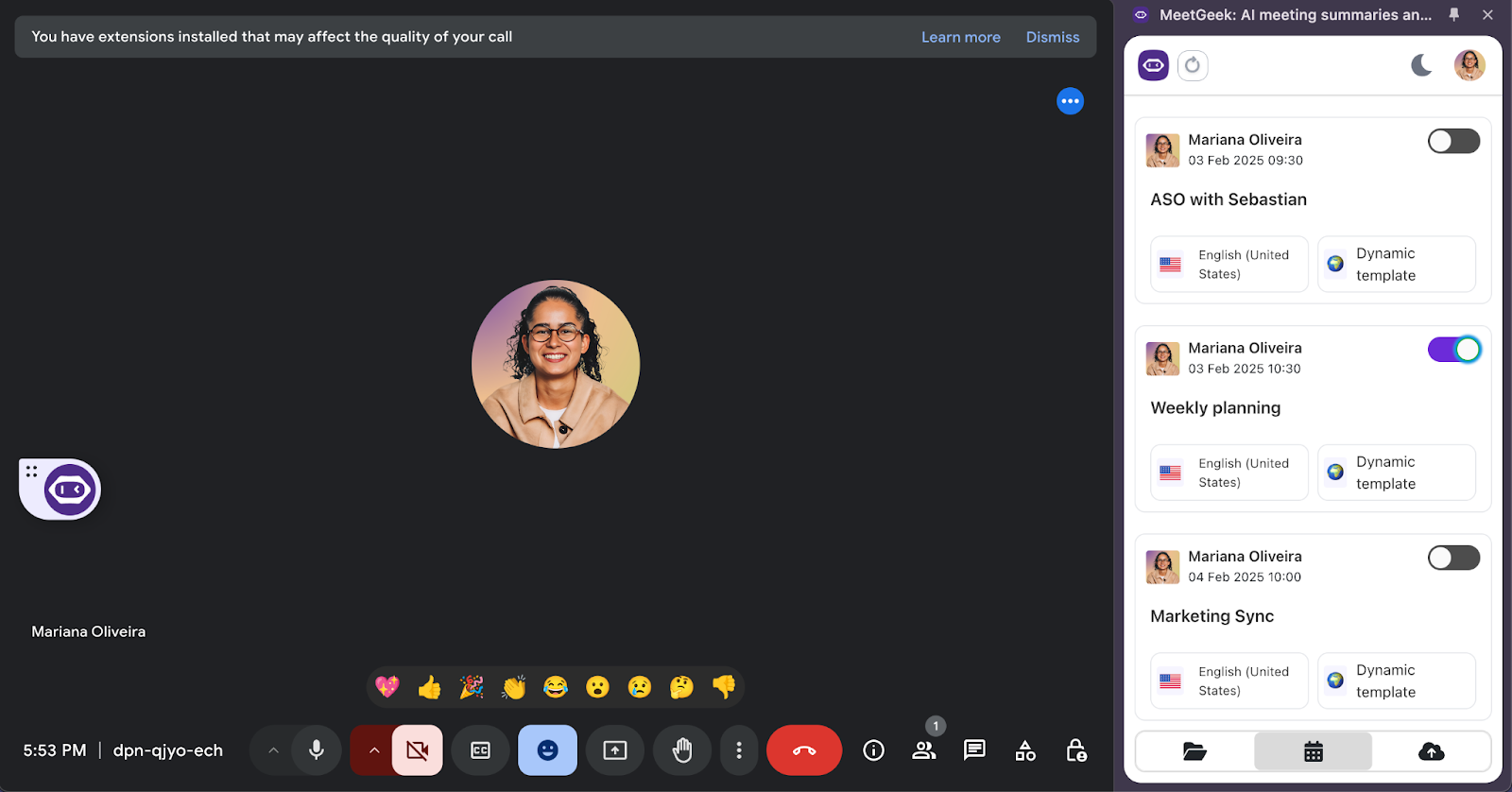
For in-person meetings, the mobile app captures conversations smoothly so key details are never lost. This flexibility is ideal for teams that move between meeting types during a busy week.
Actionable meeting summaries
Every meeting comes with AI-powered summaries that include notes, action items, insights, and clear answers to what was discussed, keeping team members up to date.
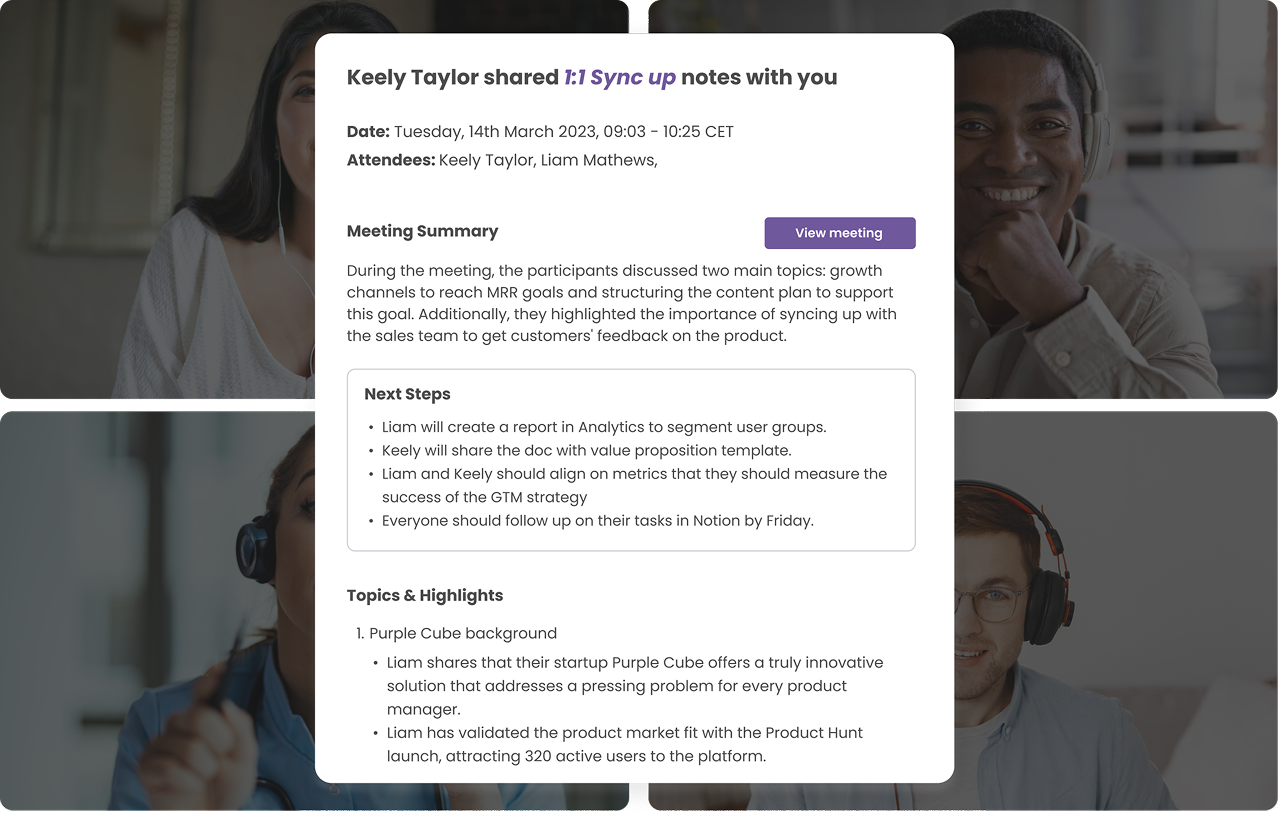
These summaries adapt to the format of the meeting, whether you are running a coaching session, a sales call, an internal update, or an interview. Teams can follow up quickly without rewatching recordings or digging through long transcripts.
Searchable conversation library
MeetGeek creates a searchable knowledge base where meeting transcripts, ideas, questions, and decisions become easy to find. Users can search with direct keywords or simply ask a question that helps them make sense of the data.
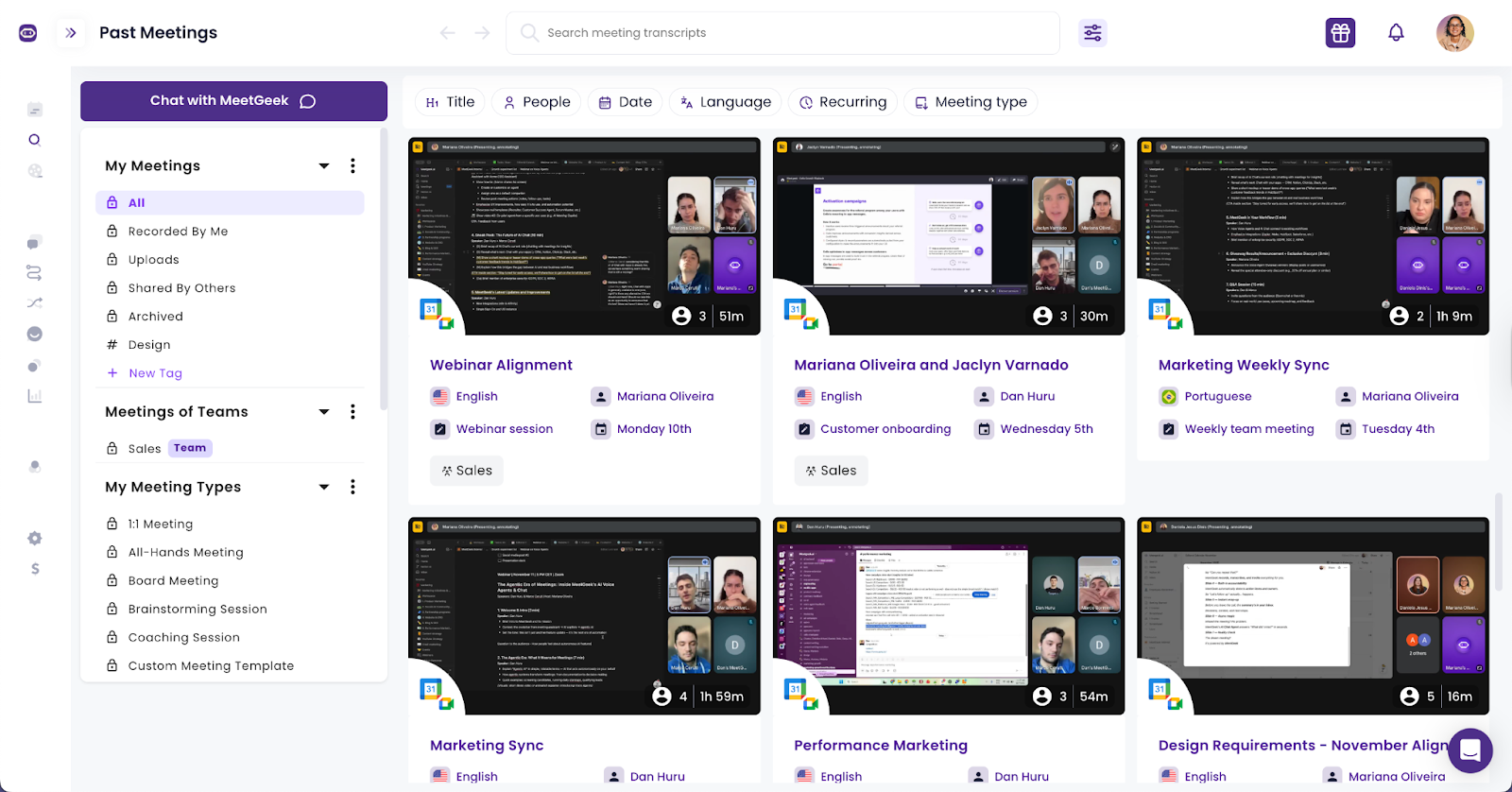
The system returns time-stamped answers and references, helping teams track progress and access meeting data and key moments without scanning the entire transcript. This makes it easier to work smarter and maintain a clean meeting history.
Communication insights
MeetGeek includes insights that help teams understand how their conversations unfold. You can review talk-time balance, interruptions, pacing, and participation.

These insights make it easier to understand how meetings are structured and offer suggestions and advice for improvement where it matters.
Integrations with everyday tools
MeetGeek connects with more than 10,000 apps, including Salesforce, HubSpot contacts, Google Docs, Slack, Notion, and dozens of project management tools.
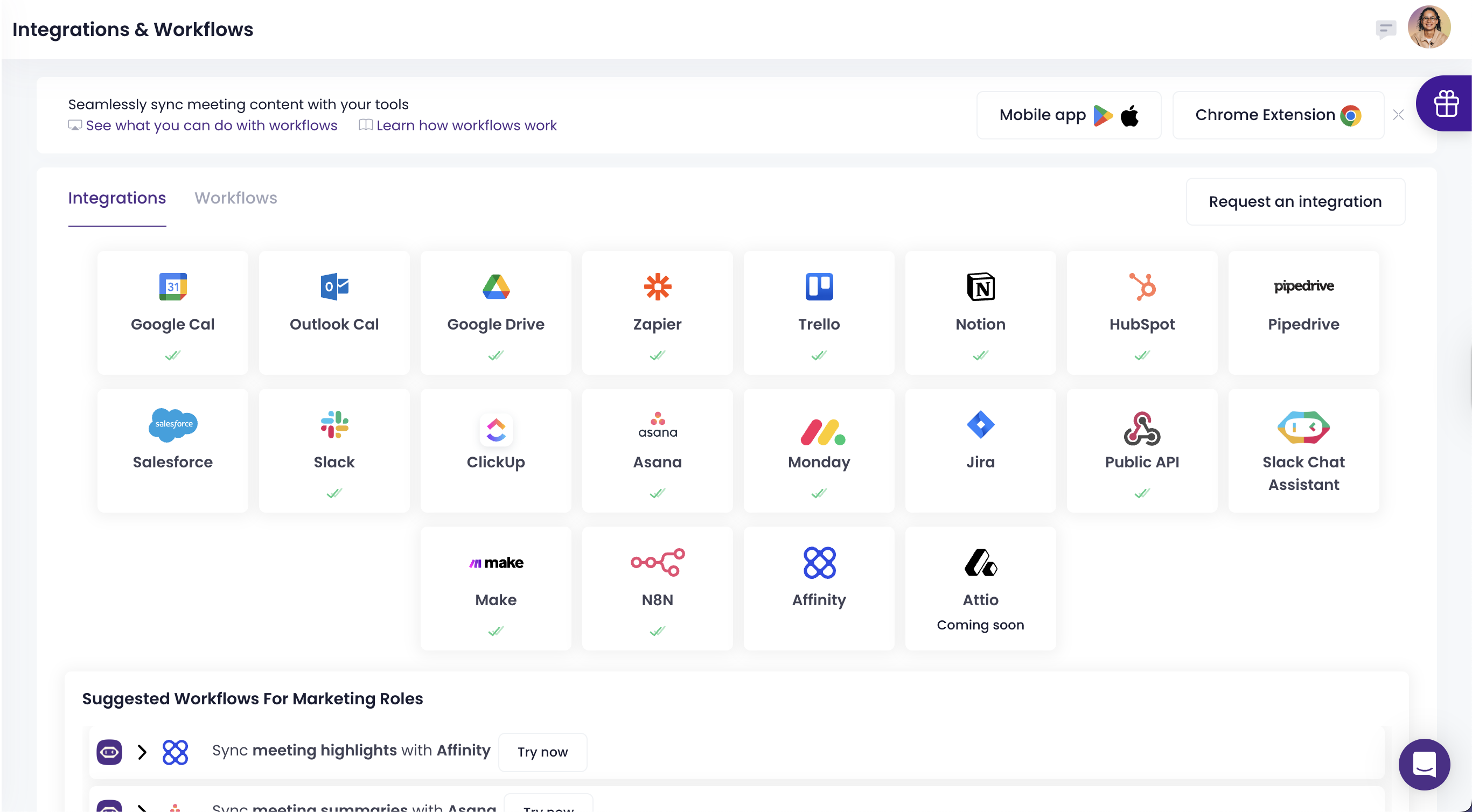
You can share meeting notes and action items directly into your existing workflow so teams can follow up without copying and pasting. This keeps work organized and consistent across the company.
Security across all plans
MeetGeek includes SOC 2, GDPR, HIPAA, and CCPA compliance across all paid plans. Companies handling sensitive data can work confidently without needing enterprise-only upgrades or special requests. Security stays consistent whether a team is on Pro, Business, or Enterprise.
MeetGeek pricing
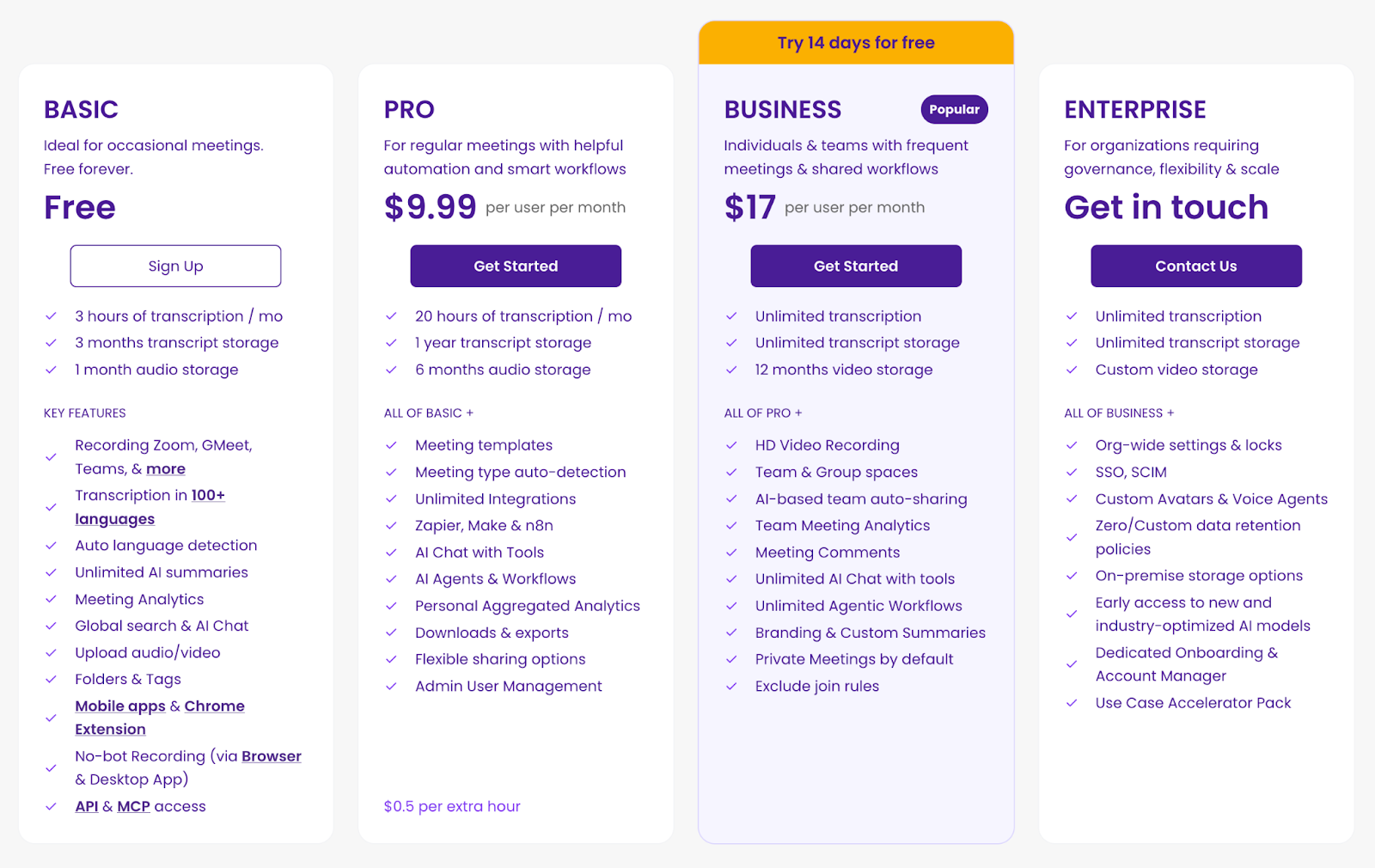
While Read AI charges based on upload credits and bot-driven automation, MeetGeek keeps pricing simple, predictable, and designed for people who want to work smarter with their meeting data.
MeetGeek offers four tiers:
Basic Plan (Free)
The Basic plan is ideal for individuals or small team pilots who want to try accurate meeting transcription without running into limitations on meeting reports.
It includes:
- 3 hours of transcription each month
- 3 months of transcript storage and 1 month of audio storage
- Unlimited AI summaries for every meeting
- Recording support for Zoom, Google Meet, Microsoft Teams, and more
- Transcription in 100+ languages with automatic language detection
- Meeting analytics to understand how conversations unfold
- Global search and AI chat
- Audio and video uploads
- Folders and tags to organize meeting data
- No bot recording using the browser or desktop app
- Mobile apps and a Chrome extension
- API and MCP access for deeper customization
This free tier gives you enough flexibility to capture real meetings, explore workflows, and access essential notes without hidden restrictions.
Pro Plan — $9.99 per user per month (billed annually)
The Pro plan supports professionals who handle frequent meetings, manage shifting schedules, or need reliable workflows when new meetings appear throughout the week.
It includes everything in Basic, plus:
- 20 hours of transcription per month
- 1 year of transcript storage
- 6 months of audio storage
- Meeting templates for consistent documentation
- Automatic detection of meeting types
- Unlimited integrations
- Zapier, Make, and n8n support
- AI chat connected to tools
- AI agents and customizable workflows
- Personal aggregated analytics
- Downloadable assets and export options
- Flexible sharing settings
- Admin and user management
- 0.50 dollars per additional hour
This plan is a strong option for users who want reliable insights, organized notes, and smooth follow-up across all their conversations.
Business Plan — $17 per user per month (billed annually)
The Business plan is MeetGeek’s most widely adopted tier, designed for teams that run frequent meetings and rely on shared collaboration and automated processes.
It includes everything in Pro, plus:
- Unlimited transcription
- Unlimited transcript storage
- 12 months of video storage
- HD video recording
- Team and group spaces for shared workflows
- AI-based auto-sharing of meeting content
- Team-level meeting analytics
- In meeting comments
- Unlimited AI chat with tools
- Unlimited agentic workflows
- Custom branding and personalized summaries
- Private meetings enabled by default
- Exclude join rules for flexible capture
This tier supports teams that need to track decisions, keep participants aligned, integrate tools like Slack and CRMs, and maintain clarity across all communication.
Enterprise Plan — custom pricing
The Enterprise plan is built for organizations requiring governance, security, and flexibility at scale, especially those with multi-department workflows or sensitive data environments.
It includes everything in Business, plus:
- Custom video storage configurations
- Organization-wide settings and administrative locks
- SSO and SCIM for identity management
- Custom avatars and voice agents
- Zero or custom data retention policies
- On-premises storage options
- Early access to advanced and industry-optimized AI models
- Dedicated onboarding support
- Dedicated account manager
- A use case accelerator pack for rapid deployment
This plan provides full control for enterprises that need consistent standards, robust compliance, and optimized meeting processes across the entire organization.
Read AI vs MeetGeek comparison
| Category | Read AI | MeetGeek |
|---|---|---|
| Recording method | Bot joins meetings automatically on Google Meet, Microsoft Teams, and Zoom. Also supports file uploads. | The calendar assistant can join meetings. Browser capture, desktop capture, mobile recording, and manual upload available. |
| Visibility in meetings | Bot appears as a meeting participant and requires host admission depending on platform settings. | Can capture without a visible participant when using browser or desktop capture. The calendar assistant can join as a participant if preferred. |
| Meeting transcription | Yes, with high accuracy across languages and platforms. | Yes, with strong accuracy across online and in-person meetings. |
| Meeting notes | Yes, including summaries and topic readouts. | Yes, with structured summaries that adapt to meeting type. |
| Action items | Yes, generated automatically. | Yes, with clear context and time-stamped references. |
| Search | AI-powered search across transcripts, emails, messages, CRM data, and connected applications through Search Copilot. | AI-powered question-based search focused on meeting data, transcripts, and time-stamped insights. |
| In person meetings | Supported through the mobile app, but speaker identification may vary depending on the environment. | Strong support with speaker detection that improves over time. |
| Integrations | Integrates with Notion, Salesforce, HubSpot, Slack, Jira, Confluence, and more. | Integrates with more than 10,000 apps, including CRMs, Slack, project apps, and knowledge platforms. |
| Storage model | Unlimited storage on paid plans. Upload credits limit monthly file uploads for transcripts and media. | Predictable storage based on each plan with no upload credit system. |
| Apps | Desktop, web, Chrome extension, iOS app, Android app. | Desktop, web, Chrome extension, Comet extension, mobile app. |
| Governance | Enterprise Plus includes HIPAA, SSO, SAML, domain capture, and data retention controls. | Strong security across all plans, including SOC 2, GDPR, CCPA, HIPAA. |
| Best fit | Users who want an AI copilot that searches meetings, emails, and messages across multiple data sources. | Teams who want clear summaries, flexible recording, predictable pricing, and meeting-focused workflows. |
Which meeting tool is a stronger choice?
Choosing between Read AI and MeetGeek depends on how your team wants to handle meeting transcription and meeting notes. Read AI works best for users who want an AI copilot that blends meeting transcripts with emails and messages and provides a wide pool of data to search through.
It can be useful for someone who needs to analyze patterns across many communication channels, although it can feel overwhelming when the goal is to focus on one meeting and follow up on what was said.
MeetGeek is built for teams that want clarity without adding unnecessary steps to the process. It allows users to capture meetings without a bot, which makes private conversations more comfortable. It organizes transcripts, summaries, ideas, and insights in a way that helps teams decide what is important. It reduces the time needed to search for information and makes the workflow easier to manage.
For companies that want predictable pricing, flexible recording options, and meeting data that stays clean and focused, MeetGeek provides a practical and scalable solution. If you're still wondering how much it can improve your meetings, try it for free and see how quickly productivity increases.
Frequently asked questions
Is Read AI free to use?
Yes. Read AI has a Free plan with 5 meeting transcripts per month, basic features, and access to its apps. But the limits make it hard for teams to evaluate the tool in real workflows.
What does Read AI do?
Read AI joins meetings, creates meeting notes, generates summaries, detects action items, and provides AI-powered search across meetings, emails and messages, CRMs, and files.
Why is Read AI joining my meeting?
Because the Read Assistant bot is enabled in your calendar. When you first set it up it will request permissions, and once connected, it automatically joins upcoming meetings unless settings are manually adjusted, which some users report difficulty doing.
Is Read AI safe to use?
Read AI offers standard security features, and Enterprise+ includes HIPAA and SSO. However, companies concerned about privacy or unexpected bot participation may prefer tools like MeetGeek that offer more transparent and controllable capture options.







.avif)