



Une base de connaissances consultable est l'un des outils les plus utiles pour les équipes qui souhaitent accéder facilement aux informations, réduire le nombre de tickets d'assistance et résoudre les problèmes plus rapidement. Il fournit aux utilisateurs un référentiel structuré dans lequel les articles, les guides et la documentation interne peuvent être stockés, recherchés et mis à jour en quelques secondes.
Lorsqu'elle est correctement construite, une bonne base de connaissances devient un lieu de confiance où les employés et les clients peuvent trouver des réponses sans avoir à faire appel à une équipe d'assistance pour chaque question.
Ce guide explique ce qu'est une base de connaissances consultable, comment elle fonctionne et pourquoi elle est importante pour les équipes internes et les cas d'utilisation en contact avec les clients. Alors que les outils de travail deviennent de plus en plus complexes et que les équipes gèrent de plus en plus de données, disposer d'informations fiables et bien organisées à la demande devient essentiel pour la productivité et l'efficacité du support client.
Qu'est-ce qu'une base de connaissances consultable ?
Une base de connaissances consultable est une plateforme numérique qui organise les informations de manière à permettre aux utilisateurs de rechercher, de filtrer et de récupérer rapidement les informations pertinentes.
Il contient des articles de base de connaissances, des guides de dépannage, des procédures opérationnelles standard, de la documentation sur les produits, des sections FAQ, des informations financières et d'autres ressources qui aident les employés et les clients à trouver des réponses.
Contrairement à un simple système de dossiers, une base de connaissances utilise des algorithmes de recherche pour comprendre les requêtes et les associer à des résultats précis et pertinents. Cela permet aux équipes de rechercher facilement et améliore la manière dont elles accèdent aux connaissances stockées.
Il élimine également les frictions en permettant aux utilisateurs de saisir des requêtes courtes ou longues dans une barre de recherche et d'obtenir des résultats pertinents sans avoir à parcourir les catégories manuellement, améliorant ainsi productivité.
Une base de connaissances consultable fonctionne pour différents types d'utilisateurs :
- Équipes internes recherche de documentation interne, de notes de gestion de projet, d'informations de contrôle de version et de documents de processus
- Des équipes en contact direct avec les clients fournir des réponses claires aux clients et réduire les tickets d'assistance
- Employés essayer de trouver des exemples, des conseils et d'autres outils utiles sans demander à des collègues
- Clients à la recherche d'options en libre-service et de moyens rapides de répondre à leurs questions
Lorsque la base de connaissances est consultable, les utilisateurs peuvent saisir des mots clés pertinents dans une barre de recherche et récupérer toutes les réponses dont ils ont besoin. Cela améliore l'expérience des équipes et des clients en réduisant les délais et en aidant les utilisateurs à trouver des informations précises et à jour sans demander d'aide.
Une bonne base de connaissances favorise également le partage des connaissances à grande échelle. À mesure que les équipes s'agrandissent, que les processus évoluent et que la documentation se développe, la capacité à localiser rapidement les informations devient l'une des principales caractéristiques de l'efficacité.
Comment fonctionne une base de connaissances consultable
Une base de connaissances devient réellement consultable lorsque la plateforme inclut un moteur de recherche intégré qui analyse les titres des articles, les balises, le contenu, les métadonnées et les termes associés. L'option de recherche examine les mots clés contenus dans chaque article et les associe à ce que les utilisateurs saisissent. Cela permet également d'identifier les lacunes en matière de contenu, car les résultats de recherche révèlent les sujets manquants ou peu clairs.
Voici ce dont une base de connaissances consultable a besoin pour fonctionner :
1. Un référentiel structuré avec un contenu organisé
Tous les articles sont stockés dans un référentiel structuré qui prend en charge les catégories, les balises, une mise en forme enrichie et des titres d'articles clairs. Cette structure aide les utilisateurs à trouver des réponses grâce à une navigation intuitive et à une recherche facile. Un référentiel bien structuré garantit également que les connaissances restent organisées même lorsque de nouveaux articles sont ajoutés, ce qui permet aux employés de gérer plus facilement les connaissances internes.
2. Algorithmes de recherche correspondant à des mots clés pertinents
Lorsque l'utilisateur saisit une requête, des algorithmes de recherche l'analysent et la mettent en correspondance avec un contenu pertinent. Ces algorithmes recherchent des synonymes, des termes associés, des phrases courantes et toute lacune de contenu susceptible d'affecter les résultats.
Une base de connaissances solide permettra non seulement d'obtenir des correspondances directes, mais également de reconnaître l'intention qui sous-tend la question afin de fournir des résultats pertinents.
3. Résultats de recherche instantanés
La plateforme génère des résultats précis et pertinents en quelques secondes. Au lieu de cliquer sur des dossiers, les utilisateurs s'appuient sur la fonctionnalité de recherche rapide pour récupérer ce dont ils ont besoin. Cette rapidité permet aux employés de passer moins de temps à trouver des réponses et plus de temps à appliquer les informations à leurs tâches.
4. Mises à jour continues et contrôle des versions
Le logiciel de base de connaissances devrait permettre aux équipes de gérer facilement les articles grâce à l'édition en temps réel, au contrôle des versions et à la mise à jour du contenu. La mise à jour de la documentation garantit que les utilisateurs reçoivent toujours des réponses fiables. Le contrôle des versions aide également les équipes internes à suivre les modifications et à revoir les versions précédentes si nécessaire.
5. Accès facile pour les utilisateurs internes et externes
Une bonne base de connaissances permet un accès facile sur n'importe quel appareil et s'intègre à d'autres systèmes. Cela garantit que les employés et les clients peuvent trouver des informations sur la plateforme de l'entreprise qu'ils utilisent déjà. En réduisant les étapes inutiles, les utilisateurs peuvent accéder à toutes les réponses dont ils ont besoin en un seul endroit.
La base de connaissances consultable de MeetGeek
MeetGeek transforme les transcriptions, les résumés et les enregistrements de vos réunions en une base de connaissances entièrement consultable qui aide les équipes à se remémorer les décisions, à revoir le contexte et à trouver des informations importantes en quelques secondes. Au lieu de stocker des articles ou des manuels, MeetGeek crée un référentiel structuré de tout ce qui a été discuté lors des appels de votre organisation avec les clients, les partenaires et les équipes internes.
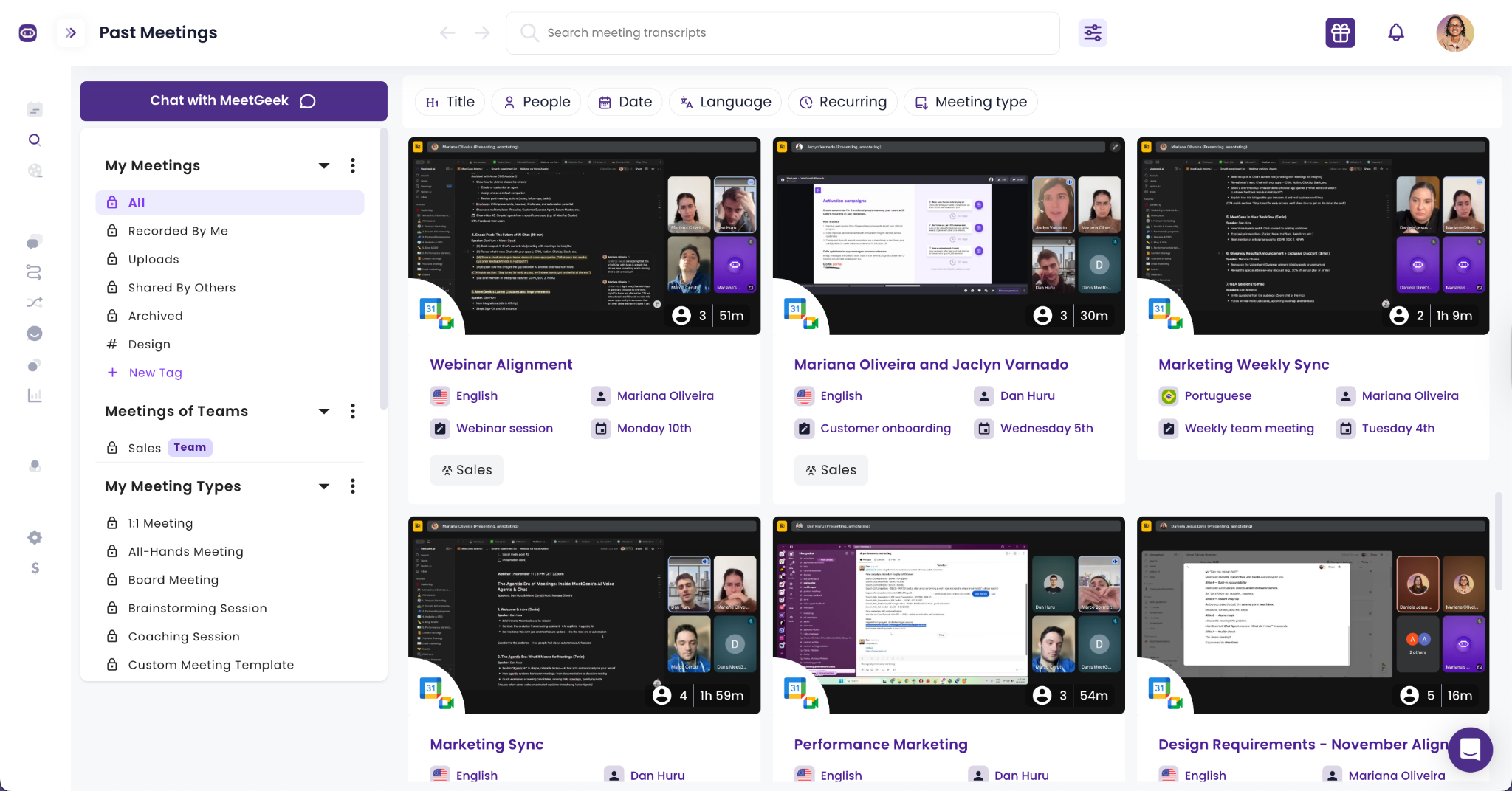
Ce hub consultable possède une interface intuitive et fait office de mémoire partagée pour votre entreprise.
Chaque appel est automatiquement transcrit, résumé et ajouté à votre référentiel central afin que les utilisateurs puissent effectuer des recherches parmi des centaines de conversations sans avoir à revoir des heures de vidéo. Grâce à la barre de recherche intelligente, les équipes peuvent rechercher des mots clés, des dates, des participants et des sujets et récupérer instantanément des informations, des décisions ou des suivis pertinents.
La base de connaissances consultable de MeetGeek prend en charge :
- Utilisateur entretien référentiels
- Référentiels de réunions d'intégration
- Archives des réunions d'équipe hebdomadaires
- Notes des réunions du conseil
- Bibliothèques de réunions personnalisées adaptées à chaque département
Comme tout est regroupé par équipe et par type d'appel de manière conviviale, les employés savent toujours où trouver des informations précises et à jour.
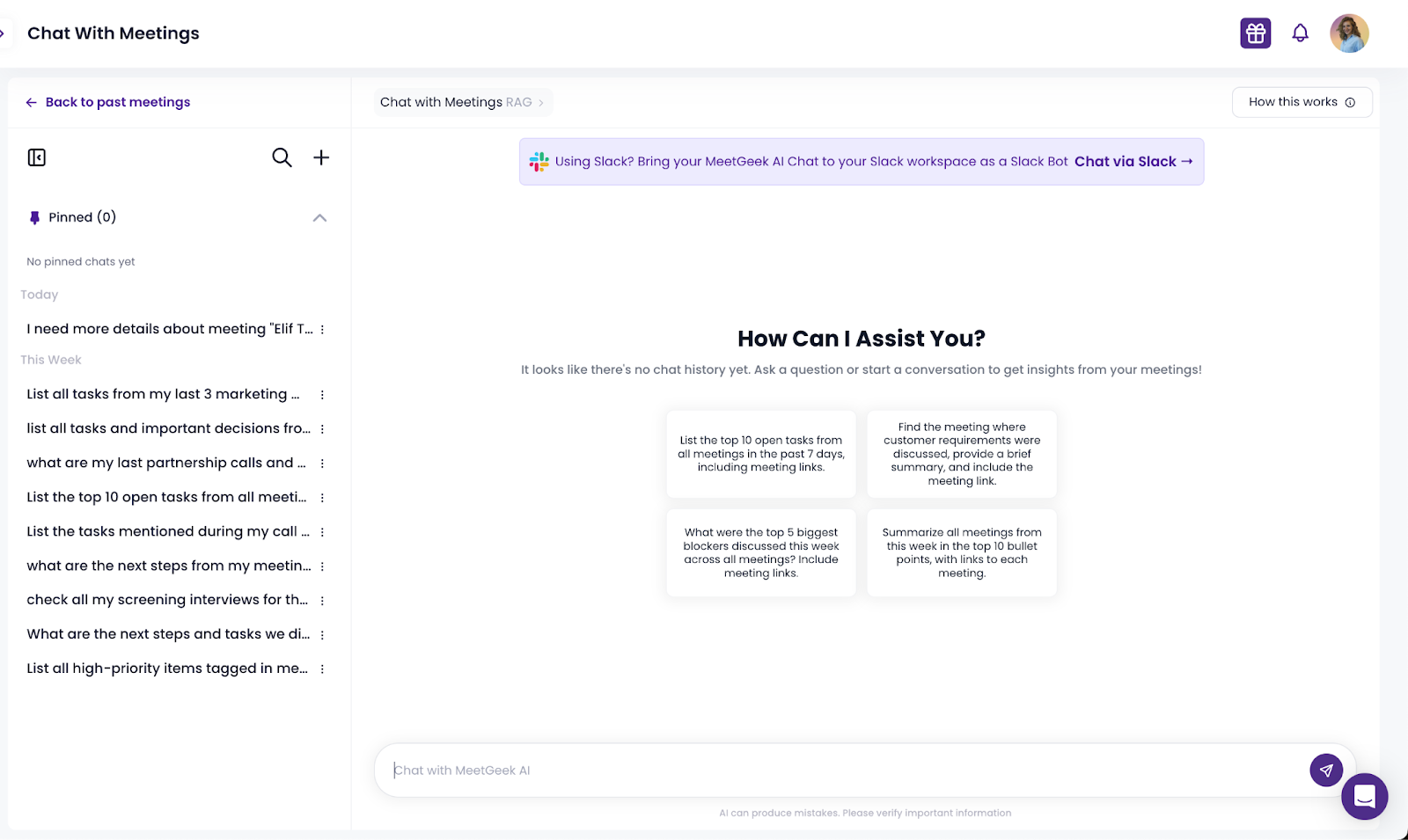
Les fonctionnalités d'IA de MeetGeek améliorent également la facilité de recherche. Les utilisateurs peuvent interagir avec les conversations précédentes via Discutez avec Meetings, une fonctionnalité qui leur permet de poser des questions telles que « Quand avons-nous discuté des prix ? » ou « Quelles étaient les exigences finales pour le projet du client ? » L'IA récupère les résultats pertinents lors de plusieurs réunions, ce qui permet d'économiser des heures de recherche manuelle et de garantir qu'aucun détail n'est perdu.
Les équipes peuvent également créer des extraits vidéo ou audio, partager les points forts, envoyer des résumés vers d'autres outils tels que Google Drive ou Notion, et collaborer de manière asynchrone entre les services. Cela permet aux équipes à distance et hybrides de rester alignées, même si elles n'ont pas participé à l'appel initial.
En d'autres termes, MeetGeek vous fournit une base de connaissances interne construite non pas à partir de documents, mais à partir des conversations réelles qui animent votre entreprise.
Autres fonctionnalités de MeetGeek qui favorisent le partage des connaissances
Au-delà de sa base de connaissances consultable, MeetGeek propose également un large éventail de fonctionnalités basées sur l'IA qui aident les équipes à maintenir, organiser et utiliser leurs connaissances de manière plus efficace.
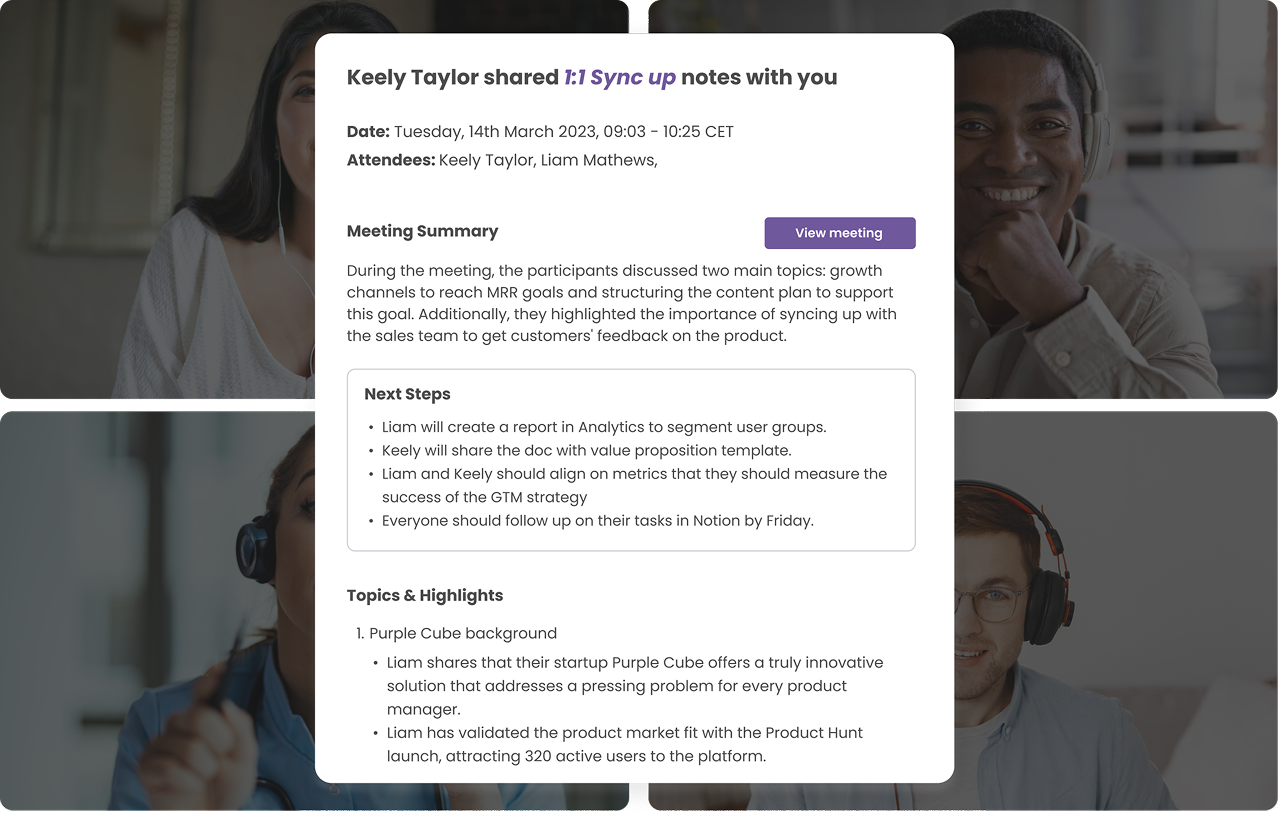
Il s'agit notamment de :
- Des résumés de réunions basés sur l'IA qui transforment de longues conversations en informations structurées et utiles
- Faits saillants thématiques qui regroupent les informations liées
- Flux de travail automatisés qui partagent les notes de réunion avec d'autres outils
- Intégrations avec d'autres systèmes qui stockent les connaissances en un seul endroit
- Édition en temps réel pour partager des documents et des informations
- Assistance aux équipes internes qui ont besoin de processus cohérents
Les résumés et les informations alimentés par l'IA de MeetGeek donnent une augmentation moyenne de 45 % heures de travail productives gagnées en remplaçant les réunions facultatives.
MeetGeek aide les équipes à actualiser leurs connaissances, à améliorer la collaboration et à garantir que les informations importantes ne soient jamais perdues. La plateforme soutient les équipes internes qui s'appuient sur des données précises et aide chacun à trouver des réponses sans avoir à rechercher dans des outils éparpillés.
Pourquoi les organisations ont besoin d'une base de connaissances consultable
Une base de connaissances est bien plus qu'une bibliothèque de contenus. Il aide les entreprises à réduire les questions répétitives, à réduire les temps de réponse et à satisfaire les clients.
Il favorise également le partage des connaissances entre les équipes en offrant aux employés un endroit unique où ils peuvent accéder aux connaissances internes et aux processus standard. À mesure que les équipes s'agrandissent, le volume d'informations augmente également, ce qui rend la fonctionnalité de recherche essentielle.
Une base de connaissances consultable aide les organisations à :
- Réduisez la charge de travail de l'équipe d'assistance
- Améliorez le self-service pour les clients
- Organiser les connaissances internes pour une utilisation à long terme
- Soutenez la gestion de projet grâce à une documentation claire
- Tenez à jour une documentation produit et des guides de dépannage précis
- Donnez aux employés un accès facile à des ressources structurées et utiles
- Identifiez les lacunes en matière de contenu en analysant les résultats de recherche
- Passez moins de temps à répondre à des questions répétitives
- Améliorez la visibilité de tous les types d'informations
Un autre avantage est l'impact sur assistance à la clientèle. Lorsque les clients ont accès à une base de connaissances accessible aux clients, ils peuvent résoudre eux-mêmes des problèmes simples. Cela réduit le nombre de tickets d'assistance entrants et permet aux agents de support de consacrer plus de temps à des problèmes complexes ou critiques.
Une base de connaissances apporte également de la cohérence. Tout le monde au sein de l'entreprise s'appuie sur les mêmes informations actualisées, évitant ainsi les malentendus et les processus obsolètes.
Une base de connaissances consultable favorise également la conformité et la précision. Les informations étant stockées de manière centralisée, les équipes peuvent vérifier les données plus facilement, garantir la cohérence des procédures opérationnelles standard et maintenir une documentation produit fiable dans l'ensemble de l'organisation.
Réflexions finales
Une base de connaissances consultable aide les entreprises à stocker leurs connaissances de manière organisée, à fournir rapidement des résultats pertinents et à fournir des informations fiables à la fois à leurs employés et à leurs clients. Associé à de puissants algorithmes de recherche, à une conception intuitive et à une maintenance continue, il devient l'un des outils les plus précieux pour le partage des connaissances.
MeetGeek renforce ce processus en proposant une base de connaissances consultable alimentée par l'IA et soutenue par de riches fonctionnalités qui améliorent la façon dont les équipes documentent, recherchent et partagent les informations issues de leurs réunions. Grâce à une recherche plus intelligente, à un accès facile et à un contenu organisé, les utilisateurs peuvent trouver des réponses rapidement et consacrer plus de temps à des tâches pertinentes.
Essayez MeetGeek gratuitement et découvrez comment il transforme le travail à distance.
Questions fréquemment posées
Qu'est-ce qui rend une base de connaissances consultable ?
Une base de connaissances est consultable lorsque la plateforme inclut un moteur de recherche qui analyse les titres des articles, les mots clés, les balises et le contenu pour fournir des résultats précis et pertinents.
À quelle fréquence une base de connaissances doit-elle être mise à jour ?
Il doit être mis à jour chaque fois que les processus changent, que les informations sur les produits évoluent ou que de nouvelles questions apparaissent dans les résultats de recherche. Des mises à jour régulières permettent de maintenir les informations à jour et fiables.
Quel type de contenu appartient à une base de connaissances ?
Le contenu courant comprend des sections FAQ, de la documentation sur les produits, des guides de dépannage, des procédures opérationnelles standard, des connaissances internes (notamment issues de réunions en ligne) et des ressources destinées aux clients.
Comment une base de connaissances consultable aide-t-elle à soutenir les équipes ?
Il réduit les tickets d'assistance en donnant aux utilisateurs un accès en libre-service à toutes les réponses dont ils ont besoin. Cela permet à l'équipe d'assistance de se concentrer sur des problèmes complexes au lieu de répéter les mêmes informations.







.avif)