


Read AI has expanded considerably beyond its original role as an AI note-taker, adding new ways to capture, search, and use information from meetings. However, it’s also raised a lot of concerns from its users over the years.
In this Read AI review, we’ll take a closer look at where the platform stands in 2026, including why some people are leaving it and how it compares to other AI meeting assistants.
TL;DR
- Read AI is popular for a reason: it takes meeting notes off your plate and turns conversations into summaries, action items, and searchable information.
- However, some users report problems with how Read AI joins their meetings. Unexpected bot appearances and confusion over why Read AI is joining calls help explain why some people ultimately decide to leave.
- Those experiences make security and privacy an important consideration, especially for teams that regularly discuss sensitive information or meet with people outside their organization.
- Read AI has also become a much broader product than an AI note-taker. That can be valuable if you want deeper meeting intelligence, but it may be more than you need if your priority is a simple way to record meetings and control when recording starts.
- Overall, Read AI has clear strengths, but the concerns raised by users are significant enough to consider before committing to it, particularly if control over how an AI assistant participates in meetings matters to your team.
What is Read AI?
Read AI is an AI-powered meeting assistant designed to turn conversations into useful information without requiring you to take notes manually. Launched in 2021, the platform has expanded from meeting transcription into a broader productivity tool that brings together information from meetings, email, and messaging.
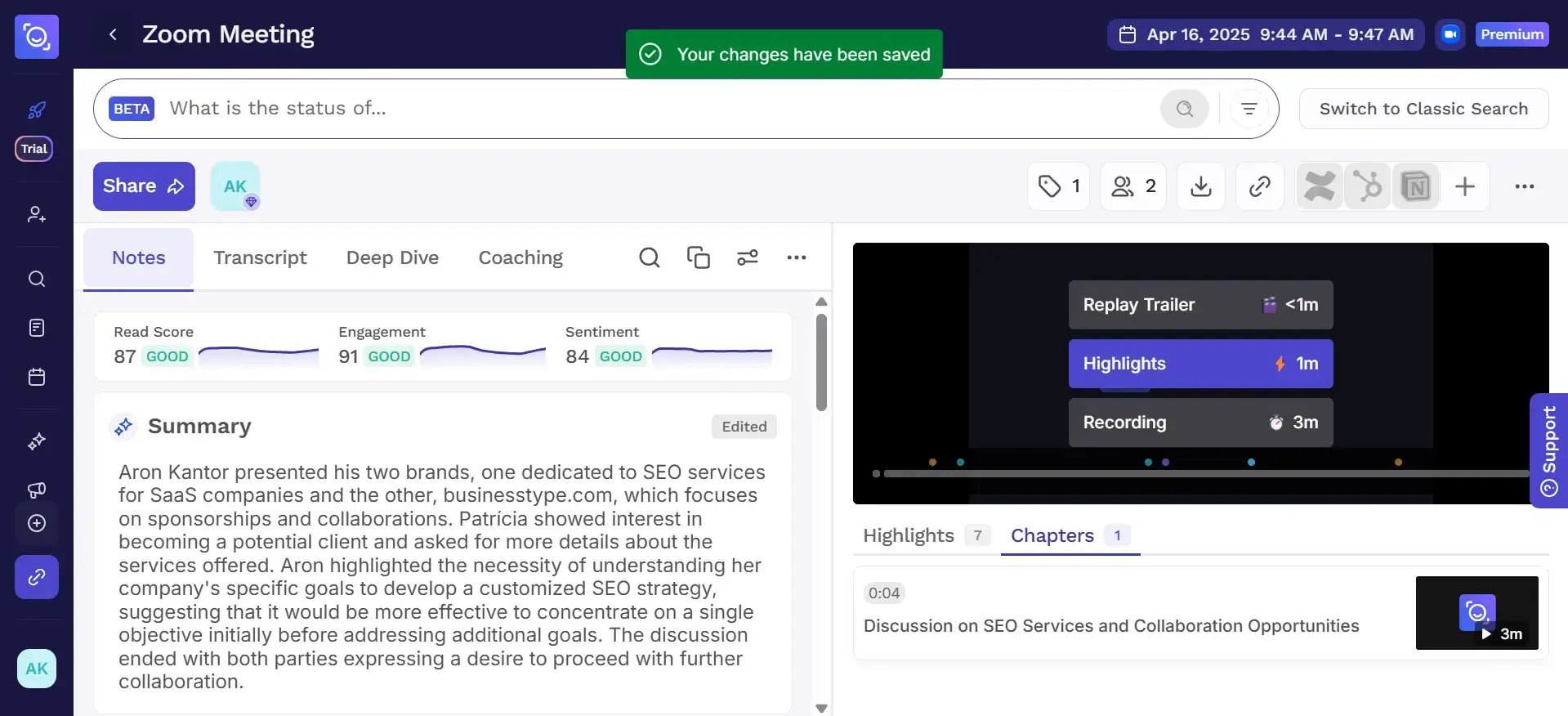
It works with major video conferencing tools, including Zoom, Google Meet, and Microsoft Teams, and also offers desktop and mobile apps for capturing in-person meetings and conversations outside these platforms.
The idea behind Read AI is simple: help you stay focused during the meeting, then give you a structured record you can return to afterward. Next, we’ll take a closer look at the key features that make that possible.
What are Read AI’s key features?
Read AI combines meeting capture with AI-powered analysis, search, and productivity tools. Its key features include:
- Meeting recording and transcription: Captures Zoom, Google Meet, and Microsoft Teams meetings with live transcription, speaker recognition, and post-meeting reports.
- AI meeting notes: Creates automated meeting summaries with key points, action items, questions, and important moments from the conversation.
- Ask Read: Provides AI-powered search across previous meetings and supported connected sources, helping you find decisions, tasks, and other key insights.
- Meeting coaching: Analyzes factors such as engagement, sentiment, speaking pace, talk time, questions, and non-inclusive terms, with additional insights available through Deep Dive.
- Smart Scheduler: Creates booking links and recommends meeting times based on calendar availability and focus periods.
- Workspaces: Gives teams shared access to meeting reports, aggregated metrics, permissions, and assistant settings.
- Integrations: Connects Read AI with tools such as Notion, Salesforce, HubSpot, Jira, Confluence, Zapier, and webhooks, with premium integrations available on paid plans.
- Desktop and mobile apps: Supports Windows, macOS, Android, and iOS for capturing online and in-person conversations beyond Read AI’s native meeting platforms.
- Readouts: Surfaces recurring insights across connected meetings, email, and messaging so users can follow important topics without reviewing each conversation individually.
Why are people leaving Read AI?
Read AI receives plenty of positive feedback for its meeting notes, summaries, and ability to reduce manual note-taking. However, recent reviews also reveal a recurring source of frustration: users don't always feel they have enough control over when the assistant appears in meetings or how accurately its AI interprets conversations.
That has also raised questions about whether Read AI is safe to use for sensitive or external meetings. The main Read AI security concerns raised by users aren't simply about data encryption. They also involve consent, attendees' awareness, and what happens when the assistant appears in a meeting unexpectedly.
Read AI's meeting summaries are useful, but they still need review
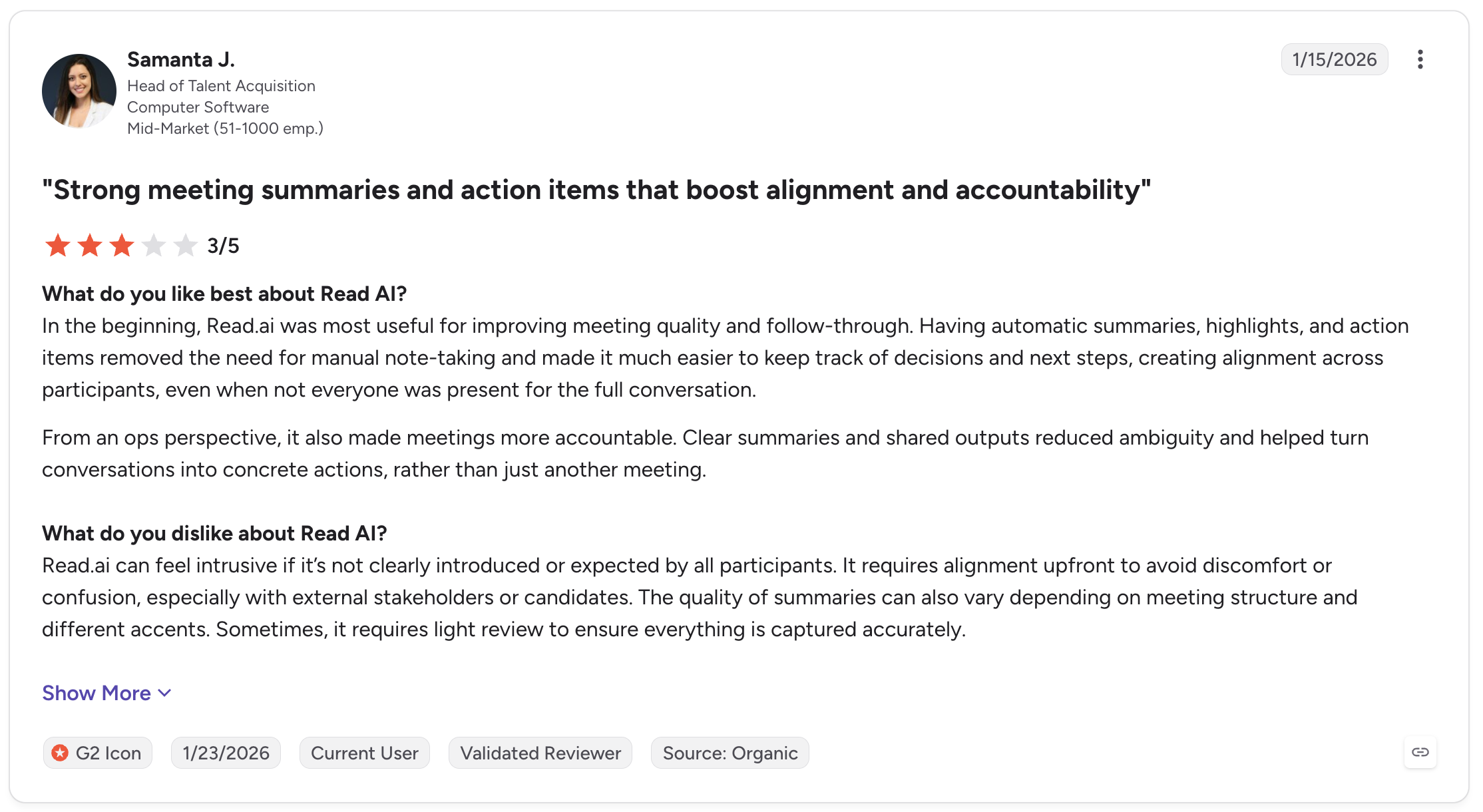
Matthew W. gave Read AI 4/5 on G2, praising its transcriptions, video playback, recaps, and ability to surface follow-up information from previous calls.
“I can also ask it for key takeaways from meetings or things I should be looking to follow up on from meetings etc.”
However, he found that Read AI's sentiment and engagement analysis could misinterpret normal meeting behavior. Humor or periods of silence, for example, could be classified as poor engagement or sentiment.
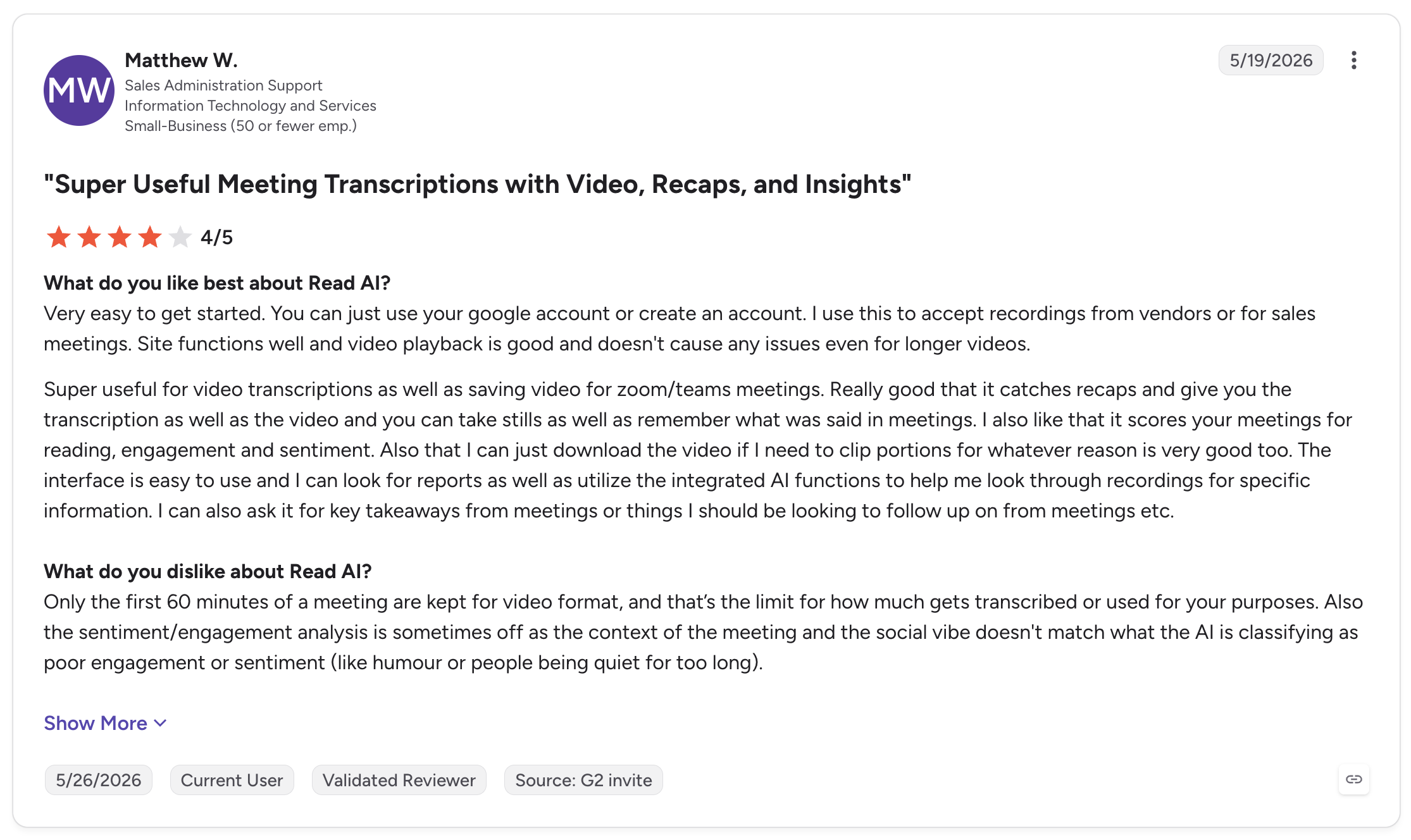
Samanta J. also saw value in the product. In her 3/5 G2 review, she said automated summaries and action items helped improve follow-through and made decisions clearer for meeting participants. But she noted that the quality of those summaries can vary with accents and meeting structure, sometimes requiring manual review.
These reviews show that Read AI can still be useful, but teams should not accept its AI-generated insights without checking.
Unexpected meeting behavior is a bigger concern for some users
Samanta also pointed to a different problem: Read AI can feel intrusive when other participants aren't expecting it.
“Read.ai can feel intrusive if it’s not clearly introduced or expected by all participants.”
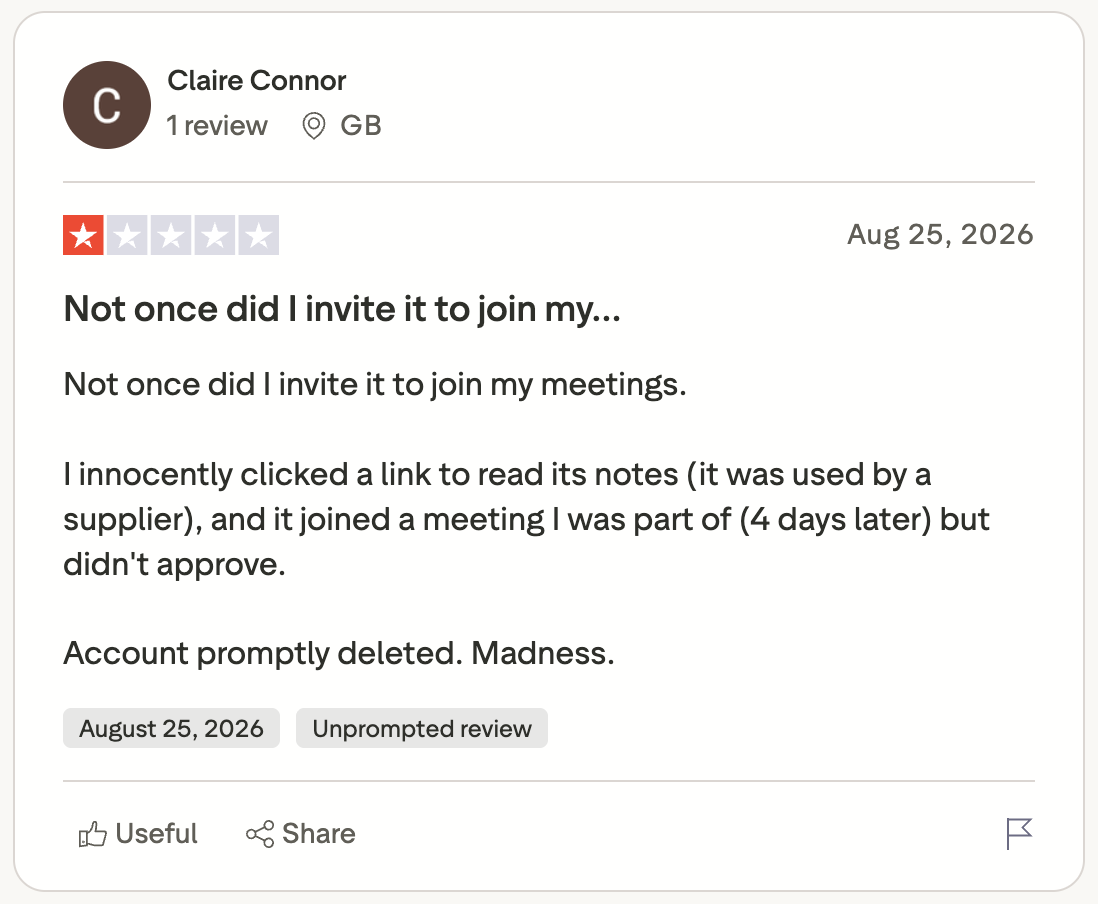
Similar concerns appear in other user reports. Trustpilot reviewer Claire Connor said she initially encountered Read AI through a supplier's meeting and clicked a link to view its notes. Four days later, she said Read AI joined another meeting she attended even though she hadn't knowingly invited it. She subsequently deleted her account.
A Microsoft Teams user on Reddit reported another confusing experience. They said coworkers told them Read AI was being added to meetings through their account, despite the user saying they had never knowingly created a Read AI account or installed the tool.
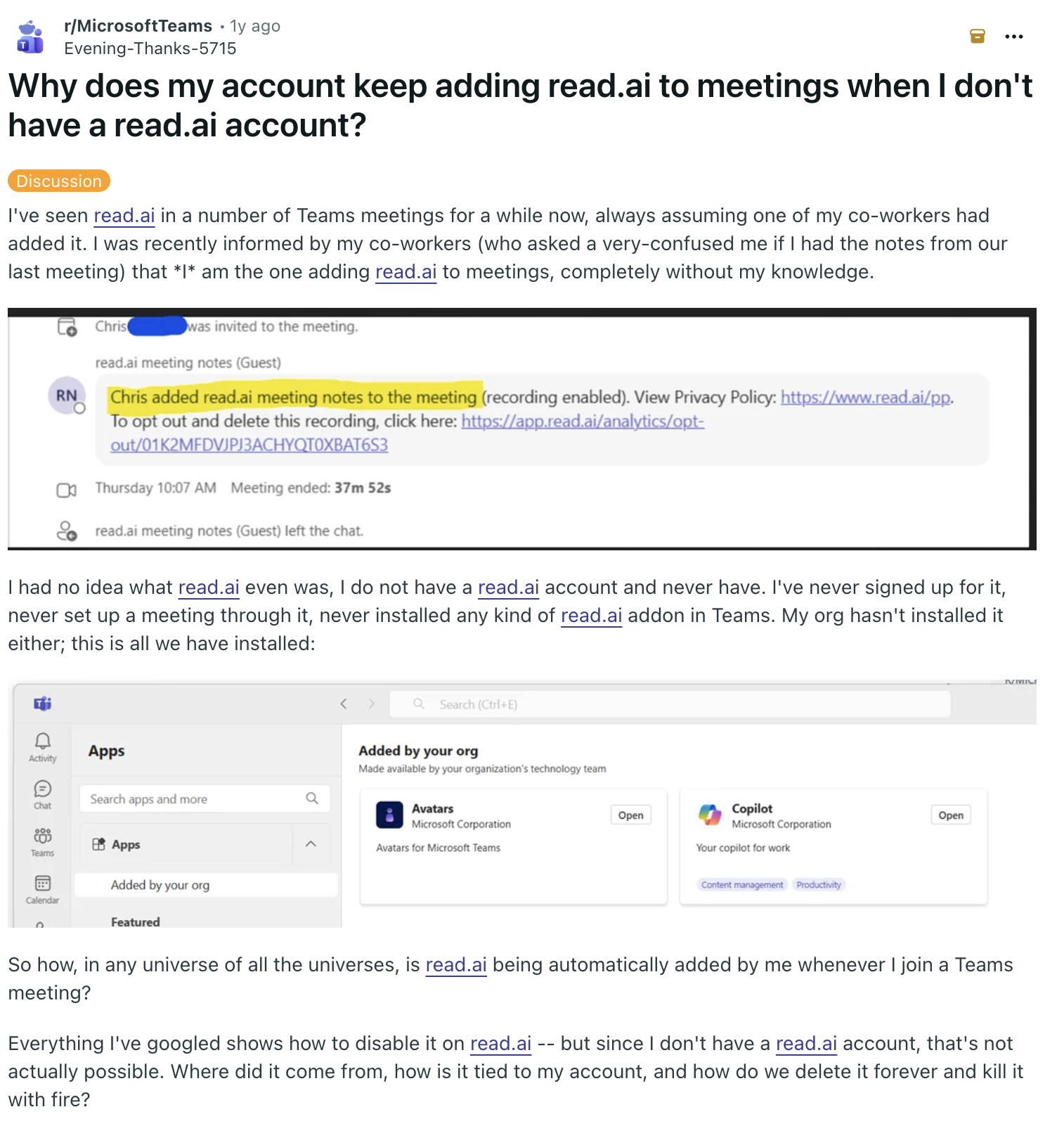
These reviews help explain why some people are leaving Read AI even when its core note-taking features work well. For teams that regularly invite clients, candidates, or other external participants, knowing exactly when an AI meeting assistant will appear can matter just as much as the quality of the notes it produces.
Is Read AI safe to use for meetings?
Read AI is a legitimate meeting assistant with established security measures, but answering “is Read AI legit?” requires looking at both its technical security and what happens when it records real meetings.
Read AI states that it is SOC 2 Type II audited, supports GDPR requirements, encrypts stored data with AES-256 and data in transit with TLS 1.2+, and does not sell meeting data. AI training on meeting data is opt-in rather than enabled by default. HIPAA support with a BAA is available for qualifying Enterprise+ annual workspaces.
Those protections address important aspects of Read AI security, but they don't eliminate the privacy concerns raised in user reviews. The other side of meeting security is whether participants know recording is taking place and whether the person using Read AI has configured it appropriately.
Read's web assistant is visible in the meeting and provides ways for participants to remove it or opt out. However, the reports above show that some users have still been surprised by its presence. That's particularly relevant when meetings involve sensitive data or people outside your organization.
Higher Read AI plans also provide administrative controls such as Workspace permissions, custom retention, SAML, SCIM, domain capture, and report-sharing settings. These can give organizations more control over meeting data, but teams still need clear internal policies for when recordings are appropriate and who should have access to them.
What about consent and attendees' awareness?
How visible Read AI is depends on the recording method.
During web meetings, Read appears as a participant or persistent icon and may post a security notice in the chat. Participants can remove the assistant or opt out of recording.
Desktop and mobile capture work differently because no bot appears in the meeting. In those cases, attendees' awareness depends on the person making the recording. Read recommends notifying other participants, but it cannot obtain consent on the user's behalf.
That distinction is important for anyone evaluating whether Read AI is legit and appropriate for their organization. Technical security controls are only part of the equation. Teams also need to consider consent requirements, meeting policies, and whether everyone involved understands when an AI assistant is recording the conversation.
What are the best alternatives to Read AI?
The complaints in Read AI reviews point to a few specific reasons for considering an alternative: difficulty getting support, concerns about how the assistant enters meetings, and AI-generated insights that sometimes need additional review. If those are the issues pushing you to switch, these three alternatives take different approaches.
1. Fathom for a simpler meeting experience
If Read AI feels more complex or analytical than you need, Fathom offers a simpler alternative. It focuses on recording meetings and generating transcripts and summaries, and it helps you capture important moments without putting as much emphasis on evaluating meeting performance.
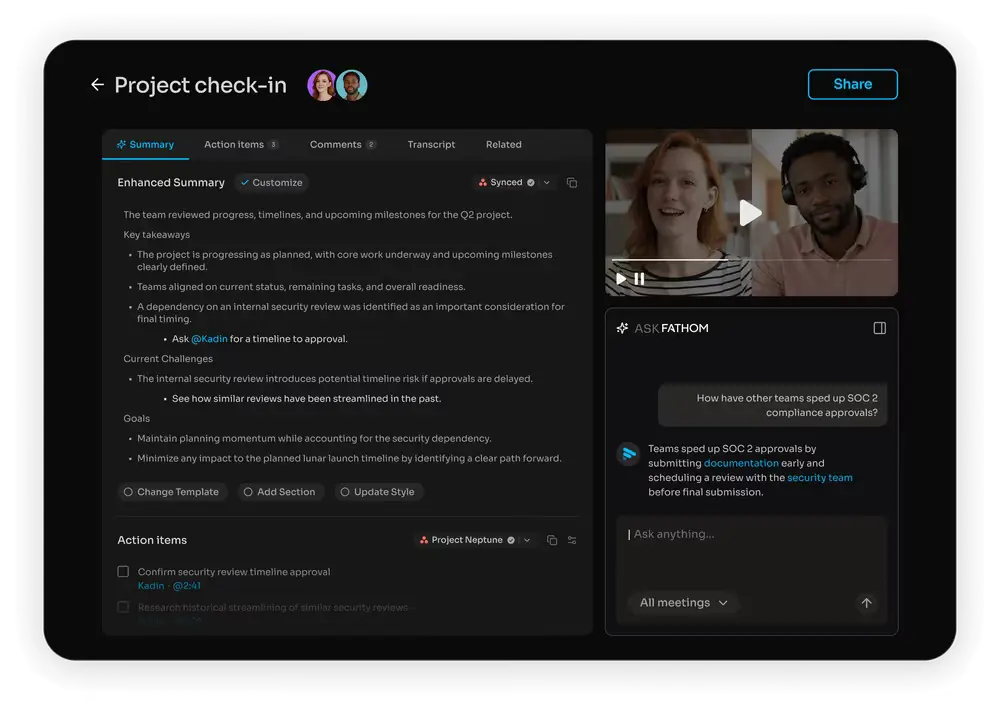
This makes Fathom particularly relevant if your main priority is keeping an accurate record of conversations and following up afterward. Rather than adding another layer of sentiment and engagement analysis, it keeps the focus on what was discussed, what matters, and what needs to happen next.
Curious what this Read AI alternative could cost you in the long run? Check out our Fathom pricing article.
2. MeetGeek for more control and collaboration
MeetGeek is worth considering if your concerns are closer to those raised about meeting-bot behavior and managing recordings across a team. It gives organizations centralized control over when the meeting assistant joins calls and how meetings are shared, helping teams establish clearer recording practices rather than leaving them to individual users.
%20(2).webp)
It also takes a more collaborative approach after the meeting. Instead of relying primarily on generated reports, teams can comment on transcripts, share specific moments, and build a searchable library of previous conversations. This gives people more ways to review and add context when an AI-generated summary does not tell the whole story.
3. Fireflies.ai for teams that depend heavily on integrations
Read AI's API reliability may be inconsistent, making integrations another reason some teams may want to compare alternatives. Fireflies.ai is particularly focused on connecting meeting information with the rest of a company's tools, including CRM and automation systems.
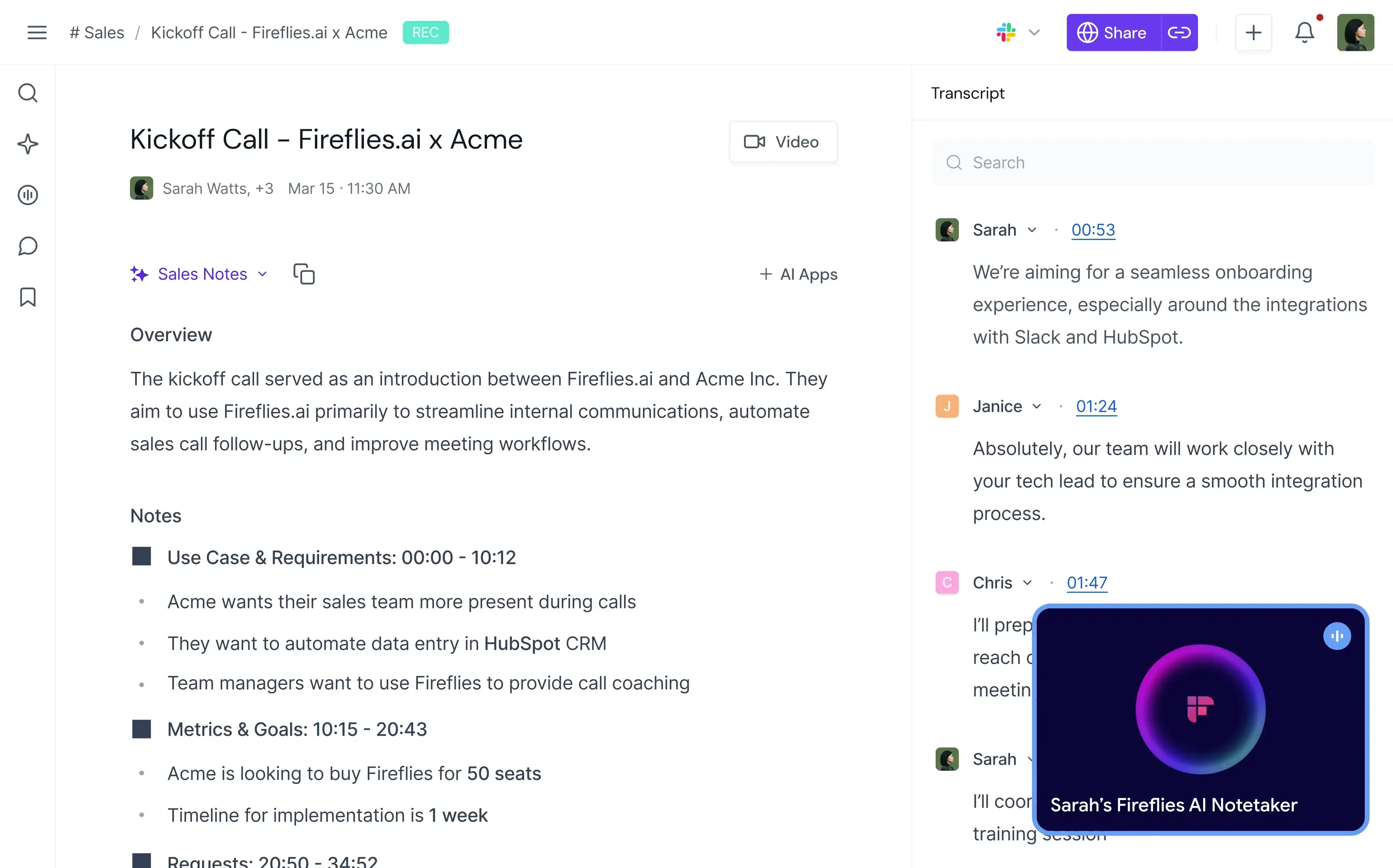
That makes it a relevant alternative for teams whose meeting assistant needs to reliably send meeting information to the other tools they use. The comparison makes the most sense for organizations where integrations are central to how meeting data gets used, rather than for teams that simply want another set of AI meeting features.
How much does Read AI cost?
Read AI has four pricing plans: Free, Pro, Enterprise, and Enterprise+.
| Read AI plan | Monthly billing | Annual billing | What it adds |
|---|---|---|---|
| Free | $0 | $0 | 5 meeting transcripts/month, summaries, coaching, search, basic integrations |
| Pro | $19.75/user/month | $15/user/month | Unlimited transcripts, Workspace access, premium integrations, 100 upload credits/month |
| Enterprise | $29.75/user/month | $22.50/user/month | Audio/video playback, video highlights, 200 upload credits/month, premium support |
| Enterprise+* | $39.75/user/month | $29.75/user/month | SAML, SCIM, domain capture, custom retention, HIPAA support, 300 upload credits/month |
*Requires 5+ licenses
The Free plan is enough to explore Read AI, but the five-meeting monthly allowance makes it more of a trial option for frequent meeting users. Paid plans remove the meeting-report limit, while the Enterprise plan is where video recording playback and highlights become available. Enterprise+ is aimed at larger organizations that need more advanced security and administration.
For a full breakdown of what each tier includes, read our Read AI pricing guide.
What are Read AI’s pros and cons?
Read AI pros
- Strong meeting reports: Read combines transcripts, summaries, action items, key questions, and meeting analytics in one report.
- Useful coaching features: Its meeting coach and Deep Dive capabilities go beyond standard AI note-taking and can help identify patterns in how people communicate.
- Works across major meeting platforms: Native support covers Google Meet, Zoom, and Microsoft Teams, with desktop capture helping fill gaps for other platforms.
- Good search capabilities: Ask Read can search across meeting and connected work data instead of limiting users to one call at a time.
- Flexible apps: Windows, macOS, Android, and iOS apps make it useful for both online meetings and in-person conversations.
- Growing team controls: Paid Workspaces offer team report access, permissions, administrative controls, and report distribution.
Read AI cons
- The Free plan is limited: Five meetings per month will not be enough for many regular users.
- Video playback requires Enterprise: Pro includes unlimited meeting reports, but you need Enterprise or Enterprise+ for stored audio and video playback.
- Some security controls require the highest plan: Features such as SAML, SCIM, domain capture, and custom retention sit in Enterprise+.
- Local recording needs extra care: Desktop and mobile recording can happen without a visible meeting bot, so the person recording is responsible for attendees’ awareness and consent.
- Collaboration is more report-focused than annotation-focused: Workspaces provide team sharing and administration, but teams wanting transcript-level comments and richer collaborative note-taking may prefer a different approach.
Who is Read AI best for?
Read AI makes the most sense for individuals and teams that want meeting analytics alongside transcription.
It is particularly relevant for:
- Professionals who want automated meeting summaries instead of manual note-taking
- Managers interested in engagement and coaching data
- Sales teams that want call insights and CRM integrations
- Teams that want searchable reports from previous calls
- Users who regularly work in Zoom, Google Meet, or Microsoft Teams
- People who want one tool for meeting capture, summaries, search, and scheduling
It is less compelling if your main requirement is simply a lightweight transcript, if you need frequent video playback but do not want an Enterprise subscription, or if transcript-level collaboration is central to how your team works.
Read AI vs MeetGeek: Feature comparison
| Feature | Read AI | MeetGeek |
|---|---|---|
| Zoom, Google Meet, Microsoft Teams | Yes | Yes |
| Automated transcription | Yes | Yes |
| Automated meeting summaries | Yes | Yes |
| Action items and key points | Yes | Yes |
| Post-meeting analytics | Yes | Yes |
| Personalized meeting coaching | Yes | Yes |
| Desktop recording | Yes | Yes |
| iOS and Android apps | Yes | Yes |
| In-person recording | Yes | Yes |
| AI-powered search across meetings | Yes | Yes |
| Workspace/team sharing | Yes | Yes |
| Transcript comments | Limited | Yes |
| Shareable meeting snippets | Video highlights on supported plans | Yes |
| Smart scheduling | Yes | No dedicated scheduler |
| CRM integrations | Yes | Yes |
| Custom meeting templates | Meeting report customization | Yes |
| Audio/video playback | Enterprise and above | Available by plan |
| Enterprise administration | SAML, SCIM, domain capture, retention | Enterprise security and organization controls |
| Supported languages | 20+ | 100+ |
The best choice depends on which advanced capabilities you actually need rather than the total number of features.
Read AI review: Is it the right meeting assistant for you?
Read AI combines meeting notes with deeper insights, coaching, and AI-powered search, making it a capable option for people who want to get more from their conversations after they end. However, lots of users have flagged concerns with its support and its security and privacy.
The right choice ultimately depends on how you want to use your meeting data. If you’re looking for an alternative with a stronger focus on team collaboration and meeting automation, as well as better security, MeetGeek is worth considering.
Try MeetGeek for free and turn your meetings into searchable notes, insights, and follow-ups.
Key takeaways
- Read AI is useful for meeting notes and automated summaries, but its broader AI analysis is not always reliable. Users have reported sentiment and engagement scores that misread meeting context, as well as summaries that still require manual review.
- Unexpected or intrusive meeting behavior is one of the more serious concerns. Some users report being surprised by Read AI appearing in meetings, which can create problems when participants aren't expecting an AI meeting assistant.
- Security controls don't remove privacy and consent concerns. Teams still need to manage auto-join settings, recording permissions, data access, and attendees' awareness, particularly during sensitive or external meetings.
- The reasons people leave Read AI vary, so the right alternative depends on the problem you're trying to solve. Fathom offers a more focused meeting experience, MeetGeek emphasizes control and collaboration, while Fireflies.ai is geared toward integration-heavy teams.
Frequently asked questions
Is Read AI safe to use?
Read AI has established security measures, including SOC 2 Type II auditing, encryption, and privacy controls. However, safe use also depends on how Read AI is configured and whether meeting participants know they are being recorded. Some users have reported unexpected or intrusive meeting behavior, so teams should review auto-join settings, access permissions, and consent requirements before using Read AI for sensitive or external meetings.
Does Read AI record meetings automatically?
It can. When connected to your calendar, Read can be configured to join supported upcoming meetings automatically. Users can control which meetings it joins, and attendees can remove the assistant or opt out when Read is present in web mode.
Does Read AI work with Microsoft Teams and Google Meet?
Yes. Read AI natively supports Zoom, Microsoft Teams, and Google Meet. Other platforms can be captured through its desktop app or by uploading an audio or video file.
Can Read AI record in-person meetings?
Yes. Read’s Windows, macOS, Android, and iOS apps can capture conversations locally, including in-person meetings. Local recording does not place a visible AI assistant in the participant list, so the person recording is responsible for informing participants and obtaining consent where necessary.
Does Read AI sell or use your meeting data to train AI?
Read states that it does not sell meeting data. It also says AI training is opt-in and disabled by default, although its Customer Experience Improvement Program has separate settings related to product evaluation.
What is the main difference between Read AI and MeetGeek?
Both provide automated meeting notes, transcripts, summaries, analytics, search, and integrations. Read AI places more emphasis on real-time metrics, coaching, scheduling, and cross-app insights, while MeetGeek places more emphasis on structured meeting templates, transcript collaboration, meeting knowledge, and automation.






.avif)