


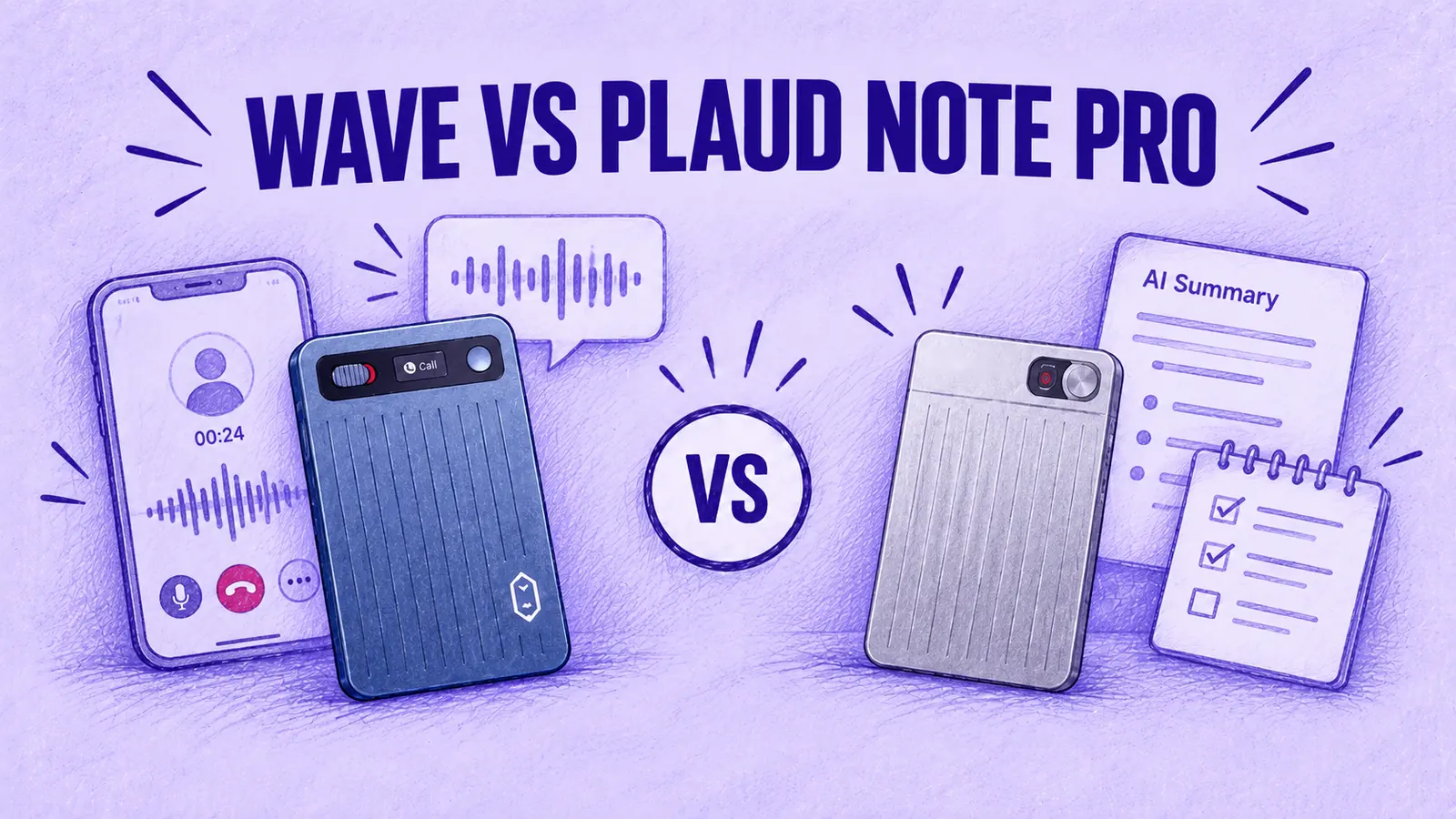

- Hardware is close: both are card-sized, about 3 mm thin, store 64 GB and record calls and in-person conversations.
- The split is software. Wave sends recordings to the MeetGeek platform, with AI Chat, Meeting Skills and CRM integrations; the Note Pro sends them to Plaud's apps.
- Both Pro plans cover 20 hours a month, at $120 a year for MeetGeek and $99.99 for Plaud.
- Neither captures the other caller on Bluetooth earbuds, and both need a press to start recording.
Plaud Note Pro and MeetGeek Wave are both card-sized AI voice recorders that capture phone calls and in-person conversations, and on paper their hardware is close. Most of the difference is in the software each recording goes into.
Plaud Note Pro works inside Plaud's own device-first ecosystem of mobile, web and desktop apps. MeetGeek Wave sends recordings into the MeetGeek workspace, where your Zoom, Google Meet and Microsoft Teams meetings already live. Pricing is structured differently too: the Note Pro is $189 with a free 300-minute monthly plan, while Wave is a $129 bundle that includes 3 months of MeetGeek Pro.
Plaud Note Pro vs MeetGeek Wave at a Glance
| Topic | MeetGeek Wave | Plaud Note Pro |
|---|---|---|
| Price | Wave + Pro $129 (3 months of Pro); Wave + Business $149 (3 months of Business) | $189 with the free Starter plan |
| Call recording | Manual Call Mode; press to record | Automatic mode detection; long-press to record |
| Calls on earbuds | Other caller not captured | Other caller not captured |
| Battery | Up to 40 h of recording | 30 h in Enhance mode, 50 h in Endurance mode (Plaud's stated figures) |
| Free transcription | MeetGeek Basic: 3 h a month | Starter: 300 min a month |
| Paid plan, billed yearly | Pro: $120/year ($9.99/month), 20 h a month | Pro: $99.99/year ($8.33/month), 1,200 min (20 h) a month |
| Online meetings | Calendar bot, desktop app and Chrome extension | Plaud Desktop, bot-free recording |
| Where recordings live | MeetGeek workspace on web, desktop and mobile | Plaud app, Plaud Web and Plaud Desktop |
| Main software difference | Meeting workflows, AI Chat and CRM integrations | Recorder apps, Ask Plaud and summary templates |
Table last updated: September 29, 2026. Plaud figures are Plaud's published claims.
What Happens After Each Recording?
MeetGeek started as meeting software; Plaud started with recording hardware. MeetGeek built search, automation and integrations around Zoom, Google Meet and Microsoft Teams calls, and Wave adds capture for conversations that happen away from the computer. Plaud has grown its software around its devices.
That history shapes where a recording ends up. On MeetGeek, a phone call joins months of online meetings, your team's shared recordings and your CRM connections. On Plaud, it joins a library built around what the recorder captures, which Plaud Desktop extends to online meetings.
In day-to-day use, the difference shows up in a handful of tasks:
| What You Want to Do | MeetGeek Wave | Plaud Note Pro |
|---|---|---|
| Recording a Zoom, Meet or Teams call | Calendar bot or bot-free desktop/browser recording | Bot-free recording through Plaud Desktop |
| Recording a phone call | Clip Wave on, set Call Mode, press the button | Clip the Note Pro on and long-press; it picks call mode by itself |
| Asking about a client across every conversation | AI Chat searches calls, in-person meetings and video meetings in one account | Ask Plaud searches your Plaud library |
| Getting notes into your CRM | Native CRM integrations | Zapier; Salesforce integration in preview |
| Work after the call | Meeting Skills, follow-ups and CRM updates | AutoFlow transcription and summaries |
| Sharing with a team | Business plan team spaces, $17 per user a month billed yearly | Team plan, from $20/user/month billed annually* |
| Online meetings without the hardware | Works on any MeetGeek plan, free Basic included | Available with Plaud Team |
Table last updated: October 26, 2026. Plaud Starter requires a linked device; Plaud Team supports Desktop recording without hardware. *Plaud Team: $20/user/month for the first year under the launch offer, then $25. Offer ends November 30, 2026.
What MeetGeek Does With a Wave Recording
Recordings sync to the MeetGeek app on iOS or Android over Bluetooth, and an interrupted transfer picks up where it stopped. A few minutes later each one has a summary with the key points, decisions and context, a transcript you can search, labeled by speaker and kept in its original language, plus the to-dos that came out of it. Highlights, a topic timeline and mind maps let you jump to the part that mattered without replaying the audio. Language is detected automatically across 100+ languages.
AI Chat answers questions across that recording and every other meeting you have, so you can ask what a client said about a renewal date and get the answer from a WhatsApp call even if the follow-up happened on Zoom. Meeting Skills and AI Studio run follow-up work after each conversation, with 26+ ready-made skills such as call scoring and follow-up drafts.
Sales teams can push notes to HubSpot, Salesforce, Pipedrive, Zoho or Attio; project work flows to Notion, ClickUp, Asana, Monday or Slack; hiring teams get Greenhouse, Lever and Ashby. Zapier, Make and n8n extend that to 10,000+ apps. MeetGeek's API and MCP server also let Claude and ChatGPT access the content of your meetings.
What Plaud Does With a Note Pro Recording
Plaud's Auto Transfer feature moves each recording to the Plaud app in the background (on iOS, per Plaud's help center), and AutoFlow then transcribes and summarizes it automatically. Transcription covers 112 languages with speaker labels, and Plaud Intelligence turns each recording into action items, decisions and follow-ups. The company describes the Plaud app, Plaud Web and Plaud Desktop as one connected workspace.
While recording, a short press on the device marks a highlight, and in the app you can attach images such as slides, whiteboards or business cards to a note. Plaud's plans page lists 10,000+ summary templates, custom templates (beta), Ask Plaud for questions about your recordings, Google Calendar and a Plaud MCP server in preview. Zapier, also in preview, can send transcripts and summaries to other apps. Plaud also lists a Salesforce integration in preview.
One Library for Phone Calls, In-Person Meetings and Video Calls
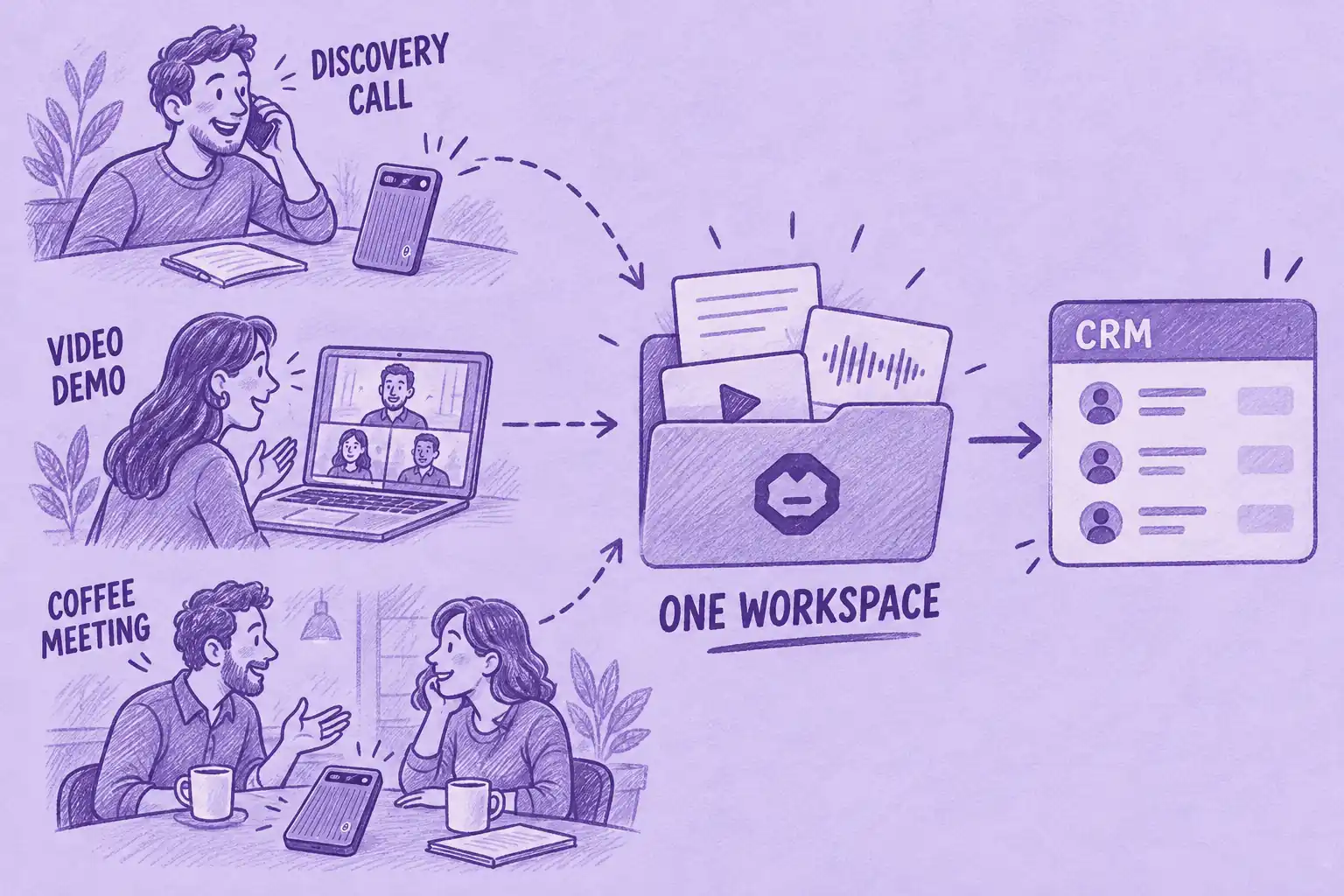
Wave adds phone-call recording to the MeetGeek workspace, so a call on the phone or on WhatsApp now lands in the same library and search as the meetings MeetGeek's bot records. Plaud users get a similar mix by pairing the Note Pro with Plaud Desktop for online meetings.
Picture a sales rep working one account: a discovery call on the phone, a demo on Zoom, then the contract discussion over coffee. Each gets its own summary in one workspace, AI Chat can answer a question that spans all three, and the notes reach HubSpot or Salesforce without anyone copying them over. If that is how your week looks, get MeetGeek Wave and keep those conversations together.
Which Is Better for Phone Calls?
Both record calls from the back of your phone, and both need a press of the button to start recording. With Wave, you select Call Mode and press the button. Plaud says the Note Pro selects call mode by itself, then you long-press to start recording.
How MeetGeek Wave Records a Call
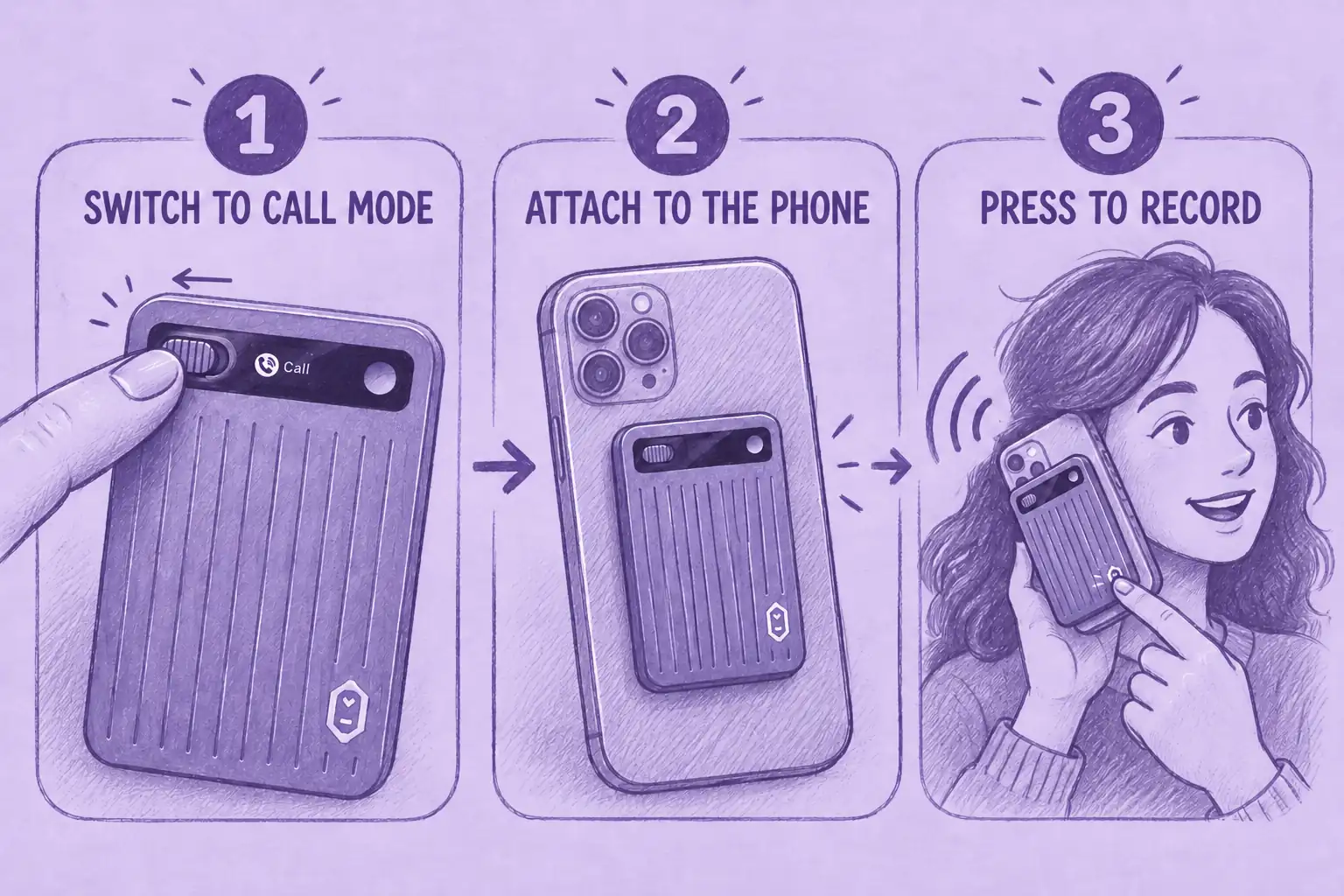
To record a call with Wave:
- Slide the switch left into Call Mode.
- Attach Wave to the back of your phone with the included magnetic case.
- Press the button when the call starts.
Wave listens to the call's audio itself, so there is nothing to integrate and no dial-in number. It works with the regular phone app and with WhatsApp, FaceTime, Messenger, Telegram and Signal. It records both sides with the phone at your ear or on speaker. With earbuds, the other caller's voice is not captured. If you forget to press the button, the call is not recorded.
If you would rather use software alone, here is how to record WhatsApp calls on a laptop or phone.
How Plaud Note Pro Records a Call
Plaud's product page describes “smart dual-mode recording” that moves between in-person and phone calls automatically. Its help center fills in the rest: a contact sensor picks up the call through the phone, and recording starts with a long press, so only the mode is automatic. A magnetic case comes in the box.
Which Works With Bluetooth Earbuds?
Neither captures both sides of a call with Bluetooth earbuds. On an AirPods call, Wave hears just you, since the caller's voice goes to your earbuds instead of the phone's speaker, which is where Wave picks it up; other Bluetooth earbuds behave the same way. Plaud's help center states the same limit for the Note Pro. If both voices matter, keep the earbuds out for that call.
Recording Consent on Calls
Recording rules vary by jurisdiction. US federal law generally allows one-party consent under 18 U.S.C. § 2511, while some states require everyone on the call to consent. Other countries have their own recording and privacy rules, and data-protection requirements may also apply. Tell participants before recording. This is general information, not legal advice. State-by-state details are in our explainer on whether you can record someone without their permission.
Which Is Better for In-Person Meetings?
Either one can sit on the table or stay in your hand for a team meeting in a conference room, a job interview, a client lunch or a walk-through on a job site.
To record an in-person meeting with Wave, slide the switch right into Note Mode and give it a short press. One vibration confirms it is recording. MeetGeek then tells the speakers apart and detects the language, which matters when four people are talking and you need to know who agreed to what.
For the Note Pro, Plaud lists 4 MEMS microphones and a pickup range of up to 16.4 ft in Enhance mode, or 9.8 ft in Endurance mode, which it describes as a reduced audio quality setting. Those are Plaud's figures, not our measurements. The highlight press and image attachments are aimed at interviews and site visits, where you want to mark a moment or add a photo of a whiteboard.
How Much Does Each Cost?
Wave is sold as a bundle first:
- Wave + Pro, $129: you get the device and your first 3 months of MeetGeek Pro. From month four, Pro costs $120 a year ($9.99 a month on annual billing), so MeetGeek calls it 15 months for the price of 12.
- Wave + Business, $149: for teams, with the first 3 months of Business included, then $17 per user a month billed yearly ($204 a year).
- Existing Pro or Business customers: Wave alone is $129.
- No paid plan: Wave can still record audio. MeetGeek Basic includes 3 hours of transcription per month.
Plaud sells the Note Pro for $189 with its free Starter plan, and its paid plans are optional. The purchases bundle different things, so compare plan with plan: both Pro plans include 20 hours of transcription a month, at $120 a year for MeetGeek Pro and $99.99 a year for Plaud Pro. Wave costs $60 less up front and includes 3 months of Pro; Plaud Pro costs about $20 less per year after that.
| Pricing | MeetGeek Wave | Plaud Note Pro |
|---|---|---|
| Device purchase | Wave + Pro: $129, 3 months of Pro included | Note Pro: $189, free Starter plan included |
| Individual paid plan, billed yearly | Pro: $120/year ($9.99/month) | Pro: $99.99/year ($8.33/month) |
| Transcription on that plan | 20 hours/month | 1,200 minutes/month |
| Unlimited transcription, billed yearly | Business: $204/user/year ($17/month), with team spaces | Unlimited: $239.99/year ($20/month), up to 24 h a day |
| Free plan | MeetGeek Basic: 3 hours/month, transcripts kept 3 months, audio kept 1 month | Starter: 300 minutes/month |
| Device only | Wave only: $129, for existing Pro and Business customers | Note Pro: $189 |
Table last updated: September 29, 2026.
Plaud also bills Pro at $17.99 and Unlimited at $29.99 month to month. The full MeetGeek plan list is on the MeetGeek pricing page.
Plaud Note Pro vs MeetGeek Wave Specs
The remaining hardware details, from each company's published figures:
| Spec | MeetGeek Wave | Plaud Note Pro |
|---|---|---|
| Weight | 28 g | 1.06 oz (about 30 g) |
| Dimensions | 87 × 53 × 3.1 mm | 3.37 × 2.13 × 0.12 in (about 86 × 54 × 3 mm) |
| Material or finish | Aluminum alloy | Dual-tone ripple finish |
| Microphones | Not listed in Wave's specs | 4 MEMS microphones plus 1 VPU |
| Charging time | About 90 minutes | 2 hours |
| Storage | 64 GB | 64 GB |
| Screen | Not listed in Wave's specs | 0.95-inch AMOLED |
| Connectivity | Bluetooth to app; no direct internet connection | BLE 5.4 and Wi-Fi |
| Transcription languages | 100+, detected automatically | 112 |
| In the box | Wave, magnetic phone case | Note Pro, magnetic case, magnetic ring, charging cable |
Table last updated: September 29, 2026.
On privacy, Wave has no internet connection of its own; its only link is Bluetooth to the MeetGeek app. On the platform side, data is encrypted at rest with AES-256 and in transit with TLS 1.2+, and MeetGeek is SOC 2 Type II certified, offers a BAA for eligible customers, meets GDPR and CCPA, offers EU and US data-residency options (support can confirm or change your account's region) and never trains models on what you record.
Which Is Better for Teams and CRM Workflows?
A Wave recording sits in the same shared MeetGeek workspace as the team's online meetings, and the Business plan adds team and group spaces with unlimited transcription. CRM links to HubSpot, Salesforce, Pipedrive, Zoho and Attio, plus Greenhouse, Lever and Ashby for recruiting, send notes where people already work.
Plaud sells a Team plan too. It costs $25 per user per month with annual billing. Its launch offer reduces that to $20 for the first year if purchased by November 30, 2026. The Team plan adds shared team files, centralized billing, user, seat and device management and workspace-level data residency.
Who Should Choose MeetGeek Wave?
Wave makes the most sense when:
- your Zoom, Google Meet or Teams meetings already run through MeetGeek
- one history should hold phone calls, in-person meetings and video meetings, searchable together
- call notes have to get into a CRM, project tool or ATS without copying
- your team shares meeting knowledge and follow-up workflows
That usually describes sales reps, consultants and agencies, founders, customer success managers, recruiters and product teams. Wave + Pro gets you the recorder and 3 months of the platform in one purchase.
Who Should Choose Plaud Note Pro?
The Note Pro is likely the better match if you:
- prefer staying inside Plaud's apps, from the phone app to Plaud Desktop
- want an on-device screen, which Plaud calls its InstantView AMOLED display
- want the recorder to switch between call mode and in-person mode by itself
- rely on a large summary template library
If every meeting you have is on video, you may not need a separate recorder: start with the best AI note taker apps for video meetings instead.
Frequently Asked Questions
Is MeetGeek Wave a Plaud Alternative?
Yes. It records the same situations as the Note Pro, phone calls, app calls and in-person conversations, but sends them to MeetGeek instead of Plaud's apps.
Does Plaud Note Pro Require a Subscription?
No. Every Note Pro comes with Starter, a free tier of 300 transcription minutes a month. Paid tiers are optional: $99.99 a year for Pro, $239.99 for Unlimited.
Does MeetGeek Wave Require a Subscription?
No, though it is sold with one. The $129 bundle includes 3 months of Pro; after that, Pro costs $120 a year. Without a paid plan, Wave falls back to MeetGeek Basic, which is free and covers 3 hours a month.
Can Both Record WhatsApp Calls?
Wave does: it records the call audio from the back of the phone, so WhatsApp works like a regular call. Plaud says the Note Pro records calls through a contact sensor on the back of the phone, without listing individual calling apps.
Can Either Record Both Sides of a Call With AirPods?
No. With earbuds, each captures only your side, according to MeetGeek and to Plaud's help center. This limitation concerns phone-call recording with the hardware, not system-audio recording through a desktop app.
Does MeetGeek Wave Start Recording Automatically?
No. You pick Call Mode or Note Mode with the switch, then press the button; one vibration confirms it is recording.
Which One Records Online Meetings?
Both ecosystems do. MeetGeek uses a calendar bot, a Chrome extension and a desktop app. Plaud uses Plaud Desktop. Starter requires a linked device, while Team supports recording without hardware.
Ready to bring your calls into the same place as your meetings? Buy MeetGeek Wave with 3 months of Pro.






.avif)