


Raising your hand in Zoom means using the built-in Raise Hand reaction to tell the host you want to speak, without unmuting or talking over anyone. A small hand icon appears next to your name in the participant list, the host and co-hosts see it, and they invite you in when it is your turn. The feature works on the desktop app, the mobile app, a web browser, and even a dial-in phone line, with slightly different steps on each.
That small signal is what keeps a busy call from turning into crosstalk. It lets you participate without interrupting, keeps discussions in order, and makes it easy for whoever is running the meeting to manage who speaks next. Good virtual meeting etiquette starts with knowing exactly how and when to use it.
This guide covers every method, the keyboard shortcuts, and the common reasons the button goes missing. If you also want a record of what was said after everyone lowers their hands, MeetGeek is an AI notetaker that joins your Zoom calls and turns them into transcripts and summaries, which we cover near the end.
What Does the Raise Hand Feature Do in a Zoom Meeting?
The Raise Hand feature lets you signal that you want to speak without using your voice. When you raise your hand, a hand icon appears next to your name in the participant list, and the host or co-host can invite you into the conversation when the moment is right.
It matters most in larger meetings, structured discussions, training sessions, and webinars. Instead of talking over someone or jumping in at the wrong moment, you raise your hand and wait to be called on. It is a small feature that does a lot to keep meetings respectful and focused.
How Do You Raise Your Hand in Zoom on Desktop (Windows and Mac)?
On the Zoom desktop app, raising your hand takes a few clicks:
- Join the meeting through the Zoom desktop application.
- Move your cursor to reveal the meeting controls at the bottom of the screen.
- Open Reactions.
- Choose Raise Hand.
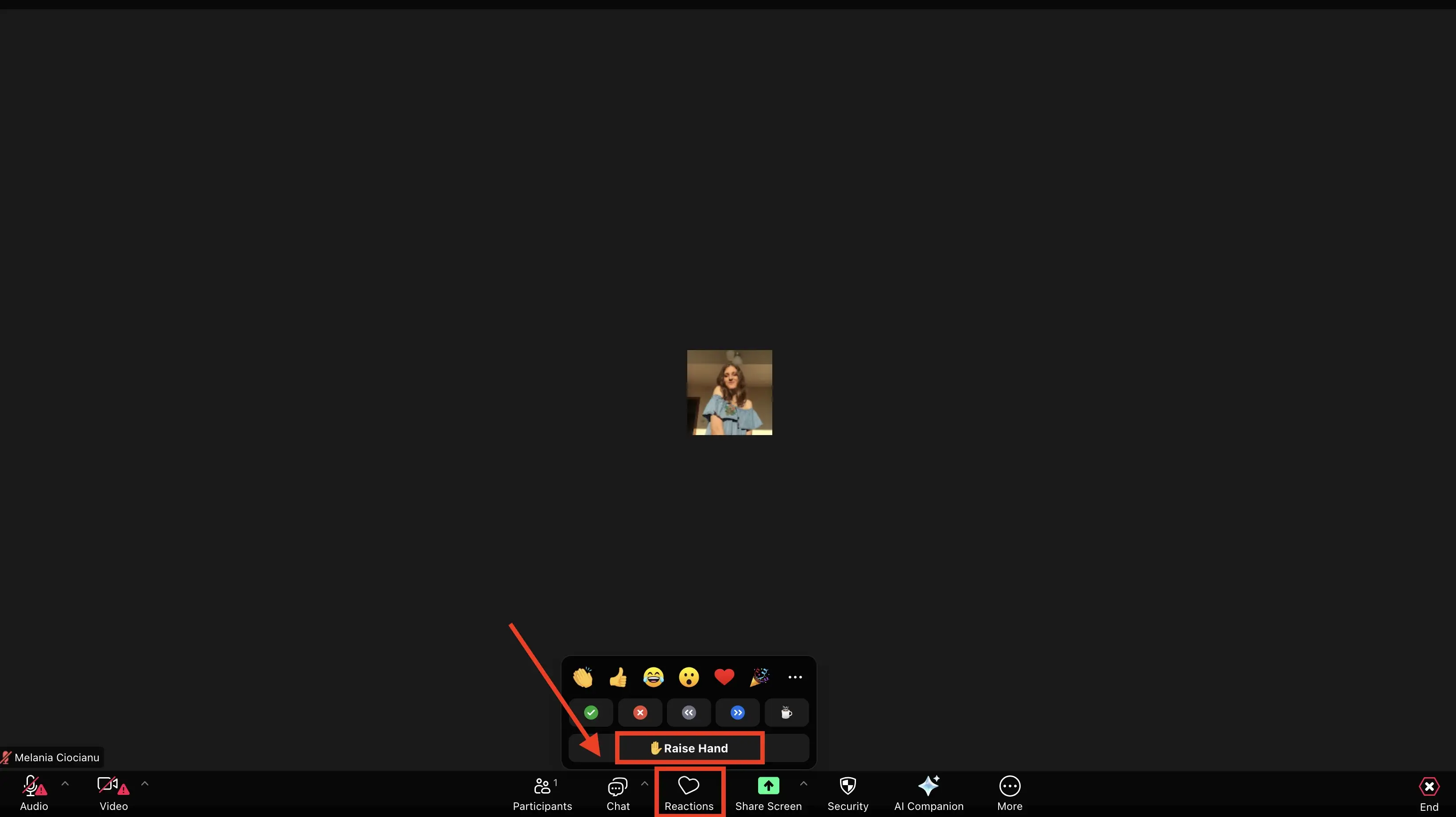
A hand icon then appears next to your name in the participant list. Your hand stays raised until you lower it or the host clears it.
To lower your hand, open Reactions again and select Lower Hand.
Prefer the keyboard? You can toggle your hand instantly:
- Windows: press Alt + Y
- Mac: press Option + Y
How Do You Raise Your Hand in Zoom on Mobile (iOS and Android)?
On phones and tablets the steps are slightly different but just as quick:
- Join the Zoom meeting from the mobile app.
- Tap the screen to display the meeting controls.
- Tap Reactions.
- Select Raise Hand.
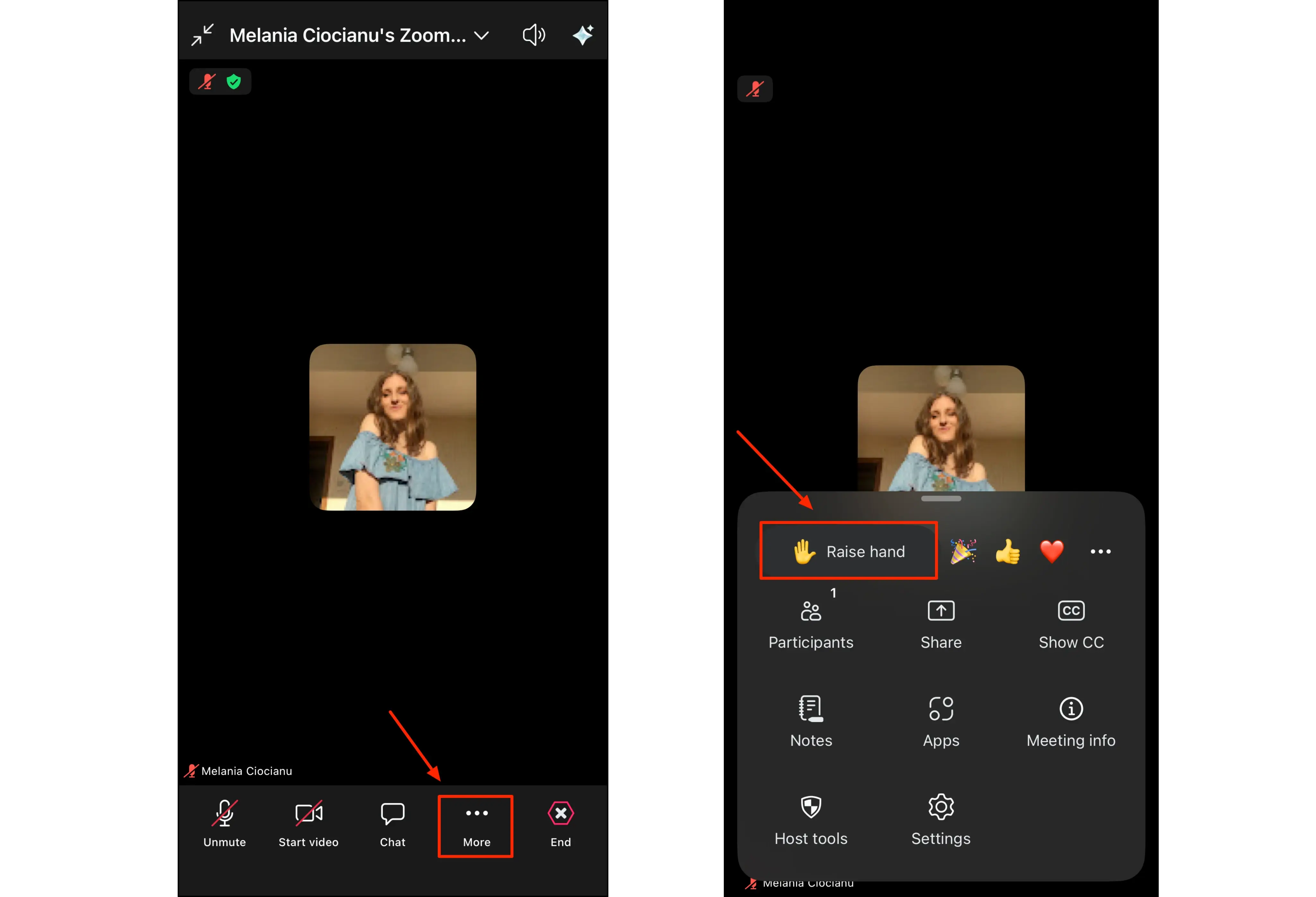
The hand icon appears next to your name, exactly as it does on desktop. To put your hand down, tap Reactions again and choose Lower Hand. This works the same way on iOS and Android, as long as the app is up to date. On older app versions the option lives under the More (three dots) menu instead of Reactions.
How Do You Raise Your Hand in Zoom From a Browser?
If you are attending through a web browser, the steps are nearly identical to the desktop app:
- Join the meeting in your browser.
- Find the control bar at the bottom of the meeting window.
- Click Reactions.
- Select Raise Hand.
Zoom shows the raised hand icon next to your name in the participant list. To lower it, click Reactions once more and choose Lower Hand. If you joined from a link rather than the app, our guide to joining a Zoom meeting with an ID covers getting into the call in the first place.
How Do You Raise Your Hand on a Zoom Call by Phone?
If you dialed in by phone with no video, you can still raise your hand with the keypad:
- Press *9 to raise your hand.
- Press *9 again to lower it.
This is the option audio-only participants use to take part in the discussion without a screen.
How Do Hand Gestures and Gesture Recognition Work in Zoom?
Zoom can also read physical hand gestures and turn them into on-screen reactions. With gesture recognition enabled, raising your hand in front of the camera or giving a thumbs-up triggers the matching reaction automatically, no clicking required.
To turn it on, open your Zoom settings, go to the reactions or in-meeting section, and enable gesture recognition. If Zoom keeps raising your hand when you did not click anything, this setting is almost always the reason.
How Do Hosts and Co-Hosts Manage Raised Hands?
For hosts and co-hosts, each raised hand shows up as a hand icon next to that participant's name in the participant list, and Zoom notifies the host that a hand has gone up.
From there, the host can invite someone to speak, unmute them, or lower their hand once the point has been addressed. In larger meetings this keeps things orderly and gives everyone a fair chance to be heard.
From Raised Hands to Follow-Through
Raising your hand gets you into the conversation. Remembering what was decided after the call is where most meetings fall apart. That is the gap an AI notetaker fills: once connected to your calendar, MeetGeek can join selected Zoom calls with permission through its Zoom integration, record and transcribe them in 100+ languages, and hand you a summary with the key points and action items when the meeting ends.
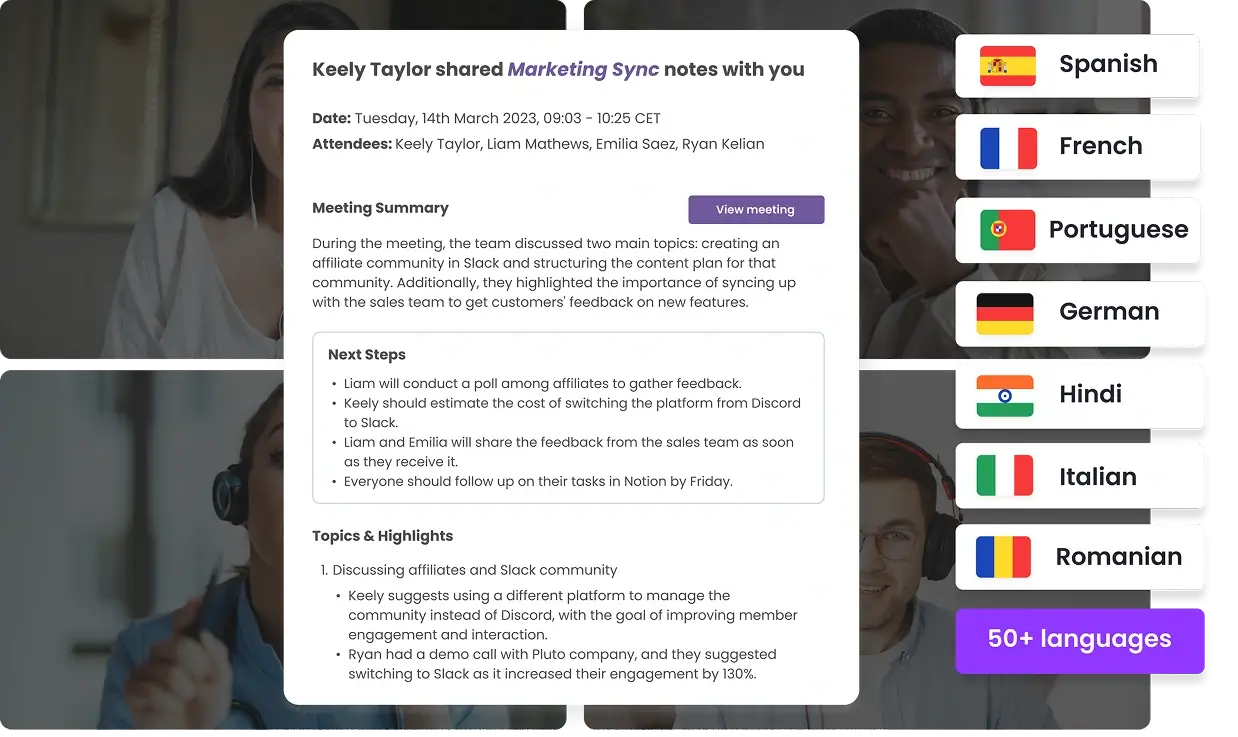
Instead of splitting your attention between taking notes and deciding when to speak, you can focus on the discussion and let the recap write itself. It also captures anything you missed, useful for teammates who joined late, and its AI voice agents can even help run parts of the meeting for you.
If you want your Zoom calls to end with clear notes instead of half-remembered decisions, try MeetGeek free.
Key Takeaways
- Raising your hand in Zoom signals that you want to speak without unmuting or interrupting; a hand icon appears next to your name for the host to see.
- The path is Reactions > Raise Hand on desktop and browser, and the same on mobile (More on older app versions).
- Keyboard shortcut: Alt + Y on Windows, Option + Y on Mac. On a dial-in phone line, press *9.
- If the button is missing, the host has usually disabled reactions or your app needs updating.
- Gesture recognition can raise your hand automatically from a camera movement, which explains phantom raised hands.
Frequently Asked Questions
Why Can't I Raise My Hand in Zoom?
This usually means the host has disabled reactions, or you are on an outdated app. Update Zoom to the latest version and check the Reactions menu, where the Raise Hand button is sometimes grouped. If you are on a browser and still cannot see it, try rejoining from the desktop app.
What Is the Shortcut Key for Raising a Hand in Zoom?
On Windows, press Alt + Y. On Mac, press Option + Y. The shortcut toggles between raise hand and lower hand.
How Do I Raise My Hand in Zoom on My Phone?
In the Zoom mobile app, tap the screen, tap Reactions, then select Raise Hand (on older app versions it is under the More menu). If you dialed in by phone without the app, press *9 on the keypad to raise your hand and *9 again to lower it.
How Do I Turn On Hand Gestures in Zoom?
Open Zoom settings, go to the reactions or in-meeting section, and enable gesture recognition. Once on, Zoom detects a raised hand or thumbs-up from your camera and triggers the reaction automatically.
Where Do Raised Hands Appear in Zoom?
A raised hand shows as a hand icon next to the participant's name in the participant list, visible to the host and co-hosts.







.avif)