


A Google Meet AI note taker is software that captures a Meet call and turns it into a written summary with decisions and action items, by joining the call as a participant, by recording it locally with nothing in the participant list, or by reading the live captions Meet already produces. Google ships one natively through Gemini, and third-party tools do the same job from outside the call.
So the real question is not which notetaker is best in the abstract. It is whether Google's own Gemini already covers you, and if not, which tool fits the way Meet actually works. Four things decide that, and all four are specific to this platform:
- Your Workspace tier. Gemini notes need Business Standard or higher. Business Starter does not have them.
- Your admin. Workspace admins can restrict third-party bots from Meet entirely.
- Your languages. Gemini handles 8, one per meeting.
- Where the notes go. Gemini writes a Google Doc and stops there.
One thing worth saying before the table: every third-party tool below has a free tier, so you can run two of them on the same Meet call this week and compare the summaries yourself. That is worth more than any comparison table, including this one. Pick two, not five.
Disclosure before the table: MeetGeek is our product and it ranks first below, so check our columns against the others rather than taking the ranking on trust. Its Google Meet note taker joins from Google Calendar or records with no bot at all, and turns calls into AI meeting notes that land outside the Google stack.
This guide covers 7 options: Google's own Gemini, which gets its own section because it arrives with your Workspace tier rather than being something you buy per seat, and the 6 third-party tools in the table below. For the wider market beyond Meet, see our ranking of AI note takers across every platform.
Best AI Note Takers for Google Meet in 2026
Table last updated: July 15, 2026.
Gemini is deliberately not in this table. It is not a tool you choose and pay for per seat: it either comes with your Workspace tier or it does not, so dropping it into a price column would compare two different things. It gets its own section directly below, and it is the first thing to check. Everything in the table is a third-party tool that works on any Google Meet account, whatever your tier and whatever your admin has done to Gemini.
Every tool here has a free tier you can test on a real Meet call today. What each free plan caps varies enormously, and the headline is rarely the real limit, which is why we rank the best free AI meeting note takers on their real caps in a separate guide.
First, Check Whether Gemini Already Covers You
Google's “take notes for me” is Gemini writing notes straight into a Google Doc. Nothing joins the call, because it is the call. It is the only option here you may already be paying for, so rule it in or out before you evaluate anything in the table.
Start with your tier. “Take notes for me” requires an eligible Google Workspace subscription: Business Standard, Business Plus, Enterprise Standard, Enterprise Plus, or Frontline Plus. Business Starter does not have it. On a personal account, only Google AI Ultra includes it. So “we use Google Meet” and “we can use Gemini notes” are not the same sentence, and plenty of teams are shopping precisely because their tier does not cover it.
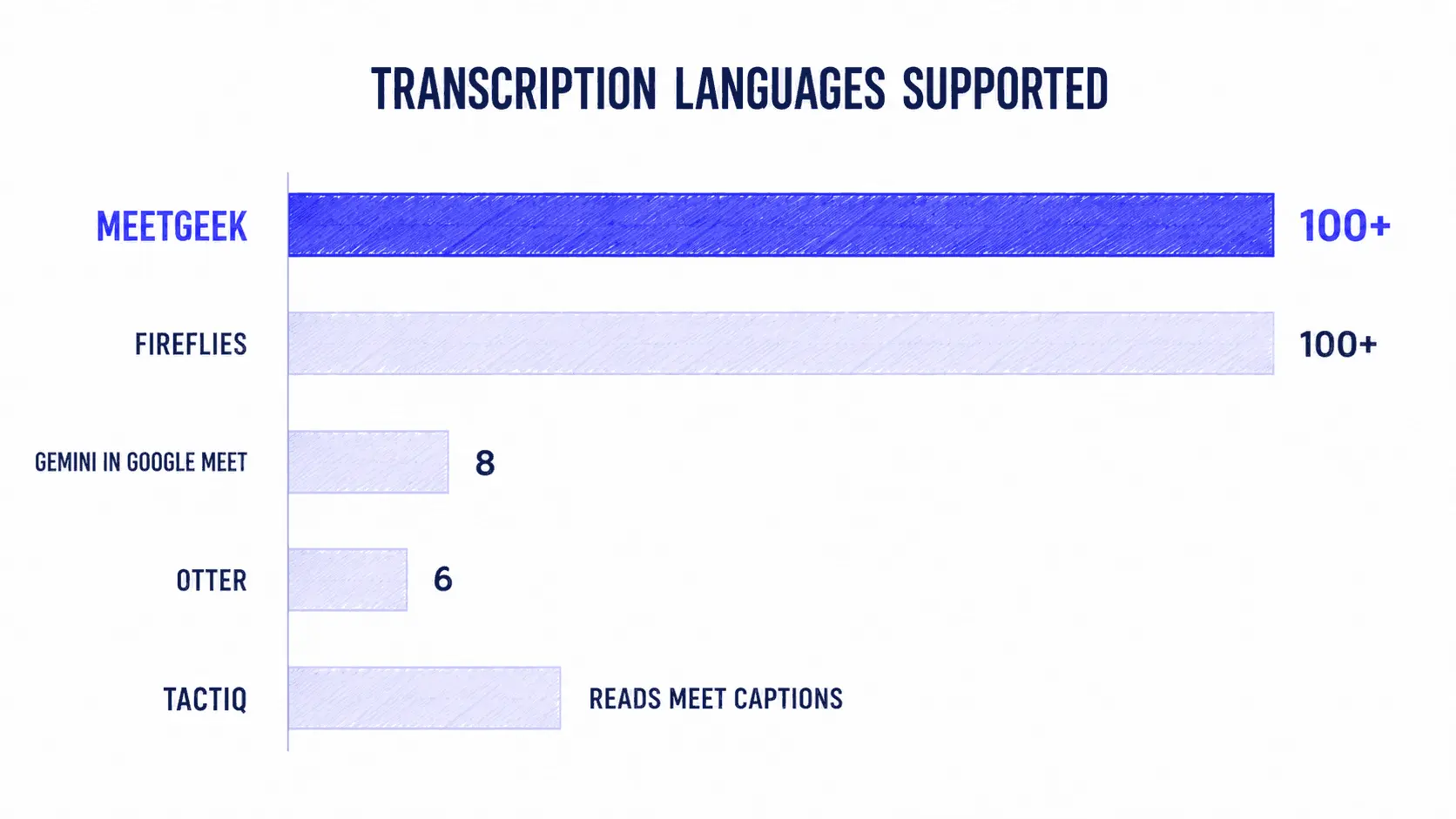
Then your languages. 8: English, French, German, Italian, Japanese, Korean, Portuguese, Spanish. One per meeting. Google is explicit that mixed-language meetings are not supported; switch mid-call and you get a prompt asking which language to use, not a bilingual transcript.
Three practical limits. It is recommended for meetings of 15 minutes to 8 hours, so a short standup may produce nothing. Your admin can turn it off org-wide and require participant consent. And the notes doc follows your Vault retention policy, which is either what compliance wanted or a surprise.
The ceiling is where it stops. Gemini answers “what was said” and writes it down well. It does not create the Jira ticket, update the HubSpot deal, or post to Slack. Read notes in Docs and act manually and it is fine. Need the note to become work elsewhere and the Doc is where it stalls.
Gemini is enough if you are on Business Standard or higher, you speak one of the 8 languages, and every downstream tool is also Google. If that is you, our walkthrough of how to use Google Meet's built-in AI note taker covers turning it on. If any of the three is a no, keep reading.
1. MeetGeek: Strong All-Round Pick for Google Meet
MeetGeek joins your Meet calls from Google Calendar, or records them with nothing in the participant list at all. It transcribes, summarizes, and then uses the meeting as a trigger for work in other systems.
Both routes into Meet, on any plan. This matters here more than on any other platform, because Workspace admins can restrict third-party bots. The bot joins from your calendar automatically. The MeetGeek Chrome extension and desktop app record the call with no bot in the participant list, including on Free. If your admin blocks bots, or you are interviewing a candidate and a visible “Notetaker” would be awkward, you do not switch tools.
Against Gemini, which is the comparison that matters here. 100+ languages with auto-detection versus 8, one per meeting. Notes that reach HubSpot, Salesforce, Jira, Slack, or 10,000+ apps through Zapier, Make, and n8n, versus a Google Doc. And no Workspace tier requirement, so a Business Starter org locked out of Gemini can still use it.
When Meet is not your only platform. Zoom calls, Microsoft Teams meetings, and in-person conversations from the mobile app all land in the same format, so the archive is one searchable thing rather than four.
Pricing: $9.99 Pro (20 hours), $17 Business (unlimited, team spaces, team analytics). Free and paid seats mix in one workspace. SOC 2 Type II, HIPAA BAA, GDPR, CCPA, with EU or US data residency. Check the MeetGeek pricing plans before you commit.
Weaknesses: if your company lives entirely in Workspace, already pays for a tier with Gemini, and never needs a note to leave Docs, most of what you would pay for goes unused. There is also more to configure than in a tool that just emails a recap.
Best for: Meet-heavy teams whose work happens in a CRM, a tracker, or Slack rather than in Docs, and teams speaking anything outside Gemini's 8 languages.
If you want your Meet calls to write themselves into the tools your team already uses, the free plan covers it, with no Workspace tier requirement and no admin approval at all when you record from the extension instead of the calendar bot.
2. Otter: Best for Reading the Transcript Live
Otter has a dedicated live notes and captioning integration for Google Meet, and the in-call reading experience is its strongest card. The transcript streams into a side panel while the call runs and people annotate it live, rather than after. If that is how your team works, this is what Otter is for.
Pro is $16.99 monthly or $8.33 annually, with 1,200 recording minutes and a 90-minute cap per conversation that cuts long workshops short. Business is $30 monthly or $19.99 annually for unlimited in-app recording, 4-hour meetings, and 3 concurrent bots.
The constraint most reviews miss is in Otter's own help centre, and it is unusually blunt: “Otter currently only supports English, Spanish, French, German, Japanese, and Chinese (Simplified).” Six languages. Their FAQ answers “Does Otter support other languages, such as Portuguese?” with a flat “No.” If your Meet calls run in Portuguese, Dutch, Italian, or Polish, Otter is not a candidate at any price.
Otter also has a desktop app for Mac and Windows that records with no bot in the meeting, and bot-free capture from Chrome. So the bot is the default, not the only route.
Strengths: live-transcript UX, fast keyword search, native Meet captioning, bot-free desktop and Chrome capture. Weaknesses: 6 languages is the lowest published count here, CRM sync is seat-capped below Enterprise, and the 90-minute per-conversation cap persists on Pro.
3. Fireflies: Best for High Call Volume
Fireflies is the closest competitor to MeetGeek on raw coverage: 100+ languages, unlimited transcription on every tier, and a deep integration catalog. If your constraint is volume across a large multilingual team, it belongs on the shortlist.
Pro is $10 per seat annually ($18 monthly) with 8,000 minutes of storage per seat. Business is $19 and adds conversation intelligence and team analytics. Enterprise is $39, which is where HIPAA, SSO, and SCIM live.
Here is the inversion that matters on this platform. The Fireflies bot-free Chrome extension is built for Google Meet and nothing else, and their FAQ says so flatly: “Can I use the Chrome Extension on Zoom or Teams? No.” Anywhere else that reads as a limitation. On Meet it is a specialization, and it puts Fireflies among the genuinely bot-free options here. What it costs you is video: the extension captures audio only, so a screen share leaves no record.
The other thing to watch is AI credits, which are not what most people assume. They are one-time on sign-up, not a monthly allowance: 20 on Free and Pro, 30 on Business, 50 on Enterprise. They are pooled per team, they do not scale with seats, and they do not stack when you upgrade. Transcription is unlimited; the intelligence on top runs out and does not refill.
Strengths: 100+ languages, unlimited transcription, deep integrations, AskFred, bot-free on Meet. Weaknesses: one-time AI credits make real cost hard to forecast, the extension is Meet-only and audio-only, and HIPAA needs the $39 tier.
4. Fathom: Best for Reviewing and Clipping Your Own Calls
Fathom is built around the recording rather than the automation: unlimited recordings, unlimited storage, clips, playlists, and search across calls, in an interface people keep using. If your team rewatches a Meet call and sends a two-minute clip to a colleague, that workflow is where Fathom is strongest.
Premium is $16 annually ($20 monthly) for the 15+ summary templates (BANT, Sandler), AI action items, and the assistant. Team is $15 with a 2-seat minimum. Business is $25, where CRM field sync and coaching scorecards appear. Tier-by-tier detail in our review of Fathom AI pricing.
On languages, Fathom is more transparent than most. It publishes 38 transcript languages, and separately flags the 6 where it also translates the summary into that language: Spanish, Portuguese, German, French, Italian, and Dutch. That split is worth stealing as a question for any vendor: a tool that transcribes your language is not the same as a tool that hands your team a summary they can read.
The thing to check before buying is CRM sync, capped at 3 users per domain below Enterprise, which quietly breaks the main reason a sales team would buy it.
Strengths: a clip-and-review workflow built for rewatching, unlimited storage, 38 transcript languages published openly, a 90-day guarantee. Weaknesses: CRM sync seat-capped, bot-free is still a Mac-only beta while Otter and tl;dv ship it on both platforms, and automation well behind MeetGeek or Fireflies.
5. tl;dv: Best for Sales Call Review
tl;dv records Meet calls into a library built for sales coaching and deal review: timestamped highlights, clip reels, and a coaching layer more developed than most tools at this price.
Its desktop app is the strongest bot-free story here after MeetGeek. It records system audio directly, with no bot in the call, and unlike Fathom's it is generally available on both Mac and Windows rather than a Mac beta. Transcripts translate into 30+ languages, though note that is translation of the transcript, not native transcription in 30+ languages, which is a different claim.
Pro starts at $18 annually, removing the AI caps and unlocking HubSpot, Salesforce, Notion, Slack, and Zapier. Business adds playbooks, AI coaching, multi-meeting insights, and CRM field mapping, which is the tier a sales org actually buys.
Strengths: the playbook and coaching layer is genuinely useful for a manager reviewing a rep's week, and bot-free recording works on both desktop platforms. Weaknesses: tl;dv publishes no native transcription language count, only its translation list, and pricing shifts often enough that you should check the live page before budgeting rather than trust any round-up, including this one.
6. Tactiq: Best Bot-Free Chrome Extension
Tactiq is the tool most tied to how Google Meet actually works: it reads the live captions Meet already produces, from Chrome, so nothing ever joins the call. The transcript is visible only to you unless you notify the room, and it supports Meet's companion mode. That makes it the safest pick for interviews and board calls, and the answer when your admin has blocked third-party bots outright.
The trade-off is inherited: Tactiq only knows what Meet's captions know, so it is bound to Meet's own language support and accuracy rather than running its own speech model.
Pro is $8 annually with unlimited transcripts, but still caps AI credits at 10 a month. One credit is one AI action: a summary, a set of action items, or a question. Unlimited credits start at Team, $16.67; Business is $29.17. That Pro ceiling is the thing to plan around, and we cover it in our analysis of Tactiq pricing tiers.
Tactiq also carries SOC 2 Type II, GDPR, ISO 27001, and HIPAA. For a browser extension pitched at sensitive calls, that list is the actual product, and ISO 27001 is unusual at this price.
Strengths: invisible to participants, instant setup, no calendar permissions, strong compliance. Weaknesses: browser-only, so it misses a Meet call you joined from your phone, and unlimited AI needs the $16.67 tier. If you are stacking browser tools, our round-up of the best Google Meet extensions covers what else is worth installing.
How Does an AI Note Taker Work in Google Meet?
An AI note taker works in Google Meet by capturing the call's audio, converting it to text with a speech recognition model, and passing that transcript to a language model that extracts a summary, decisions, and action items. Google Meet supports three distinct routes in, and which ones are open to you is often decided by your Workspace admin rather than by you.
Bot-Based Capture
A bot joins the Meet call as a participant, using Google Calendar access to know when to show up. It records the audio and video stream directly, which gives the cleanest signal and captures screen shares and speaker video. Every tool here except Tactiq defaults to this. Two trade-offs: the bot is visible in the participant list, and a Workspace admin can restrict third-party bots, which ends the conversation for any tool with no other route in.
Bot-Free Capture
A Chrome extension or desktop recorder captures the audio locally, without adding a participant. Nothing shows in the participant list, which is why recruiters, consultants, and regulated teams reach for this route first.
Every tool in this comparison now offers it, but not equally. MeetGeek does it via extension and desktop app on any plan including Free. Otter and tl;dv both ship desktop apps for Mac and Windows. Fireflies' extension is Google Meet only and audio only, with a desktop app as the fallback elsewhere that drops speaker labels. Fathom's is beta and Mac-only, the least mature here. Tactiq never uses a bot at all. The question is no longer whether a tool can skip the bot, it is on which platforms, on which plan, and what you lose when you do.
Reading Google Meet's Own Captions
Google Meet generates live captions natively, and a tool can simply read them. Tactiq works this way. It is the lightest-touch option, needs no calendar permissions, and survives an admin bot restriction, but it inherits whatever Meet's captions get right or wrong rather than running its own speech model.
Gemini's “take notes for me” sits outside all three, because it is not capturing Meet from outside. It is Meet. If your team also needs to record and transcribe meetings on Zoom or Microsoft Teams, check that your chosen route travels, since caption-reading in particular does not.
Google Meet's Built-In Notes vs a Dedicated AI Note Taker
Before adding a tool, it is worth knowing which parts of this Google already solved. Meet generates live captions natively. On eligible Workspace tiers, Gemini takes notes and emails a recap. Recordings, where your plan includes them, land in the organizer's Drive, and our guide on where Google Meet recordings are saved covers finding one that has gone missing.
So the native pieces answer “what was said”. A dedicated tool answers “what happens now”. Three practical differences decide which you need:
- Language coverage. This is the most underrated filter in the category, and almost no comparison page shows it side by side. MeetGeek and Fireflies both cover 100+ with automatic detection. Fathom publishes 38. Gemini's note-taking supports 8, one per meeting. Otter's help centre says 6, and answers “does it support Portuguese?” with a flat no. For a team running calls in Portuguese, Dutch, or Romanian, that is not a preference, it is a hard filter that removes two of the best-known tools before price ever enters the conversation.
- Where the output goes. Gemini writes a Google Doc. A dedicated tool can create the Jira ticket, update the HubSpot deal, and post the summary to the right Slack channel without a human in the loop.
- Coverage across platforms. Gemini only works inside Google Meet. If half your customer calls are on Zoom and your vendor calls are on Microsoft Teams, notes trapped in one platform recreate the fragmentation you were trying to fix. Our comparison of Google Meet and Zoom covers where each platform's own features stop.
The honest read: if your entire company lives in Workspace, already pays for a tier with Gemini, and only needs a readable recap, the native feature is enough. If meetings are the input to work that happens in other systems, it is not.
How to Choose a Google Meet AI Note Taker
Answer these five questions before you compare feature lists. They eliminate most of the market in about ten minutes.
- What Workspace tier are you on? If it is Business Standard or higher and Gemini notes are enabled, you already own a notetaker. Rule it in or out before you evaluate anything else. On Business Starter, or a personal account without AI Ultra, Gemini is not an option and the rest of this list is your list.
- What languages do you actually run Meet calls in? Anything outside Gemini's 8 or Otter's 6 removes those two immediately, whatever else they do well. This single question eliminates more of the market than price does, and almost nobody asks it first. Ask it in two halves, the way Fathom's own docs do: which languages get transcribed, and which get a summary you can actually read.
- Does your admin allow bots into Meet? Admins can restrict third-party bots and require participant consent. Every tool here now has a bot-free route, so this no longer eliminates anyone outright, it re-ranks them. Check three things: does it cover your platforms (Fireflies' bot-free is Meet-only), is it finished (Fathom's is a Mac beta), and is it on your plan (MeetGeek's and Tactiq's both work on their free tiers). If bots are blocked in your org and you want to test the route that survives that, the MeetGeek Chrome extension records a Meet call with no bot and no calendar permission, on the free plan.
- Do the notes need to leave Google? This is where Gemini stops and everything else starts. If your team reads recaps in Docs and acts manually, the native feature is enough. If a Meet call has to update the CRM or open a ticket without a human, you need real workflow automation, which narrows the field to MeetGeek, Fireflies, and tl;dv at Business.
- Is Google Meet your only platform? If a chunk of your calls happen on Zoom or Teams, a Meet-only answer fragments your archive. Caption-reading tools in particular do not travel off Meet, and the ranking shifts once Zoom is in scope, which we cover in our test of the best AI note takers for Zoom.
If you are still choosing between categories rather than vendors, our guide to picking an AI note taker app walks through the same decision for in-person and hybrid meetings.
How to Set Up an AI Note Taker in Google Meet
Setup for a bot-based tool takes about two minutes and follows the same four steps regardless of vendor.
- Connect Google Calendar. This is what tells the notetaker which Meet calls to join and when. It is also the step your admin may need to approve, so check that before rolling it out to a team.
- Set your auto-join rules. Every Meet call, external ones only, or only meetings you organize. Exclusion rules matter more than people expect; nobody wants a bot in their 1:1 with their manager.
- Pick a summary template. Sales discovery, interview, standup, and customer success calls need different structures. Generic summaries are the main reason people abandon these tools in week three.
- Connect one destination. Slack, Notion, HubSpot, or your task tracker. One is enough to start. The point is to see Meet output arrive somewhere you already look.
For bot-free capture, install the Chrome extension instead and hit record once you are in the Meet call. Either way, tell the room. Google Meet shows a pencil icon to everyone when Gemini notes are running, reputable third-party tools announce themselves too, and your admin may require explicit consent before capture starts. If you also want the recording itself, our guide on how to record a Google Meet covers the native and assisted routes.
Why Meet Notes Matter More Than They Used To
Executives spend close to 23 hours a week in meetings, up from under 10 hours in the 1960s. What has changed since is the shape of that time, not only the volume. Microsoft's Work Trend Index puts 57% of meetings outside the calendar entirely, inside a day already broken by an interruption every 2 minutes during core hours.
Ad hoc calls are the ones nobody sets notes up for in advance. On Google Meet that is the “click the link now” call that never had a Calendar event, which means no bot was ever scheduled to join it. Whichever tool you pick should cover the unplanned Meet call as well as the recurring one, and that is a real argument for having a bot-free extension available even if the calendar bot is your default.
Key Takeaways
- Check your Workspace tier first. Gemini's “take notes for me” needs Business Standard or higher, or Google AI Ultra on a personal account. Business Starter does not have it, which is why many teams on Meet are shopping at all.
- Our pick for 2026 is MeetGeek, and MeetGeek is our product, so weigh it on the columns that matter to you rather than on our say-so. It offers both a calendar-driven bot and bot-free capture, transcribes in 100+ languages against Gemini's 8, and sends notes to systems outside Google.
- Language coverage is the fastest disqualifier and almost nobody checks it. MeetGeek and Fireflies do 100+. Fathom publishes 38. Gemini handles 8, one per meeting. Otter's own help centre says 6, and answers “does it support Portuguese?” with a flat no.
- Google Meet has three ways in: a bot from your calendar, a local recording via extension or desktop, or reading Meet's own live captions. Your admin may decide which are available, not you.
- Bot-free is now table stakes, not a differentiator. Every tool here offers it. What separates them is coverage (Fireflies' is Meet-only), maturity (Fathom's is a Mac beta), and plan (MeetGeek and Tactiq both cover it on their free tiers).
- Gemini is the right answer for Workspace-native orgs speaking one of the 8 languages, where the recap only ever needs to live in a Doc.
- Fireflies matches MeetGeek on languages but meters its AI by credits and keeps HIPAA at Enterprise. Fathom owns clip-and-review, tl;dv owns sales coaching, Otter owns the live in-call transcript.
- Pick on where the notes land, not on transcription accuracy. Every tool here transcribes Meet well enough.
Frequently Asked Questions
Does Google Meet Have an AI Note Taker?
Yes. Google Meet includes a native feature called “take notes for me”, powered by Gemini, which writes meeting notes into a Google Doc and shares them after the call. It requires Google Workspace Business Standard or higher, or a Google AI Ultra subscription on a personal account. It is not available on a free Gmail account.
Is There a Free AI Note Taker for Google Meet?
Yes. Every tool in this comparison except Gemini has a free tier, and MeetGeek's includes 3 hours of transcription a month in 100+ languages with unlimited AI summaries. What each one caps varies a lot, and the headline is rarely the real limit, so we rank them on their real caps in our guide to the best free AI meeting note takers.
Can an AI Note Taker Join a Google Meet Without a Bot?
Yes. Every tool in this comparison now offers bot-free capture, through a Chrome extension, a desktop recorder, or by reading Google Meet's live captions. Nothing extra appears in the participant list. What differs is the detail: MeetGeek's works on any plan including Free, Otter's and tl;dv's are desktop apps for Mac and Windows, Fireflies' extension covers Google Meet only, Fathom's is a Mac-only beta, and Tactiq never uses a bot in the first place.
Which Google Meet AI Note Taker Supports the Most Languages?
MeetGeek and Fireflies both transcribe in 100+ languages with automatic detection. Fathom publishes 38. Google's Gemini notes support 8 and handle only one per meeting. Otter covers 6: English, Spanish, French, German, Japanese, and Chinese (Simplified), and its help centre answers “does it support Portuguese?” with a flat no. Ask the question in two halves: which languages get transcribed, and which get a summary your team can read. Fathom, for instance, transcribes 38 but translates summaries into only 6.
Why Can't I Turn On Take Notes for Me in Google Meet?
The usual reason is your Workspace edition. Google limits “take notes for me” to Business Standard, Business Plus, Enterprise Standard, Enterprise Plus, and Frontline Plus, so Business Starter accounts do not see it. Other causes: your admin has disabled the feature, smart features are turned off in your settings, or you are on a personal Google account without Google AI Ultra.
Can My Workspace Admin Block AI Note Takers from Google Meet?
Yes, and this shapes the decision more than most people expect. Admins can stop Google's own AI from taking notes, restrict third-party bots, and require every participant to give explicit consent before recording or transcription starts. If bots are restricted in your org, a Chrome extension that records the tab locally or reads Meet's captions is the route that still works.
Does the Free Version of Google Meet Have AI Notes?
No. Free Google Meet accounts get neither Gemini notes nor native recording, and calls are time-limited, which our guide to the Google Meet time limit covers in detail. A third-party notetaker with a free tier is the only way to get an automatic summary on a free Meet account.
How Accurate Are Google Meet AI Transcripts?
Modern speech recognition models transcribe clear English audio at roughly 95% accuracy or better in good conditions. Accuracy drops with heavy accents, crosstalk, poor microphones, and industry jargon. Tools that let you add a custom dictionary of company terms and acronyms, as MeetGeek does on higher plans, recover most of that gap.
Do Meeting Participants Have to Consent to Being Recorded?
In many jurisdictions, yes. Consent requirements vary by country and by US state. Google Meet notifies all participants when “take notes for me” is active, and reputable third-party tools do the same. MeetGeek offers recording consent notifications and customizable disclaimers on Business plans. Check your local rules before recording customer calls.
What Happens to My Google Meet Recording After the Call?
That depends on the tool and your plan. Native Google Meet recordings save to the organizer's Drive, and Gemini's notes doc follows whatever Vault retention policy your organization has configured. Third-party tools keep recordings for a set period, from a few months on entry tiers to unlimited higher up. Check this before you commit, because retention is the setting people discover only when they go looking for a call from last quarter.
Ready to stop taking notes in your own meetings? Connect MeetGeek to the Google Meet calls already on your calendar and see what lands in your tools after the next one.





.avif)