



Bildquelle: freepik auf Freepik
Haben Sie sich schon einmal gefragt, wie Sie jedes wertvolle Wort Ihres Podcasts festhalten und einem breiteren Publikum zugänglich machen können?
Ein Podcast-Transkript zu erstellen bedeutet mehr, als nur Audio in Text umzuwandeln: Sie verbessern die Barrierefreiheit, stärken Ihre SEO und geben Ihrem Publikum eine flexible Möglichkeit, Ihre Inhalte zu nutzen. Mit Tools, die Bilder vergrößern und den Text um visuelle Elemente ergänzen, bereichern Sie das Erlebnis für Ihr Publikum zusätzlich.
In diesem umfassenden Leitfaden führen wir Sie Schritt für Schritt durch die Erstellung eines Podcast-Transkripts, von der Auswahl der richtigen Tools bis zum Feinschliff des fertigen Textes, damit Ihr Podcast im digitalen Raum sein volles Potenzial entfalten kann. Legen wir los.
Die 9 wichtigsten Vorteile von Podcast-Transkripten
Podcasting ist zu einem beliebten Medium geworden, um Wissen und Geschichten mit Millionen von Menschen weltweit zu teilen. Wenn Sie mit Ihrem Podcast die größtmögliche Wirkung erzielen möchten, sollten Sie Ihre Episoden transkribieren lassen. Sie fragen sich, warum?
Sehen wir uns die Vorteile von Podcast-Transkripten an!
A. Verbesserte Barrierefreiheit
Wenn Sie Audio in Text umwandeln, machen Sie Ihre Podcast-Inhalte einem breiteren Publikum zugänglich, darunter auch gehörlosen und schwerhörigen Menschen. Laut WHO sind mehr als 430 Millionen Menschen wegen ihres Hörverlusts auf Rehabilitation angewiesen.
Mit einer schriftlichen Fassung Ihres Podcasts geben Sie diesem großen Teil der Weltbevölkerung die Möglichkeit, Ihre Inhalte zu nutzen und zu genießen.
B. Optimierung Ihrer SEO-Strategie
Suchmaschinen können Podcast-Inhalte nicht anhören, aber sie indexieren Text. Indem Sie Ihre Episoden transkribieren, versorgen Sie Suchmaschinen mit wertvollen, relevanten Keywords, die Ihrem Content zu einem besseren Ranking verhelfen.
Diese Sichtbarkeit ist entscheidend, insbesondere angesichts der überfüllten Podcast-Landschaft mit über 3 Millionen Podcasts im Jahr 2024.
C. Neue Zielgruppen erschließen
Transkripte machen Ihre Inhalte für Nicht-Muttersprachler oder Menschen, die lieber lesen als hören, leichter verständlich. So findet auch ein internationales Publikum leichter Zugang zu Ihrem Podcast.
D. Content-Repurposing
Mithilfe von Podcast-Transkripten können Sie eine einzelne Episode mühelos in verschiedene Content-Formate verwandeln, seien es Blogartikel, Newsletter, Social-Media-Beiträge oder E-Books. So holen Sie zudem das Maximum aus Ihrer Investition in jede Episode heraus und verschaffen Podcastern sowie B2B-Podcast-Werbeagenturen mehrere Plattformen für die Vermarktung, vor allem in Kombination mit Tools wie einem Rechner für Podcast-Werbung, mit dem sich Kampagnen besser planen und ihre Ergebnisse besser messen lassen.
E. Verbessertes Lernen und Verständnis
Transkripte sind ein wertvolles Hilfsmittel bei komplexen Themen. Hörer können bestimmte Abschnitte nachlesen, Fachbegriffe klären oder das Gelernte vertiefen, indem sie den Text während des Hörens mitlesen. Diese Kombination aus Audio und Text fördert das Behalten und Verstehen von Informationen.
F. Bequemes Nachschlagen und Recherchieren
Transkripte ermöglichen es Hörern, bestimmte Stellen in Ihren Podcasts schnell zu finden und nachzuschlagen, ohne die gesamte Folge erneut anhören zu müssen.
Durch die Transkription werden lehrreiche, technische oder inhaltsreiche Podcasts, bei denen Nutzer gezielt nach Informationen für Forschungs- oder Lernzwecke suchen, wesentlich zugänglicher.
G. Multitasking und laute Umgebungen
Der durchschnittliche Apple-Podcasts-Nutzer hört 6,1 Podcasts pro Woche. Wo sich Audio nur schlecht hören lässt, etwa an lauten öffentlichen Orten oder beim Pendeln, bieten Transkripte eine Alternative.
Ihre Zielgruppe kann sich auch unter weniger idealen akustischen Bedingungen mit Ihrem Podcast beschäftigen und verpasst so keine wertvollen Inhalte.
H. Zitierfähigkeit und Social Sharing
Mit Transkripten können Hörer wörtliche Zitate aus Ihren früheren Episoden mühelos finden und teilen. Das macht die geteilten Informationen genauer und erhöht die Chance, dass sie viral gehen, was Ihre Präsenz in den sozialen Medien stärkt und neue Follower anzieht.
I. Reichweite vergrößern
Wenn Sie den Nutzen Ihres Podcasts durch Transkripte erweitern, sprechen Sie Fachleute, Akademiker und Studierende an, die Ihre Inhalte für Recherchen, Präsentationen oder Lehrmaterialien verwenden. Dadurch wird Ihr Podcast zu einer glaubwürdigen Quelle für Zitate und Referenzen, was seinen Einfluss weit über das übliche Podcast-Publikum hinaus ausdehnt.
3 Arten der Podcast-Transkription
Je nach Bedarf, Budget und gewünschter Genauigkeit des Transkripts müssen Sie eine Methode für die Transkription Ihrer Podcast-Audiodatei wählen.
Diese drei Arten der Podcast-Transkription gibt es:
- Automatisierter Transkriptionsdienst: Diese Technologie, die auf fortschrittlichen Spracherkennungsalgorithmen basiert, hat sich in den letzten Jahren erheblich verbessert. Einige Tools erreichen unter idealen Bedingungen (gute Audioqualität, kaum Akzent) eine Genauigkeit von über 96 %.
- Manuelle Podcast-Transkription: Bei der manuellen Transkription hört in der Regel der Podcast-Host oder ein Teammitglied die Audiodateien ab und tippt den Inhalt Wort für Wort ab. Dadurch bleibt das Transkript originalgetreu und erfasst Nuancen wie Tonfall und Betonung, die von automatisierten Systemen manchmal übersehen werden.
- Professionelle Transkription durch Menschen: Ein professioneller Transkriptionsdienst kombiniert in der Regel das Beste aus beiden Welten. Erste Entwürfe werden von automatisierten Tools erstellt und anschließend von menschlichen Transkriptoren überprüft. Dies sorgt für ein ausgewogenes Verhältnis zwischen Geschwindigkeit und Genauigkeit und liefert ein zuverlässiges Transkript, auch wenn die Kosten höher sind und die Bearbeitungszeit variieren kann.
A. So erstellen Sie automatisch ein Podcast-Transkript
Dank der Fortschritte in der künstlichen Intelligenz können Aufgaben, die früher stundenlange manuelle Arbeit erforderten, heute mit Hilfe eines Podcast-Transkript-Generators in wenigen Minuten erledigt werden.
Ein Beispiel dafür ist MeetGeek, eine KI-Plattform zur Automatisierung von Meetings, die Ihre Gespräche automatisch aufzeichnet, transkribiert und zusammenfasst.
Darüber hinaus bietet das Speech-to-Text-Tool präzise Transkriptionsdienste für Online-Meetings, Offline-Dateien und Audioaufnahmen in über 100 Sprachen. Selbst im kostenlosen Tarif erhalten Sie zusätzliche Funktionen wie Sprechererkennung und Zeitstempel, die den Nutzen und die Genauigkeit Ihrer herunterladbaren Transkripte erhöhen.
So erstellen Sie mit MeetGeek mit nur wenigen Klicks Podcast-Transkripte!
1. Laden Sie Ihr Podcast-Audio hoch
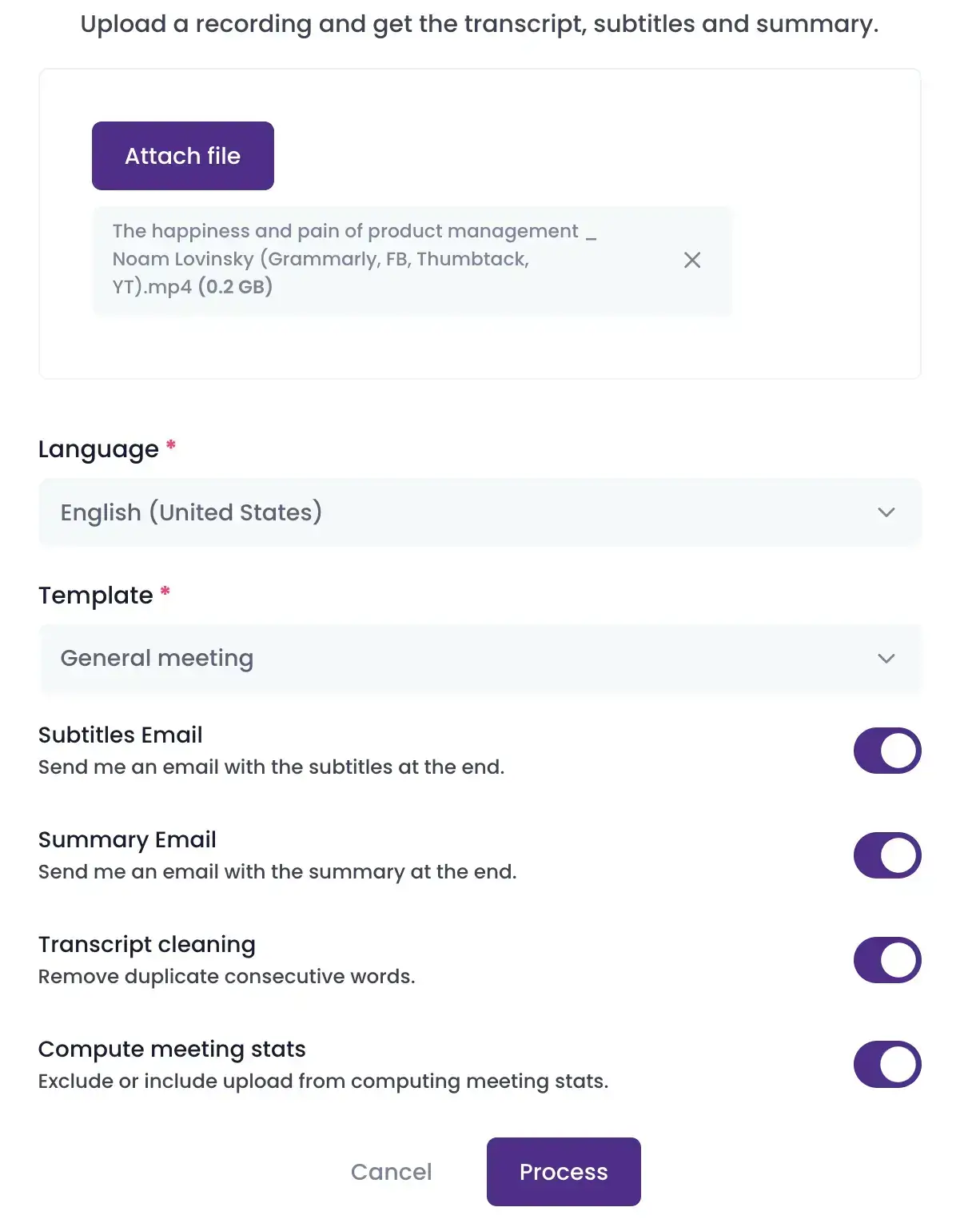
Zuerst erstellen Sie Ihr kostenloses MeetGeek-Konto. Laden Sie Ihre Datei hoch und legen Sie Ihre Transkriptionseinstellungen fest, einschließlich Sprache und Ausgabeformat. Achten Sie darauf, die Sprache des Podcasts für die Transkription korrekt einzustellen.
HINWEIS: MeetGeek unterstützt gängige Audioformate wie MP3, MP4 und WAV.
Anschließend können Sie die Transkription so strukturieren, wie es Ihren Anforderungen am besten entspricht. Sie können zum Beispiel:
- Untertitel generieren und direkt per E-Mail erhalten.
- Prägnante Zusammenfassungen der Podcast-Gespräche erstellen und direkt in Ihren Posteingang bekommen.
- Das Transkript bereinigen, indem Sie Füllwörter entfernen.
2. Wandeln Sie Ihre Podcast-Audiodatei in Text um
Sobald Ihre Audiodatei hochgeladen ist, beginnt MeetGeek mit der Erstellung Ihres Podcast-Transkripts. Dank fortschrittlicher KI-Technologie sorgt MeetGeek für eine präzise und schnelle Transkription, wobei die Dauer je nach Dateigröße und Länge des Podcasts variieren kann.
Nehmen Sie sich danach einen Moment Zeit und prüfen Sie die erstellten Transkripte auf ihre Richtigkeit. KI-Technologie ist zwar auf Präzision ausgelegt, dennoch können gelegentlich Fehler auftreten, vor allem bei komplexen Sprechmustern oder Fachbegriffen.
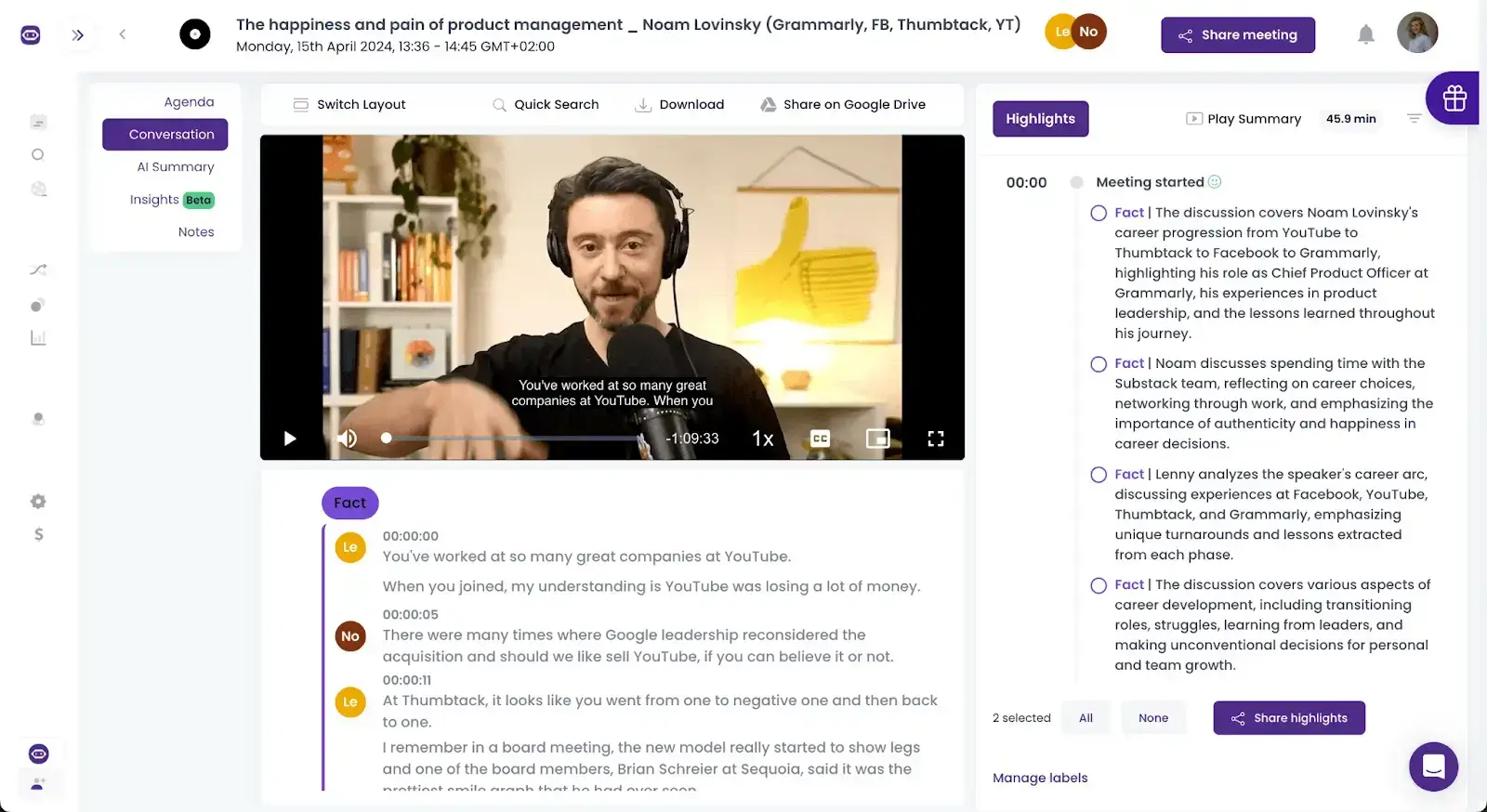
Nehmen Sie mit den verfügbaren Bearbeitungsfunktionen alle nötigen Korrekturen vor, damit Ihre Transkription sämtliche Anforderungen erfüllt.
3. Exportieren oder teilen Sie Ihre Transkription
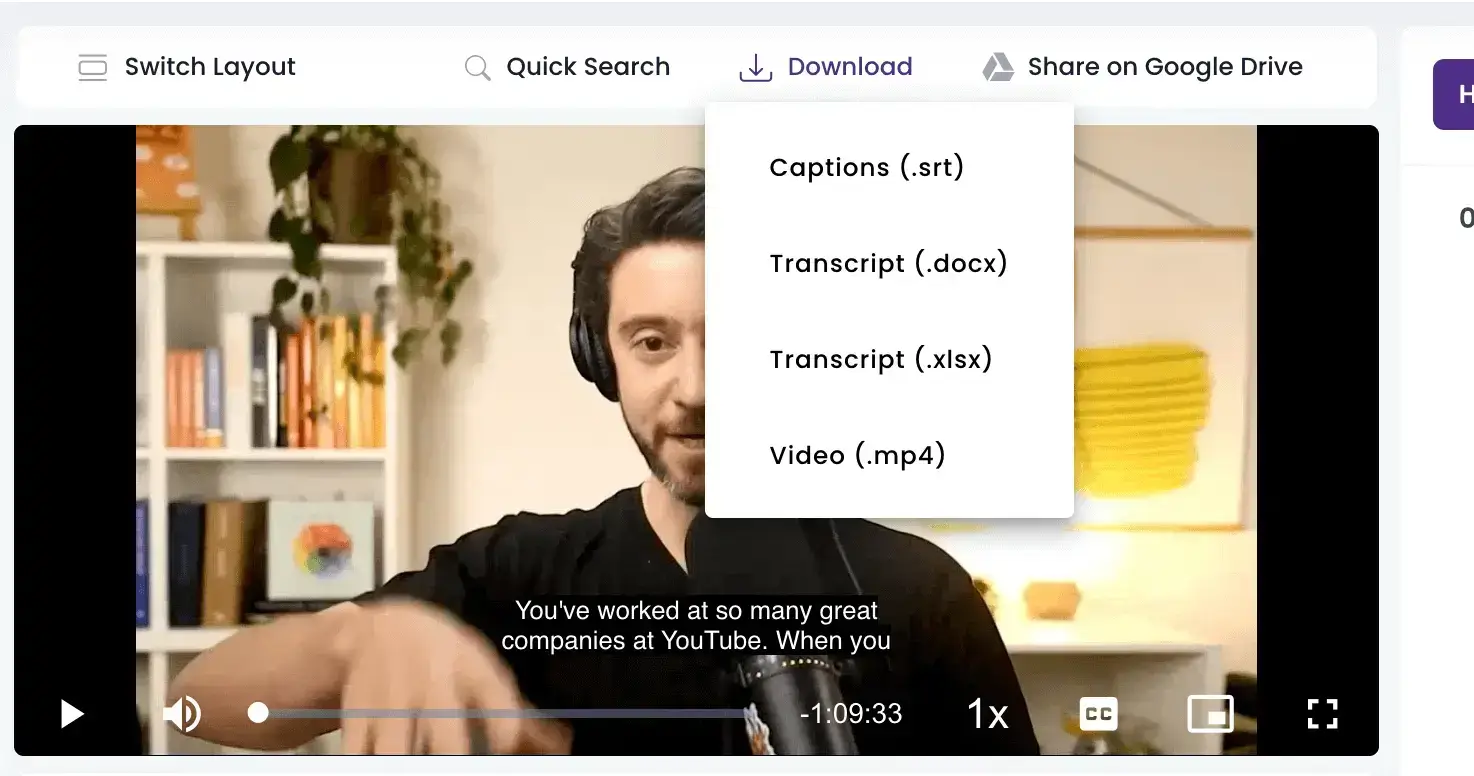
Wenn Sie Ihre Transkription verwenden möchten, klicken Sie auf die Schaltfläche „Herunterladen“ (Download) und wählen Sie je nach Bedarf ein Format wie DOCX, SRT, XLSX oder MP4.
Möchten Sie Ihre Arbeit mit anderen teilen, erstellen Sie über die Schaltfläche „Teilen“ (Share) einen eindeutigen Link für Kollegen oder andere Beteiligte.
Diese Vorteile bietet Ihnen MeetGeek bei der Transkription Ihrer Podcasts:
- Transkription in über 100 Sprachen
- Suchfunktion, mit der Sie per Stichwortsuche die genaue Stelle im Podcast finden
- KI-Zusammenfassung des Podcasts
- Möglichkeit, die gesamte Aufnahme oder Teile davon mit anderen zu teilen
HINWEIS: Bei MeetGeek hat die Sicherheit Ihrer Daten Priorität. Wir halten strenge Standards wie SOC und HIPAA ein, um die Verschlüsselung zu gewährleisten und Ihre Privatsphäre zu schützen.
B. So erstellen Sie ein Podcast-Transkript manuell
Ein Podcast-Transkript von Hand zu erstellen, erfordert Geduld und Genauigkeit. Die Vorteile, nämlich mehr Reichweite, bessere SEO und eine originalgetreue Transkription, machen es jedoch zu einer lohnenden Ergänzung Ihres Podcast-Werkzeugkastens.
So erstellen Sie ein Podcast-Transkript manuell:
- Richten Sie sich zunächst einen ruhigen Arbeitsplatz ein, an dem Sie sich ungestört konzentrieren können. Hochwertige Kopfhörer helfen Ihnen, jedes Detail der Aufnahme zu erfassen. Nutzen Sie außerdem ein zuverlässiges Textverarbeitungsprogramm, mit dem Sie gut zurechtkommen und dessen Bearbeitungsfunktionen Ihnen die Arbeit erleichtern.
- Hören Sie sich Ihre Podcast-Episode einmal vollständig an, ohne mitzutippen. Dieses erste Anhören hilft Ihnen, den Gesamtablauf zu erfassen und komplexe Abschnitte zu erkennen, die bei der Transkription mehr Aufmerksamkeit brauchen.
- Spielen Sie die Episode erneut ab und pausieren Sie alle 15 bis 30 Sekunden, um das Gehörte abzutippen. Steuern Sie die Wiedergabe nach Möglichkeit mit einem Fußpedal oder mit Tastenkombinationen, damit Ihre Hände beim Tippen bleiben.
- Versuchen Sie, den Dialog genau so festzuhalten, wie er gesprochen wurde, einschließlich bedeutsamer nonverbaler Laute oder Pausen, die für Tonfall und Emotionen entscheidend sein können. Ob Sie gängige Füllwörter wie „äh“ oder „weißt du“ übernehmen, entscheiden Sie danach, wie wichtig sie für den Kontext oder das Hörerlebnis insgesamt sind.
- Zeitstempel in regelmäßigen Abständen oder an wichtigen Übergängen helfen Lesern, bestimmte Stellen des Podcasts schnell zu finden. Das ist vor allem bei langen oder in Abschnitte gegliederten Episoden nützlich und macht Ihr Transkript zu einem praktischen Begleiter der Aufnahme.
- Sobald Ihr Entwurf fertig ist, spielen Sie die Episode noch einmal ab und lesen Sie dabei Ihr Transkript mit, um sicherzugehen, dass beides übereinstimmt. Dieser zweite Durchgang ist entscheidend, um Abweichungen, Tippfehler oder ausgelassene Passagen zu korrigieren. Achten Sie besonders auf Fachbegriffe und Namen und stellen Sie sicher, dass sie korrekt wiedergegeben sind.
- Bringen Sie Ihr Transkript in ein leserfreundliches Format. Kennzeichnen Sie die Sprecher, wenn mehrere Personen reden, und gliedern Sie den Text in Absätze mit Überschriften für neue Themen oder Abschnitte. So können Leser den Text überfliegen und Informationen schnell finden.
- Prüfen Sie Ihr Transkript mit frischem Blick, am besten nach einer Pause oder am nächsten Tag, um verbliebene Fehler zu finden und zu beheben. Lassen Sie es nach Möglichkeit auch von einer zweiten Person gegenlesen, damit es sich natürlich liest und die Aufnahme genau wiedergibt.
Und das war es schon! Der gesamte Prozess kann zwar zeitaufwendig sein, doch richtig gemacht lohnt er sich wirklich.
C. So wählen Sie den richtigen Podcast-Transkriptionsdienst mit menschlichen Transkriptoren
Wenn jedes Wort zählt, können genaue und gut lesbare Transkripte das Erlebnis Ihrer Hörer grundlegend verändern. Hier kommen Transkriptionsdienste mit menschlichen Transkriptoren ins Spiel.
So treffen Sie eine fundierte Entscheidung, die genau zu den besonderen Anforderungen der Podcast-Transkription passt:
- Genauigkeit an erste Stelle setzen: Transkriptionsdienste mit menschlichen Transkriptoren erreichen in der Regel hohe Genauigkeitsraten, oft mehr als 98 %. Achten Sie auf Anbieter, die hohe Genauigkeit nicht nur versprechen, sondern dies auch mit begeisterten Kundenstimmen belegen können.
- Flexibilität bei der Bearbeitungszeit prüfen: Podcasts erscheinen oft nach einem festen Veröffentlichungsplan, weshalb verlässliche Bearbeitungszeiten entscheidend sind. Sehen Sie sich Transkriptionsdienste an, die verschiedene Lieferzeiten anbieten, von Standard bis Express, ohne Abstriche bei der Qualität zu machen.
- Vertraulichkeit sicherstellen: Viele Podcasts behandeln sensible Themen oder enthalten unveröffentlichte Inhalte, die Diskretion erfordern. Vergewissern Sie sich, dass der Transkriptionsdienst die geltenden Datenschutzgesetze einhält, vor allem wenn Sie mit Informationen arbeiten, die besondere Sorgfalt verlangen.
- Fachwissen: Wenn sich Ihr Podcast mit Nischenthemen wie Technologie, Medizin oder Recht befasst, reicht eine Standardtranskription möglicherweise nicht aus. Spezialisierte Transkriptoren kennen Fachjargon und Zusammenhänge der jeweiligen Branche genauer, was die Genauigkeit und Relevanz Ihrer Transkripte deutlich erhöht.
- Transparente Preise: Die meisten Dienste rechnen pro Audiominute ab, die Tarife können jedoch je nach Audioqualität und Zusatzfunktionen variieren. Vergleichen Sie die Preise, damit das Preis-Leistungs-Verhältnis stimmt, aber seien Sie vorsichtig bei Tarifen, die zu gut klingen, um wahr zu sein. Oft sind sie es auch.
- Reaktionsschneller Kundensupport: Prüfen Sie, ob der Transkriptionsdienst einen schnell erreichbaren und hilfsbereiten Kundensupport bietet. Verlässliche Ansprechpartner können viel ausmachen, wenn es darum geht, Termine einzuhalten und auftretende Probleme zu lösen.
- Qualität anhand von Arbeitsproben prüfen: Sehen Sie sich Arbeitsproben des Dienstes an, bevor Sie sich festlegen, und achten Sie darauf, dass sie der Audioqualität und Komplexität Ihres Podcasts entsprechen. So sehen Sie aus erster Hand, was der Anbieter kann, und können einschätzen, ob er der Aufgabe gewachsen ist.
- Einen Testlauf erwägen: Bei laufendem Transkriptionsbedarf ist es ratsam, mit einem Testlauf zu beginnen. In diesem kleineren Rahmen können Sie Zuverlässigkeit, Qualität und Eignung des Anbieters für Ihren Podcast beurteilen, ohne sich langfristig zu binden.
Manuelle vs. automatisierte vs. professionelle Transkription: eine Vergleichstabelle
| Kriterium | Automatische KI-Transkriptionssoftware | Manuelle Transkriptionsdienste | Transkription durch Menschen |
|---|---|---|---|
| Genauigkeit | Hohe Genauigkeit mit kleineren Fehlern, meist aufgrund schlechter Audioqualität | Mittlere bis ausgezeichnete Genauigkeit, je nach Können und Erfahrung der transkribierenden Person | Ausgezeichnete Genauigkeit, da Profis für Präzision sorgen |
| Sprachunterstützung | Unterstützt viele Sprachen, die Genauigkeit kann bei bestimmten Akzenten jedoch schwanken | Hängt von den Kenntnissen der transkribierenden Person ab | Unterstützt viele Sprachen, mit Transkriptoren, die die gewählte(n) Sprache(n) beherrschen |
| Preis | Niedrige Kosten pro Audiominute | Mittlere Kosten pro Audiominute | Hohe Kosten pro Audiominute, |
| Compliance | Je nach Tool unterschiedlich | Kann Branchenvorschriften erfüllen | Kann gegen Aufpreis Branchenvorschriften erfüllen |
| Sprechererkennung | Erkennt und unterscheidet Sprecher zuverlässig, besonders in Podcasts mit mehreren Teilnehmern | Kann auf Wunsch eine Sprechererkennung enthalten | Profis erkennen und unterscheiden Sprecher zuverlässig |
| Bearbeitung | Vollständige Bearbeitungsfunktionen | Transkripte lassen sich bei Bedarf überarbeiten und bearbeiten | Umfangreiche Bearbeitungsmöglichkeiten mit gründlichem Korrekturlesen und Überarbeiten |
Häufig gestellte Fragen zur Podcast-Transkription
1. Ist es legal, Podcasts zu transkribieren?
Ja, in der Regel ist es legal, Podcasts zu transkribieren, vor allem wenn Sie selbst der Urheber sind oder dessen Erlaubnis eingeholt haben.
Wenn Sie jedoch den Podcast einer anderen Person für die öffentliche Nutzung transkribieren, etwa um das Transkript online zu veröffentlichen, müssen Sie unbedingt die Zustimmung des Podcast-Inhabers einholen, um urheberrechtliche Probleme zu vermeiden.
2. Kann KI Podcasts transkribieren?
Auf jeden Fall! KI-Technologie ist in der Spracherkennung immer leistungsfähiger geworden und wird häufig zum Transkribieren von Podcasts eingesetzt.
Tools wie MeetGeek bieten effiziente Transkriptionsdienste, die unterschiedliche Akzente und Dialekte mit hoher Genauigkeit verarbeiten.
3. Wie lange dauert es, eine Podcast-Episode zu transkribieren?
Wie lange die Transkription einer Podcast-Episode dauert, hängt von mehreren Faktoren ab und kann stark variieren. Mit KI-Transkriptionsdiensten wie MeetGeek lässt sich ein einstündiger Podcast oft in etwa 10 Minuten transkribieren.
Audioqualität, Anzahl der Sprecher und Verständlichkeit der Sprache können die Dauer allerdings beeinflussen. Bei der manuellen Transkription gelten in der Branche üblicherweise vier bis sechs Stunden Arbeitszeit pro Stunde Audio als Standard, je nach Komplexität der Aufnahme und Erfahrung der transkribierenden Person.
Holen Sie sich präzise Podcast-Transkripte mit MeetGeek!
Ob Sie Ihre Episoden manuell transkribieren, KI-Tools nutzen oder beides kombinieren: Es bringt enorme Vorteile, Ihre Inhalte auch als Text bereitzustellen. Denken Sie daran: Entscheidend für eine gelungene Transkription ist die Methode, die zu Ihren Anforderungen passt.
Wenn Sie eine zuverlässige Lösung für die Podcast-Transkription suchen, testen Sie die kostenlose Podcast-Transkription von MeetGeek! MeetGeek bietet einen schlanken, benutzerfreundlichen Dienst, der auch schwierige Aufnahmen mühelos bewältigt und hochwertige Transkripte liefert, die den Wert Ihres Podcasts steigern. Geben Sie Ihren Podcasts die Barrierefreiheit und Reichweite, die sie verdienen!








.avif)