
Durch Anklicken „Alle Cookies akzeptieren“, stimmen Sie der Speicherung von Cookies auf Ihrem Gerät zu, um die Seitennavigation zu verbessern, die Nutzung der Website zu analysieren und unsere Marketingaktivitäten zu unterstützen. Sehen Sie sich unsere an Datenschutzrichtlinie für weitere Informationen.
MeetGeekBlogManaging Security and Compliance Risks Related to AI Note-Takers
Back to Blog

Managing Security and Compliance Risks Related to AI Note-Takers

Produktivität
Produktivität

Keep your AI-powered meetings secure and compliant! Learn how to manage security and compliance risks, protect sensitive data, and ensure privacy in your virtual meetings.

Anastasia Muha
April 2, 2025
/
5 min read
Table of content
Get started with MeetGeek AI Meeting Assistant:
📝 AI-powered Meeting Note taker
✅ Free meeting recording & transcription
💬 Automated sharing of insights to other tools.
Sign Up for Free
Share the knowledge with your circle
Copied

As workplaces become more digital, manual note-taking in meetings is becoming a thing of the past. AI note-takers can now be used to automatically record and organize discussions. What can’t be measured can’t be improved, so while recording multiple meetings unlocks new opportunities for meeting productivity, it also raises privacy and security questions, and common misconceptions.

In this article, we’ll highlight the key privacy and security considerations associated with AI note-takers and meeting recordings. Our goal is to clarify common concerns and offer practical guidance to help you select and implement a compliant solution, allowing you to boost productivity without compromising privacy or your organization's reputation.

But before diving into it, let’s take a step back and take a look at how AI notetakers work.

How Do AI Note-Takers Work?

AI note-takers are foundational to meeting automation platforms like MeetGeek, capturing, transcribing, and analyzing conversations through a structured pipeline: 

Here's how the magic happens:

  1. Recording: Some tools, including MeetGeek, join the actual meeting hosted on a video conferencing platform as bot participants, while others record directly through browsers or desktop apps, potentially raising compliance concerns. This is an important distinction, and we’ll come back to it later.
  2. Transcription: The audio is converted into text using speech-to-text and diarization technologies, both AI-driven.
  3. Text analysis: AI features analyze the transcript to highlight key moments, decisions, and action items. Multiple LLMs can be used. Platforms like MeetGeek even automate summary delivery via email based on your preferences. 
  4. Storage & Sharing: Recordings, transcripts, and AI-generated summaries are typically stored securely in public cloud environments, accessible through web or mobile applications.

Sounds pretty simple, but it's important to address concerns at every step before adopting a solution. We’ll take a look at each and dive in.

Common Security and Privacy Questions Regarding AI Note-Takers

TL;DR: AI note-taking apps should follow strong security practices like encryption, access controls, and strict third-party vetting to protect your data. Choosing a platform with a solid security posture that aligns with your regional and organizational requirements is your best defense against future risks.

Participants' Consent

Although recording meetings and calls is completely legal, it's important to consider several key factors when choosing and using AI meeting tools for this purpose.


From a legal standpoint, the most important factor to understand before recording a meeting or call is participants’ consent. Be aware that consent laws vary:

  • One-party consent (most U.S. states): Under one-party consent laws, a conversation can be legally recorded if at least one participant consents to the recording. This means that if you are part of the conversation, you can record it without informing the other parties involved. Most U.S. states follow this rule.
  • Two-party consent (e.g., European Union, California, Illinois): In contrast, two-party consent laws require that all participants in a conversation give their approval before any recording takes place. This standard is also referred to as "all-party consent". 13 states, including California, and countries from the EU follow this rule. It means you need to inform and obtain consent from the participants in your meeting.

The above are some general guidelines, but you should always check your local laws to ensure compliance. 

A useful feature that platforms like MeetGeek offer is to automatically collect consent on your behalf, either before the call using email or during the call by notifying participants about the call being recorded. 

This makes it easier, and you have full control (the bot can be paused or kicked out of the meeting), but this doesn’t replace your responsibility as an owner of the recording to communicate properly and stay compliant.

Important Notice:

When you record and transcribe meetings without participants' knowledge, you may face serious legal and ethical issues due to one-party or two-party consent laws, depending on your jurisdiction. Unlike MeetGeek, which clearly announces its presence by joining the call as a participant, many tools (Chrome extensions, desktop apps, even mobile phone recordings) allow for incognito recordings without notifying others.

Be transparent with participants in all your meetings. Failing to do so may not only breach trust but also violate privacy laws.

Are Your Recordings, Transcripts, and Summaries Used to Train AI?

Some platforms use customer data, like all the meetings they record and transcribe, to improve their AI models. You should always be clearly informed about this and have the option to opt out.

Be especially cautious with free platforms. Review their privacy policies and pricing models to ensure they’re not relying on your data for training or monetization.

A good practice is to check the platform’s security and privacy posture (look for pages like https://security.meetgeek.ai/) and review their list of subprocessors. Even if you’re a small company, it’s worth making this part of your vendor vetting process.

How Is My Meeting Data Stored? 

Secure data storage depends on the following criteria:

  • Storage location: Where your data is stored matters, especially for compliance with regional privacy laws. Leading AI tools offer data localization, meaning your data stays within a specific region (e.g., MeetGeek provides data centers in both the EU and the US to meet various regulatory requirements).
  • Retention policies: Each platform has its own data retention policy. Some may store data for months or years, while others offer customizable options. Make sure you review these policies and align them with your legal or corporate compliance requirements.

How Is My Data Protected?

Your meeting data should be encrypted both in transit (as it's being transmitted) and at rest (while stored). This ensures that only authorized users can access it and helps prevent unauthorized access, leaks, or tampering.

Who Can Access My Meeting Notes?

Access to your meeting data should be tightly controlled. Look for an AI assistant that uses role-based access controls (RBAC), allowing you to define exactly who can view, edit, or delete content. No one outside your authorized team should have access (you don’t want flying public links with sensitive recordings).

Check the platform’s default sharing settings, as some may automatically share the automated meeting notes (or the meeting summary) with all participants, while others let you restrict access to selected team members.

It’s also a good idea to review the company’s security posture to confirm that they enforce the principle of least privilege internally (PoLP). This means their employees can’t access your recordings or AI meeting notes unless legally required or explicitly authorized by you.

Can Transcripts Be Tampered With? 

Security is all about data integrity. The platform should ensure that transcripts, recordings, and summaries can’t be modified without authorization. 

Look for audit trails or version histories that track who accessed or edited the content, providing a layer of accountability and transparency.

MeetGeek’s Approach to Security and Privacy

At MeetGeek, we’re committed to delivering a secure, transparent, and privacy-first experience that empowers your team, without compromising on trust or compliance.

1. What Compliance Certifications Does MeetGeek Have?

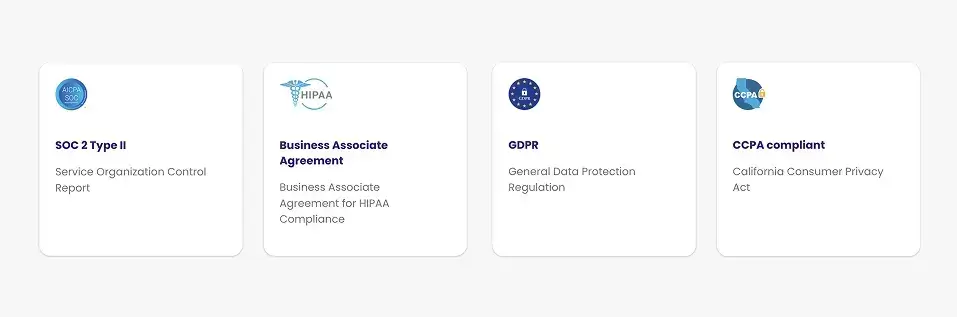
Security and privacy are foundational, not just for customer success teams, but for the overall being of your company. That’s why we prioritize industry-leading compliance standards such as SOC 2, GDPR, and CCPA, ensuring your data is handled with the highest level of care, no matter where you operate.

meetgeek security certificates

We adapt our data protection practices to meet regional requirements:

  • European Union: Data is stored within the EU, and we conduct annual audits to maintain full GDPR compliance, known for its rigorous privacy standards.
  • United States: We respect both one-party and two-party consent laws across states, including full adherence to the California Consumer Privacy Act (CCPA) through regular audits.
  • Canada & Australia: We align with PIPEDA in Canada and the Australian Privacy Principles (APP), protecting user rights and ensuring lawful data handling in both regions.

Customers can also choose their preferred data storage location (including EU or US) to stay aligned with local legal and corporate policies.

2. Why Should EU-based Companies Choose AI Note-Takers that Store and Process Data in Europe? 

If your business is based in the EU (or even if you serve EU clients), it’s essential to choose a provider, like MeetGeek, that stores and processes your data within the European Union. Here’s why:

  • Stronger privacy protections: Data hosted in EU-based data centers is fully protected under GDPR, one of the world’s strictest privacy frameworks. This ensures your information isn’t subject to weaker data protection laws from other jurisdictions.

  • Simplified compliance: Keeping your data within the EU eliminates the need for Standard Contractual Clauses (SCCs) and other legal hurdles related to cross-border data transfers, helping reduce risk and administrative overhead.

  • Protection from foreign surveillance laws: Data stored outside the EU (such as in the U.S.) may fall under regulations like the CLOUD Act, which could expose it to foreign government access. Localizing your data in Europe adds a critical layer of legal and operational security.

  • Tailored compliance guarantees: EU-based infrastructure providers often offer enhanced compliance measures specifically designed to meet European regulatory standards. This not only supports your own legal obligations but also builds greater trust with your customers and partners.

3. Are Participants Notified When Notes or Recordings Are Being Taken?

Consent and control are central to our approach, and we implement several measures to live up to it. We offer built-in safeguards to ensure everyone knows when a meeting is being recorded or transcribed.

Two ways to notify participants about the meeting recording:

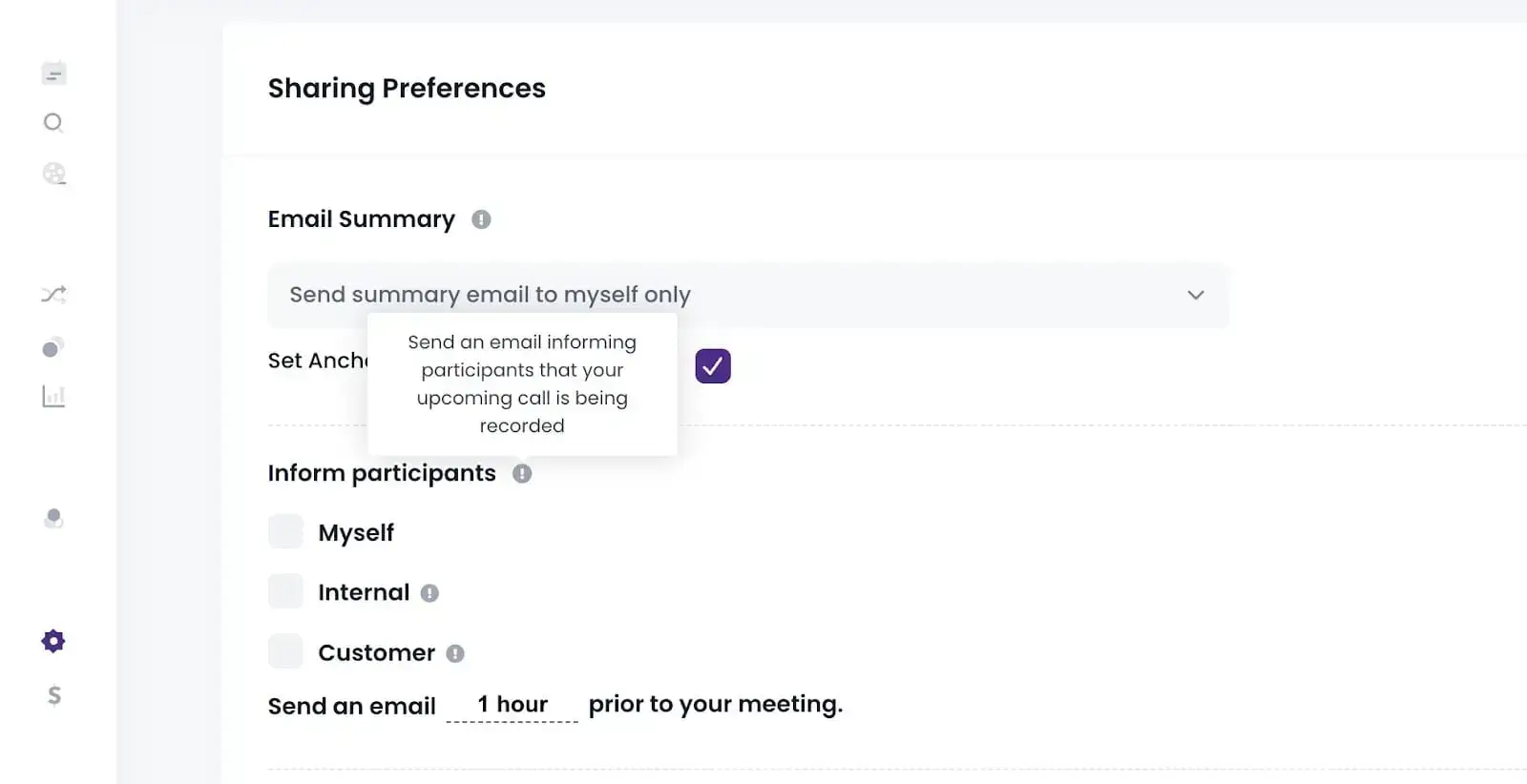
  • Pre-meeting notifications: MeetGeek can automatically send participants an email before the meeting starts, informing them that AI-powered note-taking will be used. This gives participants time to understand what to expect and the opportunity to opt in or out.
MeetGeek Sharing Permissions
  • In-meeting notifications: Once the meeting begins and recording starts, MeetGeek displays a clear on-screen notification, ensuring all participants are aware the session is being recorded
MeetGeek Recording Permissions


Using AI notetakers that fail to notify participants can lead to privacy violations, legal risk, and loss of trust, especially when dealing with external partners or customers.

With MeetGeek, you stay compliant and transparent by default—protecting your organization and keeping communication clear at every step.

4. Do I Have Control Over Which Parts of the Meeting Are Recorded?

Absolutely. MeetGeek gives you full control over what gets recorded, so you can protect sensitive conversations while still capturing what matters.

You can manage recordings in two ways:

  • Before the meeting: In the Upcoming Meetings section of the web platform, mobile app, or Chrome Extension, you can select which meetings should be recorded or not.

  • During the meeting: Need to stop recording mid-meeting? You can remove the MeetGeek Notetaker via the native controls in Google Meet, Microsoft Teams, Zoom, or directly from our apps.

This flexibility ensures that you stay in control of your recordings at all times.

5. Can Someone Edit a Meeting Recording to Misrepresent What Was Said?

No. MeetGeek preserves the original audio and video files in their original form. This guarantees a single source of truth, preventing any tampering or misrepresentation.

However, you can manage and enhance the content around your meetings:

✔️ Transcripts & Summaries: You can correct AI summaries for accuracy or clarity.
✔️ Annotations & Notes: Add highlights, comments, and action items or key points to help track outcomes and follow-ups.

6. Does MeetGeek Use Recorded Data to Train AI Models?

No. MeetGeek does not use your meeting recordings, transcripts, or any other user data to train AI models. Our AI is trained solely on publicly available datasets, and your private data remains exactly that: private.

Our business model is built around subscriptions, not data monetization. We have no incentive to train on or sell your data, as privacy and trust are core to how we operate.

7. Where and How Is My Data Stored in MeetGeek and for How Long? 

Your meeting data, including recordings, transcripts, AI-generated notes, and file uploads, is securely stored in a cloud-based infrastructure across multiple geographically distributed data centers. This setup ensures high availability, resilience, and compliance, no matter your subscription plan.

We follow default retention schedules based on:

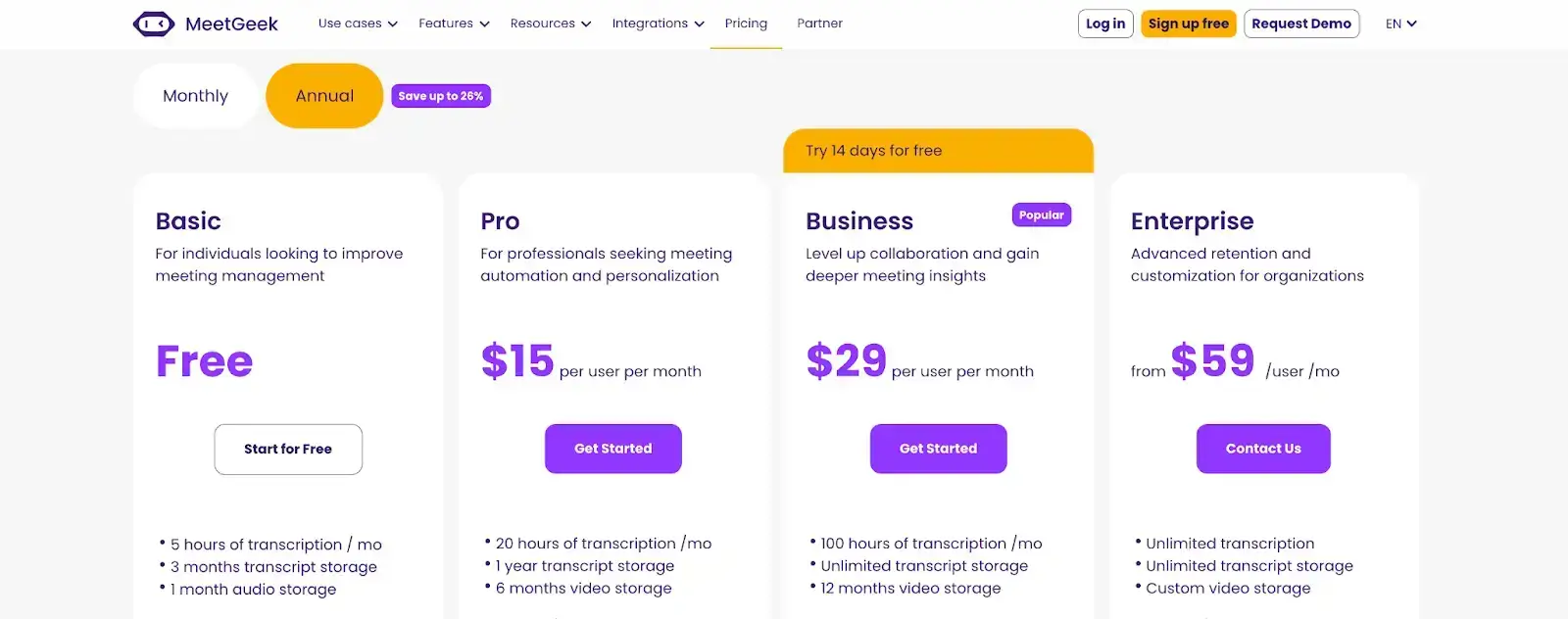
  • Your subscription tier (see our Pricing page),
  • Your custom user or company-level settings, and
  • Applicable legal requirements.

You can always adjust how long your data is retained, giving you full control over its lifecycle.

MeetGeek pricing
MeetGeek pricing

8. Can I Manage Who Has Access to Notes and Recordings?

Yes! MeetGeek gives you robust access controls, so only authorized users can view or manage your meeting notes, recordings, and transcripts.

Here’s how default access works in MeetGeek:

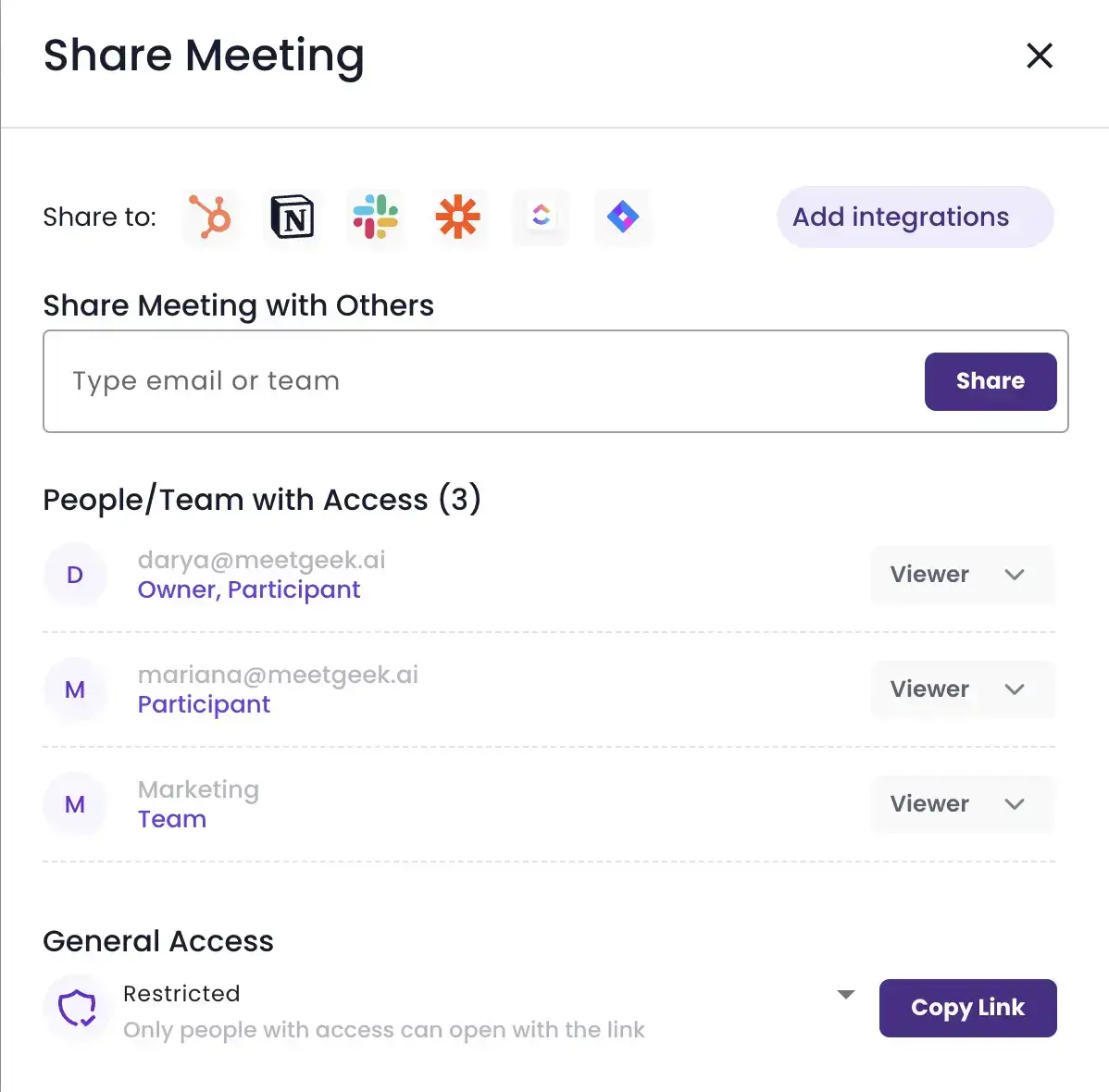
  • Meeting bot owner (not necessarily the meeting host): Has full control over the recording, transcript, and summaries produced from your video calls. They decide how and with whom the content is shared.
MeetGeek Team Permissions
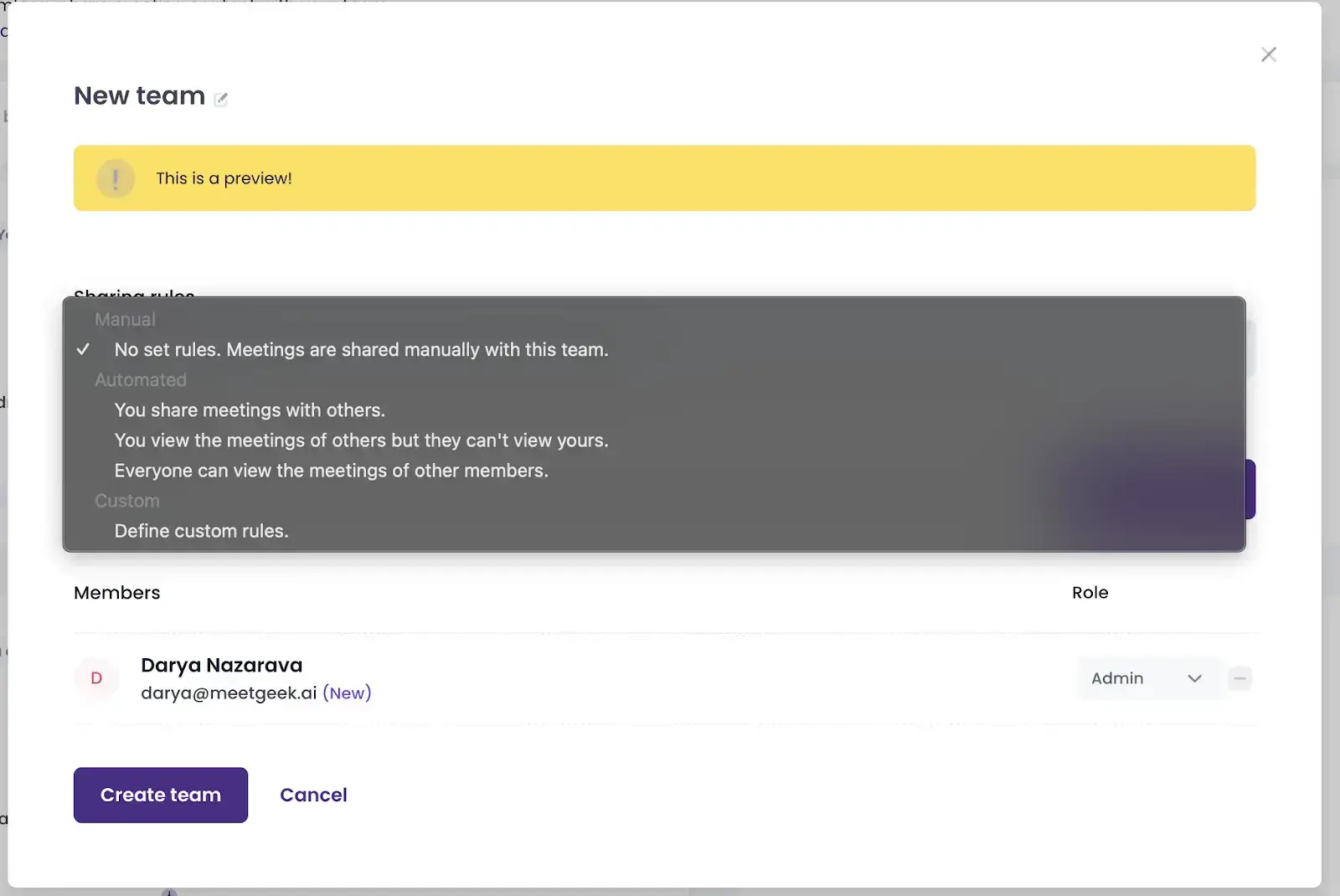
  • Team members: Only have access if the organizer chooses to share the meeting. MeetGeek also allows you to create custom teams with tailored access rules for shared meetings.
MeatGeek Team Access
  • External participants: Individuals who were not in the meeting cannot access any content unless the organizer explicitly grants them permission (especially useful for customer calls).

With these flexible and secure access settings, MeetGeek helps you protect sensitive discussions while still making collaboration simple and seamless.

9. Can MeetGeek Access My Meeting Recordings and Notes?

No. MeetGeek employees do not have access to your meeting recordings or content by default. Access is strictly limited to a small group of authorized personnel, and only in the following cases:

  • When you explicitly request support, or
  • When access is required for legal or compliance reasons.

To ensure full accountability, we maintain comprehensive logging and monitoring systems that track any data access by MeetGeek staff. This guarantees transparency and strict adherence to our internal security standards.

To learn more about how we protect your data and to review our detailed security policies, please visit our Security Portal.

10. Who Owns the Meeting Data in MeetGeek?

You do. MeetGeek does not claim any ownership over your meeting content. Everything recorded, transcribed, or summarized during your meetings remains your private property.

The meeting organizer (the person who scheduled or initiated the recording via MeetGeek) holds full control over the data and decides how it’s accessed or shared.

We do not ever use, sell, or distribute your recordings. Your data remains yours, secure, and under your control.

A Secure Future for Your Meetings With MeetGeek

AI-powered meeting assistants can dramatically boost productivity, but only if they’re built on trust. MeetGeek is designed to be secure, compliant, and privacy-first from the ground up.

We follow industry-leading security standards, adhere to global privacy laws, and give you full control over unlimited meetings, whether you’re online on Google Meet, Microsoft Teams, Zoom, or offline using our apps. 

With MeetGeek, you can ensure your future meetings are organized, secure, and fully yours (even for our free version!).

Article updated on 
December 30, 2025
Share the knowledge with your circle
Copied
Related posts

Was ist der Companion Mode in Google Meet? Alles was du wissen musst

Lesen Sie weiter, um eine praktische Anleitung zur Verwendung des Begleitmodus in Google Meet für klarere, ausgewogenere Hybrid-Meetings zu erhalten.

This is some text inside of a div block.

Was ist ein Skip-Level-Meeting? Wie Führungskräfte Skip-Levels nutzen, um die Kommunikation zu verbessern

Ein detaillierter Einblick in Besprechungen auf Skip-Level-Ebene und wie sie Führungskräften helfen, mit Teams in Kontakt zu treten und echte Einblicke zu gewinnen.

This is some text inside of a div block.

Was ist ein AI-Sprachagent? Ein praktischer Leitfaden, wie Sprach-KI wirklich funktioniert

In diesem Leitfaden wird erklärt, was ein KI-Sprachagent ist, wie er funktioniert, welche Vorteile er bietet und wo er am besten zu menschlichen Teams passt.

This is some text inside of a div block.

Leitfaden für Stand-Up-Meetings: Was sie sind und wie man sie durchführt

Finden Sie heraus, was ein Stand-up-Meeting tatsächlich nützlich macht. In diesem Leitfaden wird erklärt, wie du tägliche Stand-Ups durchführst, die kurz bleiben, Blockaden zum Vorschein bringen und die Teams auf einer Linie halten.

This is some text inside of a div block.

Alles über Microsoft Teams AI Interpreter + So gehen Sie über die Übersetzung hinaus

Erfahren Sie, wie Microsoft Teams AI Interpreter funktioniert, wo er zu kurz kommt und wie Sie über die Übersetzung hinausgehen können.

This is some text inside of a div block.

Beste App zur Vorlesungsaufzeichnung im Jahr 2026:5 Tools, die Studierende tatsächlich verwenden

Schauen wir uns genauer an, was Studierende heutzutage verwenden, um ihre Vorlesungen sowohl online als auch offline aufzuzeichnen und zu organisieren.

This is some text inside of a div block.

Read AI-Preise erklärt für 2026: Lohnt es sich für Meeting-Notizen?

Erfahren Sie mehr über die Preisgestaltung für 2026 von Read AI, ihre Kernfunktionen und wie sie mit Besprechungsnotizen, Transkriptionen und Erkenntnissen umgeht, um moderne Teams zu unterstützen.

This is some text inside of a div block.

Was ist eine durchsuchbare Wissensdatenbank und wie funktioniert sie?

Erfahren Sie, wie durchsuchbare Wissensdatenbanken den Zugriff auf Informationen verbessern, und sehen Sie, wie MeetGeek Ihre Meetings in eine schnelle, zuverlässige Wissenszentrale verwandelt.

This is some text inside of a div block.

So verwischen Sie den Hintergrund in Google Meet (einfache Anleitung für alle Geräte)

Erfahren Sie, wie Sie Ihren Hintergrund in Google Meet auf Desktop und Handy verwischen, visuelle Effekte verwenden und bei jedem Anruf ein klareres, fokussierteres Aussehen erzielen.

This is some text inside of a div block.

So treten Sie Team-Meetings mit Code bei: Eine vollständige schrittweise Anleitung

Erfahren Sie, wie Sie mithilfe eines Besprechungscodes an Microsoft Teams-Besprechungen teilnehmen können, sowie über andere Optionen wie einen Link oder eine Einladung. In diesem Handbuch werden alle Methoden klar und Schritt für Schritt erklärt.

This is some text inside of a div block.

Die 5 besten NoteGPT-Alternativen im Jahr 2026

Entdecken Sie die 5 besten NoteGPT-Alternativen, mit denen Sie wichtige Erkenntnisse erfassen, Inhalte transkribieren und die Produktivität in Lern- und professionellen Arbeitsabläufen steigern können.

This is some text inside of a div block.

Was ist Perplexity AI? Ein Leitfaden für die KI-gestützte Suchmaschine, die die Art und Weise, wie wir Informationen finden, verändert

In diesem Artikel werfen wir einen genaueren Blick auf Perplexity AI, was sie im Vergleich zu herkömmlichen Suchmaschinen für Sie tun kann, und einige ihrer Vor- und Nachteile.

This is some text inside of a div block.

Die besten tl;dv-Alternativen zur Optimierung Ihrer Besprechungen

Entdecken Sie die besten tl;dv-Alternativen und erkunden und vergleichen Sie deren Funktionen, um das richtige KI-Meeting-Tool für Ihr Unternehmen auszuwählen.

This is some text inside of a div block.

ChatGPT-Aufnahmemodus gegen MeetGeek: Hier finden Sie alles, was Sie wissen müssen

Neugierig, wie der ChatGPT-Rekorder im Vergleich zu MeetGeek abschneidet? Wir haben uns die Funktionen, die Integration und die Datensicherheit für die Aufzeichnung von Besprechungen angesehen.

This is some text inside of a div block.

Fathom AI Pricing 2026: Lohnt es sich für moderne Teams immer noch?

Erkunden Sie die Preise von Fathom AI für 2026, einschließlich Funktionen, Limits und Tarifvergleiche, und erfahren Sie, wie MeetGeek Teams mehr Flexibilität bietet.

This is some text inside of a div block.

KI-Tagenten: Wie autonome KI die Zukunft der Arbeit verändert

Erfahren Sie, wie KI-Besprechungsagenten die Zukunft der Arbeit neu definieren. Sie kümmern sich um die Planung, Nachbereitung und sprechen sogar in Ihrem Namen, um Zeit zu sparen und jedes Meeting in echte Aktionen umzusetzen.

This is some text inside of a div block.

Notta AI Review: Lohnt sich dieses KI-Transkriptionstool im Jahr 2026?

Lesen Sie diesen ausführlichen Testbericht über Notta AI, um zu erfahren, wie gut es Besprechungen transkribiert, mehrere Sprachen verarbeitet und KI-Zusammenfassungen liefert und wo es im Vergleich zu intelligenteren Besprechungsassistenten zu kurz kommt.

This is some text inside of a div block.

Mit diesen 4 KI-Tools für gemeinnützige Organisationen zählt jede Stunde

Machen Sie Ihre gemeinnützige Organisation effizienter mit KI-Tools, die den Verwaltungsaufwand verkürzen, die Zusammenarbeit verbessern und jede Stunde der Wirkung maximieren.

This is some text inside of a div block.

Granola AI Notes-Alternativen: Die besten Optionen, die Sie 2026 ausprobieren sollten

Entdecken Sie die besten Granola AI Notes-Alternativen für 2026 mit intelligenteren Tools, die über die Transkription hinausgehen und Automatisierung, Einblicke und Zusammenarbeit bieten.

This is some text inside of a div block.

Folge-E-Mail nach dem Interview: Wie man es schreibt, wann man es sendet und was man sagt

Erfahren Sie, wie Sie nach einem Interview eine effektive Folge-E-Mail schreiben. Von Zeitplan und Vorlagen bis hin zu Ton und Struktur behandelt dieser Leitfaden alles, was Sie brauchen, um sich abzuheben und unvergesslich zu bleiben.

This is some text inside of a div block.

Tactiq Pricing Review 2026: Pläne, Grenzen und die beste Alternative

Informieren Sie sich über die neuesten Preispläne von Tactiq und finden Sie heraus, wie sie im Vergleich zum All-in-One-Meeting-Assistenten von MeetGeek abschneiden.

This is some text inside of a div block.

Bedeutung und Durchführung eines Ad-hoc-Meetings

Entdecken Sie die wahre Bedeutung von Ad-hoc-Meetings und lernen Sie, wie Sie spontane Diskussionen zielgerichteter und effektiver gestalten können. Finden Sie heraus, wann Sie sie abhalten und verwalten sollten.

This is some text inside of a div block.

Etikette für virtuelle Besprechungen: Grundlegende Regeln für Professionalität

In diesem Artikel werden wir 15 praktische Tipps zur Etikette virtueller Besprechungen untersuchen, die Ihnen helfen, reibungslosere und professionellere Online-Meetings abzuhalten.

This is some text inside of a div block.

So verwischen Sie den Hintergrund im Zoom: Schrittweise Anleitung

Erfahren Sie, wie Sie die Funktion zum Weichzeichnen des Hintergrunds von Zoom für mehr Privatsphäre und Fokus verwenden können, sowie Tipps, Korrekturen und wann Sie zu virtuellen Hintergründen wechseln sollten.

This is some text inside of a div block.

So teilen Sie den Bildschirm in Google Meet: Eine einfache schrittweise Anleitung

Erfahre, wie du deinen Bildschirm auf Google Meet mit klaren Schritten für Computer, iPhone, iPad und Android teilst.

This is some text inside of a div block.

Der MCP-Server von MeetGeek erklärt: Wie KI-Assistenten damit Besprechungen transformieren können

Erfahren Sie, wie der MCP Server von MeetGeek KI-Assistenten dabei unterstützt, Ihre Besprechungen in intelligente, umsetzbare Erkenntnisse zu verwandeln, und das alles von Ihrem lokalen Computer aus.

This is some text inside of a div block.

So ändern Sie den Namen auf Zoom (vor und nach dem Beitritt zu einem Meeting)

Erfahre Schritt für Schritt, wie du deinen Zoom-Namen auf jedem Gerät änderst, und erhalte Tipps für Gastgeber, Wartezimmer und Problemlösungen.

This is some text inside of a div block.

KI zum Notieren für Studierende: Die besten Tools, um 2026 intelligenter zu lernen

Ein Leitfaden zu den besten KI-Tools zum Notieren für Schüler im Jahr 2026 mit Funktionen, Vor- und Nachteilen, die Ihnen bei der Auswahl der richtigen App für das Lernen helfen.

This is some text inside of a div block.

Beschreibung des Preisüberblicks 2026: Was es bietet, wo es zu kurz kommt und eine bessere Alternative

Ein genauerer Blick auf die Preisstufen von Descript, ihre Kompromisse und warum MeetGeek als intelligentere Wahl für YouTuber hervorsticht.

This is some text inside of a div block.

Google Meet-Zeitlimit: Alles, was Sie wissen müssen

In diesem Artikel erfahren Sie alles, was Sie über die Zeitlimits von Google Meet wissen müssen und wie Sie diese überschreiten.

This is some text inside of a div block.

So transkribieren Sie Sprachnotizen in Text (3 verschiedene Möglichkeiten)

In diesem Artikel erfahren Sie, wie Sie Sprachnotizen auf drei verschiedene Arten transkribieren und dabei die Vor- und Nachteile der einzelnen Optionen abwägen.

This is some text inside of a div block.

Beste ClickUp-Alternativen für KI-Notizen

Erfahren Sie mehr über die 5 besten ClickUp-Alternativen, wenn Sie über das einfache Erstellen von KI-Notizen hinausgehen und einen umfassenden Besprechungsassistenten finden möchten.

This is some text inside of a div block.

Was ist eine objektive Zusammenfassung und wie schreibe ich eine für Ihre Besprechungen

Objektive Zusammenfassungen sind ein Muss, wenn Sie wichtige Informationen aus langen Besprechungen benötigen. Wir werden in diesem Artikel alles darüber besprechen!

This is some text inside of a div block.

So zeichnen Sie ein Google Meet auf: Alle Optionen erklärt

In diesem Artikel erfahren Sie, wie Sie ein Google Meet sowohl nativ als auch mithilfe von Tools von Drittanbietern wie MeetGeek aufzeichnen.

This is some text inside of a div block.

Die 7 derzeit besten Apps zum Aufzeichnen von Besprechungsnotizen

Suchen Sie nach der besten App zum Aufzeichnen von Besprechungsnotizen für Ihr Team? Wir erläutern die Funktionen, Vor- und Nachteile der derzeit 7 besten Apps.

This is some text inside of a div block.

So zeichnen Sie ein Zoom-Webinar als Gastgeber oder Teilnehmer auf (2 Methoden)

In diesem Artikel erfahren Sie, wie Sie ein Zoom-Webinar als Gastgeber oder Teilnehmer mithilfe des integrierten Aufzeichnungs- und Drittanbietertools mit KI-Transkription von Zoom aufzeichnen.

This is some text inside of a div block.

Die 7 besten Chrome-Erweiterungen für Verkäufer und AMs

In diesem Artikel werden wir die besten Chrome-Erweiterungen für Vertriebsmitarbeiter untersuchen und uns dabei auf Tools konzentrieren, die die Intelligenz von Besprechungen verbessern, in CRMs integrieren und die Produktivität optimieren.

This is some text inside of a div block.

Die besten Chrome Audio Capture-Erweiterungen und -Tools im Jahr 2026 [Vergleich]

Wir werden uns mit einer Reihe von Optionen befassen, von einfachen Rekordern bis hin zu fortschrittlichen Plattformen, die Transkription, Zusammenfassungen und nahtlose Integrationen bieten.

This is some text inside of a div block.

Die 7 besten Speech-to-Text-Chrome-Erweiterungen: Vergleich und Funktionen

In diesem Leitfaden werden die 8 wichtigsten Chrome-Erweiterungen für Speech-to-Text für 2025 beschrieben. Dabei werden die wichtigsten Funktionen, Preise und idealen Anwendungsfälle beschrieben, damit Sie eine fundierte Entscheidung treffen können.

This is some text inside of a div block.

Die Überlastung von Besprechungen ist nicht das eigentliche Problem — schlechtes Meeting-Design schon

Wenn eine Überlastung der Besprechungen offensichtlich wird, gibt es einige kleine Änderungen, die Ihre gesamte Meetingkultur verändern können.

This is some text inside of a div block.

Die beste Conversational Intelligence-Software für Coaching und Meeting-Analytics im Jahr 2026

Durch den Einsatz von KI liefern diese Conversational Intelligence-Plattformen die Analysen, die erforderlich sind, um Verkaufs- oder Investorengespräche zu verfeinern, das Coaching zu verbessern und den Umsatz zu beeinflussen.

This is some text inside of a div block.

So fügen Sie Besprechungsnotizen zu Google Docs hinzu [3 einfache Möglichkeiten]

Schauen wir uns drei Möglichkeiten an, wie Sie Ihre Besprechungsnotizen zu Google Docs hinzufügen können — manuell oder automatisch.

This is some text inside of a div block.

Finden Sie die beste Zoom-Alternative im Jahr 2026

Suchen Sie nach einer Zoom-Alternative? Schauen Sie sich die besten Optionen für 2026 an und finden Sie die perfekte Lösung für Ihre Meetings!

This is some text inside of a div block.

So verlängern Sie das Zoom-Zeitlimit: Bezahlte und kostenlose Lösungen

Benötigen Sie mehr Zeit für Ihr Zoom-Meeting? Erfahren Sie mit dieser einfachen Anleitung, wie Sie Ihre Sitzung einfach verlängern können.

This is some text inside of a div block.

So installieren Sie Microsoft Teams für Mac (Anfängerfreundliche Anleitung)

Das Einrichten von Microsoft Teams auf dem Mac ist einfach! Folgen Sie unserer Kurzanleitung, um nahtlos mit der Zusammenarbeit zu beginnen.

This is some text inside of a div block.

Die 5 besten Integrationen für KI-Besprechungsassistenten im Jahr 2026

Sie möchten Ihre Meeting-Produktivität steigern? Entdecken Sie die besten KI-Integrationen für Besprechungsassistenten von 2026, die sich nahtlos mit Ihren bevorzugten Tools und Apps verbinden lassen.

This is some text inside of a div block.

Die viertägige Arbeitswoche: Wie Unternehmen den Talentkrieg gewinnen

Warum weniger Arbeit für Unternehmen, die nach Produktivität, Innovation und Talentbindung streben, der klügste Schritt sein könnte.

This is some text inside of a div block.

So zeichnen Sie WhatsApp-Anrufe Schritt für Schritt auf

Entdecken Sie mit unserer klaren, schrittweisen Anleitung, wie Sie WhatsApp-Anrufe am einfachsten aufzeichnen können.

This is some text inside of a div block.

7 Möglichkeiten, wie KI-Meeting-Assistenten Vertriebsteams im Jahr 2026 Zeit sparen

Erfahren Sie, wie KI-Besprechungsassistenten die Vertriebsproduktivität im Jahr 2026 verbessern, indem sie manuelle Aufgaben eliminieren, Arbeitsabläufe rationalisieren und es den Mitarbeitern ermöglichen, sich auf den Verkauf zu konzentrieren.

This is some text inside of a div block.

Alle Zoom-Preispläne erklärt und Alternativen

Erhalten Sie eine klare Aufschlüsselung aller Zoom-Preispläne sowie nützliche Tipps zum Speichern oder zur kostenlosen Nutzung von Funktionen.

This is some text inside of a div block.

Kann ich in Teams einen Screenshot machen? Ihre Fragen, beantwortet

Sie fragen sich, wie Sie einen Screenshot in Teams machen können? Wir erklären, was funktioniert, was nicht und worauf Sie achten sollten.

This is some text inside of a div block.

Preise und Tarife für Google Meet, vereinfacht

Finden Sie mit unserer übersichtlichen Aufschlüsselung und intelligenten Tipps zum Kostensparen den richtigen Google Meet-Tarif für Ihr Team.

This is some text inside of a div block.

Where Are Teams Recordings Stored? All Locations, Explained

Wondering where your Microsoft Teams recordings end up? Here’s every storage option clearly explained.

This is some text inside of a div block.

Find the Best Speech to Text App for Work in 2026 (Free & Paid)

Looking for a speech to text app in 2026? We’ve rounded up top picks to boost productivity and save time at work.

This is some text inside of a div block.

Managing Security and Compliance Risks Related to AI Note-Takers

Keep your AI-powered meetings secure and compliant! Learn how to manage security and compliance risks, protect sensitive data, and ensure privacy in your virtual meetings.

This is some text inside of a div block.

How to Write a Business Meeting Follow-Up Email + Templates & ChatGPT Prompts

Learn how to write clear, professional business meeting follow-ups with templates and ChatGPT prompts to save time and boost responses.

This is some text inside of a div block.

How to Take Minutes for a Meeting Like a Pro [+ Free Customizable Template]

Take flawless meeting minutes every time! Learn expert tips to capture key points, track action items, and impress your team with professional note-taking skills.

This is some text inside of a div block.

How to Use Microsoft Teams AI for Meetings

Learn how to automate notes, improve team collaboration and knowledge exchange, and make Teams meetings more productive with AI-powered features.

This is some text inside of a div block.

The 5 A's of Effective Communication: A Startup Guide to Better Team Collaboration

Startup success isn’t just about great ideas—it’s about how well your team communicates. Discover the 5 A’s framework to improve collaboration, reduce friction, and turn conversations into action.

This is some text inside of a div block.

Teams Meeting Attendance Report: What It Is & How to Use It

Demystify the Teams Meeting Attendance Report! Learn how to access, interpret, and leverage it to track engagement and improve your virtual meetings effortlessly.

This is some text inside of a div block.

How to Create & Use Google Meet Breakout Rooms

Master Google Meet breakout rooms! Learn how to create, manage, and use them to foster collaboration and engagement in your virtual meetings.

This is some text inside of a div block.

Fireflies vs. Otter: Which One’s the Best

Compare Fireflies.AI and Otter.AI to find out which meeting transcription tool fits your needs best. Explore features, pricing, and more to make the right choice!

This is some text inside of a div block.

How to Make the Most of the Zoom AI Companion as Your AI Meeting Assistant

Learn how to use Zoom AI Companion features to enhance your meetings, save time, and boost productivity with helpful features and tips for a smoother workflow.

This is some text inside of a div block.

How to Schedule a Zoom Meeting in Outlook on Any Device

Learn to schedule Zoom meetings in Outlook across devices with our step-by-step guide. Streamline your planning process for efficient meetings.

This is some text inside of a div block.

How to Write a “Thank You” Email After a Sales Meeting with Examples

Learn to craft compelling thank you emails after sales meetings with examples, to accelerate deals and foster strong client relationships.

This is some text inside of a div block.

How to Record a Teams Meeting with any Microsoft 365 Subscription

Discover our easy-to-follow steps for recording a Teams Meeting. Effortlessly save discussions, presentations, and collaborative sessions to never miss out on important details again!

This is some text inside of a div block.

How to Record Google Meet Sessions without Special Permissions in 2026

Discover how to easily record a Google Meet in our comprehensive guide. Read this article to never worry about missing important information again!

This is some text inside of a div block.

Best 60+ Sales Motivational Quotes for Your Sales Team in 2026

Looking for sales motivation? Find the best sales quotes for 2026 to empower your team, encourage a positive mindset, and keep everyone focused on hitting targets.

This is some text inside of a div block.

How to Professionally Handle Any Schedule Conflict

Learn how to handle schedule conflicts professionally. This guide offers practical tips to manage overlaps, reschedule meetings, and maintain strong relationships.

This is some text inside of a div block.

How to Use the Google Meet AI Note-Taker

Learn how to make the most of Google Meet’s AI note-taker to automatically capture meeting details, stay organized, and save time on follow-ups and summaries!

This is some text inside of a div block.

The 10 Most Effective Types of Note-Taking

Unveiling the top 10 note-taking methods to skyrocket your productivity. Don't miss out on these game-changing strategies!

This is some text inside of a div block.

30+ Sales KPIs to Track in 2026

Unlock the secrets to sales success in 2026 with this guide to over 30 essential sales KPIs. Learn what to track to drive your team’s performance and revenue growth.

This is some text inside of a div block.

How to Create a Zoom Transcript: 3 Ways

Discover how to effortlessly create Zoom transcripts with our guide on three simple methods, perfect for capturing every key discussion point.

This is some text inside of a div block.

7 Best Loom Alternatives in 2026

Discover the top 7 Loom alternatives in 2026. Find the best tools for video messaging and team collaboration.

This is some text inside of a div block.

Microsoft Teams vs Zoom: What Works Better in 2026?

Discover which is better for you in 2026: Zoom or Microsoft Teams? Compare features and make the best choice for your needs!

This is some text inside of a div block.

Land More Appointments With a Meeting QR Codes

Read this handbook to learn all about meeting QR Codes. Dive into their practical use cases, benefits, and step-by-step instructions to create these for your needs.

This is some text inside of a div block.

How to Ace Remote Closing in 2026: Top Tips & Strategies

Discover how to stand out in the remote closing industry with these expert-approved tips and strategies!

This is some text inside of a div block.

How to Take Great Meeting Notes (+Free Template)

Are you struggling to take meeting notes during your team meetings? Follow these tips to get it down to a science and ace your next meeting!

This is some text inside of a div block.

Find the Perfect Employee Performance Review Template

Discover the best employee performance review templates to streamline your evaluation process and boost workplace productivity.

This is some text inside of a div block.

Where Do Zoom Recordings Go? 3 Places You Should Check

Find out where your Zoom recordings are stored with this easy guide. Learn how to locate, access, and manage your recorded meetings in just a few simple steps.

This is some text inside of a div block.

How to Generate a Podcast Transcript: A Complete Guide

Discover easy steps to generate a podcast transcript with this comprehensive guide. Boost accessibility and engagement for your audience today!

This is some text inside of a div block.

How to Switch to and from DST Using a Time Zone Meeting Planner

Unlock seamless time transitions with a time zone meeting planner! Effortlessly switch between DST and standard time. Plan better, stress less!

This is some text inside of a div block.

How Do I Share My Google Calendar for Better Collaboration?

Are you getting the most out of your Google Calendar app? Learn how to share your Google Calendar with others to boost your productivity here!

This is some text inside of a div block.

9 Tips to Achieve Ultimate Meeting Productivity

Are you tired of being stuck in an endless cycle of unproductive meetings? Follow our 9 tips to help you achieve maximum meeting productivity!

This is some text inside of a div block.

How to Record Yourself on Zoom, Step-by-Step

Master the art of recording on Zoom with our straightforward guide. Learn how to capture your meetings or personal notes effortlessly.

This is some text inside of a div block.

How to Generate ChatGPT Meeting Notes [+Free ChatGPT Prompts]

Discover simple steps to generate meeting notes with ChatGPT. Follow this guide to capture key points, action items, and more for organized and efficient meeting records.

This is some text inside of a div block.

12 Effective Sales Team Management Strategies

Discover 12 powerful strategies for managing your sales team more effectively. Boost productivity, enhance teamwork, and drive sales success!

This is some text inside of a div block.

15 Tips to Run Effective Team Meetings

Team meetings are an important tool for motivating your team and driving success. Learn how to plan and execute effective meetings that inspire and engage your team!

This is some text inside of a div block.

Essential Productivity Tools for Customer Success Managers

15 best tools for calendaring, emailing, customer success activities, project management, and meetings gathered by our partner Custify

This is some text inside of a div block.

Easy Guide for Installing Zoom for Windows

New to Zoom? Follow this simple guide to install Zoom on your Windows computer. Get set up in no time and start joining meetings with ease. Perfect for beginners.

This is some text inside of a div block.

How to Generate a Microsoft Teams Transcription as a Standard User

Unlock the power of every word spoken in your meetings with our guide to Microsoft Teams Transcription – perfect clarity in every conversation!

This is some text inside of a div block.

How to Send a Teams Meeting Invite from Any Device

Discover how to invite people to your Teams meetings in only a few steps with this guide!

This is some text inside of a div block.

Every Way You Can Transcribe Audio to Text: A Comparative Guide

Explore the best ways to transcribe audio to text, covering options to suit every need and budget. Simplify your approach to productivity today!

This is some text inside of a div block.

What Is Conversation Intelligence & Why You Need It

Learn how conversation intelligence can change how you do business and what tools to look for by reading this article!

This is some text inside of a div block.

Como Gerar uma Transcrição do Microsoft Teams como um Usuário Padrão

Desbloqueie o poder de cada palavra falada em suas reuniões com nosso guia para Transcrição do Microsoft Teams – clareza total em todas as conversas!

This is some text inside of a div block.

Best Sales Training Software in 2026: Pros, Cons & Pricing

Uncover the leading sales training software of 2026 with our analysis on their advantages, disadvantages, and pricing options.

This is some text inside of a div block.

How Sales Call Recording Can Help Your Team Close More Deals

Sales call recording is a game-changer for any sales team. Read this article to discover how it can help sales reps and managers alike refine their sales process and close more deals!

This is some text inside of a div block.

How to Create AI Notion Meeting Notes, Automatically

Read this article to learn how to hack notion meeting notes with minimal effort on your part — in only a few steps!

This is some text inside of a div block.

Where to Find Google Meet Recordings + How to Manage Them

Discover where to find your Google Meet recordings with this complete guide. Learn how to access, manage, and share your recordings easily and efficiently.

This is some text inside of a div block.

How to Create a Killer Talk Track Your Sales Team Will Use

A good talk track is a tried and tested way to engage potential customers in conversation and boost your sales. Here’s what you need to know!

This is some text inside of a div block.

Erste Schritte mit MeetGeek

Machen Sie Besprechungen von einem notwendigen Übel zu einer positiven und lohnenden Erfahrung
Kostenlos testen
Keine Kreditkarte erforderlich.