


Es ist nicht einfach, alles festzuhalten, was Ihr Professor sagt, besonders wenn Sie mit sich schnell bewegenden Folien, komplexen Erklärungen und dem Druck, Ihre Vorlesungsunterlagen sauber und vollständig zu halten, jonglieren müssen. Aus diesem Grund wenden sich immer mehr Studierende der besten App zur Aufzeichnung von Vorlesungen zu, die sie finden können. Nicht nur, um Vorlesungen aufzuzeichnen, sondern auch, um sie in organisierte, durchsuchbare und wirklich nützliche Studiennotizen umzuwandeln.
Eine gute Aufnahme-App kann weit mehr als nur rohe Audiodateien oder Last-Minute-Sprachnotizen speichern. Es hilft Ihnen, sich während des Unterrichts zu konzentrieren, wichtige Punkte danach zu überprüfen und Ihr gesamtes Lernmaterial auf jedem Gerät, das Sie verwenden, zugänglich zu haben. Und mit modernen KI-Tools, die Transkriptionen, Zusammenfassungen und synchronisierte Notizen bieten, müssen sich die Schüler nicht mehr zwischen Zuhören und Schreiben entscheiden.
In diesem Leitfaden gehen wir auf die wichtigsten Apps ein, auf die sich Studierende verlassen: was sie anbieten, wo sie sich auszeichnen und wie sie in Ihren Lernalltag passen. Egal, ob Sie Online-Vorlesungen besuchen, handgeschriebene Diagramme bevorzugen oder einfach nur eine zuverlässige Methode suchen, um auf Aufnahme zu drücken, ohne einen Moment zu verpassen, diese Tools sollten Sie in Betracht ziehen.
Warum brauchst du eine App zur Vorlesungsaufzeichnung
Moderne Studierende jonglieren mit einer Menge: Online-Vorlesungen, Hybridunterricht, Teilzeitarbeit und ein wachsender Stapel von Vorlesungsnotizen, Sprachnotizen und Audiodateien, die auf allen Geräten verstreut sind. Eine spezielle App zur Aufzeichnung von Vorlesungen hilft dir dabei, Vorlesungen aufzuzeichnen, alles an einem Ort aufzubewahren und eine einheitliche Lernroutine aufzubauen.
Anstatt hektisch auf Papier zu schreiben und wichtige Punkte zu übersehen, können Sie auf Aufnahme drücken, sich auf die Erklärung des Professors konzentrieren und den Stoff erneut lesen, wenn es wirklich darauf ankommt: bei Wiederholungen, Hausarbeiten und Prüfungen.
Eine gute App sollte:
- Klar erfassen Audio- (und idealerweise Video)
- Generieren Transkription oder Live-Transkription
- Lass dich nehmen Notizen direkt oder verlinke sie mit Zeitstempeln
- Hilf dir organisieren Aufnahmen in Ordner und Themen
- Behalte deine Inhalte zugänglich quer Android, iPhone, iPad, Windows, und Mac
Egal, ob Sie etwas Kostengünstiges und einfaches oder einen vollständigen KI-Assistenten suchen, der Lernressourcen transkribieren, zusammenfassen und erstellen kann, die Wahl der besten App zur Aufzeichnung von Vorlesungen kann einen großen Unterschied für Ihre Noten und Ihre geistige Gesundheit ausmachen.
Grundlegende Funktionen der besten App zur Vorlesungsaufzeichnung
Wenn Sie Tools vergleichen, sind diese Funktionen und Details wirklich wichtig:
Hochwertige Audioaufnahme
Gute Notizen beginnen mit einer guten Audioaufnahme. Ihre App sollte die Sprache des Hauptlautsprechers zuverlässig erfassen, auch in einem großen Raum oder bei einem geschäftigen Gespräch. Achten Sie auf Tools, die zu aggressiv komprimieren, was zu einer geringeren Genauigkeit der Transkripte führt.
Transkription, Zusammenfassungen und Textsuche
Das beste Apps nehmen nicht nur auf, sie transkribieren auch. Suchen Sie nach:
- Automatische Transkription oder Live-Transkription
- KI-Zusammenfassungen von Vorträgen und Treffen
- Durchsuchbarer Text, sodass Sie sofort zu wichtigen Punkten springen können
Dies macht aus rohen Audiodateien echte Lernnotizen und Ressourcen, die Sie tatsächlich verwenden werden.
Notizen machen und Inhalte synchronisieren
Mit einigen Tools können Sie während der Aufnahme Notizen eingeben, Diagramme zeichnen oder Folien hervorheben. Im Idealfall werden diese Notizen mit der Audio-Timeline synchronisiert. Wenn Sie also auf ein Wort oder eine Skizze tippen, können Sie sich genau diesen Moment noch einmal anhören.
Dateiverwaltung und Barrierefreiheit
Sie möchten, dass Ihre Aufzeichnungen leicht zugänglich und organisiert werden können. Suchen Sie nach:
- Ordner und Beschriftungen löschen
- Suche nach Titel, Datum, Kurs oder Schlüsselwort
- Unterstützung für das Hochladen vorhandener Audio- oder Videodateien
- Cloud-Zugriff, sodass Sie zwischen Telefon, Laptop und Tablet wechseln können
Plattformübergreifende Unterstützung
Wenn Sie eine Mischung aus Windows, Mac, Android, iPhone oder iPad verwenden, wählen Sie eine App, die Sie nicht an ein Gerät bindet. Webbasierte Tools eignen sich hier hervorragend, insbesondere wenn sie in Plattformen wie Google Meet integriert werden können. Zoomenund Microsoft Teams.
Bearbeitungs- und Wiedergabesteuerung
Du solltest in der Lage sein:
- Aufnahmen anhalten und fortsetzen
- Start/Ende kürzen
- Wiedergabegeschwindigkeit ändern
- Springen Sie mithilfe von Zeitstempeln oder Suchen zu bestimmten Abschnitten
Diese kleinen Bearbeitungs- und Navigationswerkzeuge machen das Wiederholen langer Vorlesungen viel effizienter und helfen Ihnen, effektiver zu lernen.
Beste Apps zur Aufzeichnung von Vorlesungen im Jahr 2026 (Rangliste)
1. MeetGeek — beste Vorlesungsaufzeichnungs-App für Online-Vorlesungen und Studiennotizen
MeetGeek wurde als KI-Notizbuch für Online-Konversationen entwickelt und eignet sich daher perfekt, wenn Ihre Vorträge auf Google Meet, Zoom, Microsoft Teams oder anderen Konferenzplattformen stattfinden. Es zeichnet automatisch Ihre Besprechungen auf, generiert vollständige Protokolle und erstellt KI-Zusammenfassungen, in denen wichtige Punkte und Entscheidungen hervorgehoben werden.
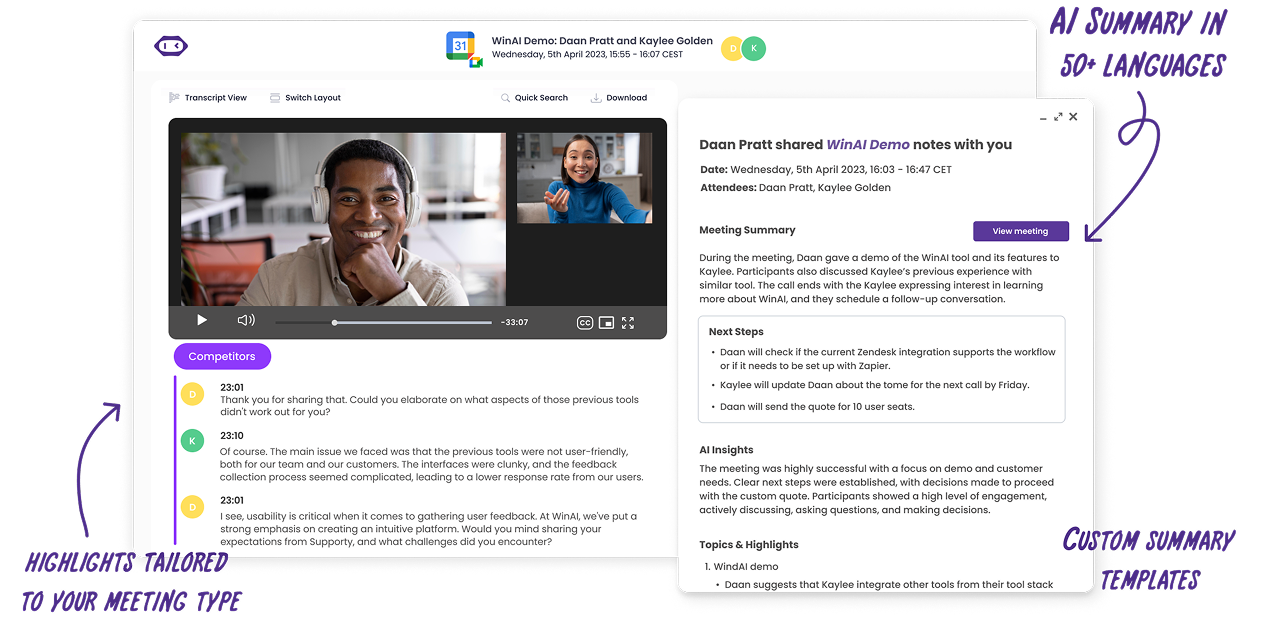
Für den Unterricht positioniert sich MeetGeek speziell als eine Möglichkeit, jede Vorlesung und jedes Meeting in ein Lerngold zu verwandeln, indem der Unterricht aufgezeichnet, transkribiert und zusammengefasst und dann alles in einem gespeichert wird durchsuchbare Wissensdatenbank.
Du kannst deinen Kalender verbinden, MeetGeek automatisch an Online-Vorlesungen teilnehmen lassen oder aufgezeichnete Audio- und Videodateien von deinem Telefon, iPad oder Laptop hochladen. Die App transkribiert und analysiert sie dann, sodass Sie nichts erneut eingeben müssen. Mit der mobilen App können Sie auch persönliche Vorlesungen aufzeichnen (natürlich mit Genehmigung Ihrer Professoren).
Dies ist ideal, wenn Sie einmal aufnehmen und das Material überall wiederverwenden möchten: Verwandeln Sie Transkripte in Lernkarten, exportieren Sie Notizen in Tools wie Notion oder überprüfen Sie einfach die KI-Zusammenfassung vor den Prüfungen.
Hauptmerkmale für Studierende:
- Automatische Aufnahme und Transkription für Google Meet, Zoom, Microsoft Teams und persönliche Vorträge
- Laden Sie Audiodateien und Videos hoch, um vergangene Vorlesungen zu transkribieren
- KI-Zusammenfassungen, Themenschwerpunkte und Schlüsselmomente
- Durchsuchbare Vorlesungsnotizen in einem gemeinsamen oder persönlichen Arbeitsbereich
- Zugänglich über das Internet und Handy, sodass Sie auf Windows, Mac, Android und iPhone überprüfen können
Vorteile:
- Speziell für die Erfassung und Zusammenfassung von Online-Vorlesungen und Besprechungen entwickelt
- Hervorragend für Schüler, die manuelle Anleitungen hassen notieren und möchte organisierte Studiennotizen
- Starkes Such- und Hervorhebungssystem zum schnellen erneuten Aufrufen von Details
- Funktioniert dank Integrationen und Automatisierungen gut mit Ihren vorhandenen Tools (E-Mail, Kalender, LMS, Notion usw.) zusammen
Nachteile:
- Für einige erweiterte Automatisierungs- und längere Speicheroptionen ist möglicherweise eine kostenpflichtige Konto
2. Otter.ai — am besten für die Transkription von Vorlesungen in Echtzeit und durchsuchbare Notizen
Otter.ai ist ein beliebter KI-Notizblock, der Schülern hilft, Vorlesungen aufzuzeichnen und in Echtzeit Transkriptionen für Präsenz- und Online-Kurse zu erhalten. Wenn Otter mit Ihrem Google- oder Microsoft-Kalender verbunden ist, kann er automatisch an Zoom-, Google Meet- und Teams-Sitzungen teilnehmen, das Audio aufnehmen und interaktive Notizen und Zusammenfassungen erstellen.
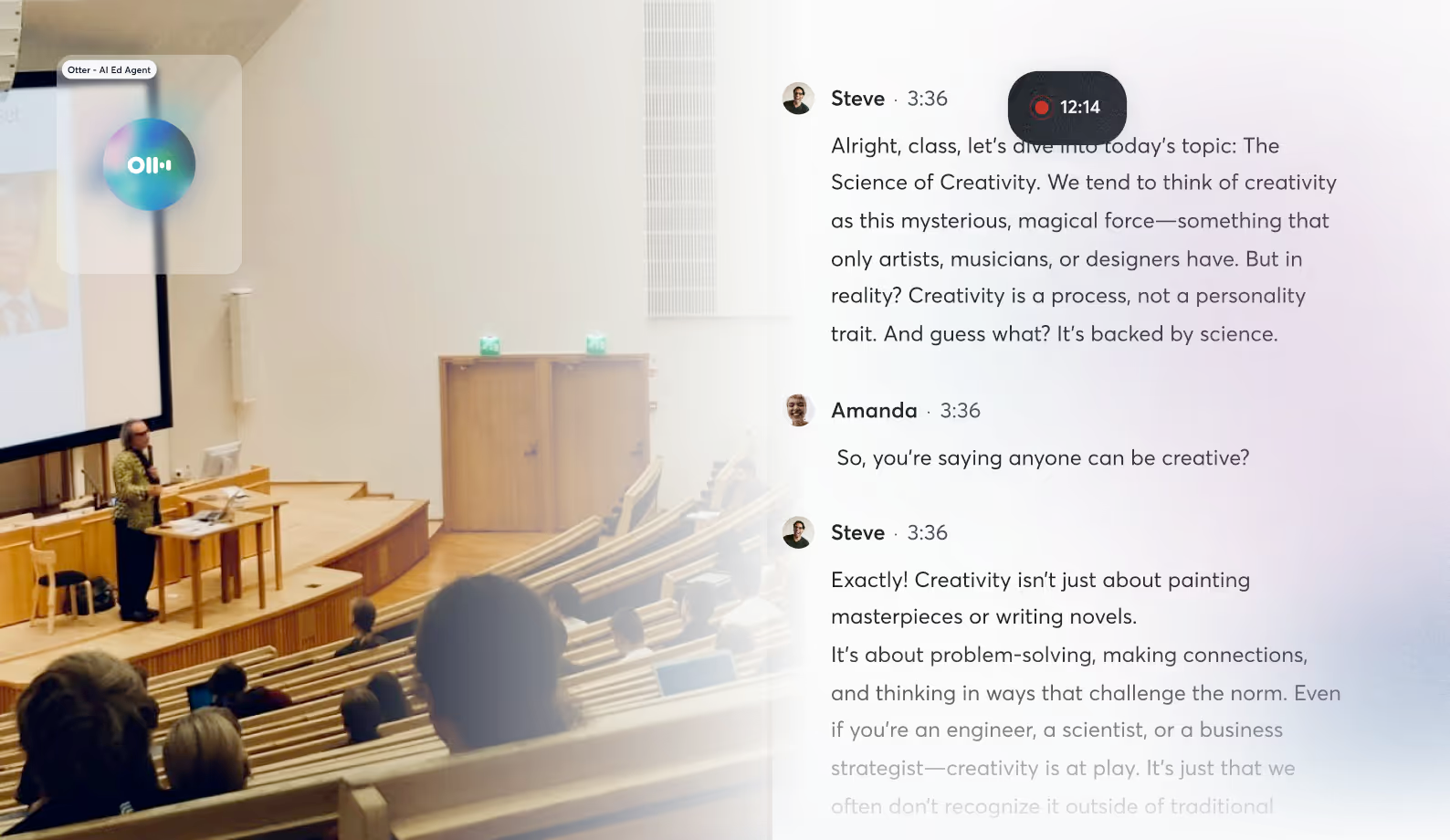
Sie erhalten ein Live-Protokoll, das Sie während des Unterrichts verfolgen können, sowie durchsuchbare Vorlesungsnotizen danach. Du kannst wichtige Punkte hervorheben, Sprecher taggen und später jeden Abschnitt überprüfen, indem du auf den Text klickst, um zu dieser Stelle in der Aufzeichnung zu springen.
Vorteile:
- Starke Live-Transkription für Online- und Präsenzunterricht
- Durchsuchbare Notizen mit Sprecheridentifikation
- Ideal, um später schnell bestimmte Ideen und Zitate zu finden
Nachteile:
- Der kostenlose Tarif begrenzt die monatlichen Transkriptionsminuten
- Die Genauigkeit kann in lauten Umgebungen oder bei starken Akzenten variieren
3. Notability — am besten für handschriftliche Notizen mit synchronisiertem Audio (iPad)
Notability ist eine klassische Wahl für iPad-Nutzer, die Handschrift bevorzugen, aber dennoch verknüpfte Audiodaten wünschen. Wenn du beim Schreiben aufnimmst, verknüpft Notability deine Anmerkungen automatisch mit der Audioaufnahme. Wenn du also auf ein beliebiges Wort oder eine Skizze tippst, springt du genau zu dem Moment in der Vorlesung.
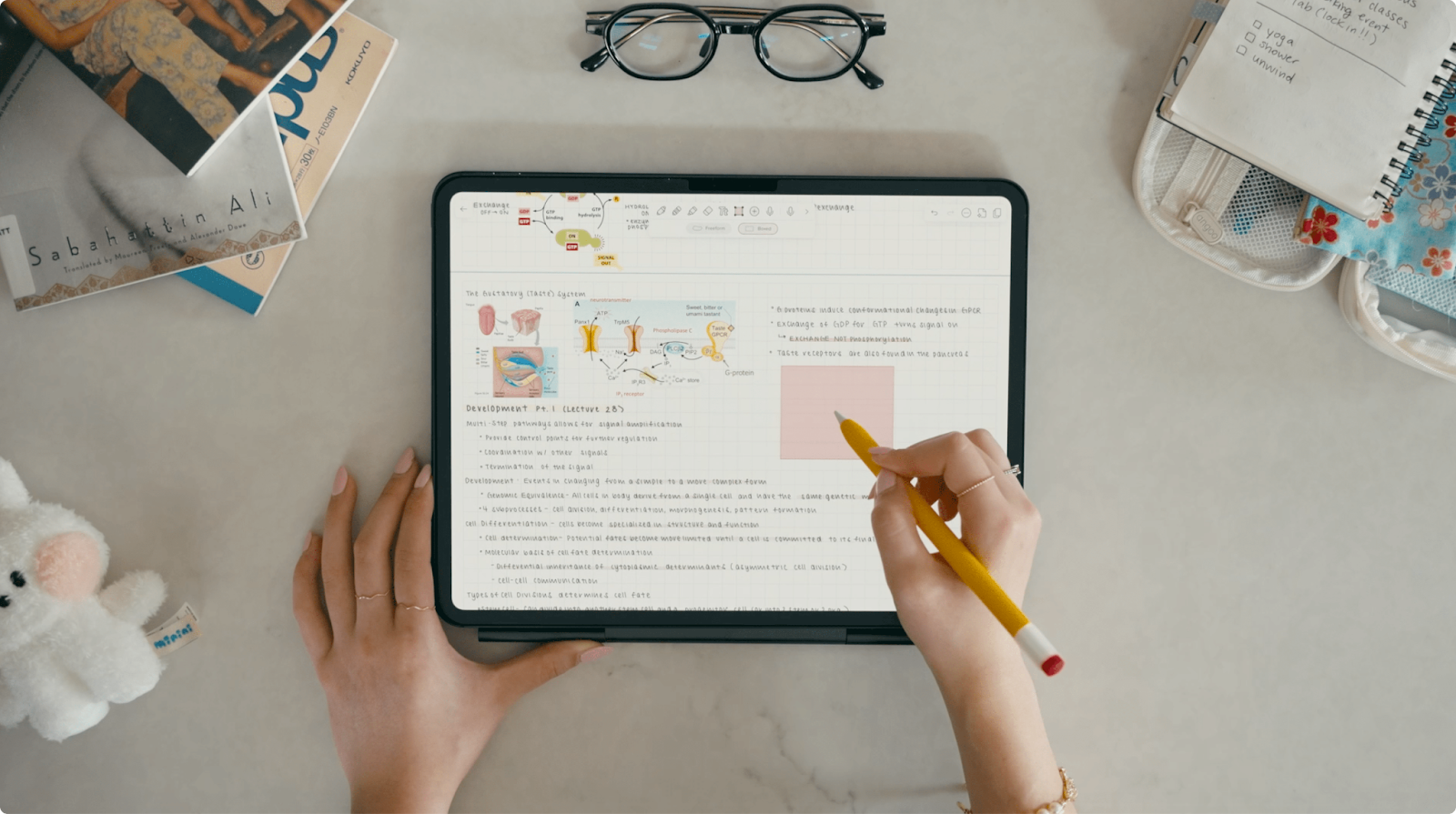
Notability verfügt auch über Audio-Transkripte, mit denen Sie Aufnahmen in Text innerhalb Ihrer Notizen umwandeln können. Dies ist ein großes Upgrade, wenn Sie zusätzlich zur zeitsynchronisierten Wiedergabe durchsuchbares Material wünschen.
Vorteile:
- Reibungsloses Handschrifterlebnis mit dem Apple Pencil
- Zeitgebundenes Audio erleichtert die Überprüfung der Vorlesungsnotizen erheblich
- Die neue Transkriptionsfunktion hilft Ihnen, knifflige Teile zu transkribieren und sich intensiver mit dem Inhalt auseinanderzusetzen
Nachteile:
- Die beste Erfahrung ist auf das iPad und das Apple-Ökosystem beschränkt
- Für alle Funktionen ist ein Abonnement erforderlich und nicht völlig kostenlos.
4. Goodnotes — am besten zum Kommentieren von Folien und zum gemeinsamen Aufnehmen von Audio
Goodnotes ist ein weiterer Gigant im Bereich digitaler Notizen, der für sein Stift-und-Paper-Feeling bekannt ist. Es enthält jetzt ein Audioaufzeichnungstool, mit dem Sie Vorlesungen, Besprechungen oder Termine aufzeichnen können, während Sie kleine Notizen machen und sich später auf die Aufzeichnung verlassen können, um Lücken zu schließen.
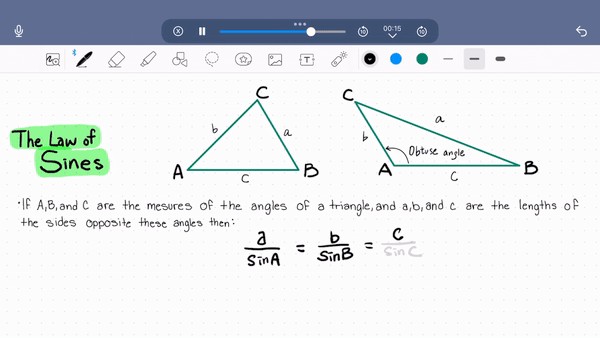
Sie können Folien mit Anmerkungen versehen, Formeln schreiben und Ideen aufschreiben, während die App im Hintergrund aufzeichnet. Auf iOS und unterstützten Plattformen kannst du Mikrofonberechtigungen erteilen und geschriebene Seiten und Audio ganz einfach an einem Ort kombinieren.
Vorteile:
- Ideal zum Kommentieren von Vorlesungsfolien während der Aufnahme
- Natürliches Handschreib- und Zeichenerlebnis
- Notizen und Aufzeichnungen bleiben für eine einfachere Überprüfung zusammen
Nachteile:
- Einige Funktionen werden zuerst auf Apple-Plattformen eingeführt
- Bietet nicht das gleiche Maß an KI-Zusammenfassungen und Automatisierung wie MeetGeek oder Otter
5. Easy Voice Recorder — beste kostengünstige App für einfache Vorlesungsaufzeichnung
Easy Voice Recorder ist genau das, was der Name schon sagt: eine unterhaltsame, einfache App, mit der Kurse, Besprechungen und Sprachnotizen mit minimalem Aufwand aufgezeichnet werden können. Auf Android und iOS können Sie auf Aufnahme in hochwertigem PCM oder AAC drücken, es im Hintergrund laufen lassen und dann die Audiodateien teilen oder sichern.
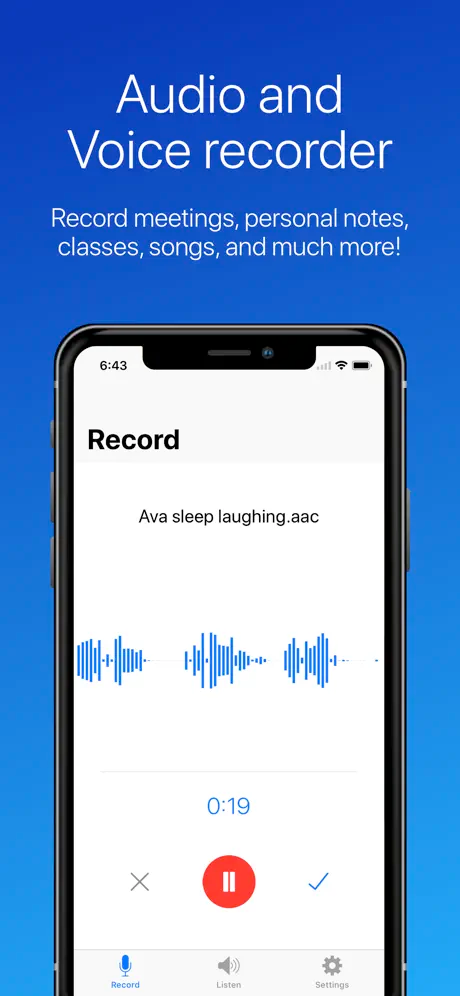
Die Pro-Version bietet zusätzliche Funktionen wie Stereoaufnahme, Skip Silence, Unterstützung für externe Bluetooth-Mikrofone, Cloud-Upload auf Google Drive oder Dropbox sowie einfache Zuschneidewerkzeuge, mit denen Sie unnötige Abschnitte herausschneiden können.
Vorteile:
- Sehr niedrige Kosten im Vergleich zu vielen KI-Tools
- Einfache Oberfläche mit schnellem Zugriff über Widgets
- Ideal für schnelle Sprachaufnahmen, wenn Sie nur Rohaudio benötigen
Nachteile:
- Keine integrierten KI-Zusammenfassungen oder Transkriptionen
- Organisations- und studienorientierte Workflows erfordern zusätzliche Apps (z. B. den Export nach Notion oder ein separates Karteikarten-Tool)
Tipps, um das Beste aus Ihren Vorlesungsaufzeichnungen herauszuholen
Selbst die beste App zur Aufzeichnung von Vorlesungen hilft nicht, wenn die Aufzeichnungen nur in einem Ordner gespeichert werden. Ein paar einfache Tricks können dir helfen, sie effektiver zu nutzen:
- Benennen Sie Ihre Aufnahmen immer klar und deutlich: Fügen Sie den Kursnamen, das Datum und das Thema in den Titel ein (z. B.: „Psychology 101 — 2025-10-18 — Memory & Learning“). Das macht es viel einfacher Zugriff und organisieren alles später.
- Markieren Sie wichtige Momente während des Unterrichts: Wenn deine App das zulässt (wie MeetGeek-Highlights oder Otter-Kommentare), markiere wichtige Punkte, wenn der Professor etwas Wichtiges erklärt oder wenn ein komplexes Diagramm auf dem Bildschirm erscheint. Bei der Überarbeitung wirst du einen großen Unterschied feststellen.
- Kombinieren Sie Transkripte mit aktivem Notieren: Überfliegen Sie nach dem Unterricht das Protokoll und fügen Sie wichtige Zitate oder Texte in Ihr bevorzugtes System ein, egal ob es sich um Notion, ein Dokument oder spezielle Karteikarten handelt. Hier steigern KI-Zusammenfassungen und durchsuchbare Notizen die Produktivität wirklich.
- Verwende Aufzeichnungen, um Lücken zu füllen, nicht um Aufmerksamkeit zu ersetzen: Behandeln Sie das Aufzeichnen Ihres Anrufs nicht als Lizenz zum Zonieren. Überlassen Sie die Sprachaufnahme der App, damit Sie sich auf das Verstehen in Echtzeit konzentrieren können. Verwenden Sie dann die Aufzeichnung, um Details zu überprüfen und knifflige Abschnitte zu überprüfen.
- Geräte- und plattformübergreifend synchronisieren: Stellen Sie sicher, dass das von Ihnen gewählte Tool mit Ihrem Kalender und Plattformen wie Google Meet, Zoom und Teams verbunden bleibt. Auf diese Weise werden Online-Sitzungen automatisch erfasst und Sie können Ihren Lernfluss problemlos über Laptop und Telefon miteinander verbinden.
- Verwandeln Sie Aufzeichnungen zusätzlich in Lernressourcen: Hört nicht bei Rohaufnahmen auf. Verwandeln Sie sie in strukturierte Studiennotizen, Zusammenfassungen, Mindmaps oder sogar kleine Videoerklärungen für sich selbst. Viele Studierende erstellen gerne Notion-Seiten, auf denen Ressourcen, Links und Vorlesungshighlights von MeetGeek oder Otter.
Wählen Sie die beste App zur Aufzeichnung von Vorlesungen für Ihren Lernalltag
Es gibt keine allgemeingültige App, aber da ist passt am besten zu Ihrer Lernweise. Wenn Sie bereit sind, sich keine Gedanken mehr über verpasste Details zu machen und sich darauf zu konzentrieren, den Stoff zu verstehen, MeetGeek kostenlos testen als Ihre Haupt-App zur Aufzeichnung von Vorlesungen. Es erfasst, transkribiert, fasst und organisiert deine Vorlesungen automatisch, sodass du mehr Zeit mit Lernen und weniger Zeit mit dem Tippen verbringen kannst.
Häufig gestellte Fragen
Kann ich Vorlesungen mit meinem Handy aufzeichnen?
Ja. Einfache Rekorder wie Easy Voice Recorder oder integrierte Sprachnotizen eignen sich gut für persönliche Vorträge auf Android und iPhone. Wenn Sie jedoch eine vollständige Transkription und KI-Zusammenfassungen wünschen, können Sie mit der mobilen App von MeetGeek auch persönliche Vorträge direkt von Ihrem Telefon aus aufzeichnen und sie dann automatisch transkribieren und zusammenfassen.
Ist es legal, Vorlesungen aufzuzeichnen?
Die Regeln variieren je nach Universität und Region. Vielerorts ist es erlaubt, wenn die Aufnahme für das persönliche Studium bestimmt ist, aber einige Dozenten oder Institutionen benötigen eine ausdrückliche Genehmigung. Informieren Sie sich immer über die Richtlinien Ihrer Institution und fragen Sie Ihren Professor, wenn Sie sich nicht sicher sind, insbesondere, wenn Sie vorhaben, Aufzeichnungen mit anderen zu teilen.
Brauche ich wirklich eine Transkription oder reicht Audio aus?
Das hängt davon ab, wie du gerne lernst. Reines Audio ist in Ordnung, wenn Sie sich beim Hören mit hoher Geschwindigkeit wohlfühlen. Transkription und KI-Zusammenfassungen machen es jedoch viel schneller, Material zu suchen, zu überfliegen und wiederzuverwenden, insbesondere bei langen Vorlesungen oder komplexen Vorträgen. Tools wie MeetGeek sind genau für diesen Anwendungsfall konzipiert.







.avif)