


Der KI-Notetaker für Google Meet ist „Mach Notizen für mich“ (Take Notes for Me), eine in Google Workspace integrierte Gemini-Funktion, die eine Zusammenfassung mit Entscheidungen und Aufgaben in ein Google-Dokument schreibt und dieses im Drive des Organisators der Besprechung ablegt. Sie aktivieren die Funktion direkt in der Besprechung über die Schaltfläche „Mach Notizen für mich“ oben rechts, ohne dass ein zusätzlicher Teilnehmer in der Besprechung erscheint.
Über den Zugang entscheidet zuerst die Workspace-Edition des Organisators der Besprechung. Business Starter und Enterprise Starter enthalten „Mach Notizen für mich“ nicht für Besprechungen, die Nutzer dieser Editionen organisieren. In diesen Besprechungen erscheint die Schaltfläche deshalb nicht.
Dieser Leitfaden zeigt die sechs Editionen mit Zugang, die 8 Sprachen, die Gemini verarbeitet, wie Sie die Funktion ein- und ausschalten, wo Sie die Notizen in Drive finden, wie die im September 2026 eingeführte automatische Einstellung funktioniert und was Sie prüfen sollten, wenn keine Notizen erscheinen. Wenn Sie lieber Tools vergleichen möchten, statt diese Funktion zu aktivieren, hilft Ihnen unser Ranking der besten KI-Notetaker für Google Meet dabei.
Welche Google-Workspace-Editionen Enthalten Gemini-Notizen?
„Mach Notizen für mich“ ist in fünf Google-Workspace-Editionen und einem Bildungs-Add-on enthalten. Innerhalb von Google Workspace ist alles andere ausgeschlossen, auch die beiden Starter-Editionen.
| Edition | Mach Notizen für mich |
|---|---|
| Business Standard | Enthalten |
| Business Plus | Enthalten |
| Enterprise Standard | Enthalten |
| Enterprise Plus | Enthalten |
| Frontline Plus | Enthalten |
| Add-on Google AI Pro for Education | Enthalten |
| Business Starter | Nicht enthalten |
| Enterprise Starter | Nicht enthalten |
| Privates Google-Konto | Nur mit einem berechtigten Google-AI-Tarif |
Tabelle zuletzt aktualisiert: 14. Oktober 2026.
Eine berechtigte Edition allein reicht nicht aus. Administratoren steuern die Funktion über einen Schalter in der Admin-Konsole und können sie für eine ganze Domain oder für eine einzelne Organisationseinheit deaktivieren. Deshalb können zwei Kollegen mit demselben Tarif Unterschiedliches sehen.
Entscheidend ist die Edition des Organisators, nicht Ihre eigene. Google verlangt, dass der Organisator der Besprechung eine berechtigte Edition hat. Die Funktion kann also in der Besprechung eines Kollegen verfügbar sein, auch wenn Ihr eigenes Konto die Voraussetzungen nicht erfüllen würde.
In unserer Übersicht der Google-Meet-Preise nach Tarif steht, dass Gemini in jedem Workspace-Tarif ohne Aufpreis enthalten ist, und das stimmt für Gemini als Assistenten. „Mach Notizen für mich“ ist eine eigene Meet-Funktion, die darauf aufbaut, und für sie gilt die Mindestedition aus der Tabelle oben.
Welche Sprachen Unterstützen die Gemini-Notizen in Google Meet?
Die Gemini-Notizen in Google Meet unterstützen 8 Sprachen: Englisch, Französisch, Deutsch, Italienisch, Japanisch, Koreanisch, Portugiesisch und Spanisch. Gepflegt wird diese Liste auf der Google-Hilfeseite zu „Mach Notizen für mich“.
Gemini verwendet für die gesamte Besprechung eine Sprache, und zwar die, die Sie auswählen. Laut Google werden mehrere Sprachen in derselben Besprechung nicht unterstützt. Das betrifft gemischtsprachige Besprechungen, etwa ein Kundengespräch, das auf Englisch beginnt und auf Spanisch endet, oder ein Design-Review, in dem zwei Personen eine Minute lang Portugiesisch sprechen.
Es gibt einen manuellen Ausweg. Wird mindestens 30 Sekunden lang eine andere Sprache gesprochen, bietet Google einen Wechsel der Notizsprache an, und Sie wählen „Sprache ändern“ oder „Ignorieren“. Wenn Sie den Wechsel bestätigen, hat das drei Folgen, die Sie kennen sollten:
- Er gilt nicht rückwirkend: Alles, was vor Ihrer Bestätigung gesagt wurde, wurde in der ursprünglichen Sprache verarbeitet;
- Er betrifft mehr als die Notizen: Auch Ask Gemini und jede aktive Besprechungsaufzeichnung wechseln die Sprache;
- Er wird nicht übertragen: Wiederkehrende und künftige Besprechungen behalten die alte Einstellung. Bei einem zweisprachigen Wochentermin müssen Sie also jede Woche neu entscheiden.
Sie brauchen mehr Sprachen? Die Google-Meet-Integration von MeetGeek transkribiert in über 100 Sprachen, ebenfalls mit einer Sprache pro Besprechung.
Wie Sie Gemini-Notizen in Google Meet Aktivieren
Es gibt drei Stellen zum Aktivieren: den Kalendertermin, den Meet-Vorraum kurz vor dem Beitreten und die Besprechung selbst. An keiner davon müssen Sie etwas installieren.
Für eine Besprechung, die Sie selbst organisieren, ist der Weg über Google Calendar der richtige, denn Sie richten die Notizen einmal ein, und am Tag selbst muss niemand daran denken.
- Öffnen Sie den Termin in Google Calendar und klicken Sie auf „Termin bearbeiten“. Die Google-Meet-Videokonferenz muss bereits hinzugefügt sein;
- Wählen Sie „Optionen für Videoanruf“ und dann in der linken Spalte „Besprechungsaufzeichnungen“;
- Setzen Sie das Häkchen bei „Notizen mit Gemini erstellen“.
Im Meet-Vorraum öffnen Sie über die Benachrichtigung zu den Notizen die Besprechungstools und starten oder beenden die Notizen, bevor Sie beitreten.
In der Besprechung selbst geht es schneller, und das ist der Weg für Besprechungen, die Sie nicht organisiert haben.
- Treten Sie der Besprechung unter meet.google.com bei. Die Schaltfläche ist vorhanden, wenn die Edition des Organisators die Funktion enthält und Ihr Administrator sie nicht deaktiviert hat;
- Klicken Sie auf „Mach Notizen für mich“ oben rechts auf dem Bildschirm;
- Passen Sie die Einstellungen an, wenn Sie möchten, bevor Sie starten. Sie können festlegen, wer die Notizen erhält, in welcher Sprache sie erstellt werden und welche Abschnitte das Dokument enthält;
- Klicken Sie auf „Notizen erstellen“ und bestätigen Sie die Einwilligungsabfrage, falls Ihr Administrator eine verlangt;
- Klicken Sie auf „Beenden“, wann immer es nötig ist, zum Beispiel vor einem vertraulichen Abschnitt.
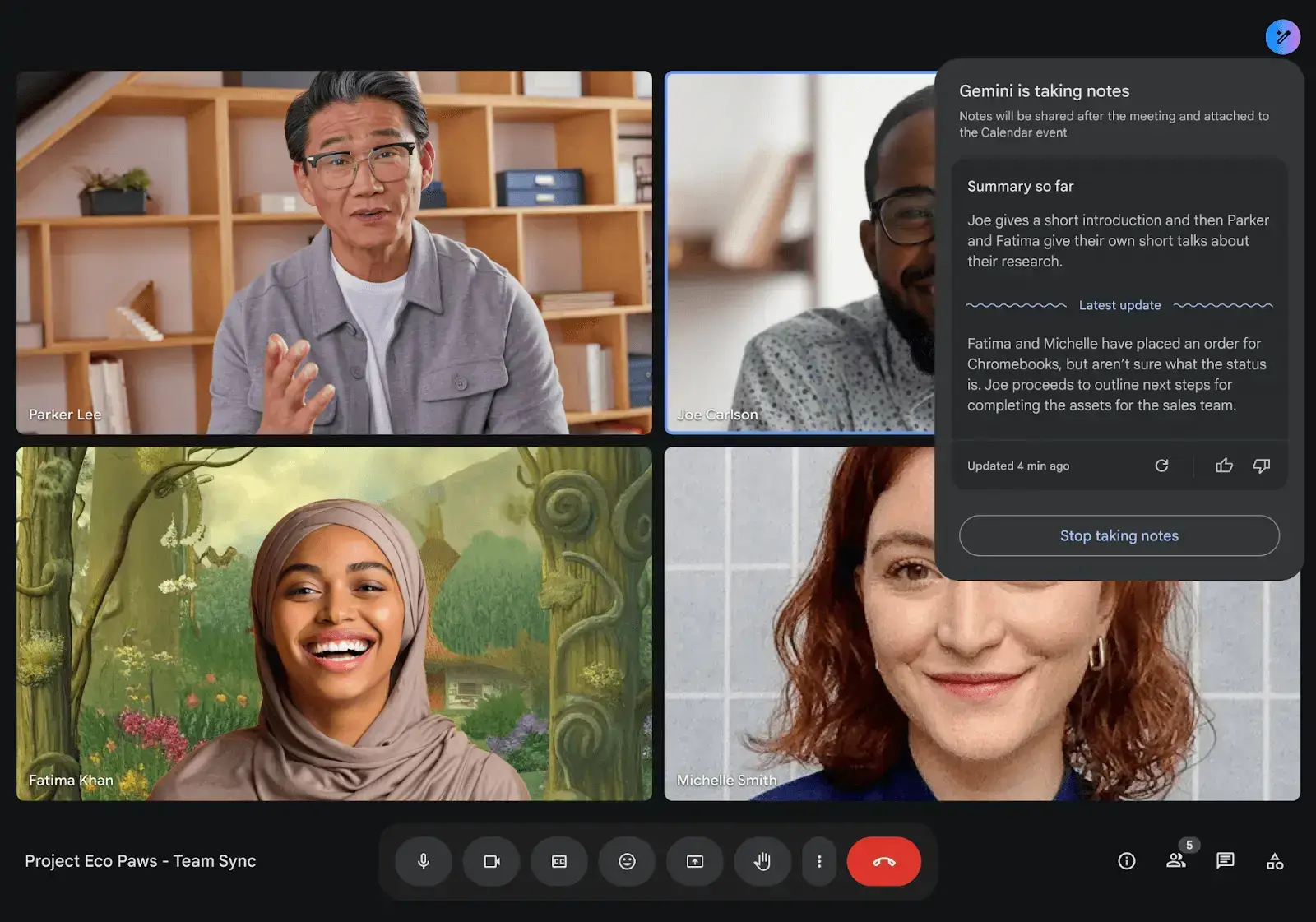
Expertentipp von MeetGeek
Achten Sie auf das Stiftsymbol. Es erscheint für alle Teilnehmenden, solange Notizen erstellt werden, und ist das einzige verlässliche Zeichen dafür, dass Gemini überhaupt etwas erfasst.
Wenn Sie die Notizen beenden, wird die „Bisherige Zusammenfassung“ eingefroren, nicht gelöscht. Der bereits erzeugte Text bleibt auf dem Bildschirm, wird aber erst wieder aktualisiert, wenn jemand die Notizen fortsetzt. Deshalb kann es so aussehen, als liefen die Notizen noch.
Die Hostverwaltung legt fest, wer den Schalter bedient. Ist sie aktiviert, können nur Organisator und Co-Organisatoren Notizen starten oder beenden. Ist sie deaktiviert, kann das jede teilnehmende Person aus derselben Organisation wie der Organisator. Außerdem gibt es die Einstellung Quick Stop, die Ihr Administrator aktivieren kann. Damit kann jeder interne Nutzer die Erfassung für alle auf einmal beenden.
Notizen auf Android, iPhone und iPad Erstellen
Auf dem Mobilgerät öffnen Sie die Meet-App, tippen auf eine Besprechung, tippen auf den Bildschirm, dann auf „Menü“, dann auf „Notizen mit Gemini erstellen“ und schließlich auf „Starten“. Die einzige Voraussetzung, die Google nennt, ist eine aktuelle Version der App.
Die „Bisherige Zusammenfassung“ gibt es nur am Computer. Laut den Google-Hilfeseiten wird sie weder unter Android noch unter iOS unterstützt. Wer per Smartphone später dazukommt, kann sich in der Besprechung also nicht über diese Zusammenfassung auf den aktuellen Stand bringen.
Dieselbe Schaltfläche funktioniert inzwischen auch ohne Videoanruf. Seit August 2026 können Sie „Mach Notizen für mich“ im Web, unter Android oder unter iOS über den Meet-Startbildschirm für eine Präsenzbesprechung starten. Sobald Sie die Erfassung beenden, erstellt Gemini ein Dokument mit Zusammenfassung, Aufgaben und vollständigem Transkript. Laut Googles Ankündigung zur Cloud Next 2026 funktioniert derselbe Weg auch für Besprechungen in Zoom oder Microsoft Teams: Sie starten die Notizen manuell über den Meet-Startbildschirm, und Gemini erfasst das Gespräch auf Ihrem Gerät. Wenn Präsenzbesprechungen Ihr Hauptanwendungsfall sind, zeigt unser Ranking der KI-Notetaker für Präsenzbesprechungen, welche Tools sich sonst noch dafür eignen.
Wo Landen die Gemini-Notizen von Google Meet?
Das Dokument, eine Art Besprechungsprotokoll, wird im Drive des Organisators gespeichert, nicht in Ihrem. Es ist an den Kalendertermin angehängt, und die E-Mail, die verschickt wird, enthält einen Link dazu sowie eine kurze Zusammenfassung der Besprechung.
| Was Sie suchen | Wo Sie es finden |
|---|---|
| Das Notizdokument | „Meine Ablage“ des Organisators > Google Meet > Unterordner der Besprechung |
| Eine Terminserie | Derselbe Unterordner für alle Termine, sodass die Notizen vom letzten Dienstag neben denen von diesem Dienstag liegen |
| Ihre Kopie als teilnehmende Person | Eine Verknüpfung in Ihrem eigenen Google-Meet-Ordner, sofern Sie Zugriff haben |
| Der Link | Der Kalendertermin und die E-Mail mit der Zusammenfassung |
| Die ausführliche Fassung | Der Tab „Vollständige Notizen“ (das Dokument öffnet sich auf „Schnellnotizen“) |
| Dateien von vor Juli 2026 | Google Meet > Besprechungsaufzeichnungen (alt) |
Tabelle zuletzt aktualisiert: 14. Oktober 2026.
Das Dokument öffnet sich auf dem Tab „Schnellnotizen“, seit September 2026 die Standardansicht, mit einer kurzen Zusammenfassung der wichtigsten Erkenntnisse und Aufgaben. Wenn Ihre Notizen knapp wirken, prüfen Sie den Tab „Vollständige Notizen“, bevor Sie annehmen, dass etwas verloren gegangen ist. Mit der Umstellung im Juli 2026 hat Google den alten Ordner „Meet Recordings“ verschoben: Er liegt jetzt im neuen Ordner „Google Meet“ und heißt „Besprechungsaufzeichnungen (alt)“.
Wer das Dokument erhält, hängt von einer Freigabeeinstellung ab, die der Organisator steuert:
- Alle eingeladenen Gäste: auch Personen außerhalb Ihrer Organisation;
- Eingeladene Gäste in Ihrer Organisation: nur interne Personen aus der Einladung;
- Nur Organisatoren und Co-Organisatoren: Sonst erhält niemand das Dokument automatisch.
Eingeladene Gäste sind alle Personen in der Kalendereinladung, unabhängig davon, ob sie teilgenommen haben.
Über eine Gruppen-E-Mail-Adresse erhalten die Mitglieder keinen Zugriff. Jedes Mitglied eines Verteilers muss das Dokument einzeln freigegeben bekommen. Das ist ein häufiger Grund dafür, dass manche Personen im Team die Notizen erhalten und andere nicht.
Auch drei Einstellungen der Administratoren beeinflussen, was Sie finden:
- Screenshots: Wenn Ihr Administrator es zulässt, fügt Gemini den Notizen Screenshots der geteilten Inhalte hinzu. Die präsentierende Person sieht einen Hinweis und kann die Screenshots deaktivieren;
- Aufbewahrung: Die Meet-Regel, die Ihre Administratoren in Google Vault festlegen, bestimmt, wie lange das Dokument aufbewahrt wird. Es kann also automatisch gelöscht werden;
- Einwilligung: Administratoren können verlangen, dass die Teilnehmenden einwilligen, bevor eine Erfassung beginnt.
Wenn ein Dokument weiterhin zu fehlen scheint, beginnen Sie am besten mit unserem Leitfaden dazu, wo Google-Meet-Aufzeichnungen gespeichert werden. Unser Leitfaden dazu, wie Sie Ihren Google-Meet-Verlauf ansehen, hilft Ihnen herauszufinden, zu welcher Besprechung die Notizen gehören. Wie Sie zusätzlich zu den Notizen Audio und Video erhalten, erfahren Sie in unserem Leitfaden dazu, wie Sie eine Google-Meet-Besprechung aufzeichnen.
Starten Gemini-Notizen Automatisch?
Bei manchen Tarifen ja. Seit dem 29. September 2026 ist die automatische Notizenerstellung bei Business Standard und Business Plus standardmäßig aktiviert, und zwar für Besprechungen mit drei oder mehr Personen, den Organisator eingeschlossen. Bei Enterprise Standard, Enterprise Plus, Frontline Plus und dem Add-on Google AI Pro for Education bleibt die automatische Notizenerstellung standardmäßig deaktiviert. In seinem Update vom 22. September hat Google den Start am 29. September bestätigt. Bis die Einführung alle Konten erreicht, können mehr als 15 Tage vergehen.
Schon vor dieser Änderung war die Funktion weit verbreitet. Google gab auf der Cloud Next im April 2026 bekannt, dass im Vormonat mehr als 110 Millionen Teilnehmende „Mach Notizen für mich“ genutzt hatten, 8,5-mal so viele wie ein Jahr zuvor.
Wie Sie Automatische Notizen Ein- oder Ausschalten
Ihre eigene Einstellung hat für die Besprechungen, die Sie organisieren, Vorrang vor der Standardeinstellung des Administrators. Sie ändern sie in Meet, nicht in Google Calendar.
- Meet-Einstellungen öffnen: Rufen Sie an einem Computer meet.google.com auf und klicken Sie oben rechts auf „Einstellungen“;
- „Besprechungsaufzeichnungen“ aufrufen: Sie finden den Bereich in der linken Spalte;
- Option auswählen: Wählen Sie unter „Automatische Notizenerstellung für alle zukünftigen Besprechungen“ eine der Optionen „Aus“, „Für alle geplanten Besprechungen, die ich organisiere“ oder „Für alle geplanten Besprechungen, die ich mit mindestens drei Gästen organisiere“;
- Speichern: Klicken Sie auf „Speichern“. Die Auswahl gilt dann für Ihre zukünftigen Besprechungen.
Für einen einzelnen Termin beendet die Schaltfläche „Beenden“ die Notizen nur für diese Besprechung. Sobald jemand beigetreten ist, lassen sich die geplanten Einstellungen dieser Besprechung nicht mehr ändern. Legen Sie sie deshalb vor Beginn fest. Wenn ein Administrator die Funktion komplett deaktiviert, kann keine persönliche Einstellung sie wieder aktivieren.
Wie Lang Sollte eine Besprechung für Gemini-Notizen Sein?
Laut Google wird „Mach Notizen für mich“ für Besprechungen von 15 Minuten bis maximal acht Stunden empfohlen.
Kaum eine Besprechung kommt an die Grenze von acht Stunden heran. In der Praxis ist also das Minimum von 15 Minuten der Teil, der Sie betrifft.
Google nennt dieses Minimum auch in seiner Liste zur Fehlerbehebung: Eine Besprechung unter 15 Minuten ist einer von nur drei dokumentierten Gründen, warum eine Zusammenfassung unvollständig, ungenau oder gar nicht erstellt wird.
Grenzen der Besprechung selbst sind eine andere Frage. Sie hängen von Ihrem Tarif ab, nicht von Gemini. Unser Überblick zum Zeitlimit von Google Meet nach Tarif zeigt, wo jeder Tarif eine Besprechung beendet.
Welche Ihrer Besprechungen Erreichen die 15-Minuten-Grenze?
Die meisten, aber nicht alle, und welche darunter liegen, lässt sich leicht vorhersagen. MeetGeek-Daten von Januar bis Juni 2026 zeigen, dass 22,3 % der Besprechungen innerhalb von 15 Minuten endeten. Ungefähr jede fünfte Besprechung erreicht damit höchstens die Mindestdauer, die Google für Notizen empfiehlt.
Am stärksten betroffen ist das Daily Stand-up. Laut MeetGeek-Daten für das erste Halbjahr 2026 endeten 36,7 % der Daily Stand-ups innerhalb von 15 Minuten. Wenn Ihr Team jeden Morgen eines abhält, können einige dieser Notizen lückenhaft ausfallen oder ganz fehlen.
Warum Erstellt Google Meet Keine Notizen?
Wenn Gemini-Notizen fehlen, prüfen Sie drei Phasen: vor der Besprechung, währenddessen und danach. Möglicherweise war die Funktion für diese Besprechung nicht verfügbar. Vielleicht ist sie auch nie gelaufen oder das Dokument liegt an einem Ort, an dem Sie noch nicht nachgesehen haben.
Vor der Besprechung
Google dokumentiert drei Gründe, warum sich die Schaltfläche nicht auswählen lässt.
- Edition ohne Berechtigung: Nutzt der Organisator der Besprechung Business Starter oder Enterprise Starter, erscheint die Option nicht, egal wie alles andere konfiguriert ist;
- Vom Administrator deaktiviert: Die Einstellung befindet sich in der Admin-Konsole und kann für eine einzelne Organisationseinheit statt für die gesamte Domain deaktiviert werden;
- Steuerung intelligenter Funktionen deaktiviert: Das ist der dritte Grund auf Googles eigener Liste. Er wird leicht übersehen, weil sich diese Einstellung in den Einstellungen für intelligente Funktionen Ihres Google-Kontos befindet und nicht in Meet.
In der Praxis gibt es drei weitere Hindernisse.
- Privates Konto: Außerhalb von Workspace setzt die Funktion einen berechtigten Google-AI-Tarif voraus;
- Hostverwaltung aktiviert: Nur Organisator und Co-Organisatoren können Notizen starten. Ein Klick eines Gastes hilft also nicht weiter;
- Keine Einwilligung: Verlangt ein Administrator eine ausdrückliche Einwilligung, beginnt die Erfassung erst, wenn die Teilnehmenden die Abfrage bestätigt haben.
Während der Besprechung
- Kein Stiftsymbol: Niemand hat die Notizen gestartet. Das Symbol ist für alle Teilnehmenden sichtbar, solange die Funktion läuft;
- Sprachwechsel nicht bestätigt: Hat die Besprechung mittendrin die Sprache gewechselt und niemand hat die Abfrage nach 30 Sekunden bestätigt, wurde dieser Abschnitt in der falschen Sprache verarbeitet;
- Beendet und nie fortgesetzt: Die „Bisherige Zusammenfassung“ zeigt weiter ihren letzten Text an, und das sieht genauso aus wie eine Funktion, die noch läuft;
- Smartphone oder Tablet: Die „Bisherige Zusammenfassung“ wird unter iOS und Android nicht unterstützt. Dass sie dort fehlt, ist also kein Fehler;
- Verbindungsabbruch: Lücken im Audio der Besprechung werden zu Lücken in den Notizen.
Nach der Besprechung
- Unter 15 Minuten: Google nennt kurze Besprechungen als einen Grund, warum eine Zusammenfassung unvollständig sein oder fehlen kann;
- Tab „Schnellnotizen“: Das Dokument öffnet sich mit der Kurzfassung. Die vollständige Zusammenfassung, die Entscheidungen und die Details stehen auf dem Tab „Vollständige Notizen“;
- Falscher Ordner: Seit Juli 2026 wird das Dokument im Ordner „Google Meet“ gespeichert, nicht in dem Ordner, der jetzt „Besprechungsaufzeichnungen (alt)“ heißt;
- Aufbewahrung in Vault: Die Richtlinie hat das Dokument womöglich schon entfernt. Fragen Sie deshalb die Person, die für die Aufbewahrung zuständig ist, und nicht den Organisator;
- Nie für Sie freigegeben: Die Freigabe richtet sich nach der Freigabeeinstellung des Organisators und der Kalendereinladung. Eine Gruppen-E-Mail-Adresse gibt den Zugriff nicht an ihre Mitglieder weiter;
- Markierte Inhalte: Google erstellt keine Zusammenfassung für eine Besprechung, die gegen die Richtlinie zur angemessenen Nutzung verstößt.
Wo die Gemini-Notizen Enden
Die Arbeit von Gemini endet, sobald es das Dokument geschrieben, in Drive gespeichert und den Link per E-Mail verschickt hat.
Das reicht, wenn im nächsten Schritt nur jemand die Zusammenfassung lesen muss. Es reicht nicht, wenn aus der Besprechung direkt eine Aktion entstehen soll: ein Verlängerungsdatum in den Kundendatensatz eintragen, eine Kandidatenbewertung an Ihr ATS senden oder eine Onboarding-Checkliste für neue Mitarbeitende anlegen.
Die zweite Grenze betrifft die Frage, welche Besprechungen Gemini erfassen kann. Eine Zoom- oder Microsoft-Teams-Besprechung erfasst Gemini nur, wenn jemand „Mach Notizen für mich“ jedes Mal manuell über den Meet-Startbildschirm auf dem eigenen Gerät startet. Für diese Besprechungen startet nichts über den Kalender. In einer gemischten Woche hängt es also davon ab, dass jemand daran denkt.
MeetGeek hebt diese beiden Einschränkungen für Teams auf, die mehr brauchen, und funktioniert mit jedem Google-Meet-Konto, kostenlos oder kostenpflichtig. Die Editionsschwelle vom Anfang dieses Leitfadens gilt dafür also nicht. Eine Business-Starter-Domain erhält dieselbe Erfassung wie eine Enterprise-Plus-Domain.
Es gibt drei Möglichkeiten, eine Besprechung zu erfassen:
- Notetaker: nimmt über Ihren Kalender an geplanten Besprechungen in Google Meet, Zoom und Microsoft Teams teil, auch an solchen, die Sie nicht organisiert haben, wobei der Organisator ihn wie jeden anderen Gast einlässt;
- Chrome Recorder: zeichnet direkt im Browser-Tab auf, ohne als Teilnehmer in der Besprechung zu erscheinen;
- Desktop App: zeichnet Besprechungen direkt auf Ihrem Mac- oder Windows-Computer auf, ohne Bot.
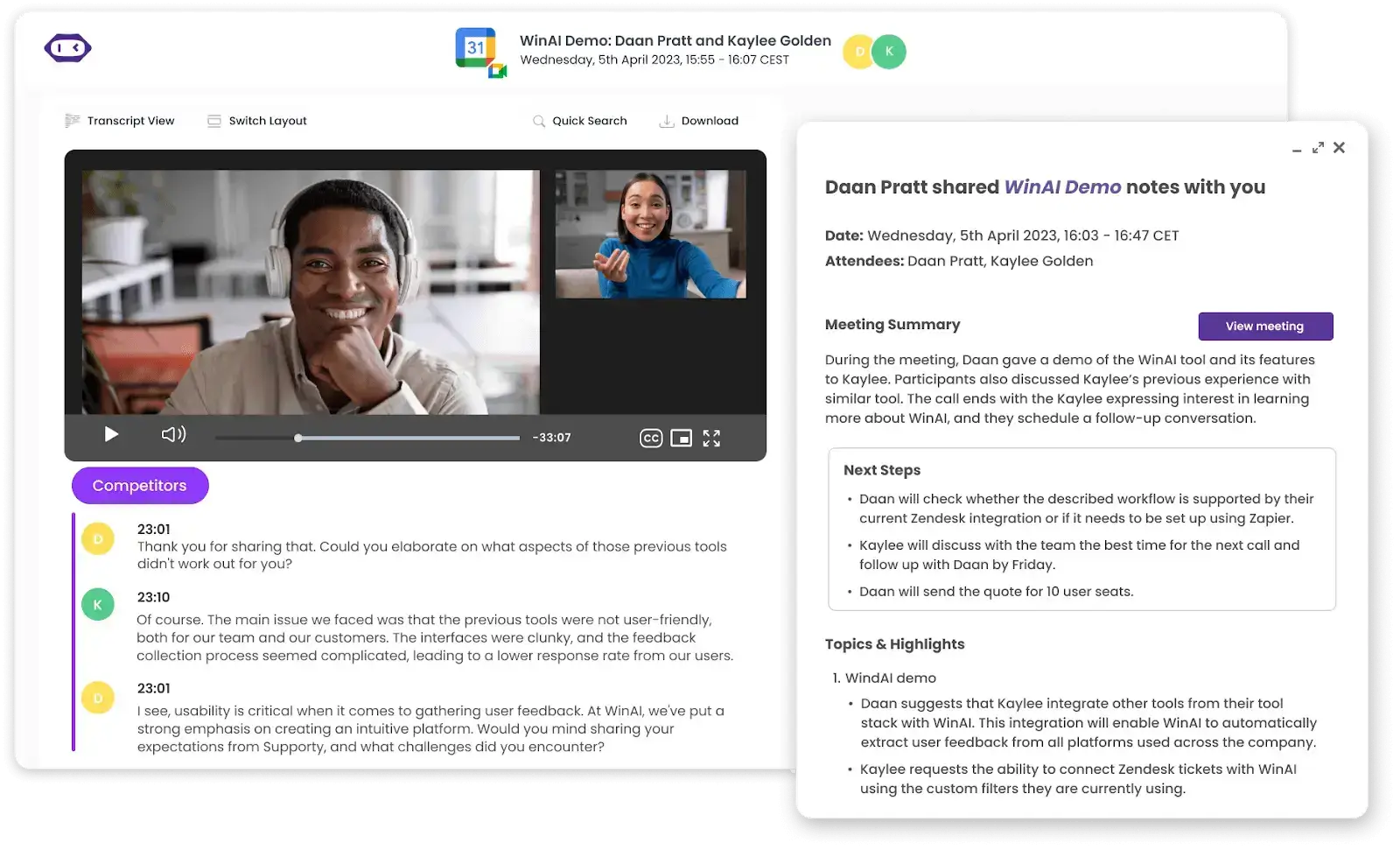
Anschließend kann MeetGeek strukturierte KI-Besprechungsprotokolle an Ihr CRM, Ihr Ticketsystem oder den passenden Slack-Kanal senden, und Besprechungen aller drei Plattformen liegen am selben durchsuchbaren Ort.
Wenn Ihre Edition Sie ausschließt oder die Notizen woanders als in Google Docs landen sollen, können Sie MeetGeek bei Ihrer nächsten Google-Meet-Besprechung kostenlos testen.
Wichtigste Erkenntnisse
- „Mach Notizen für mich“ ist in Business Standard, Business Plus, Enterprise Standard, Enterprise Plus, Frontline Plus und dem Add-on Google AI Pro for Education enthalten, und es zählt die Edition des Organisators. Business Starter und Enterprise Starter sind ausgeschlossen;
- Die Funktion unterstützt 8 Sprachen, eine pro Besprechung, und funktioniert am besten bei Besprechungen ab 15 Minuten. Diese Untergrenze nennt Google, wenn Notizen lückenhaft ausfallen oder fehlen;
- Seit dem 29. September 2026 starten Notizen bei Business Standard und Business Plus automatisch für Besprechungen mit drei oder mehr Personen. Sie können das in den Meet-Einstellungen unter „Besprechungsaufzeichnungen“ ausschalten;
- Das Dokument liegt im Ordner „Google Meet“ im Drive des Organisators, öffnet sich auf dem Tab „Schnellnotizen“ und erreicht die Empfänger je nach Freigabeeinstellung des Organisators und Kalendereinladung;
- Mit dem Dokument endet die Arbeit von Gemini. Nichts wird in ein CRM, ein ATS oder ein Ticketsystem übertragen, und eine Zoom- oder Teams-Besprechung wird nur erfasst, wenn jemand die Notizen manuell startet.
Häufig Gestellte Fragen
Hat Google Meet einen KI-Notetaker?
Ja. Google Meet hat mit „Mach Notizen für mich“ einen integrierten KI-Notetaker auf Basis von Gemini. Er schreibt eine Zusammenfassung mit Entscheidungen und Aufgaben in ein Google-Dokument und legt dieses im Drive des Organisators ab. Die Funktion ist in fünf Workspace-Editionen und einem Bildungs-Add-on enthalten, und dafür nimmt kein zusätzlicher Teilnehmer an der Besprechung teil.
Erstellt Google Meet eine KI-Zusammenfassung?
Ja. Das Dokument, das „Mach Notizen für mich“ erstellt, ist eine Zusammenfassung der Besprechung mit Entscheidungen und vorgeschlagenen nächsten Schritten. Es öffnet sich auf dem kurzen Tab „Schnellnotizen“. Die ausführliche Fassung steht auf dem Tab „Vollständige Notizen“. Während der Besprechung liefert die „Bisherige Zusammenfassung“ allen, die später dazukommen, eine laufende Fassung, allerdings nur am Computer.
Sind Gemini-Notizen in Google Workspace Business Starter Enthalten?
Nein. Business Starter und Enterprise Starter sind beide ausgeschlossen. Die Funktion ist in Business Standard, Business Plus, Enterprise Standard, Enterprise Plus, Frontline Plus und dem Add-on Google AI Pro for Education enthalten. Für ein privates Google-Konto ist ein berechtigter Google-AI-Tarif erforderlich.
Kosten Gemini-Notizen Extra?
Für die oben genannten berechtigten Business-, Enterprise- und Frontline-Editionen fällt für „Mach Notizen für mich“ keine separate Gebühr an. Die Kosten stecken also im Tarifpreis. Im Bildungsbereich ist das Add-on Google AI Pro for Education erforderlich, während private Konten einen berechtigten Google-AI-Tarif brauchen. Unsere Übersicht der Google-Meet-Preise nach Tarif zeigt, was jeder Tarif kostet und was er sonst noch enthält.
Gibt Es eine Kostenlose Möglichkeit für KI-Notizen in Google Meet?
Ja, über einen Notetaker eines Drittanbieters mit Gratis-Tarif, denn Googles eigene Funktion setzt eine berechtigte Workspace-Edition oder einen Google-AI-Tarif voraus. Mehrere Tools decken Google Meet kostenlos ab, mit monatlichen Limits für Transkriptionsstunden. Unser Ranking der besten KI-Notetaker für Google Meet vergleicht, was jeder Gratis-Tarif tatsächlich erlaubt.
Wie Aktiviere Ich Gemini-Notizen in Google Meet?
Es gibt drei Wege. Klicken Sie in der Besprechung oben rechts auf „Mach Notizen für mich“ und wählen Sie „Notizen erstellen“. Setzen Sie vor der Besprechung im Kalendertermin unter „Optionen für Videoanruf“ und dann „Besprechungsaufzeichnungen“ das Häkchen bei „Notizen mit Gemini erstellen“. Sie können die Notizen auch im Meet-Vorraum starten. Danach erscheint für alle Teilnehmenden ein Stiftsymbol.
Warum Sind Gemini-Notizen Ausgegraut oder Nicht Verfügbar?
Google nennt drei Gründe: Der Organisator der Besprechung nutzt eine Workspace-Edition ohne diese Funktion, Ihr Administrator hat sie deaktiviert oder die Steuerung intelligenter Funktionen ist in den Einstellungen Ihres Google-Kontos deaktiviert. In der Praxis kommt mit der Hostverwaltung ein vierter Grund hinzu, weil sie das Starten von Notizen auf Organisator und Co-Organisatoren beschränkt.
Welche Sprachen Unterstützen die KI-Notizen von Google Meet?
8 Sprachen: Englisch, Französisch, Deutsch, Italienisch, Japanisch, Koreanisch, Portugiesisch und Spanisch. Gemini verwendet eine Sprache pro Besprechung, und laut Google werden mehrere Sprachen in derselben Besprechung nicht unterstützt. Wird mindestens 30 Sekunden lang eine zweite Sprache gesprochen, erscheint eine Abfrage zum Wechseln. Der Wechsel erfolgt manuell.
Funktionieren Gemini-Notizen auf Mobilgeräten?
Notizen funktionieren am Computer, auf Android, iPhone und iPad. Die „Bisherige Zusammenfassung“ dagegen nicht, denn laut den Google-Hilfeseiten wird sie weder unter iOS noch unter Android unterstützt. Das Aufholen während der Besprechung bleibt also dem Computer vorbehalten.
Wo Werden Gemini-Notizen in Google Meet Gespeichert?
Im Drive des Organisators der Besprechung, in einem Ordner „Google Meet“ mit einem Unterordner pro Besprechung, den sich alle Termine einer Terminserie teilen. Das Dokument ist an den Kalendertermin angehängt und wird nach der Meet-Richtlinie Ihrer Organisation in Google Vault aufbewahrt. Der Zugriff richtet sich nach der Freigabeeinstellung des Organisators und der Kalendereinladung. Eine Gruppen-E-Mail-Adresse gibt den Zugriff nicht an ihre Mitglieder weiter. Das Dokument muss deshalb für jedes Mitglied einzeln freigegeben werden.
Erstellt Google Meet Automatisch Notizen?
Bei Business Standard und Business Plus ja. Seit dem 29. September 2026 ist die automatische Notizenerstellung dort standardmäßig für Besprechungen mit drei oder mehr Personen aktiviert. Bei Enterprise Standard, Enterprise Plus und Frontline Plus bleibt sie standardmäßig deaktiviert, und jeder Organisator kann die Einstellung für seine eigenen Besprechungen in Meet unter „Besprechungsaufzeichnungen“ ändern.
Wie Schalte Ich Automatische Notizen in Google Meet Aus?
Rufen Sie meet.google.com auf, öffnen Sie „Einstellungen“, wählen Sie „Besprechungsaufzeichnungen“, setzen Sie „Automatische Notizenerstellung für alle zukünftigen Besprechungen“ auf „Aus“ und klicken Sie auf „Speichern“. Während einer Besprechung beendet die Schaltfläche „Beenden“ die Notizen nur für diese Besprechung. Die Einstellung richtet sich nach dem Organisator. Bei der Besprechung einer anderen Person müssen Sie diese also darum bitten.
Wie Kurz Darf eine Besprechung Sein, Damit Gemini Notizen Erstellt?
Google empfiehlt Besprechungen von mindestens 15 Minuten. Kürzere Besprechungen liefern möglicherweise eine unvollständige Zusammenfassung oder gar keine. Bei einem 10-minütigen Stand-up ist daher nicht zuverlässig mit vollständigen Notizen zu rechnen.







.avif)