


Besprechungsprotokolle sind die offizielle schriftliche Aufzeichnung einer Besprechung. Sie dokumentieren Datum und Uhrzeit, Teilnehmer, wichtige Diskussionspunkte, getroffene Entscheidungen, Aufgaben und nächste Schritte.
Ob Sie Vorstandsprotokolle, eine Zusammenfassung einer Firmenbesprechung oder Besprechungsprotokolle für zukünftige Referenzzwecke erstellen – die Erstellung effektiver Besprechungsprotokolle gewährleistet Rechenschaftspflicht, rechtlichen Schutz und Teamausrichtung.
In diesem Artikel führen wir Sie durch alles, was Sie wissen müssen, um diese Aufgabe souverän zu meistern. Lassen Sie uns beginnen und verwandeln Sie eine möglicherweise überwältigende Aufgabe in einen unkomplizierten und befriedigenden Teil Ihrer Arbeit.
Was sind Besprechungsprotokolle?
Besprechungsprotokolle sind die offizielle schriftliche Aufzeichnung einer Besprechung. Sie dokumentieren, was während einer bestimmten Besprechung geschah, einschließlich des Datums der Besprechung, Uhrzeit, Ort, Teilnehmer, Tagesordnungspunkte, wichtiger Diskussionspunkte, getroffener Entscheidungen und Aufgaben.
Im Gegensatz zu informellen Besprechungsnotizen folgt das Format der Besprechungsprotokolle einem strukturierten und konsistenten Aufbau. Ihr Zweck ist es, eine genaue Aufzeichnung zu erstellen, die als Referenzpunkt für zukünftige Besprechungen dienen, den Fortschritt verfolgen und Folgemaßnahmen unterstützen kann.
In Vorstandssitzungen spielen Protokolle eine noch wichtigere Rolle. Vorstandsprotokolle können zu rechtlichen Dokumenten werden und können bei Gerichtsverfahren, Audits oder Compliance-Prüfungen überprüft werden. Deshalb gelten genaue Protokolle als wesentlicher Bestandteil guter Unternehmensführung und des Rechtsschutzes.
Gut geschriebene Protokolle helfen dabei:
- Das gesamte Team auf dem gleichen Stand zu halten
- Wichtige Entscheidungen und nächste Schritte hervorheben
- Angenommene oder abgelehnte Anträge protokollieren
- Verantwortliche und Fälligkeitstermine zuweisen
- Eine historische Aufzeichnung für zukünftige Referenz bewahren
Ob Sie eine Firmenbesprechung, eine Jahreshauptversammlung oder eine Strategieplanungssitzung protokollieren – Besprechungsprotokolle sind das offizielle Dokument, das die wichtigsten Details der gesamten Sitzung festhält.
Warum nennt man sie „Protokoll“?
Das Wort „minutes“ bezieht sich nicht auf die Zeit. Es stammt aus dem lateinischen Ausdruck minuta scriptura, was „kleine Notizen“ bedeutet.
Besprechungsprotokolle waren ursprünglich kurze schriftliche Aufzeichnungen wichtiger Diskussionen und Entscheidungen. Im Laufe der Zeit hat sich der Begriff etabliert, auch wenn moderne Besprechungsprotokolle oft detaillierter und strukturierter sind.
Trotz des Namens sind Besprechungsprotokolle kein wörtliches Transkript. Sie konzentrieren sich auf Schlüsselinformationen, wichtige Diskussionspunkte, getroffene Entscheidungen und zugewiesene Aufgaben, nicht auf jeden einzelnen Kommentar, der während der Besprechung geäußert wurde.
Besprechungsprotokolle vs. Besprechungsnotizen vs. Besprechungszusammenfassungen
Diese Begriffe werden oft synonym verwendet, sind aber nicht dasselbe. Das Verständnis des Unterschieds hilft Ihnen, das richtige Format für eine bestimmte Besprechung zu wählen.
Besprechungsprotokolle
Sitzungsprotokolle sind die offizielle schriftliche Aufzeichnung einer Besprechung. Sie folgen einem strukturierten und einheitlichen Format und dienen dazu, Folgendes zu dokumentieren:
- Datum, Uhrzeit und Ort der Besprechung
- Anwesende und Abwesende
- Tagesordnungspunkte und zentrale Diskussionspunkte
- Getroffene Entscheidungen und angenommene oder abgelehnte Anträge
- Aktionspunkte, Verantwortliche und Fristen
- Das Datum der nächsten Besprechung
In Vorstandssitzungen und Jahreshauptversammlungen können Sitzungsprotokolle als rechtliche Dokumente dienen. Sie sind Teil der offiziellen Dokumentation der Organisation und können bei Prüfungen oder Gerichtsverfahren rechtlichen Schutz bieten.
Besprechungsprotokolle sind keine wörtlichen Transkripte. Sie konzentrieren sich auf die wichtigsten Informationen und halten Entscheidungen klar fest, anstatt jeden Kommentar der gesamten Besprechung zu erfassen.
Besprechungsnotizen
Besprechungsnotizen sind typischerweise informell und flexibel. Sie werden oft in Teambesprechungen, Projekt-Updates oder Einzelgesprächen verwendet.
Besprechungsnotizen können Folgendes enthalten:
- Besprochene Hauptpunkte
- Während der Diskussion ausgetauschte Ideen
- Persönliche Erinnerungen
- Folgeaktionen
Im Gegensatz zu Besprechungsprotokollen folgen Besprechungsnotizen nicht immer einem standardisierten Format. Sie werden normalerweise für den internen Gebrauch erstellt und können eine spezifische Notizmethode widerspiegeln, die vom zuständigen Protokollführer oder Projektmanager gewählt wurde.
Besprechungsnotizen sind hilfreich für die schnelle Zusammenarbeit, dienen aber normalerweise nicht als offizielles Dokument.
Besprechungszusammenfassungen
Besprechungszusammenfassungen liegen irgendwo dazwischen.
Eine Besprechungszusammenfassung bietet eine übergeordnete Zusammenfassung der besprochenen Themen, der wichtigsten Erkenntnisse und der nächsten Schritte. Sie konzentriert sich auf Klarheit statt auf Struktur.
Eine klare und prägnante Zusammenfassung kann per E-Mail, Chat oder Kollaborationstools wie Microsoft Teams geteilt werden. Sie hilft abwesenden Besprechungsteilnehmern zu verstehen, was passiert ist, ohne detaillierte Protokolle überprüfen zu müssen.
Besprechungszusammenfassungen tun dies jedoch typischerweise nicht:
- Anträge oder Abstimmungsergebnisse festhalten
- Einem formellen Genehmigungsprozess folgen
- Als rechtlicher Beweis dienen
Welches Format sollten Sie verwenden?
- Verwenden Sie Sitzungsprotokolle für Vorstandssitzungen, formelle Unternehmensbesprechungen, Compliance-relevante Diskussionen und jede Situation, in der eine offizielle Aufzeichnung erforderlich ist.
- Verwenden Sie Besprechungsnotizen für Arbeitssitzungen, Brainstorming und informelle Team-Abstimmungen.
- Verwenden Sie Besprechungszusammenfassungen wenn Sie eine schnelle Zusammenfassung für Stakeholder wünschen, die einen Überblick benötigen.
Die Wahl des richtigen Formats stellt sicher, dass Ihre Dokumentation den Zielen des Meetings entspricht und unnötige Details vermeidet, wo sie nicht erforderlich sind.
So schreiben Sie Sitzungsprotokolle (Schritt für Schritt)
Das Schreiben von Sitzungsprotokollen wird viel einfacher, wenn Sie einem klaren Protokollierungsprozess folgen. Egal, ob Sie eine Vorstandssitzung, eine Firmenbesprechung oder eine Projektabstimmung dokumentieren, diese Schritte helfen Ihnen, effektivere Sitzungsprotokolle zu erstellen, ohne die Arbeit zu verkomplizieren.
1. Vorbereitung vor dem Meeting
Gute Sitzungsprotokolle beginnen mit einer guten Vorbereitung des Meetings.
Bevor das Meeting beginnt, überprüfen Sie die Tagesordnung des Meetings und klären Sie die Ziele des Meetings mit dem Meeting-Leiter oder dem Vorstandsvorsitzenden. Das vorherige Verständnis der Tagesordnungspunkte hilft Ihnen, sich auf die wichtigsten Diskussionspunkte zu konzentrieren, anstatt zu versuchen, alles festzuhalten.
Zur Vorbereitung gehört:
- Bestätigung von Datum, Uhrzeit und Ort des Meetings
- Einholen einer Liste der Meeting-Teilnehmer und erwarteten Anwesenden
- Überprüfung relevanter Dokumente oder Finanzberichte (für Vorstandssitzungen)
- Einrichten einer Protokollvorlage in einem einheitlichen Format
Eine vorgefertigte Vorlage spart Zeit und hilft, die Genauigkeit später sicherzustellen.
2. Während des Meetings strukturierte Notizen machen
Beim Protokollieren sollten Sie sich auf aktives Zuhören konzentrieren, anstatt ein wortwörtliches Transkript zu erstellen. Meeting-Protokolle sollen nicht jeden Kommentar festhalten. Sie sollten wichtige Punkte hervorheben, zentrale Entscheidungen erfassen und zu klaren Aktionspunkten führen.
Im Verlauf des Meetings:
- Anwesenheit und verspätete Ankünfte festhalten
- Tagesordnungspunkte in der Reihenfolge der Besprechung notieren
- Wichtige Diskussionen und Diskussionspunkte erfassen
- Protokollieren Sie getroffene Entscheidungen und angenommene oder abgelehnte Anträge
- Benennen Sie die für jede Aufgabe verantwortliche Person
- Notieren Sie Fälligkeitstermine und nächste Schritte
Die Verwendung von Aufzählungspunkten anstelle langer Absätze hilft Ihnen, den Überblick zu behalten und macht den Entwurf leichter lesbar.
Gegebenenfalls und mit Zustimmung aller Beteiligten kann ein Aufnahmegerät zur Sicherstellung der Genauigkeit beitragen, insbesondere bei Vorstandssitzungen oder in formellen Umgebungen. Das endgültige Protokoll sollte jedoch prägnant und strukturiert bleiben, kein Transkript sein.
3. Halten Sie Entscheidungen und Aufgaben klar fest
Einer der Hauptzwecke von Besprechungsprotokollen ist die Dokumentation getroffener Entscheidungen und Folgemaßnahmen.
Jeder Maßnahmenpunkt sollte Folgendes enthalten:
- Die Aufgabe
- Die verantwortliche Person
- Ein Fälligkeitsdatum
Eine klare Dokumentation hilft Teams, den Fortschritt vor der nächsten Besprechung zu verfolgen und gewährleistet die Rechenschaftspflicht unter den Besprechungsteilnehmern.
In Vorstandsprotokollen ist es besonders wichtig, Anträge, Abstimmungsergebnisse und offengelegte Interessenkonflikte festzuhalten. Diese Details können Teil der offiziellen Aufzeichnungen werden und bieten Rechtsschutz, falls später Fragen aufkommen.
4. Erstellen Sie das Protokoll unverzüglich nach der Sitzung
Das Protokoll sollte so bald wie möglich nach Beendigung der Sitzung erstellt werden. Zu langes Warten erhöht das Risiko, wichtige Details zu übersehen.
Bei der Protokollerstellung:
- Ordnen Sie Ihre Notizen in einem konsistenten, standardisierten Format an
- Entfernen Sie persönliche Meinungen oder Beobachtungen
- Verwenden Sie prägnante Sprache
- Heben Sie Entscheidungen und zentrale Ergebnisse hervor
- Überprüfen Sie Namen, Daten und Fakten auf ihre Richtigkeit
In dieser Phase erstellen Sie einen Protokollentwurf, nicht die endgültige Version.
Bei formelleren Sitzungen, wie Vorstandssitzungen oder Jahreshauptversammlungen, halten Sie genügend Details fest, um eine präzise Dokumentation zu gewährleisten, vermeiden Sie jedoch unnötige Kommentare.
5. Befolgen Sie den Genehmigungsprozess
In vielen Organisationen, insbesondere für Protokolle von Vorstandssitzungen, gibt es einen formellen Genehmigungsprozess.
In der Regel:
- Protokollentwürfe werden an den Sitzungsleiter oder den Vorstandsekretär weitergeleitet
- Bei Bedarf werden Überarbeitungen vorgenommen
- Das Protokoll wird bei der nächsten Sitzung genehmigt.
- Nach der Genehmigung wird es zum offiziellen schriftlichen Dokument.
Genehmigte Protokolle können auch Verweise auf frühere Sitzungsprotokolle, Entscheidungen und Aktualisierungen zu unerledigten Angelegenheiten enthalten.
6. Protokolle zum späteren Nachschlagen aufbewahren
Nach der Fertigstellung sollten Sitzungsprotokolle an einem zentralen Ort mit einfachem Zugang für relevante Stakeholder aufbewahrt werden.
Eine ordnungsgemäße Aufbewahrung gewährleistet:
- Eine historische Aufzeichnung von Entscheidungen
- Einfaches Nachschlagen für zukünftige Sitzungen
- Unterstützung bei Audits oder Gerichtsverfahren
- Kontinuität zwischen der vorherigen Sitzung und der nächsten Vorstandssitzung
Die Nutzung von Cloud-Tools wie Google Docs, Microsoft Word mit Online-Freigabe oder einer Kollaborationsplattform ermöglicht die Zusammenarbeit in Echtzeit und hält die Dokumentation organisiert.
Eine gut strukturierte Sitzungsdokumentation hilft Ihrem gesamten Team, sich abzustimmen und reduziert Verwirrung in zukünftigen Sitzungen.
Wie man mit MeetGeek effektivere Sitzungsprotokolle erstellt
Manuelles Protokollieren zwingt oft eine Person, ihre Aufmerksamkeit zwischen der Teilnahme an der Diskussion und der Dokumentation wichtiger Entscheidungen aufzuteilen. MeetGeek ist speziell darauf ausgelegt, diese Reibung zu verringern, indem es die Aufzeichnung, Transkription, Zusammenfassung und Nachverfolgung automatisiert.
Automatische Aufzeichnung und Transkription von Besprechungen
Sobald es mit Ihrem Kalender verbunden ist, kann MeetGeek automatisch an geplanten Besprechungen auf Plattformen wie Microsoft Teams teilnehmen, Zoom und Google Meet. Es zeichnet die gesamte Besprechung auf und erstellt ein Transkript mit Sprechererkennung und Zeitstempeln.
.webp)
Dies erstellt eine zuverlässige schriftliche Aufzeichnung der gesamten Diskussion, was besonders wertvoll für Vorstandssitzungen, gesetzeskonforme Gespräche oder strategische Planungssitzungen ist. Anstatt sich auf handschriftliche Notizen zu verlassen, haben Sie ein vollständiges Transkript, auf das Sie sich bei der Erstellung präziser Protokolle beziehen können.
KI-generierte Zusammenfassungen und strukturierte Besprechungsprotokolle
MeetGeek geht über die Transkription hinaus. Es analysiert das Gespräch und erstellt strukturierte KI-Zusammenfassungen, die wichtige Diskussionspunkte, getroffene Entscheidungen und relevante Details der Besprechung hervorheben.

Diese Zusammenfassungen dienen als Entwurf für Besprechungsprotokolle. Anstatt mit einem leeren Dokument zu beginnen, starten Sie mit einer organisierten Gliederung, die die Tagesordnung der Besprechung und die Kernergebnisse widerspiegelt. Sie können den Entwurf dann überprüfen und verfeinern, um ihn an Ihre bevorzugte Vorlage für Besprechungsprotokolle oder formale Anforderungen anzupassen.
Automatische Erkennung von Aktionspunkten und Aufgabenverfolgung
Eine der praktischsten Funktionen für die Erstellung effektiver Besprechungsprotokolle ist die automatische Erkennung von Aktionspunkten. MeetGeek identifiziert während der Diskussion Folgemaßnahmen und ordnet Aufgaben der verantwortlichen Person zu.
Dies erleichtert die Fortschrittsverfolgung zwischen der vorherigen und der nächsten Besprechung. Anstatt Notizen manuell nach zugewiesenen Aufgaben zu durchsuchen, können Sie schnell eine strukturierte Liste von Aktionspunkten mit klarer Verantwortlichkeit und nächsten Schritten überprüfen.
Zentralisierte Speicherung und durchsuchbarer Besprechungsverlauf
Alle Aufzeichnungen, Transkripte, Zusammenfassungen und Besprechungsprotokolle werden an einem zentralen Ort gespeichert. Dies schafft eine durchsuchbare Wissensdatenbank in der Sie frühere Besprechungsprotokolle und Entscheidungen einsehen, spezifische Diskussionspunkte finden oder sich auf die nächste Vorstandssitzung vorbereiten können, ohne E-Mail-Verläufe oder verstreute Dokumente durchsuchen zu müssen.
.webp)
Für Organisationen, die regelmäßige Firmenbesprechungen oder formelle Vorstandssitzungen abhalten, wird dieses zentralisierte Archiv zu einer wertvollen historischen Aufzeichnung, die Kontinuität und Rechenschaftspflicht unterstützt.
Integrationen mit Ihren bestehenden Tools
MeetGeek lässt sich in Tools integrieren, die Teams bereits nutzen, wie CRM-Systeme, Kollaborationsplattformen und Dokumentationstools. Dadurch fließen Besprechungszusammenfassungen und Aktionspunkte direkt in Ihren Workflow ein, anstatt manuell in Microsoft Word, Google Docs oder Projektmanagement-Tools kopiert werden zu müssen.
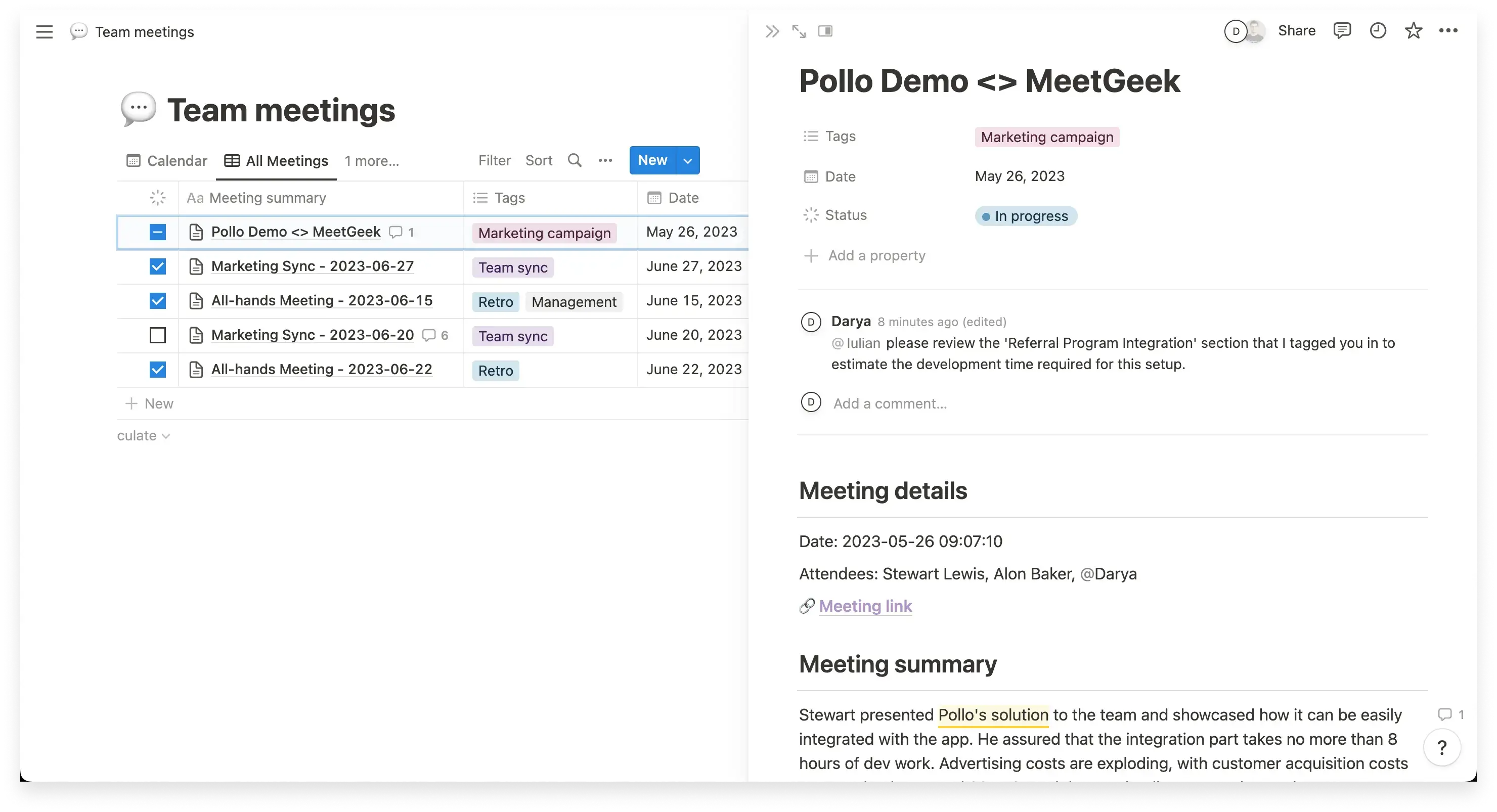
Das Ergebnis ist ein reibungsloserer Prozess von der Diskussion über die Dokumentation bis zur Ausführung.
Welchen Zweck erfüllen Besprechungsprotokolle?
Besprechungsprotokolle schaffen Klarheit aus Gesprächen. Wenn eine Besprechung endet, erinnern sich die Beteiligten oft an unterschiedliche Versionen des Gesagten. Protokolle schaffen eine gemeinsame schriftliche Aufzeichnung, die die wichtigsten Diskussionen, getroffenen Entscheidungen und zugewiesenen Aufgaben festhält, sodass alle Beteiligten auf dem gleichen Stand sind.
Einer ihrer Hauptzwecke ist es, eine offizielle Aufzeichnung zu erstellen. Ein gut geführtes Besprechungsprotokoll dokumentiert Datum, Uhrzeit, Ort, Teilnehmer, Tagesordnungspunkte und die wichtigsten Entscheidungen der Besprechung. Insbesondere in Vorstandssitzungen dienen Protokolle als rechtliche Dokumente. Sie können bei Audits oder Gerichtsverfahren überprüft werden, weshalb präzise Protokolle für den Rechtsschutz und die Einhaltung von Vorschriften unerlässlich sind. Vorstandsprotokolle tragen dazu bei, zu belegen, dass Entscheidungen sorgfältig und im Rahmen eines ordnungsgemäßen Genehmigungsprozesses getroffen wurden.
Besprechungsprotokolle sorgen auch für Verantwortlichkeit. Wenn Aufgaben in einer Besprechung besprochen werden, kann die Verantwortlichkeit im Nachhinein leicht unklar werden. Das Verfassen von Besprechungsprotokollen erzwingt Klarheit, indem die für jeden Aktionspunkt verantwortliche Person identifiziert und ein Fälligkeitsdatum festgelegt wird. Dies erleichtert die Verfolgung von Folgemaßnahmen vor der nächsten Besprechung. Anstatt sich auf das Gedächtnis zu verlassen, können sich die Besprechungsteilnehmer auf die schriftliche Aufzeichnung beziehen, um zu sehen, was vereinbart wurde.
Ein weiterer wichtiger Zweck ist die Verfolgung des Fortschritts im Laufe der Zeit. Die Überprüfung früherer Protokollentscheidungen ermöglicht es Teams zu sehen, ob Zusagen eingehalten wurden und ob strategische Ziele vorangetrieben werden. Dies ist besonders wichtig bei wiederkehrenden Unternehmensbesprechungen, Vorstandssitzungen und strategischen Planungssitzungen. Protokolle schaffen eine historische Aufzeichnung, die eine Besprechung mit der nächsten Vorstandssitzung verbindet und einen zuverlässigen Bezugspunkt für zukünftige Besprechungen bietet.
Besprechungsprotokolle tragen auch dazu bei, das gesamte Team auf dem gleichen Stand zu halten. Nicht jeder Stakeholder kann an jeder Besprechung teilnehmen. Das Teilen strukturierter Protokolle ermöglicht abwesenden Teilnehmern den Zugriff auf die wichtigsten Erkenntnisse, getroffenen Entscheidungen und nächsten Schritte, ohne dass eine separate Zusammenfassung erforderlich ist. Wenn sie an einem zentralen Ort mit einfachem Zugriff gespeichert werden, wird die Besprechungsdokumentation zu einer stabilen Quelle der Wahrheit.
Schließlich tragen effektive Besprechungsprotokolle dazu bei, unnötige zukünftige Besprechungen zu reduzieren. Wenn Entscheidungen klar festgehalten und Aktionspunkte zugewiesen werden, besteht weniger Notwendigkeit, dieselben Themen wiederholt zu behandeln. Eine klare Dokumentation fördert eine effektivere Besprechungskultur, in der Diskussionen zu Handlungen statt zu Verwirrung führen.
Wer ist für die Protokollführung verantwortlich?
Wer für die Protokollführung zuständig ist, hängt von der Art der Besprechung und der Struktur der Organisation ab.
In Vorstandssitzungen
Bei Vorstandssitzungen und Hauptversammlungen ist in der Regel der Schriftführer des Vorstands für die Protokollführung zuständig.
In diesem Kontext sind Protokolle:
- Teil der offiziellen Aufzeichnungen
- Unterstützen den Genehmigungsprozess
- Können bei Audits oder Gerichtsverfahren als rechtlicher Nachweis dienen
- Müssen Anträge, Abstimmungsergebnisse und wichtige Entscheidungen klar festhalten
Der Schriftführer des Vorstands arbeitet in der Regel eng mit dem Vorstandsvorsitzenden zusammen, um sicherzustellen, dass die Protokolle einem konsistenten und vorschriftsmäßigen Format entsprechen.
In Unternehmensbesprechungen
In weniger formellen Unternehmensbesprechungen fällt die Rolle oft an:
- Einen benannten Protokollanten
- Einen Projektmanager
- Eine Assistenz der Geschäftsleitung
- Einen anderen Besprechungsteilnehmer
Einige Teams verteilen die Verantwortung auf das gesamte Team. Während dies die Arbeitslast verteilt, kann es zu inkonsistenter Dokumentation führen, wenn keine standardisierte Vorlage für Besprechungsprotokolle vorhanden ist.
Sollte der Besprechungsleiter protokollieren?
In den meisten Fällen nicht.
Der Besprechungsleiter oder Vorsitzende sollte sich darauf konzentrieren, die Diskussion zu moderieren, Tagesordnungspunkte zu leiten und sicherzustellen, dass Entscheidungen getroffen werden. Der Versuch, gleichzeitig zu leiten und Protokoll zu führen, erhöht das Risiko, wichtige Details zu übersehen, während die Besprechung läuft.
Worauf es am meisten ankommt
Unabhängig davon, wer das Protokoll führt, sollte die verantwortliche Person:
- Die Tagesordnung und die Ziele der Besprechung verstehen
- Wissen, welcher Detaillierungsgrad erforderlich ist
- Wichtige Diskussionspunkte von Nebenbemerkungen unterscheiden können
- Genaue Protokolle erstellen, die Entscheidungen und Aufgaben klar festhalten
Ziel ist es, strukturierte Protokolle zu erstellen, die einen zuverlässigen Bezugspunkt für zukünftige Besprechungen bieten.
Was sollten Besprechungsprotokolle enthalten?
Besprechungsprotokolle sollten die wesentlichen Details einer Besprechung festhalten, ohne ein wortwörtliches Transkript zu sein. Ziel ist es, eine genaue Aufzeichnung zu erstellen, die widerspiegelt, was besprochen, entschieden und zugewiesen wurde.
Hier sind die Kernelemente, die jedes Besprechungsprotokoll enthalten sollte.
1. Besprechungsdetails
Jedes Protokoll sollte mit den grundlegenden Informationen zur Besprechung beginnen:
- Besprechungsname
- Besprechungsdatum
- Datum und Uhrzeit
- Besprechungsort
- Art der Besprechung, wie z.B. Vorstandssitzung oder Firmenversammlung
Diese Angaben bilden das offizielle Protokoll und liefern Kontext für spätere Bezugnahme.
2. Anwesenheit
Es ist wichtig, die Anwesenheit deutlich festzuhalten.
Dieser Abschnitt sollte Folgendes enthalten:
- Anwesende
- Abwesende Teilnehmer
- Verspätete Ankünfte, falls zutreffend
- Bestätigung der Beschlussfähigkeit bei Vorstandssitzungen
Die genaue Erfassung der Anwesenheit stärkt die Glaubwürdigkeit des Protokolls und unterstützt die Einhaltung von Vorschriften in formellen Kontexten.
3. Genehmigung des vorherigen Sitzungsprotokolls
Bei wiederkehrenden Sitzungen fügen Sie einen Vermerk hinzu, der bestätigt, ob die Protokolle der vorherigen Sitzung überprüft und genehmigt wurden.
Das Protokoll der Vorstandssitzung sollte Folgendes widerspiegeln:
- Ob das vorherige Sitzungsprotokoll genehmigt wurde
- Vorgenommene Korrekturen
- Bestätigung des Genehmigungsprozesses
Dieser Schritt bestätigt formell das schriftliche Protokoll.
4. Tagesordnungspunkte und zentrale Diskussionspunkte
Das Protokoll sollte der Tagesordnung der Sitzung folgen und jeden Tagesordnungspunkt in der Reihenfolge zusammenfassen, in der er besprochen wurde.
Unter jedem Tagesordnungspunkt sollten Sie Folgendes aufführen:
- Zentrale Diskussionspunkte
- Wichtige Details
- Relevante referenzierte Dokumente
- Alle in Vorstandssitzungen geprüften Finanzberichte
Konzentrieren Sie sich auf die Hauptpunkte und wichtigsten Informationen, anstatt auf persönliche Beobachtungen oder Nebengespräche.
5. Getroffene Entscheidungen
Jeder Beschluss sollte klar und prägnant festgehalten werden.
Dies kann beinhalten:
- Gestellte Anträge
- Angenommene oder abgelehnte Anträge
- Abstimmungsergebnisse
- Wichtige Entscheidungen bezüglich strategischer Planung oder Neugeschäft
In den Protokollen von Vorstandssitzungen ist es besonders wichtig, Anträge präzise festzuhalten und zu dokumentieren, wie Beschlüsse zustande kamen.
6. Maßnahmen und Verantwortliche
Das Sitzungsprotokoll sollte Folgemaßnahmen klar darlegen.
Jede Maßnahme sollte Folgendes festlegen:
- Die Aufgabe
- Die verantwortliche Person
- Das Fälligkeitsdatum
- Eventuell erforderliche nächste Schritte
Dies gewährleistet Rechenschaftspflicht und erleichtert die Fortschrittsverfolgung vor dem nächsten Meeting.
7. Informationen zum nächsten Meeting
Fügen Sie abschließend Details zum nächsten Meeting hinzu.
Dies umfasst typischerweise:
- Datum und Uhrzeit des nächsten Meetings
- Ort oder virtuelle Plattform
- Vorläufige Tagesordnungspunkte, falls verfügbar
Die Aufnahme dieser Informationen trägt dazu bei, die Kontinuität zwischen den Meetings zu gewährleisten.
Protokolle von Vorstandssitzungen: Was unterscheidet sie?
Protokolle von Vorstandssitzungen sind formeller als normale Besprechungsnotizen. Sie dienen als offizielles Protokoll der Vorstandssitzungen und können bei Audits oder Gerichtsverfahren überprüft werden. Aus diesem Grund müssen sie präzise, strukturiert und konsistent sein.
Im Gegensatz zu informellen Besprechungsdokumentationen müssen Protokolle von Vorstandssitzungen Anträge, Abstimmungsergebnisse, getroffene Entscheidungen und offengelegte Interessenkonflikte klar festhalten. Sie sollten bei Bedarf auch Finanzberichte, strategische Planungsdiskussionen und neue Geschäftsvorgänge erwähnen.
Sie folgen auch einem formellen Genehmigungsprozess. Protokollentwürfe werden auf der nächsten Vorstandssitzung geprüft und genehmigt. Nach der Genehmigung werden sie Teil der dauerhaften rechtlichen Unterlagen der Organisation und sollten für zukünftige Referenzzwecke sicher aufbewahrt werden.
Sitzungsprotokollvorlagen
Die Verwendung einer Sitzungsprotokollvorlage hilft Ihnen, organisiert zu bleiben und ein einheitliches Format beizubehalten. Sie beschleunigt auch das Verfassen von Sitzungsprotokollen, insbesondere bei wiederkehrenden Besprechungen.
Nachfolgend finden Sie zwei gängige Formate, die Sie an Ihre Bedürfnisse anpassen können.
Protokollvorlage für Vorstandssitzungen
Dieses Format eignet sich am besten für Vorstandssitzungen, Jahreshauptversammlungen und andere formelle Sitzungen, bei denen Protokolle als offizielle Aufzeichnung dienen.
Sitzungsname:
Sitzungsdatum:
Datum und Uhrzeit:
Sitzungsort:
Vorstandsvorsitzender:
Vorstandssekretär:
Anwesende Vorstandsmitglieder:
Abwesende Vorstandsmitglieder:
Genehmigung des Protokolls der vorherigen Sitzung:
Vermerken Sie, ob das Protokoll der vorherigen Sitzung genehmigt wurde, und halten Sie eventuelle Korrekturen fest.
Tagesordnungspunkte und zentrale Diskussionen:
Fassen Sie jeden Tagesordnungspunkt und die wichtigsten Diskussionspunkte zusammen.
Anträge und Beschlüsse:
Halten Sie vorgeschlagene Anträge, angenommene oder abgelehnte Anträge und Abstimmungsergebnisse fest.
Aktionspunkte:
Listen Sie zugewiesene Aufgaben, die verantwortliche Person und Fälligkeitsdaten auf.
Nächste Vorstandssitzung:
Geben Sie Datum und Uhrzeit der nächsten Sitzung an.
Sitzungsende:
Erfassen Sie den Zeitpunkt des Sitzungsendes.
Diese Vorlage für Vorstandssitzungsprotokolle unterstützt die Einhaltung von Vorschriften, den rechtlichen Schutz und eine klare historische Aufzeichnung.
Vorlage für informelles Besprechungsprotokoll
Dieses Format eignet sich gut für Unternehmensbesprechungen, Team-Abstimmungen oder Projektaktualisierungen.
Name der Besprechung:
Datum und Uhrzeit der Besprechung:
Teilnehmer:
Besprechungsziele:
Geben Sie kurz den Zweck der Besprechung an.
Zusammenfassung der Diskussion:
Erfassen Sie die Hauptpunkte und wichtigen Informationen unter jedem Tagesordnungspunkt.
Getroffene Entscheidungen:
Wichtige Entscheidungen klar hervorheben.
Aktionspunkte und nächste Schritte:
Verantwortliche und Fälligkeitsdaten festlegen.
Nächstes Treffen:
Datum und Uhrzeit angeben, falls bekannt.
Machen Sie sich Besprechungsprotokolle zunutze
Besprechungsprotokolle sollten Ihre Arbeit erleichtern, nicht erschweren.
Im Grunde sind sie einfach eine klare schriftliche Aufzeichnung dessen, was passiert ist, was entschieden wurde und was als Nächstes geschehen muss. Wenn sie gut strukturiert sind, beugen sie Verwirrung vor, reduzieren wiederholte Gespräche und helfen allen, zwischen der vorherigen und der nächsten Besprechung auf dem gleichen Stand zu bleiben.
Sie brauchen kein wortwörtliches Transkript. Sie brauchen Klarheit. Konzentrieren Sie sich auf die wichtigsten Diskussionspunkte, getroffene Entscheidungen und Aktionspunkte mit verantwortlicher Person und Fälligkeitsdatum. Halten Sie das Format konsistent. Speichern Sie alles an einem zentralen Ort, damit es später leicht zu finden ist.
Bei Vorstandssitzungen sind Protokolle noch wichtiger. Sie werden Teil der offiziellen Aufzeichnungen und können als rechtliche Dokumentation dienen. Ein paar zusätzliche Minuten aufzuwenden, um die Genauigkeit zu gewährleisten und den Genehmigungsprozess einzuhalten, schützt sowohl die Organisation als auch die beteiligten Vorstandsmitglieder.
Wenn das Schreiben von Besprechungsprotokollen immer noch zeitaufwendig erscheint, können Tools wie MeetGeek die Aufzeichnung, Transkription, Zusammenfassungen und die Verfolgung von Aktionspunkten übernehmen. MeetGeek kostenlos testen damit Sie sich auf die Diskussion konzentrieren und anschließend strukturierte Protokollentwürfe verfeinern können.
Häufig gestellte Fragen
Welchen Zweck haben Besprechungsprotokolle?
Der Zweck von Besprechungsprotokollen ist es, eine offizielle schriftliche Aufzeichnung eines Meetings zu erstellen. Sie dokumentieren das Datum des Meetings, die Teilnehmer, die Tagesordnungspunkte, wichtige Diskussionspunkte, getroffene Entscheidungen und Aufgaben. Besprechungsprotokolle tragen dazu bei, die Verantwortlichkeit sicherzustellen, den Fortschritt zu verfolgen und einen Bezugspunkt für zukünftige Meetings zu bieten. Bei Vorstandssitzungen können Protokolle auch als rechtliche Dokumente dienen.
Was sollten Besprechungsprotokolle enthalten?
Besprechungsprotokolle sollten das Datum und die Uhrzeit des Meetings, den Ort, die Teilnehmer, die Genehmigung früherer Protokolle, die Tagesordnungspunkte, wichtige Diskussionen, getroffene Entscheidungen, zugewiesene Aufgaben, verantwortliche Personen, Fälligkeitstermine und das Datum des nächsten Meetings enthalten. Bei Vorstandssitzungsprotokollen ist es zudem wichtig, Anträge, Abstimmungsergebnisse und etwaige Interessenkonflikte zu vermerken.
Sind Besprechungsprotokolle gesetzlich vorgeschrieben?
Besprechungsprotokolle sind oft gesetzlich vorgeschrieben für Vorstandssitzungen, Jahreshauptversammlungen und gemeinnützige Organisationen. Sie können bei Audits oder Gerichtsverfahren überprüft werden und dienen als offizielle Aufzeichnungen von Governance-Entscheidungen. Obwohl nicht alle Unternehmensmeetings formelle Protokolle erfordern, gilt die Führung genauer Dokumentationen als bewährte Praxis.
Wie detailliert sollten Besprechungsprotokolle sein?
Besprechungsprotokolle sollten detailliert genug sein, um Entscheidungen, Aufgaben und wichtige Diskussionspunkte klar festzuhalten, aber sie sollten kein wörtliches Transkript sein. Ziel ist es, eine genaue Aufzeichnung in prägnanter Sprache zu erstellen und dabei persönliche Meinungen oder unnötige Details zu vermeiden.
Wann sollten Besprechungsprotokolle verteilt werden?
Besprechungsprotokolle sollten so schnell wie möglich nach dem Meeting verteilt werden, idealerweise innerhalb von 24 bis 48 Stunden. Eine schnelle Verteilung trägt dazu bei, die Genauigkeit zu gewährleisten, solange die Diskussion noch frisch ist, und ermöglicht es den Teilnehmern, mit den Folgemaßnahmen vor dem nächsten Meeting zu beginnen.








.avif)