


A meeting agenda example is a ready-made running order for one type of meeting: what you will cover, in what order, for how long, who leads each item and what the group should leave with. Below are 15 you can copy, from a 15-minute daily stand-up to a two-hour board meeting.
Every example uses the same format, so you can swap items in and out without rebuilding the structure. The timings are suggestions that add up to the full slot. Trim or stretch them to fit the time you have.
Which Agenda Example Do You Need?
Find your meeting in the table and jump to its agenda below. Lengths and cadences are common starting points, not rules. For a department-wide staff meeting, use our staff meeting agenda template instead.
| Meeting | Length | How Often | Usually Run By |
|---|---|---|---|
| Weekly Team Meeting | 45 minutes | Weekly | Team lead |
| One-on-One Meeting | 30 minutes | Weekly or every two weeks | Employee, with the manager |
| Project Kickoff Meeting | 90 minutes | Once, at the start of a project | Project manager |
| Project Status Meeting | 30 minutes | Weekly or every two weeks | Project manager |
| Project Retrospective | 60 minutes | End of each sprint or project | Facilitator |
| Board Meeting | 2 hours | Quarterly, or as your bylaws set | Board chair |
| All-Hands Meeting | 45 minutes | Monthly or quarterly | CEO or leadership team |
| Skip-Level Meeting | 45 minutes | Quarterly | Senior leader |
| Performance Review Meeting | 60 minutes | Once or twice a year | Manager |
| Brainstorming Meeting | 60 minutes | As needed | Facilitator |
| Client Meeting | 45 minutes | Weekly, monthly or per project milestone | Account or project manager |
| Daily Stand-Up | 15 minutes | Daily | Team lead or Scrum Master |
| Sales Team Meeting | 45 minutes | Weekly | Sales manager |
| Executive Team Meeting | 90 minutes | Weekly or every two weeks | CEO |
| Stakeholder Project Check-In | 30 minutes | Monthly | Project manager |
What Every Agenda Example Includes
Each agenda below has the same parts. If you are starting from a blank page instead, our free meeting agenda template has the empty version, and our guide on how to write a meeting agenda covers the process step by step.
- Purpose: one sentence on why the meeting exists, so people can tell if they need to be there;
- Attendees: who joins, and who runs the meeting;
- Time: minutes per item, adding up to the length of the slot;
- Item: written as a question where possible, such as "What is blocking us?" instead of "Blockers";
- Owner: the person who leads each item and prepares for it;
- Outcome: whether the item is there to inform, to discuss or to decide;
- Follow-up: what gets sent after the meeting, and by whom.
The Item and Outcome parts follow advice by Roger Schwarz in Harvard Business Review: phrase topics as questions, and say whether each one is there to share information, gather input or make a decision.
15 Free Meeting Agenda Examples
Copy the agenda that best fits your meeting, then adjust the topics, timings and owners to suit your team. Replace any placeholders in square brackets with your own details.
1. Weekly Team Meeting Agenda
Use this for a recurring team sync. It opens by checking last week's action items, so unfinished ones are not forgotten between meetings. For more ideas on running the meeting itself, see our tips for effective team meetings.
Length: 45 minutes · How often: Weekly
Purpose: Check last week's commitments, clear blockers and agree on this week's priorities.
Attendees: The whole team
| Time | Item | Owner | Outcome |
|---|---|---|---|
| 5 min | Wins since last week | Everyone | Inform |
| 10 min | Last week's action items: done, late or blocked? | Team lead | Inform |
| 15 min | What is blocking us, and who can unblock it? | Owners of blocked work | Decide |
| 10 min | Priorities for the coming week | Team lead | Decide |
| 5 min | Recap of owners and due dates | Note-taker | Inform |
Follow-up: Send the recap with every action item, its owner and its due date within 24 hours.
This example fits in 45 minutes. Many weekly team meetings run longer: in MeetGeek's analysis of 1 million recorded meetings, 23.5% of weekly team meetings ran an hour or more.
2. One-on-One Meeting Agenda
In a 1:1, most of the time goes to the employee's topics. Keep a shared doc where both of you add items during the week. Our guide to one-on-one meetings covers the questions to ask.
Length: 30 minutes · How often: Weekly or every two weeks
Purpose: Give the employee time to raise what matters to them and agree on support.
Attendees: Manager and direct report
| Time | Item | Owner | Outcome |
|---|---|---|---|
| 5 min | How are things going? | Employee | Discuss |
| 10 min | Employee's topics, added to the shared doc beforehand | Employee | Discuss |
| 10 min | Feedback in both directions | Manager and employee | Discuss |
| 5 min | Next steps and the support needed | Manager | Decide |
Follow-up: Add the agreed next steps to the shared doc, so the next 1:1 starts from them.
Book the full 30 minutes and end early if you have covered everything. Real 1:1s vary a lot in length: MeetGeek's analysis of 1 million recorded meetings shows that 23.3% of 1:1s ended within 15 minutes, while 14.9% ran past the hour.
3. Project Kickoff Meeting Agenda
At a kickoff, everyone hears the same goals, scope and roles at the same time. Send the project brief a few days before, so the meeting can focus on questions and decisions. For the full process, see our project kickoff meeting playbook.
Length: 90 minutes · How often: Once, at the start of a project
Purpose: Agree on goals, scope, roles and ways of working before the work starts.
Attendees: Sponsor, project manager, team leads and the project team
| Time | Item | Owner | Outcome |
|---|---|---|---|
| 5 min | Welcome and introductions | Project manager | Inform |
| 10 min | Why this project, and what does success look like? | Sponsor | Inform |
| 15 min | Scope: what is in and what is out | Project manager | Decide |
| 15 min | Timeline and milestones | Project manager | Discuss |
| 15 min | Who owns what? | Project manager | Decide |
| 10 min | Risks and dependencies | Team leads | Discuss |
| 10 min | How will we communicate, and how often? | Project manager | Decide |
| 10 min | Questions and next steps | Everyone | Inform |
Follow-up: Share the project brief, the roles list and the first milestone date the same day.
4. Project Status Meeting Agenda
A good default is to keep status meetings short and spend the time on risks rather than on reading out updates. Ask team leads to post written updates before the meeting, then use the slot for anything at risk.
Length: 30 minutes · How often: Weekly or every two weeks
Purpose: Show where the project stands and decide what to do about anything at risk.
Attendees: Project manager and team leads
| Time | Item | Owner | Outcome |
|---|---|---|---|
| 5 min | Status at a glance: on track, at risk or late? | Project manager | Inform |
| 10 min | Progress since the last meeting, by workstream | Team leads | Inform |
| 10 min | Risks and blockers that need a decision | Project manager | Decide |
| 5 min | Actions, owners and dates | Project manager | Inform |
Follow-up: Update the project tracker and flag any changed date to stakeholders.
Thirty minutes is a realistic slot for this format. MeetGeek's analysis of 1 million recorded meetings shows that 47.1% of project status updates end within 30 minutes.
5. Project Retrospective Agenda
Run a retrospective at the end of each sprint or project, before the details fade. Starting with the actions from the last retro lets the team check whether earlier suggestions were acted on. Our retrospective meeting template has five other formats if this one gets stale.
Length: 60 minutes · How often: End of each sprint or project
Purpose: Learn from the last sprint or project and pick a few changes to try.
Attendees: The whole project or sprint team
| Time | Item | Owner | Outcome |
|---|---|---|---|
| 5 min | Goal of the retro and ground rules | Facilitator | Inform |
| 10 min | Did we do what we agreed at the last retro? | Facilitator | Inform |
| 15 min | What went well? | Everyone | Discuss |
| 15 min | What did not go well, and why? | Everyone | Discuss |
| 10 min | Which two or three changes will we try? | Everyone | Decide |
| 5 min | An owner for each change | Facilitator | Decide |
Follow-up: Post the chosen changes where the team will see them during the next sprint.
6. Board Meeting Agenda
Board meetings usually follow a fixed order set by the organization's bylaws, so check yours before you adapt this one. Send the board pack, including the previous minutes and the financial report, at least a few days in advance.
Length: 2 hours · How often: Quarterly, or as your bylaws set
Purpose: Review performance, approve key decisions and meet the board's governance duties.
Attendees: Board members, CEO or executive director, board secretary
| Time | Item | Owner | Outcome |
|---|---|---|---|
| 5 min | Call to order and quorum check | Chair | Inform |
| 5 min | Approval of the previous minutes | Chair | Decide |
| 20 min | CEO or executive director report | CEO | Inform |
| 20 min | Financial report | Treasurer or CFO | Discuss |
| 30 min | Strategic item: [for example, next year's budget] | CEO | Decide |
| 15 min | Committee reports | Committee chairs | Inform |
| 10 min | Other business | Chair | Discuss |
| 10 min | Executive session, board members only | Chair | Discuss |
| 5 min | Adjournment | Chair | Inform |
Follow-up: The secretary drafts the minutes for approval at the next board meeting.
The minutes of this meeting may become an official record, so the board secretary should take them with care. Our board meeting minutes template follows the same order as this agenda.
7. All-Hands Meeting Agenda
An all-hands meeting gives the whole company the same updates at the same time. Collect questions in advance, including anonymous ones, so the Q&A covers what people actually want to ask. MeetGeek also has an all-hands meeting template you can use in the app.
Length: 45 minutes · How often: Monthly or quarterly
Purpose: Share company results and plans with everyone, and answer their questions.
Attendees: All employees
| Time | Item | Owner | Outcome |
|---|---|---|---|
| 5 min | Welcome and today's agenda | CEO | Inform |
| 10 min | Company results since the last all-hands | CEO | Inform |
| 10 min | Team spotlights | Team leads | Inform |
| 5 min | What is changing: launches, policies, new hires | People or HR lead | Inform |
| 15 min | Open Q&A, with questions collected in advance | Leadership team | Discuss |
Follow-up: Share the slides and the answers to any questions you could not cover live.
8. Skip-Level Meeting Agenda
In a skip-level meeting, a senior leader meets employees two levels below them, without their direct manager present. The goal is to listen, so the leader speaks for a few minutes at the start and the end, and the employees use the rest.
Length: 45 minutes · How often: Quarterly
Purpose: Hear directly from employees two levels down, without their manager in the room.
Attendees: A senior leader and a small group of employees from one team
| Time | Item | Owner | Outcome |
|---|---|---|---|
| 5 min | Purpose of the meeting and how feedback will be used | Senior leader | Inform |
| 10 min | What is working well on your team? | Employees | Discuss |
| 15 min | What is getting in your way? | Employees | Discuss |
| 10 min | Questions for leadership | Employees | Discuss |
| 5 min | What I will follow up on, and by when | Senior leader | Decide |
Follow-up: Report back on each follow-up item, even when the answer is no.
9. Performance Review Meeting Agenda
Ask the employee to complete a self-assessment before the meeting, and share your own notes ahead of time if your process allows it. If you need a form to go with this agenda, see our performance review template.
Length: 60 minutes · How often: Once or twice a year
Purpose: Review the period against goals and agree on goals and development for the next one.
Attendees: Manager and employee, with HR if your process requires it
| Time | Item | Owner | Outcome |
|---|---|---|---|
| 5 min | Purpose and how the conversation will run | Manager | Inform |
| 15 min | Employee's self-assessment | Employee | Discuss |
| 15 min | Manager's assessment against the agreed goals | Manager | Discuss |
| 10 min | Development: skills, growth and support | Manager and employee | Discuss |
| 10 min | Goals for the next period | Manager and employee | Decide |
| 5 min | Next steps and the date of the first check-in | Manager | Decide |
Follow-up: Write up the agreed goals and share them with the employee within a week.
10. Brainstorming Meeting Agenda
A brainstorming session works better when it starts with one clear question and separates idea generation from evaluation. Our guide on how to run a brainstorming session covers techniques for the idea round.
Length: 60 minutes · How often: As needed
Purpose: Generate options for one clear question, then pick the few worth testing.
Attendees: Four to eight people with different perspectives on the problem
| Time | Item | Owner | Outcome |
|---|---|---|---|
| 5 min | The question we are answering today | Facilitator | Inform |
| 20 min | Generate ideas, without judging them yet | Everyone | Discuss |
| 10 min | Group similar ideas | Facilitator | Discuss |
| 15 min | Vote on the strongest ideas | Everyone | Decide |
| 10 min | Next steps for the top two or three | Facilitator | Decide |
Follow-up: Send the full idea list and the shortlist, with an owner for each next step.
11. Client Meeting Agenda
Send this agenda to the client in advance and ask what they want to add. Set aside enough time for decisions that require the client's input. If a decision cannot be made during the meeting, agree on who will make it and by when.
Length: 45 minutes · How often: Weekly, monthly or per project milestone
Purpose: Update the client, collect feedback and get the decisions you need from them.
Attendees: Client contacts, account manager, project manager and specialists as needed
| Time | Item | Owner | Outcome |
|---|---|---|---|
| 5 min | Introductions and the goal for today | Account manager | Inform |
| 10 min | Progress since the last meeting | Project manager | Inform |
| 15 min | Client feedback and open questions | Client | Discuss |
| 10 min | Decisions we need from the client | Account manager | Decide |
| 5 min | Next steps and the next meeting date | Account manager | Inform |
Follow-up: Send a written summary of decisions and next steps the same day.
12. Daily Stand-Up Agenda
The Scrum Guide sets a 15-minute timebox for the Daily Scrum, but does not require teams to follow the traditional three-question format. The example below uses those questions as a simple starting point, with longer discussions handled afterwards. Our stand-up meeting guide explains other formats.
Length: 15 minutes · How often: Daily
Purpose: Check progress toward the current goal and spot blockers early.
Attendees: The delivery team
| Time | Item | Owner | Outcome |
|---|---|---|---|
| 10 min | Progress since yesterday, plan for today, anything blocking you | Each team member | Inform |
| 3 min | Blockers that need someone's help | Team lead | Decide |
| 2 min | Topics to take offline after the stand-up | Team lead | Inform |
Follow-up: Whoever owns a blocker follows up straight after the stand-up.
13. Sales Team Meeting Agenda
A weekly sales meeting should spend more time on moving deals than on reading out numbers. Share the pipeline report before the meeting, so the numbers item stays short. Our guide to sales meetings has more agenda ideas.
Length: 45 minutes · How often: Weekly
Purpose: Review numbers against target, move stuck deals and sharpen one skill.
Attendees: Sales manager and sales reps
| Time | Item | Owner | Outcome |
|---|---|---|---|
| 5 min | Wins of the week | Sales manager | Inform |
| 10 min | Pipeline and closed deals against target | Sales manager | Inform |
| 15 min | Deal review: two or three stuck deals and how to move them | Reps | Discuss |
| 10 min | Skill focus: one objection or talk track | Sales manager | Discuss |
| 5 min | Priorities and actions for next week | Sales manager | Decide |
Follow-up: Update the CRM with the next step agreed for each deal reviewed.
14. Executive Team Meeting Agenda
Leadership meetings can fill up with updates that could be shared in writing instead. This agenda keeps the largest block for one decision that needs the whole team, and ends by agreeing what the rest of the company should hear.
Length: 90 minutes · How often: Weekly or every two weeks
Purpose: Track company performance and make the decisions that need the whole leadership team.
Attendees: CEO and the leadership team
| Time | Item | Owner | Outcome |
|---|---|---|---|
| 10 min | Key metrics against plan | CEO | Inform |
| 15 min | Progress on this year's strategic priorities | Executives | Inform |
| 30 min | Main decision of the meeting: [issue] | Executive who owns the issue | Decide |
| 15 min | Cross-team issues and resourcing | Executives | Decide |
| 10 min | What do we tell the rest of the company? | CEO | Decide |
| 10 min | Recap of decisions and owners | Chief of staff or note-taker | Inform |
Follow-up: Share the decisions, and what each team needs to know, within a day.
15. Stakeholder Project Check-In Agenda
This is the monthly meeting for sponsors and stakeholders, not the project team. The status meeting in example 4 covers day-to-day progress. This one covers budget, risk and approvals.
Length: 30 minutes · How often: Monthly
Purpose: Give sponsors a view of budget, risk and scope, and get approval for changes.
Attendees: Project manager, sponsor and key stakeholders
| Time | Item | Owner | Outcome |
|---|---|---|---|
| 5 min | Overall status against the plan | Project manager | Inform |
| 10 min | Budget: spent, remaining and forecast | Project manager | Inform |
| 10 min | Top risks: what has changed? | Project manager | Discuss |
| 5 min | Changes to scope, timeline or budget to approve | Sponsor | Decide |
Follow-up: Record approved changes in the project plan and tell the team what changed.
How to Use These Examples
An agenda is more useful when attendees receive it in advance and follow it during the meeting. A 2009 study by Leach and colleagues, published in the Journal of Business and Psychology found that agenda use was associated with higher perceived meeting effectiveness.
A few habits that help:
- Send it a day ahead: give people time to prepare, and ask them to add items before a set deadline;
- Keep a parking lot: note off-topic points in a list and decide at the end where each one goes;
- Close on owners and dates: read back every action item before people leave.
In Microsoft's 2023 Work Trend Index, 55% of people said next steps are unclear at the end of a meeting, and inefficient meetings ranked as the top productivity disruptor.
From Agenda to Action Items
An agenda tells everyone what to discuss. It does not record what was decided, who agreed to do what, or which item ran out of time. That usually ends up in one person's notes, written while they were also trying to take part.
MeetGeek helps capture what happens during your meetings. It can record and transcribe Zoom, Google Meet and Microsoft Teams calls, then generate summaries with decisions and action items. On paid plans, MeetGeek meeting templates let you set the agenda, the highlights and the summary sections for each type of meeting, and MeetGeek can match each call to the right template automatically. Your weekly team meeting gets a weekly team summary, and your client call gets a client summary.
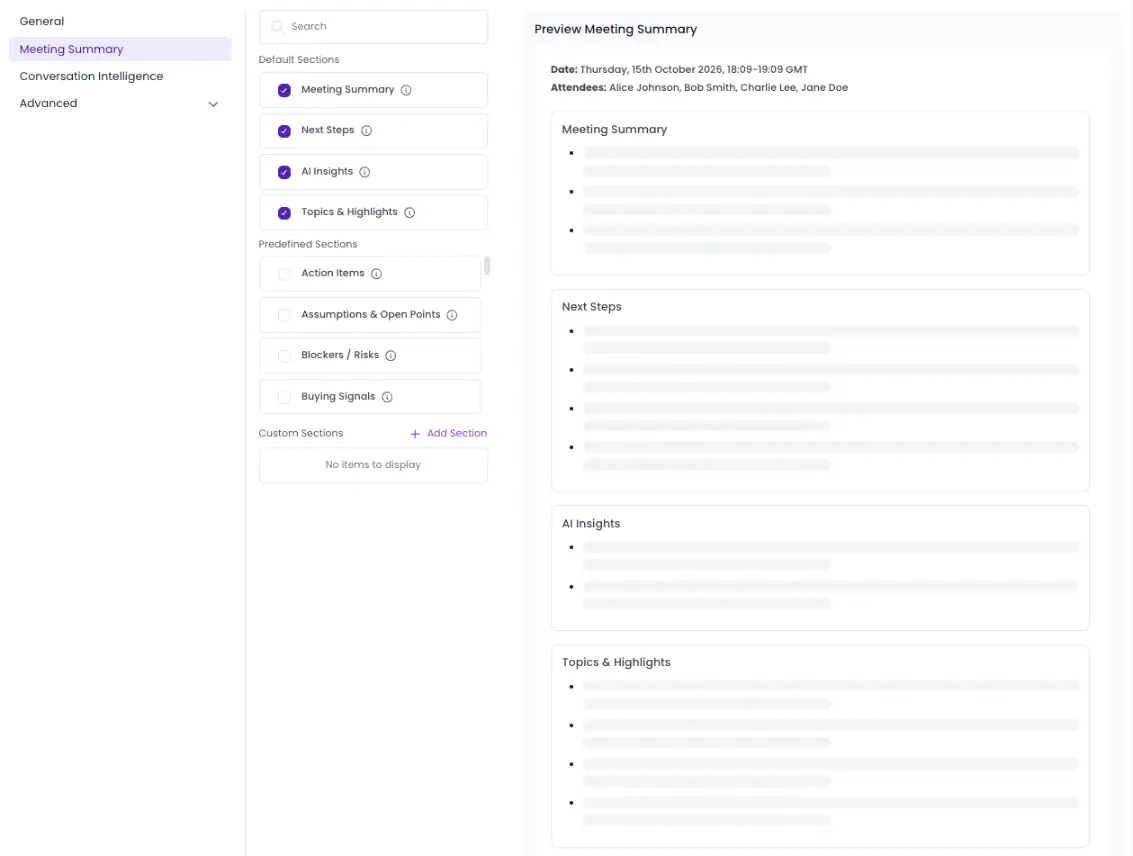
After the call, you can send notes and action items to tools such as Notion or HubSpot on paid plans, or set up a Meeting Skill like the Weekly Recap & Action Digest to collect open items across meetings. You can use that list as the first item on next week's agenda. The free plan includes 3 hours of transcription a month.
Key Takeaways
- A useful agenda lists the time, owner and expected outcome for every item, not just the topics;
- Writing items as questions and marking which ones need a decision helps people prepare;
- Timings should add up to the slot you booked, so the last items are not rushed;
- Sending the agenda a day ahead gives attendees time to prepare and add their own items;
- Every meeting should end with action items that have an owner and a due date.
Frequently Asked Questions
What Should Be Included in a Meeting Agenda?
A meeting agenda should include the purpose of the meeting, the attendees, the items to cover with the time for each, who leads each item, and what each item should achieve. Adding a follow-up line makes it clear who sends the notes and action items afterwards.
How Far in Advance Should You Send a Meeting Agenda?
A day ahead is a good default for most team meetings, so people can prepare and add their own items. Board and committee meetings often have notice periods set in the bylaws, and complex meetings with pre-reads usually need a few days.
How Many Items Should a Meeting Agenda Have?
There is no fixed number, but a good default is three to six items for a 30 to 60 minute meeting. If the estimated times exceed the meeting's duration, remove or reschedule some items instead of rushing through them.
Can I Use the Same Agenda for Every Recurring Meeting?
Yes, a fixed structure works well for recurring meetings such as weekly team meetings, stand-ups and 1:1s, because people know what to prepare. Keep the structure and update the items each time, starting with the action items from the last meeting.







.avif)