
By clicking “Accept All Cookies”, you agree to the storing of cookies on your device to enhance site navigation, analyze site usage, and assist in our marketing efforts. View our Privacy Policy for more information.
MeetGeekBlogThe Agile Retrospective Meeting Template: 5 Formats That Work
Back to Blog

The Agile Retrospective Meeting Template: 5 Formats That Work

Meetings
Meetings
Templates
Templates

Five retro formats (Start/Stop/Continue, 4Ls, Mad/Sad/Glad, Sailboat, DAKI), when to use each, and the commitment step that turns talk into change.

Mariana Oliveira
May 7, 2026
/
5 min read
Table of content
Get started with MeetGeek AI Meeting Assistant:
📝 AI-powered Meeting Note taker
✅ Free meeting recording & transcription
💬 Automated sharing of insights to other tools.
Sign Up for Free
Share the knowledge with your circle
Copied

A retrospective meeting (retro for short) is a recurring team meeting at the end of a sprint or project phase. The team reflects on what happened, decides what to keep, and commits to what will change next.

It's the smallest unit of continuous improvement in agile, codified in the Scrum Guide by Ken Schwaber and Jeff Sutherland, and echoed in the Agile Manifesto's twelfth principle. In most teams it's also the meeting that quietly loses its edge first.

Most retros don't fail at the format. They fail at the commitment step — the one minute at the end where every decision gets a name, a date, and a tracker. The format you pick matters less than whether you actually run that step.

Why retros go stale?

A retro goes stale in one of three ways.

The first is repetition. Same three complaints every sprint, same silent agreement, nothing changes. The team learns that the retro is where things are said, not where they get fixed.

The second is safety. If the team doesn't feel safe naming real problems, the retro becomes a polite ritual. This is especially true for problems with leadership, a specific person, or a decision the company made. The real conversation happens in side channels. Amy Edmondson's research on psychological safety at Harvard Business School is the underpinning literature here; the Agile Alliance and Mountain Goat Software (founded by Mike Cohn) both cite it in retrospective guidance.

The third is scope creep. The retro turns into a venting session about everything that's wrong with the company, including things the team can't influence. Energy leaks; nothing lands.

Most retro fixes target the format. The more common fix is upstream: whether the team is allowed to say true things, and whether the team's commitments actually track.

What a good retrospective meeting produces

Before picking a format, know what the retro is supposed to leave behind. A healthy retro produces four things:

  • A short list of committed changes for the next sprint, with owners and dates
  • One celebrated win worth repeating, not just a note-to-self
  • A named risk or blocker that wasn't being tracked and now is
  • A pulse on how the team is feeling, measurable or felt, but captured

If a retro ends with three of four, it was a good one. If it ends with zero, the format or the facilitation is wrong, not the team.

The 5 retro formats (and when to use each)

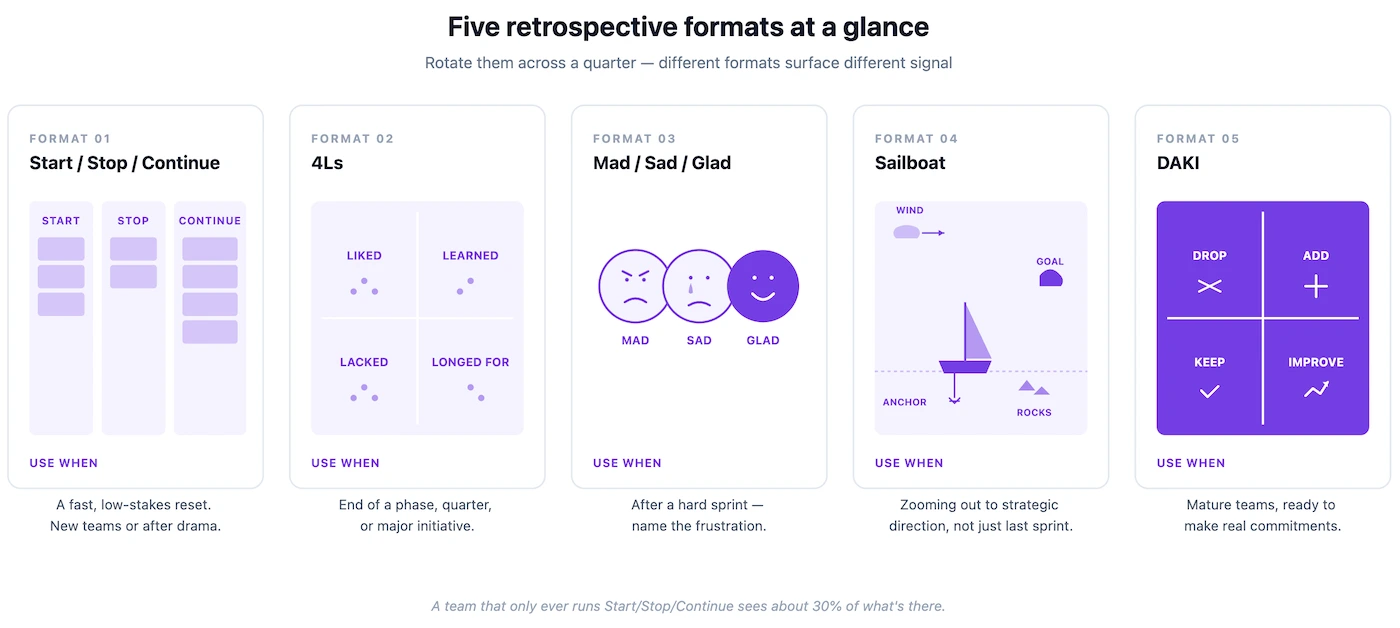
No single format fits every team every sprint. The strongest retro facilitators rotate.
1. Start / Stop / Continue

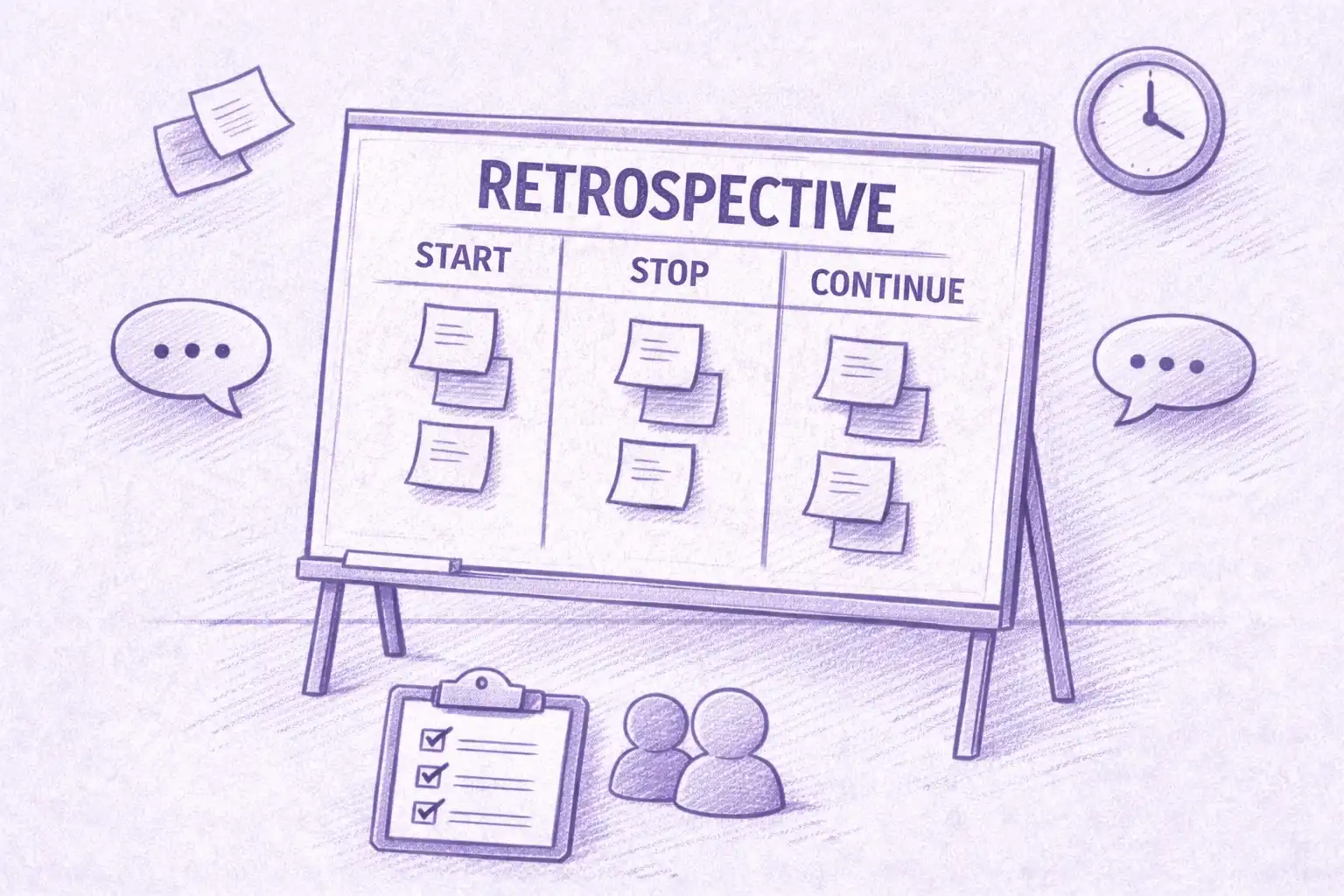
Three columns. What should we start doing? What should we stop doing? What should we continue?

Best for: teams new to retros, or teams that need a fast, clean reset after drama. Runs 30–45 minutes.

Template:

  • Start (5–7 min silent input + 10 min group)
  • Stop (5–7 min silent input + 10 min group)
  • Continue (3–5 min silent input + 5–7 min group)
  • Action items (5 min)

When not to use: when the team is stuck in repetition. Start/Stop/Continue is easy to fill with the same items every sprint, which hides the deeper problem.

2. 4Ls: Liked / Learned / Lacked / Longed For

Four prompts. What did you like? What did you learn? What did you feel lacked? What did you long for? The 4Ls format is attributed to Mary Gorman and Ellen Gottesdiener of EBG Consulting.

Best for: end of a project phase, a quarter, or a major initiative. Good at surfacing team growth and career signal, not just process friction.

Template:

  • Silent input for each L (3 min each)
  • Group discussion, one L at a time (7–10 min each)
  • Action items (5 min)

When not to use: routine mid-sprint retros. 4Ls takes emotional energy that doesn't recharge every two weeks.

3. Mad / Sad / Glad

Three emotions. What made you mad? What made you sad? What made you glad?

Best for: teams coming off a hard sprint or incident. Permission to name frustration directly without dressing it up as process language.

Template:

  • Silent input per emotion (3–5 min each)
  • Group, one emotion at a time, with a no-debate rule on naming (7–10 min each)
  • What do we want to do about it? (10 min)

Watch the safety dynamics here. The Mad column can either unstick a team or harden a grudge, depending on the facilitator. If your team is newly formed or already fragile, choose a different format until trust is established.

4. Sailboat

A visual metaphor. Draw a sailboat on a shared board (Miro, Mural, FunRetro, Retrium, EasyRetro, Parabol, or a whiteboard on Zoom or Google Meet). The sail is the wind (what's pushing us forward). The anchor is what's holding us back. The rocks are risks ahead. The island is the goal we're sailing toward. The Sailboat retrospective is associated with Luke Hohmann's Innovation Games methodology.

Best for: teams that respond better to visuals than lists, or teams that need to talk about strategic direction, not just the last sprint.

Template:

  • Set the island (the goal) at the top, 2 min group alignment
  • Silent input across wind, anchor, rocks (10 min)
  • Group discussion, one element at a time (10–15 min)
  • Action items, framed as "how do we raise the sail / cut the anchor / avoid the rocks?" (5–7 min)

When not to use: teams that find metaphors annoying. Some teams love Sailboat; others find it twee. Read the room.

5. DAKI: Drop / Add / Keep / Improve

Four buckets. What should we drop entirely? What should we add? What's working that we should keep? What's almost working that we should improve?

Best for: mature teams where the discussion is already specific. DAKI forces commitment in a way Start/Stop/Continue sometimes doesn't. You're not just starting something, you're adding or dropping it.

Template:

  • Silent input for each bucket (3 min each)
  • Group discussion (8 min each)
  • Vote on the top 1–2 per bucket (5 min)
  • Action items (5 min)

When not to use: teams that haven't yet agreed on their core practices. DAKI assumes a baseline to drop or improve from.

How to rotate formats across a quarter

A practical rotation that keeps retros fresh across a 6-sprint quarter:

  • Sprint 1: Start/Stop/Continue (fast, low-stakes reset)
  • Sprint 2: Start/Stop/Continue (spot patterns across sprints)
  • Sprint 3: DAKI (force commitment)
  • Sprint 4: Sailboat (zoom out to strategic direction)
  • Sprint 5: Mad/Sad/Glad or ESVP (Explorer, Shopper, Vacationer, Prisoner) for an emotional check-in mid-quarter
  • Sprint 6: 4Ls (quarter-end reflection)

The point of rotation isn't novelty for its own sake. Different formats surface different signal. A team that only ever runs Start/Stop/Continue sees 30% of what's there. Scrum teams working inside Scaled Agile Framework (SAFe), Large-Scale Scrum (LeSS), Scrum@Scale, or a Kanban setup should also rotate at the program level (the SAFe Inspect & Adapt ceremony plays the same role at the program increment).

The missing 10%: commitment and ownership

Here's the piece most retros skip, and why most retros don't change anything.

A retro that ends with "we should do X" without a name and a date attached is a retro that didn't end. You had a discussion. You did not make a decision. Martin Fowler and the Pragmatic Bookshelf's Agile Retrospectives (Esther Derby, Diana Larsen) have been pointing at this gap since 2006.

The missing 10% is the commitment step. Before anyone leaves the room:

  • Every action item has one owner (not two, not a team, one person)
  • Every action item has a decide-by or deliver-by date
  • Every action item is either going into the team's task tracker (Jira, Linear, ClickUp, Asana, or Azure DevOps) in the next 10 minutes or is not a real commitment

Retros without this step are how teams end up discussing the same three complaints for six months. Retros with it turn into the most valuable 45 minutes of the sprint.

A useful discipline: cap the team at three action items per retro. Teams that commit to ten commit to none. Three is enough to move the needle; ten is a wish list.

The one question that fixes a stale retro

When a retro has gone flat (same people, same complaints, no energy), ask this:

"What's a thing we're all aware is broken, but nobody has named yet because it would be uncomfortable to name?"

Then wait. Don't fill the silence. The first answer is usually the real answer.

This question works because it gives the team explicit permission to name the elephant. Most retros fail because the team is avoiding something. That something is a person, a decision, or a priority. The format is giving them plausible cover. Asking directly removes the cover.

Not every retro needs this. A healthy team working on healthy problems can run Start/Stop/Continue forever. But the first time a retro feels hollow, this is the unlock.

Running retros in remote and hybrid teams

Remote retros demand more deliberate silence than in-person ones. The dominant voice wins faster on a video call (Zoom, Google Meet, Microsoft Teams, Webex). Three adjustments:

  • Silent input first, always. Every format starts with individual written input in a shared board before any discussion.
  • Round-robin, not volunteer. When moving to discussion, go around the screen in order rather than taking volunteers. Otherwise you hear from the same three people every sprint.
  • Write the decisions in the same doc. No side notes, no "I'll send a recap later." If it's not in the shared doc by the end, it didn't happen.

Record the retro. Not to police anyone. Do it to preserve the decisions and the reasoning. Three audiences use the recording: the team member on PTO, the new hire who joins next sprint, and the future retro where someone asks "wait, didn't we already decide this?"

For hybrid retros (some in the room, some remote), put everyone on their own laptop. That rule applies even to the people physically in the room. The asymmetry between "the room" and "the remote attendees" is the single biggest silencer of remote team members. Parity of presence beats quality of room setup.

The role of the facilitator

A retro facilitator is doing four things at once, usually without announcing any of them:

  • Keeping the conversation on track without being a cop
  • Pulling in the quiet voices without putting anyone on the spot
  • Redirecting venting into actionable discussion
  • Enforcing the commitment step even when the team is out of energy

The best facilitators rotate the role across the team. The worst facilitator is a manager who sits in the retro every sprint. The team can't name manager-related problems. The facilitator can't safely call out scope creep. If a manager is part of the team doing the work, they facilitate sometimes. If they're above the team, they attend rarely and never facilitate. In Scrum, the Scrum Master is the default facilitator; in Kanban, it's whoever owns the flow, often a team lead or tech lead.

The retro follow-up that separates change from theatre

Within 24 hours of the retro, the facilitator should:

  • Post the action items in the team's tracker with owners and dates
  • Pin the retro summary in the team channel
  • Add a standing 2-minute slot to the next retro titled "How did last sprint's commitments go?"

That last one is the single biggest lever for making retros matter. If the team knows every retro opens with a check on the last one's commitments, commitments get taken seriously. If nobody ever checks, they don't.

Teams that practice this develop a useful habit: the first two minutes of every retro read like a dry stand-up, and the rest of the meeting is better for it.

How MeetGeek automates the retro admin

The retro itself is a human event. The admin around it is exactly the kind of recurring work AI is built for. That admin includes capturing action items, routing them into Jira, Linear, ClickUp, Asana, or Azure DevOps, pinging owners about their commitments, and pulling last sprint's items forward into next sprint's check.

MeetGeek's Meeting Agent joins the retro from your calendar, produces a structured summary with action items extracted and assigned to the right owners, and routes them into your task tracker. A sprint later, when the team asks "how did last retro's commitments go?", the answer is available without anyone digging through a Notion doc.

Ask AI Chat inside MeetGeek for "what did we decide in the last retro?", or pair MeetGeek with Claude through the MeetGeek connector to run Claude's full reasoning over a quarter of retros. This is useful for engineering leaders tracking patterns across multiple teams, or for founders watching how a team's conversations shift over time. The connector is the stronger option for cross-sprint synthesis.

The bottom line for engineering and delivery leaders

A retro is working when three things land every sprint: a short list of committed changes with names and dates, a visible track record that last sprint's commitments shipped, and a team that feels safe naming the real problem. Format matters less than that — Start/Stop/Continue, 4Ls, Sailboat, DAKI, and Mad/Sad/Glad each surface different signal, but none of them save a retro where commitments don't track. Pick the format that fits where the team is. Run the commitment step every time.

If your team is small and the retro admin is already light, a shared doc and a manual tracker hand-off works fine. If you're running retros across multiple squads and last sprint's commitments are getting lost, a meeting intelligence platform like MeetGeek is the more effective choice. Try MeetGeek for free and see how every retro's action items land in Jira, Linear, or your tracker of choice without anyone copying them by hand.

Frequently Asked Questions

How long should a retrospective meeting be?

Most retros run 45–60 minutes for a two-week sprint. Under 30 minutes and you skipped the commitment step. Over 75 minutes and you're running planning inside the retro. That belongs in a separate meeting.

Who should attend a retrospective?

The delivery team: engineers, designers, product owner, scrum master or team lead. Managers above the team should usually not be in the room, because their presence changes what the team is willing to say. Exceptions: an explicit team decision to invite them.

How often should a team run retros?

Every sprint if you're running sprints. For longer cycles, every 2–4 weeks. Skipping retros because "nothing major happened" is the leading indicator that a retro has quietly become performative.

What's the difference between a retrospective and a post-mortem?

A retro is recurring, covers the whole sprint or period, and is forward-looking (what we'll change). A post-mortem is triggered by an incident, focuses narrowly on that event, and produces a root cause analysis. Different meetings, different outputs.

How do you get honest feedback in a retro?

Three things: silent written input first, leadership absent, and a visible track record that last retro's commitments actually happened. Honesty is earned over time, not declared in a ground rule.

What do we do when the same complaint comes up every sprint?

Stop treating it as a retro item and escalate it. If the team has raised the same issue three sprints in a row with no change, the retro isn't the right venue. A direct conversation with the person or team that can fix it is. The retro's job is surfacing, not escalating on repeat.

Can AI run a retrospective?

No, and it shouldn't. The value of a retro is in the team's reflection and commitment. AI is useful for the admin around it: capturing action items, routing them, and tracking whether last sprint's commitments landed. The meeting itself is human.

How do we measure if our retros are working?

Track two things over a quarter: the percentage of retro action items that actually shipped in the next sprint, and how the team answers "do our retros change anything?" in an anonymous survey. If the first number is under 50% or the second is "no", change the format before changing anything else.

Article updated on 
May 7, 2026
Share the knowledge with your circle
Copied
Related posts

The Agile Retrospective Meeting Template: 5 Formats That Work

Five retro formats (Start/Stop/Continue, 4Ls, Mad/Sad/Glad, Sailboat, DAKI), when to use each, and the commitment step that turns talk into change.

This is some text inside of a div block.

HIPAA-Compliant Meeting Transcription Tools: A Vetting Guide

What HIPAA actually requires of transcription tools, why most AI notetakers don't qualify, and a 10-item checklist for clinical operations teams.

This is some text inside of a div block.

Zoom Test Meeting: Step-by-Step Guide to Test Your Setup Before Any Call

Learn how to run a Zoom test meeting, fix mic and camera issues, and ensure your setup is ready before any important call.

This is some text inside of a div block.

QBR Template: How to Run Quarterly Business Reviews Customers Actually Want

A QBR template built around customer priorities and outcome metrics, with a slot-by-slot agenda and 12 discovery questions that surface expansion signals.

This is some text inside of a div block.

The Project Kickoff Meeting Playbook (+ Template)

A 7-part project kickoff meeting agenda, copy-paste template, and 24-hour follow-up checklist. Everything you need to align scope, roles, and timelines in 60 minutes.

This is some text inside of a div block.

What Is an Annual General Meeting (AGM)? A Complete Guide

Understand annual general meetings, what to include in an AGM agenda, and how to run structured, compliant meetings that drive decisions.

This is some text inside of a div block.

Is It Illegal to Record Someone Without Their Permission?

Recording a conversation can be legal in some situations and illegal in others. This guide explains when recording someone without permission is allowed in the U.S. and EU, how consent laws work, and how to avoid legal trouble.

This is some text inside of a div block.

Free Meeting Agenda Template to Run More Productive Meetings

Learn how to create a meeting agenda template that keeps discussions focused, aligns attendees, and turns every meeting into clear action.

This is some text inside of a div block.

Games to Play On Zoom: 20 Ideas for Team Building (And Actual Laughs)

A practical list of Zoom games that help remote teams connect, boost energy, and make virtual meetings more engaging and interactive.

This is some text inside of a div block.

How to Automate Meetings Securely in Regulated and High-Risk Environments

Learn how to automate meetings in regulated environments without compromising security, privacy, or compliance.

This is some text inside of a div block.

Top tl;dv Alternatives to Streamline Your Meetings

Discover the top tl;dv alternatives and explore and compare their features to choose the right AI meeting tool for your organization.

This is some text inside of a div block.

AI Meeting Agents: How Autonomous AI Is Transforming the Future of Work

Discover how AI meeting agents are redefining the future of work—handling scheduling, follow-ups, and even speaking on your behalf to save time and turn every meeting into real action.

This is some text inside of a div block.

Granola AI Notes Alternatives: The Best Options to Try in 2026

Explore the best Granola AI Notes alternatives for 2025 with smarter tools that go beyond transcription, offering automation, insights, and collaboration.

This is some text inside of a div block.

Follow-Up Email After Interview: How to Write It, When to Send It, and What to Say

Discover how to write an effective follow-up email after an interview. From timing and templates to tone and structure, this guide covers everything you need to stand out and stay memorable.

This is some text inside of a div block.

Tactiq Pricing Review 2026: Plans, Limits, and The Best Alternative

Explore the latest Tactiq pricing plans and find out how they stack up against MeetGeek’s all-in-one meeting assistant.

This is some text inside of a div block.

Ad Hoc Meeting Meaning and How to Run One

Discover the true ad hoc meeting meaning and learn how to make spontaneous discussions more focused and effective. Find out when to hold and manage them.

This is some text inside of a div block.

Virtual Meeting Etiquette: 15 Essential Rules for Professional Video Calls

Discover 15 essential virtual meeting etiquette rules and tips that keep conversations focused, professional, and engaging.

This is some text inside of a div block.

How to See Your Google Meet History and Find Recordings (4 Easy Methods)

This article explores various ways to see your Google Meet history, recover and share recordings, and outlines the requirements for accessing this data.

This is some text inside of a div block.

Fireflies AI Pricing | Review & Things I Wish I Knew Before Buying (2026)

Explore Fireflies 2026 pricing and features. Learn why users switch from this platform and choose alternatives for AI meeting summaries and insights.

This is some text inside of a div block.

How to Choose the Right Meeting Minutes Templates for Different Types of Meetings

Understanding the different meeting types and their documentation needs is the first step in choosing the right template. In this article, we will learn how to do that.

This is some text inside of a div block.

How to Access and Review Your Zoom Meeting History: A Complete Guide

In this article, we’ll walk you through how to access and review your Zoom meeting history: both using Zoom’s built-in tools and with the help of an AI meeting assistant.

This is some text inside of a div block.

AI Notetakers for In-Person Meetings: 5 Best Mobile Apps for Android & iOS in 2026

The best mobile apps now record your in-person meetings, transcribe speech, and structure notes. We've tested the top options for iPhone and Android in this article. 

This is some text inside of a div block.

How to Record a Discord Call: A Step-by-Step Guide (2026)

This step-by-step guide will show you how to record a Discord call using both simple, built-in device features and powerful third-party tools.

This is some text inside of a div block.

How to Use Zoom Chrome Extension & 9 Best Extensions for Meetings

This guide will show you exactly how to use the Zoom Chrome extension and some other tools to simplify your meeting process.

This is some text inside of a div block.

How to Record a Webex Meeting: Step-By-Step for Desktop, Mobile, and Cloud

Record on Webex by using the built-in recording feature or enhance recording with third-party tools like the MeetGeek AI Chrome extension.

This is some text inside of a div block.

Meeting Overload Isn’t the Real Problem - Bad Meeting Design Is

When meeting overload becomes obvious, there are soma small changes that can transform your entire meeting culture.

This is some text inside of a div block.

How to Record Video Conferences: A Guide to Built-in Features and AI Tools

Record video conferences using built-in platform tools or AI transcription services to create lasting assets. Use tools like MeetGeek to automate collaboration and improve productivity.

This is some text inside of a div block.

AI Meeting Notes: Your Guide to Automated Meeting Documentation in 2026

Let's take a closer look at everything you need to know about free AI meeting notes options.

This is some text inside of a div block.

4 Best Free Transcription Software For 2026 | Personally Tested

In this article, we share the 4 best transcription software we found based on personal testing for 2026.

This is some text inside of a div block.

Read AI Review: Why are so many people leaving it? (2026)

We will guide you through the key features, pricing, pros and cons, and give some insights into why users are switching from this AI meeting assistant.

This is some text inside of a div block.

Otter AI Pricing | 4 Things I Wish I Knew Before Buying (2026)

"Is Otter AI worth it?" It is a good question, and many of you asked. Learn what we found about Otter AI's pricing and features and what other options you have.

This is some text inside of a div block.

Gong Pricing In 2026 | This will save you +$30,000

If you considered Gong, you probably asked the question, "How much does Gong cost?". Discover how much Gong customers pay and what other options you have.

This is some text inside of a div block.

How to Join Zoom with Meeting ID + Alternatives

Discover how to join a Zoom meeting using a Meeting ID and explore alternative methods to connect seamlessly.

This is some text inside of a div block.

6 Best Meeting Notes Apps In 2026 | #1 is a Game Changer

We not only collected the top AI meeting assistants in this article but also the best apps for manual note-taking when it comes to meeting notes.

This is some text inside of a div block.

We Tested And Found The 5 Best Fathom Alternatives for 2026

After a deep dive into users' experience with this AI meeting assistant, we found what the best Fathom alternatives are for you.

This is some text inside of a div block.

6 Best Gong Alternatives After +2 Years Testing (2026)

We invested over 300 hours in this project to discover the best Gong alternatives. Let's delve into the best ones.

This is some text inside of a div block.

When & How to Organize an In-Person Meeting in 2026

Plan smarter in-person meetings! Learn when to meet, how to organize effectively, and make every gathering productive and engaging.

This is some text inside of a div block.

Best 7 AI Note-Takers In 2026 | 15+ Tested Tools

I tried +15 AI note-takers to find the best ones. This article reveals the best AI note-taker based on features and pricing.

This is some text inside of a div block.

How to Have an Effective Touchpoint Meeting: Strategies for Managers

Want to conduct successful touchpoint meetings? Learn actionable tips and strategies to foster collaboration, track progress, and inspire your team to achieve more.

This is some text inside of a div block.

How to Plan and Run Productive Sales Meetings [+Free Sales Meeting Agenda]

Learn effective strategies to make your sales meetings more impactful and productive. Discover tips to boost engagement and results!

This is some text inside of a div block.

How to Run an Effective Discovery Meeting

Learn how to run an effective discovery meeting with practical tips and strategies that ensure success.

This is some text inside of a div block.

How to Master Scrum Meetings: Best Practices & Templates

Learn how to run effective Scrum meetings with practical tips and templates. Streamline your workflow, boost team collaboration, and get the most out of every meeting!

This is some text inside of a div block.

Free Board Meeting Minutes Template + Best Practices

Use these free templates for board meeting minutes and discover best practices to capture and organize key discussions effectively.

This is some text inside of a div block.

Google Meet vs. Zoom: Which One to Choose in 2026

Discover the ultimate showdown between Google Meet and Zoom in 2026! Find out which video conferencing tool wins in features and value.

This is some text inside of a div block.

20 Outside-the-Box Ideas for Team Meetings

Energize and engage your team with one of these 20 innovative team meeting ideas.

This is some text inside of a div block.

How to ‘Share Screen’ on Zoom [PC/Mobile] + Pro Tips

Learn how to share your screen during Zoom meetings on both PC and mobile devices with our expert tips!

This is some text inside of a div block.

The 10 Secrets to Effective Meeting Management

Unlock the secrets to effective meeting management! Discover 10 game-changing strategies for productive meetings.

This is some text inside of a div block.

How to Set Up a Zoom Meeting & Stellar Tips for Boosted Engagement

Master the Zoom setup with our easy step-by-step guide. From scheduling to hosting, learn how to connect & engage in the digital world.

This is some text inside of a div block.

How to Set Up a Teams Meeting: A Step-by-Step Guide for Beginners

Learn to set up a Teams meeting effortlessly with our beginner-friendly guide. From scheduling to inviting, we cover every step!

This is some text inside of a div block.

How to Have a Successful Business Meeting in 2026

Master the art of successful business meetings this year with our top tips for planning, engaging, and achieving results in the modern workplace.

This is some text inside of a div block.

How to Join a Zoom Meeting from Any Device in 2026

Step into 2026 with ease: Learn to join Zoom meetings from any device with this simple, user-friendly guide for seamless virtual connections.

This is some text inside of a div block.

How to Change the Zoom Host + How to Add a Zoom Alternative Host

Learn the quick and easy steps to change hosts in Zoom meetings with this comprehensive and beginner-friendly guide.

This is some text inside of a div block.

How to Choose the Right Meeting Cadence: The Manager’s Playbook

Unlock the secrets to setting the perfect meeting cadence for optimal team productivity with this guide for managers.

This is some text inside of a div block.

What is Virtual Meeting & What to Expect in 2026: A Look Ahead

Discover the future of virtual meetings in 2026 and some out-of-time tips with this insightful article.

This is some text inside of a div block.

How to Transcribe Zoom Meetings into Google Docs without Additional Permissions

Learn how to efficiently transcribe your Zoom meetings into Google Docs with these simple steps. Increase productivity and easily reference past discussions.

This is some text inside of a div block.

The Ultimate End-of-Year Review: A Guide for Managers

Master the art of end-of-year reviews with our comprehensive guide for managers. Learn proven strategies to evaluate performance and set goals for success in the coming year.

This is some text inside of a div block.

How to Run an Effective Brainstorming Session

Get ready to unlock your team's creativity. Don't miss this guide to running an effective brainstorming session that will bring innovative ideas to life.

This is some text inside of a div block.

How to Host the Ultimate One-on-One Meeting

Discover how to organize one-on-one meetings that improve communication, foster engagement, and build stronger relationships in your team by reading this article!

This is some text inside of a div block.

Effective Data Visualization for Meeting Insights

Visualization makes conveying complex data more understandable. Let's discover how to level up your next meeting with visual assets.

This is some text inside of a div block.

How to Facilitate Inclusive and Collaborative Meetings

Good meeting planning and facilitation are what makes team meetings inclusive, collaborative, and effective leading to problem resolution and new idea generation.

This is some text inside of a div block.

Innovative Meeting Formats: Exploring Alternatives to Traditional Business Meetings for Enhanced Creativity

Explore some alternative meeting formats that can revolutionize how your team collaborates and generates ideas.

This is some text inside of a div block.

Top 8 Online Virtual Meeting Platforms for Growing Organizations

With more and more virtual meeting platforms being available in the market, choosing the right one for your business can be quite confusing and challenging.

This is some text inside of a div block.

How to Create Flawless Action Items + Examples

Want to boost your productivity and achieve your goals with actionable steps? Master the art of writing effective action items with this guide!

This is some text inside of a div block.

How to Record Google Meet Sessions without Special Permissions in 2026

Discover how to easily record a Google Meet in our comprehensive guide. Read this article to never worry about missing important information again!

This is some text inside of a div block.

The Power of a Blog: How Meetings Can Be Transformed into Engaging Content

In this article, we'll unpack six inventive strategies for leveraging meeting transcripts to enhance your marketing efforts.

This is some text inside of a div block.

The 10 Best Vowel.ai Alternatives for Your Meetings

Click through for a look at 7 of the top alternatives to Vowel for your next meeting.

This is some text inside of a div block.

The 10 Best Meeting Scheduling Software for 2026

The best meeting scheduling tools offer a frictionless experience for all participants. Here are 10 options that will save hours of your time!

This is some text inside of a div block.

10 Ways an AI Meeting Assistant Can Help With Your Meetings & Interviews

Without the right tools in place, meetings can be a painful process. Read this article to explore the 10 best use cases of having an AI meeting assistant!

This is some text inside of a div block.

Find Your Perfect Meeting Notes Template

Are meetings a part of your work life, but you have no idea what they should contain or even look like? Read this article to get your meeting notes template!

This is some text inside of a div block.

How To Record a Zoom Meeting If You’re Not a Host

Discover how to record Zoom meetings without hosting privileges from any device for a streamlined meeting experience!

This is some text inside of a div block.

15 Free Meeting Agenda Examples

Are you still trying to find the perfect meeting agenda examples to use as inspiration before your next meeting? Check out our free 15 templates!

This is some text inside of a div block.

Why You Need to Set Meeting Goals and How to Do That

The first step to a successful meeting is defining your meeting goals. Read this article to learn how high-performing teams do this!

This is some text inside of a div block.

6 Tips to Write a Successful Meeting Agenda with Examples

Want to write the ultimate meeting agenda and achieve all-time productivity in your team meetings? Follow these 6 pro tips to learn how and check out our free templates to get started.

This is some text inside of a div block.

The 5 Best Types of Check-In Questions for Meetings

Are you a manager trying to find the best check-in questions for meetings? Read this before your next meeting!

This is some text inside of a div block.

How to Write an Effective Meeting Invitation Email

Ever wondered what the recipe for a successful meeting invitation email is? Read this article to learn all of our tips and insights!

This is some text inside of a div block.

Client Engagement Letter: Overview, Format & Sample

Looking to define the relationship with your clients and draft the perfect engagement letter? Here is everything you need to know!

This is some text inside of a div block.

How to Write an Effective Meeting Recap: Tips & Templates

Discover 10 practical tips to write clear and effective meeting recaps that keep your team informed and on track. Enhance communication and productivity with these easy steps.

This is some text inside of a div block.

15 Types Of Meetings: What Makes Them Different & Tips

Are you a manager who wants to master the art of hosting meetings? Learn how to approach these 15 types of meetings effectively with our exclusive tips!

This is some text inside of a div block.

10 Types of HR Screening Questions to Ask If You're a Hiring Manager

Are you trying to find the best candidate for a job posting in your company? Read this article to discover the best types of HR screening questions!

This is some text inside of a div block.

Get Started with MeetGeek

Turn meetings from a necessary evil into a positive and rewarding experience
Sign up for free
No credit card required.



