
By clicking “Accept All Cookies”, you agree to the storing of cookies on your device to enhance site navigation, analyze site usage, and assist in our marketing efforts. View our Privacy Policy for more information.
MeetGeekBlogThe Project Kickoff Meeting Playbook (+ Template)
Back to Blog

The Project Kickoff Meeting Playbook (+ Template)

Meetings
Meetings

The 7-part agenda, template, and 24-hour follow-up checklist that turn a project kickoff into the most valuable 60 minutes of the whole project.

Mariana Oliveira
April 21, 2026
/
5 min read
Table of content
Get started with MeetGeek AI Meeting Assistant:
📝 AI-powered Meeting Note taker
✅ Free meeting recording & transcription
💬 Automated sharing of insights to other tools.
Sign Up for Free
Share the knowledge with your circle
Copied

A project kickoff meeting is the first formal meeting between a project team and its stakeholders, where scope, roles, timeline, success criteria, and working agreements are confirmed before any work begins. Get it right and the next three months run on trust and clarity. Get it wrong and you spend the project relitigating what should have been settled in the first 60 minutes.

This guide gives you the 7-part agenda, a template you can copy, the pre-kickoff prep that most project leads skip, three failure modes that quietly sink kickoffs, and a 24-hour follow-up checklist.

What a project kickoff is (and isn't)

A kickoff is not a status update, a "getting to know you" icebreaker, or a replay of the sales pitch. It's the one meeting where you confirm that everyone, sponsor, project lead, delivery team, and any third party, leaves with the same answers to five questions:

  • What does "done" look like?
  • Who owns which decisions?
  • When do the major milestones land?
  • How will the team communicate between now and launch?
  • What could go wrong, and how will you handle it?

Two people reading the same brief will still walk in with different assumptions. The kickoff is where you surface and reconcile those assumptions before they cost you weeks.

A good rule of thumb: if the kickoff didn't change anyone's mind about anything, it wasn't a kickoff it was a briefing.

What to do in the 48 hours before the kickoff

Most project leads treat prep as "send the calendar invite and show up." The kickoffs that run cleanly are built in the 48 hours before the meeting.

Send a pre-read. One page, no more. It should state the project in two sentences, name the sponsor and the project lead, and list the questions the meeting will answer. If someone opens the pre-read and still doesn't know what the meeting is for, rewrite it.

Confirm attendees. Walk the invite list personally. Confirm the sponsor is coming and knows they're opening. Confirm the delivery team leads will be there. If a key stakeholder can't attend, reschedule. A kickoff without the decision-maker is theatre.

Pre-fill the template. Open the kickoff doc, fill in what you already know (project name, sponsor, scope hypothesis, initial milestone dates). Leave the questions you need the room to answer visibly blank. The document becomes the agenda.

Pre-align on scope with the sponsor. A 20-minute prep call with the sponsor, just the two of you, lets you catch scope disagreements that would otherwise derail the meeting. You don't negotiate scope in front of the full team for the first time.

Thirty minutes of pre-work saves two weeks of post-kickoff cleanup.

Who should be in the room

Keep it small. For most projects, attendees are:

  • The project sponsor (the person paying for the project or owning the outcome)
  • The project lead (running day-to-day delivery)
  • The core delivery team (the people doing the work)
  • Key stakeholders who'll sign off on major decisions
  • The client or customer lead, if this is external work

If your kickoff has more than 10 people, either the project is genuinely complex or you're inviting spectators. Spectators slow decisions. A useful test: for every person in the room, name the specific input you need from them or the decision they own. If you can't name one, they're a spectator.

The 7-part kickoff agenda

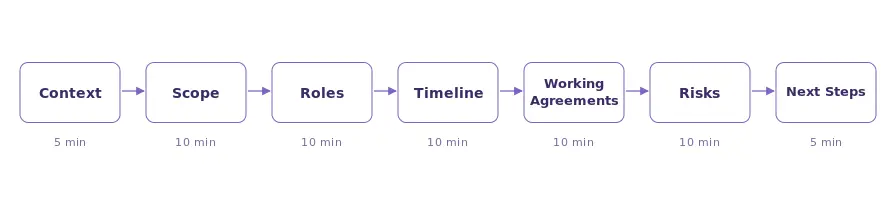
This structure works for most projects under six months. Allocate 60–75 minutes total.
1. Context and why (5 min)

The sponsor states the business context: why this project exists, what it's replacing, and what success unlocks. This frames every decision that follows.

Good context sounds like: "We're rebuilding onboarding because customer support spends 40% of their time on first-30-day questions, and churn in month one is 2x the rest of the year." Bad context sounds like: "We want to improve onboarding."

2. Scope and success criteria (15 min)

What's in scope, what's explicitly out, and how you'll measure "done." Avoid soft language like "improved" or "better." Anchor to numbers or binary outcomes. "Reduce new-customer onboarding from 14 days to 7" is stronger than "make onboarding better."

Write the out-of-scope list at least as carefully as the in-scope list. Every project that overruns does so by quietly expanding out-of-scope items into the work.

A clean scope statement has three parts: what will exist when we're done, what it must do, and what it won't do. If someone can't answer all three without ambiguity, you don't have scope yet but a wish.

3. Roles and decision rights (10 min)

Walk through who owns what. A RACI grid is fine but often overkill. A simpler version: name the one person who can say yes on each major decision. Ambiguity here is the most expensive mistake in the meeting.

Decisions to assign explicitly:

  • Who approves scope changes?
  • Who signs off on the final deliverable?
  • Who decides when a risk becomes a blocker?
  • Who can unblock the team by spending money (and up to what amount)?

"We'll decide together" is not a decision right. It's how decisions stall.

4. Timeline and milestones (10 min)

Major milestones with dates, plus the critical path. Flag any hard external deadlines (launches, regulatory cut-offs, partner commitments). Map the first two weeks of work in detail; after that, direction is enough.

One trap worth naming: milestones phrased as activities instead of outcomes. "Design review" is an activity; "design approved by sponsor" is an outcome. The second one tells you whether the milestone actually landed.

5. Working agreements (10 min)

How this team will communicate. Covers: meeting cadence (weekly sync, daily standup, or async check-ins), where decisions get logged, how blockers escalate, and which tools you'll use for what. Set default response times so no one is guessing. A common default: Slack within 4 working hours, email within 1 working day, decisions logged in the shared doc within 24 hours of being made.

This section gets skipped most often and returns to bite the team most often. Spend the full 10 minutes.

6. Risks and assumptions (10 min)

Name the top 3–5 risks and the one assumption that, if wrong, would force a reset. This is the section most teams skip. Skipping it doesn't make the risks disappear.

A useful exercise: have each person in the room write down the one thing they're most worried about on a sticky note (or in a shared doc if remote), then read them out. The risks the room avoids saying out loud are usually the real ones. Running this as a silent round before discussion surfaces more than asking "any concerns?" at the end.

7. Next steps and owners (5 min)

Every action item gets a name and a date. No floating to-dos. Close with a confirmation round: each person states their one next action.

The confirmation round does two things. It makes ownership public, and it surfaces any last misalignment. If someone's stated next action doesn't match what you thought they committed to, fix it now, not in a follow-up.

Three failure modes that sink kickoffs

1. Confusing buy-in with consensus. People nod, the meeting ends, and two weeks later a senior stakeholder says they were "never really on board." Fix: ask for dissent explicitly. "What would make this plan fail?" gets better answers than "any questions?" Give at least 10 seconds of silence after the question, because the second answer is usually the real one.

2. Leaving with unassigned decisions. If the meeting ends with anything marked "we'll figure this out later," you have an open decision that will slow the project. Fix: every open item gets an owner and a decide-by date before the meeting ends. A clean kickoff has zero "we'll circle back" items.

3. No written record, or one nobody reads. If the only artifact is a Slack message and six people's memories, you have six versions of the plan. Fix: publish a shared kickoff doc (scope, owners, timeline, risks) and have each attendee acknowledge it within 24 hours. Acknowledgement is not the same as agreement — it just means they read it — but it ends "I didn't know" as a defense.

The 24-hour follow-up checklist
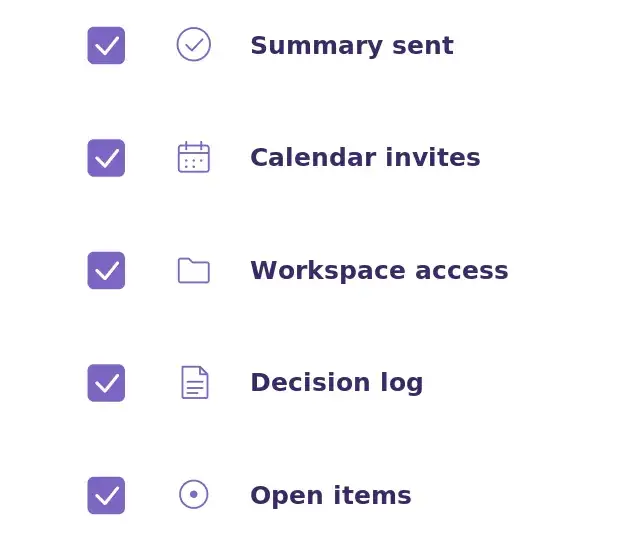
Within a day of the kickoff, the project lead should send:

  • A shared kickoff summary (scope, owners, milestones, next steps)
  • Calendar invites for all recurring meetings
  • Access to the shared project workspace (docs, task board, comms channel)
  • The decision log, pre-populated with decisions made during the kickoff
  • Any open items, with owners and decide-by dates

This is where most kickoff momentum evaporates. A clean follow-up in the first 24 hours is the highest-leverage thing a project lead can do.

Track one metric through the life of the project: how long decisions take to go from "discussed" to "logged." In healthy projects, it's under a day. When that number starts creeping up, the project is losing discipline before it's losing dates.

The kickoff template (what to fill in)

A good kickoff template has these sections. Use it as the single source of truth for the life of the project:

  • Project name + one-line description
  • Business context (2–3 sentences from the sponsor)
  • Scope — in, out, deferred
  • Success criteria (measurable)
  • Roles and decision rights
  • Timeline and major milestones
  • Working agreements (meetings, comms, tools)
  • Risks and assumptions
  • Dependencies (external teams, vendors, approvals)
  • Action items (owner + date)

Keep it in whichever tool your team already lives in: Notion, Confluence, Google Docs, a team wiki. The template matters less than the discipline of updating it. The first time the project deviates from the template, update the template before the deviation becomes the norm.

Remote and hybrid kickoffs

Same agenda, tighter time-boxing, more deliberate silence. Three adjustments that matter in remote settings:

Open with individual written input, not group discussion. On video, the loudest voice wins first. Start each agenda section with 60 seconds of silent writing in a shared doc before anyone speaks.

Round-robin, don't volunteer. When moving into discussion, go around the grid rather than taking volunteers. Otherwise you'll hear from the same three people in every kickoff you ever run.

Record the meeting, always. Not to police anyone. To preserve the reasoning for the team member on PTO, the new hire who joins next week, and the stakeholder who asks in month three "what did we actually decide about X?"

Hybrid kickoffs (some in the room, some on video) are harder than fully remote ones. If you can't get everyone in the same room, put everyone on their own laptop on video even the people physically co-located. Parity of presence beats quality of room setup.

How MeetGeek automates the kickoff admin

The kickoff is high-leverage. The admin around it is where project leads lose hours: transcribing, summarizing, extracting action items, chasing people for acknowledgements.

Recording the kickoff and letting an AI meeting assistant produce the summary, action items, and follow-up gives you a source of truth you didn't have to type at midnight. MeetGeek's Meeting Agent joins your kickoff automatically from your calendar, generates a structured summary, extracts action items with owners, and distributes the recap to everyone who attended.

Three months in, when someone asks "what did we actually agree to in the kickoff?", the answer is one search away in your meeting library. Ask AI Chat inside MeetGeek for quick in-the-moment questions, or pair MeetGeek with Claude through the MeetGeek connector if you want Claude's full reasoning running over your complete meeting history, which is useful for cross-project synthesis or building a decision log across multiple kickoffs.

Frequently Asked Questions

How long should a project kickoff meeting be?

Most kickoffs run 60–75 minutes. Under 45 minutes usually means you skipped risks or roles. Over 90 minutes usually means you tried to do real planning work inside the kickoff and that belongs in a separate working session.

Should the client be in the kickoff for external projects?

Yes, for the first half. Include them for context, scope, success criteria, and timeline. The delivery team can cover working agreements and internal risks separately.

What's the difference between a kickoff and a planning meeting?

Kickoffs set the frame: scope, roles, success criteria, cadence. Planning meetings work inside the frame on what gets built when. Don't collapse the two.

Who should run the kickoff?

The project lead, not the sponsor. The sponsor sets context for 5 minutes; the lead runs everything else. This cements the lead as the decision hub for the project.

How do I run a kickoff for a fully remote team?

Same agenda, tighter time-boxing, and more deliberate silence for input. Use a shared doc everyone edits during the meeting so decisions stay visible. Record it. Always record it.

What if the sponsor can't attend?

Reschedule. A kickoff without the person who owns the outcome is not a kickoff it's a team meeting pretending to be one. The only exception: if the sponsor has pre-recorded or pre-written their 5-minute context and a named deputy is in the room to answer scope questions on their behalf.

How do I handle a kickoff where one stakeholder is already unhappy?

Name it in the pre-read and address it first in the meeting, not last. Stakeholders who are managed into the conversation early tend to stay engaged; stakeholders who feel ambushed disengage and escalate later.

Article updated on 
April 21, 2026
Share the knowledge with your circle
Copied
Related posts

The Project Kickoff Meeting Playbook (+ Template)

The 7-part agenda, template, and 24-hour follow-up checklist that turn a project kickoff into the most valuable 60 minutes of the whole project.

This is some text inside of a div block.

What Is an Annual General Meeting (AGM)? A Complete Guide

Understand annual general meetings, what to include in an AGM agenda, and how to run structured, compliant meetings that drive decisions.

This is some text inside of a div block.

Is It Illegal to Record Someone Without Their Permission?

Recording a conversation can be legal in some situations and illegal in others. This guide explains when recording someone without permission is allowed in the U.S. and EU, how consent laws work, and how to avoid legal trouble.

This is some text inside of a div block.

Games to Play On Zoom: 20 Ideas for Team Building (And Actual Laughs)

A practical list of Zoom games that help remote teams connect, boost energy, and make virtual meetings more engaging and interactive.

This is some text inside of a div block.

How to Automate Meetings Securely in Regulated and High-Risk Environments

Learn how to automate meetings in regulated environments without compromising security, privacy, or compliance.

This is some text inside of a div block.

Top tl;dv Alternatives to Streamline Your Meetings

Discover the top tl;dv alternatives and explore and compare their features to choose the right AI meeting tool for your organization.

This is some text inside of a div block.

AI Meeting Agents: How Autonomous AI Is Transforming the Future of Work

Discover how AI meeting agents are redefining the future of work—handling scheduling, follow-ups, and even speaking on your behalf to save time and turn every meeting into real action.

This is some text inside of a div block.

Granola AI Notes Alternatives: The Best Options to Try in 2026

Explore the best Granola AI Notes alternatives for 2025 with smarter tools that go beyond transcription, offering automation, insights, and collaboration.

This is some text inside of a div block.

Follow-Up Email After Interview: How to Write It, When to Send It, and What to Say

Discover how to write an effective follow-up email after an interview. From timing and templates to tone and structure, this guide covers everything you need to stand out and stay memorable.

This is some text inside of a div block.

Tactiq Pricing Review 2026: Plans, Limits, and The Best Alternative

Explore the latest Tactiq pricing plans and find out how they stack up against MeetGeek’s all-in-one meeting assistant.

This is some text inside of a div block.

Ad Hoc Meeting Meaning and How to Run One

Discover the true ad hoc meeting meaning and learn how to make spontaneous discussions more focused and effective. Find out when to hold and manage them.

This is some text inside of a div block.

Virtual Meeting Etiquette: Essential Rules for Professionalism

In this article we will explore 15 practical virtual meeting etiquette tips to help you run smoother, more professional online meetings.

This is some text inside of a div block.

How to See Your Google Meet History and Find Recordings (4 Easy Methods)

This article explores various ways to see your Google Meet history, recover and share recordings, and outlines the requirements for accessing this data.

This is some text inside of a div block.

Fireflies AI Pricing | Review & Things I Wish I Knew Before Buying (2026)

Explore Fireflies 2026 pricing and features. Learn why users switch from this platform and choose alternatives for AI meeting summaries and insights.

This is some text inside of a div block.

How to Choose the Right Meeting Minutes Templates for Different Types of Meetings

Understanding the different meeting types and their documentation needs is the first step in choosing the right template. In this article, we will learn how to do that.

This is some text inside of a div block.

How to Access and Review Your Zoom Meeting History: A Complete Guide

In this article, we’ll walk you through how to access and review your Zoom meeting history: both using Zoom’s built-in tools and with the help of an AI meeting assistant.

This is some text inside of a div block.

AI Notetakers for In-Person Meetings: 5 Best Mobile Apps for Android & iOS in 2026

The best mobile apps now record your in-person meetings, transcribe speech, and structure notes. We've tested the top options for iPhone and Android in this article. 

This is some text inside of a div block.

How to Record a Discord Call: A Step-by-Step Guide (2026)

This step-by-step guide will show you how to record a Discord call using both simple, built-in device features and powerful third-party tools.

This is some text inside of a div block.

How to Use Zoom Chrome Extension & 9 Best Extensions for Meetings

This guide will show you exactly how to use the Zoom Chrome extension and some other tools to simplify your meeting process.

This is some text inside of a div block.

How to Record a Webex Meeting: Step-By-Step for Desktop, Mobile, and Cloud

Record on Webex by using the built-in recording feature or enhance recording with third-party tools like the MeetGeek AI Chrome extension.

This is some text inside of a div block.

Meeting Overload Isn’t the Real Problem - Bad Meeting Design Is

When meeting overload becomes obvious, there are soma small changes that can transform your entire meeting culture.

This is some text inside of a div block.

How to Record Video Conferences: A Guide to Built-in Features and AI Tools

Record video conferences using built-in platform tools or AI transcription services to create lasting assets. Use tools like MeetGeek to automate collaboration and improve productivity.

This is some text inside of a div block.

AI Meeting Notes: Your Guide to Automated Meeting Documentation in 2026

Let's take a closer look at everything you need to know about free AI meeting notes options.

This is some text inside of a div block.

4 Best Free Transcription Software For 2026 | Personally Tested

In this article, we share the 4 best transcription software we found based on personal testing for 2026.

This is some text inside of a div block.

Read AI Review: Why are so many people leaving it? (2026)

We will guide you through the key features, pricing, pros and cons, and give some insights into why users are switching from this AI meeting assistant.

This is some text inside of a div block.

Otter AI Pricing | 4 Things I Wish I Knew Before Buying (2026)

"Is Otter AI worth it?" It is a good question, and many of you asked. Learn what we found about Otter AI's pricing and features and what other options you have.

This is some text inside of a div block.

Gong Pricing In 2026 | This will save you +$30,000

If you considered Gong, you probably asked the question, "How much does Gong cost?". Discover how much Gong customers pay and what other options you have.

This is some text inside of a div block.

How to Join Zoom with Meeting ID + Alternatives

Discover how to join a Zoom meeting using a Meeting ID and explore alternative methods to connect seamlessly.

This is some text inside of a div block.

6 Best Meeting Notes Apps In 2026 | #1 is a Game Changer

We not only collected the top AI meeting assistants in this article but also the best apps for manual note-taking when it comes to meeting notes.

This is some text inside of a div block.

We Tested And Found The 5 Best Fathom Alternatives for 2026

After a deep dive into users' experience with this AI meeting assistant, we found what the best Fathom alternatives are for you.

This is some text inside of a div block.

6 Best Gong Alternatives After +2 Years Testing (2026)

We invested over 300 hours in this project to discover the best Gong alternatives. Let's delve into the best ones.

This is some text inside of a div block.

When & How to Organize an In-Person Meeting in 2026

Plan smarter in-person meetings! Learn when to meet, how to organize effectively, and make every gathering productive and engaging.

This is some text inside of a div block.

Best 7 AI Note-Takers In 2026 | 15+ Tested Tools

I tried +15 AI note-takers to find the best ones. This article reveals the best AI note-taker based on features and pricing.

This is some text inside of a div block.

How to Have an Effective Touchpoint Meeting: Strategies for Managers

Want to conduct successful touchpoint meetings? Learn actionable tips and strategies to foster collaboration, track progress, and inspire your team to achieve more.

This is some text inside of a div block.

How to Plan and Run Productive Sales Meetings [+Free Sales Meeting Agenda]

Learn effective strategies to make your sales meetings more impactful and productive. Discover tips to boost engagement and results!

This is some text inside of a div block.

How to Run an Effective Discovery Meeting

Learn how to run an effective discovery meeting with practical tips and strategies that ensure success.

This is some text inside of a div block.

How to Master Scrum Meetings: Best Practices & Templates

Learn how to run effective Scrum meetings with practical tips and templates. Streamline your workflow, boost team collaboration, and get the most out of every meeting!

This is some text inside of a div block.

Google Meet vs. Zoom: Which One to Choose in 2026

Discover the ultimate showdown between Google Meet and Zoom in 2026! Find out which video conferencing tool wins in features and value.

This is some text inside of a div block.

20 Outside-the-Box Ideas for Team Meetings

Energize and engage your team with one of these 20 innovative team meeting ideas.

This is some text inside of a div block.

How to ‘Share Screen’ on Zoom [PC/Mobile] + Pro Tips

Learn how to share your screen during Zoom meetings on both PC and mobile devices with our expert tips!

This is some text inside of a div block.

The 10 Secrets to Effective Meeting Management

Unlock the secrets to effective meeting management! Discover 10 game-changing strategies for productive meetings.

This is some text inside of a div block.

How to Set Up a Zoom Meeting & Stellar Tips for Boosted Engagement

Master the Zoom setup with our easy step-by-step guide. From scheduling to hosting, learn how to connect & engage in the digital world.

This is some text inside of a div block.

How to Set Up a Teams Meeting: A Step-by-Step Guide for Beginners

Learn to set up a Teams meeting effortlessly with our beginner-friendly guide. From scheduling to inviting, we cover every step!

This is some text inside of a div block.

How to Have a Successful Business Meeting in 2026

Master the art of successful business meetings this year with our top tips for planning, engaging, and achieving results in the modern workplace.

This is some text inside of a div block.

How to Join a Zoom Meeting from Any Device in 2026

Step into 2026 with ease: Learn to join Zoom meetings from any device with this simple, user-friendly guide for seamless virtual connections.

This is some text inside of a div block.

How to Change the Zoom Host + How to Add a Zoom Alternative Host

Learn the quick and easy steps to change hosts in Zoom meetings with this comprehensive and beginner-friendly guide.

This is some text inside of a div block.

How to Choose the Right Meeting Cadence: The Manager’s Playbook

Unlock the secrets to setting the perfect meeting cadence for optimal team productivity with this guide for managers.

This is some text inside of a div block.

What is Virtual Meeting & What to Expect in 2026: A Look Ahead

Discover the future of virtual meetings in 2026 and some out-of-time tips with this insightful article.

This is some text inside of a div block.

How to Transcribe Zoom Meetings into Google Docs without Additional Permissions

Learn how to efficiently transcribe your Zoom meetings into Google Docs with these simple steps. Increase productivity and easily reference past discussions.

This is some text inside of a div block.

The Ultimate End-of-Year Review: A Guide for Managers

Master the art of end-of-year reviews with our comprehensive guide for managers. Learn proven strategies to evaluate performance and set goals for success in the coming year.

This is some text inside of a div block.

How to Run an Effective Brainstorming Session

Get ready to unlock your team's creativity. Don't miss this guide to running an effective brainstorming session that will bring innovative ideas to life.

This is some text inside of a div block.

How to Host the Ultimate One-on-One Meeting

Discover how to organize one-on-one meetings that improve communication, foster engagement, and build stronger relationships in your team by reading this article!

This is some text inside of a div block.

Effective Data Visualization for Meeting Insights

Visualization makes conveying complex data more understandable. Let's discover how to level up your next meeting with visual assets.

This is some text inside of a div block.

How to Facilitate Inclusive and Collaborative Meetings

Good meeting planning and facilitation are what makes team meetings inclusive, collaborative, and effective leading to problem resolution and new idea generation.

This is some text inside of a div block.

Innovative Meeting Formats: Exploring Alternatives to Traditional Business Meetings for Enhanced Creativity

Explore some alternative meeting formats that can revolutionize how your team collaborates and generates ideas.

This is some text inside of a div block.

Top 8 Online Virtual Meeting Platforms for Growing Organizations

With more and more virtual meeting platforms being available in the market, choosing the right one for your business can be quite confusing and challenging.

This is some text inside of a div block.

How to Record Google Meet Sessions without Special Permissions in 2026

Discover how to easily record a Google Meet in our comprehensive guide. Read this article to never worry about missing important information again!

This is some text inside of a div block.

The Power of a Blog: How Meetings Can Be Transformed into Engaging Content

In this article, we'll unpack six inventive strategies for leveraging meeting transcripts to enhance your marketing efforts.

This is some text inside of a div block.

The 10 Best Vowel.ai Alternatives for Your Meetings

Click through for a look at 7 of the top alternatives to Vowel for your next meeting.

This is some text inside of a div block.

The 10 Best Meeting Scheduling Software for 2026

The best meeting scheduling tools offer a frictionless experience for all participants. Here are 10 options that will save hours of your time!

This is some text inside of a div block.

10 Ways an AI Meeting Assistant Can Help With Your Meetings & Interviews

Without the right tools in place, meetings can be a painful process. Read this article to explore the 10 best use cases of having an AI meeting assistant!

This is some text inside of a div block.

Find Your Perfect Meeting Notes Template

Are meetings a part of your work life, but you have no idea what they should contain or even look like? Read this article to get your meeting notes template!

This is some text inside of a div block.

How To Record a Zoom Meeting If You’re Not a Host

Discover how to record Zoom meetings without hosting privileges from any device for a streamlined meeting experience!

This is some text inside of a div block.

15 Free Meeting Agenda Examples

Are you still trying to find the perfect meeting agenda examples to use as inspiration before your next meeting? Check out our free 15 templates!

This is some text inside of a div block.

Why You Need to Set Meeting Goals and How to Do That

The first step to a successful meeting is defining your meeting goals. Read this article to learn how high-performing teams do this!

This is some text inside of a div block.

6 Tips to Write a Successful Meeting Agenda with Examples

Want to write the ultimate meeting agenda and achieve all-time productivity in your team meetings? Follow these 6 pro tips to learn how and check out our free templates to get started.

This is some text inside of a div block.

The 5 Best Types of Check-In Questions for Meetings

Are you a manager trying to find the best check-in questions for meetings? Read this before your next meeting!

This is some text inside of a div block.

How to Write an Effective Meeting Invitation Email

Ever wondered what the recipe for a successful meeting invitation email is? Read this article to learn all of our tips and insights!

This is some text inside of a div block.

How to Write an Effective Meeting Recap: Tips & Templates

Discover 10 practical tips to write clear and effective meeting recaps that keep your team informed and on track. Enhance communication and productivity with these easy steps.

This is some text inside of a div block.

15 Types Of Meetings: What Makes Them Different & Tips

Are you a manager who wants to master the art of hosting meetings? Learn how to approach these 15 types of meetings effectively with our exclusive tips!

This is some text inside of a div block.

10 Types of HR Screening Questions to Ask If You're a Hiring Manager

Are you trying to find the best candidate for a job posting in your company? Read this article to discover the best types of HR screening questions!

This is some text inside of a div block.

Get Started with MeetGeek

Turn meetings from a necessary evil into a positive and rewarding experience
Sign up for free
No credit card required.



