



A HIPAA-compliant meeting transcription tool is one that can handle protected health information (PHI) under the rules set by the Health Insurance Portability and Accountability Act, codified at 45 CFR Parts 160 and 164. In practice, that means the tool has the technical safeguards, the contractual structure (a Business Associate Agreement), and the operational discipline to be used legally inside a covered entity or business associate. The HHS Office for Civil Rights (OCR) is the federal enforcer; NIST Special Publication 800-66 is the most commonly cited implementation reference for the Security Rule.
Most AI notetakers in the market are not HIPAA-compliant by default. The gating document is the Business Associate Agreement (BAA): without one, a vendor cannot legally process PHI, no matter how strong the encryption or audit logs look. Everything else (the technical safeguards, the certifications, the configuration choices) sits downstream of that contract.
⚠️ This article is general guidance, not legal advice. Your compliance officer or counsel should approve any tool you bring into a clinical workflow.
What does HIPAA actually require of a transcription tool?
HIPAA doesn't list approved tools. It sets standards a tool must meet when handling PHI. The relevant standards live in two rules, strengthened in later amendments by the HITECH Act and the 21st Century Cures Act:
The Privacy Rule
The Privacy Rule governs how PHI can be used and disclosed. For a transcription tool, this means PHI can only be processed for permitted purposes (treatment, payment, healthcare operations) and only by an authorized business associate. The Office of the National Coordinator for Health IT (ONC) sets adjacent interoperability rules that often land on the same vendor review.
The Security Rule
The Security Rule sets the technical, physical, and administrative safeguards required to protect electronic PHI (ePHI). For a transcription tool, that means encryption in transit and at rest (AES-256 at rest and TLS 1.2 or TLS 1.3 in transit are baseline), access controls, audit logs, automatic logoff, integrity controls, and a documented incident response process.
The three questions that matter
Three things matter most when applying these to a transcription product: who has access to the data, where the data lives, and what happens to it over time. A tool that can answer those three questions clearly is in the running. A tool that can't isn't. The HITRUST Common Security Framework (CSF) is one of the most widely used cross-walks for mapping these answers to a scored assessment.
Why aren't most AI notetakers HIPAA-compliant by default?
AI notetakers were built for a horizontal market (sales calls, internal meetings, customer success) where the data is sensitive but not regulated under HIPAA. Three patterns commonly disqualify them for clinical use:
Training on customer data
Many consumer AI tools use call data to improve their models. PHI used to train a model is a disclosure. Without explicit configuration to disable training, the tool fails the Security Rule.
No BAA on offer
A Business Associate Agreement is the contract that makes a vendor a legal business associate of the covered entity. Without it, the vendor is not allowed to handle PHI, full stop. Many vendors refuse to sign one because their architecture doesn't support the obligations. Zoom for Healthcare, Microsoft Teams, and Google Workspace all offer BAAs on specific paid SKUs; confirm the SKU, not the brand.
Subprocessors with unclear data handling
A transcription tool often relies on a chain of vendors: a speech-to-text API, a Large Language Model (LLM) provider, and a cloud host (typically AWS, Microsoft Azure, or Google Cloud Platform). Each one is a subprocessor that must also be HIPAA-eligible and covered under the BAA chain. If your vendor can't list their subprocessors and confirm coverage, assume the chain is broken.
A tool being SOC 2 Type II certified is not the same as being HIPAA-compliant. SOC 2 is a security framework maintained by the American Institute of CPAs (AICPA); HIPAA is a federal regulation. SOC 2 evidence helps the case but does not satisfy the BAA requirement on its own. Organizations certified under HITRUST or ISO 27001 are usually further along, but neither replaces the BAA.
The BAA is the gating document
A Business Associate Agreement is the contract under HIPAA that binds a vendor (the business associate) to a covered entity's compliance obligations. It defines:
- What PHI the vendor will access
- The permitted uses and disclosures
- The safeguards the vendor will maintain
- The breach notification timeline
- The vendor's obligations on subprocessors
- What happens to the PHI when the contract ends
Who owns the BAA review
On the covered-entity side, the Chief Information Security Officer (CISO), Chief Compliance Officer, and Privacy Officer typically co-own BAA review, with sign-off from General Counsel. The American Health Information Management Association (AHIMA) publishes practitioner guidance that many compliance teams use as a BAA review baseline.
What to read carefully
If a vendor will not sign a BAA, they cannot legally handle PHI. The conversation ends there. If they will sign one, read it carefully, particularly the breach notification timeline, the data retention terms, and the subprocessor clause.
A signed BAA is necessary but not sufficient. Covered entities retain responsibility for how the tool is configured and used. Misconfiguration by the covered entity is still a violation by the covered entity, BAA or not.
Data residency, retention, and PHI handling
Three operational areas where most evaluations live or die:
Residency
Where the recordings, transcripts, and derived data physically sit. For US healthcare, US data residency (often AWS US-East, US-West, or GovCloud) is usually required. Some tools default to multi-region storage; some let you configure region per workspace; some can't tell you where the data is. Research hospitals with EU patient populations often add EU residency under GDPR on top of HIPAA.
Retention
How long PHI is held by the tool, and what triggers deletion. HIPAA requires PHI to be available for as long as the covered entity needs it for treatment, payment, or operations, and disposed of securely when no longer needed. Electronic Health Record (EHR) systems like Epic, Cerner (Oracle Health), Meditech, and Allscripts remain the clinical record-of-truth; the transcription tool is a working layer on top. The tool needs configurable retention policies and verifiable deletion.
PHI handling controls
Who can see what. Role-Based Access Control (RBAC), audit logs of every PHI access, automatic logoff after inactivity, the ability to redact PHI in shared summaries, and clear separation between user accounts and patient data references. Integrations into EHR, Picture Archiving and Communication Systems (PACS), and Radiology Information Systems (RIS) should flow through the BAA chain, not around it.
A 10-item vetting checklist
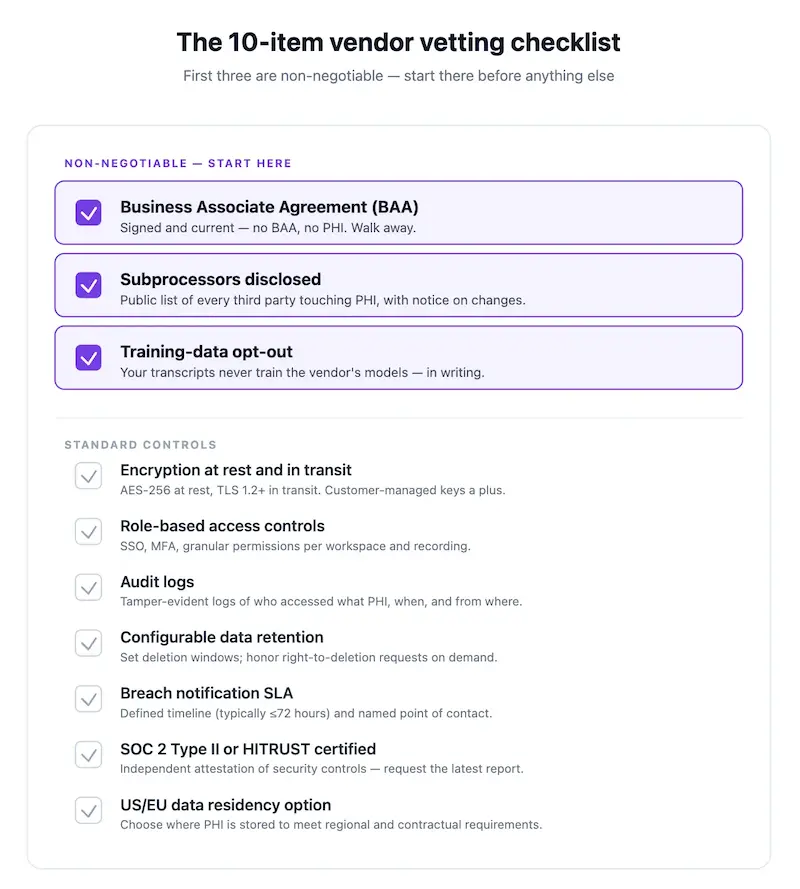
Use this when evaluating any meeting transcription or AI notetaker for clinical use:
- Will the vendor sign a BAA? If yes, get a copy of their standard BAA before further evaluation.
- Are all subprocessors (speech-to-text, LLM, hosting) listed and HIPAA-covered? Get the list in writing.
- Is customer data used to train AI models? It must be possible to disable this, or better, off by default.
- Where is data stored? Is US data residency configurable per workspace?
- What is the encryption standard at rest and in transit? AES-256 at rest and TLS 1.2+ in transit are baseline.
- Can retention be configured, and is deletion verifiable? Look for documented retention policies and audit-log proof of deletion.
- Are role-based access controls and audit logs available? Can you see who accessed which transcript when?
- Is there a documented breach notification process, and what is the timeline? HIPAA requires notification without unreasonable delay.
- Does the vendor have SOC 2 Type II evidence in addition to HIPAA? It strengthens the case but does not replace a BAA.
- What happens to your data when the contract ends? You should be able to export everything and verify deletion.
Tools that fail items 1, 2, or 3 shouldn't reach a pilot. Tools that fail any of 4–10 may still work but require explicit risk acceptance from compliance.
Configuration decisions that keep a compliant tool compliant
Signing a BAA doesn't make daily use compliant. Five configuration choices cover most of the failure surface:
Disable training on customer data explicitly
Even if the default is off, confirm the setting in the admin panel, take a screenshot, and put it in the configuration record.
Restrict workspace access to named users
Shared logins are a HIPAA audit finding waiting to happen. Every user who sees PHI gets their own account. Single Sign-On (SSO) via SAML or OpenID Connect (OIDC) against Okta, Microsoft Entra ID, or Google Workspace tightens this further.
Set retention to the minimum your clinical workflow needs
Longer retention is more risk. If the clinical record-of-truth is the EHR (Epic, Cerner, Meditech), the transcription tool should be a working copy, not an archive.
Turn off integrations that aren't HIPAA-covered
If Slack, Notion, or a generic CRM isn't under your BAA chain, don't route PHI into it. Confirm per-integration whether the covered SKU (Slack Enterprise Grid with a BAA, for example) is in use.
Review access logs monthly
Not as a compliance performance, as a habit. Irregular patterns (after-hours access, access to records outside someone's caseload) should prompt a conversation.
Where HIPAA-compliant transcription is used
Common workflows where compliant transcription earns its keep:
- Telehealth visits where the clinician needs the encounter documented without typing through the conversation
- Multidisciplinary care team huddles where action items must be captured and routed
- Clinical research interviews where verbatim transcripts are part of the study record
- Practice operations meetings that touch patient cases
- Compliance and risk reviews that reference specific encounters
Outside the consult room, the same tool often supports administrative meetings (billing, ops, vendor management) where PHI may surface incidentally.
How MeetGeek handles HIPAA
MeetGeek offers a Business Associate Agreement for eligible plans, SOC 2 Type II certification, configurable EU and US data residency, encryption at rest and in transit, role-based access controls, audit logs, and a documented breach notification process. Customer data is not used to train AI models. Subprocessors are listed in the trust documentation.
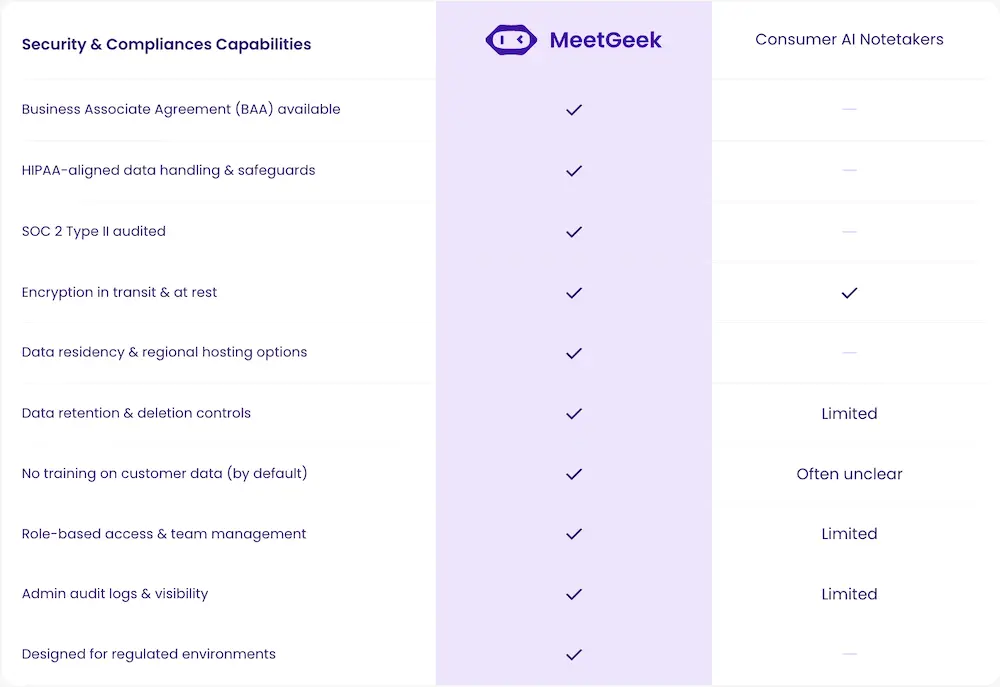
For healthcare teams, this means the same Meeting Agent that joins meetings, produces structured recaps, and routes action items can run inside the compliance posture clinical operations require, without rebuilding the workflow.
For documentation, audit, or research workflows that benefit from deeper analysis across many sessions, ask AI Chat inside MeetGeek for in-the-moment queries, or pair MeetGeek with Claude through the MeetGeek connector to bring Claude's reasoning over a full library of meetings within the same compliance boundary. The connector is the stronger option for synthesis across many sessions: quarterly compliance reviews, multi-encounter case summaries, or audit-trail reconstruction.
The bottom line for clinical operations
A transcription tool is HIPAA-compliant when three things line up: a signed BAA, technical safeguards that meet the Privacy and Security Rules, and configuration on the covered-entity side that doesn't break either. Most AI notetakers fail on the first two; the few that pass still need the configuration discipline (training disabled, named-user access, minimum retention, audit-log review) to stay compliant in daily use. The 10-item checklist above is the fastest path to a pass-or-fail call before a pilot.
If your meetings never touch PHI, a general-purpose AI notetaker is often enough. If they do, a HIPAA-ready platform like MeetGeek is the safer, simpler choice. Try MeetGeek for free and run the 10 items against the product yourself before you bring it to compliance.
Frequently Asked Questions
Is any AI notetaker HIPAA-compliant out of the box?
No tool is "HIPAA-compliant" as a label. Compliance is a combination of the vendor's safeguards, a signed BAA, and how your team configures and uses the tool. A vendor that offers a BAA, US data residency, no model training on customer data, and SOC 2 Type II is in the right neighborhood, but the configuration and usage on your side complete the picture.
What is a Business Associate Agreement (BAA)?
A BAA is a HIPAA-required contract between a covered entity (or another business associate) and a vendor that handles PHI on their behalf. It defines the permitted uses, the safeguards, breach notification, and subprocessor obligations. No BAA, no PHI handling.
Is SOC 2 Type II the same as HIPAA-compliant?
No. SOC 2 Type II is an independent audit of a vendor's security controls over a period of time. It strengthens a HIPAA case but does not satisfy HIPAA on its own. The BAA and the specific HIPAA safeguards still need to be in place.
Can I use a free or consumer AI notetaker for a clinical meeting?
Almost never. Consumer tools rarely offer BAAs, often train on customer data by default, and usually have unclear subprocessor chains. Using one with PHI is a HIPAA violation by the covered entity, regardless of the vendor's marketing copy.
What about meetings that don't involve patients, like billing or ops calls?
If PHI may surface even incidentally, treat the tool as if it handles PHI. The simplest operational rule is: if the meeting is about a patient, the tool needs to be HIPAA-covered. If the meeting cannot involve a patient under any circumstance, the standard is lower.
What happens if a vendor has a breach?
Your BAA should require notification within a defined timeline (often 60 days under HIPAA, but many BAAs tighten this to 30 or less). On notification, the covered entity has its own downstream breach notification obligations. A vendor that's vague on breach timing is a red flag.
Does HIPAA apply to telehealth calls in the same way?
Yes. HIPAA applies to PHI regardless of channel. A telehealth call is subject to the same Privacy and Security Rule requirements as an in-person visit, and the transcription tool handling the recording is a business associate just like any other.








.avif)