


Choosing the right audio and video editing platform can make or break your content creation workflow. Descript has become a popular choice thanks to its automatic transcription, screen recording, and text-based editing process that enables users to polish media files with just a few clicks.
From filler word removal to studio sound enhancement, Descript offers a range of editing capabilities that appeal to podcasters, video creators, and teams working on finished podcasts or training content.
But while Descript offers a mix of editing audio and video features, many users run into limits with Descript pricing. Caps on transcription hours, hidden restrictions in the free plan, and missing advanced editing tools often force creators into constant upgrades.
That’s why in this review, we’ll break down what Descript offers, where it falls short, and how it stacks up against a leading Descript alternative, MeetGeek.
Descript review: what it offers and where it falls short
Descript has positioned itself as a go-to solution for creators who want to simplify audio and video editing. At its core, Descript enables users to edit media files by working directly with text, making the editing process more intuitive for beginners.
The platform combines audio and video editing with screen recording, filler word removal, studio sound enhancement, and collaborative tools in one interface.
For creators producing podcasts, video content, or finished recordings, the idea of editing spoken words with just a few clicks can be appealing. You can remove filler words, clean up audio quality with noise reduction, and even use stock AI voices or voice clones to adjust dialogue without re-recording.
Despite these strengths, several drawbacks limit Descript’s appeal:
- Processing speed and performance: Larger audio and video files, especially multi-track video projects, can slow Descript’s automated transcription and editing, creating frustrating bottlenecks.
- Learning curve: While promoted as a user-friendly interface, the text-to-edit model feels foreign to creators used to timeline-based video editors.
- Limited advanced features: For professionals who rely on advanced editing tools like green screen adjustments, detailed color grading, or multi-layer audio mixing, Descript falls short.
- Export and format issues: Descript does not consistently deliver watermark-free video export at lower tiers, and codec flexibility is limited.
- Pricing concerns: Many users discover that the free plan, creator plan, and even the pro plan come with transcription hours caps, additional transcription hours fees, and restrictions on collaboration tools.
While Descript offers a basic AI-powered suite with automated transcription and editing capabilities, it can feel restrictive once content creation scales. That’s why many professionals evaluate Descript pricing carefully and compare it to more transparent alternatives.
Descript pricing breakdown: what you get at each tier

Descript pricing in 2026 includes five tiers: Free, Hobbyist, Creator, Business, and Enterprise. Each plan comes with its own mix of transcription hours, editing capabilities, and AI features, but as you’ll see, there are clear trade-offs.
1. Descript Free Plan
The free plan is designed to let beginners try out Descript’s basics. It includes:
- 1 transcription hour per month
- 720p video export with watermark
- Limited trial of the basic AI suite (filler word removal, studio sound, create clips)
- Unlimited projects and dynamic captions
Drawbacks: With only 1 hour of transcription, it’s easy to hit the limit before you’ve even tested the editing process. Watermarked exports and restricted AI features mean the free plan doesn’t provide enough value for ongoing content creation. For anyone serious about editing audio or producing video content, moving to a paid plan is almost inevitable.
2. Descript Hobbyist Plan
The Hobbyist plan ($16–$24 per user/month) is meant for solo creators who want watermark-free video export and a few more editing tools.
Key Features:
- 10 transcription hours per month
- Export 1080p, watermark free
- 20 uses per month of the basic AI suite (filler word removal, studio sound, draft show notes, create clips, and more)
- 30 minutes per month of AI speech with stock AI speakers and custom voice clones
- 5 minutes per month of avatars
Drawbacks: Despite offering studio sound and basic filler word removal, users report transcription errors and export unreliability. When processing audio and video files fails, creators risk losing valuable time and money. Customer support has also been criticized for being slow to resolve these issues.
3. Descript Creator Plan
The Creator plan ($24–$35 per user/month) is marketed toward small teams and independent creators looking for advanced features.
Key Features:
- 30 transcription hours per month
- Export 4K, watermark free
- Unlimited use of both basic and advanced AI features (including eye contact correction, green screen support, and more)
- 2 hours of AI speech every month
- 30 minutes per month of dubbing in 20+ languages
- 10 minutes of avatars every month
- Royalty free stock library with unlimited access
Drawbacks: While you get advanced editing tools like green screen and access to AI speech, transcription accuracy still requires manual review. The browser limitation (optimized for Chrome only) can disrupt workflows for users who prefer Safari or Edge.
4. Descript Business Plan
The Business plan ($50–$65 per user/month) is designed for larger teams needing better collaboration tools.
Key Features:
- 40 transcription hours per month
- Team-wide access to Brand Studio
- Unlimited access to the full professional AI suite (including translation, proofreading and dubbing)
- 5 hours per month of AI speech
- 2 hours per month of dubbing in 20+ languages
- 30 minutes per month of avatars
- Priority support with SLA
- Free basic seats for collaboration
- Cloud storage, custom branding, and advanced export options for Adobe Premiere and Final Cut Pro
Drawbacks: The Business plan introduces many premium features, but it comes with complexity. The user-friendly interface can feel overwhelming when paired with advanced editing tools and AI features. Dependence on a stable internet connection also makes it difficult for creators working on the go.
5. Descript Enterprise Plan
The Enterprise plan is a custom-priced option for large organizations with complex editing needs.
Key Features:
- Unlimited transcription hours
- Enterprise-grade collaboration tools
- Dedicated account representative
- Custom branding
- Security review and compliance tools
- Unlimited access to advanced editing tools and AI features
Drawbacks: While this plan finally unlocks unlimited access and top-level support, it requires direct negotiation and a significant investment. For many growing teams, jumping from Business to Enterprise can feel like a steep leap.
Looking for a top Descript alternative with superior audio processing and transparent pricing?
If Descript pricing feels too restrictive, and you want unlimited access to accurate transcription, higher audio quality, and predictable costs, MeetGeek is a strong alternative. MeetGeek stands out for its clarity and advanced features designed for modern creators.
MeetGeek key features
MeetGeek is designed to help teams get more value from every conversation. It combines accurate transcription, meeting automation, and collaboration tools, making it a strong alternative to Descript for those who want more than basic editing functions.
Reliable transcription accuracy
MeetGeek provides transcription in more than 100 languages and recognizes different accents and multiple speakers.
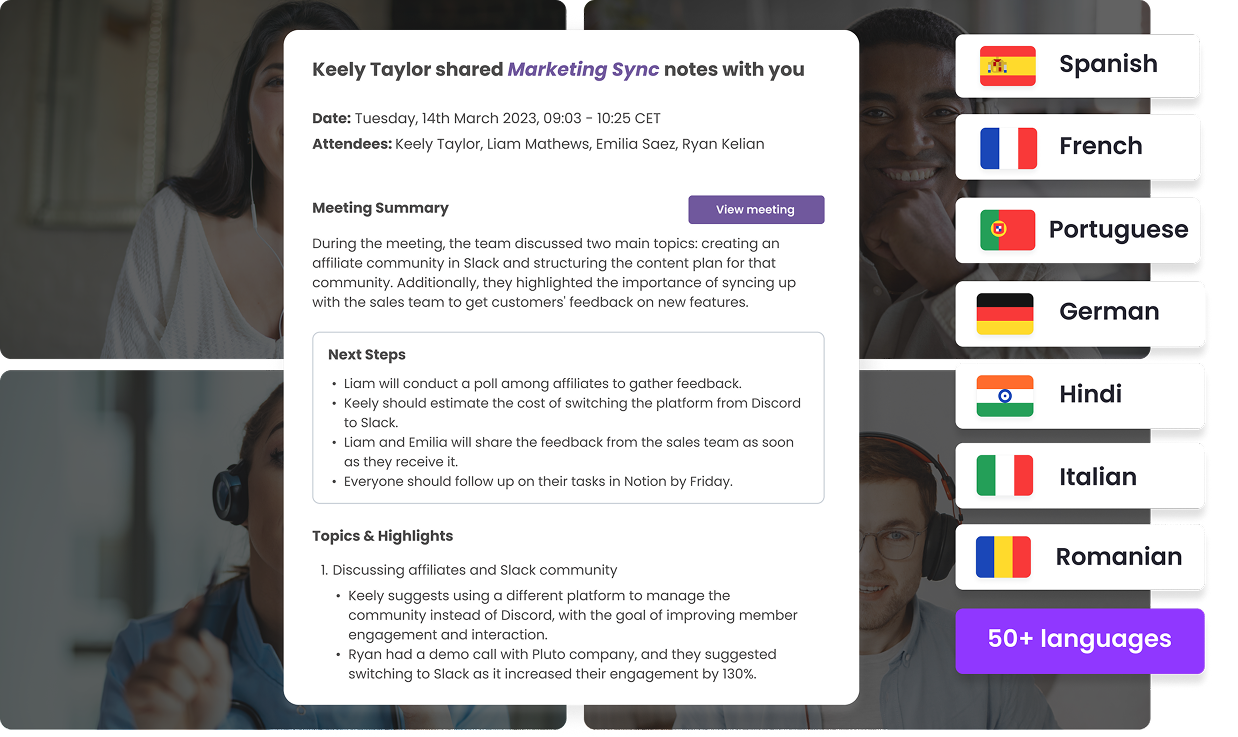
It handles background noise, overlapping dialogue, and technical terminology with a high level of precision, so you spend less time on audio editing and fixing mistakes and more time using the transcript for better productivity.
Flexible meeting capture
MeetGeek makes it easy to record both online and in-person conversations. Its calendar bot can automatically join Zoom, Teams, or Google Meet calls, while a Chrome extension covers platforms like WebEx and Discord.
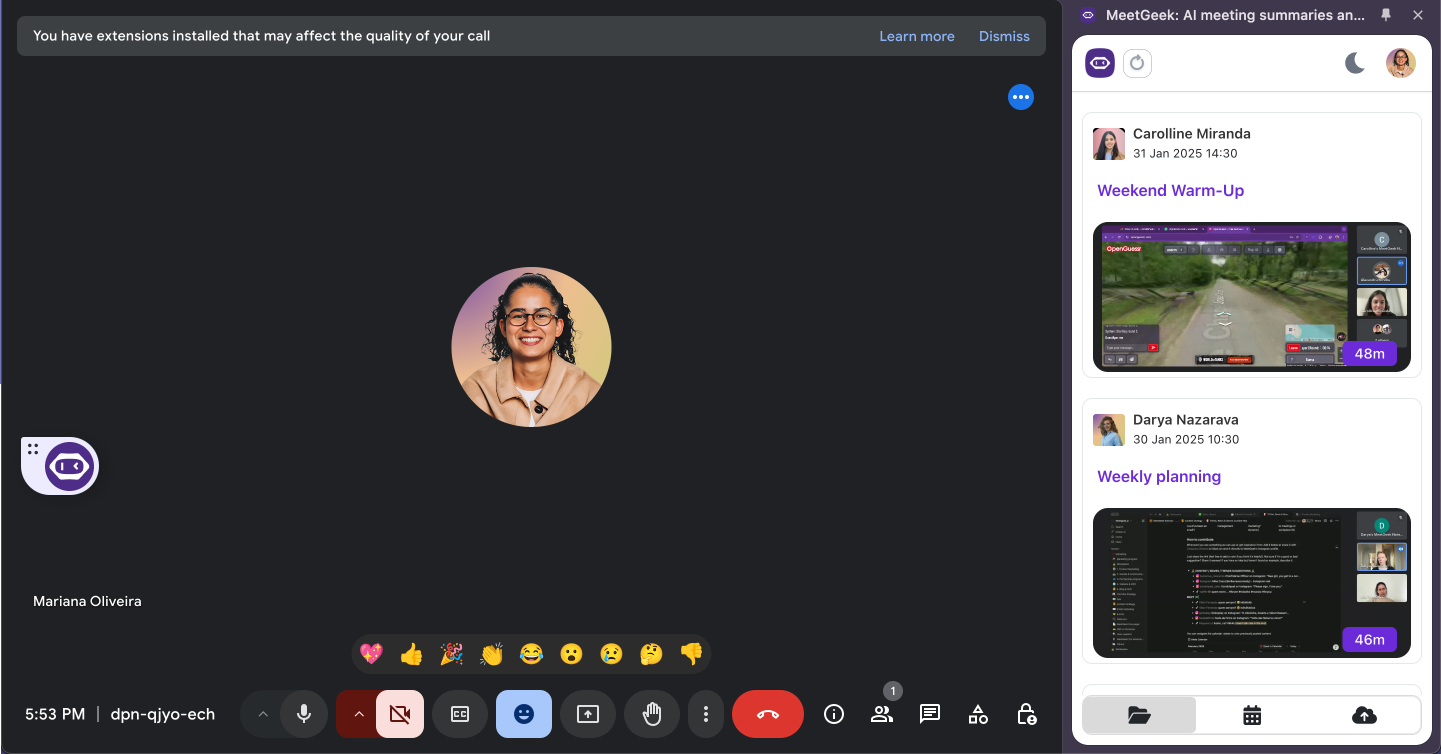
For face-to-face meetings, the mobile app records with the same accuracy as virtual calls, ensuring important details are never lost.

Actionable summaries
After each meeting, MeetGeek delivers structured notes, highlights, and action points. These summaries adapt to the type of meeting, whether it is an interview, a client call, or a team discussion.
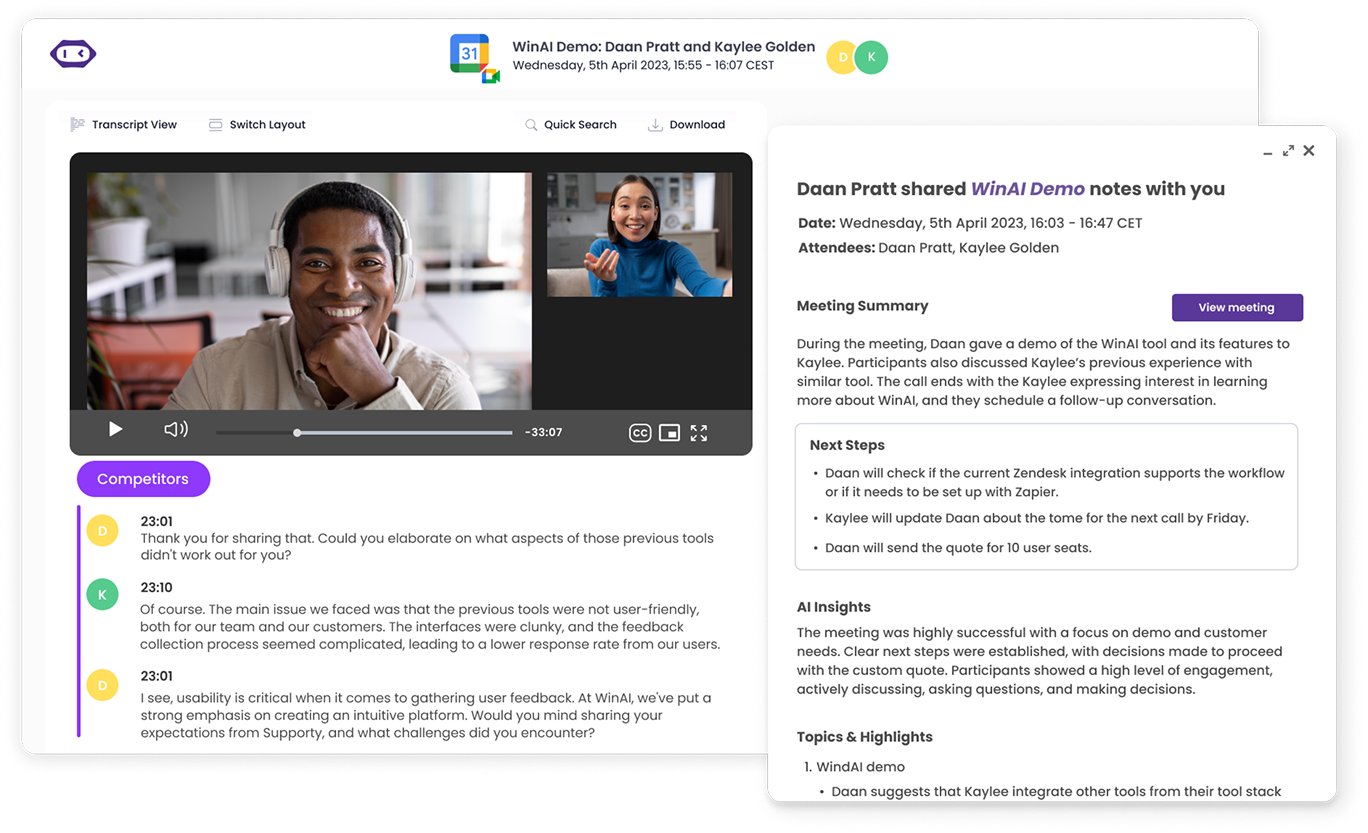
This feature reduces the time spent on manual review and helps you turn remote recording into usable information more quickly.
Searchable conversation library
MeetGeek stores all your recordings in a central library.

A search function allows you to find exact quotes, while a question-style search makes it possible to ask for specific details and receive time-stamped results from any audio file. This saves time compared to scanning long transcripts manually.
Insights on communication
Beyond transcription, MeetGeek gives you feedback on how conversations unfold. You can see how much each person spoke, where interruptions happened, and how often filler words were used.
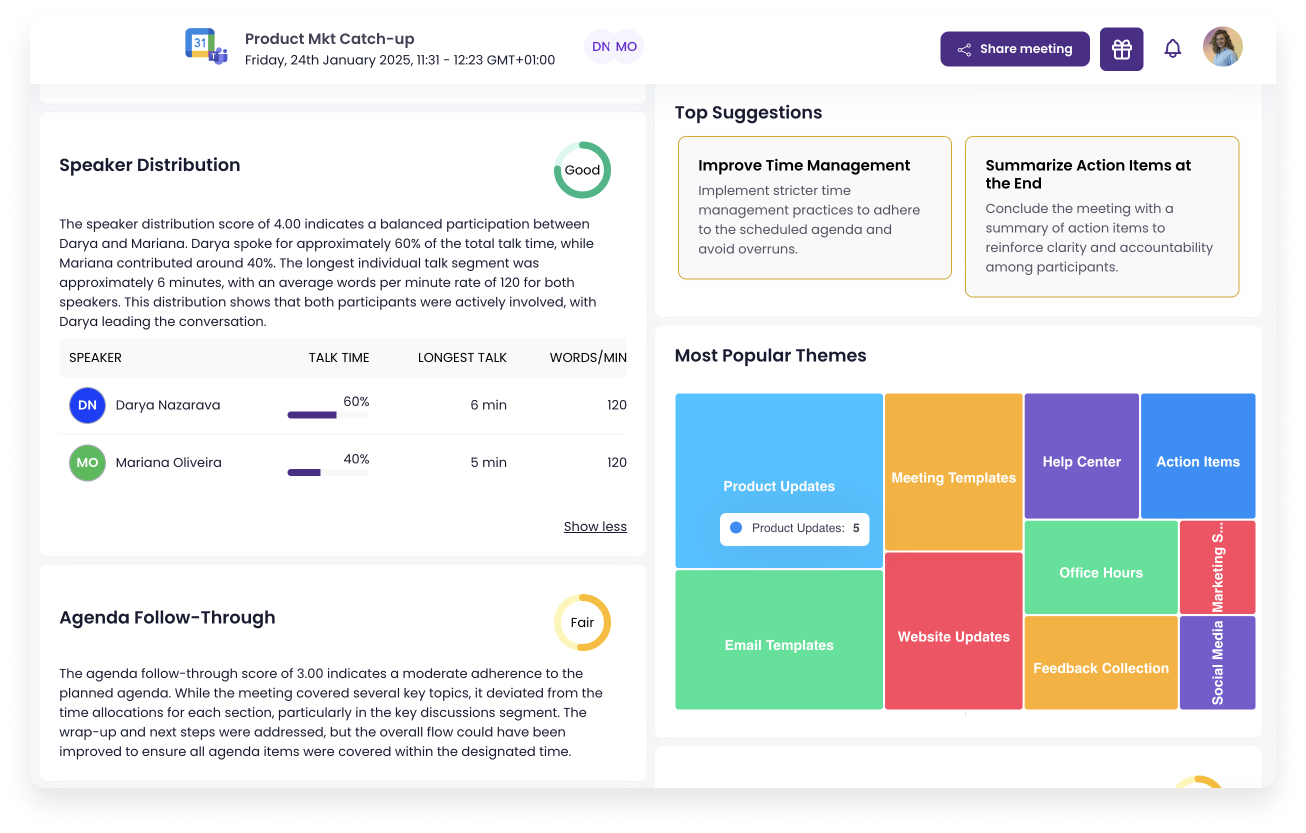
These insights help teams improve how they run meetings and communicate with clients.
Integrations with everyday tools
MeetGeek connects with over 10,000 apps and services, including Salesforce, HubSpot, Google Docs, Slack, and Notion.
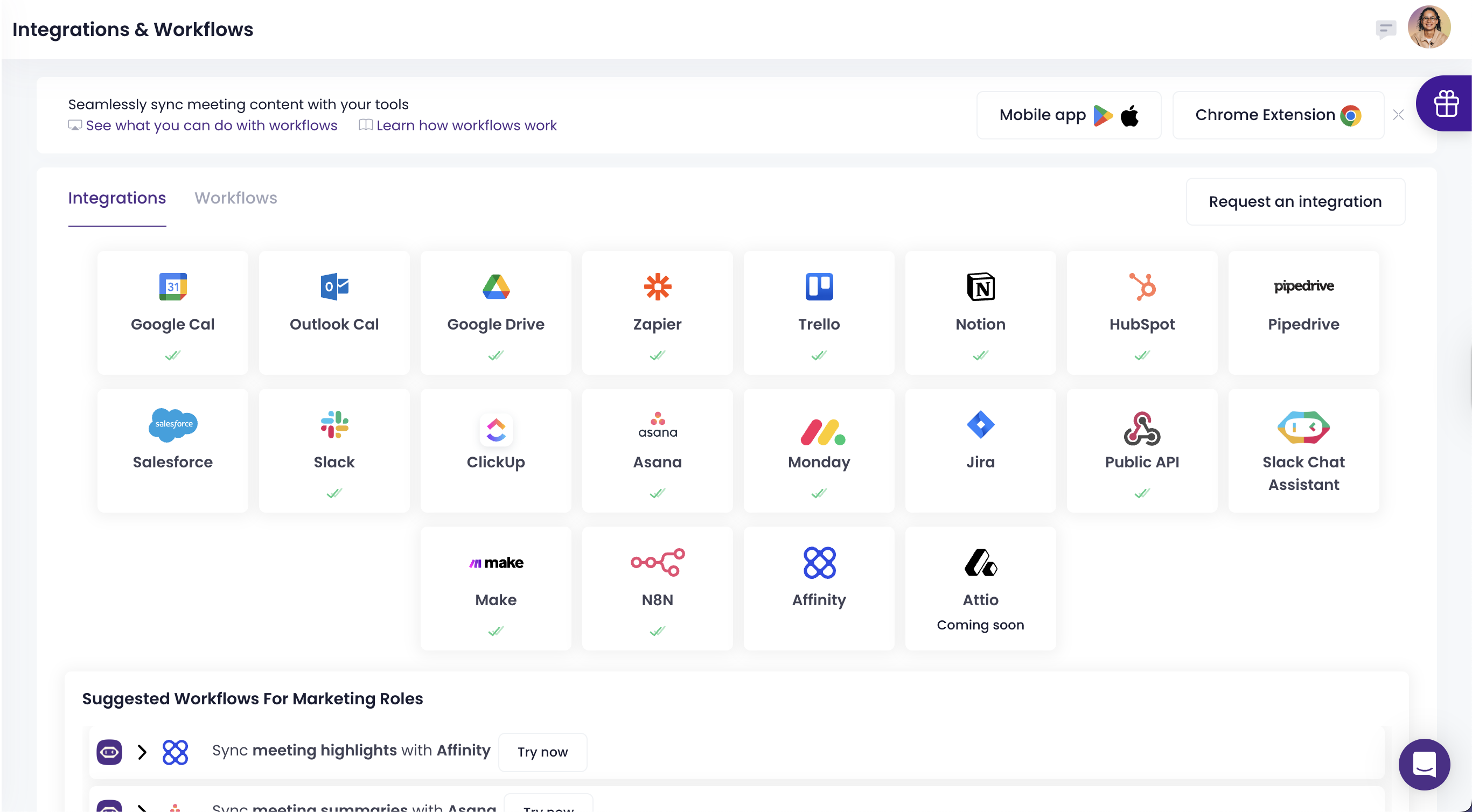
Meeting notes and action items can be sent directly to project boards or CRM systems. This turns meeting content into part of your workflow without the need for extra steps.
Security across all plans
MeetGeek provides enterprise-level security with SOC 2 Type II, GDPR, CCPA, and HIPAA compliance included in every plan. This allows businesses that handle sensitive data to stay protected without needing a custom agreement or an upgraded subscription.
MeetGeek pricing
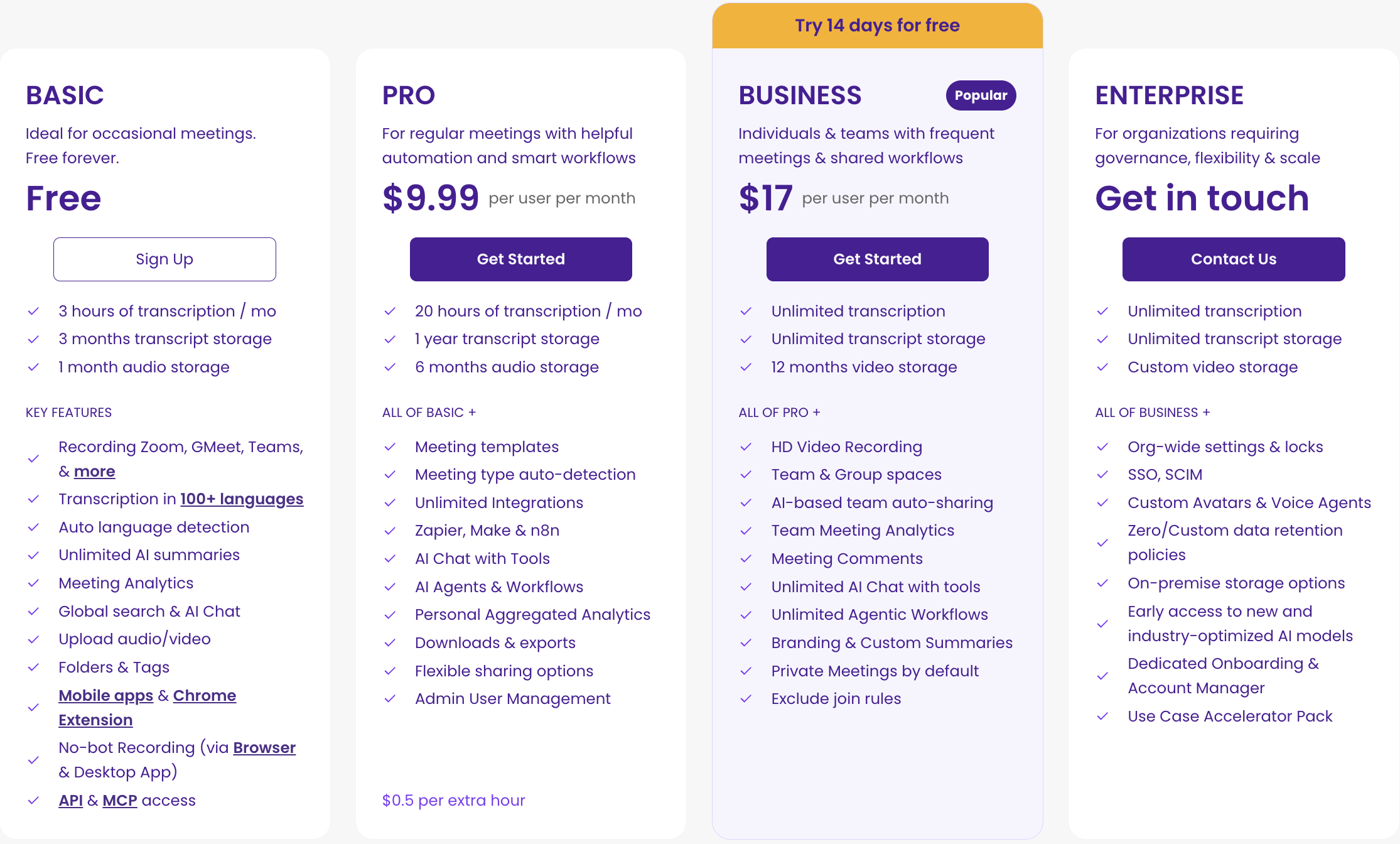
MeetGeek offers a clear pricing model with no hidden fees or confusing credit systems. Every plan includes the platform’s core features, such as transcription, AI summaries, integrations, and collaboration tools, so you always know what you are paying for.
Basic Plan (Free)
The Basic plan is ideal for individuals who want to try MeetGeek without a commitment. It includes:
- 3 hours of transcription per month
- 3 months of transcript storage and 1 month of audio storage
- Automated meeting transcription with unlimited summaries
- Auto language detection
- Integrations and global search
- File uploads, folders, and AI chat
- Access to the mobile app and Chrome extension
This plan provides a real opportunity to test the platform, unlike competitors that restrict key features on their free tiers.
Pro Plan ($9.99 per user/month billed annually)
The Pro plan is designed for professionals who want advanced automation and personalization. It offers:
- 20 hours of transcription per month
- 1 year of transcript storage and 6 months of video storage
- AI agents & workflows
- Meeting templates and automated workflows
- Zapier and Make integrations
- Downloadable assets, user management, and flexible sharing options
- $0.50 per additional transcription hour
This plan gives small teams or individuals the tools they need to manage video content and meeting insights efficiently.
Business Plan ($17 per user/month billed annually)
The Business plan is the most popular choice for teams that need collaboration features and deeper insights. It includes:
- Unlimited hours of transcription per month
- Unlimited transcript storage and 12 months of video storage
- All Pro features, plus:
- Team spaces for collaboration
- Meeting insights by team and call type
- Comments and private meetings by default
- Custom dictionary and custom notetaker name
- Dedicated account manager
- $0.50 per additional transcription hour
This tier is designed to support growing teams that need reliable collaboration and personalized meeting management.
Enterprise Plan (Custom pricing)
The Enterprise plan is built for organizations with complex needs. It provides:
- Unlimited transcription and transcript storage
- Custom video storage options
- All Business features, plus:
- Branded emails and organization-wide settings
- Custom data retention policies
- Custom speech models
- Onboarding sessions
- Private data storage
- $0.50 per additional transcription hour
With enterprise-level support and security, this plan ensures large organizations can manage their content creation and meeting data with confidence.
Want to learn more about why MeetGeek is the best choice for your virtual meetings? Then check out this video:
MeetGeek vs Descript: feature comparison
| Feature | Descript | MeetGeek |
|---|---|---|
| Transcription accuracy | ⚠️ generally accurate for clean audio, but often needs manual edits on jargon or poor recordings | ✅ high, handles accents, multiple speakers, and jargon well |
| Generous transcription hours | ❌ capped per plan (1–40 hrs, unlimited only on Enterprise) | ✅ 3 hrs Free, 20 Pro, Unlimited Business, unlimited Enterprise |
| Editing tools | ✅ strong video editing features including multitrack editing, green screen, eye contact, filler word removal, and studio sound | ❌ focused on transcription workflows, includes filler word removal, noise reduction, and create clips but no studio sound |
| Watermark free exports | ❌ only from Hobbyist plan upward | ✅ available starting on Free plan |
| Collaboration tools | ❌ limited until Business plan | ✅ shareable links and team spaces from paid plans |
| Meeting summaries & insights | ❌ basic, requires manual review | ✅ advanced, structured, context-aware |
| Searchable repository | ✅ searchable project folders with transcript search | ✅ full conversation library with keyword and Q&A style search |
| Speaking habits & coaching | ❌ not available | ✅ talk-time balance and communication insights |
| Integrations | ⚠️ supports publishing/export, YouTube, Zoom, and Zapier integrations, but fewer deep CRM connectors | ✅ 10,000+ apps, including CRM and project tools |
| Security & compliance | ⚠️ basic security features included, advanced compliance (SSO, SCIM, custom policies) only on Enterprise | ✅ SOC 2, GDPR, HIPAA, CCPA across all plans |
| Priority support | ✅ available on Business and Enterprise | ✅ available on Business and Enterprise |
Wrap-up: Descript pricing evaluation in 2026
Descript offers a novel approach to editing audio and video content, with filler word removal, AI speech, and collaborative tools. However, its restrictive Descript pricing structure, transcription hours caps, and advanced features locked behind expensive upgrades leave many creators frustrated.
MeetGeek provides a more user-friendly interface, superior transcription capabilities, and transparent pricing. From its free plan to its enterprise plan, MeetGeek delivers predictable value without forcing users into constant plan upgrades.
For anyone evaluating Descript alternatives in 2026, MeetGeek stands out as the best choice for virtual meeting productivity. Try MeetGeek for free and see if it’s a fit for your team!
Frequently asked questions
How much does Descript cost?
Descript offers a Free plan with 1 hour of transcription, while paid tiers start at $16 per month. Higher plans add more transcription hours, advanced tools like text-to-speech and high-quality sound, and team collaboration features.
What is better than Descript?
For many creators, MeetGeek is a stronger alternative. Unlike Descript, which caps transcription hours and locks features behind higher tiers, MeetGeek includes watermark-free exports even on its free plan.
It delivers highly accurate transcription that can automatically identify multiple speakers and jargon, making it ideal for managing audio content without constant corrections.
MeetGeek also provides built-in tools to remove background noise and turn recordings into summaries with just a few clicks. With extensive team collaboration features and transparent pricing, MeetGeek often proves more practical for creators who want both transcription and workflow automation in one platform.
Is Descript a one-time purchase?
No, Descript is not a one-time purchase. To access Descript and its editing features, you must subscribe to one of its monthly or annual paid plans. Each plan sets limits on transcription hours, storage, and editing capabilities.
For example, advanced tools like text-to-speech or studio-quality sound are only available on higher tiers, and you may need to pay extra for additional transcription hours if your audio content goes beyond the monthly allowance.
What are the disadvantages of Descript?
Descript limits transcription hours, restricts advanced tools like removing background noise and transcription glossary to higher tiers, and only unlocks full team collaboration on Business or Enterprise plans. Exports on the free plan also include watermarks.





.avif)