


Choosing between Webex and Zoom is a common challenge for teams that rely on video conferencing for daily work. Both platforms are leaders in reliable video conferencing, offer strong core features, and support everything from quick video calls to large-scale meetings and virtual events.
The difference is not about whether they work. It is about how they work for your team, your meeting types, and your long-term collaboration needs.
This guide compares Webex vs Zoom across video meetings, collaboration tools, security features, pricing plans, and usability so you can decide with confidence.
Video conferencing basics: what both Webex and Zoom do well
At their core, both Webex and Zoom cover the essential features required for modern online meetings:
- HD video quality and stable audio
- Screen sharing with presenter controls
- Recording capabilities for live and past meetings
- In-meeting chat and file sharing
- Password-protected meetings and waiting rooms
- Support for virtual backgrounds
- Tools for making virtual meetings more interactive
If your needs stop here, either platform will work well for small teams, small businesses, and distributed teams running frequent video conferences.
The real differences appear once you look at advanced features, scalability, and ecosystem fit.
Make every Webex or Zoom meeting more valuable with MeetGeek
Before comparing platforms feature by feature, there is a bigger question worth asking:
What happens after the meeting ends?
Well, that's when MeetGeek starts really becoming useful
MeetGeek works with Zoom Meetings, Cisco Webex Meetings, Microsoft Teams, Google Meet, and more, adding clarity and follow-through to every call, regardless of platform.
With MeetGeek, you get:
- Automatic recording and transcription for video meetings
- AI-generated summaries, action items, and detailed insights
- Searchable notes across all past meetings
- Strong administrative controls and privacy-first design
- Smart highlights for sales calls, interviews, and team meetings
-1%202.webp)
MeetGeek also includes AI Voice Agents that can join or run routine conversations for you:
- Handle repetitive internal or customer-facing calls
- Reduce meeting load while keeping structured outcomes
- Support teams running large meeting volumes
- Free up time for work that actually needs human attention
Whether you choose Webex or Zoom, MeetGeek ensures your meetings lead to decisions, not forgotten notes.
Webex vs Zoom: user interface and ease of use
Zoom’s intuitive interface

Zoom is widely known for its intuitive interface and low learning curve. New users can join Zoom meetings quickly, often without an account, which is one reason it works so well for external calls, interviews, and client-facing video meetings.
The meeting interface feels clean and familiar, with straightforward controls for mute, chat, and screen sharing. It is also quick to schedule meetings, and the overall experience tends to feel smooth for small teams and ad-hoc calls where you just want to get started fast.
Webex’s enterprise-first design
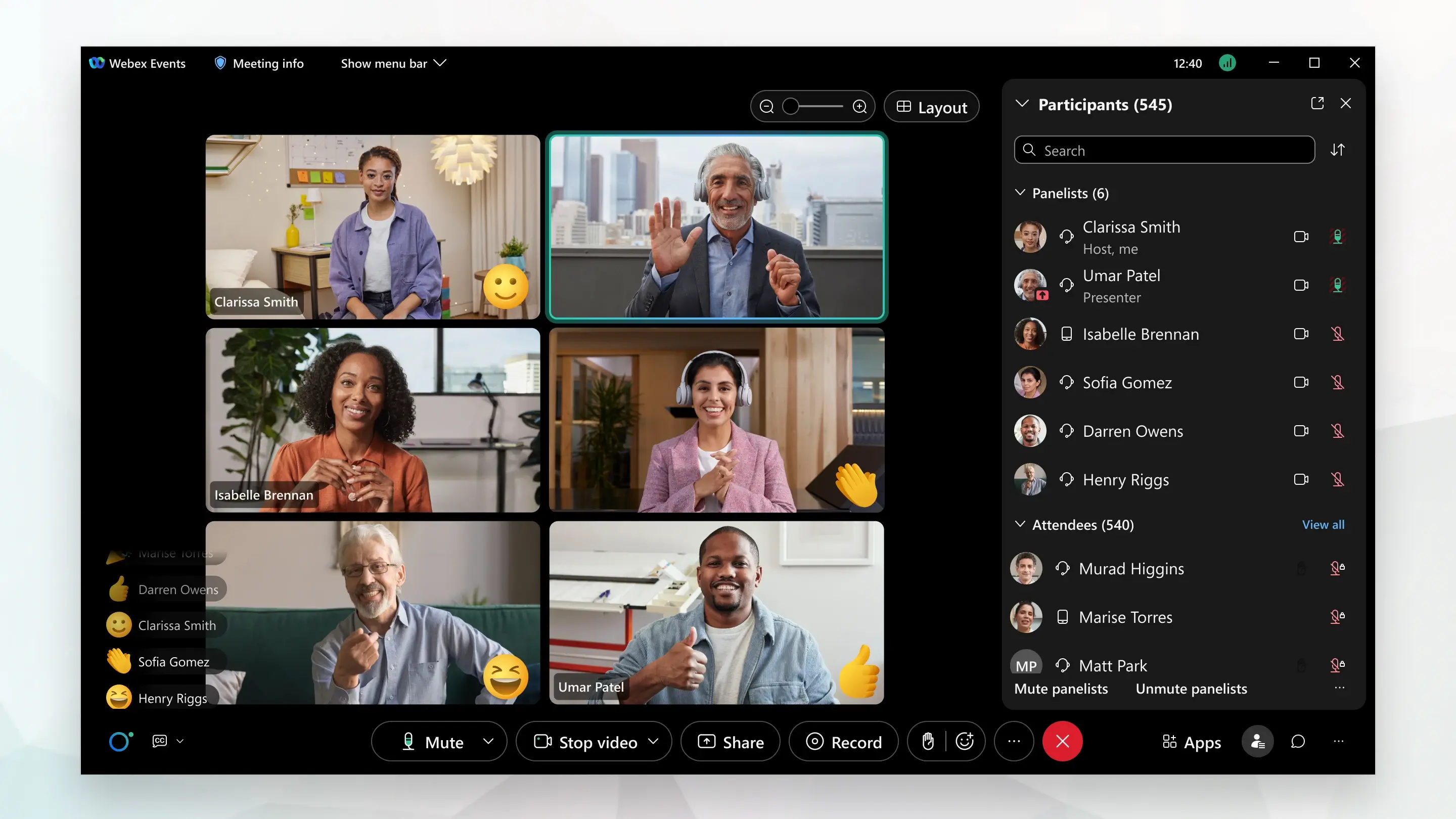
Cisco Webex takes a more structured, enterprise-oriented approach. The interface shows more controls up front, which can feel heavier at first, but it gives admins and larger organizations more room to configure how meetings run.
Webex is a strong fit when IT teams need stronger administrative controls, when companies want consistent meeting policies across departments, and when teams depend on advanced collaboration tools in more regulated environments where compliance and governance matter.
Collaboration tools and meeting features
Zoom collaboration tools
Zoom offers a broad set of collaboration tools designed to support work before, during, and after meetings:
- Breakout rooms for workshops and training
- Interactive whiteboards and Zoom Docs
- Team chat for async communication
- Video messages for updates without live calls
- Zoom rooms for hybrid meeting spaces
- Zoom phone with a cloud-based business phone number
Zoom also integrates smoothly with many third-party applications, making it flexible for fast-moving teams.
Webex collaboration tools
The Webex Suite focuses on structured, secure collaboration across meetings, messaging, and calling:
- Includes unlimited whiteboards across plans
- Strong file sharing inside team spaces
- Built-in messaging for ongoing collaboration
- Native calling and contact center solution options
- Deep ties into the Cisco ecosystem
Webex is often preferred by organizations running large-scale meetings, regulated workflows, or global operations.
AI features: Zoom AI Companion vs Webex intelligence
Zoom AI Companion
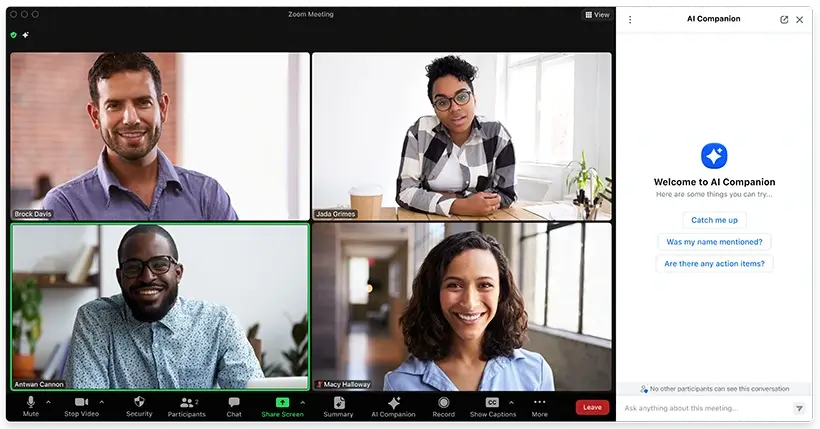
Zoom AI Companion is built to reduce the manual work that happens after video meetings and across daily collaboration. It focuses on helping teams move faster once a call ends.
Zoom AI Companion helps with:
- Automatic meeting summaries and key takeaways
- Highlighting action items and important moments from past meetings
- Chat and document summaries across Team Chat and Zoom Docs
- Drafting follow-up messages, notes, and content based on meeting context
- Searching conversations, meetings, and files from one place
Recent updates have expanded its coverage across meetings, chat, documents, and email. While useful for quick follow-ups, teams often review outputs manually, as summary accuracy can vary depending on meeting structure and audio quality.
Webex intelligence
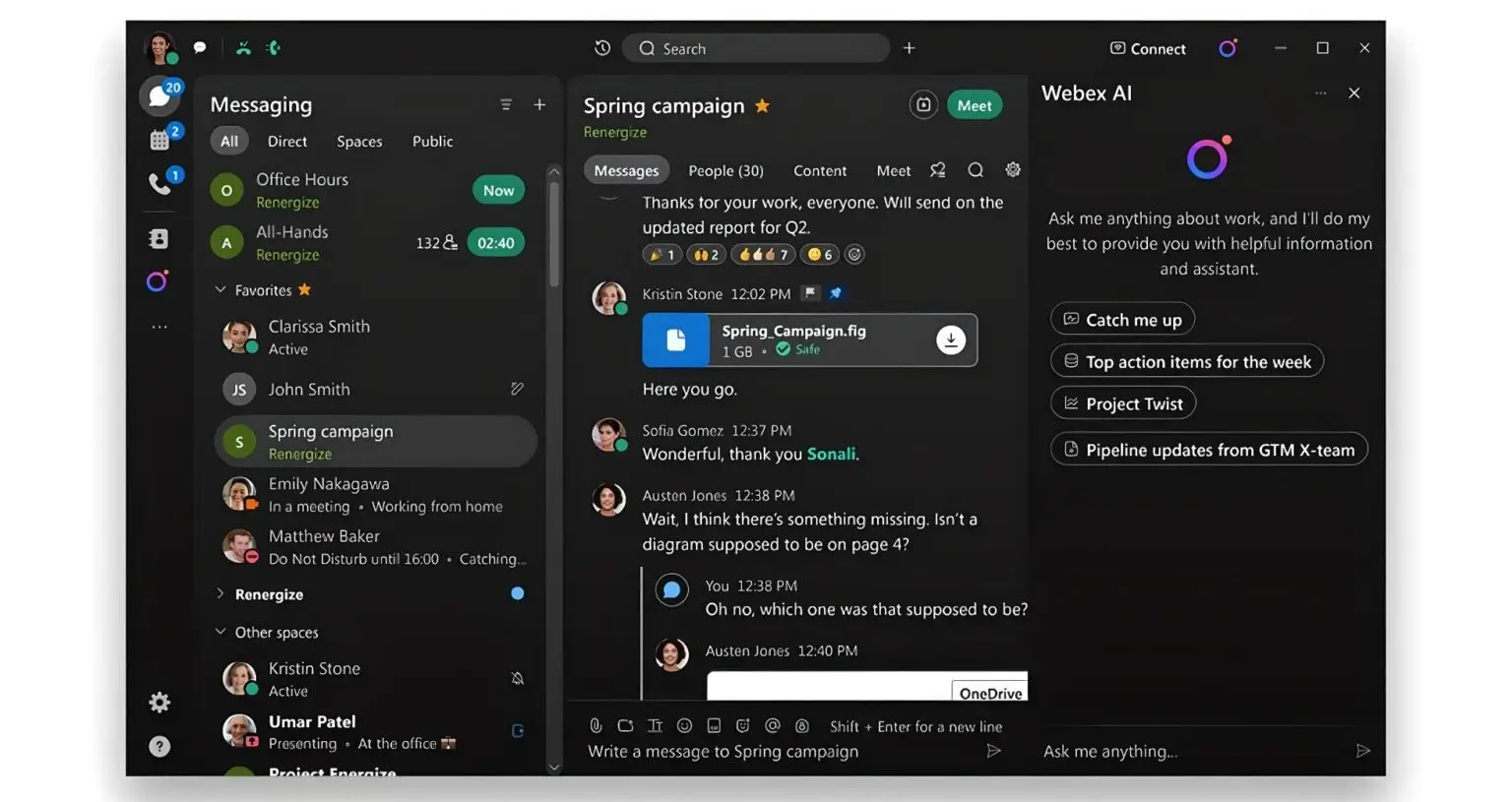
Cisco Webex applies AI more heavily to improving the live meeting experience and supporting enterprise-level oversight, especially in complex or regulated environments.
Webex intelligence focuses on:
- Advanced audio quality improvements, including noise removal and voice enhancement
- Live transcription for online meetings, with real-time captions
- Real-time translation to support global virtual meetings
- Meeting analytics and usage insights for admins and leaders
- Engagement and participation data across recurring meetings
Webex’s AI is especially valuable for organizations that prioritize accessibility, multilingual communication, and consistent meeting standards at scale.
Both platforms continue to release new features, but their AI remains tightly connected to their own ecosystems. Zoom emphasizes speed and productivity after meetings, while Webex prioritizes quality, accessibility, and oversight during meetings.
Neither fully replaces a dedicated meeting intelligence layer like MeetGeek when teams need highly accurate summaries, clear action tracking, and structured outcomes across Webex, Zoom, and other meeting platforms.
Security and compliance
Security is where Webex traditionally leads.
Webex security features
- End-to-end encryption
- Strong advanced security features
- Locked meeting rooms and lobby controls
- Compliance certifications for enterprise use
- Designed for Webex enterprise environments
Zoom security features
Zoom has significantly improved its security features and now includes:
- Password-protected meetings
- Waiting rooms and host controls
- Encryption for video conferences
- Granular permissions for hosts
For most teams, both platforms provide solid advanced security. Highly regulated industries often lean toward Webex.
Pricing plans and free options
Below is a detailed description of how Cisco Webex and Zoom structure their pricing, what you actually get at each level, and who each tier is best suited for.
Webex pricing overview
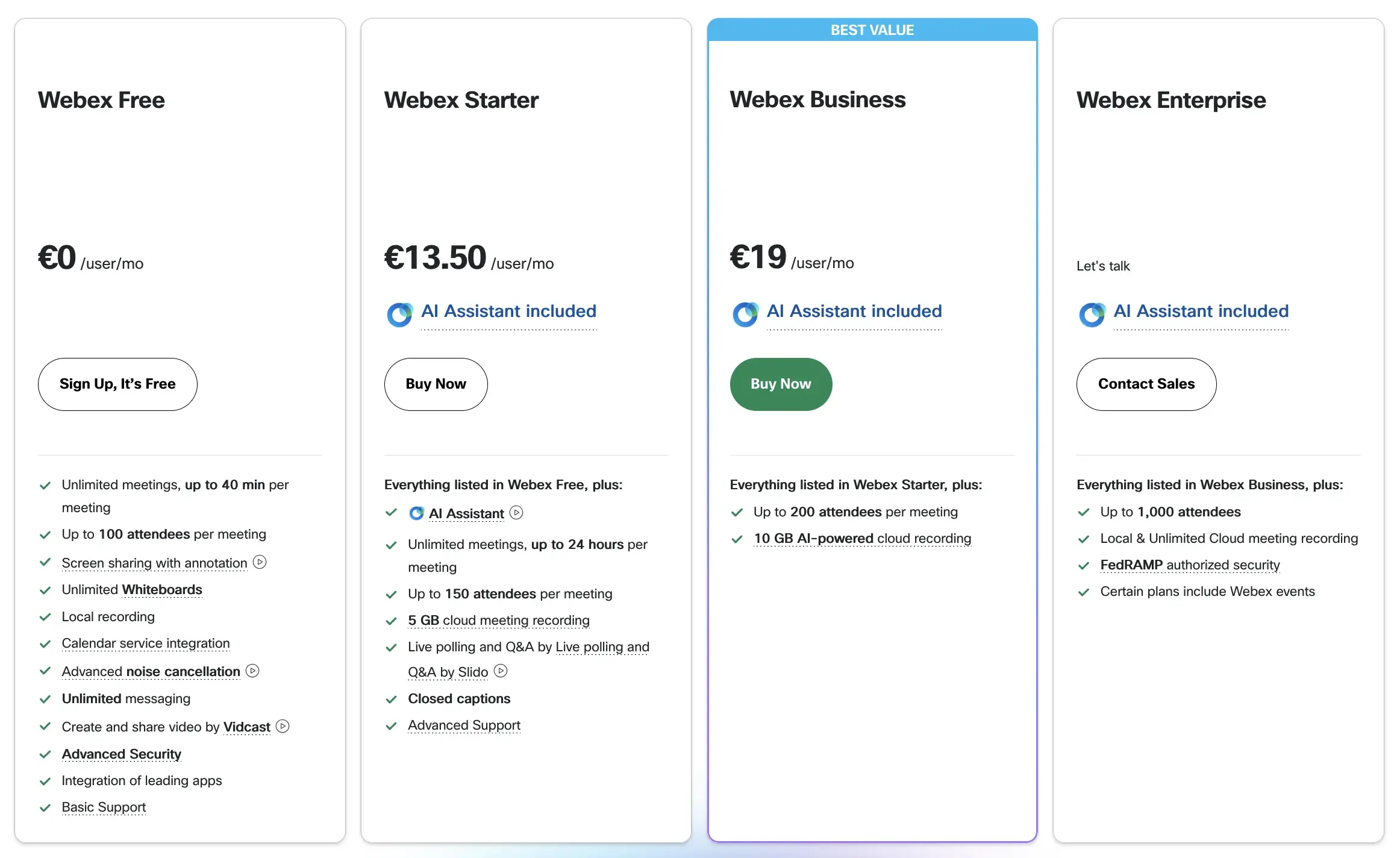
Webex structures its pricing around meetings, messaging, and calling, with a strong emphasis on security, governance, and bundled capabilities.
Webex Free (€0/license/month)
Best for individuals or very small teams that need secure video conferencing with essential functionality.
- Meetings up to 40 minutes
- Up to 100 participants per meeting
- Interactive whiteboards
- Screen sharing and virtual backgrounds
- Secure lobby and password-protected meetings
- Local meeting recordings
- Basic messaging and file sharing
- End-to-end encryption and core security features
Webex Starter (€13.50/license/month)
Designed for small teams that need longer meetings and light AI support.
- Meetings up to 24 hours
- Up to 150 participants
- 5 GB cloud recording storage
- AI Assistant for meeting summaries and message summaries
- Live polling and Q&A with Slido
- Closed captions and meeting highlights (selected languages)
- Breakout rooms and mobile screen sharing
Webex Business (€19/license/month)
A strong mid-tier option for growing teams that need more scale and control.
- Up to 200 participants per meeting
- 10 GB cloud recording storage
- Join overlapping meetings simultaneously
- Post-meeting transcripts
- More advanced host and co-host controls
- Deeper messaging and collaboration tools
- Stronger administrative and security controls
Webex Enterprise (custom pricing)
Built for large organizations with advanced compliance, calling, and event needs.
- Up to 1,000 participants per meeting
- Unlimited cloud storage for recordings
- Full Webex Calling features, including a business phone number
- Advanced calling tools like call queues, call recording, voicemail-to-email, and extensions
- FedRAMP authorization and enterprise-grade advanced security features
- Custom retention policies and compliance controls
- Dedicated customer support
Overall, Webex is well-suited for organizations that want meetings, messaging, calling, and security tightly bundled into one platform, especially in regulated or enterprise environments.
Zoom pricing overview
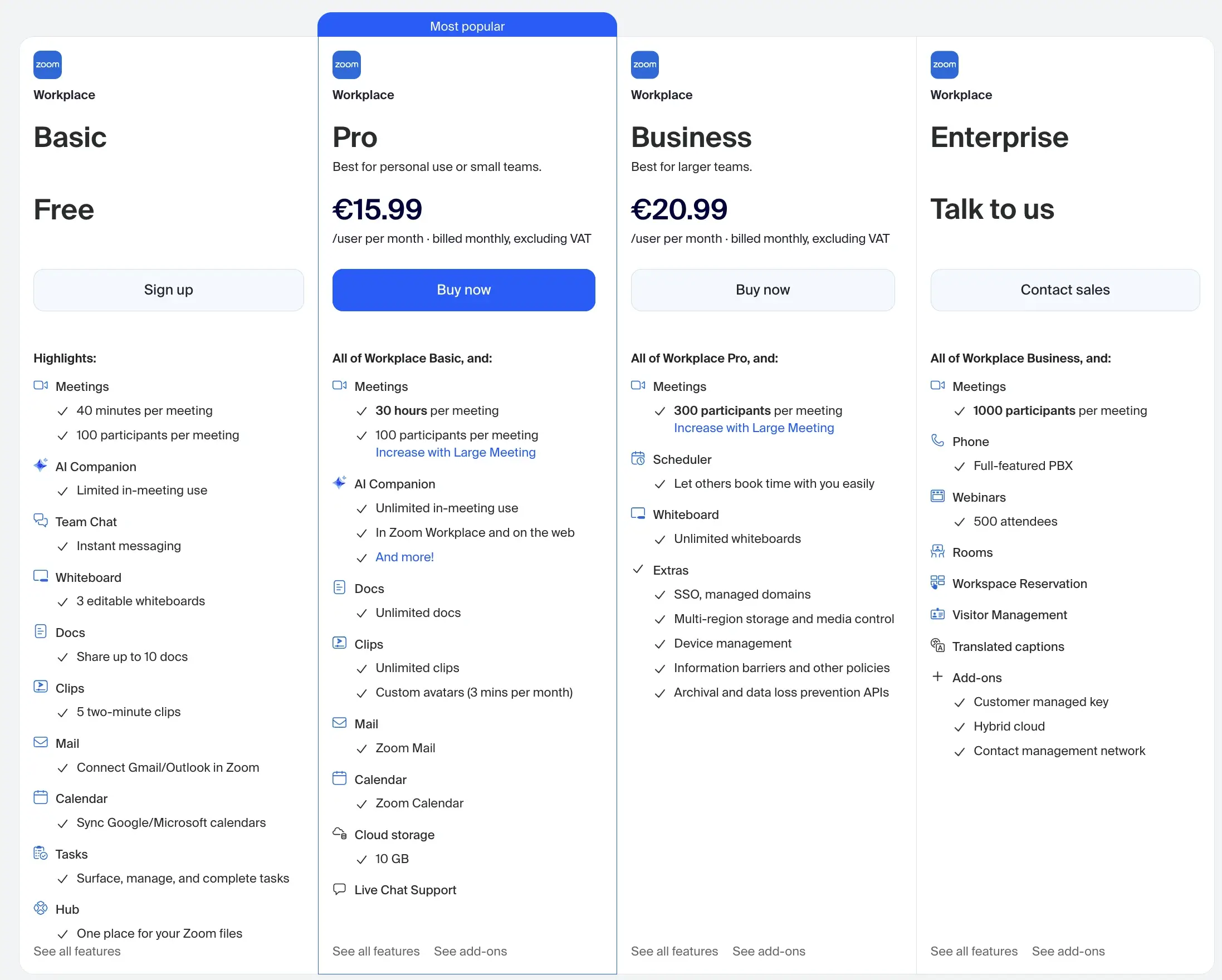
Zoom’s pricing is structured for flexibility, allowing teams to start small and add features as they grow.
Zoom Workplace Basic (Free)
Ideal for individuals and small teams running short online meetings.
- 40-minute meeting limit
- Up to 100 participants
- Limited in-meeting Zoom AI Companion usage
- Team Chat with instant messaging
- 3 editable whiteboards
- Up to 10 shared Zoom Docs
- 5 short video clips
- Calendar sync with Google and Microsoft
- Basic task and file hub
Zoom Workplace Pro (€15.99/user/month)
Best for personal use and small teams that need longer meetings and more AI support.
- Meetings up to 30 hours
- 100 participants (expandable with Large Meeting add-on)
- Unlimited in-meeting AI Companion usage
- Unlimited Zoom Docs and Clips
- 10 GB cloud storage
- Zoom Mail and Calendar
- Live chat support
Zoom Workplace Business (€20.99/user/month)
Designed for larger teams that need stronger admin and collaboration controls.
- Up to 300 participants per meeting
- Unlimited whiteboards
- Scheduler for easier meeting booking
- SSO, managed domains, and device management
- Multi-region data storage and media control
- Advanced security and policy enforcement
Zoom Workplace Enterprise (custom pricing)
Built for large-scale and global organizations.
- Up to 1,000 participants per meeting
- Zoom Phone with full PBX functionality
- Webinars for up to 500 attendees
- Zoom Rooms and workspace reservation tools
- Translated captions
- Advanced compliance, encryption, and key management options
Zoom is often seen as more cost-effective early on, especially for teams that want to start with a free plan and gradually add features like large meeting capacity, webinars, or phone services as needed.
Webex vs Zoom pricing: the takeaway
Both platforms offer free plans and scalable paid plans, but they approach growth differently. Webex packages meetings, calling, and security into fewer, more comprehensive tiers, which appeals to enterprises that want consistency and control. Zoom offers more modular flexibility, making it easier for teams to start small and expand features over time.
In practice, Zoom often feels more flexible in the early stages, while Webex becomes more compelling as meeting complexity, security requirements, and organizational scale increase.
Integrations and ecosystem fit
When comparing integrations and ecosystem fit, the difference between Zoom and Cisco Webex becomes much clearer once you look at how teams actually work day to day.
Zoom integrations: broad, flexible, and business-friendly
Zoom is built to plug easily into a wide range of tools used across sales, marketing, support, and operations. Its App Marketplace offers hundreds of native integrations and embedded apps, which makes it easy to adapt Zoom to different workflows without heavy IT involvement.
Zoom integrates especially well with:
- CRM platforms like Salesforce and HubSpot for sales calls and follow-ups
- Helpdesk and support tools such as Zendesk and Freshdesk
- Scheduling tools like Calendly
- Project and documentation tools like Notion, Asana, and Jira
- Marketing and webinar platforms for virtual events and lead generation
- Productivity suites like Google Workspace and Microsoft 365
Zoom Apps (often called Zapps) can also run directly inside the Zoom meeting interface, allowing teams to collaborate on documents, whiteboards, polls, or workflows without leaving the call. This breadth makes Zoom a strong choice for fast-moving teams, customer-facing roles, and organizations that rely heavily on third-party software.
Webex integrations: deep, secure, and enterprise-focused
Webex takes a more controlled and security-driven approach to integrations. While its third-party app library is smaller than Zoom’s, Webex focuses on deep, reliable integrations that meet enterprise compliance and governance standards.
Webex integrates tightly with:
- Cisco products such as Cisco Calling, Contact Center, Meraki, and networking tools
- Enterprise productivity tools like Microsoft 365 and Microsoft Teams
- Google Workspace for calendar syncing, email, and meeting scheduling
- Identity and access management systems for SSO and policy enforcement
- Enterprise content management and security platforms
This makes Webex particularly strong for organizations that already operate within the Cisco ecosystem or that require strict administrative controls, data residency options, and compliance-friendly workflows.
Zoom vs Webex: breadth vs depth
If integrations are a major factor in your decision:
- Zoom usually wins on breadth, offering more plug-and-play integrations and flexibility across departments
- Webex wins on depth and governance, delivering tighter control, stronger security alignment, and smoother operation within large enterprise environments
In short, Zoom fits teams that want fast setup and wide compatibility with modern SaaS tools, while Webex fits organizations that value structured ecosystems, centralized IT management, and long-term platform consistency.
Webex vs Zoom: which one should you choose?
Choose Webex if you need:
- Enterprise-grade controls and compliance
- Advanced security and governance
- Built-in calling and contact center solution options
- Structured collaboration at scale
Choose Zoom if you want:
- A fast, intuitive interface
- Easy onboarding for external users
- Strong collaboration tools for everyday work
- Flexible pricing for small businesses and growing teams
The smarter approach: platform choice plus meeting intelligence
No matter where you land in the Webex vs Zoom debate, one truth remains: Great meetings depend on what you do with the conversation afterward.
That is why teams using Webex, Zoom, or both rely on MeetGeek to turn video meetings into clear outcomes.
If you want searchable notes, accurate summaries, AI-powered follow-ups, and voice agents that reduce meeting overload, MeetGeek works across platforms without changing how your team meets. Try MeetGeek for free and make every meeting count, no matter which tool you use.
Frequently asked questions
What are the disadvantages of Webex?
Cisco Webex disadvantages often include higher costs compared to some competitors, a less intuitive user interface for new users, fewer third-party integrations than tools like Zoom, and heavier system and bandwidth usage during large or complex meetings. Teams may also find setup, configuration, and ongoing management more complex, especially when advanced security, calling features, or enterprise policies are involved.
Can someone without Webex join a meeting?
Yes. Cisco Webex meetings allow participants to join without creating a Webex account. Guests can join directly through a browser using the meeting link, or optionally download the Webex app for access to features like screen sharing and improved audio and video quality.
Who is Zoom’s biggest competitor?
Zoom’s biggest competitor is generally considered to be Microsoft Teams, largely because it’s deeply bundled into Microsoft 365 and widely adopted across enterprises, which makes it the default option for a lot of organizations.







.avif)