


AI sales coaching is the use of AI to analyze recorded sales conversations at scale: transcribing calls, detecting coachable moments, scoring Account Executives (AEs), Sales Development Representatives (SDRs), and Business Development Representatives (BDRs) against a playbook, and delivering feedback that would otherwise require a sales manager to sit through every call.
It replaces the 3% sample a human can realistically listen to with a structured read across 100%. Salesforce's State of Sales research has reported for several editions running that reps spend under 30% of their week actually selling, which puts a hard ceiling on how much coaching a frontline manager can deliver manually.
The deals it changes most are the ones nobody listened to: the 90% of normal pipeline calls that never made it onto a manager's review list. Once every call is scored against the same playbook, the outliers (a rep who consistently cuts off objections, a stage where discovery falls apart) rise to the top automatically, and the coaching conversation has somewhere to start.
What AI sales coaching does — and what it doesn't
AI sales coaching is not a robot listening over a rep's shoulder. It's a pipeline: record the call, transcribe it, extract signals, compare against a scorecard, and surface the moments worth reviewing.
What it does well:
- Flags missed discovery questions or skipped qualification steps
- Tracks talk-to-listen ratio, monologue length, and competitor mentions
- Identifies objections by type and how the rep handled each one
- Scores calls against the stages of your sales methodology (MEDDIC, MEDDPICC, BANT, SPIN, Sandler, Challenger, SPICED, or your own)
- Trends these signals per rep and per stage over time against win rate, quota attainment, and Average Contract Value (ACV)
What it doesn't do:
- Replace a manager's judgment on whether feedback will land
- Understand politics inside the customer's account
- Catch tone or rapport in the way another human would
- Replace the career conversation a manager owes a rep
Treat it as a telescope that covers the whole sky, not the astronomer.
Why doesn't manual coaching scale?
The math is simple. A sales manager with ten reps, each running 25 calls a week, would need to listen to 250 calls a week to coach meaningfully. The bottleneck is well-known to anyone who has run a sales team: in practice managers spot-check, usually the 3–5% of calls that are easiest to pull, often from the same reps.
Manual coaching also has a blind spot. It focuses on the calls that got flagged: lost deals, a customer complaint, a request from the rep. The 90% of normal pipeline calls never get reviewed, even though that's where most coaching opportunities live.
AI sales coaching inverts both problems. Every call gets the same structural review, and the outliers rise to the top automatically.
How does AI sales coaching actually work?

1. Capture and transcription
The conversation is recorded from Zoom, Google Meet, Microsoft Teams, or a phone system like Dialpad, Aircall, or RingCentral. A speech-to-text model (OpenAI Whisper, Deepgram, AssemblyAI, or a proprietary equivalent) converts it into a diarized transcript, meaning each speaker is tagged separately. Transcription accuracy is the floor for everything that follows; below about 92% Word Error Rate (WER) accuracy, the signals downstream get unreliable.
2. Signal detection
The transcript gets run through a series of classifiers. Classifiers look for specific things: a pricing objection, a competitor mentioned by name, a discovery question about budget, a compliance risk phrase. Each is a binary or categorical output tagged to a timestamp.
3. Scorecard comparison
The detected signals are compared against your sales playbook. If your MEDDIC or MEDDPICC playbook expects the rep to qualify "Metrics" in stage-one calls, the scorecard marks whether that happened. The same logic maps cleanly to BANT (Budget, Authority, Need, Timeline), SPIN (Situation, Problem, Implication, Need-payoff), or the Challenger Sale commercial-teaching framework. This is where "AI coaching" becomes specific to your team, not generic.
4. Summary and feedback
The output is a structured call summary with a score, a short list of coachable moments, and direct-quote snippets. The manager sees this before their 1:1 with the rep, with the specific moments queued up.
5. Aggregation and trending
Signals from hundreds of calls aggregate into rep-level and team-level dashboards, typically surfaced inside a CRM like Salesforce, HubSpot, Pipedrive, or Zoho so Chief Revenue Officers (CROs) and RevOps leaders can see them alongside pipeline data. A rep who's cutting prospects off mid-objection shows up as a pattern, not a one-off.
The realistic limits
AI sales coaching is load-bearing, not a silver bullet. Three limits worth naming:
It's only as good as your playbook. If your definition of "good discovery" isn't written down, the AI has nothing to score against. Before you buy a tool, document your playbook.
It cannot fix a coaching culture. A tool that produces perfect scorecards for a manager who never acts on them is overhead. AI coaching multiplies an existing coaching practice; it does not create one.
It can reinforce the wrong pattern. If the scorecard rewards talk time or feature mentions that don't correlate with closed-won, reps will optimize for what gets measured. Audit your scoring criteria against your actual win data quarterly.
What to look for in a tool
The AI sales coaching market has blurry edges: call recorders, revenue intelligence platforms, meeting intelligence platforms, and dedicated coaching tools all claim the category. A usable shortlist filters on these:
- Coverage of every meeting platform your team uses (Zoom, Google Meet, Microsoft Teams, Webex)
- Transcription accuracy above 92% with speaker diarization
- Scorecard customization that maps to your methodology, not a templated one
- Trending by rep, by stage, and by objection type, not just per-call summaries
- Integration with your CRM (Salesforce, HubSpot, Pipedrive, Zoho) so signals land in the opportunity, not a separate tool
- Security and compliance posture your legal team will actually sign off on (SOC 2 Type II, ISO 27001, GDPR, CCPA, HIPAA BAA if you're in regulated industries, configurable data residency in the EU, US, or APAC)
Price rarely differentiates at the shortlist stage. Fit with your existing stack does.
Who AI sales coaching is for
AI sales coaching earns its place fastest in these configurations:
- Teams of 5+ reps running 15+ calls per rep per week
- SaaS and services companies with a defined sales methodology
- Any team where onboarding time to quota is a tracked metric
- Revenue operations functions that need pipeline signal for forecasting
It earns its place slowest in:
- Solo founders or 1–2 person sales teams (the overhead exceeds the signal)
- High-velocity transactional sales where calls are under 5 minutes
- Industries with heavy in-person selling, where the AI can't see the room
Rolling it out without killing adoption
The single biggest reason AI sales coaching deployments stall is trust. Reps who suspect the tool exists to grade them disengage fast. Three practices protect adoption:
Explain the scope before the tool goes live. Reps should know what's analyzed, who sees it, and how it's used. "Your calls are summarized for coaching purposes; your manager sees them" is far better than a compliance footnote nobody reads.
Let reps see their own dashboards first. Self-service access before manager access changes the framing. The tool becomes theirs, not a surveillance layer. Reps who use their own dashboards weekly become the strongest advocates.
Set a clear line between coaching and performance management. If scorecard data starts showing up in PIPs and comp conversations, you're done. The tool will be gamed within a quarter. Keep coaching data out of performance reviews by explicit policy.
The hiring and ops questions it changes
When every call is analyzed, several operational questions get easier, and a few get harder.
Easier: ramp time for new AEs and SDRs compresses because they get feedback on real calls from week one, which shows up in time-to-first-deal and time-to-quota metrics. Manager 1:1s get sharper because the coaching moment is already queued. Forecast accuracy improves because deal risk signals show up in the transcript before the rep admits them, which RevOps leaders can surface directly in Salesforce opportunity records or Clari forecasts.
Harder: privacy and consent. You need an airtight policy on recording disclosure, data retention, and who can see what. Reps need to trust that scorecards are used for growth, not surveillance. If that trust slips, adoption dies in a quarter.
Where MeetGeek fits for sales teams
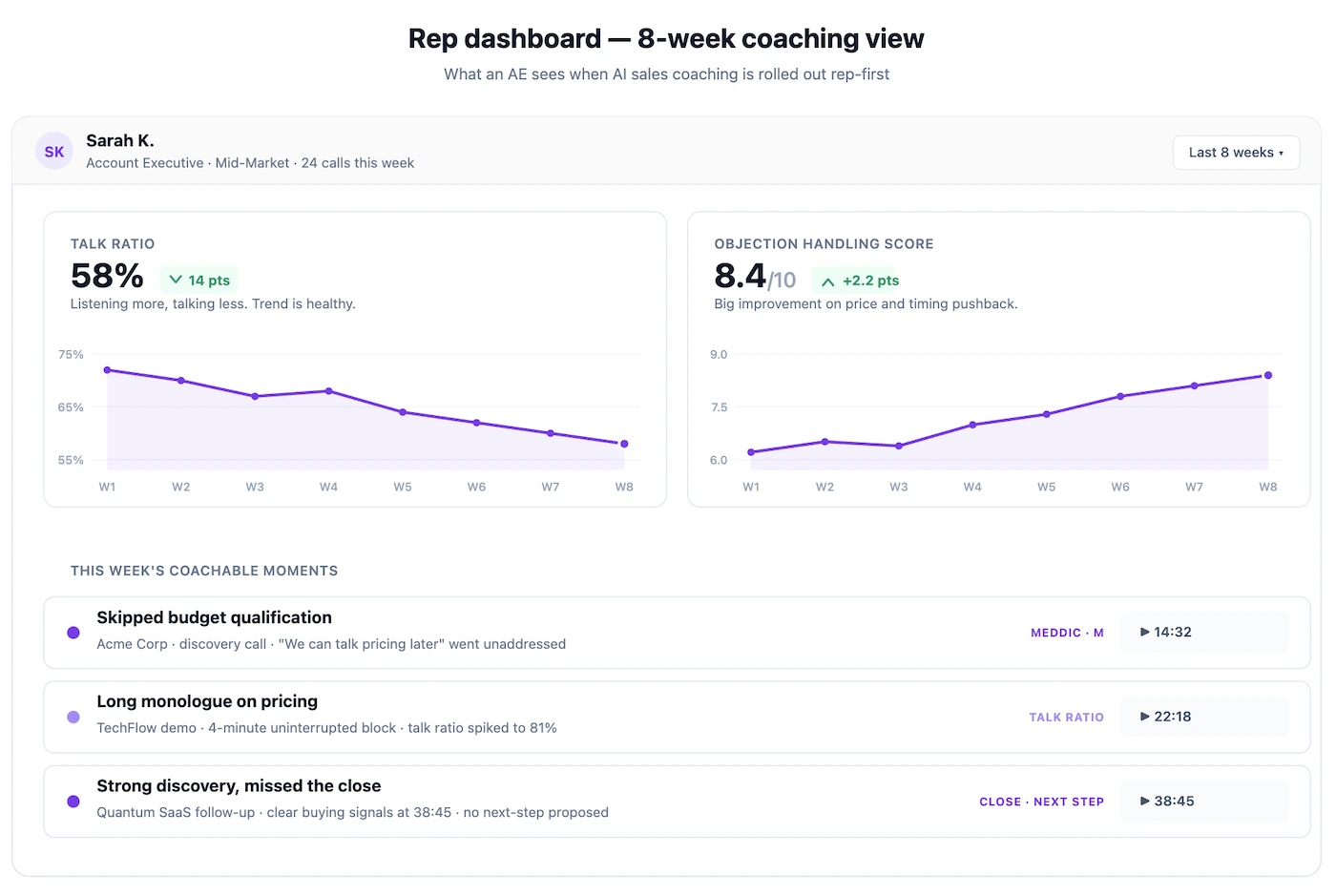
AI sales coaching is one application of a broader category: meeting intelligence. Meeting intelligence platforms record and analyze every meeting (not just sales calls, but customer success, internal planning, and cross-functional syncs) and make the whole library searchable and auditable.
MeetGeek's Meeting Agent joins sales calls from the calendar, produces a structured recap with talk-to-listen ratio, objection patterns, and a customizable Meeting Quality Score, then routes the signals to Slack or the CRM. Reps get their own dashboards; managers get team-level trends that point at the coaching moments that matter most.
Ask AI Chat inside MeetGeek for quick questions across recent calls, or pair MeetGeek with Claude through the MeetGeek connector to run Claude's full reasoning over a rep's last 50 calls. The connector is the stronger option for the harder coaching questions: "where is this rep consistently losing deals, and which objections do they handle worst?" gets a real answer when Claude can see the full transcript history.
The bottom line for revenue leaders
AI sales coaching pays off when three things are true: a defined sales methodology that the AI can score against, a coaching practice that already runs on 1:1s and pipeline reviews, and reps who trust the scope of what's being analyzed. With those in place, the tool turns the 3% of calls a manager could review into a 100% read and pulls the outliers to the top automatically. Without them, it produces dashboards nobody acts on.
If you're running 1–2 reps with a clean playbook, a manager-led review still works. If you're running ten reps across SDR, BDR, and AE pods with mixed objection patterns and a rolling forecast, a meeting intelligence platform like MeetGeek is the more effective choice. Try MeetGeek for free and see how every call lands in the same scorecard from week one.
Frequently Asked Questions
What is AI sales coaching?
AI sales coaching is the use of AI to analyze recorded sales calls, score them against a playbook, flag coachable moments, and surface trends per rep and per stage. It covers 100% of calls instead of the 3–5% a manager could realistically review manually.
Does AI sales coaching replace a sales manager?
No. It replaces the review work a manager couldn't physically do, not the judgment on what to coach, how, or when. A manager without an AI coaching tool is overloaded; a manager using one without a clear coaching practice is just generating dashboards.
How accurate is AI sales coaching?
Accuracy depends on transcription quality (aim for above 92% word accuracy) and the fit between the scorecard and your actual playbook. Out-of-the-box scorecards are a starting point — real accuracy comes from tuning against your win data over a quarter or two.
What's the difference between AI sales coaching and conversation intelligence?
Conversation intelligence is the broader category — analyzing customer conversations for signal. AI sales coaching is a specific application focused on rep development and methodology adherence. A good conversation intelligence platform usually includes coaching; a coaching tool that ignores wider conversation signal is narrower than it needs to be.
Do reps need to be told their calls are analyzed?
Yes, and not as a compliance footnote. Explicit consent and a clear data-use policy are table stakes, both for legal reasons and for adoption. Reps who feel surveilled will game the system or disengage.
How long until AI sales coaching shows ROI?
One full sales cycle for a ramp-time signal, two quarters for a coaching-impact signal on win rates. If you're seeing usage reports but not behavior change, the tool is producing data, not coaching — that's a process gap, not a tool gap.








.avif)