


Bottom line: Google offers four transcription products, each for a different job. Google Meet transcription turns video calls into Google Docs (Workspace Business Standard or above). Google Cloud Speech-to-Text is a developer API for building transcription into apps. Google Docs voice typing dictates speech into a document. Google Recorder transcribes voice memos on Pixel phones. They're all solid for narrow use cases, but for end-to-end meeting workflows (recording, speaker labels, summaries, action items, analytics), MeetGeek is the more capable alternative.
Transcription used to mean hiring a person and waiting two days. In 2026, it's instant, AI-powered, and free in many tools, including across Google's product family. But "Google transcription" isn't one product. It's four, each with different limits, pricing, and quality. This review walks through each, then explains where Google's transcription stops being enough and what to use instead.
What is Google's transcription service?
Google doesn't sell a single transcription product. Instead, transcription is a feature inside several Google tools, plus a developer API. The four main products:
- Google Meet transcription — built into Google Meet for recorded video calls
- Google Cloud Speech-to-Text — an API for developers and enterprises
- Google Docs voice typing — real-time dictation inside Google Docs
- Google Recorder — voice memo transcription on Pixel devices
Below is what each one is good at, where it falls short, and which one (if any) fits your need.
The 4 Google transcription products, reviewed
Google Meet transcription

What it is: A built-in feature that auto-saves a transcript of your Google Meet call as a Google Doc in the organizer's Drive.
Best for: Workspace teams that need basic, occasional meeting transcripts — board minutes, recurring team meetings, training sessions where a flat record is enough.
Strengths:
- Native to Google Meet, no extra setup
- Auto-saves transcript to Google Drive after the meeting
- Shareable via the same Google Docs permissions you already use
- Real-time live transcript in the side panel during the call (great for noisy environments)
Limitations:
- Plan-restricted. Only available on Workspace Business Standard and above. Personal Gmail accounts and basic Workspace plans don't get it.
- No structured summary. You get a transcript, not a summary, action items, or decisions.
- Speaker identification is inconsistent. Sometimes labeled, sometimes not, and the labels are basic.
- No timestamps in the transcript unless paired with Gemini-generated meeting notes (a separate feature).
- No integration with the recording. You can't click a section of text to jump to that moment in the video.
- Limited language support compared to Google's broader speech recognition.
- Multilingual meetings struggle. When participants switch languages, the transcript misses the switch.
Pricing: Included with Google Workspace Business Standard ($14/user/month) and above as of 2026.
Verdict: Fine for occasional meeting records. Not enough if you want structured outputs, action items, or any kind of post-meeting workflow.
Google Cloud Speech-to-Text

What it is: A REST API that lets developers add speech recognition to apps, products, or workflows. Real-time streaming and batch transcription supported.
Best for: Developers, ISVs, and enterprises building transcription into their own products — call-center analytics, voice-controlled apps, custom transcription pipelines.
Strengths:
- 125+ languages and variants supported
- Real-time streaming and asynchronous batch modes
- Domain-specific models (medical, telephony, video)
- High accuracy on clean audio
- Pay-as-you-go pricing
Limitations:
- It's an API, not an app. You need an engineer to use it. There's no UI, no dashboard, no "click here to transcribe."
- Per-minute pricing adds up. As of 2026, standard pricing is $0.024/minute for the Chirp 2 model and goes up for premium features. A 60-minute meeting is roughly $1.44.
- No built-in workflow. You're building everything — file management, summaries, action items, sharing, yourself.
Pricing: Pay-as-you-go. See Google's Speech-to-Text pricing for current rates.
Verdict: The right pick for engineering teams building transcription into their own product. Wrong choice if you just want to transcribe a meeting and read the result.
Google Docs voice typing

What it is: A free dictation feature inside Google Docs that turns speech into typed text in real time.
Best for: Individuals dictating drafts, accessibility use cases, or anyone who wants to speak instead of type.
Strengths:
- Free for any Google Docs user
- Real-time dictation
- 100+ languages supported
- Voice commands for formatting, punctuation, and editing
Limitations:
- Only one speaker. Voice typing is built for dictation, not multi-speaker meetings.
- No file upload. You can't drop in an audio file and have it transcribed, you have to play the audio out loud near the microphone.
- No export with timestamps or speaker labels. It's just text in a document.
Pricing: Free.
Verdict: Useful for personal dictation. Not a meeting transcription tool.
Google Recorder
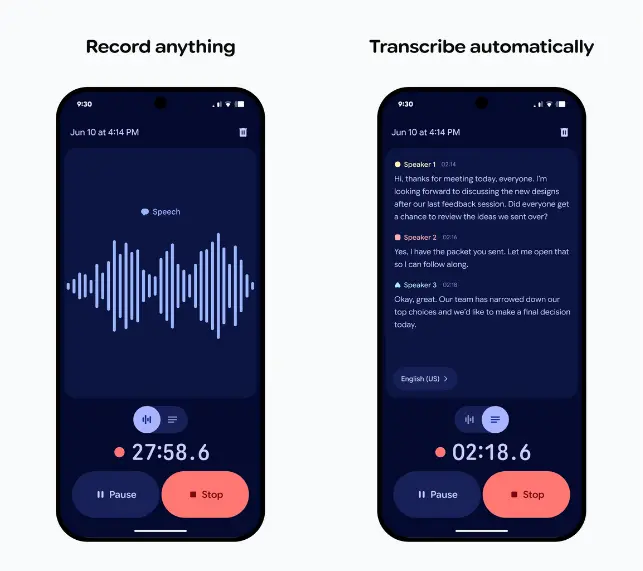
What it is: A voice-memo app pre-installed on Pixel phones that records audio and transcribes it locally on-device.
Best for: Pixel users recording lectures, interviews, voice memos, or in-person conversations.
Strengths:
- Free, on-device transcription (no cloud upload required for many languages)
- Searchable transcripts within the app
- Auto-generates titles and topic tags
- Works offline
Limitations:
- Pixel-only. Not available on iOS or non-Pixel Android devices.
- No web app. Recordings live on the phone unless you export them to Google Drive manually.
- No team features. Built for individual use.
- Speaker identification is basic.
Pricing: Free, included on Pixel devices.
Verdict: Excellent for Pixel users transcribing personal recordings. Not a team-wide solution.
Where Google transcription falls short for teams
If you're an individual using Google Docs to dictate a memo, you're set. But if you're managing meetings for a team — sales calls, customer interviews, internal syncs, all-hands — Google's transcription products miss in five specific ways:
- No structured summary or action items. You get a transcript. You don't get "here are the three decisions made and the four follow-ups assigned."
- No cross-meeting search or AI Chat. Each transcript is a standalone Google Doc. There's no way to ask "What did we decide about pricing across our last 10 customer calls?"
- No speaker analytics. Who talked the most? Who talked least? Where did the meeting drag? Google doesn't surface any of it.
- No CRM, project tool, or Slack integrations. Transcripts stay in Drive. They don't flow into HubSpot, Salesforce, Linear, Notion, or anywhere else.
- Limited platform support. Google Meet transcription only covers Google Meet. If your team also uses Zoom, Teams, Webex, or in-person, you need different tools per platform.
For an individual taking occasional notes, this is fine. For a team running 50+ meetings a week, it's a productivity tax.
The best alternative to Google transcription: MeetGeek

MeetGeek is an AI meeting assistant that handles the full meeting workflow — capture, transcript, summary, action items, search, and integration. It works with Google Meet (and every other major video tool), so you don't have to abandon Meet to upgrade what you get from it.
What MeetGeek adds on top of Google Meet transcription:
- Auto-joins scheduled meetings from Google Calendar, no host action needed.
- Speaker identification that's accurate and consistent across the entire transcript.
- Real-time, timestamped transcript with click-to-jump-to-recording navigation.
- AI summary, action items, and decisions delivered in your dashboard within minutes of the meeting ending.
- Searchable meeting library across every meeting you've ever recorded.
- AI Chat that answers questions across all past meetings ("What did James commit to about onboarding?"). For agentic workflows that act on meeting context, the MeetGeek MCP Server plugs directly into Claude and ChatGPT.
- 100+ languages with auto language detection — including multilingual meetings where participants switch mid-call.
- Multi-platform support: Google Meet, Zoom, Microsoft Teams, Webex, Discord, Slack huddles, and in-person via the MeetGeek mobile app.
- Native integrations with HubSpot, Salesforce, Notion, Slack, and 10,000+ apps via Zapier.
- Meeting analytics — talk-time, punctuality, sentiment, engagement, and Meeting Productivity Score.
- SOC 2 Type II, HIPAA BAA, GDPR compliant with EU and US data residency.
- Free plan with 3 hours of transcription per month and full feature access. Paid plans start at $9.99/user/month.
MeetGeek vs Google Meet transcription: side-by-side
| Feature | MeetGeek | Google Meet Transcription |
|---|---|---|
| Transcription accuracy | 95%+ — consistent in noisy environments and with multiple accents | Solid in clean audio; drops with poor audio or multiple accents |
| Speaker identification | Accurate and consistent | Limited / inconsistent |
| AI summaries | Yes — structured by meeting type | No (Gemini notes are a separate paid feature) |
| Action item extraction | Yes | No |
| Meeting analytics | Talk-time, punctuality, sentiment, engagement, Meeting Productivity Score | None |
| Languages | 100+ with auto detection | Limited (English, French, German, Italian, Spanish, Portuguese — varies by region) |
| Click-to-jump in recording | Yes | No |
| CRM integrations | Yes (HubSpot, Salesforce native) | No |
| Project tool integrations | Yes (Notion, Asana, ClickUp, Linear, etc.) | No |
| AI Chat across meetings | Yes (with MCP Server for Claude/ChatGPT) | No |
| Multi-platform support | Google Meet, Zoom, Teams, Webex, Discord, Slack huddles, in-person | Google Meet only |
| Free plan | Yes (3 hrs/month, all features) | No (Workspace Business Standard required) |
Which Google transcription tool should you actually use?

- Just need a one-off transcript of a Google Meet call? Google Meet's built-in transcription works if you're on Workspace Business Standard or above.
- Building transcription into an app? Google Cloud Speech-to-Text is the right API.
- Dictating a doc? Google Docs voice typing is free and good enough.
- Pixel user recording in person? Google Recorder is great.
- Running a team that depends on what gets said in meetings? Use MeetGeek. It's the only one of these that does the full workflow — capture, structured output, search, action items, integrations.
Frequently Asked Questions about Google transcription
Is the Google transcription service free?
It depends on which one. Google Docs voice typing is free. Google Recorder is free on Pixel devices. Google Meet transcription requires Workspace Business Standard ($14/user/month) or above. Google Cloud Speech-to-Text charges per minute (~$0.024/min for the standard model in 2026).
How accurate is Google Meet transcription?
In ideal conditions — clear audio, single speaker, standard accent — Google Meet transcription is solid (90%+ accuracy in published benchmarks). Accuracy drops with poor audio, multiple overlapping speakers, or strong accents. Punctuation is basic; speaker identification is inconsistent. For consistent accuracy across noisy and multilingual meetings, MeetGeek tends to perform better in real-world tests.
What is the Google speech-to-text API?
Google Cloud Speech-to-Text is a REST API developers use to embed transcription into apps. It supports 125+ languages, real-time streaming, and asynchronous batch transcription. Pricing is per minute. It's a developer tool, you need engineering resources to use it.
How do I use the Google Docs transcription service?
Open a Google Doc, click Tools → Voice typing, and click the microphone icon to start. Speak into your microphone (or play audio from another source near it). The text appears in the document in real time. Voice typing supports 100+ languages and includes voice commands for formatting and editing.
Does Google Meet have automatic action items?
Not in the base transcription. Google's Gemini-powered "AI take notes" feature (separate from transcription) generates summaries and action items, but it's available only on certain Workspace plans and is generally less detailed than dedicated AI meeting assistants like MeetGeek.
Can I transcribe a Google Meet for free?
The built-in Google Meet transcription requires Workspace Business Standard or above. For a free alternative, MeetGeek's free plan offers 3 hours of transcription per month, AI summaries, action items, and access to AI Chat, and it works on Google Meet, Zoom, Teams, Webex, and more.
What's the best alternative to Google Meet transcription?
For team workflows, MeetGeek is the most complete alternative — it adds AI summaries, action items, speaker analytics, multi-platform support, CRM integrations, and AI Chat across past meetings. Other options include Otter.ai (individual note-taking), Fireflies.AI (sales-call coaching), and tl;tdv (basic transcription with a generous free plan).








.avif)