



AI for customer success is the use of AI to take over the repeatable, high-volume parts of a CSM's job (call summaries, churn-signal detection, renewal briefs, QBR prep) so the human work shifts to relationships, judgment, and strategic guidance. Used well, AI gives a CSM team coverage they couldn't afford to hire for. Used badly, it adds another dashboard.
This playbook organizes the CSM day around four jobs (Renewals, Risk, References, and Reviews), shows where AI plugs into each, gives you a maturity model for getting from ad hoc to agentic, a 10-item checklist for choosing tools your team will actually use, and the metrics that prove ROI. It uses an AI meeting assistant for customer success as the worked example throughout.
Why Is AI Reshaping the Customer Success Role?
A Customer Success Manager (CSM) in 2026 is asked to do four things at once: drive renewal, expand accounts, flag churn risk early, and be the customer's strategic advisor. Headcount didn't grow to match the workload. The expectation is that AI fills the gap. Gartner's Customer Service and Support Leaders research has tracked this gap for several years, and Forrester's annual CX Index consistently lists CSM capacity as a top-three constraint on Net Revenue Retention (NRR).
The pressure isn't only on workload. Chief Financial Officers (CFOs) and Chief Customer Officers (CCOs) are asking harder questions about every tool the CS function owns. NRR and Gross Revenue Retention (GRR) are the numbers that matter, and the head of CS needs to defend them with evidence, not anecdotes.
AI helps on both fronts (capacity and proof), but only if it's deployed against the work that actually moves those numbers. Jeanne Bliss and Lincoln Murphy have both argued for more than a decade that CS leaders win on outcomes (NPS, CSAT, CES, Customer Lifetime Value), not activities.
One useful reframe: AI doesn't make a CSM faster at everything. It makes a CSM faster at the parts of the job that scaled badly (notes, recaps, pre-read prep, risk monitoring) and leaves untouched the parts that don't scale and shouldn't (the customer relationship itself).
CS platforms like Gainsight, Totango, ChurnZero, Planhat, and Vitally already sit on the structured account-health data; AI for CS extends that spine into the unstructured data (calls, emails, Slack threads) where most risk signals live, which is the job of conversation intelligence.
Will AI Replace Customer Success Managers?
No. AI replaces customer success tasks, not the customer success manager. The repeatable, rules-based work, note-taking, reporting, and first-line risk detection, is being automated, while the work that runs on trust, negotiation, and judgment becomes a larger share of the role.
The realistic 2026 picture is a CSM who covers more accounts because AI handles the busywork, not a team replaced by software. The roles most exposed are the ones built entirely on manual admin; roles built on outcomes get stronger.
The Four Rs of the Modern CSM Day
Most CSM activity falls into one of four buckets. AI plugs into each one differently.
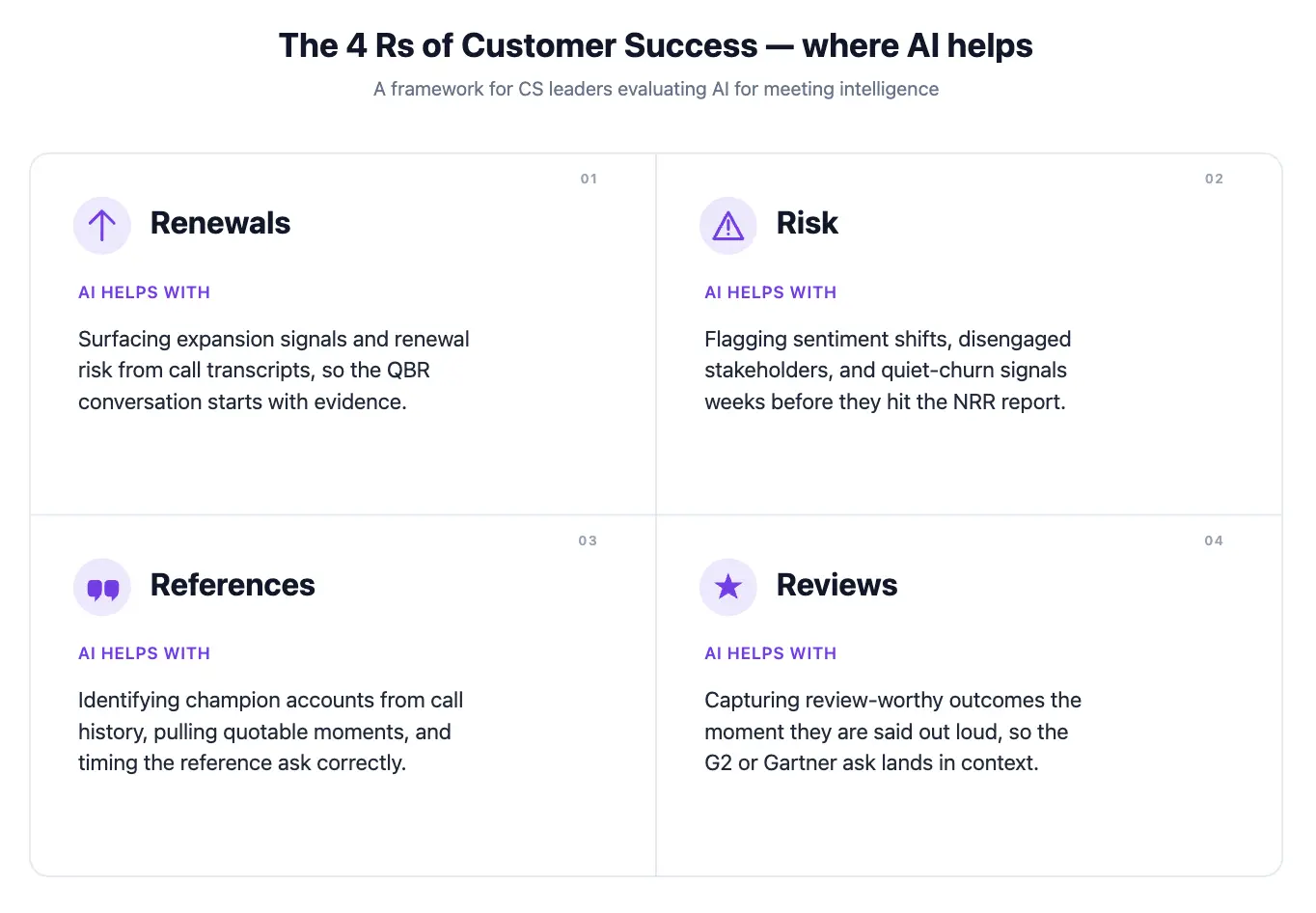
Renewals: Building the Brief from Meeting History
Renewal is the outcome the CSM is judged on. The work behind it is unglamorous: tracking commitments made over four quarters, building a renewal narrative that ties usage to outcomes, and prepping the brief for the renewal conversation.
Where AI helps: auto-generating the renewal brief from the QBR history, summarizing what was promised vs. delivered each quarter, surfacing the talking points the customer used most when they described value. Pulling usage data from Gainsight or Totango and stitching it to the commitments logged in Salesforce or HubSpot gives a full renewal narrative without a spreadsheet exercise.
What it can't do: read the room with the buyer. The brief is preparation, not a script.
Risk Detection: Surfacing Churn Signals Across Accounts
Churn rarely arrives as a single bad signal. It accumulates: a champion leaves, the QBR cadence slips, calls get shorter, the executive sponsor stops attending.
Where AI helps: scanning every customer meeting for sentiment changes, drop-offs in attendance, mentions of competitors, or phrases that flag dissatisfaction. Aggregating these across all customers and surfacing the accounts trending the wrong way before the CSM would notice.
What it can't do: tell you why. The signal points at the account; the human investigates and intervenes.
References: Matching the Right Customer to the Right Prospect
Reference customers are the most underused asset most CS teams have. The bottleneck is finding them. Which customers are happy enough, similar enough to the prospect, and willing enough to take a call?
Where AI helps: matching prospects to customers by industry, use case, and outcome. Surfacing which customers volunteered the strongest praise in their last QBR, NPS, CSAT, or CES response. Drafting the outreach, linking to G2, Gartner Peer Insights, and TrustRadius reviews where relevant.
What it can't do: maintain the goodwill. Asking for references too often kills the well.
Reviews: Turning QBRs and EBRs into Outcome Scorecards
QBRs are the most repeatable meeting in the customer lifecycle: same attendees, same structure, every 90 days. They generate the data that feeds the other three Rs.
Where AI helps: producing the QBR recap with action items, comparing this quarter's commitments to last quarter's, building the outcomes scorecard from the conversation. (For the full QBR structure, see the QBR template piece; this article focuses on where AI plugs in.)
What it can't do: reframe a stale QBR. If the format is broken, AI just produces broken summaries faster.
What Are the Three Stages of AI Maturity in Customer Success?
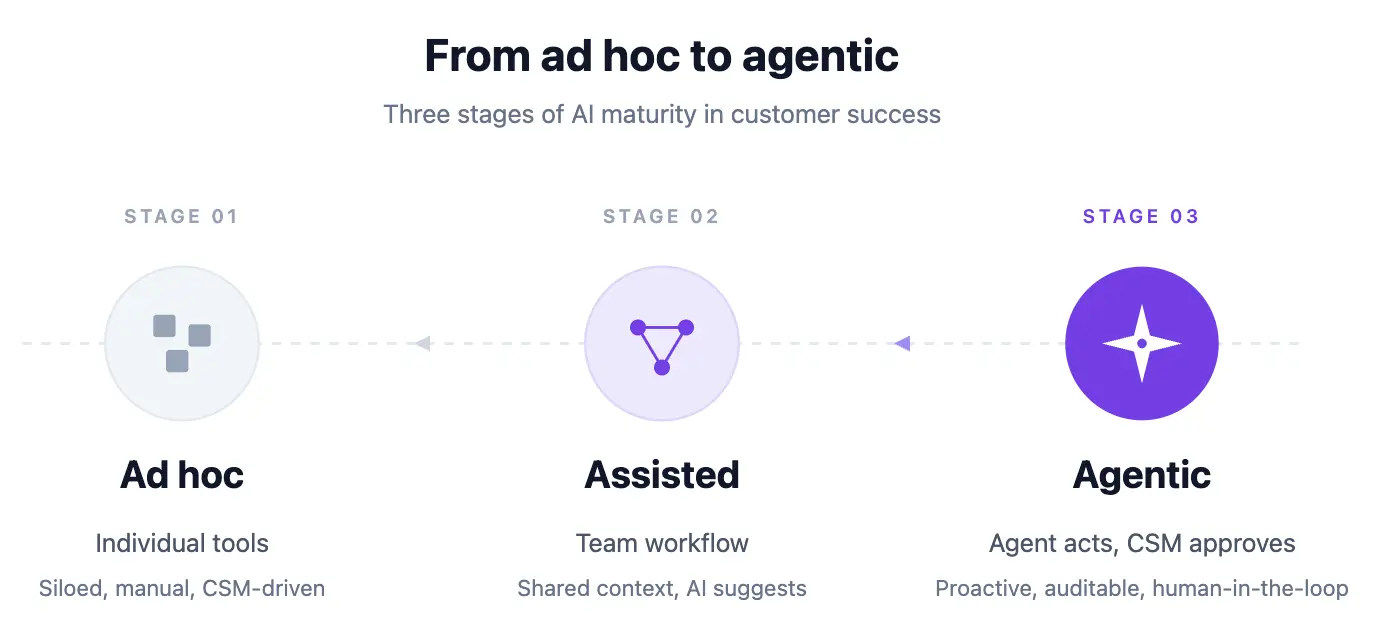
The three stages of AI maturity in customer success are ad hoc (individual tool use), assisted (team-level deployment with CRM integration), and agentic (AI acts and CSM approves). Knowing where you are clarifies what to fix next.
Stage 1. Ad hoc. AI use is individual. A CSM uses an AI notetaker for their own meetings, summarizes calls in a chat tool, drafts an email here and there. There's no team-wide consistency. The data doesn't aggregate.
Stage 2. Assisted. AI is deployed at the team level for specific jobs. Every customer meeting is captured and summarized. Action items route into the CRM. Sentiment and risk signals roll up into a dashboard. CSMs save real hours per week.
Stage 3. Agentic. AI doesn't just summarize; it acts. A Meeting Agent flags a churn signal in a Tuesday call, drafts a save plan, schedules a follow-up with the customer's exec sponsor, and updates the renewal forecast before the CSM checks Slack on Wednesday morning. The CSM reviews and approves; the agent does the work.
Most CS teams are in Stage 1, think they're in Stage 2, and need to plan deliberately to reach Stage 3. The jump from 2 to 3 is less about the tool and more about the workflows you connect to it.
How to Move from Stage 1 to Stage 2
The jump most CS teams fail to make isn't the glamorous one to agentic. It's the move from individual use to team consistency. Three practices help:
Pick three jobs, not fifteen. The teams that stall try to automate everything at once. The teams that succeed pick three (call summaries into the CRM, action items into the task tracker, weekly risk digest in Slack) and get them working end-to-end before adding a fourth.
Define the endpoint before the tool. “Action items land in the right opportunity in the CRM” is an endpoint. “We'll use an AI notetaker” is not. If you can't describe where the output lives and who acts on it, the tool is going to produce overhead.
Measure hours saved, not features used. Track CSM hours spent on notes and recaps one quarter before deployment and one quarter after. A tool that produces beautiful summaries but doesn't move that number isn't earning its seat cost.
The jump from Stage 2 to Stage 3 requires API or connector access. The AI tool needs to push data into your CRM, ticketing system, and chat tool without manual steps. This is less about the tool's features and more about whether it exposes its data through an API or AI assistant connector that lets you compose with the rest of your stack.
What AI for Customer Success Looks Like in Practice
Concrete examples of what “AI plugged in” looks like across the four Rs:
- After every customer call, a structured summary lands in the CRM under the right opportunity, with action items assigned to the right owners.
- A weekly digest in Slack lists the five customers whose risk score moved most this week, with the meeting clip that drove the change.
- A renewal brief auto-generates 30 days before contract end, pulling from the last four QBRs and the support history.
- A reference-match query like “who's a good reference for a mid-market manufacturing prospect evaluating us against [competitor]?” returns three candidates with the quote that proves the fit.
- A “what did we commit to in the last QBR?” question is answered in seconds across the customer's full meeting history.
None of these require new headcount. All of them require the AI to have access to the actual data, which is why the platform you build on matters more than the individual feature.
What Are the Best AI Tools for Customer Success?
The best AI tools for customer success fall into four categories, and most teams combine two or three rather than buying one platform. Grouping them by the job they do makes the choice clearer than a ranked list, because each category solves a different problem.
- Customer success platforms. Gainsight, ChurnZero, Totango, Planhat, and Vitally layer AI onto health scores, playbooks, and renewal forecasting. They are the system of record for the CS team.
- Meeting intelligence. These tools capture, transcribe, and structure the customer conversation, then route summaries, action items, and risk signals into the CRM. This is where MeetGeek sits, and it feeds the platforms above with real conversation data instead of manually logged notes.
- Support and ticketing AI. Zendesk AI and Intercom Fin deflect repeat questions and summarize tickets, useful where customer success overlaps with support.
- Automation and agents. General automation such as Zapier, Make, and n8n, plus customer success automation that acts on a trigger, for example creating a renewal task the moment a call ends.
Pick the CS platform that fits your motion, then add a meeting-intelligence layer so the platform is fed by what customers actually said. A tool that traps that data inside its own interface becomes the dead end the checklist below warns about.
How Do You Evaluate AI Tools for Customer Success?
Evaluate any AI tool for customer success against these ten criteria before buying:
- Does it cover every meeting platform your team uses, not just one?
- Does it produce structured summaries with action items routed to the right owners, not just a transcript?
- Does it integrate natively with your CRM, your ticketing system, and your team's chat tool?
- Does it surface trends across recurring meetings (QBRs, weekly syncs), not just per-call summaries?
- Does it offer customizable risk and sentiment signals, not a fixed model?
- Does it pass your security review (SOC 2 Type II, BAA if you're in regulated industries, configurable data residency)?
- Does it support the languages your customer base actually speaks?
- Does it respect customer consent, so recording can be turned off per meeting and per region?
- Does it expose its data through an API or AI assistant connector so other tools can use it?
- Is the data ownership clear? When you leave, can you export everything?
A tool that fails on items 1, 6, or 10 is a future migration in waiting.
How Do You Measure ROI on AI for CSM?
AI for customer success earns its seat cost when it moves three numbers. Pick one primary, two secondary, and track them quarterly:
- Primary: CSM hours per account per quarter. The leading capacity indicator. If AI isn't reducing this, it's producing output without producing leverage.
- Secondary: Risk-signal precision. Of the accounts flagged as risk this quarter, what fraction actually churned or downgraded? Early in a deployment this number will be noisy. After two quarters it should converge.
- Secondary: Renewal-forecast accuracy. Forecast 30 days out vs. what actually happened. A tool that surfaces risk early should tighten this number and lift NRR.
Harvard Business Review has argued for years that reducing customer effort correlates with retention more strongly than delight metrics, which is why CES often beats raw NPS as a QBR-level signal. Vanity metrics (summaries generated, hours of audio processed, seats provisioned) are activity, not ROI. Keep them off the CFO report.
How Does MeetGeek Support AI for Customer Success?
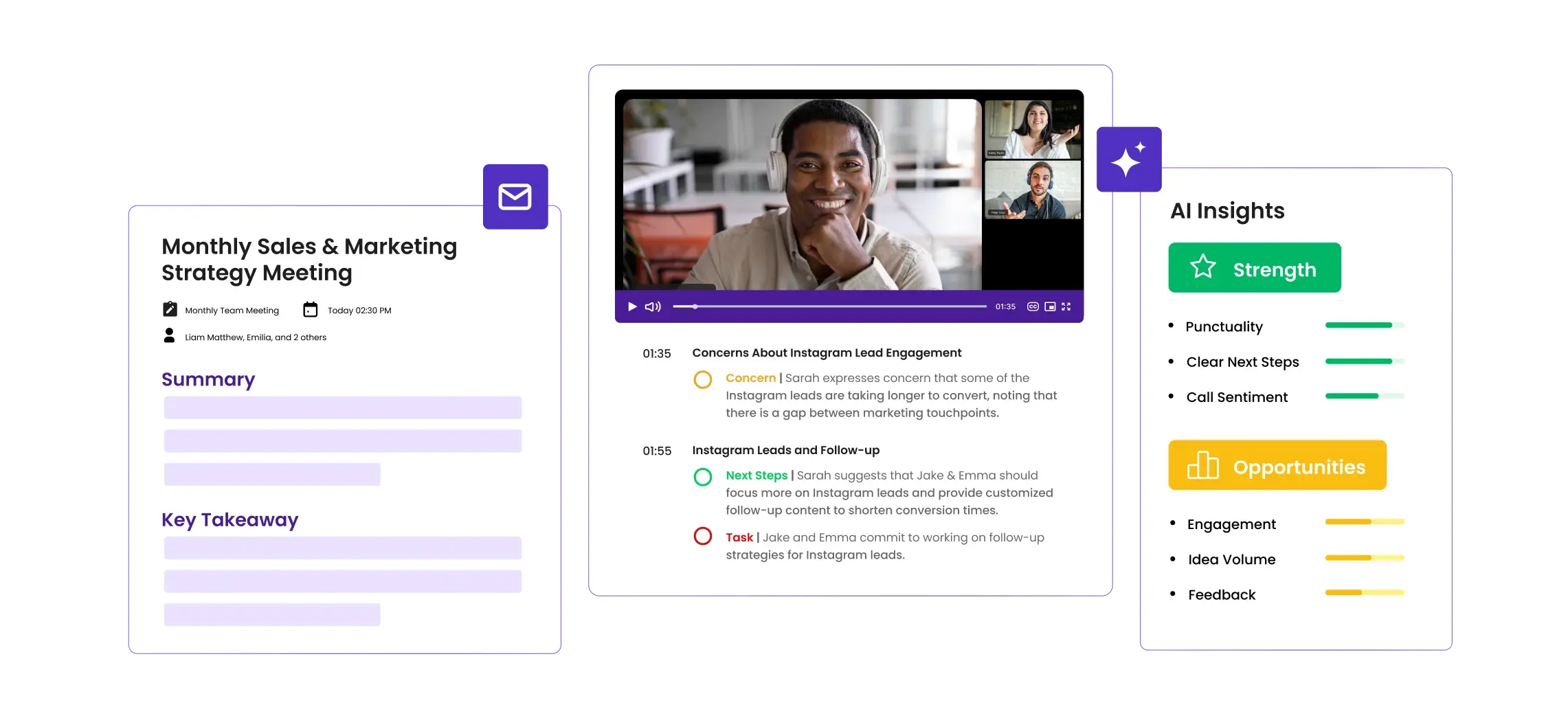
MeetGeek is built for the assisted-to-agentic transition. The Meeting Agent joins every customer meeting from the calendar, produces a structured recap with action items routed to the right owners, scores meetings against customizable rubrics, and surfaces risk signals across the customer's full meeting history.
Ask AI Chat inside MeetGeek for in-the-moment questions across recent meetings, or pair MeetGeek with Claude through the MeetGeek connector for the harder cross-account synthesis: comparing how a customer talked in Q1 vs. Q4, building a save plan from a year of meeting context, or generating a renewal brief that ties usage to outcomes in the customer's own words. The connector is the stronger option whenever the question requires reasoning across a lot of meetings at once.
If you want the meeting side of this workflow running on your next customer call, try MeetGeek free and watch the recap and action items land automatically.
AI for customer success works when it's deployed against the repeatable parts of the CSM job, renewal prep, churn-signal detection, reference matching, and QBR documentation, and measured on outcomes the CFO cares about. Start with three workflows, get them running end-to-end, and expand from there. The tool matters less than the workflow it plugs into.
Frequently Asked Questions
What Is AI for Customer Success?
AI for customer success is the use of AI tools (meeting intelligence, summarization, sentiment detection, agent workflows) to take over the repeatable parts of a CSM's job (notes, recaps, risk signals, renewal briefs) so human time goes to relationships and strategic work.
Will AI Replace Customer Success Managers?
No. AI takes over documentation and detection work; relationship, judgment, and strategic guidance stay human. The section earlier in this guide covers this in full.
What's the Biggest Mistake CS Teams Make When Adopting AI?
Buying a tool before defining the workflow. An AI notetaker that produces beautiful summaries no one reads is overhead. Decide what gets done with the output (where it lands, who acts on it) before the tool goes live.
How Do You Measure ROI on AI for Customer Success?
Three honest measures: hours saved per CSM per week (track for one quarter pre- and post-deployment), accuracy of risk signals (did the accounts AI flagged actually churn at a higher rate?), and renewal forecast accuracy. Vanity metrics like “summaries generated” are not ROI.
What's the Difference Between an AI Notetaker and AI for Customer Success?
A notetaker captures and summarizes one meeting. AI for customer success connects those summaries across the full customer relationship (every meeting, every quarter) and turns them into renewal narratives, risk signals, and reference matches. The notetaker is the input; the customer success workflow is the output.
How Do You Pick Between a Horizontal AI Tool and a CS-Specific One?
Horizontal tools (meeting intelligence, chat-based AI assistants) win on breadth, working across sales, CS, and ops. CS-specific tools (health scoring platforms, renewal forecasting tools) win on depth, but only if you already have the workflow to use them. Most teams underbuy on breadth and overbuy on depth.
What's the One Thing Worth Paying Extra For?
The API or assistant connector. Tools that expose their data cleanly let you compose with the rest of your stack (CRM, BI, chat, AI assistants). Tools that trap data inside their UI become dead ends within 18 months.








.avif)